Behind every successful campaign is a system, and marketing project management (PM) is what holds it together.
Briefs, timelines, approvals, content pipelines — you need to keep all of that somewhere and in a way that makes sense.
Fortunately, there are marketing project management software solutions to make it easier, and I reviewed a bunch of them.
Keep reading to find your match!
WHY TRUST US?
The apps we talk about are selected, tested, and written about by human reviewers who follow strict review and editorial guidelines. We pick solutions that are practical, purposeful, and can offer real value for the specific use case or business context we’re covering — while also being justified in their pricing. Our methodology is transparent, clear, and available to everyone:
Best marketing project management software — top 12 picks
Before diving into individual reviews, here’s a brief overview of all the apps I tested.
| Tool | Best for | Free trial | Free plan | Lowest price |
|---|---|---|---|---|
| Plaky by CAKE.com | Small marketing teams | ✔ | ✔ | $3.99/user/month |
| Notion | Marketing knowledge sharing | ✔ | ✔ | $10/user/month |
| ClickUp | All-in-1 marketing PM | ✔ | ✔ | $7/user/month |
| Airtable | Data-driven campaigns | ✔ | ✔ | $20/user/month |
| monday.com | Visual campaign management | ✔ | ✔ | $9/user/month |
| GanttPRO | Timeline-based planning | ✔ | ❌ | $7/user/month |
| Teamwork.com | Client-facing marketing teams | ✔ | ✔ | $9.99/user/month |
| Asana | Tracking marketing goals | ✔ | ✔ | $10.99/user/month |
| ProofHub | Large marketing teams | ✔ | ❌ | $45/month |
| Teamhood | Kanban-style marketing | ✔ | ✔ | €9/user/month |
| Basecamp | Simple team communication | ✔ | ✔ | $15/user/month |
| Miro | Marketing brainstorming | ✔ | ✔ | $8/user/month |
#1 Plaky by CAKE.com — best for small marketing teams
Plaky by CAKE.com is an affordable tool where you can assign tasks, set deadlines, monitor status through different views, and much more.
Why choose Plaky?
At its core, Plaky is built to be simple, visual, and accessible, with unlimited projects and users even on the free plan.
| Pros | Cons |
|---|---|
| – Powerful yet user-friendly – Highly customizable – Cost-effective – Part of CAKE.com’s Productivity Suite | – Limited integrations |
As part of a marketing team that uses Plaky daily, I’ll start by emphasizing these:
- Clear hierarchy — From big-picture strategy down to individual tasks, Plaky keeps everything neatly structured. Make as many spaces, boards, and (sub)items as you need.
- Flexibility — Thanks to Fields, you can specify the campaign type, status, budget, etc. to turn tasks into mini marketing databases. Pro tip: Use the custom color picker for labels and tags for extra personalization.
- Visual work management — Marketers, designers, and managers can look at the same data in different ways. Apply the List view for comprehensive overviews, Kanban for content pipelines, Gantt for planning timelines, and pie/bar charts for analyzing campaign distribution.
By the way, you can build boards from scratch or use ready-made templates (and tweak them if needed).
Get our free Marketing strategy template
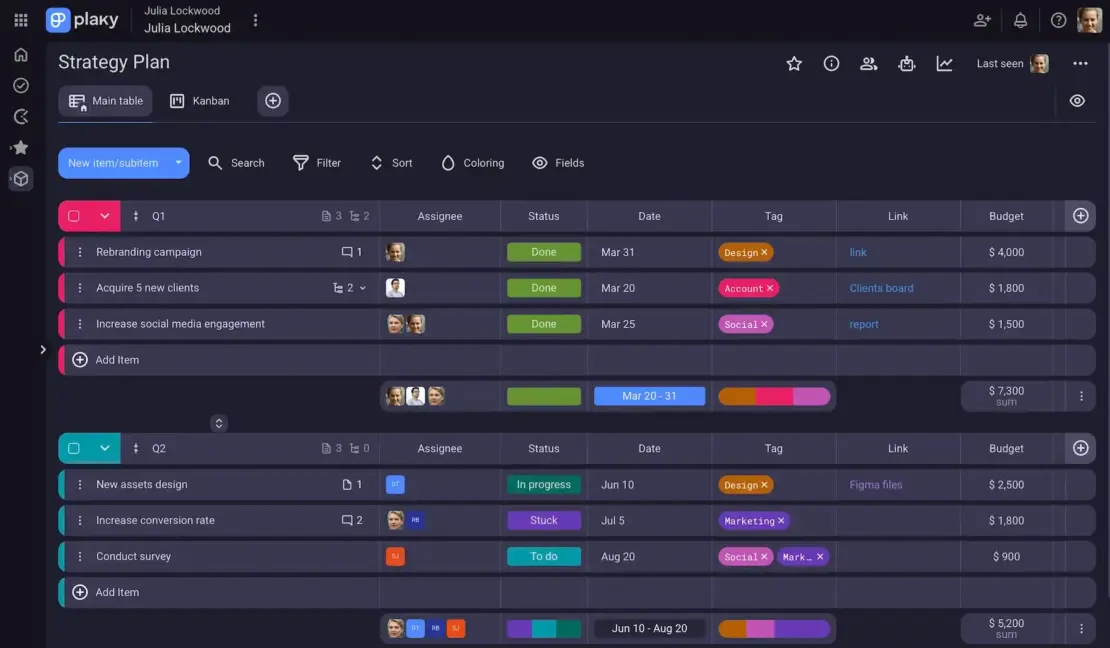
Plaky accommodates teams of all sizes, but it’s particularly popular among small teams. Some of the perks are:
- Quick onboarding — The UI is intuitive, so onboarding new members takes minutes, not days. You don’t need a separate IT department to set Plaky up, and there’s 24/7 customer support (100% human).
- Easy collaboration — Comments and file attachments are tied to tasks to eliminate endless emails and meetings. Plus, real-time notifications and the Activity log keep everything transparent.
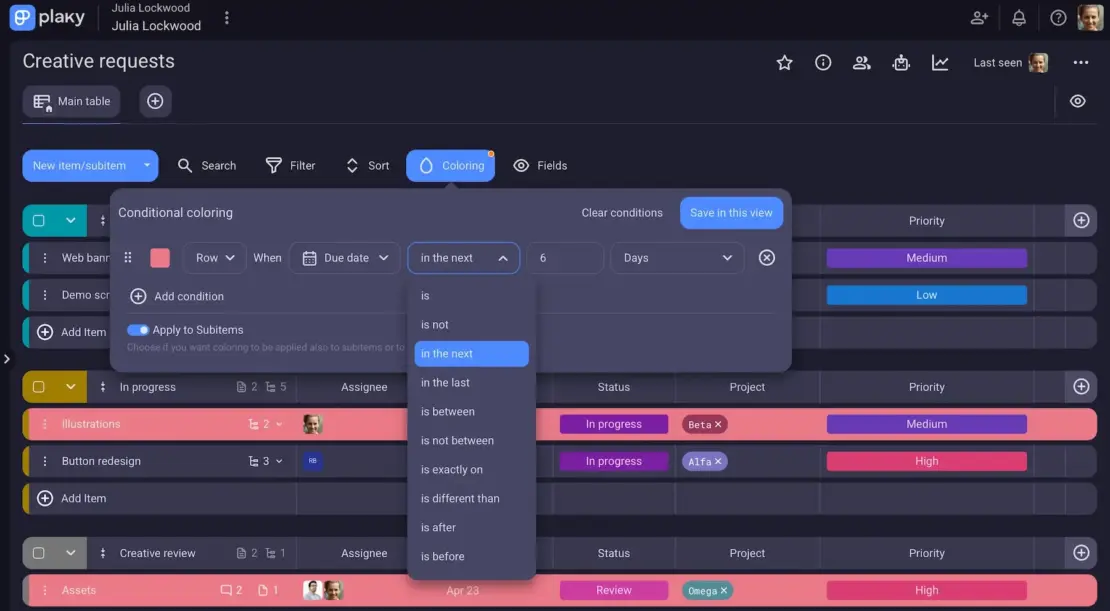
- Automation — Setting up Board automations means Plaky deals with routine steps instead of you (e.g., task handoffs, status updates). There’s also conditional coloring to highlight potential bottlenecks and risks before it’s too late.
The only thing that could be better is integrations. Right now, Plaky only integrates with 2 other CAKE.com tools, but together they create a productivity package that’s incredibly useful in marketing:
- Clockify — time tracking and billable hours directly in Plaky
- Pumble — Plaky notifications where your team chat and video calls happen
Finally, Plaky’s public API is fairly basic, but you can use it to connect it with other apps for core task operations.

What’s new in Plaky?
Plaky launched Dashboards that let you visualize data and track progress across multiple boards.
Plaky also introduced Protected view, which limits access to a board view so only Board owners and View owners can make structural changes to that board view.
These are just some of the recent improvements — to see more, check out Plaky’s Changelog.
Available for: web, iOS, Android
| Plan | Price |
|---|---|
| Free | $0 |
| Pro | $3.99/seat/month* |
| Enterprise | $8.99/seat/month* |
| CAKE.com Bundle (Plaky + Clockify + Pumble) | $12.99/seat/month* |
*billed annually

#2 Notion — best for marketing knowledge sharing
Notion is a solution that blends notes, databases, and light project management into a highly flexible, block-based editor.
Why choose Notion?
Notion shines as a knowledge-sharing tool, so if your team relies on documentation and learnings, it can become a central hub for marketing knowledge.
| Pros | Cons |
|---|---|
| – Extremely flexible – Numerous integrations – Synced blocks and databases | – Limited workflow automation – Pricey |
After trying Notion primarily for content calendars and campaign plans, this is what I can highlight as advantages:
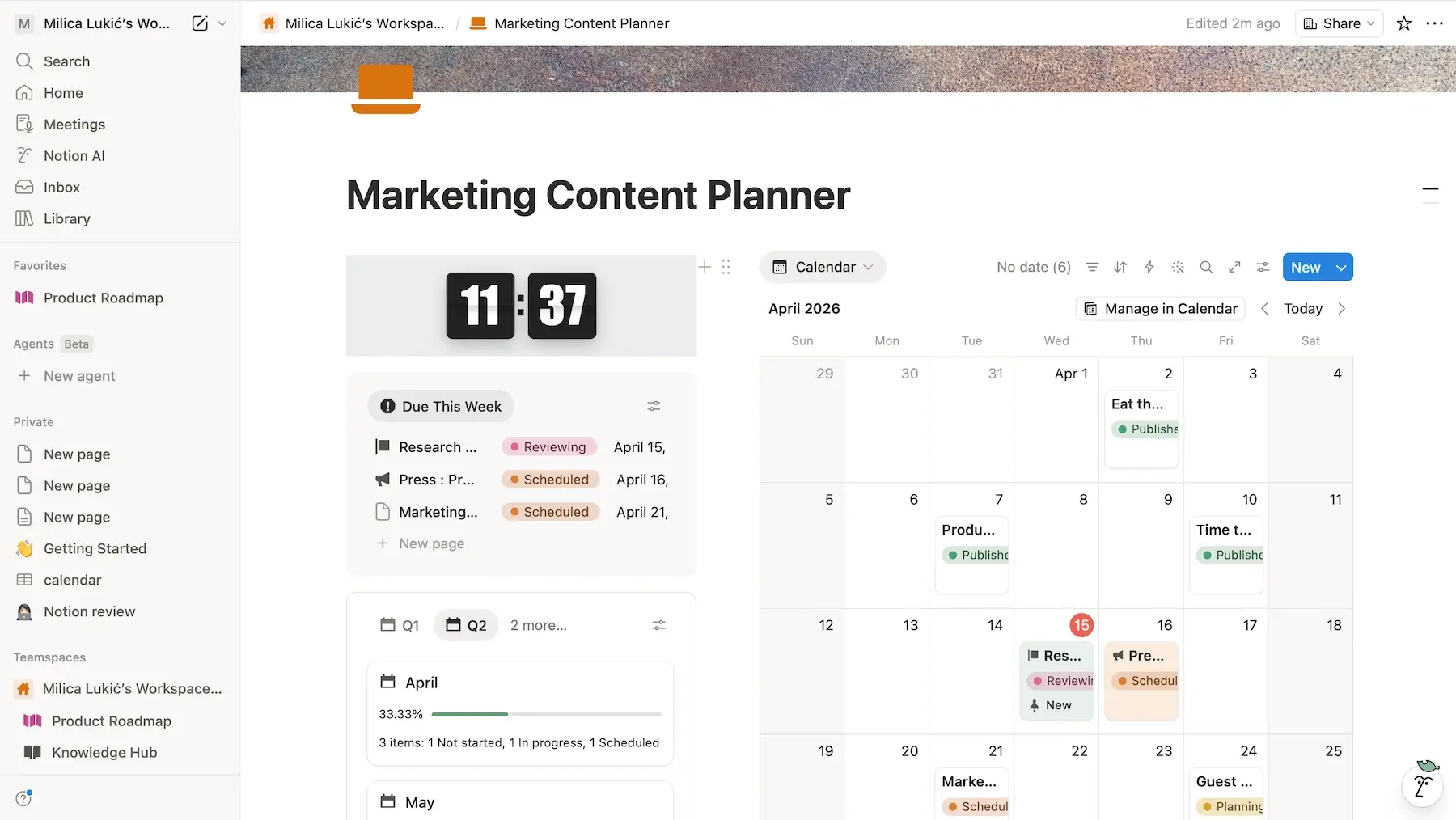
- Customization capabilities — use building blocks (text, audio, checklists, and more), choose color text and backgrounds, add cover images, etc. to build whatever page you need.
- Easy collaboration and sharing — use comments and tags to work seamlessly across teams, and share your pages with relevant people (even if they’re outside your organization and not a Notion user).
- Templates for repeatable workflows — reuse proven setups for planning and tracking campaigns, blog posts, or social media content.
I also enjoyed Notion’s minimalist design, but it can become disorganized over time if you aren’t careful with naming conventions and the amount of nested pages.
As for why Notion is great for marketing knowledge sharing, these features stood out to me:
- Internal linking — you can link databases and docs (e.g., best practices, lessons learned) together to have a connected system instead of isolated pages.
- Synced blocks — if you have the same content in multiple pages, it gets automatically updated everywhere, keeping your documentation accurate without much effort.
- Search and filter — Notion’s search is fast and reliable, and filters help you focus by displaying only the items that meet specific criteria.
Additionally, the Synced Databases feature is currently in beta, allowing live data streams from apps Notion integrates with (200+ options).
I also found Notion AI useful for summarizing long campaign reports and extracting key takeaways, but this feature is reserved for the 2 highest tiers. Free and Plus users only get a limited trial of Notion AI.
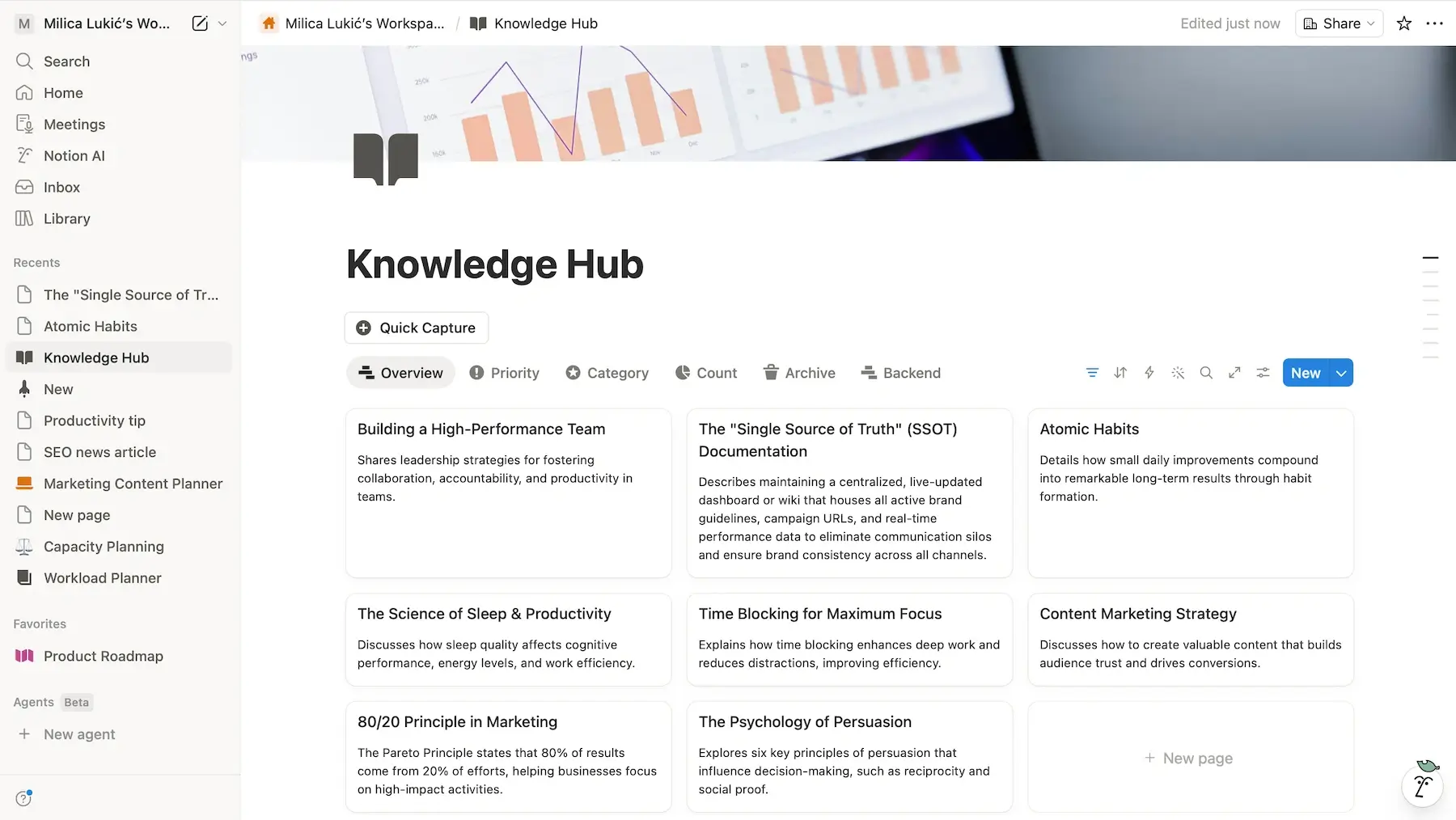
What confused me was Notion’s customer support. In addition to self-service documentation and an AI-powered chatbot, I found an email address you can write to in case you have issues. However, I couldn’t find info on the average response time or anything else.
I’ll also note that Notion’s pricing is on the steeper side. If you’re budget-conscious, consider more cost-efficient and straightforward tools like Plaky or Basecamp.
Affordable Notion alternative — Plaky
💡 Plaky Pro Tip
Check out these articles for head-to-head comparisons between Notion and several other similar apps:
What’s new in Notion?
The most noteworthy updates in Notion involve AI. For instance, the platform doubled down on its AI teammate idea with Custom Agents, letting you create agents tailored to your workflow. Also, new AI Autofill runs continuously (not just one-time prompts), essentially turning Notion databases into self-maintaining systems.
Available for: web, macOS, Windows, iOS, Android
| Plan | Price |
|---|---|
| Free | $0 |
| Plus | $10/member/month* |
| Business | $20/member/month* |
| Enterprise | POA |
*billed annually
#3 ClickUp — best for all-in-1 marketing PM
ClickUp is a customizable work management platform that aims to be a central hub for all team operations.
Why choose ClickUp?
This app is a solid choice for marketing teams that aim to centralize everything — tasks, docs, goals, time tracking, and communication.
| Pros | Cons |
|---|---|
| – All-in-1 ecosystem – Built-in chat – 1,000+ integrations | – Crowded UI – Long response time from support |
ClickUp left me under the impression that it could handle marketing teams who often juggle multiple moving parts, primarily thanks to:
- Multiple views — you can apply 15+ views to visualize work the way you like (only List, Board, and Calendar on the free plan, though).
- Advanced analytics — real-time dashboards are helpful when tracking campaign progress, team workload, and performance metrics.
- AI & automation — built-in AI can help with generating ideas and summarizing tasks, while automations can handle repetitive actions like status updates and setting up recurring tasks.
To support all these features (and more), ClickUp has many buttons, options, and panels, so the UI feels quite busy and, frankly speaking, even intimidating at times.
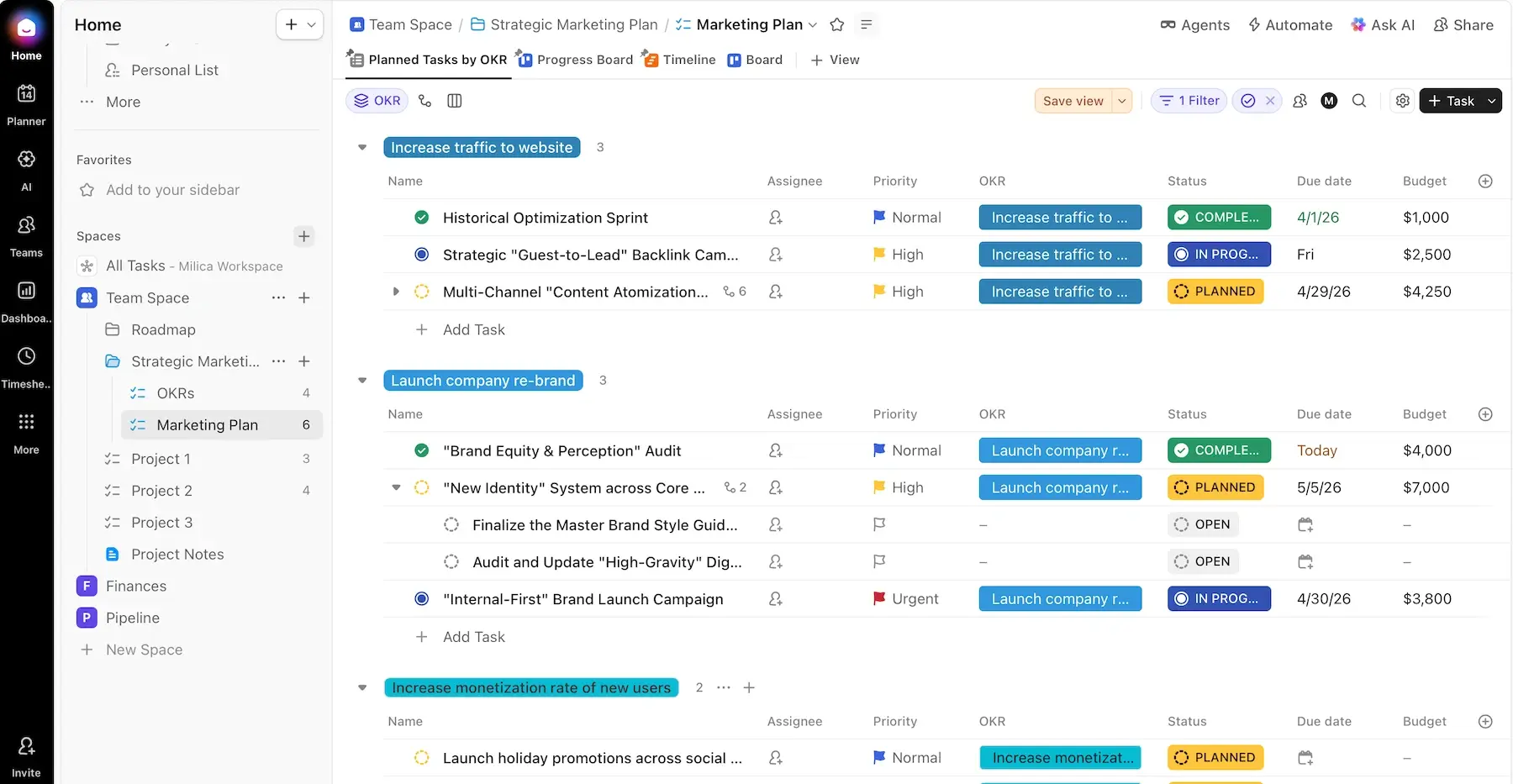
That said, ClickUp delivers on its all-in-1 marketing PM promise. The platform offers:
- Task and goal management — plan campaigns, assign tasks, and track goals side by side to keep execution and strategy connected.
- Built-in docs — write content and create campaign briefs directly inside ClickUp, then link them to tasks for full context.
- Native chat — keep conversations inside the platform to make team communication more focused.
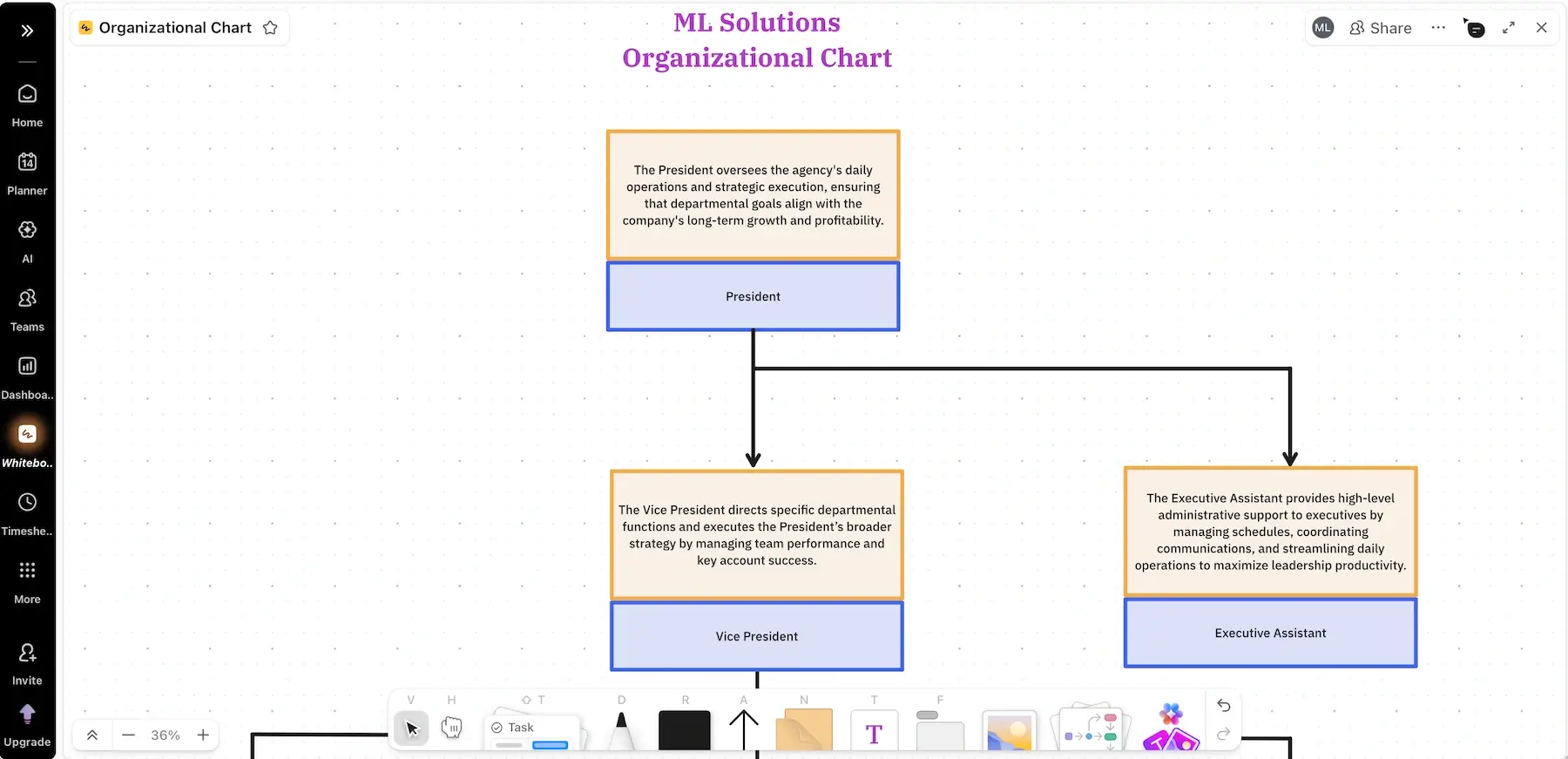
- Whiteboards — map out campaigns and brainstorm ideas in a collaborative, visual space.
What’s more, ClickUp supports 1,000+ native and third-party integrations, so you can expand its functionality even more. Just note that large workspaces with lots of automations and data may slow it down.
Another downside in my eyes — ClickUp’s customer support. The website advertises 24/7 support across all tiers, but there’s a catch:
- Free users — AI chatbot creates an email ticket, and then you wait up to 48 hours for a response.
- Paying users — live chat is available, but the response time is up to 24 hours (8 hours in the best case, i.e., on the Enterprise plan).
This is quite disappointing when you compare ClickUp to Plaky, for example — an app that actually has live support for everyone and the average response time of under 1 hour.
What’s new in ClickUp?
Some of the recent updates in ClickUp include new triggers for Google Drive automations, enhanced grouping in Workload view, and AI Notetaker for meetings (AI joins your calls and takes notes automatically).
Available for: web, macOS, Windows, Linux, iOS, Android
| Plan | Price |
|---|---|
| Free | $0 |
| Unlimited | $7/user/month* |
| Business | $12/user/month* |
| Enterprise | POA |
*billed annually

#4 Airtable — best for data-driven campaigns
Airtable is a no-code/low-code platform that blends spreadsheets and databases into a highly visual, customizable interface.
Why choose Airtable?
If your marketing relies heavily on data, you may like the way Airtable feels more like a lightweight data system rather than a simple task manager.
| Pros | Cons |
|---|---|
| – Deep customization – Relational databases – Lots of templates | – Learning curve – Expensive |
Having tested Airtable for various scenarios before, I’d like to spotlight its flexibility first. The standout features include:
- Custom apps — design interfaces and PM workflows with various custom fields and extensions — all on your own or with the help of Omni AI.
- Multiple views — use different views (List, Timeline, Calendar, and more), depending on your preference.
- Personalized branding — customize the guest sign-in page according to your branding (if you opt for the Business or Enterprise Scale tier).
- Easy collaboration — stay aligned via Comments, Activity feed, and Snapshots (automatic or manual backups of an entire project).
There aren’t many native integrations (20+ options), but you can connect Airtable with numerous other apps via Zapier for automation purposes.
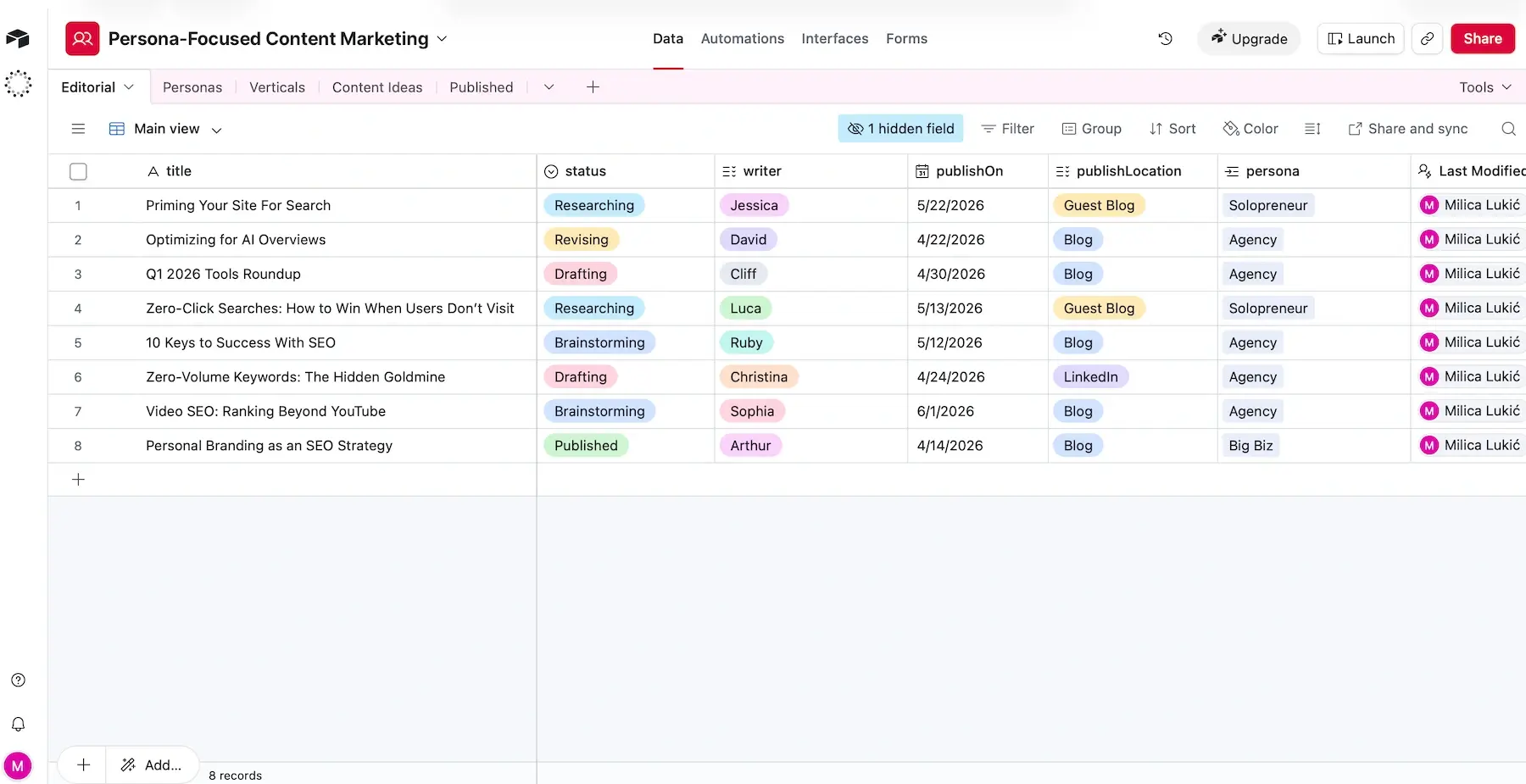
If I had to point out Airtable’s forte, I’d say it is particularly well-suited for data-focused marketing campaigns — here’s why:
- Relational databases — link campaigns to channels, assets, audiences, and results to actually see how everything connects.
- Dashboards and reports — build visual overviews for stakeholders without exporting data elsewhere.
- Formulas and functions — use Excel-like formulas and functions (e.g., IF, SUM, ARRAYJOIN) to automatically calculate KPIs, flag underperformance, and more.
That said, there is a learning curve for advanced use, mainly if you have lots of relational data and automations. So, if you’re a beginner, I suggest you start by exploring Airtable’s rich template library.
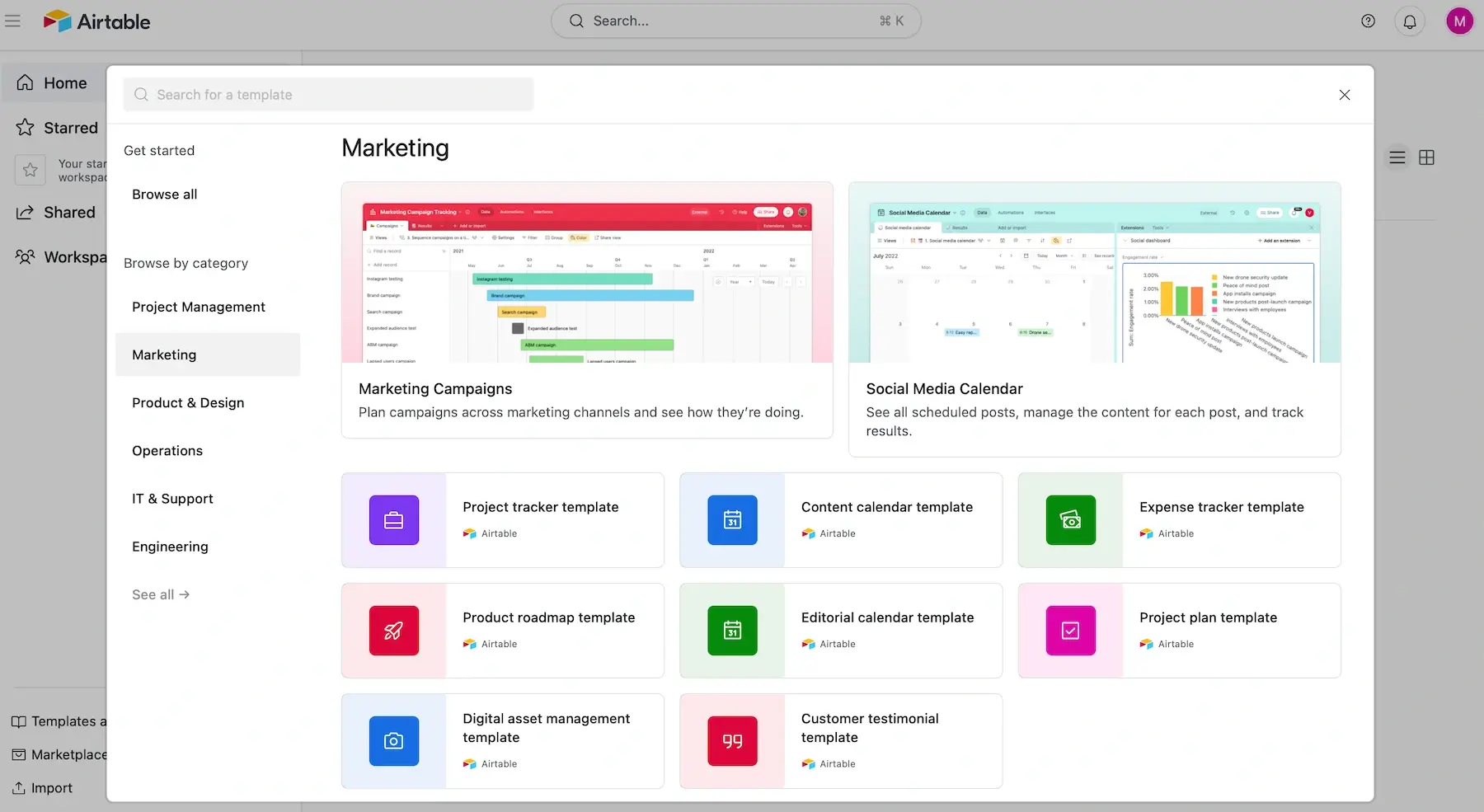
All in all, this is a neat tool, but it’s far from cheap. As your team grows or you need advanced features, costs can rise fast. This is especially true if you also need Portals — an add-on for external collaborators starting from $120 for 15 guests/month on Airtable’s paid plans.
I’m also not a fan of how Airtable’s customer service works. There’s no live human chat support, and email support is reserved for Business and Enterprise Scale users only. So, Free and Team users are pretty much left stranded in case of technical issues.
What’s new in Airtable?
Some of the novelties in Airtable include better control over AI field agents (e.g., easier setup, new triggers), Claude integration upgrade (direct connection via MCP), and sync from Databricks and Snowflake using SQL.
Available for: web, macOS, Windows, iOS, Android
| Plan | Price |
|---|---|
| Free (up to 5 editors) | $0 |
| Team | $20/seat/month* |
| Business | $45/seat/month* |
| Enterprise Scale | POA |
*billed annually
#5 monday.com — best for visual campaign management
Monday.com is a professional tool that helps teams organize tasks, timelines, people, and workflows.
Why choose monday.com?
Thanks to versatile project views and widgets, monday.com supports visual and proactive marketing campaign management.
| Pros | Cons |
|---|---|
| – Rich template gallery – Over 850 integrations – Powerful dashboards | – Limited free plan – Impractical pricing |
I tried both building boards from scratch and exploring monday.com’s template collection (200+ options) — here’s what stood out:
- Strong automations — no-code automations could save you hours spent on repetitive, manual tasks.
- 850+ integrations — you can connect monday.com to other tools you use for sales tracking, design, social media management, etc. for smoother data flows.
- Collaboration in context — comments, file sharing, and feedback live inside tasks to eliminate scattered folders and emails.
Since I had the trial version of the Pro plan, I also got to check out monday.com’s AI Sidekick. It provided some valuable insights and suggestions, but it worked a little slower than I expected.
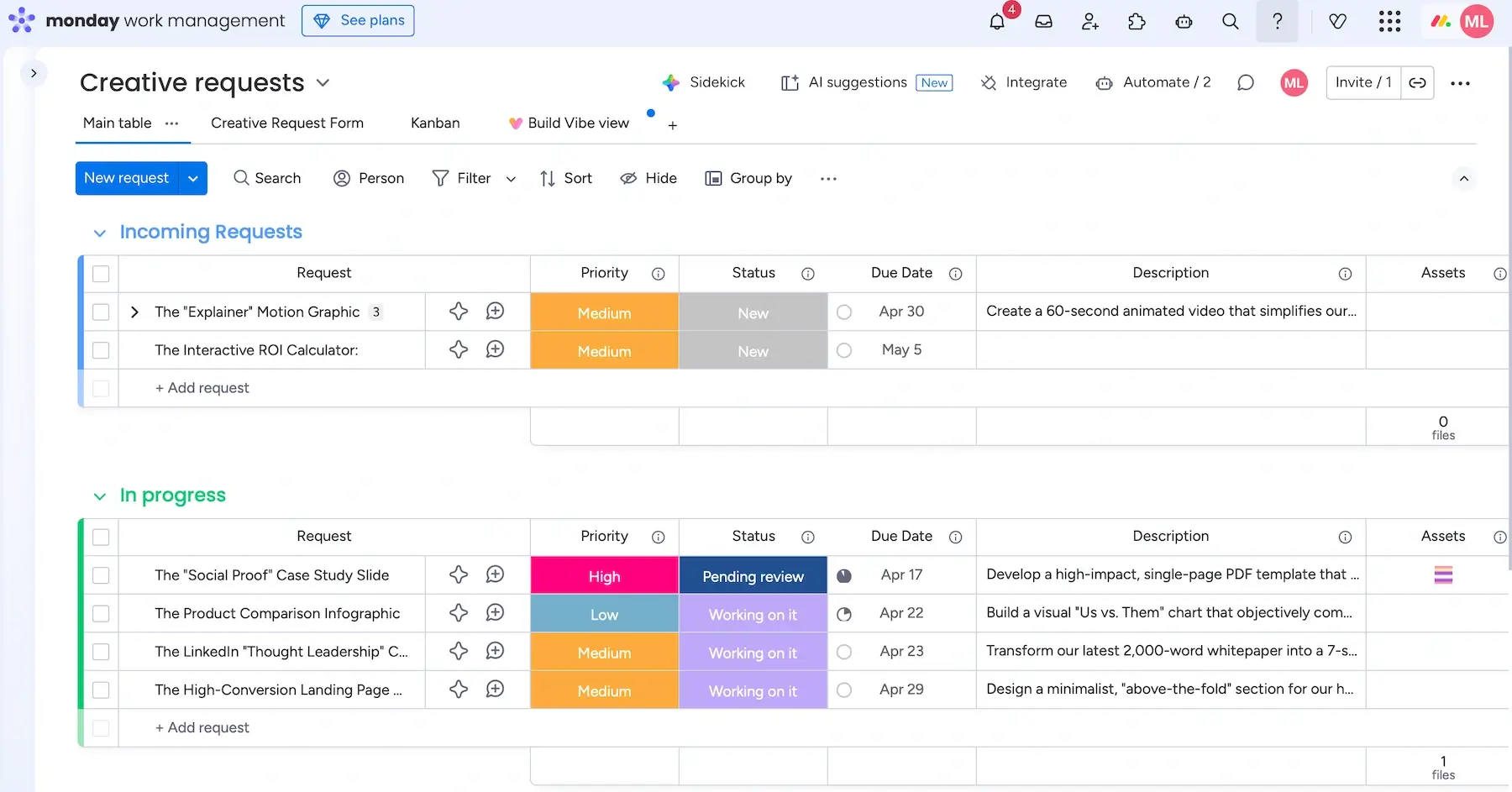
Moreover, there are several features that made me think monday.com excels at visual campaign management — for instance:
- Visual task tracking — color-coded statuses and multiple views (Table, Gantt, Calendar, and more) are easy to set up and use (just know they’re limited on the free plan).
- Drag-and-drop simplicity — moving deadlines or adjusting campaigns feels intuitive since you can drag things around instead of reworking entire plans.
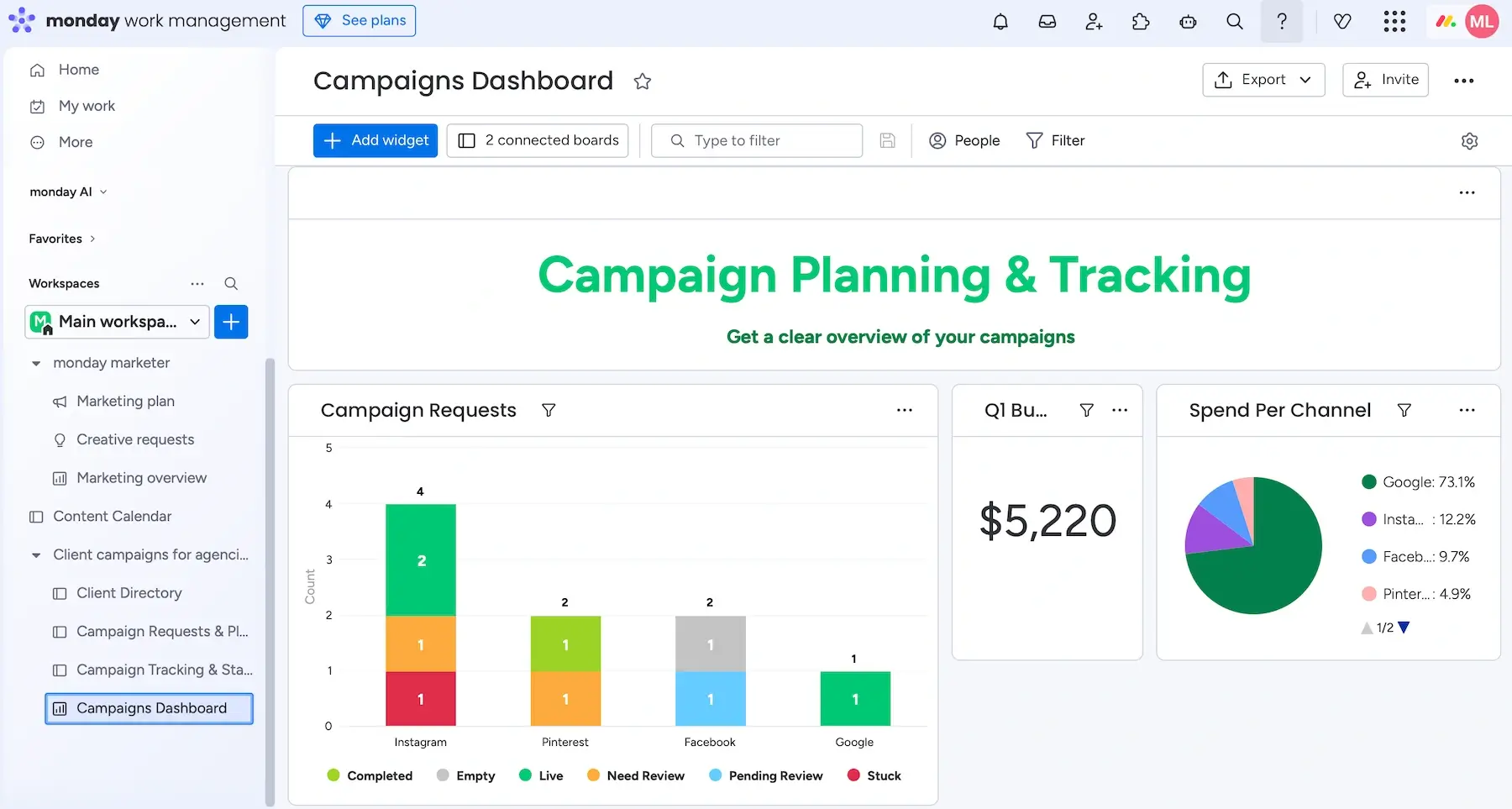
- Dashboards for performance tracking — you can pull data from multiple boards into one place to monitor campaign progress and team workload.
A disclaimer for cost-conscious teams: dashboards aren’t available on the free plan. Also, the Basic plan can only draw data from 1 dashboard, while the limit is more generous on Standard, Pro, and Enterprise (5, 20, and 50 boards, respectively).
What I dislike the most is monday.com’s pricing — because seats are sold in bundles of 3, 5, 10, 15, 20, etc. It means you have to waste money on unused seats if you don’t fit into the said subscription sizes (e.g., buying 20 seats when you have 17 users).
My final complaint is that free plan users can only get help by reading the self-serve knowledge base, as 24/7 live support is reserved for paying customers.
💡 Plaky Pro Tip
Curious to see how monday.com compares to similar platforms in more detail? Check these out:
What’s new in monday.com?
AI Agents have been officially launched into real workflows, which means AI can now do actual project work inside monday.com, not just suggest things. In addition, Autopilot Hub has better AI automation control and improved governance + usage tracking.
Available for: web, macOS, Windows, iOS, Android
| Plan | Price |
|---|---|
| Free (up to 2 seats) | $0 |
| Basic | $9/seat/month* |
| Standard | $12/seat/month* |
| Pro | $19/seat/month* |
| Enterprise | POA |
*billed annually

#6 GanttPRO — best for timeline-based planning
As its name suggests, GanttPRO is a PM tool built around Gantt charts. It can help you plan and track projects and collaborate effectively.
Why choose GanttPRO?
Thanks to built-in time tracking and a timeline-first interface, GanttPRO helps you manage tasks and time equally well.
| Pros | Cons |
|---|---|
| – Good marketing templates – Advanced Gantt features – Robust yet intuitive | – No free plan – No dynamic automations |
I found GanttPRO really intuitive from the get-go. You can start from one of the many handy marketing templates or build boards on your own or with the help of AI features.
The core functionalities include:
- Multiple views — besides Gantt, this tool has Board, List, and Dashboard views in the Core plan, plus Calendar, Portfolio, and Workload views on higher tiers, supporting different user needs.
- Centralized collaboration — keeping all your projects, comments, and attachments in one place eliminates confusion.
- Resource management — GanttPRO has neat features that show availability and utilization of project resources, but only on the 2 highest plans.
Unfortunately, GanttPRO only integrates with a handful of tools (Google Drive, Slack, Jira Cloud, One Drive, MS Project, MS Teams, and MS Excel), so that could be improved.
Also, there are no rule-based automations — just auto-scheduling (adjusting deadlines of dependent tasks) and recurring tasks, which feels outdated compared to other tools.
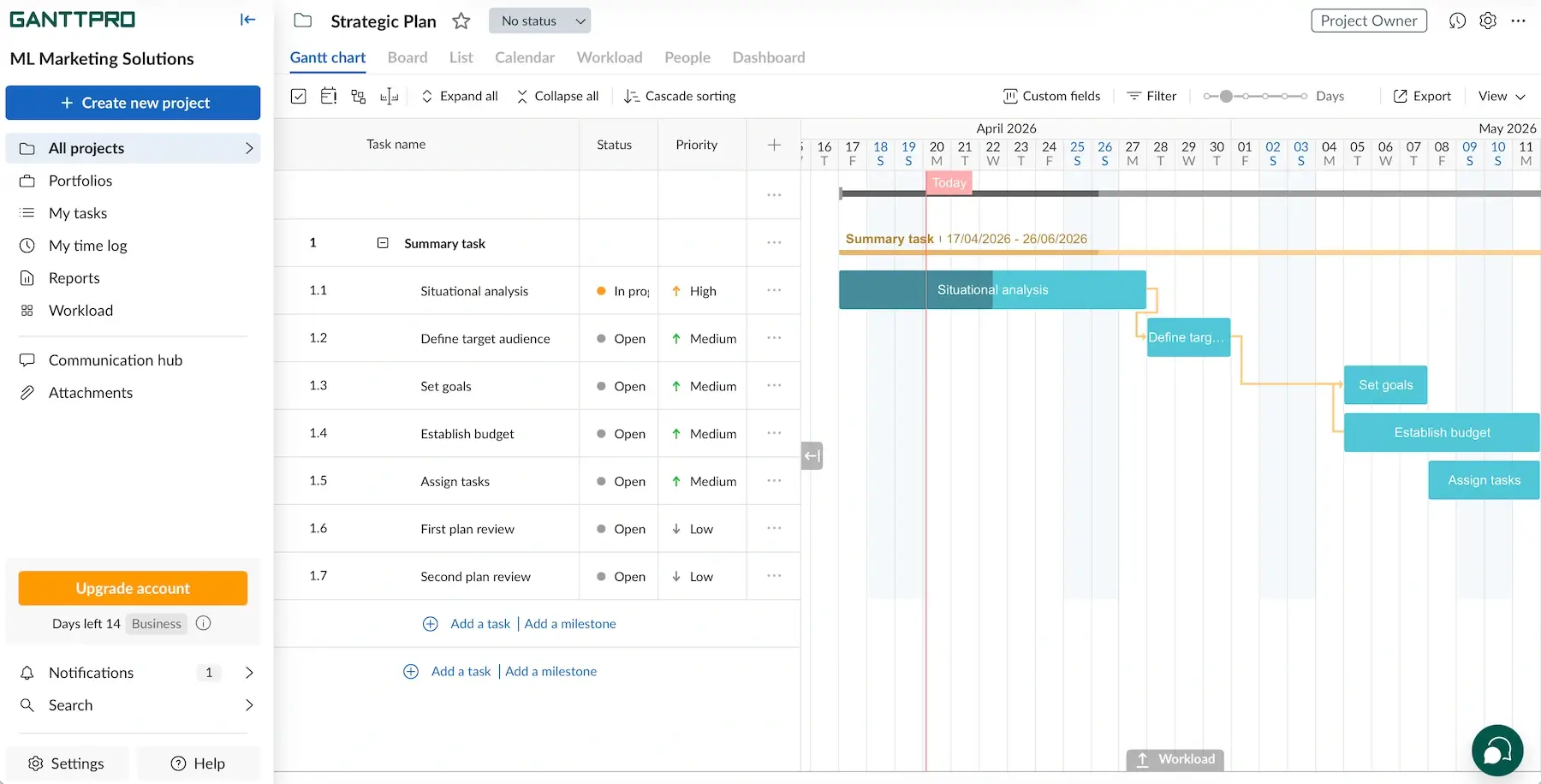
If you asked me what GanttPRO does best, I’d say timeline-based planning, which is essential in marketing. These are the standout features:
- Dependencies — with different dependency types, plus lags and leads (intentional delays and overlaps between tasks), you can avoid overly rigid plans that slow campaigns down.
- Critical path — when you highlight the exact chain of steps directly impacting your final deadline, you instantly know what matters the most.
- Baseline — by comparing progress with the original plan, you can easily spot scope creep and delays.
I also appreciated the drag-and-drop simplicity — dragging a task and shifting everything else saves time and mental effort.
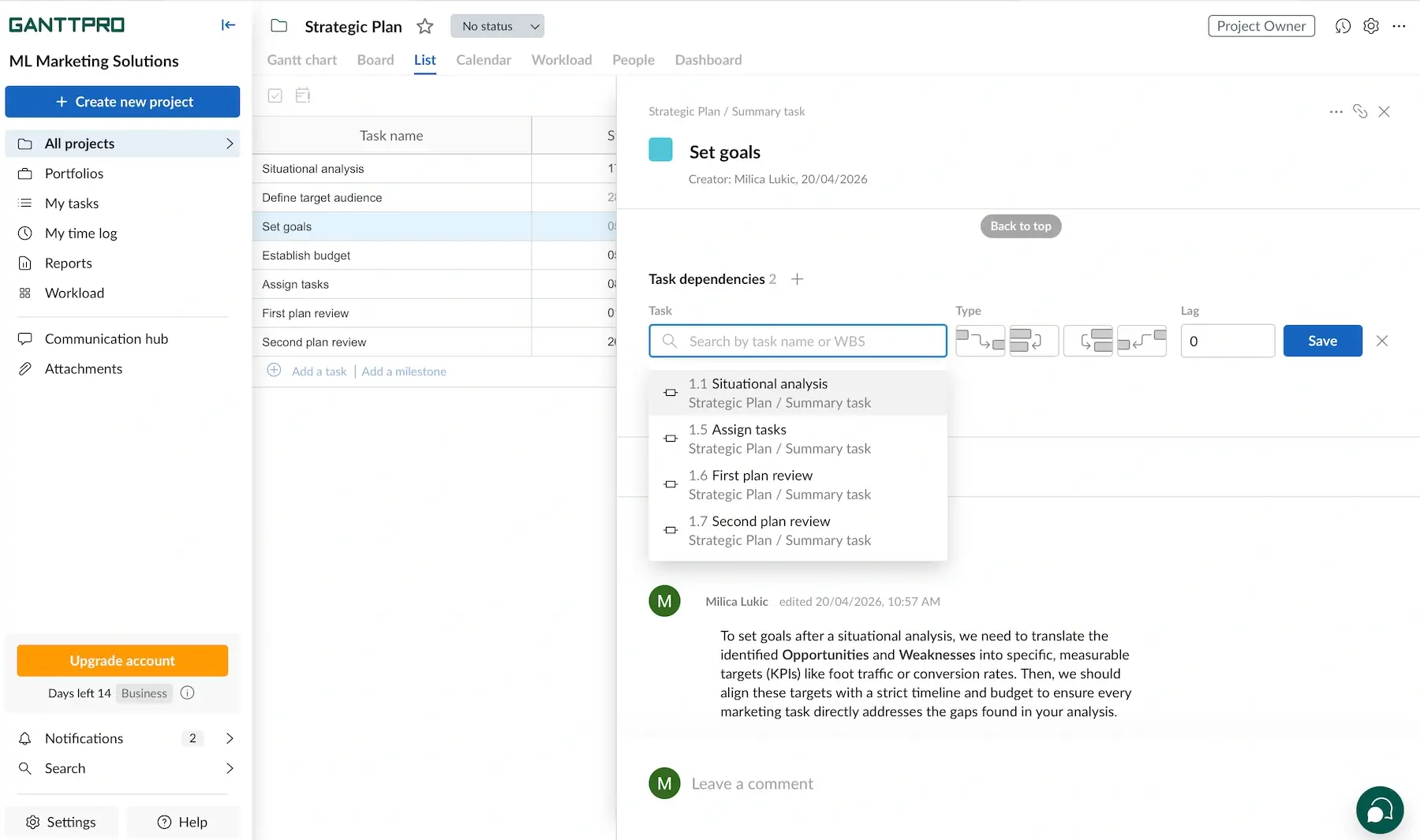
Unlike most platforms on this list, GanttPRO doesn’t offer a free plan. It means you have to commit fairly quickly after the free trial, which isn’t ideal if you’re still figuring things out.
And, custom fields are only available on the Advanced plan and higher. I get that this feature is often absent from free plans, but since the Core tier is also paid, I expected custom fields for everyone.
What’s new in GanttPRO?
The app has expanded the functionality of its AI Gantt chart maker (e.g., faster project creation, cleaner dependency setup). There have also been some small but practical improvements in UI and usability, like smoother navigation in Gantt and List views, plus minor UX fixes for task editing.
Available for: web, iOS, Android
| Plan | Price |
|---|---|
| Core | $7/user/month* |
| Advanced | $10/user/month* |
| Business | $17/user/month* |
| Enterprise (5+ members) | $20/user/month* |
*billed annually (for est. 20 members)
#7 Teamwork.com — best for client-facing marketing teams
Teamwork.com is a tool that combines project management, time tracking, budgeting, and client collaboration into one system.
Why choose Teamwork.com?
This app has features for both planning and executing campaigns while keeping clients as involved as needed.
| Pros | Cons |
|---|---|
| – Powerful automations – Free client users – Custom branding | – Learning curve for clients – Steep pricing |
After testing Teamwork.com on realistic marketing workflows, here’s what I noted down as the main perks:
- Campaign visibility — get a centralized view of tasks, timelines, and progress (in Gantt, Table, List, or Board views).
- Resource and capacity planning — see who’s overloaded/who’s free, and plan campaigns realistically.
- Automation hub — set up event- and time-based triggers to automate routine work (from scratch or existing automation templates).
That said, if you just need simple task management and KPI tracking, Teamwork.com might feel like overkill.
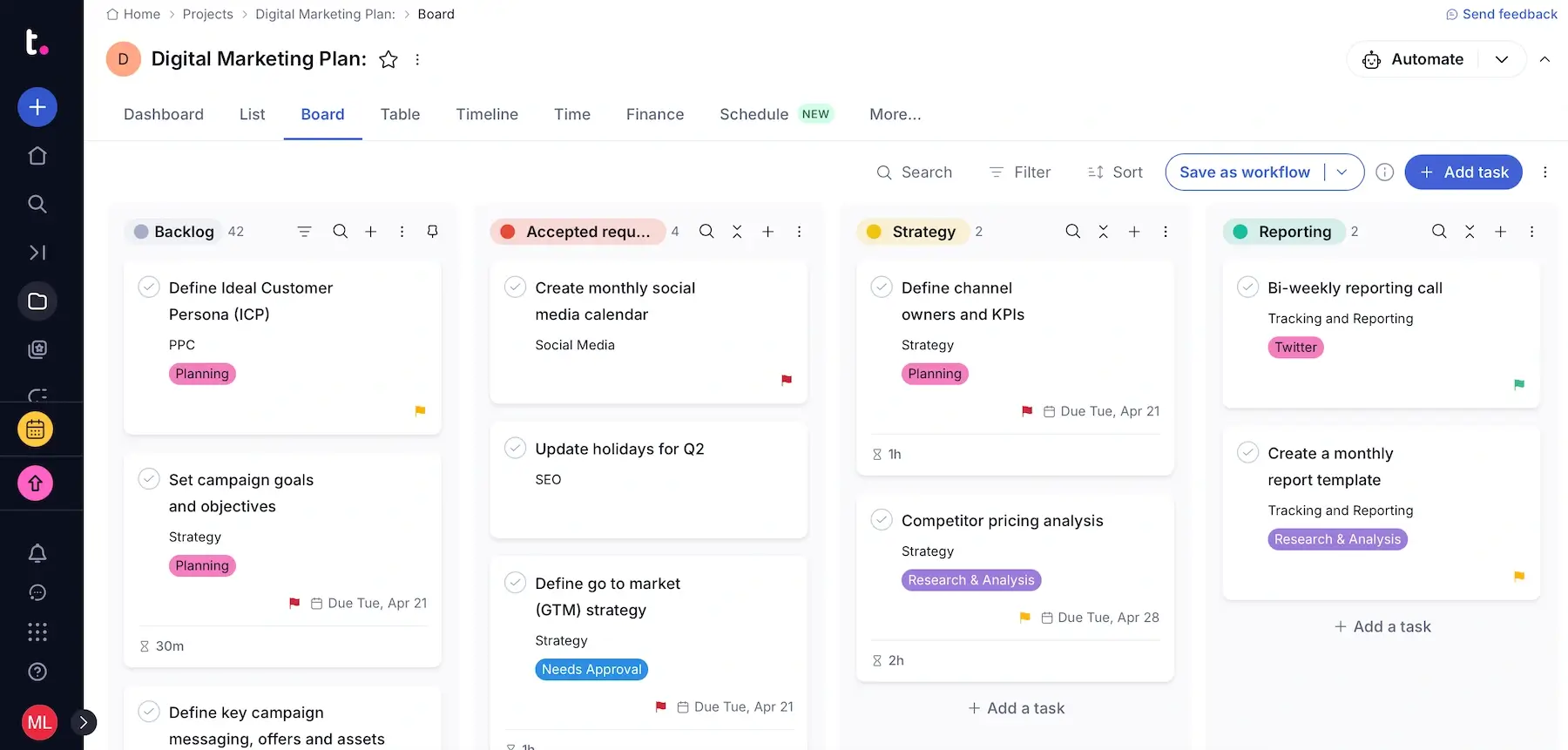
If your work involves lots of client collaboration, Teamwork.com could be an adequate choice thanks to:
- Unlimited free client users — invite clients into projects without extra cost, and control exactly what they can see.
- Proofing features — collect clients’ feedback on assets (e.g., content, design, ads) without messy email threads.
- Custom branding — add your own logo and colors so that the platform feels like an extension of your agency instead of a third-party tool.
- Integrated invoicing — tie logged work hours to projects and clients, and generate invoices without switching tools.
I must underline that invoicing and custom branding are advanced features, i.e., available on the Accelerate tier and higher. This means at least $24.99/user every month, which is far from cheap.
The extent of what you can do with TeamworkAI also grows with the tiers — from comment summaries on Basics to financial and workload management on higher plans.
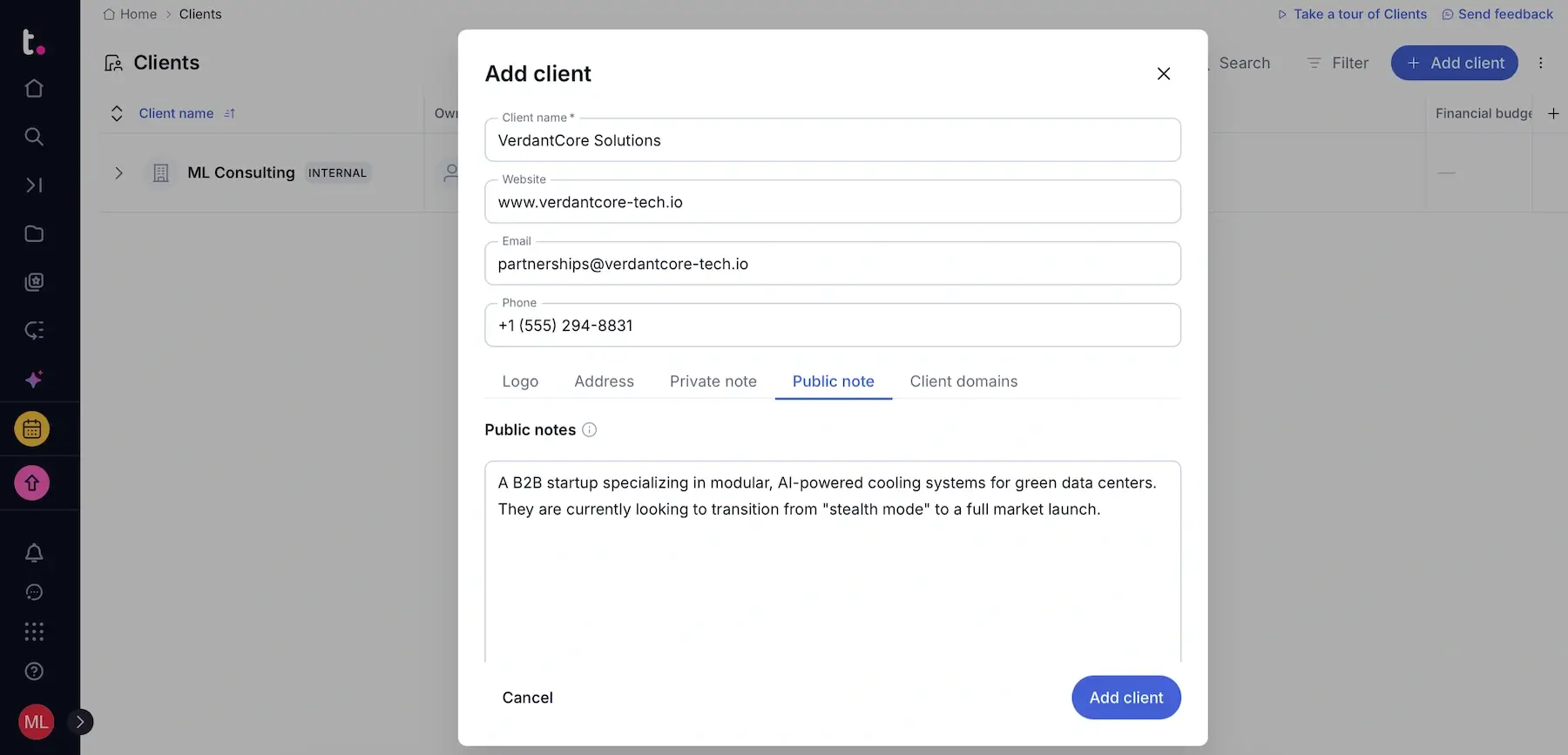
Although clients can collaborate inside this tool, getting them to actually adopt it might be difficult. Besides the fact that some clients prefer sticking to emails, a platform with as much depth as Teamwork.com can easily intimidate people who don’t ordinarily use such solutions.
So, in practice, you might end up balancing between the platform and inbox communication, at least until clients get used to the workflow (and some never fully do).
💡Plaky Pro Tip
Already using Teamwork.com and looking for an alternative that will be easier on your budget? We’ve got you covered:
What’s new in Teamwork.com?
Teamwork.com has introduced AI Teammates: Scout (personal assistant that summarizes projects, cleans up notifications, etc.) and Flo (project manager AI that checks project health and helps with reporting, among other things). Everything Table View is also new — one table showing all projects together.
Available for: web, macOS, Windows, iOS, Android
| Plan | Price |
|---|---|
| Free (up to 5 users) | $0 |
| Basics (3+ users) | $9.99/user/month* |
| Accelerate (5+ users) | $24.99/user/month* |
| Optimize | POA |
| Enterprise | POA |
*billed annually
#8 Asana — best for tracking marketing goals
Asana is a platform that helps teams organize and manage their work, from daily tasks to long-term strategic initiatives.
Why choose Asana?
Marketing teams need to connect campaigns and daily work to trackable goals, and Asana has the tools to support that.
| Pros | Cons |
|---|---|
| – Hundreds of integrations – Great goal overviews – Solid dashboards | – Limited customer support – Inflexible pricing |
While exploring Asana as a tool for marketing project management, I saw how reliable it is for day-to-day operations. Here’s why it works:
- Clear structure — work is organized into Projects, Tasks, Goals, and Portfolios, with multiple view options (List, Calendar, Kanban, Timeline, and Gantt).
- Team collaboration — comments and file sharing keep team communication centralized, while multi-home tasks support cross-functional collaboration.
- Automations for routine steps — with Rules and AI Studio, you can automate handoffs, status updates, and reminders so that campaigns don’t stall.
What I find odd is the 1-assignee-per-task policy. The idea is to ensure accountability, but it’s inconvenient when multiple people are working on the same assignment and you have to create subtasks in order to make that clear.
As for integrations, I couldn’t find the definitive number, but it seems there are 200-300+ native integrations in Asana, which is quite impressive.
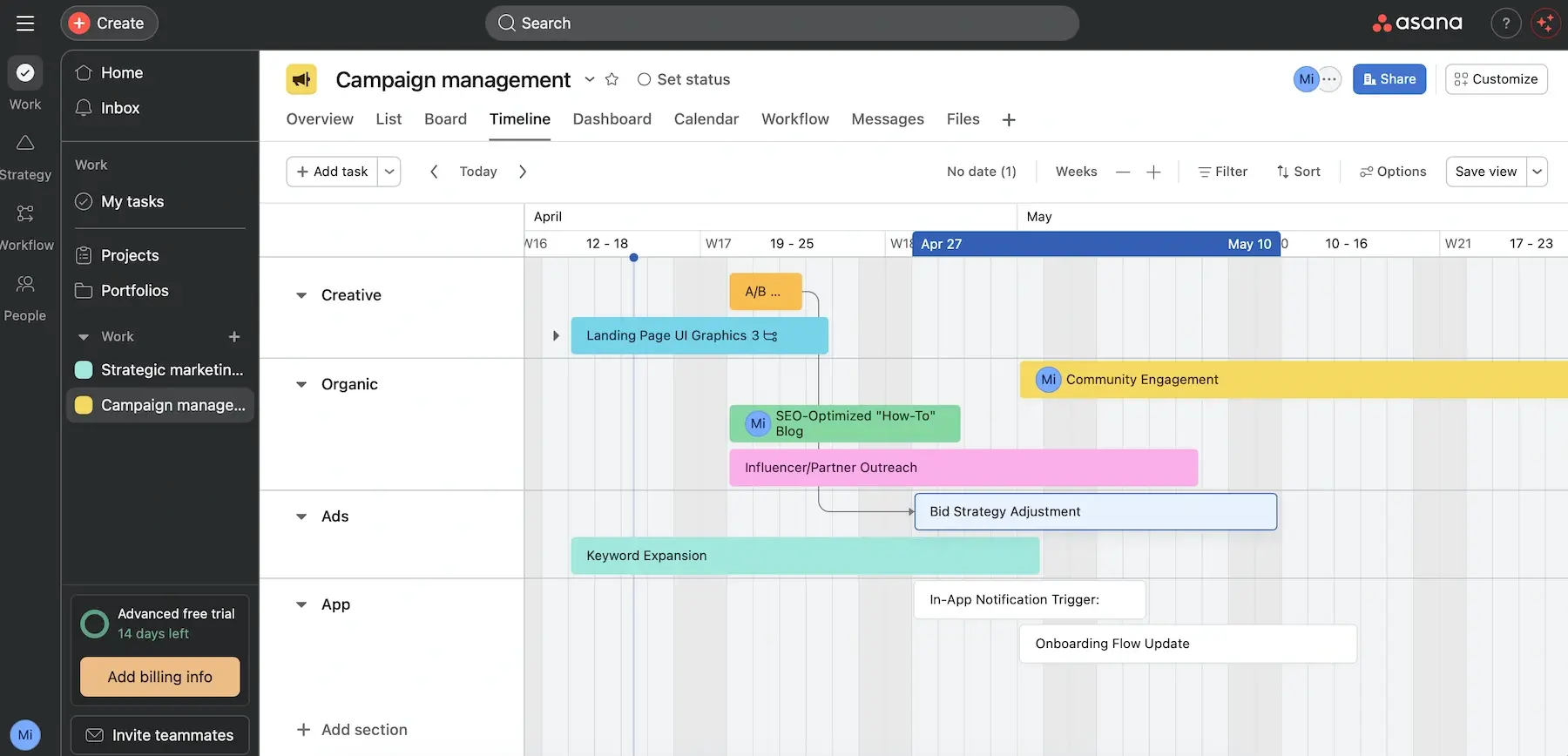
The area where Asana shines is goal tracking, as it allows you to:
- Specify clear (sub)goals — set goals with assignees and deadlines, or create personal goals, with the ability to divide them into subgoals for precision.
- Connect goals with work — link goals with specific projects/tasks, allowing the goal completion field to automatically update as you mark work as done.
- Generate reporting dashboards — visualize data in different chart styles to identify blockers, resolve problems, and achieve goals faster.
Goals are available on the Advanced and Enterprise tiers only, which means at least $24.99/user/month. Asana isn’t the cheapest option, but if you need strong alignment between tasks and measurable goals, it might be worth it.
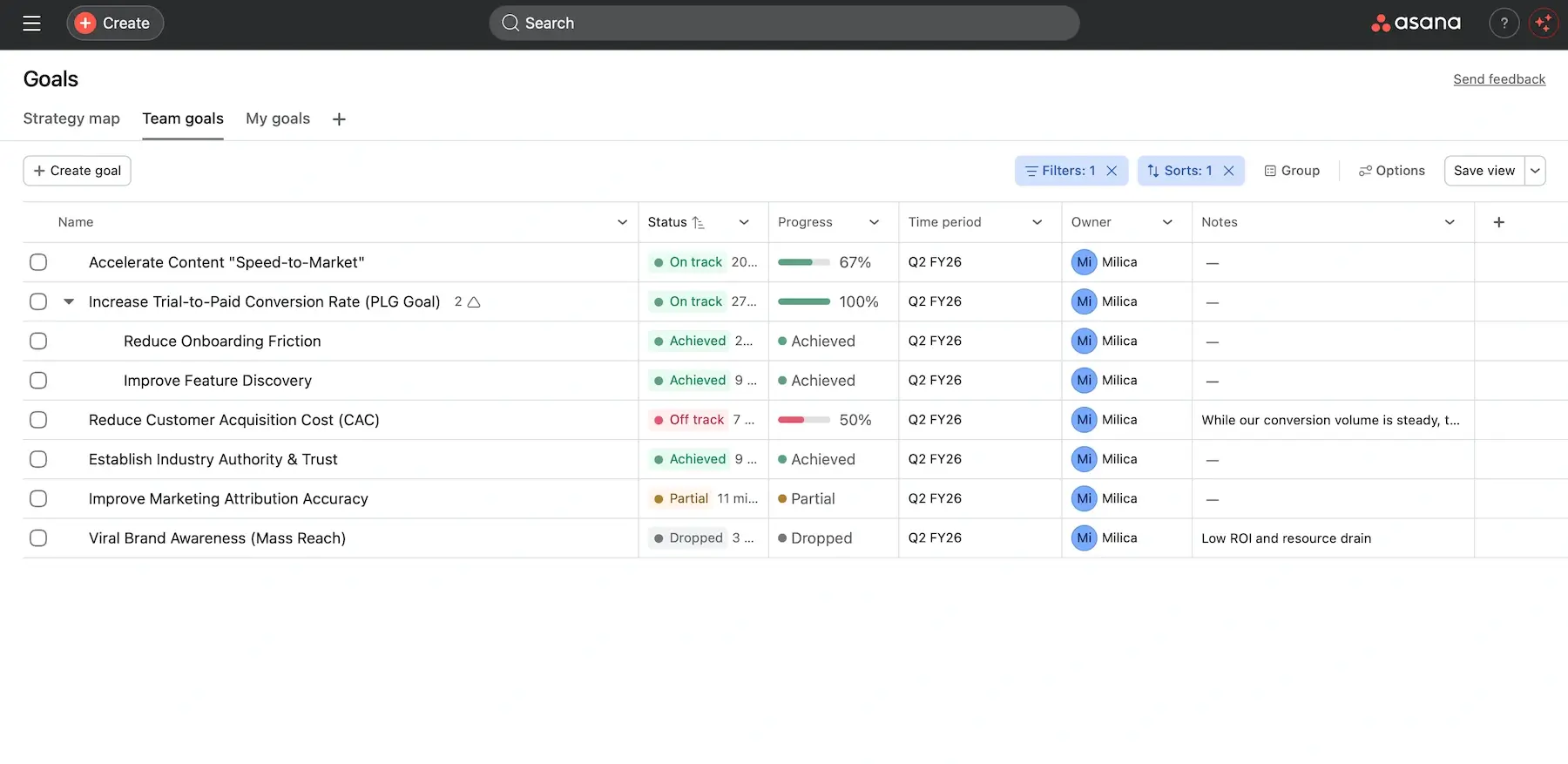
Another thing about Asana’s pricing: much like with monday.com, subscription size grows in fixed increments (5, 10, 25, or 50, depending on the team size). So, you’ll have to pay for unused seats if your total isn’t a “neat” number.
I must also criticize the lack of direct customer support for free users (only Asana Developer Guide available). Plus, 24/7 live support is locked behind the 2 highest plans.
💡 Plaky Pro Tip
Want to learn how Asana compares to its main competitors? Read these:
What’s new in Asana?
You can now use AI teammates directly inside Asana projects, as they can create plans, suggest next steps, write briefs, etc. There have also been rule improvements for automations (text-based triggers, ability to pause rules temporarily, and more).
Available for: web, macOS, Windows, iOS, Android
| Plan | Price |
|---|---|
| Free (up to 2 users) | $0 |
| Starter | $10.99/user/month* |
| Advanced | $24.99/user/month* |
| Enterprise | POA |
| Enterprise+ | POA |
*billed annually

#9 ProofHub — best for large marketing teams
ProofHub is an all-in-1 project management and team collaboration tool. It combines tasks, communication, file sharing, time tracking, and reports.
Why choose ProofHub?
This app uses flat-rate pricing, which means your costs stay the same while your team scales. So, ProofHub is a reasonable choice for marketing teams with lots of people and moving parts.
| Pros | Cons |
|---|---|
| – All-in-1 PM app – Easy proofing and approvals – Flat-rate pricing | – No free plan – Design feels outdated |
When you’re managing campaigns, content, and approvals, things can get messy fast. ProofHub is built to reduce that friction with:
- Strong task management — you can assign tasks, set deadlines, and define dependencies to ensure campaign steps happen in the right order.
- Built-in proofing and approvals — it’s easy to review creatives and approve work directly in the app to avoid long email threads.
- Real-time collaboration — proofing, comments, and built-in chat reduce context switching.
Unsurprisingly, ProofHub lets you see work in Table, Board, Gantt, and Calendar views. The UI is functional, if a little dated compared to sleeker tools like Notion or Airtable.
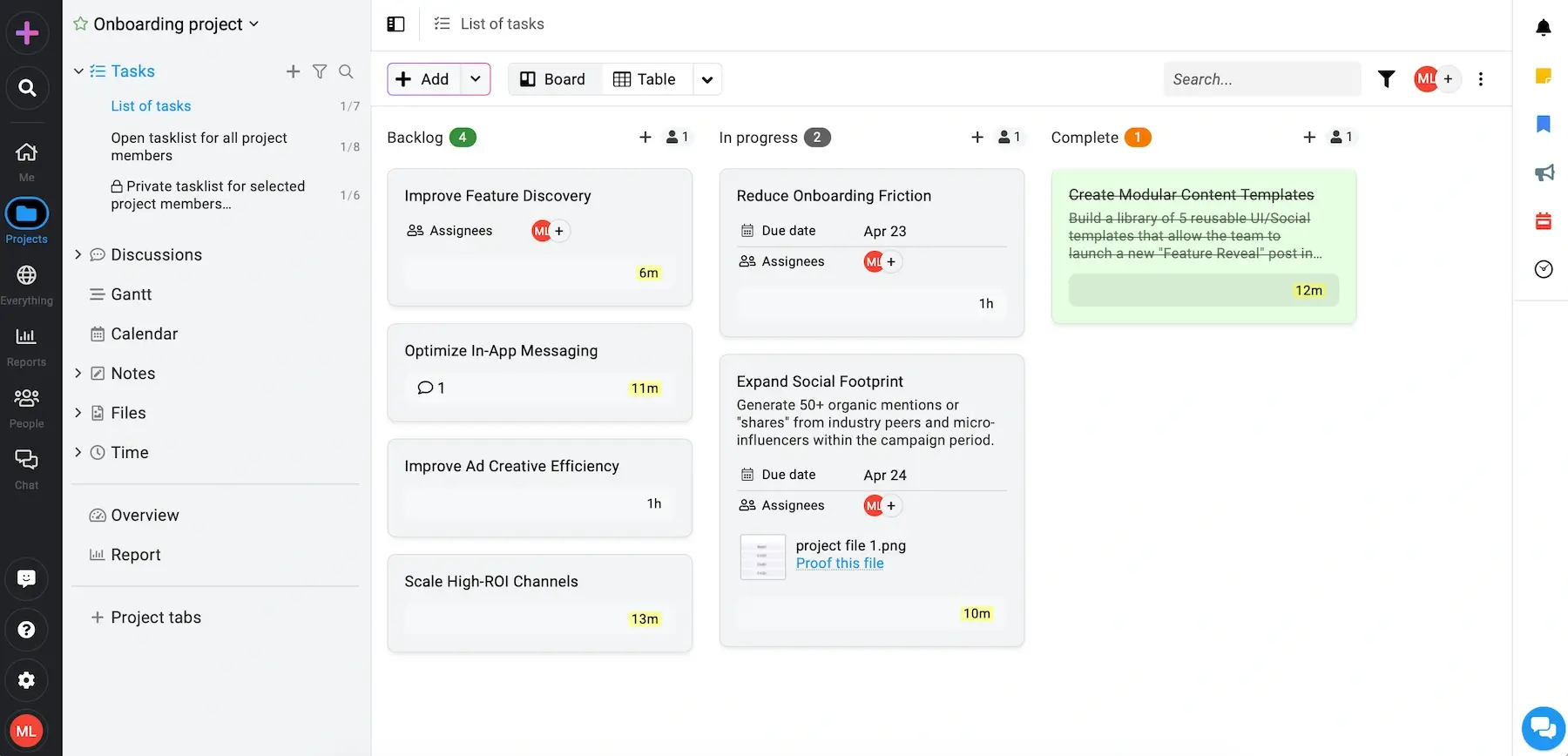
ProofHub feels less like a tool and more like infrastructure, especially for large teams — here’s why:
- No per-user pricing — you don’t have to think twice about adding more team members or external collaborators thanks to ProofHub’s flat-rate pricing.
- Work centralization — scattered docs, chats, proofing tools, and trackers for a big team would be a nightmare as opposed to ProofHub’s all-in-1 approach.
- Workload and resource reporting — managers can see who’s overloaded and who has capacity, helping avoid burnout and bottlenecks.
The reporting options provide solid overviews, but I must say they’re not as deep as in Asana or monday.com, for instance.
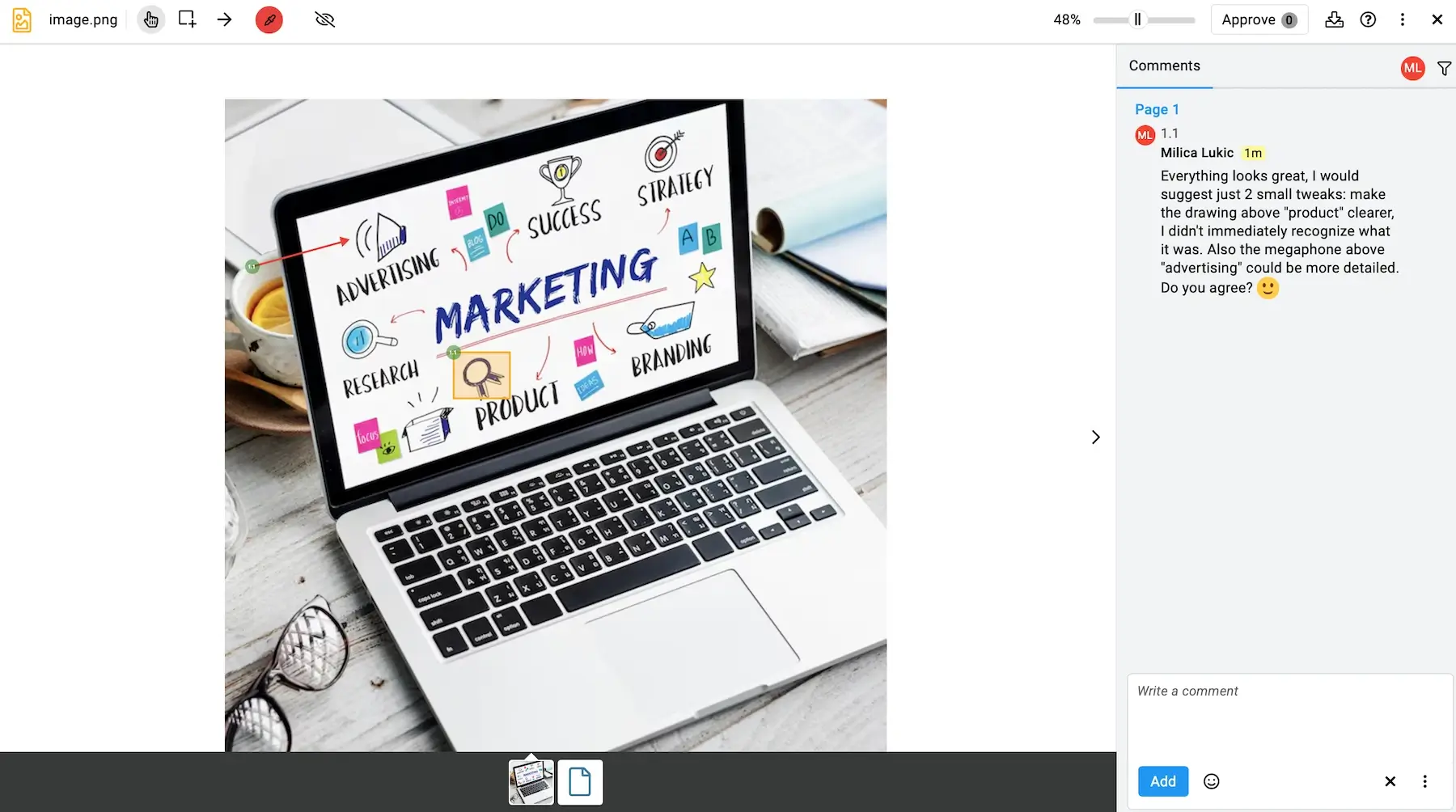
As for room for improvement, ProofHub has limited native integrations (less than 10), but you can connect it to platforms like Make or Zapier for automation.
And while the flat-rate pricing model is a notable advantage, the lack of a free plan is a minus. There is a free trial, but those 14 days may not be enough for teams that want to explore the tool in more detail or test it on real campaigns over time without committing.
I’ll also mention that ProofHub currently doesn’t have built-in AI, but that isn’t a deal breaker in my eyes since it has so many other features that similar apps lack.
What’s new in ProofHub?
It seems that ProofHub has had no notable updates lately, only bug fixes and performance-related improvements.
Available for: web, iOS, Android
| Plan | Price |
|---|---|
| Essential | $45/month* |
| Ultimate Control | $89/month* |
*billed annually
#10 Teamhood — best for Kanban-style marketing
Teamhood is a PM tool designed around visual workflows. It supports tasks, time tracking, workload management, and collaboration, all in one place.
Why choose Teamhood?
If your marketing workflow is primarily stage-based, Teamhood will feel almost tailor-made as a Kanban-first platform.
| Pros | Cons |
|---|---|
| – Advanced Kanban features – Gantt view in the free plan – Workload visibility | – Integration bugs – No native mobile app |
While Teamhood’s design is quite minimalistic, the amount of features is not. To begin with, I enjoyed these:
- Neat work structure — folders, boards, and (sub)tasks with dependencies ensure clear organization.
- Teamhood AI — Teamhood’s AI assistant can help you create projects, optimize workflows, speed up search across your account, and more.
- Company reports — 4 types of reports (Workload, Portfolio, Time & Cost, and Profitability) provide useful insights for planning future work.
Integrations are limited (just a handful of options), but Teamwork can connect with 3,500+ apps for automation purposes via Zapier.
That said, while I personally didn’t experience integration issues, I’ve seen user reviews online about bugs and glitches when connecting Teamhood with other tools.
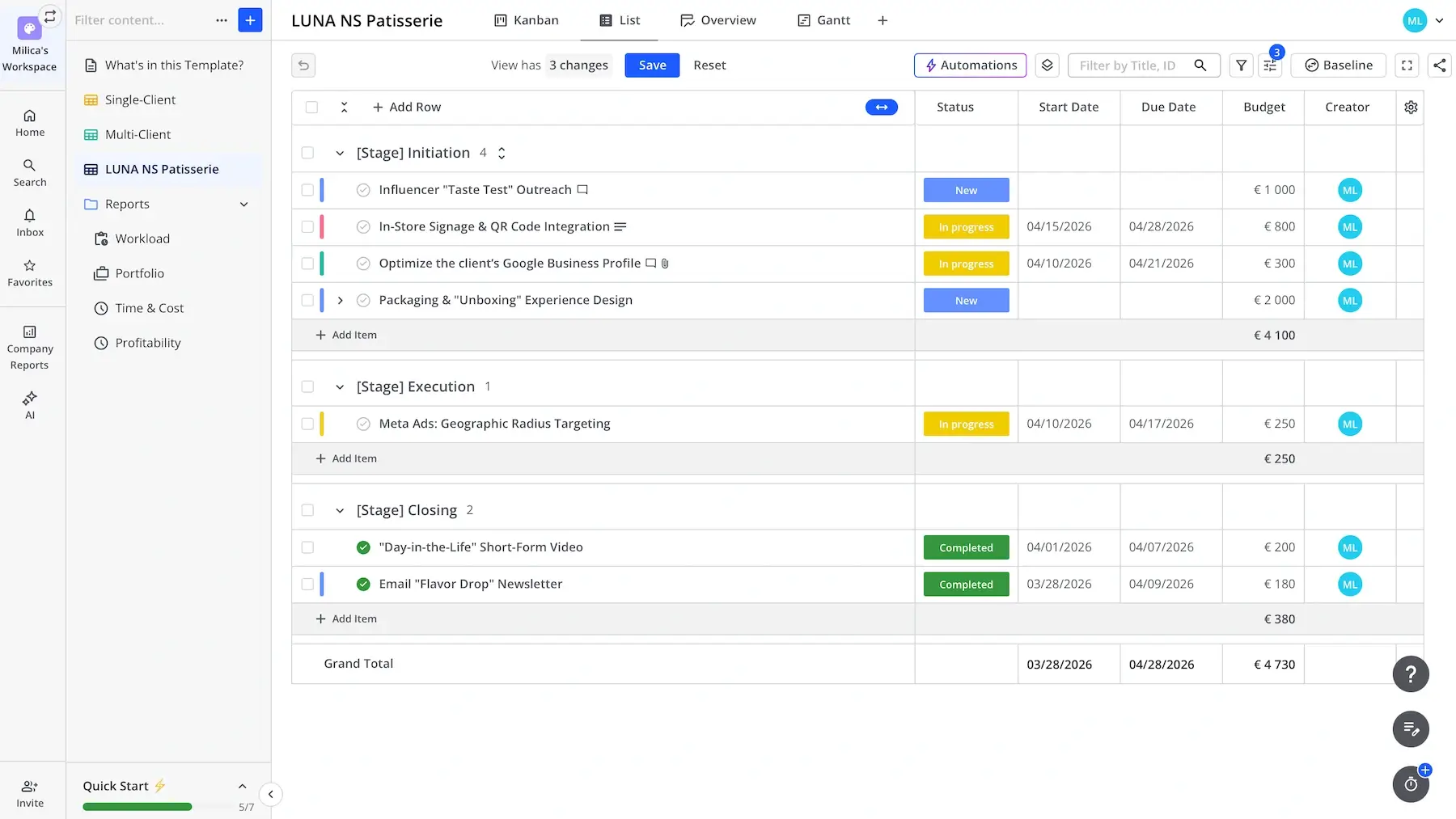
What Teamhood handles extra well is Kanban project management. Marketing teams that use this approach a lot will certainly appreciate:
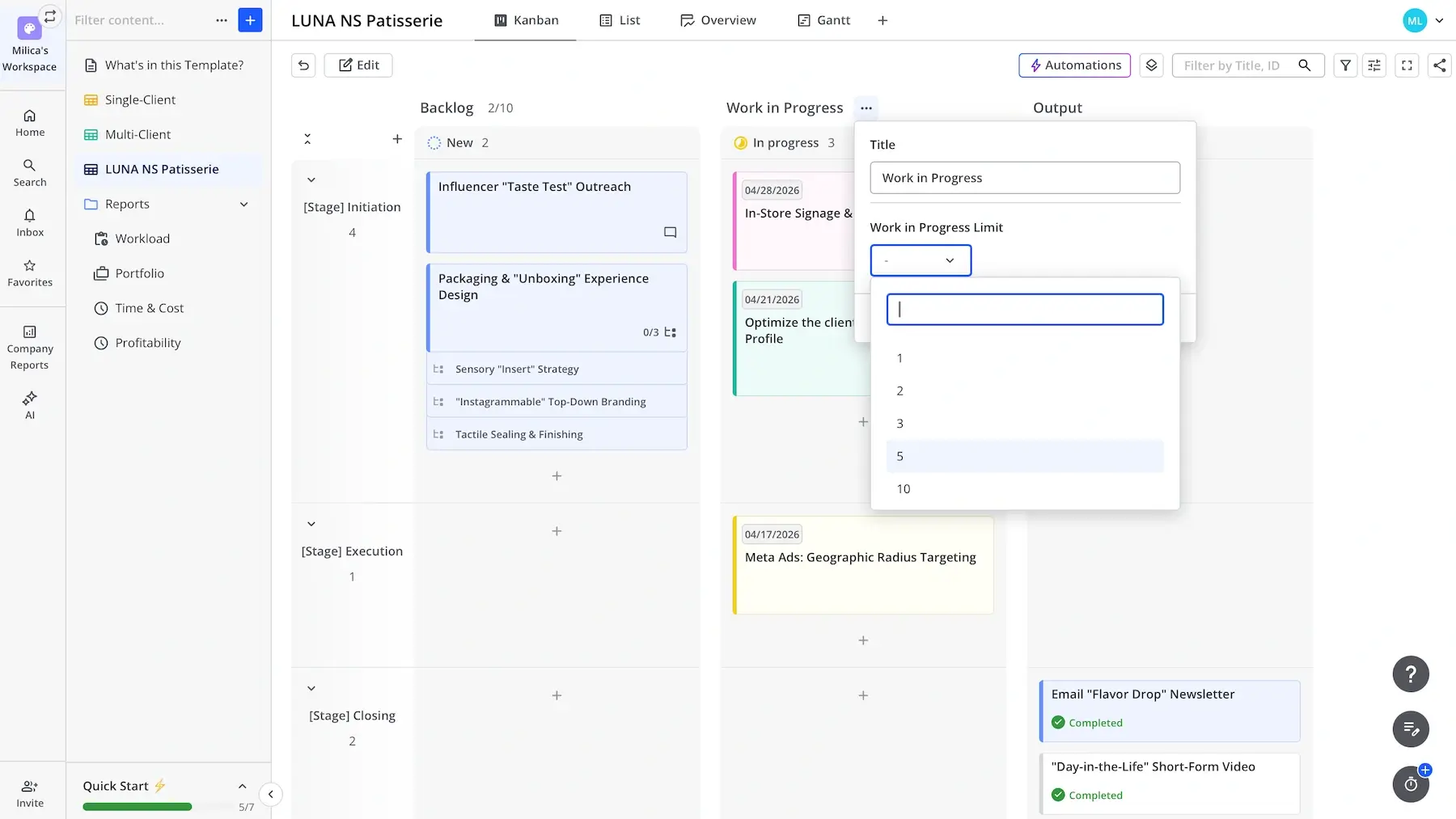
- Kanban swimlanes — using horizontal sections in addition to Kanban columns enables categorizing tasks more precisely (by campaign, priority, project, etc.).
- WIP limit — you can set a Work-in-progress (WIP) limit to define the maximum number of items in each column (stage) and prevent bottlenecks.
- Dependencies — unlike many tools, Teamhood shows dependencies in the Kanban view, which is useful for multi-step campaigns.
Teamhood’s free plan also supports List and Gantt views, while Time and Calendar views are locked behind the paid plans.
I also want to underscore that Teamhood doesn’t have a native app for desktop or mobile. You can use it as a desktop-like app via tools like WebCatalog, but I can honestly say that browser use is really smooth — clean, focused experience and no install needed.
The lack of a dedicated mobile app is a bigger issue since some teams like to check progress on the go. You can access Teamhood via browser on your phone too, but interaction is slower and less precise.
If a strong Android/iOS app is a must for you, then you’d probably enjoy Plaky, Asana, or ClickUp more.
What’s new in Teamhood?
Teamhood users can now choose to run automation actions on child items or parent items. There have also been some import improvements (merging items during import and importing from the EPPM tool Primavera).
Available for: web
| Plan | Price |
|---|---|
| Free (up to 10 users) | $0 |
| Team (3+ users) | €9/license/month* |
| Business (3+ users) | €18/license/month* |
| Enterprise (25+ users) | POA |
*billed annually
#11 Basecamp — best for simple team communication
Basecamp is a platform designed to be a central hub where teams plan, discuss, and execute projects together.
Why choose Basecamp?
This tool reduces communication overload instead of adding to it, which could be a game-changer for marketing teams.
| Pros | Cons |
|---|---|
| – Simple UI – Solid integrations – Excellent communication features | – Lack of native reporting and automation – Limited free plan |
Exploring Basecamp for marketing workflows, I quickly realized it’s not trying to be the most advanced PM solution, just a straightforward one.
This is what I liked the most:
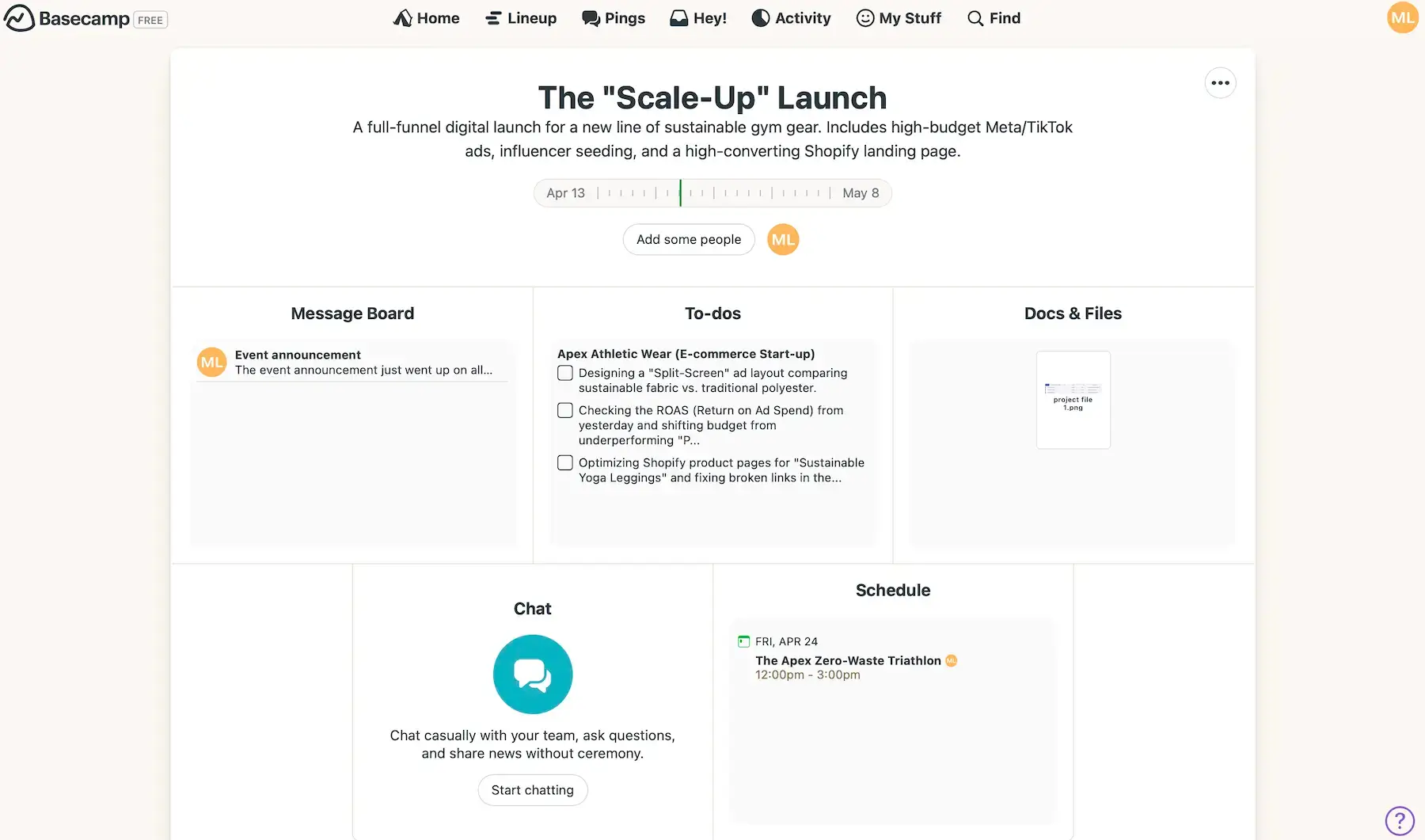
- All-in-1 workspace — you have a single place for to-dos, files, deadlines, and campaign discussions.
- Hill charts — this is a visual progress tracking tool that maps work along a curve, reflecting how confident the team is and where uncertainty still exists.
- Integrations — there are dozens of native integrations, plus the possibility to connect Basecamp to hundreds of apps via Zapier and Zoho Flow.
You need the said integration options if you want handy features like Kanban or Gantt views, as well as charts and reports.
From what I saw during my testing, Basecamp excels at supporting team communication, which is crucial for marketing teams. The best features are:
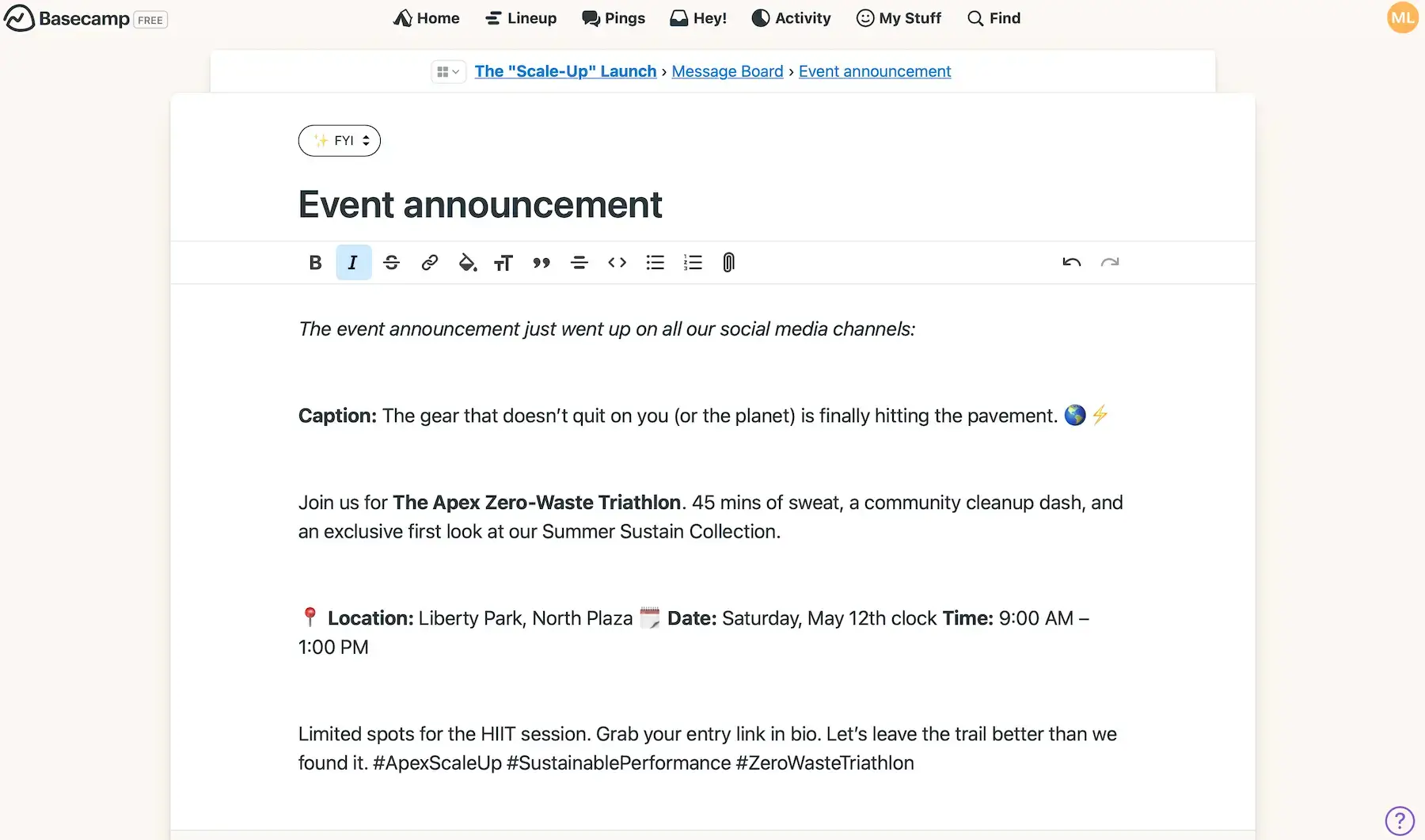
- Message board — you can share messages with rich text formatting and categorize them (e.g., announcement, pitch, question) to avoid fragmented email chains.
- Group chat — Campfire is a real-time group chat, ideal for fast questions or coordinating things on the fly.
- Private messages — Pings are private, focused conversations for 1:1 or small-group messages when something doesn’t need to involve the whole team.
- Automatic check-ins — Basecamp can prompt team members for updates, reducing the need for constant sync meetings.
Unfortunately, besides automatic check-ins and recurring to-dos, this tool has no automation capabilities. The integration with Zapier can help, though, if you really need Basecamp to be a part of an automated workflow system.
Overall, Basecamp can be a decent choice for those who like its simple and clean philosophy. However, as your marketing operations become more complex, you may outgrow it and look for more advanced Basecamp alternatives.
And, if you’re eyeing Basecamp’s free plan, you should know it supports 20 users maximum and only 1 project.
To end this on a more positive note, I’ll add that Basecamp has a support contact page for both existing users and pre-sales questions, and they promise to respond within an hour, which is commendable.
What’s new in Basecamp?
Basecamp has had no feature releases in the recent period. There have only been bug fixes and minor usability improvements.
Available for: web, macOS, Windows, iOS, Android
| Plan | Price |
|---|---|
| Free (up to 20 users) | $0 |
| Plus | $15/user/month |
| Pro Unlimited | $299/month billed annually |
#12 Miro — best for marketing brainstorming
Miro is a visual collaboration platform where teams can jointly explore ideas, map workflows, and engage in real-time or asynchronous communication.
Why choose Miro?
Unlike static docs or basic whiteboards, Miro actually improves how teams think together instead of just writing ideas down.
| Pros | Cons |
|---|---|
| – 250+ integrations – Very flexible – Voting and feedback loops | – Not a full-fledged PM tool – Large boards are slow to load |
Miro isn’t a traditional PM tool, but it works for marketing — here’s why:
- Visual task management — you can add fields like status, owner, or priority to task cards — they’re most effective in table/list-style views, though.
- Templates for common workflows — from social media calendars to customer journey maps, Miro’s templates save time and offer a solid starting point.
- More than 250 integrations — if you need to get more out of Miro, you can integrate it with other apps your team uses.
There are no classic “if this, then that” automations, but you can set up rules for status updates, generating reports, and sending notifications. Miro can also lean on AI to automate thinking tasks like summarizing boards and structuring messy input.
After testing Miro for marketing, I see why it’s said to shine as a brainstorming space. My favorite features are:
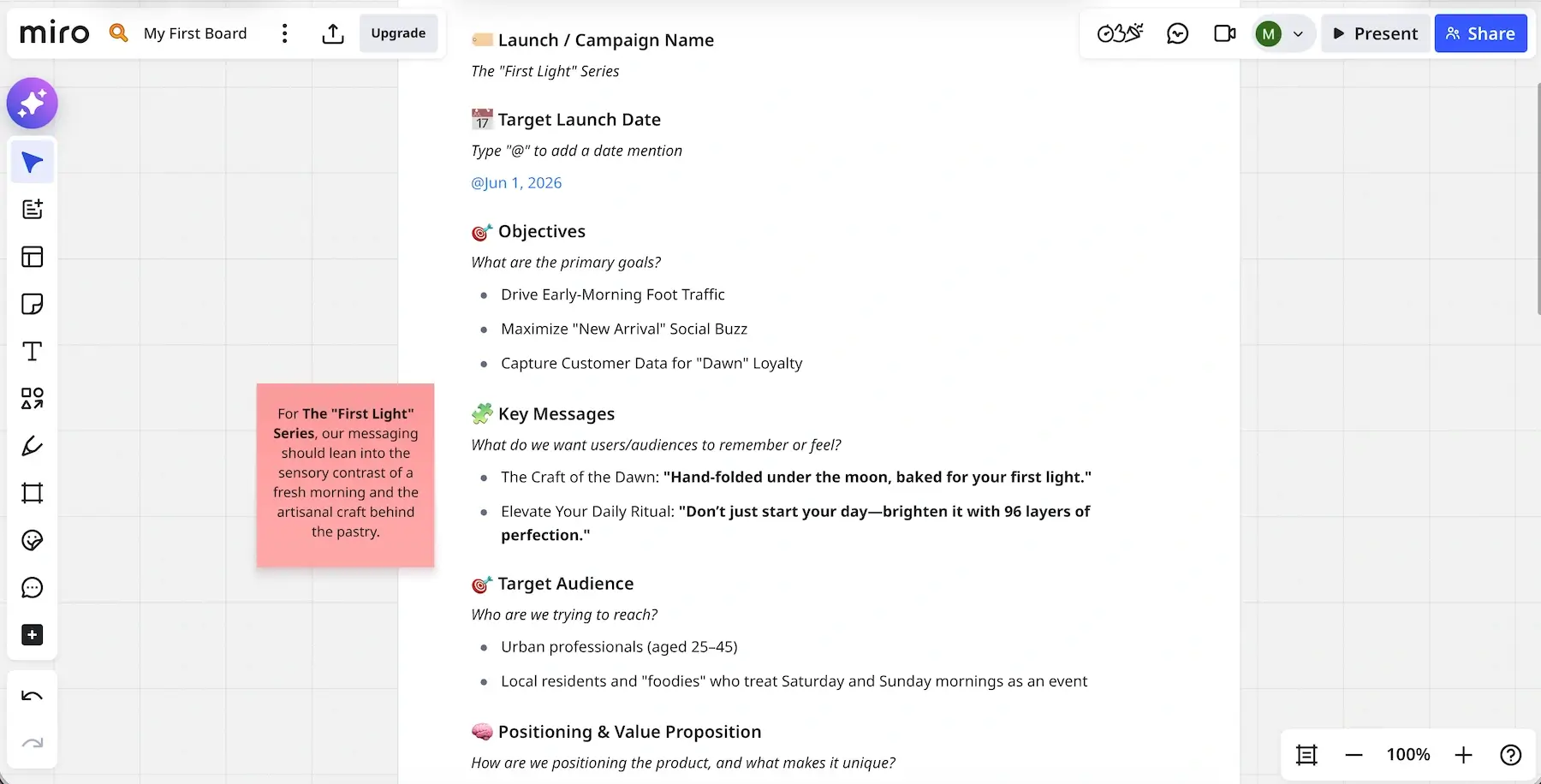
- Infinite canvas — you can expand ideas endlessly, which is particularly useful for messy early-stage thinking.
- Sticky notes and comments — these features allow you to quickly capture and group ideas like campaign themes or content pillars.
- Miro Engage — interactive activities like polls and word clouds keep everyone actively involved in workshops and structured sessions.
- Miro Insights — AI-powered customer feedback analysis makes it easier to move from brainstorming to actual strategy.
I also noticed that Miro can get cluttered fast without discipline. So, if you go for it, I’d advise you to avoid overly complex boards — especially since the app can lag in those cases.
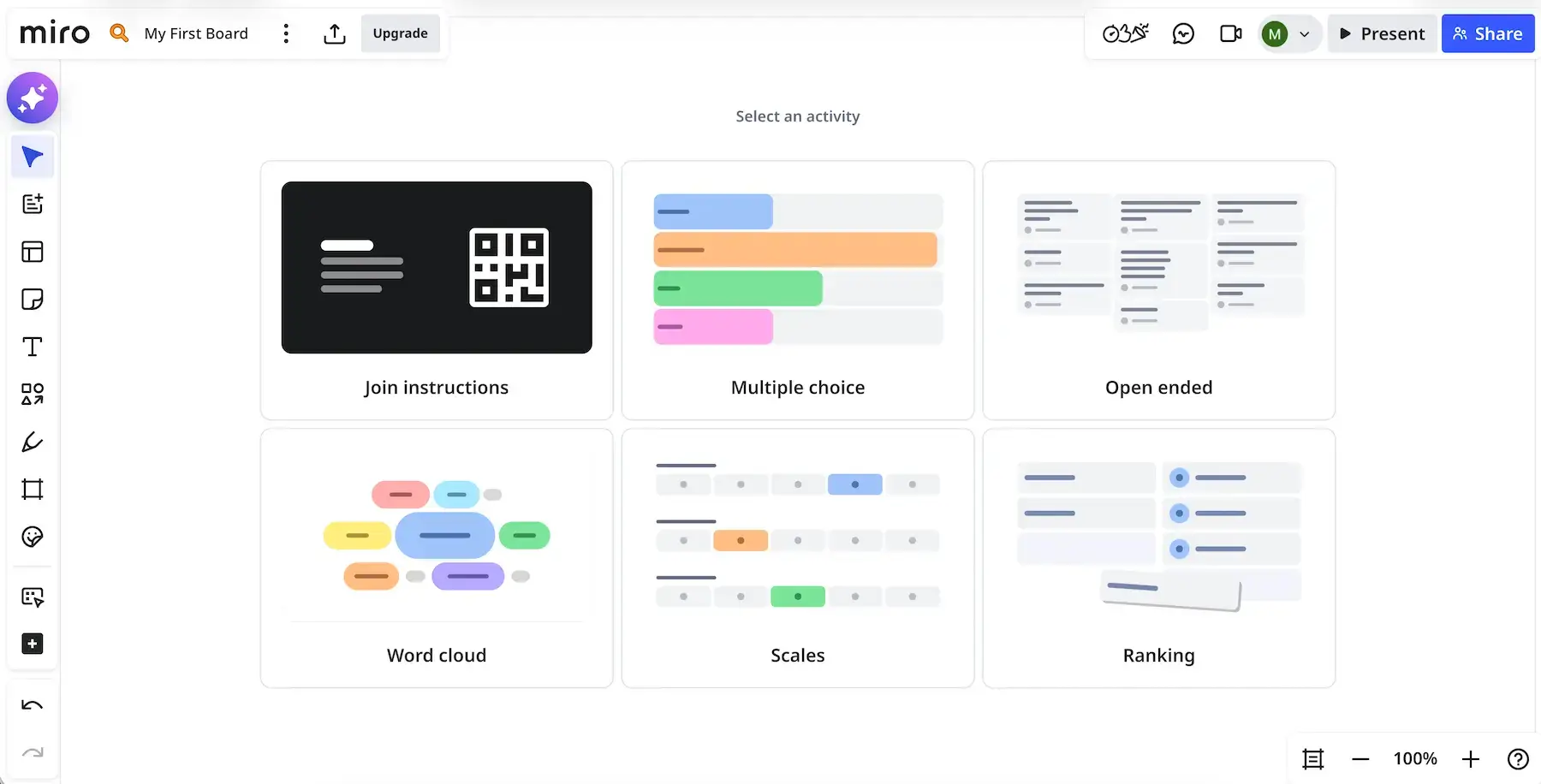
All in all, I like how Miro lets you go from rough ideas to structured plans in the same place. Just remember it isn’t exactly a true PM tool with in-depth reports and native automation logic.
My last remark is that 24/7 support is available only on the highest tier. So, on lower plans, your employee productivity can suffer if technical issues arise outside customer service business hours.
What’s new in Miro?
Miro has made it possible to take a screenshot and turn it into a live interactive prototype instead of redesigning manually (in the add-on Miro Prototypes). Plus, any space in Miro can now be saved as a Custom Blueprint (reusable template).
Available for: web, macOS, Windows, iOS, Android
| Plan | Price |
|---|---|
| Free | $0 |
| Starter | $8/member/month* |
| Business | $20/member/month* |
| Enterprise (30+ members) | POA |
*billed annually
Reliable project management software for marketing — Plaky
Choosing the best marketing PM app ultimately comes down to how well it can support your team’s day-to-day work. Some tools excel in specific areas, while others try to do everything at once.
If you want a solution that balances flexibility, ease of use, and long-term scalability, Plaky by CAKE.com stands out as one of the most sensible choices. Go for it if you appreciate:
- Strong security standards,
- Affordable pricing with a genuinely usable free plan, and
- A native mobile app keeping your team connected wherever they are.
Bring more clarity and control to your marketing projects — in Plaky by CAKE.com.
How we reviewed this post: Our writers & editors monitor the posts and update them when new information becomes available, to keep them fresh and relevant.