The most effective way to communicate bugs is through a standardized bug report template.
In this text, you’ll find 8 free and editable bug report templates you can start using right away. We’ve covered every format, from Google Sheets, Google Docs, Excel, Word, and PDF to templates offered in various task management software.
- A bug report template is a standardized form for reporting software bugs.
- The best bug report templates exist in a collaborative space alongside your projects instead of in passive documents and spreadsheets, helping developers notice and resolve bugs faster.
- The perfect bug report should contain the following 8 elements: bug ID, title, description, environment, expected vs. actual results, steps to reproduce, visual proof, and bug severity and priority.
What is a bug report template?
A bug report template is a standardized document used for reporting software issues to the development team. A bug report helps developers reproduce, prioritize, and fix problems quickly.
Using a template for reporting bugs allows you to:
- Gather essential information about the bug in a precise and systematic way.
- Produce reports in a consistent and predictable format that’s easy to skim and understand at a glance.
- Eliminate unstructured, rambly reports that waste time.
- Reduce back-and-forth messaging to clarify unclear bug reports.
The best bug report templates are those that live in a shared space where all your project teams work and collaborate. This eliminates internal team silos and leads to faster bug resolution.

Sample bug report template
This sample bug report template contains fields for both reporting bugs and tracking bug status. Use it to collect issues from your internal QA team or external sources and track their progress. The image below shows an example of a filled-out sample bug report.
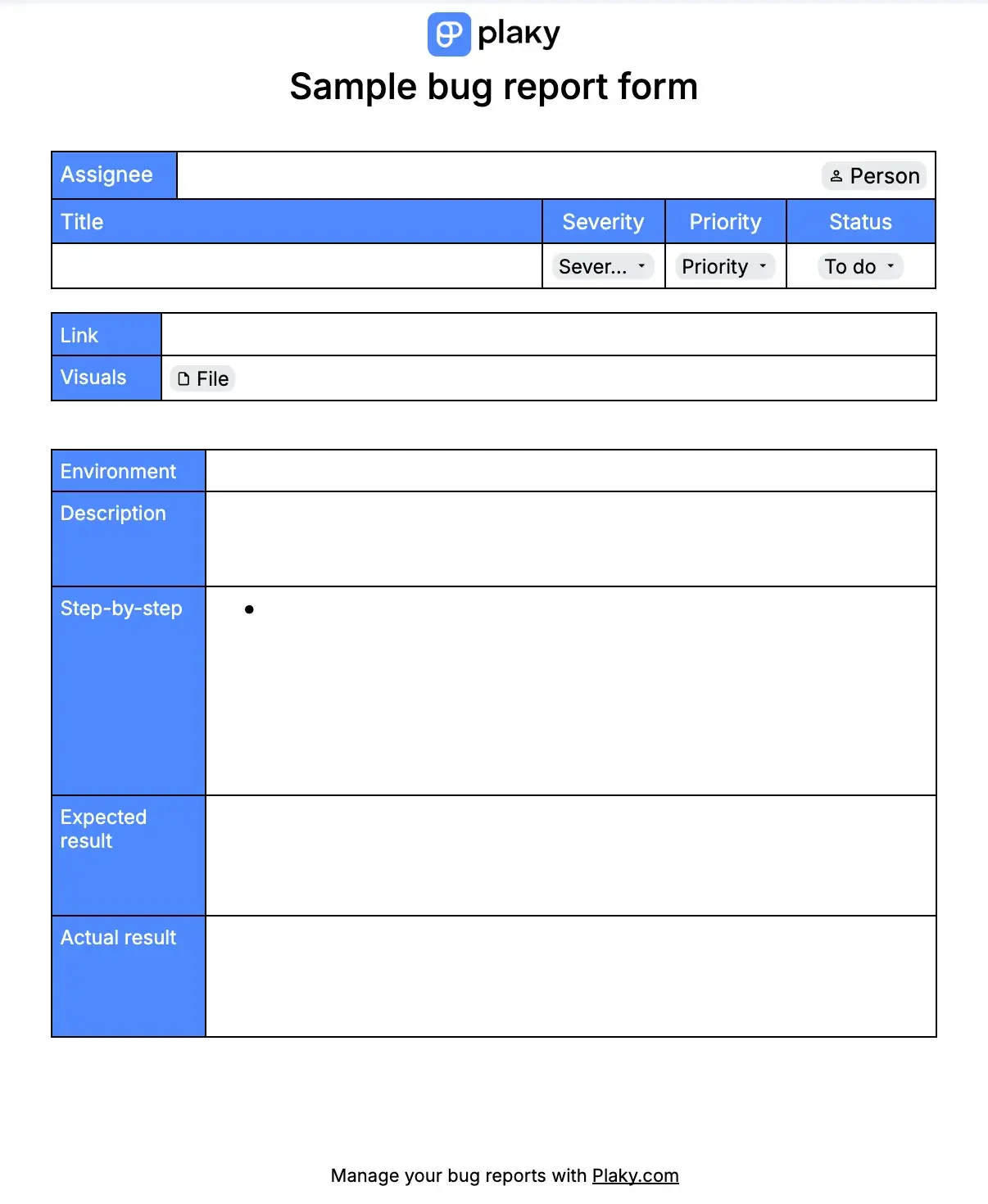
Get this sample bug report example in 5 different formats:
How to write the perfect bug report every time
To consistently produce bug reports developers will appreciate, your bug report template should contain the following information:
- Bug ID — A unique ID that helps locate the bug within your bug tracking system.
- Bug title — A short and precise name that gives developers a clear idea of what the bug is about at a glance.
- Bug description — Describe when, where, and how the bug manifested and whether you could replicate it.
- Bug environment — Specifies where the bug appeared (which device, operating system, browser, app version, etc.). If any system configurations might have influenced the bug, mention those too.
- Expected vs actual result — What you expected to happen versus what actually happened. Sometimes reveal issues that aren’t system flaws, but a disconnect between expected and actual results due to confusing UI decisions.
- Steps to reproduce — List step-by-step instructions on how to reproduce the bug. This helps developers and QA testers deconstruct the issue and move it through the QA testing pipeline faster.
- Visual proof — Images, videos, GIFs, or links that show an example of the bug in action help developers and QA testers understand the problem and lead to faster resolution times.
- Bug severity and priority — Bug severity describes how much of an impact the bug has on the functionality of the software. Bug priority determines how quickly it should be fixed. The 2 may or may not influence one another, which is why it’s good to have both statuses listed in your bug report.
While this seems like a lot of information at first, there’s no need to complicate it. Dragana Tadić, a QA Engineer at CAKE.com, revealed that the best bug reports are those that help developers resolve bugs fast, which makes precision more important than volume of information:

“Every great bug report should be clear, concise, intelligible, and informative so that the developers can easily reproduce the bug and fix it as soon as possible.”
One of the easiest ways to speed up bug resolution is to stop using passive Excel or Google Sheet templates to log software bugs and switch to storing them in the same project management software you use to track other project-related tasks.
Placing them in the same dynamic environment allows you to connect bugs to specific tasks and notify developers as soon as a bug is detected instead of relying on them to manually check spreadsheets in between tasks.
8 bug report templates to try out today
Creating a new report every time you find a bug is time-consuming and repetitive — it’s much better to use a pre-made template.
That’s why I gathered some of the best bug report templates I could find. I tested each one, so let’s see how they held up.
#1 Plaky bug report template
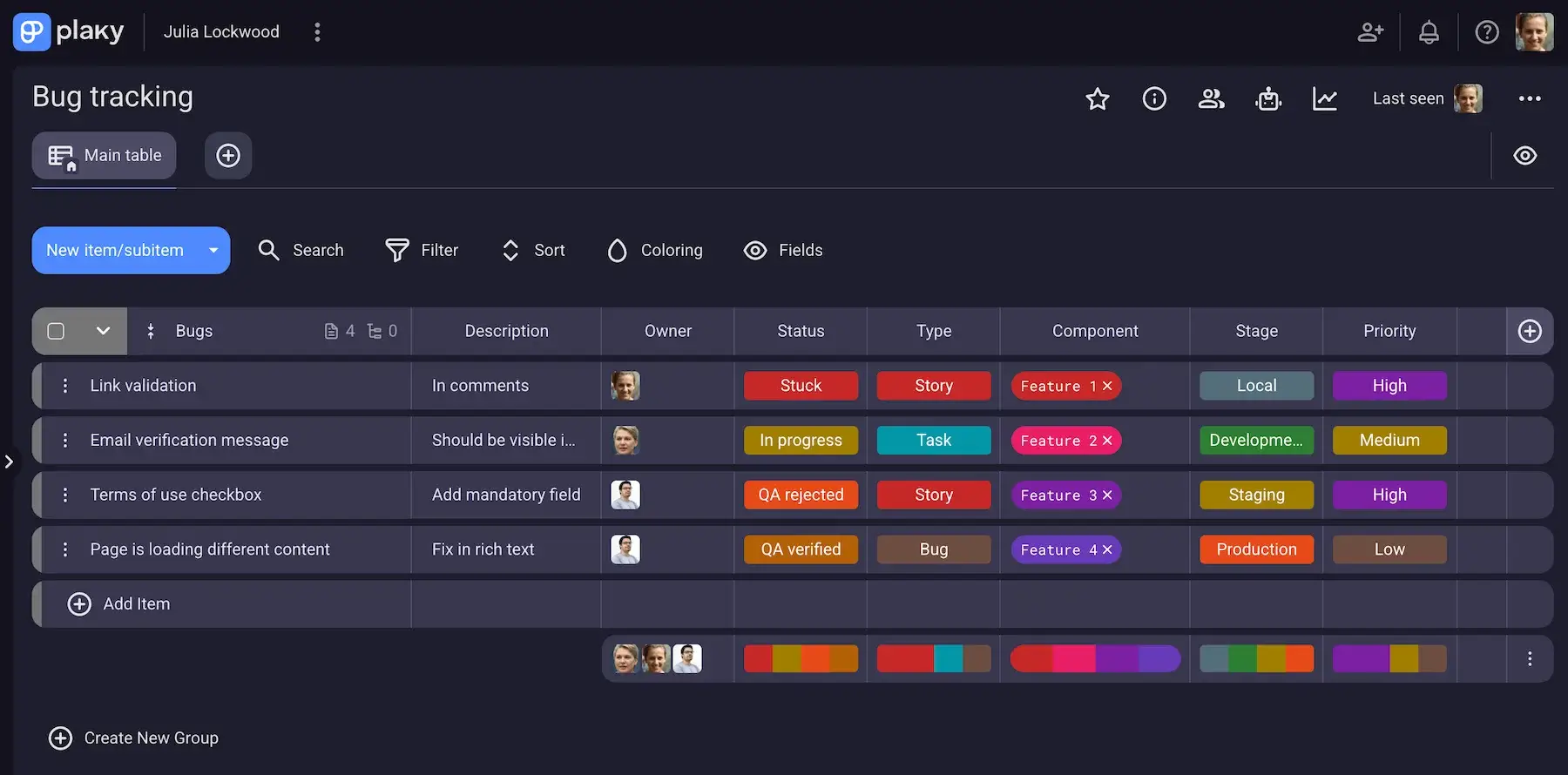
Plaky by CAKE.com is a project management tool, which means that this bug report template lives in a collaborative workspace available to all your project teams. Whenever a new report is added, developers get a Notification and take over the issue, keeping handoffs clean and simple.
| Pros | Cons |
|---|---|
| – Fully customizable fields – Ability to create Item templates – Effective for both reporting and tracking software bugs | – Limited integrations |
This pre-made template is available on the Free plan. You can use it as is or customize Fields to fit your team’s workflow. Opting for one of the paid plans will also give you access to Board automations and custom Item templates that function as individual bug reports with custom, pre-determined Fields.
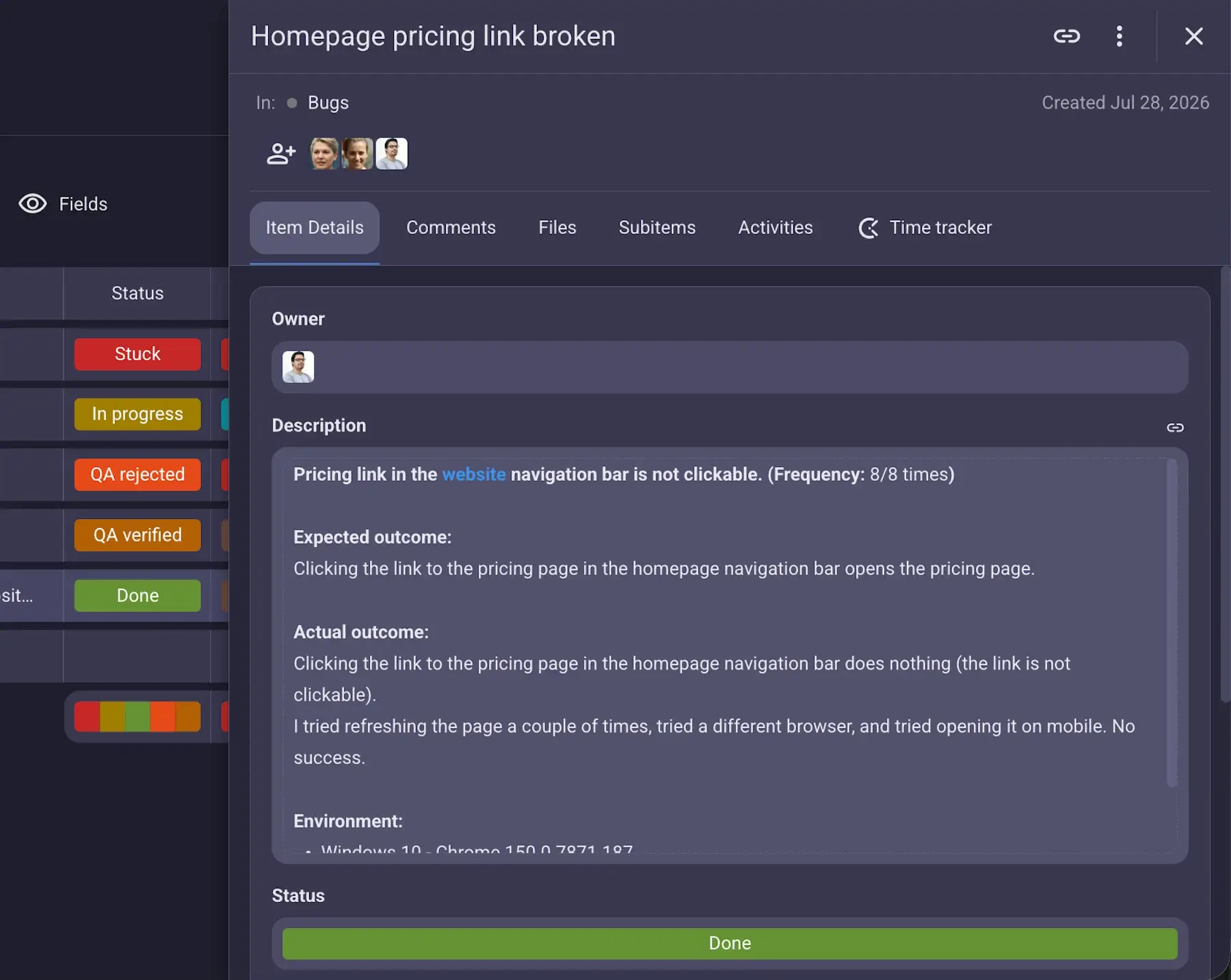
Besides bug reporting, you can also use this template to:
- Track bug status in Table or Kanban view.
- Check your bug statistics with Chart view.
- Track activity on your Boards and items with Activity log.
- Highlight critical bugs with Conditional coloring.
- See quick column summaries with Summary row.
The only thing I would like to see more of is integrations. For now, Plaky only integrates with 2 other free tools from the same app ecosystem by CAKE.com:

#2 GitHub bug report template
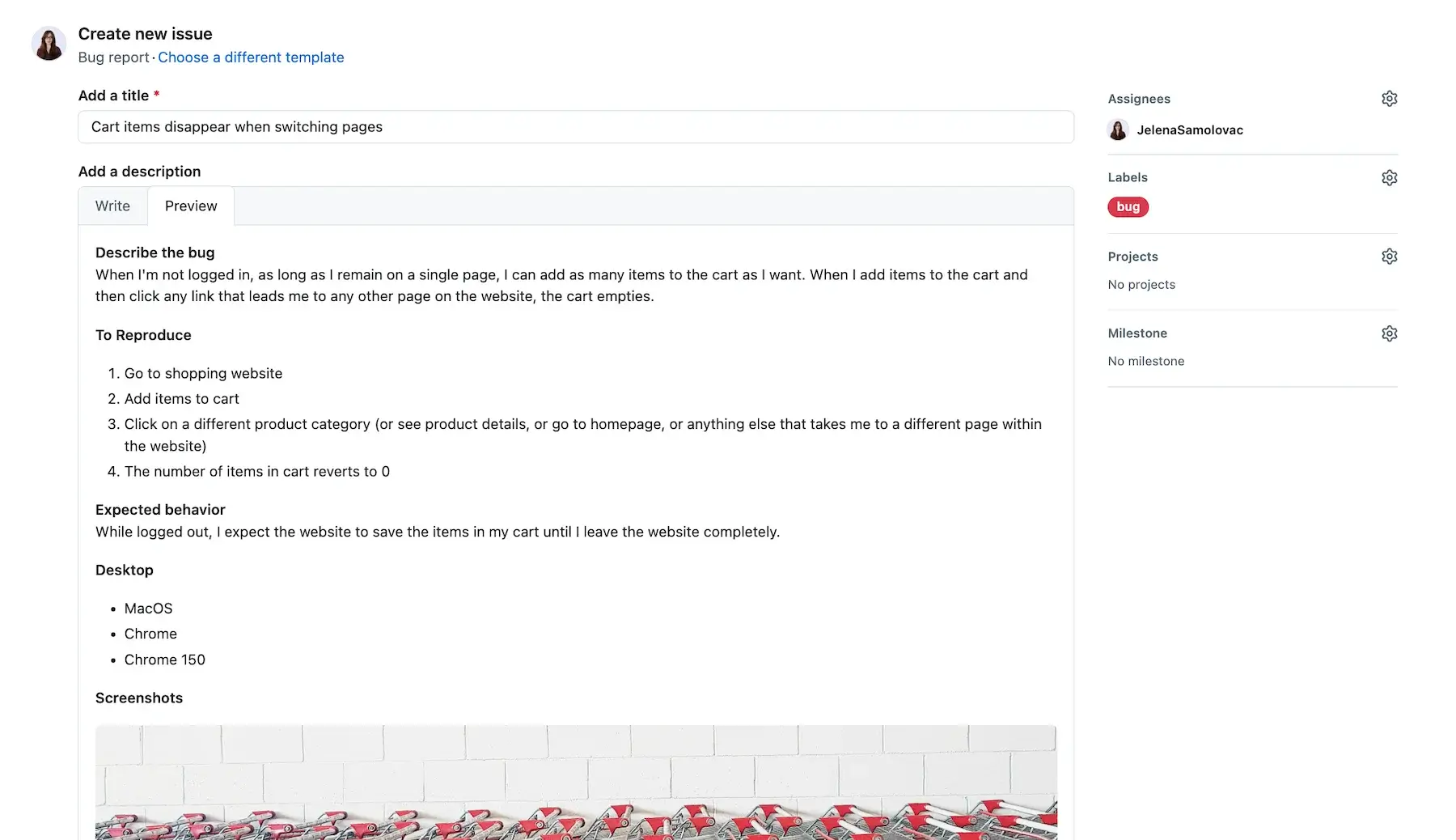
GitHub offers a professional bug report system that lets you submit bug reports directly to the software development team.
| Pros | Cons |
|---|---|
| – Submits a report directly to the dev team – Lets you create issues directly from comments, code, discussions, or projects – Stores bug reports in the same place as source codes | – The bug reporting process can be long and tedious |
GitHub uses Markdown for bug descriptions, but I had no problem creating a bug report even without being familiar with the language.
When creating a bug report in GitHub, you need to add a bug title and description, as well as:
- Assign people
- Add labels
- Assign projects
- Attach a project milestone
The tool offers one dedicated bug report template, but if that one doesn’t suit you, you can always make your own or see what other users have created.
Alternatively, you can generate an issue directly from a comment, a piece of code, a discussion, or a project.
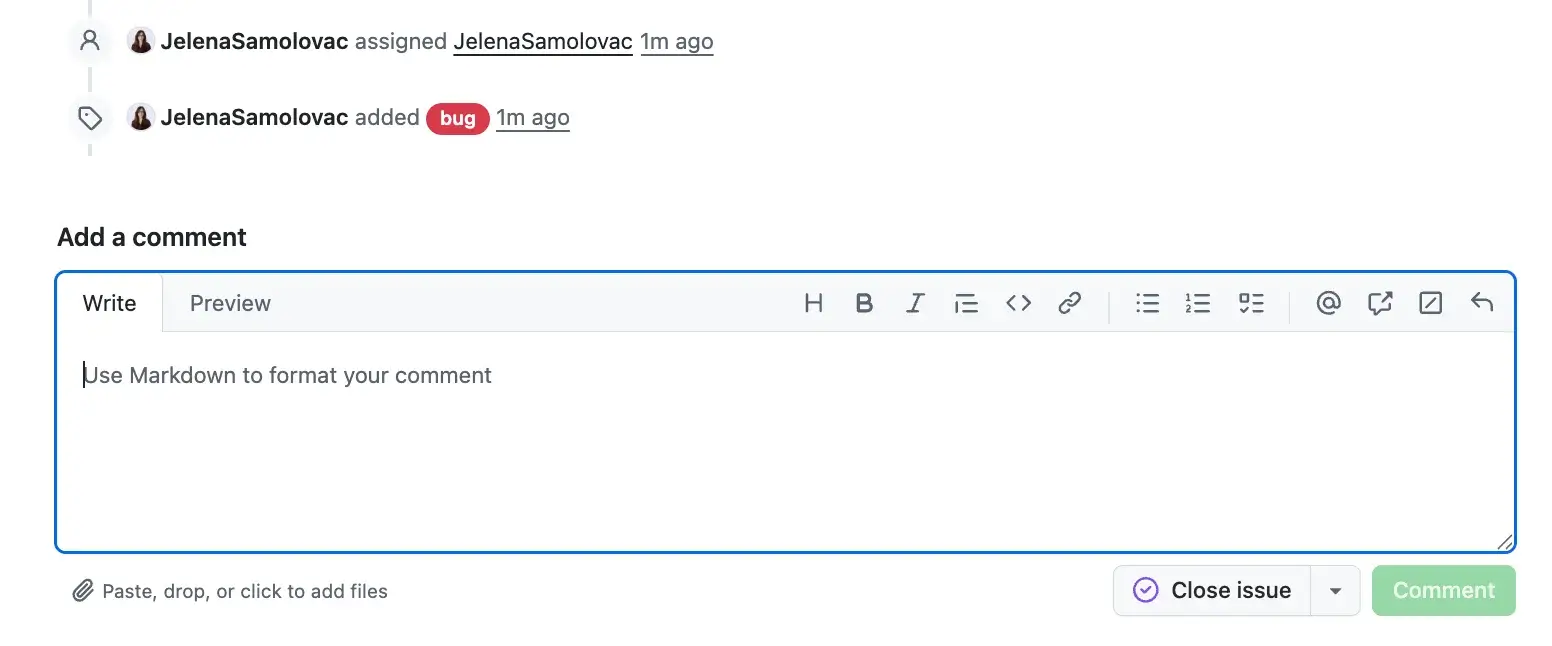
While it may be convenient to use GitHub to report bugs directly to developers, I found the bug report format to be disorganized. Moreover, reporting a bug, especially a more complex one, can take a lot of time.
But because it allows you to reference comments, code, and discussions in an issue, GitHub is a great option for developers creating bug reports for other developers.
💡 PLAKY PRO TIP
GitHub is one of the most widely used software in development teams around the world, but it’s not the only one. Check out our list of some of the most useful tools you could use for software and game development:
#3 Jira bug report template
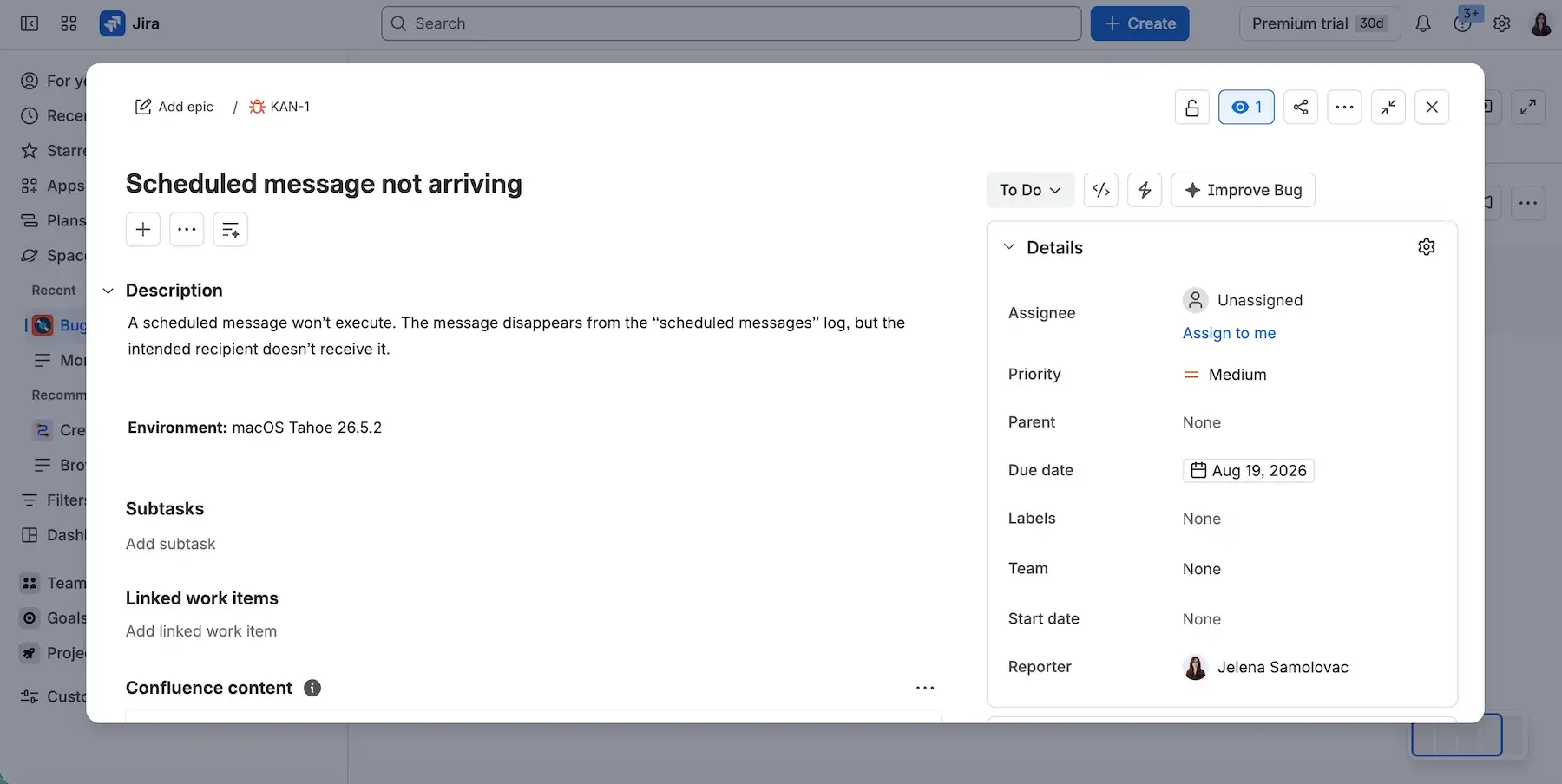
Jira is a task management tool that lets you manage bugs and issues in a meticulous and organized way. It allows developers, QA testers, managers, and project stakeholders to have a clear insight into the project and the issues it’s facing.
| Pros | Cons |
|---|---|
| – Simple to use – Good customization options for fields and work types – Lets you link bugs to other issues or comments | – Customization isn’t very intuitive |
If you’re creating a Jira account for the first time when opening this template, you need to answer a few questions about what you do and how you will be using Jira. This might result in a slightly different workspace than what I got based on my responses.
Once you’ve created a bug report, you can link it to other issues, add comments, create subtasks, see the issue activity log, etc. For lengthier descriptions, there’s also an option to generate an AI summary.
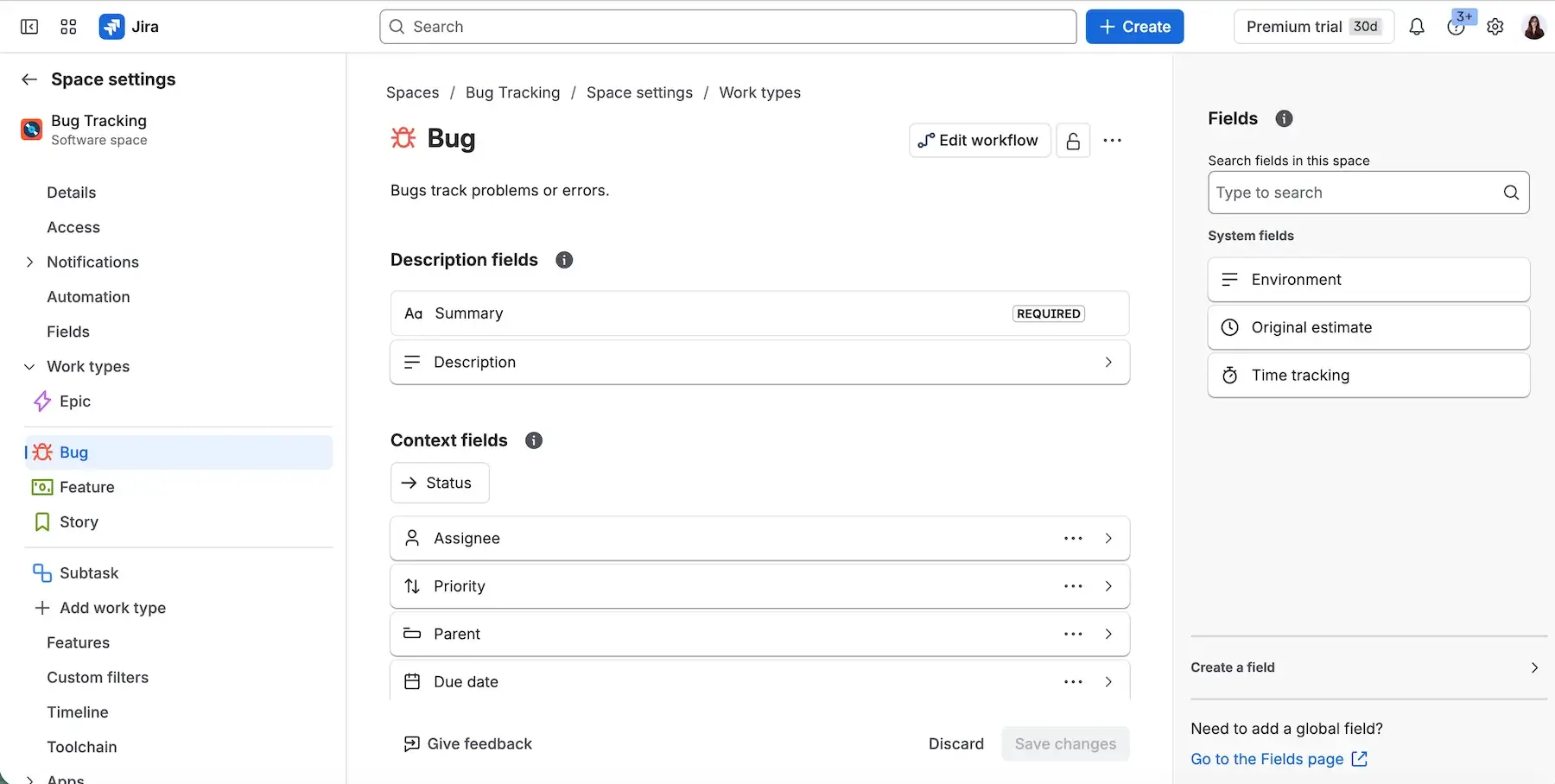
I especially liked Jira’s customization in this case. You can create customized bug reports based on the “work type” you choose, with templates and customizable fields that fit your project’s specific needs.
#4 ClickUp bug report template
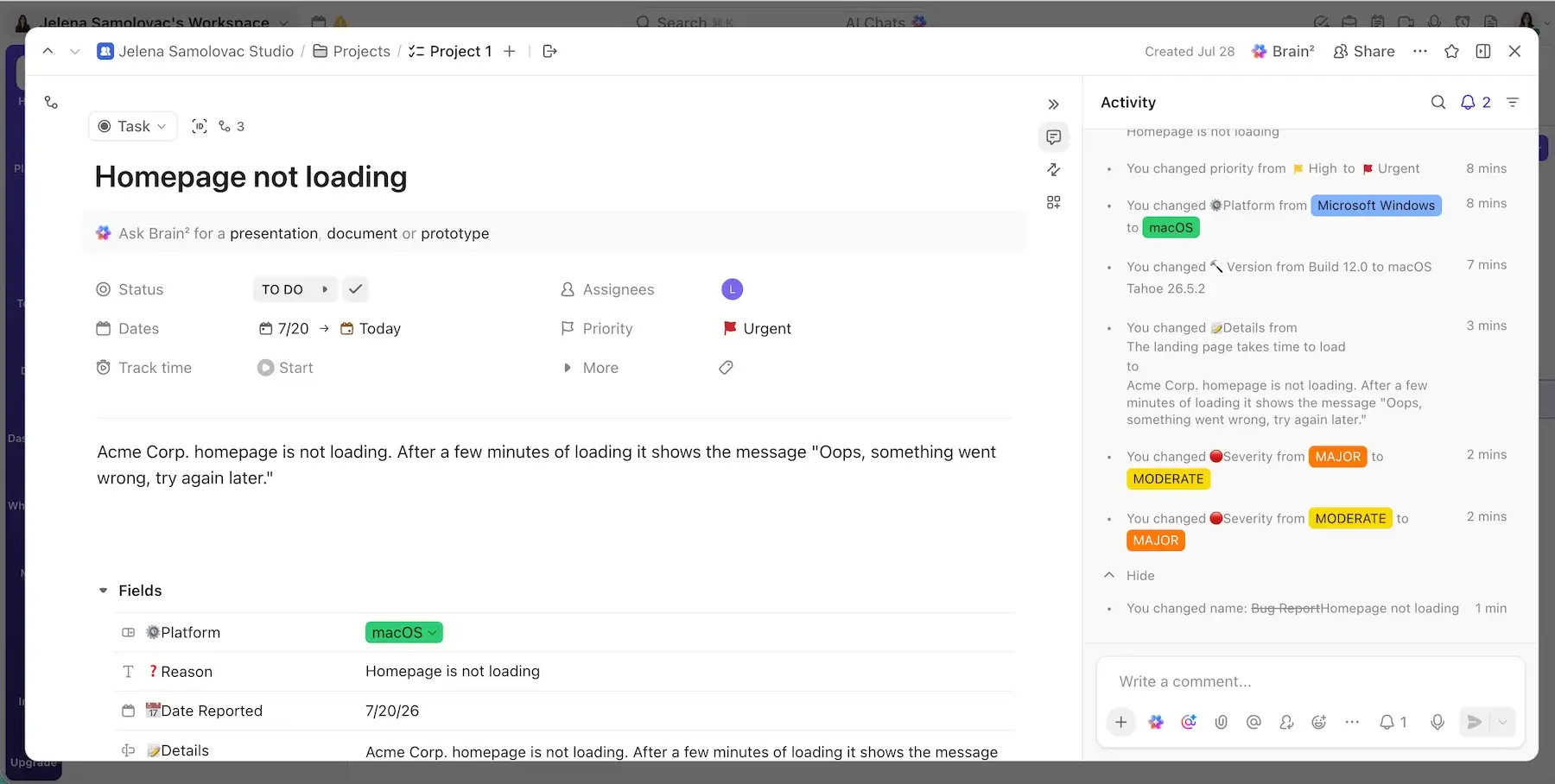
ClickUp offers several different bug tracking templates, all of which are customizable and available in at least 2 different views.
| Pros | Cons |
|---|---|
| – Multiple template options – Custom and shareable bug submission forms – Automatically turns bug submission forms into tasks | – The interface can be hard to navigate |
The best thing about bug reporting in ClickUp is bug submission forms. The tool lets you create your own bug report form with custom fields. You can then copy the link to the form and send it to users or team members who’ve encountered an issue with your software. Once they submit the form, ClickUp automatically creates a task on your project page.
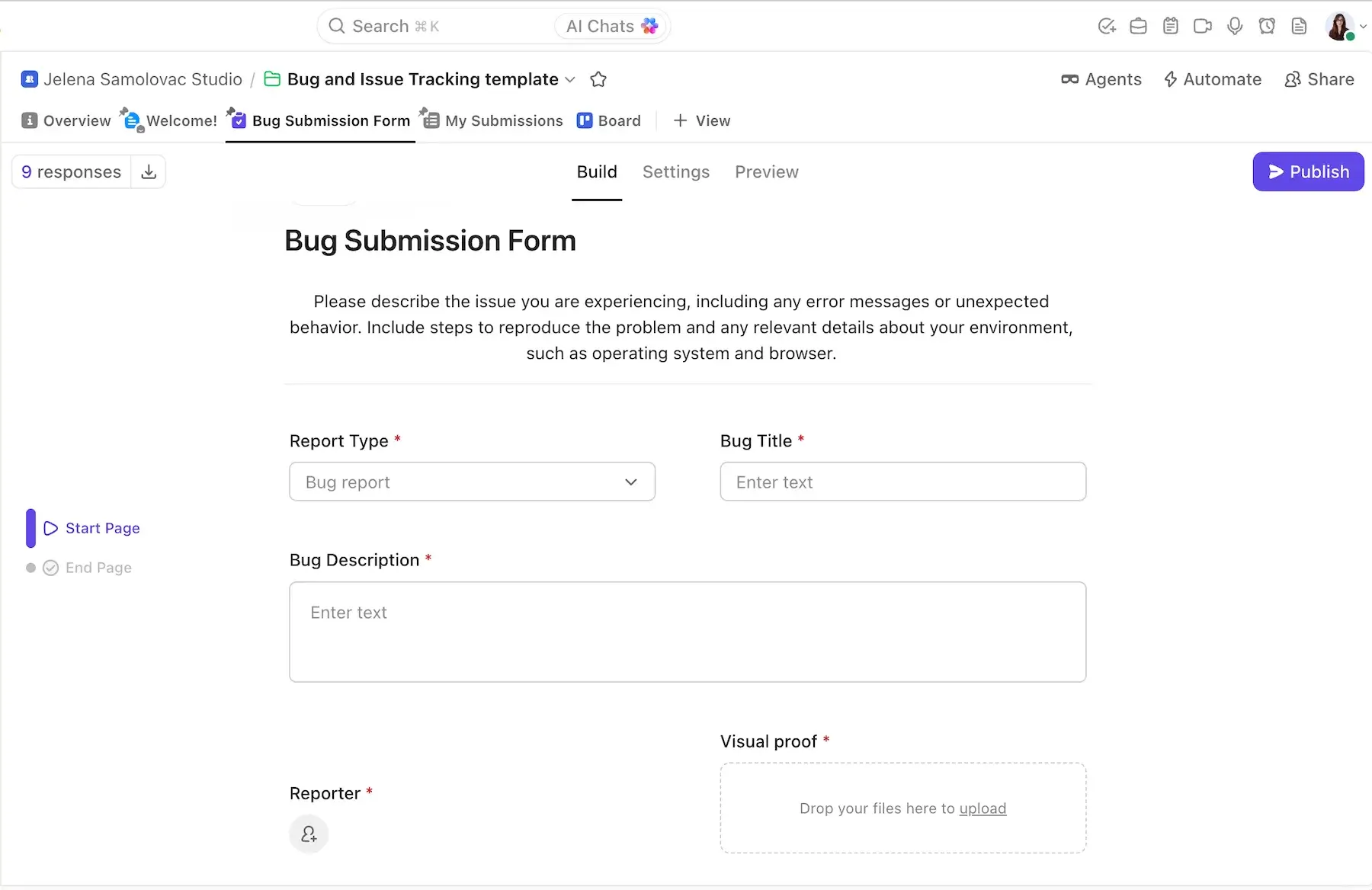
Despite its useful features and templates, I think ClickUp’s interface is awkward at times, and I had some trouble navigating it to get to the features I needed.
💡 PLAKY PRO TIP
If you’d like a full, in-depth review of ClickUp and how it compares to some other popular PM tools, such as Asana and monday.com, definitely check out these reviews:
#5 Asana bug report template
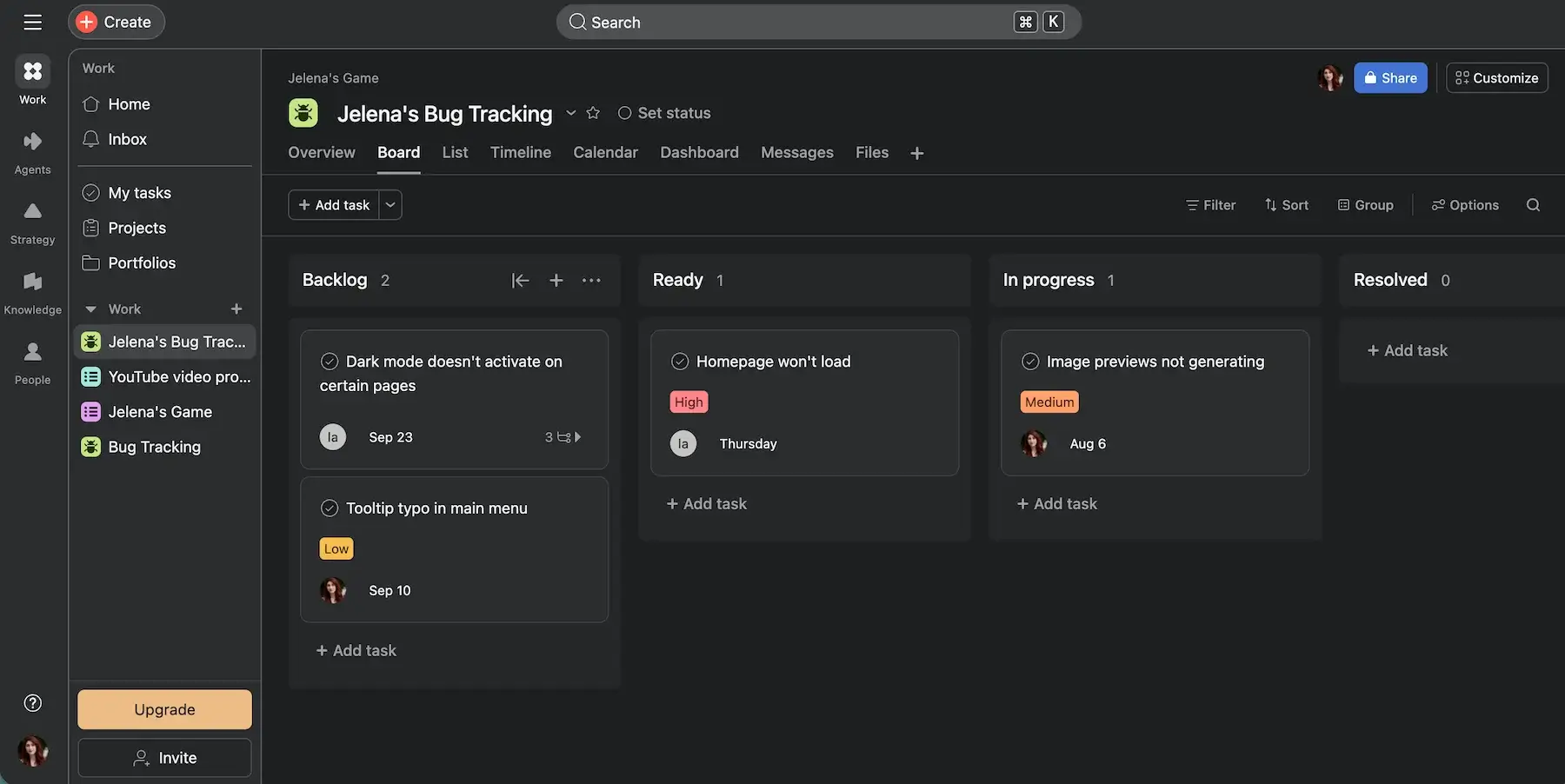
Like Plaky and ClickUp, Asana is primarily a project management tool. It doesn’t have dedicated bug-tracking functions, but it’s fairly easy to use and keep track of project issues.
| Pros | Cons |
|---|---|
| – Has multiple views that cater to different projects and team habits – Offers automations that speed up issue management – Easy to use | – The template is too simple, so it’s almost like starting from scratch |
Asana’s bug report template is very simple and doesn’t offer much more to work with — it saved me barely any time compared to starting from scratch.
However, Asana’s base functionality is good for bug reporting. For example, the different views it offers can be useful for specific team habits — like Agile teams preferring the Kanban view.
You can also add plenty of elements to your report, such as:
- A due date
- Assignee
- Status
- Priority
- Attachments for visual proof
- Comments
- Subtasks
I used the description field for a detailed explanation of the bug, including information such as the environment, expected and actual behavior of the software, steps to reproduce the bug, etc.
Alternatively, you can create a custom text field for each of those elements.
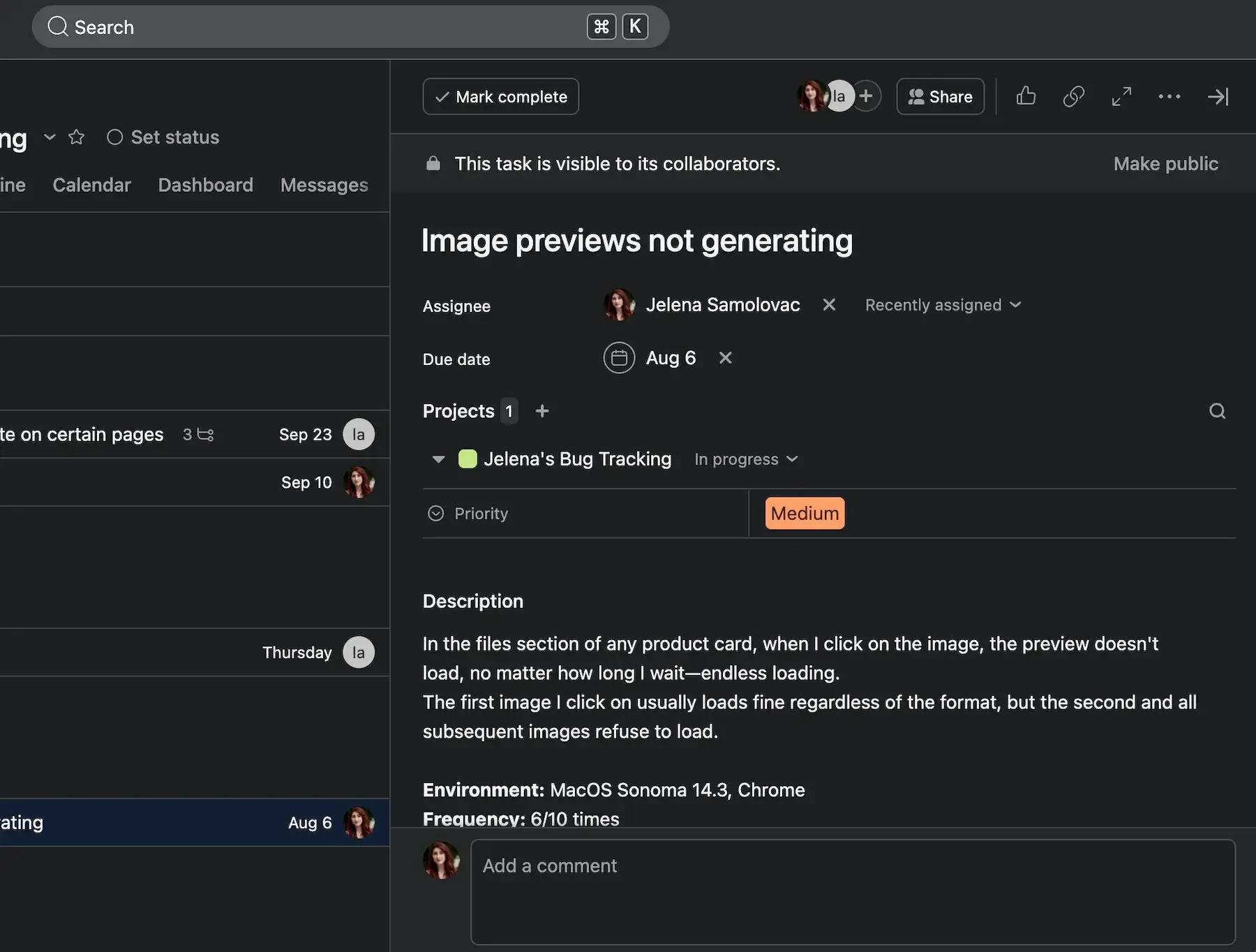
Asana’s paid plans provide you with more customization options, such as additional fields, views, and most importantly, rules (automations) that make the issue management process smoother.
However, the prices are definitely on the higher end of the spectrum.
💡 PLAKY PRO TIP
If you’d like to compare how Asana fares overall against some of the other bug tracking tools on this list, such as Jira and Trello, check out our detailed comparisons:

#6 Trello bug tracking template
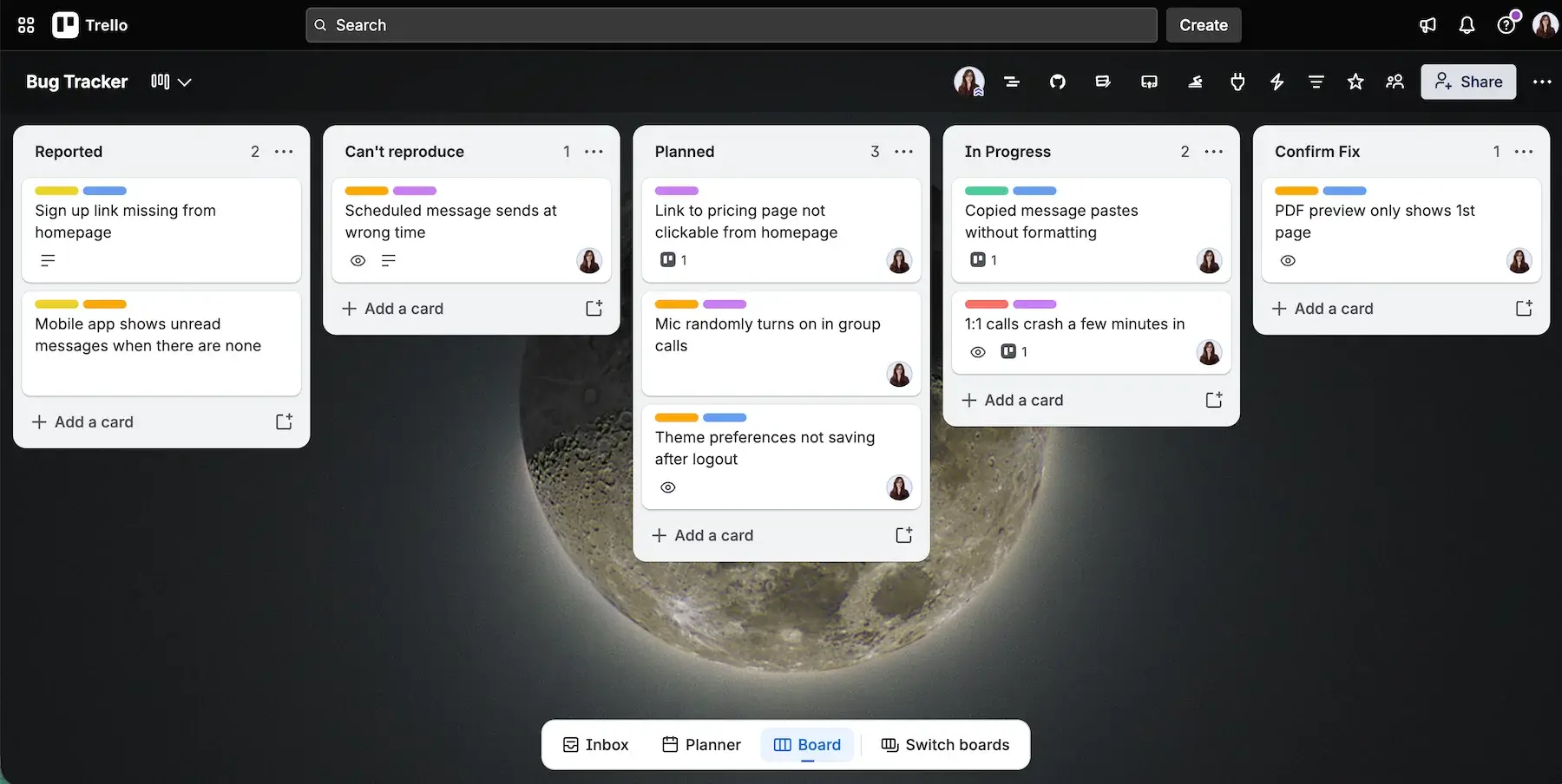
Trello’s bug tracking templates are great for devs who don’t want to use an overcomplicated bug management system. That said, it’s worth mentioning that Trello doesn’t have a native bug report or bug tracking template that I could find, so you’ll have to choose among those made by other users (for this review I used the Bug Tracker by Robin Warren).
| Pros | Cons |
|---|---|
| – Easy to use – Offers clear and intuitive visual task tracking via Trello’s Kanban board – Enables workflow enhancements through Power Ups and automations | – The most useful features are accessible only on paid plans |
This bug report template leaves much to be desired if you’re on Trello’s free plan. It contains the expected fields, such as assignee, date, description, tags, and attachments, but anything more than that requires an upgrade.
On the bright side, Trello’s signature Kanban-style task management and user-friendly interface make bug tracking easy for Agile teams. The free plan also lets you connect Power-Ups (add-ons and integrations) to your Trello workspace, which gives your template additional functionality.
In my case, I found the Blue Cat Reports Power-Up useful. This add-on lets you quickly create reports for your issues, which helps with progress tracking.
Using Trello Forms is also a simple way to add bug reports — Trello Forms will let you create up to 25 custom and shareable forms a month that people can fill out to report a bug.
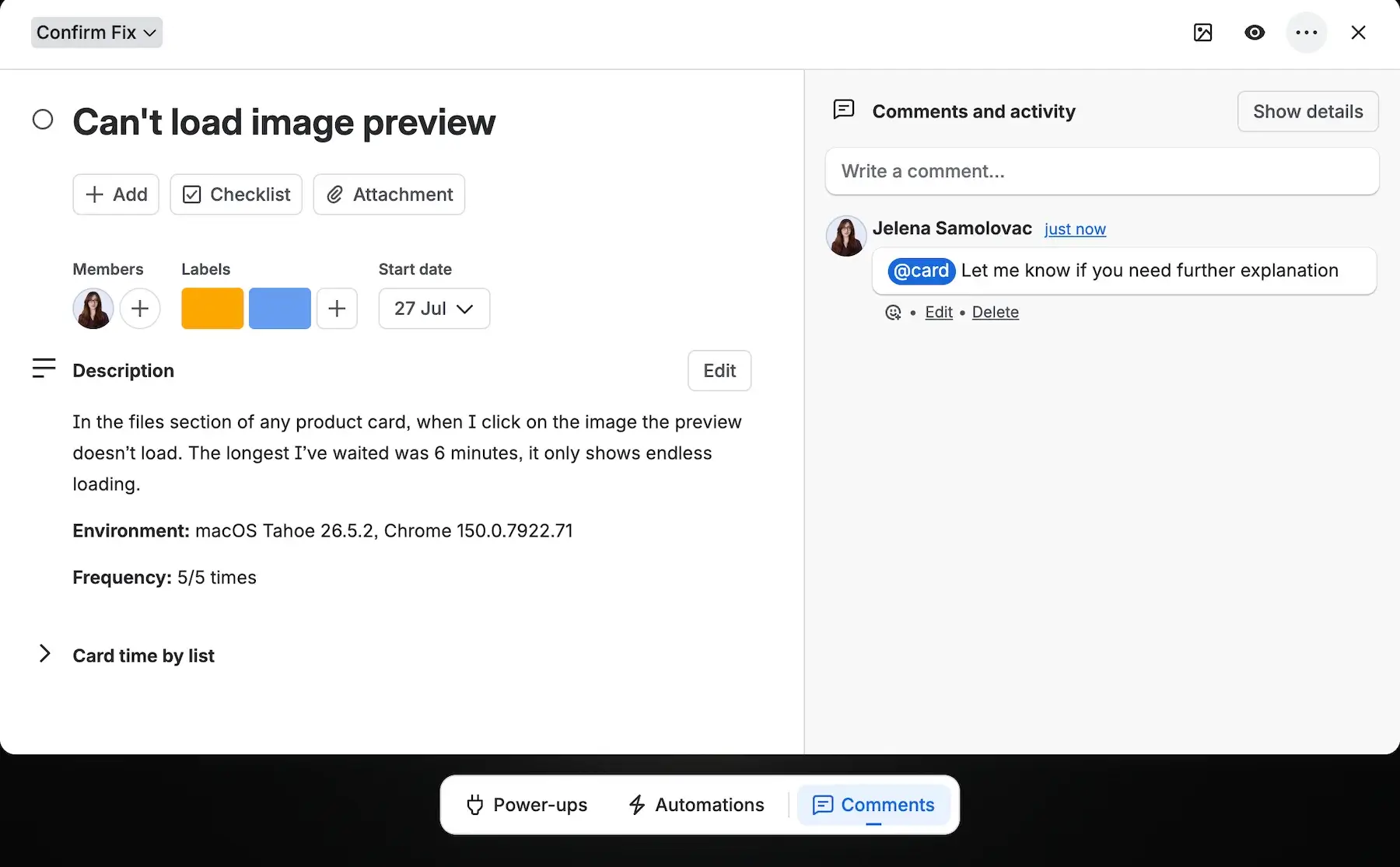
Once you upgrade your plan, you’ll also be able to add custom fields to your Trello cards and make tracking bugs more formulaic and tailored to your specific project.

#7 Software bug report template: Google Sheets, Excel, Google Docs
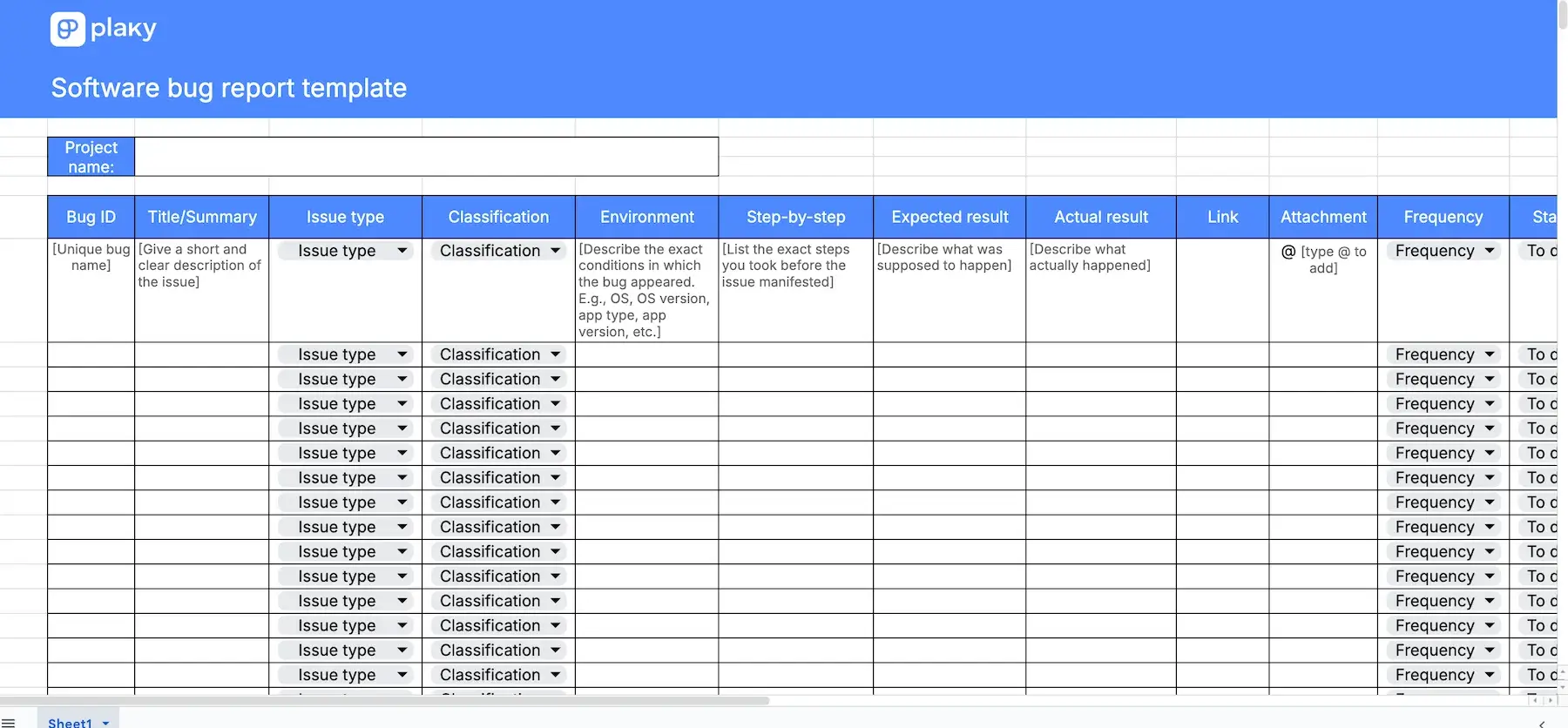
Download: Google Docs, Google Sheets, Excel
Using templates for bug reporting is supposed to make your life easier, not harder.
That’s why I took some time to create simple bug tracking templates for Excel, Google Sheets, and Google Docs — so that you don’t need to introduce yet another software to your team’s project workflow.
The templates for Google Sheets and Google Docs allow you to add people, dates, statuses, and files and collaborate with your colleagues, just like you would if you were using dedicated bug tracking tools.
The bug report template for Excel is not as collaborative, but it’s definitely useful for anyone who prefers to keep their information offline.
The templates are entirely customizable, so feel free to add or remove fields as you see fit.
💡 PLAKY PRO TIP
If Google Sheets and Excel seem too similar to one another, and you’re not sure which to choose, you can find a detailed comparison of the 2 in the link below:
#8 QA bug report form template: Google Docs, Microsoft Word
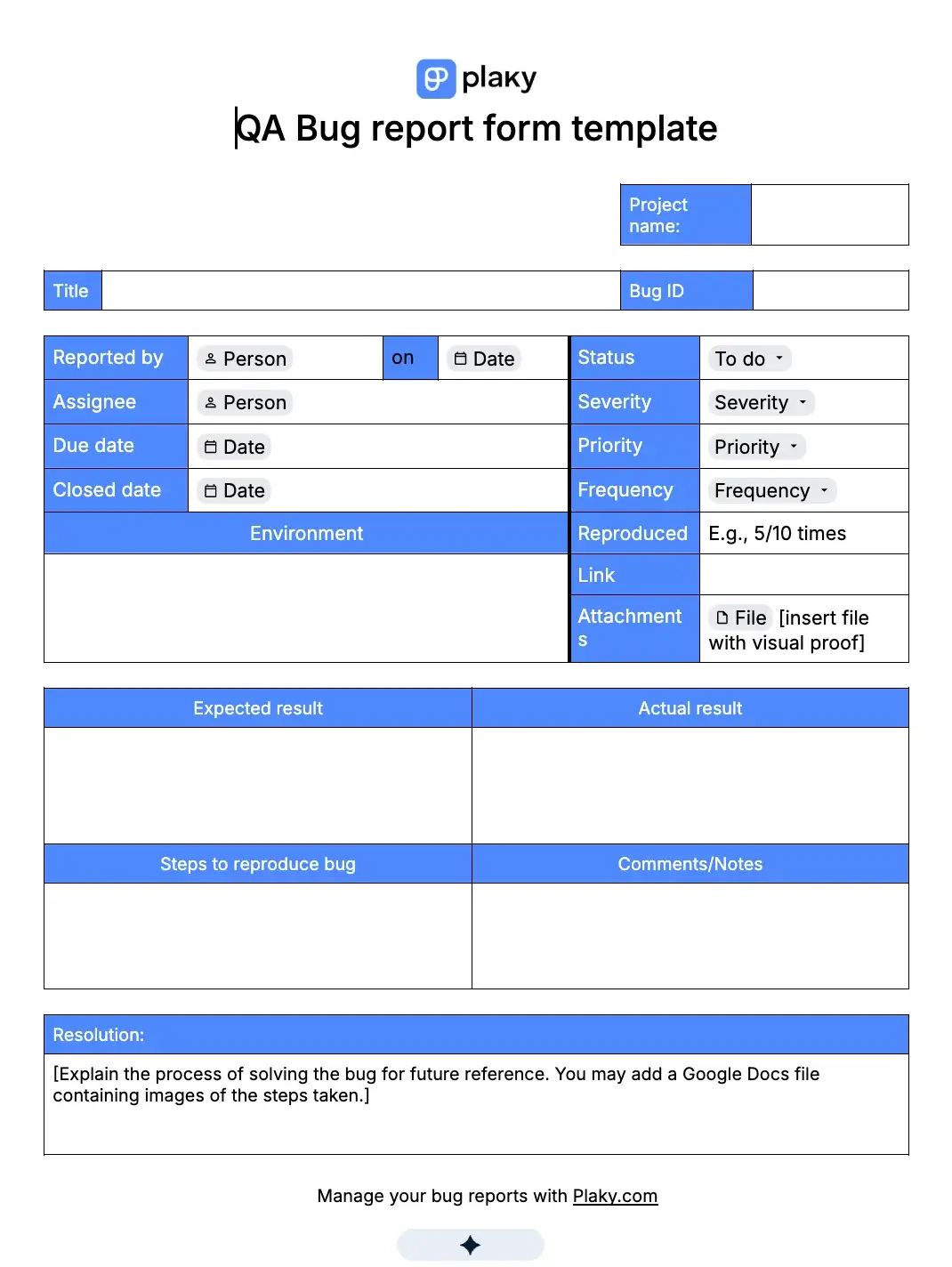
Download: Google Docs, Word
If what you need isn’t a template for issue tracking, but a bug report form that other people can fill out and return to you, this is the template for you!
This bug report form template contains fields for your bug ID, title, environment in which the bug manifested, expected and actual results, steps to reproduce the bug, links, files, and resolution notes, as well as drop-down fields to mark the bug status, priority, severity, classification, and more.
It can be sent out basically as a form for your QA team, clients, or anyone else to fill out and submit a bug report to you.
The Google Docs and Word forms are easily customizable in case there are fields you’d like to add, remove, or rearrange.
Why technical teams track software defects in Plaky
Plaky brings the entire organization together, creating a single source of truth and promoting cross-team collaboration. The clean interface and zero learning curve make Plaky the perfect tool for internal defect logging since it enables developers to easily collect bug reports from techies and non-techies alike.

For those of you used to a spreadsheet-like layout, Plaky has the Table view. The Table view is used by 97.8% of our users precisely because it offers the clean structure of an Excel grid, but with all the speed and interconnectedness of a dynamic project management system that enables a smooth bug tracking process from report to resolution.
On top of this, where spreadsheets force you to build and troubleshoot your systems yourself, Plaky offers 24/7 expert customer support for all users. Whether you have a question or an issue, the solution is only a call or message away, even on the Free plan.
Plaky’s Free plan offers a well-rounded set of features that works as a starting point for any small business. From unlimited Spaces, Boards, Items, and Board views, to the My tasks feature, member and admin user roles, Table, Kanban, and Chart views, and more, you are set to go from day 1.
And if you ever decide you need more advanced features such as the Gantt chart, automations, private boards, viewer role, and such, Plaky’s has some of the most affordable paid plans on the market, starting from only $3.99/seat/month.
All of these qualities combined make Plaky the increasingly popular choice among small and growing teams looking to escape the restrictive features and seat limits, high entry fees, and exponentially growing software costs.