Calling on all consultants! Does managing client work feel more complicated than delivering it? If so, the real problem often lies in your tool stack. A spreadsheet here, a to-do list there, time tracking in another place…
And suddenly nothing quite lines up anymore.
That’s why this listicle is based on real testing. I paid close attention to project management software for consultants that can keep work visible and billable.
Read on to find your best match!

WHY TRUST US?
The apps we talk about are selected, tested, and written about by human reviewers who follow strict review and editorial guidelines. We pick solutions that are practical, purposeful, and can offer real value for the specific use case or business context we’re covering — while also being justified in their pricing. Our methodology is transparent, clear, and available to everyone:
How I chose and tested the apps on this list
To make this roundup genuinely useful, I approached the task the way I thought a real consultant would — with realistic scenarios and expectations.
I only considered reputable tools that offer a free plan or at least a free trial — it’s important for you to be able to try out these apps, just like I did, before committing to one.
Once inside each app, I primarily paid attention to:
- Ease of use,
- PM fundamentals (task hierarchy, statuses, dependencies, etc.),
- Collaboration and communication,
- Time tracking and invoicing, and
- Analytics and visualization.
The result is a list based on hands-on experience, not just feature checklists. See my #1 choice now!
💡 Want more insight into how we select and test apps for our reviews? Visit the CAKE.com software review methodology page.
Best project management software for consultants — top 12 standouts
Here’s a brief overview of all the solutions I tested. Scroll down to find my full reviews, including pros and cons!
| Tool | Best for | Free trial | Free plan | Lowest price |
|---|---|---|---|---|
| Plaky by CAKE.com | Day-to-day consulting PM | ✔ | ✔ | $3.99/user/month |
| Freedcamp | Consulting low-tech industries | ✔ | ✔ | $1.49/user/month |
| Zoho Projects | Integrated business and PM | ✔ | ✔ | $4/user/month |
| Asana | Cross-functional consulting | ✔ | ✔ | $10.99/user/month |
| SmartSuite | Document-centric workflows | ✔ | ❌ | $12/user/month |
| Airtable | Data-focused teams | ✔ | ✔ | $20/user/month |
| Wrike | Detailed analytics | ✔ | ✔ | $10/user/month |
| Avaza | Teams that bill by time | ✔ | ✔ | $11.95/month |
| Scoro | Ops-focused firms | ✔ | ❌ | $19.90/user/month |
| Podio | Highly customizable workflows | ✔ | ✔ | $11.20/user/month |
| ProWorkflow | Small to mid-size teams | ✔ | ❌ | $18/user/month |
| Teamwork | Direct client collaboration | ✔ | ✔ | $10.99/user/month |
#1 Plaky by CAKE.com — best for day-to-day consulting PM
Plaky by CAKE.com is an affordable tool that helps teams organize work, follow progress, and collaborate in one place.
Why choose Plaky?
As PM software for consultants, Plaky delivers clarity and lightweight structure, which is ideal when you need to support daily ops, not just high-level roadmaps.
| Pros | Cons |
|---|---|
| – Intuitive – Cost-effective – Smooth team collaboration – Multiple custom fields & project views | – Limited integrations |
My team uses Plaky daily. While we don’t do consultancy, I definitely see some similarities with writing/content management. We both identify pain points and present solutions, translating complex concepts into something more digestible.
Here’s why Plaky stands out:
- Quick onboarding and intuitive UI — Plaky’s interface is user-friendly, so consultants and even non-technical clients (if provided with viewer roles, for example) can start using it right away.
- Flexible project structure — Custom fields (text, numbers, assignee, date, status, etc.) let you model each project or client board however you like.
- True collaboration inside tasks — Comments, @mentions, and real-time notifications keep everyone on the same page without email clutter.
Track consulting projects in Plaky
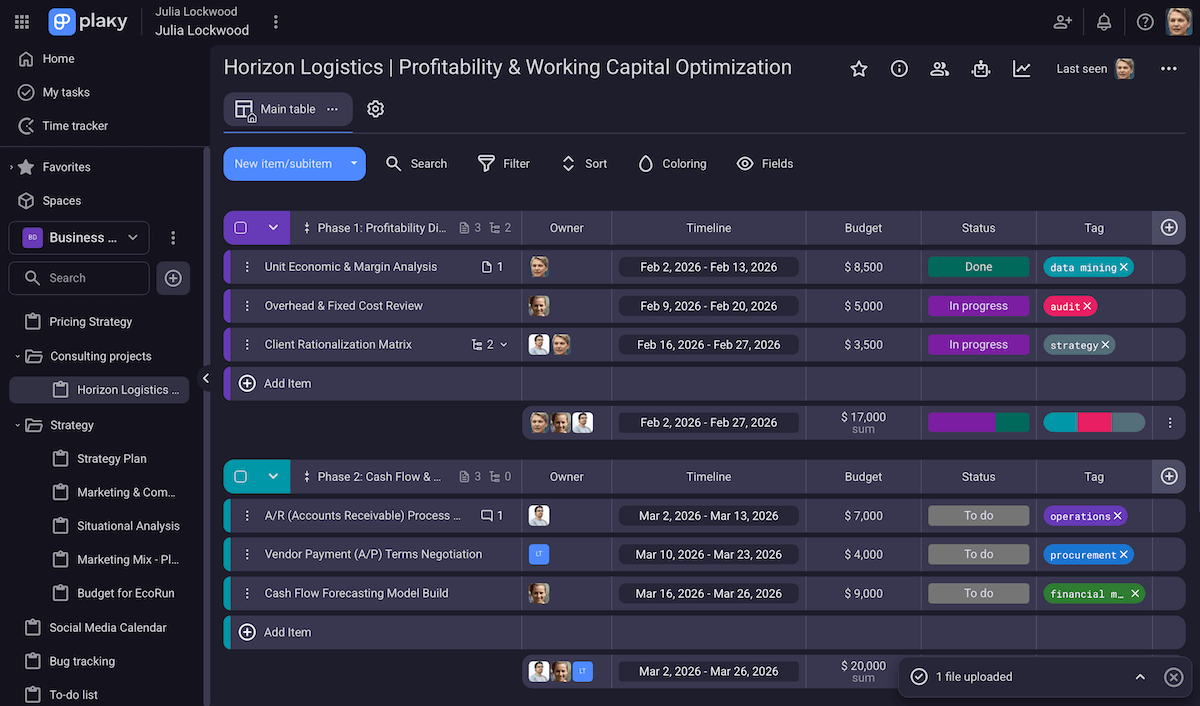
What’s more, Plaky provides responsiveness and focus needed for daily consulting work thanks to:
- Centralized task tracking — Tasks, deadlines, files, and conversations conveniently live on a single platform.
- Templates — Everyone can apply and customize Plaky’s handy templates, while paid plan users can save their own proven workflows with the Mark as template option.
- Board views — Plaky can show the same tasks in different views (table-like, Gantt, Kanban, and pie/bar charts), depending on your preference/priority.
- Automation — Recurring tasks and rule-based board automations help you eliminate routine work (e.g., status updates, task handoffs).
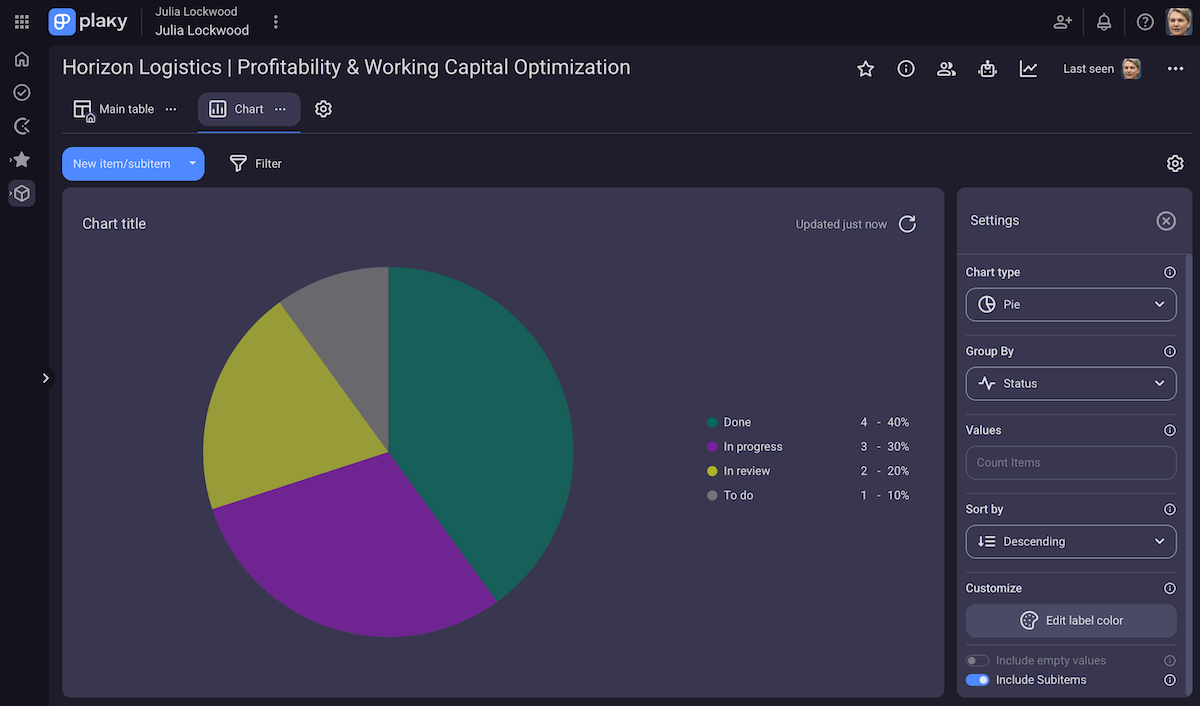
The only potential downside to Plaky for me is limited integrations. However, it does integrate with 2 CAKE.com apps, both of which are practical for consultants:
- Pumble — This is a messaging and video conferencing app. The Pumble-Plaky integration is an extra way to ensure you never miss task updates.
- Clockify — There are 2 simple ways to link Plaky to Clockify and track time. You can then get useful reports and dashboards based on billability status, projects, team members, and more for better productivity and forecasting.
💡 Plaky Pro Tip:
Want a more detailed picture of how consultants use Plaky? Read this:
What’s new in Plaky?
Recurring tasks were recently introduced in Plaky, as well as the native Plaky-Clockify integration. Additionally, paid plan users can now rely on the My tasks page to see all items assigned to a particular team member, besides their own items.
To see all recent updates, check out Plaky’s Changelog. And, for upcoming updates, see Plaky’s Roadmap.
Available for: web, iOS, Android
| Plan | Price |
|---|---|
| Free | $0 |
| Pro | $3.99/seat/month* |
| Enterprise | $8.99/seat/month* |
| CAKE.com Bundle (Plaky + Clockify + Pumble) | $12.99/seat/month* |
*billed annually

#2 Freedcamp — best for consulting low-tech industries
Freedcamp is a platform that combines project/task management, calendars, and file sharing in a single workspace.
Why choose Freedcamp?
This tool is practical when working with tech-light industries since it’s simple yet effective, especially if you need to share guest access with clients.
| Pros | Cons |
|---|---|
| – User-friendly – White labeling – Solid time tracking & invoicing | – Limited project views in the free plan – Mobile app could be better |
Smooth client communication and task centralization are important for consultants, and Freedcamp supports those via:
- All-in-1 project organization — managing tasks, milestones, calendars, and files in a single app for better alignment and control,
- Native time tracking and invoicing — tracking billable hours and generating invoices without needing separate tools,
- Integrations — connecting with numerous other useful apps, mostly via Zapier, and
- White label experience — adding your own logos and colors to make Freedcamp look like an in-house tool rather than a generic SaaS platform.
Overall, Freedcamp’s paid tiers are affordable, but I expected certain features to be available in the free plan — for example, the table view or detailed subtasks.
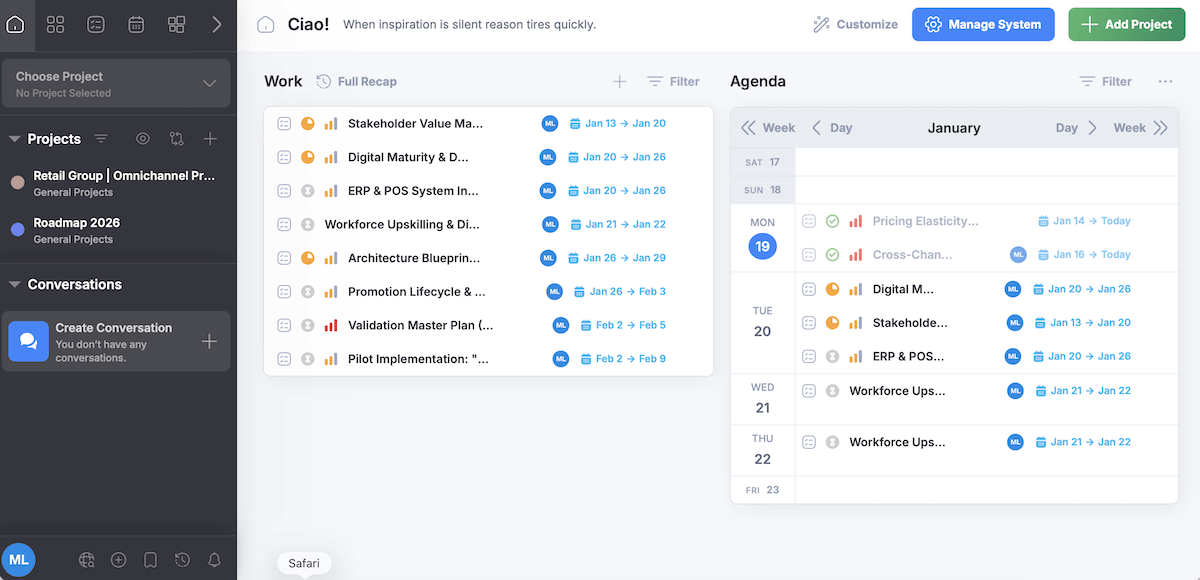
Since Freedcamp balances simplicity and functionality, I think it’s useful when consulting low-tech industries and sharing guest access to clients. The benefits include:
- Minimal learning curve — The simple interface ensures clients and team members don’t get lost in menus and buttons.
- Visual project tracking — Different project views (table, calendar, Gantt chart, etc.) make it easy to organize and monitor work even when clients’ systems are manual or paper-based.
- Effective internal process documentation — Business/Enterprise users can store client-specific processes, notes, and reference materials in a Wiki, giving everyone the access they need without digging through emails.
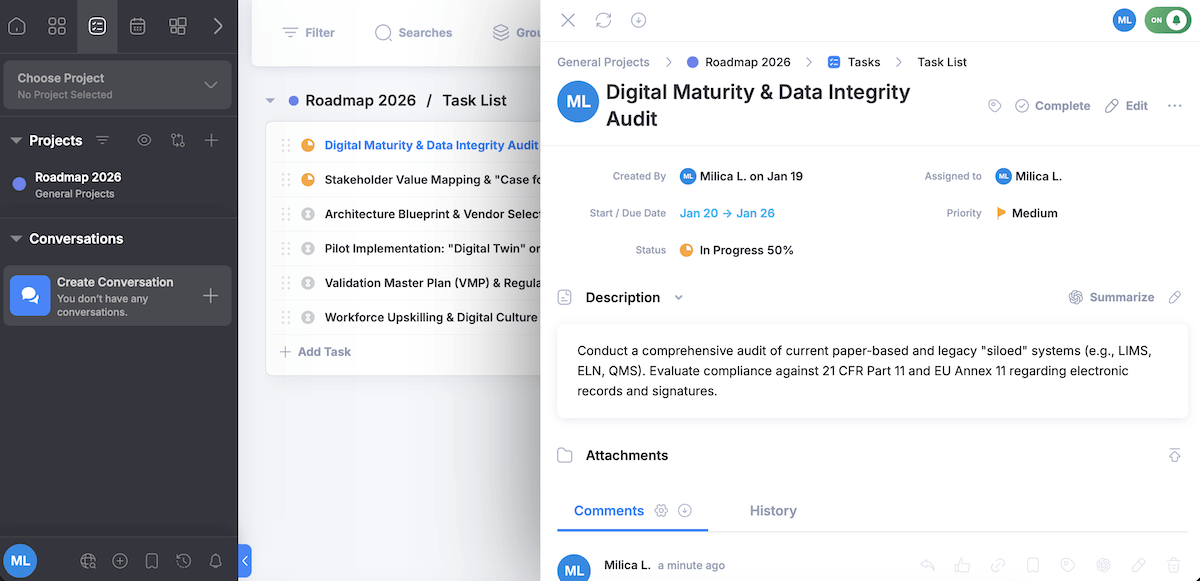
Finally, I want to note that Freedcamp offers a native mobile app for iOS and Android, but there are quite a few comments online about it being less polished compared to the desktop experience. This could frustrate consultants who need to update tasks on the go.
What’s new in Freedcamp?
Freedcamp launched a big visual overhaul recently, with improved navigation and animations, as well as better project list sorting and filtering.
Available for: web, macOS, Windows, iOS, Android
| Plan | Price |
|---|---|
| Free | $0 |
| Pro | $1.49/user/month* |
| Business | $7.49/user/month* |
| Enterprise | $16.99/user/month* |
*billed annually
#3 Zoho Projects — best for integrated business and PM
Zoho Projects is a work management and collaboration platform for planning, tracking, and delivering projects efficiently.
Why choose Zoho Projects?
If your company uses more than just PM software, Zoho Projects is particularly compelling because it’s part of the larger Zoho Suite — 40+ apps for finance, HR, CRM, etc. that you can easily connect with Projects.
| Pros | Cons |
|---|---|
| – Built-in chat – Client portals – Seamless integration with other Zoho apps | – Slight learning curve – Limited free plan |
Exploring Zoho Projects, I felt it was deep enough for real project complexity, yet affordable and flexible as software for business consultants thanks to:
- Comprehensive PM — detailed task management, project views (list, Kanban, Gantt), time logs, and reporting for centralizing work,
- Value-for-budget functionality — paid tiers at a lower cost compared to many competitors,
- Team communication — comments, mentions, and a built-in chat for preserving discussions and feedback, and
- Client collaboration — client portals for letting external stakeholders view project info or share feedback without full internal access.
Considering the amount and depth of this app’s features, it can seem overwhelming at first, but the structure starts to make sense once you’ve run a few projects in it.
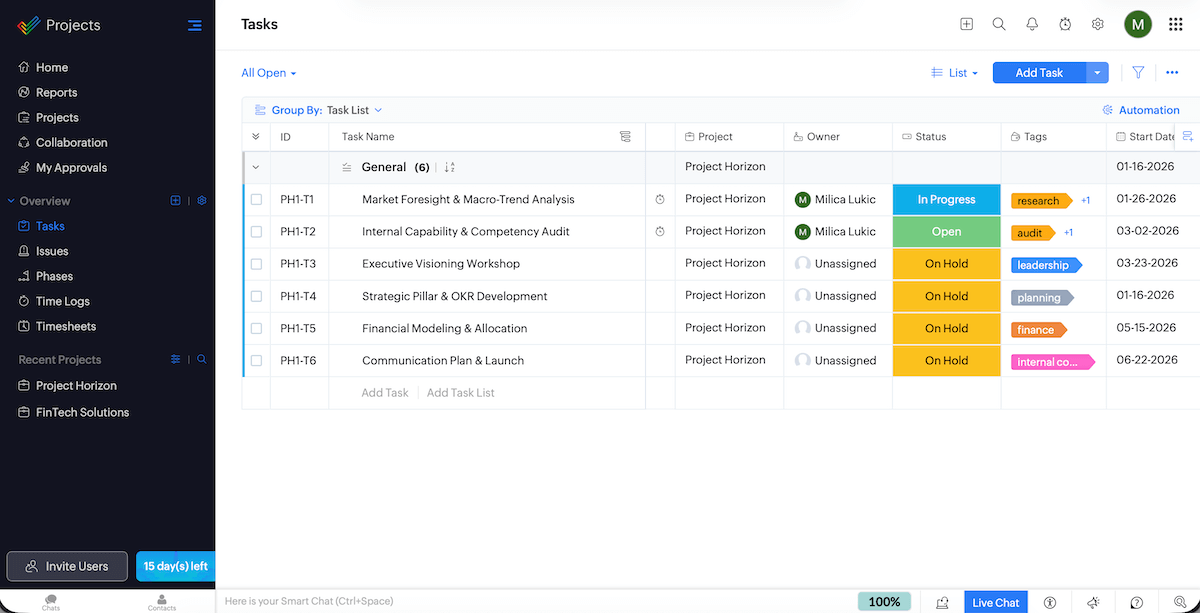
If you already invest in other Zoho apps or plan to do so, Zoho Projects will become a hub in your broader business workflows — here’s how:
- Seamless Zoho integrations — Working with Zoho CRM, Books, Invoices, Analytics, and other apps from the ecosystem ensure smooth data flow thanks to unified workflows.
- Automation across apps — Workflow rules and triggers can stretch across Zoho products, reducing repetitive admin work.
- Better visibility across functions — Integrated data improves forecasting, resource planning, and performance reporting, all of which become vital when a consulting business grows.
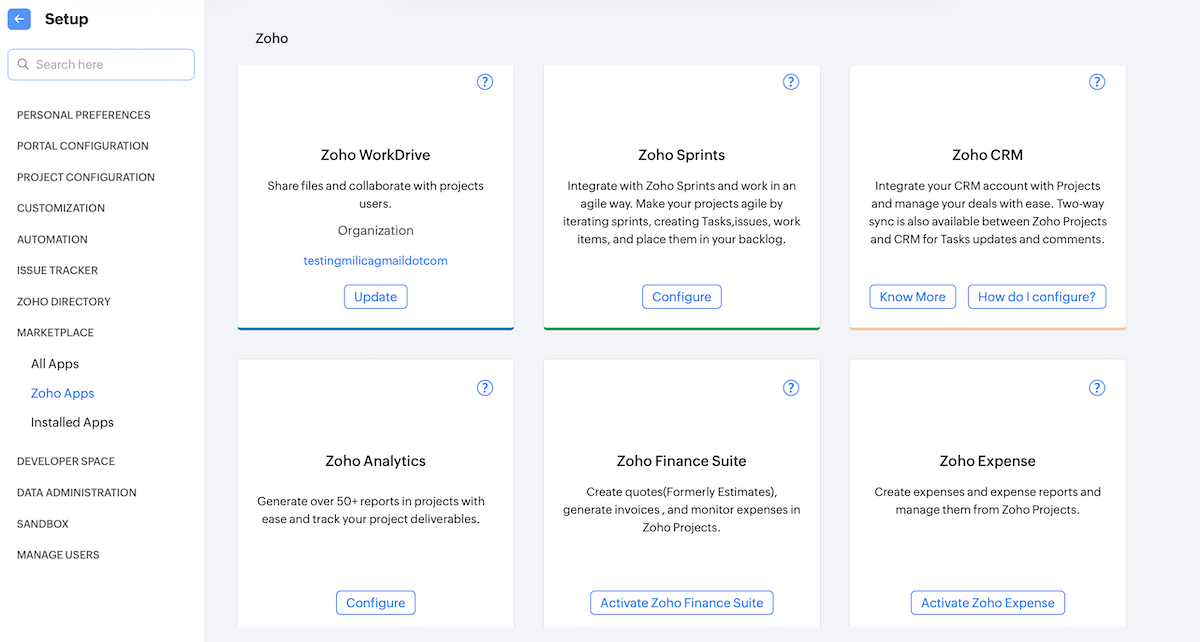
Now, I did say Zoho Projects is affordable, and compared to many competitors it really is, but looking at the free plan — which may be the only option for some cost-conscious teams — I’m surprised to see it doesn’t include templates or custom fields at all.
Also, unlike Plaky or Freedcamp, Zoho Projects limits the number of users on the free plan (5 maximum).
What’s new in Zoho Projects?
Zoho Projects has updated its Timesheets to improve the review and approval aspect. Another novelty is the creation of automations based on user actions (for instance, sending emails to managers when a new user accepts a project invite).
Available for: web, iOS, iPadOS, Apple Vision, Android
| Plan | Price |
|---|---|
| Free | $0 (up to 5 users) |
| Premium | $4/user/month* |
| Enterprise | $9/user/month* |
| Ultimate | $14/user/month* |
| Zoho Projects Plus (Projects, Sprints, Analytics, and Workdrive) | POA |
*billed annually
#4 Asana — best for cross-functional consulting
Asana is a comprehensive tool for planning, monitoring, and coordinating work across projects.
Why choose Asana?
This platform does a good job of aligning people with different project team roles, priorities, and way of working — suitable for cross-team consulting activities.
| Pros | Cons |
|---|---|
| – Has all PM essentials – Multi-home tasks – Numerous templates | – Task assignee limitations – Inefficient pricing model |
Asana provides structure and visibility with:
- Clear task management — Tasks have owners and due dates, plus other details via custom fields if you’re a paying user. I just find it awkward that only 1 user can be the primary assignee, which may force you to use subtasks.
- Standard collaboration features — Comments, mentions, and file attachments live directly on tasks to preserve context.
- Guest access — Asana isn’t exactly built for external users the way client portal tools are, but you can share projects with clients while protecting internal data.
Moreover, Asana has a new tool for tracking hours and managing project budgets, but it’s available only as a paid add-on (you need to contact sales for pricing details).
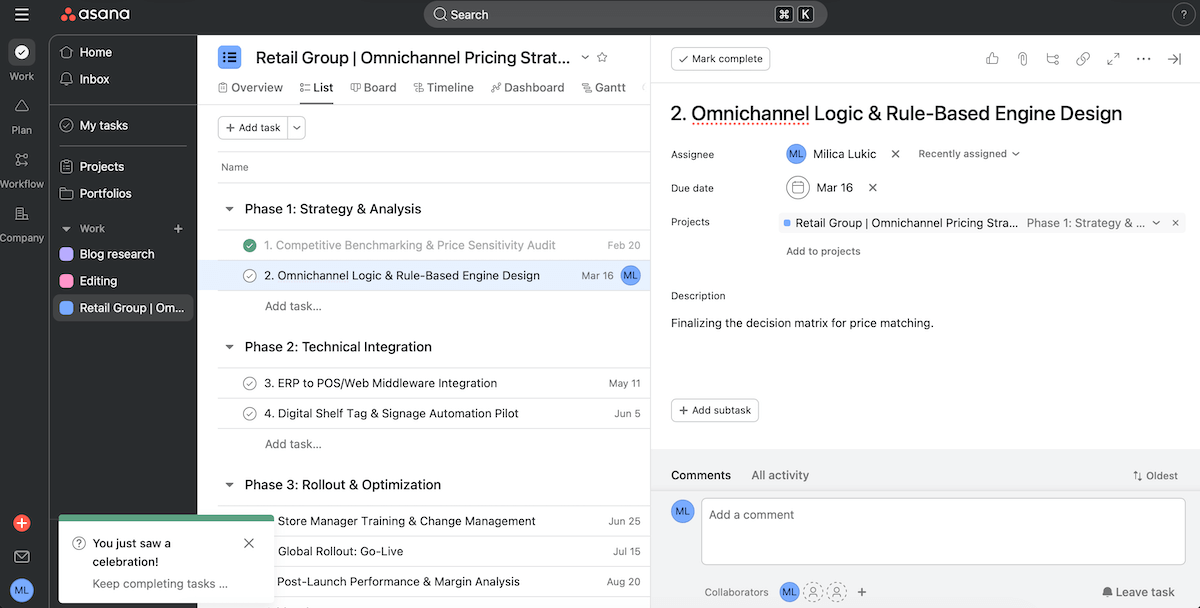
As for why I believe Asana is a decent choice for consulting that involves cross-functional collaboration, this is what stood out during testing:
- Multi-home tasks & dependencies — A task can exist in multiple projects, so any updates are synchronized across the app. Also, you can set task dependencies to see how delays in one function impact others.
- Automation rules — Native rule-based automations reduce manual coordination between teams (e.g., adding assignees, sending notifications).
- 80+ templates — Prebuilt structures for diverse workflows speed up project setup and guarantee consistency across teams.
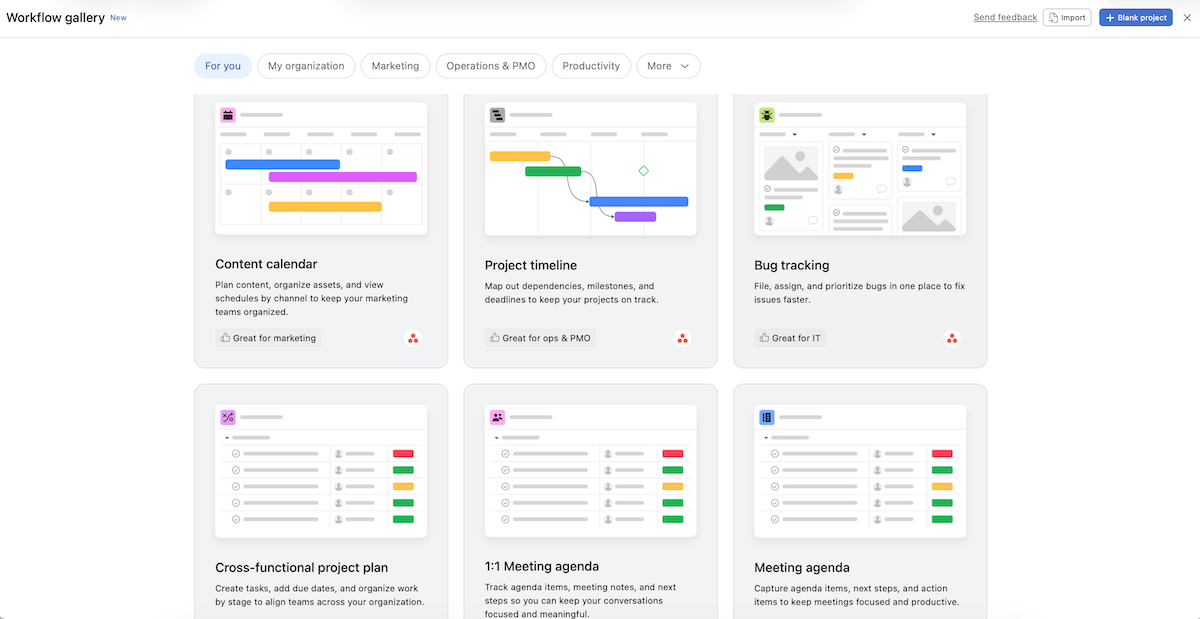
It’s important you know that Asana’s pricing works like this:
- 2–5 users — adding seats in increments of 1,
- Up to 30 users — adding seats in increments of 5,
- Up to 100 users — adding seats in increments of 10,
- Up to 500 users — adding seats in increments of 25, and
- 500+ users — adding seats in increments of 50.
In other words, you must pay for unused seats if your team size doesn’t fit into neat bundles.
Another minus: there’s no customer service on the free plan, which means no help with technical issues for budget-conscious users apart from the Help page and video tutorials.
💡 Plaky Pro Tip:
Wanna see how Asana stacks up against its most popular competitors? Check these out:
What’s new in Asana?
Asana has enhanced its rule builder so that creating automations is faster and more intuitive. Also, there’s a new integration that lets you search and interact with your Asana data directly through Gemini AI.
Available for: web, macOS, Windows, iOS, Android
| Plan | Price |
|---|---|
| Personal (free) | $0 (up to 2 users) |
| Starter | $10.99/user/month* |
| Advanced | $24.99/user/month* |
| Enterprise | POA |
| Enterprise+ | POA |
*billed annually

#5 SmartSuite — best for document-centric workflows
SmartSuite is a solution that blends customizable workflows, file and data organization, and automation into a unified system.
Why choose SmartSuite?
If your consulting relies on documents as much as tasks, SmartSuite supports both rich document editing and structured workflows in the same ecosystem.
| Pros | Cons |
|---|---|
| – Many fields and project views – Comprehensive reports – Document designer | – Occasionally slow performance – No free plan |
SmartSuite feels like a hybrid between a traditional PM platform and a robust database tool. Here’s what caught my eye:
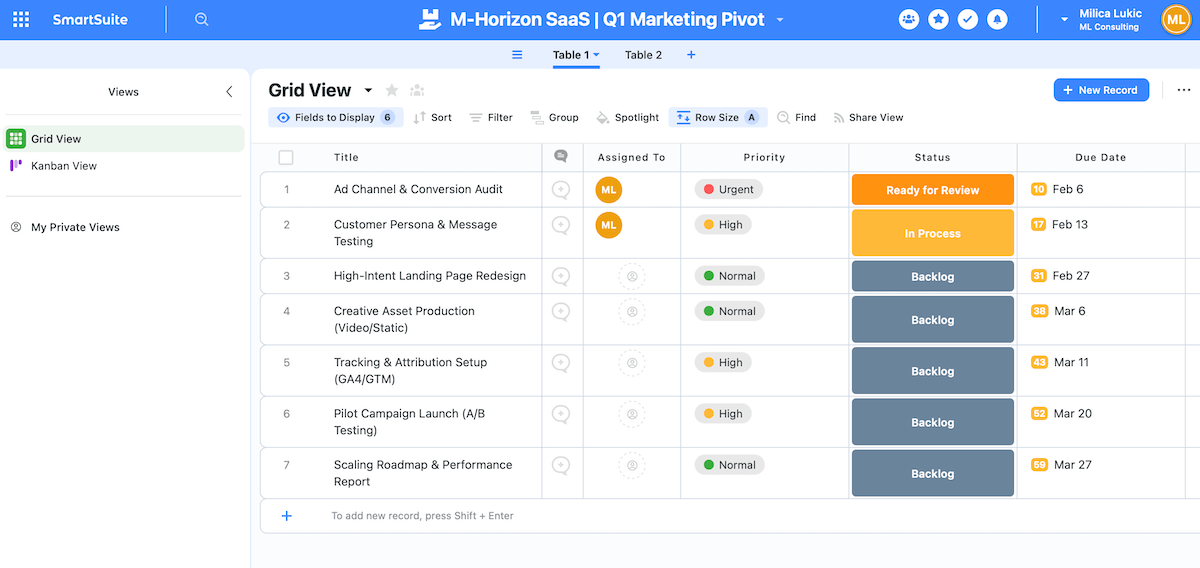
- Highly customizable workflows — With 40+ field types, 10+ views (grid, Gantt, map, and more), built-in automation, time logging, and billing capabilities, you can build solutions (workspaces) that match your consulting methodology.
- User-friendly forms — SmartSuite’s forms allow you to gather information from clients (intake requests, feedback, approvals) and feed it directly into your flows, avoiding manual re-entry or messy spreadsheets.
- 2,000+ integrations — Thanks to Zapier, Make, and Ply, you can connect SmartSuite with many other tools if needed.
- Dashboards and reports — The app pulls data from all solutions and transforms them into digestible metrics and trends for stronger visibility.
As you can see, SmartSuite has some powerful features, but I noticed it tends to load more slowly when you have large, complex workspaces.
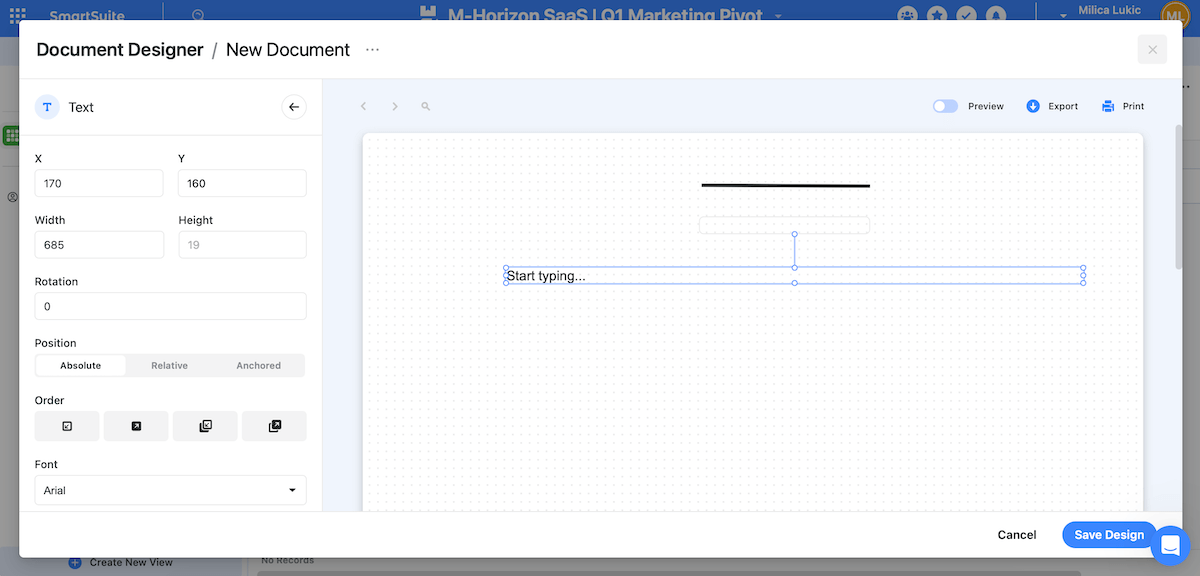
What sets SmartSuite apart is rich documentation features:
- Page formatting and elements — Create different documents by customizing page size and orientation and adding different elements (text, shapes, images, links).
- Field dropping — Insert fields into documents if you want your reports and summaries to auto-populate themselves with live data from your system.
- Document templates — Make templates for proposals, kickoff notes, status reports, etc. to save time on recurring work and standardize quality.
All in all, SmartSuite is robust, but it’s not without some tradeoffs. For instance, teams that prefer simple, minimalistic UIs will probably find this platform too dense and overwhelming at first.
I must also underscore that SmartSuite doesn’t have a free plan. There is a free trial, but 14 days might not be enough for some firms to evaluate whether an app is the right fit.
What’s new in SmartSuite?
SmartSuite has redesigned the workspace administration area to make it easier for admins to find and manage settings. Solution Packaging is new as well — bundling multiple workspaces together and moving/duplicating them as a group with all linked records and settings kept intact.
Available for: web, iOS, Android
| Plan | Price |
|---|---|
| Team | $12/seat/month* (3+ users) |
| Professional | $30/seat/month* (5+ users) |
| Enterprise | $45/seat/month* (10+ users) |
*billed annually
#6 Airtable — best for data-focused teams
Airtable is a flexible, database-driven work management tool. It lets you structure information in spreadsheets, relate them, and see the same data in different views.
Why choose Airtable?
If your team thinks in data, relationships, and systems, Airtable is a solid consultancy software solution for smarter workflows and decision-making.
| Pros | Cons |
|---|---|
| – Highly flexible – Client portals – Relational databases | – Learning curve – Expensive |
Testing this app left me under the impression it’s for consulting agencies that work with versatile clients and have different reporting needs. Airtable enables structure without rigidity thanks to:
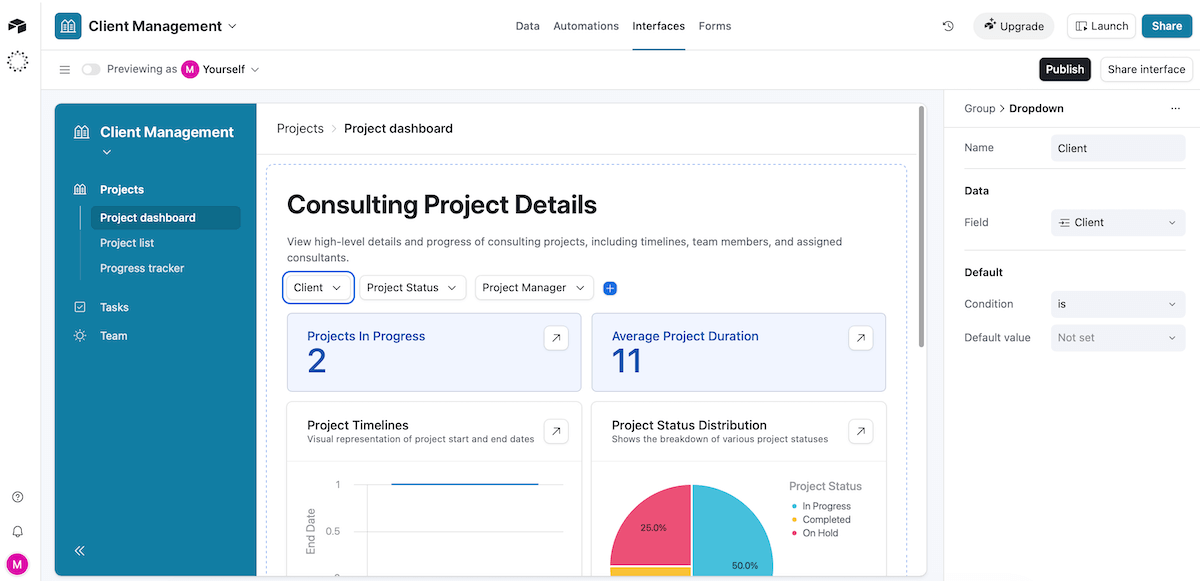
- Deep customization — Get tables, fields, views, formulas, and interfaces to match your project structure and service types.
- White labeling — Add your company logo and customize the background to make a branded workspace (if you opt for the Business or Enterprise Scale plan).
- Client portals — Create controlled views where clients can follow progress or review project deliverables without accessing internal workflows.
- No-code/low-code automations — Automate processes like approvals and status changes with no-code automations, or if you have some coding knowledge, extend the logic with Javascript.
As you might be able to tell, you don’t just “start using” Airtable. Instead, you design it. This can be a perk, but also a huge struggle for non-technical users.
That said, if you have a data-centric team that works with connected systems, Airtable offers benefits such as:
- Relational databases — You can link tables (e.g., clients, projects, and invoices) to make a complex consulting setup far easier to manage.
- Strong formula and field logic — Calculations, dependencies, and conditional fields allow you to build real operational logic into your workflow.
- Custom dashboards — Raw data turns into polished dashboards with charts and metrics for seamless reporting.
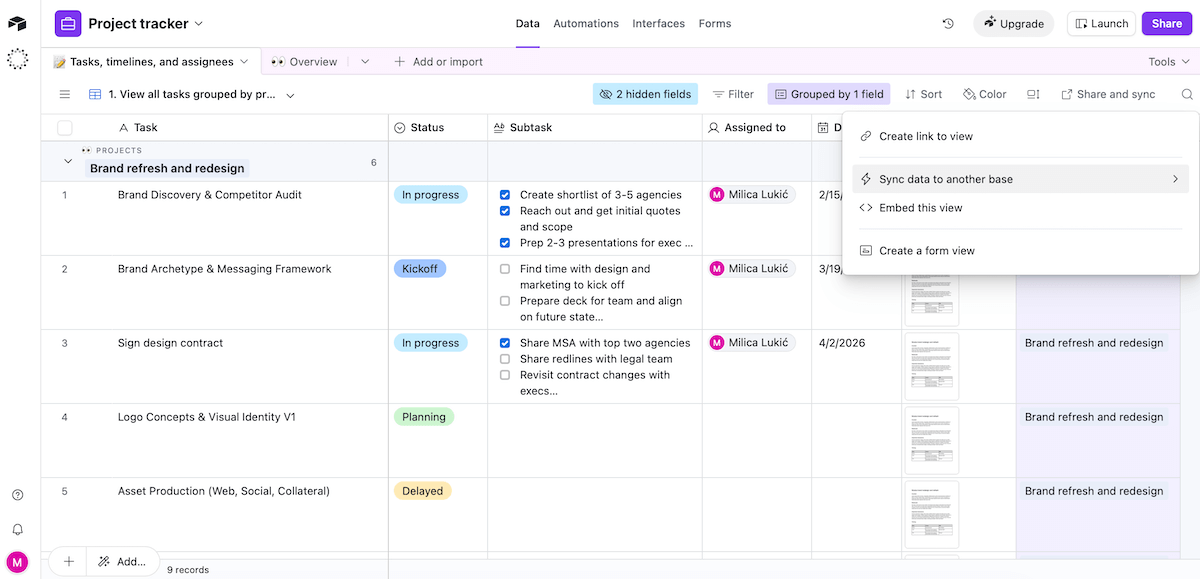
Unfortunately, the majority of Airtable’s best features (e.g., extensions, 2-way sync) and unlimited users are locked behind a paywall. What’s more, the cheapest paid plan is pricier than some competitors’ premium tier.
Plus, Portals are a paid add-on, starting at a steep $120/month for 15 guests.
Another downside is that the time tracking feature (via an app in Airtable’s marketplace) doesn’t offer many advanced functionalities, so you’d need to rely on integrations or separate apps for robust time reporting.
What’s new in Airtable?
Airtable rolled out several AI improvements to make its built-in AI assistant Omni easier to use in everyday workflows — for example, “Open Omni” action buttons that you can embed in interfaces or record details.
Available for: web, macOS, Windows, iOS, Android
| Plan | Price |
|---|---|
| Free | $0 (up to 5 editors) |
| Team | $20/seat/month* |
| Business | $45/seat/month* |
| Enterprise Scale | POA |
| Portals (add-on) | starting from $120/15 guests/month* |
*billed annually
#7 Wrike — best for detailed analytics
Wrike is a robust PM solution built for teams handling multi-layered projects. It combines task tracking, resource management, automation, and reporting.
Why choose Wrike?
If your leadership or clients expect detailed visibility into progress and performance, Wrike can deliver more depth than many other PM tools.
| Pros | Cons |
|---|---|
| – Rich with features – Strong dashboards & reports – Multi-home tasks | – Limited free plan – Impractical subscription size |
As soon as I saw how many enterprise-level features this app has, I knew it was a solid option for handling multiple clients and timelines at once. Wrike handles complexity thanks to:
- Robust work management — Task hierarchies, custom fields, dependencies, and project milestones support long-running, multi-phase consulting projects.
- Controlled client collaboration — Wrike allows view-only users on all tiers and broader (but still controlled) guest access on the Business plan and higher. This enables client visibility without exposing internal operations.
- 400+ integrations — You can connect Wrike with other tools your agency already depends on (CRM, messaging, invoicing, etc.) for a smoother data flow.
Unfortunately, my favorite Wrike features aren’t available in the free plan (e.g., custom fields, automations) or even the first paid tier (e.g., time tracking, branded workspace).
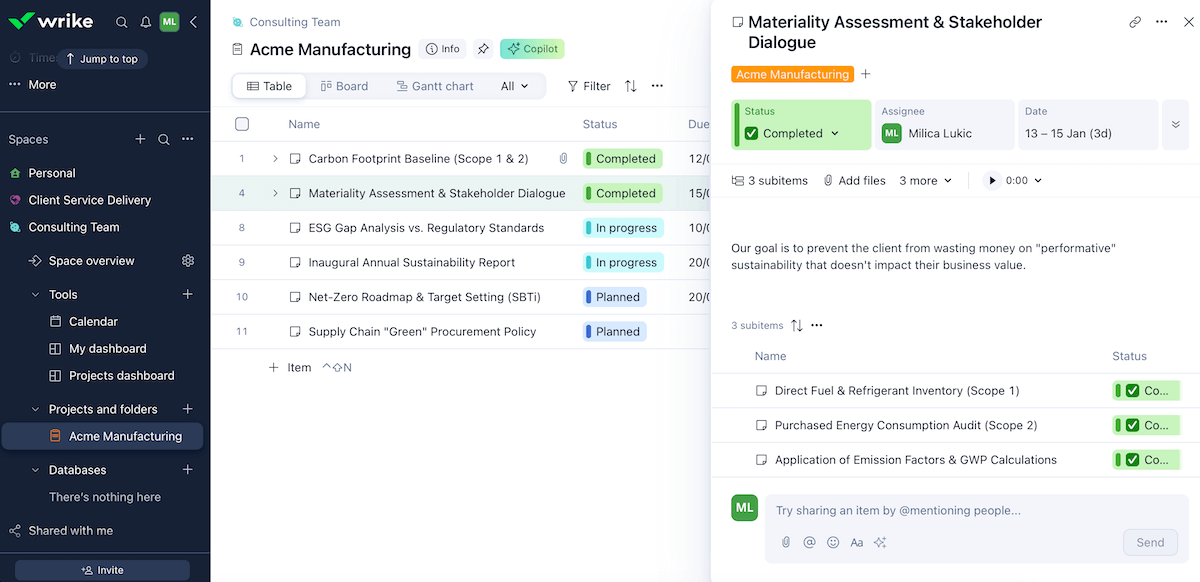
Now, here’s why I see Wrike as suitable for consultancies that rely on reporting and dashboards to manage/present their performance:
- Custom reports — Users can get detailed reports based on task status, effort, assignees, etc. without exporting data elsewhere.
- Real-time dashboards — Executives, project managers, and consultants can each have tailored dashboards showing what matters to them.
- Cross-project visibility — Wrike can roll data up accurately across multiple clients/projects, partly because it supports cross-tagging (letting the same task live in more than 1 project without duplication).
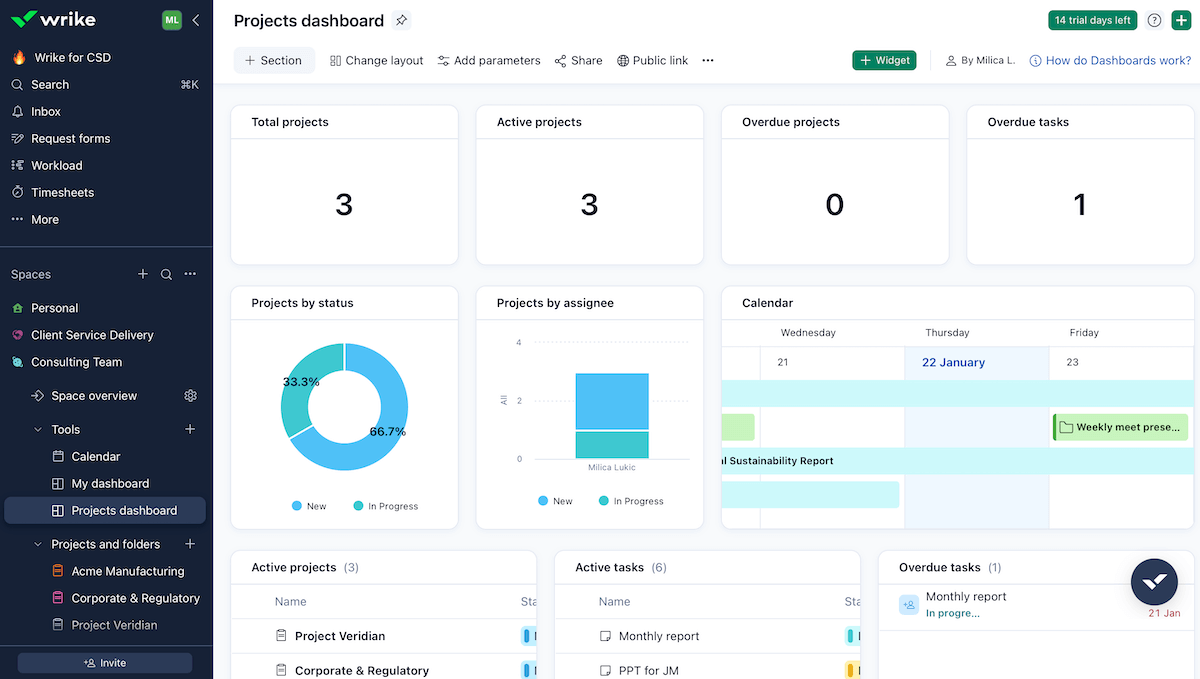
If you asked me what this app could do better, I’d say the pricing structure. Much like Asana, Wrike requires you to purchase seats in bundles:
- Under 30 Seats — blocks of 5,
- 30–100 Seats — blocks of 10, and
- 100+ Seats — blocks of 25.
So, for instance, with 42 users in your company, you’d have to buy 50 seats because of this policy, which forces overpaying and is awkward for growing teams.
What’s new in Wrike?
Wrike has a new tier called Apex, combining features from all lower plans with enterprise-level capabilities (Wrike Integrate, Sync, Databases, and Whiteboard). The old Enterprise plan is now a legacy option, not available for new purchases.
Available for: web, macOS, Windows, iOS, Android
| Plan | Price |
|---|---|
| Free | $0 |
| Team | $10/user/month (2–15 users) |
| Business | $25/user/month (5–200 users) |
| Pinnacle | POA (5+ users) |
| Apex | POA (5+ users) |
#8 Avaza — best for teams that bill by time
Avaza is an all-in-1 work management platform that helps teams plan projects, collaborate, track time, and invoice clients.
Why choose Avaza?
If billing by the hour is your business model, tracking and visibility are crucial — and Avaza supports that through several features.
| Pros | Cons |
|---|---|
| – Native chat – 500+ integrations – Powerful invoicing | – Limited automations – Dull design |
As soon as I opened Avaza, it felt straightforward and easy to use. Here’s what I want to highlight after using it with a consulting agency setup:
- Centralized task management — Detailed (sub)tasks with comments and attachments in the list, Kanban, Gantt, and calendar view ensure clear ownership and priorities.
- Team workload and resource planning — The Team Schedule tab shows who’s booked, overloaded, or ready for more projects, which is helpful for leveling workload across busy consultants.
- Built-in chat — Group or 1–1 conversations with teammates or clients are handy for sharing ideas and feedback, especially because you can send files here as well.
- 500+ integrations — You can connect Avaza with hundreds of popular apps in case you need additional functionality.
That said, I found Avaza’s design outdated and static. I wish it was more polished, with smoother transitions and stronger visual hierarchy.
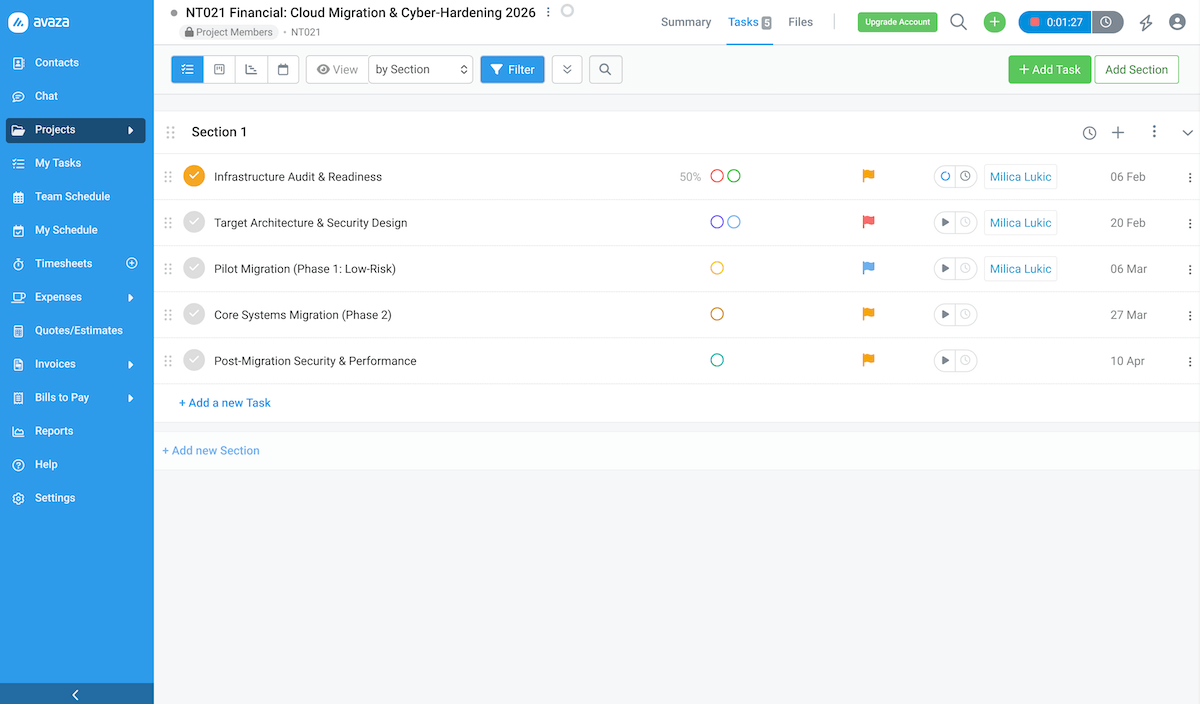
As for why Avaza is great for consulting teams that bill by time, consider these features:
- Task-level time logging — Users can log exact time spent on specific tasks/ clients and tie it to billing, making everything precise instead of estimated.
- Excellent invoicing — Customizable invoice branding and format are a nice touch, along with integrations with apps for receiving fast payments from clients (cards, digital wallets, and bank direct debits).
- Solid reporting tools — There are 50+ real-time report types you can customize, save, and schedule for automatic delivery.
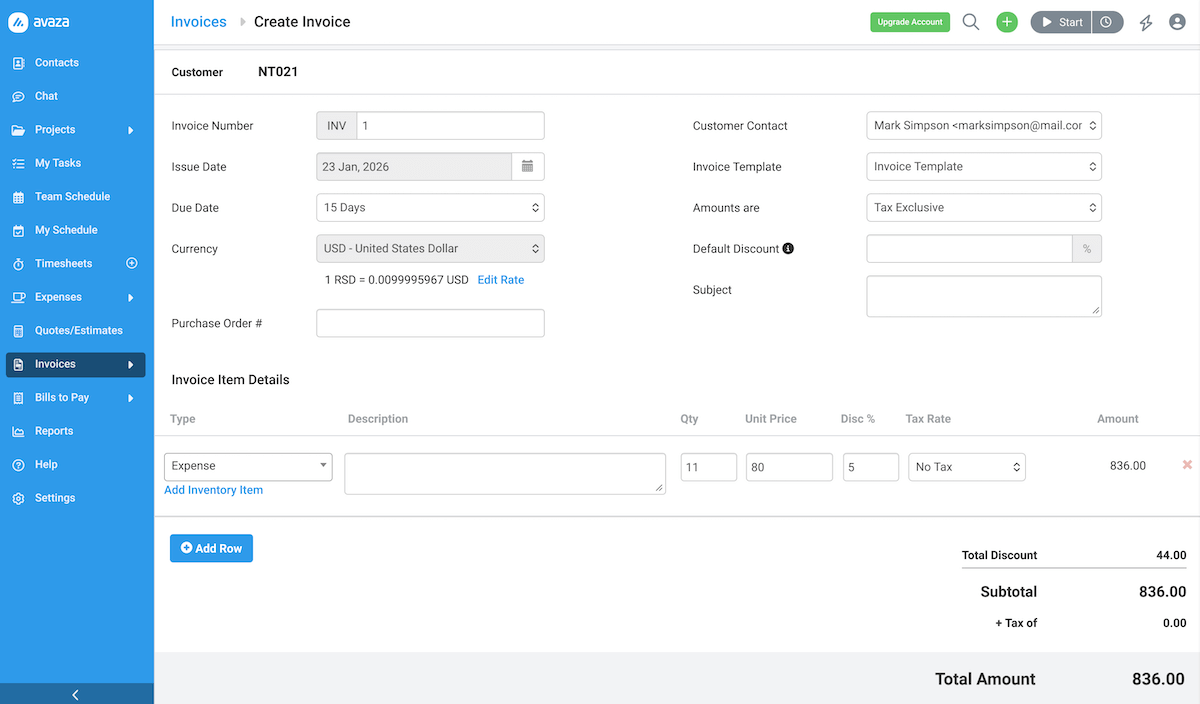
Now my biggest complaint: Avaza’s automations are mostly about billing/financial processes, while workflow automation could be more polished. You can create some rule-based automations via Zapier, but there’s no native workflow rule editor like in Plaky or Asana, for instance.
What’s new in Avaza?
Avaza’s mobile app got a general performance and usability update recently. Also, the platform’s chat tool continues to get refinements for better team communication (I couldn’t find a specific feature list, though, just “better experience” notes).
Available for: web, macOS, Windows, iOS, Android
| Plan | Price |
|---|---|
| Free | $0 |
| Startup | $11.95/month |
| Basic | $23.95/month |
| Business | $47.95/month |
| NB: Each plan has unlimited collaborators and external contacts with chat access. The maximum number of other types of users on the free plan differs depending on the type, while paid plans allow adding more at $2–7/user/month. | |
#9 Scoro — best for ops-focused firms
Scoro is a professional services automation (PSA) platform that mixes PM, resource planning, CRM, time tracking, and billing into a single integrated system.
Why choose Scoro?
This platform is a strong choice for consultancies that don’t just deliver work but optimize every process. The reason is Scoro’s ability to link various aspects of business tightly together.
| Pros | Cons |
|---|---|
| – Tight operational & financial control – Real-time resource & time tracking – Strong reporting | – Steep learning curve – No free plan & pricey |
Scoro feels like a single source of truth thanks to:
- Comprehensive lifecycle visibility — There are detailed tabs for your projects, contacts, pipeline, tasks, and more, reducing the need for juggling several apps.
- Financial features — You can create quotes, convert them to projects, and set up automatic invoices, linking quotes to actual delivery.
- CRM and client context — Scoro combines CRM with delivery, so you see client contacts, proposals, project status, and billing history together.
With so many interconnected modules, onboarding can be challenging, and for me personally it was. Out of all the apps on this list, setting up Scoro took the longest, and I had to reach for their knowledge base several times.
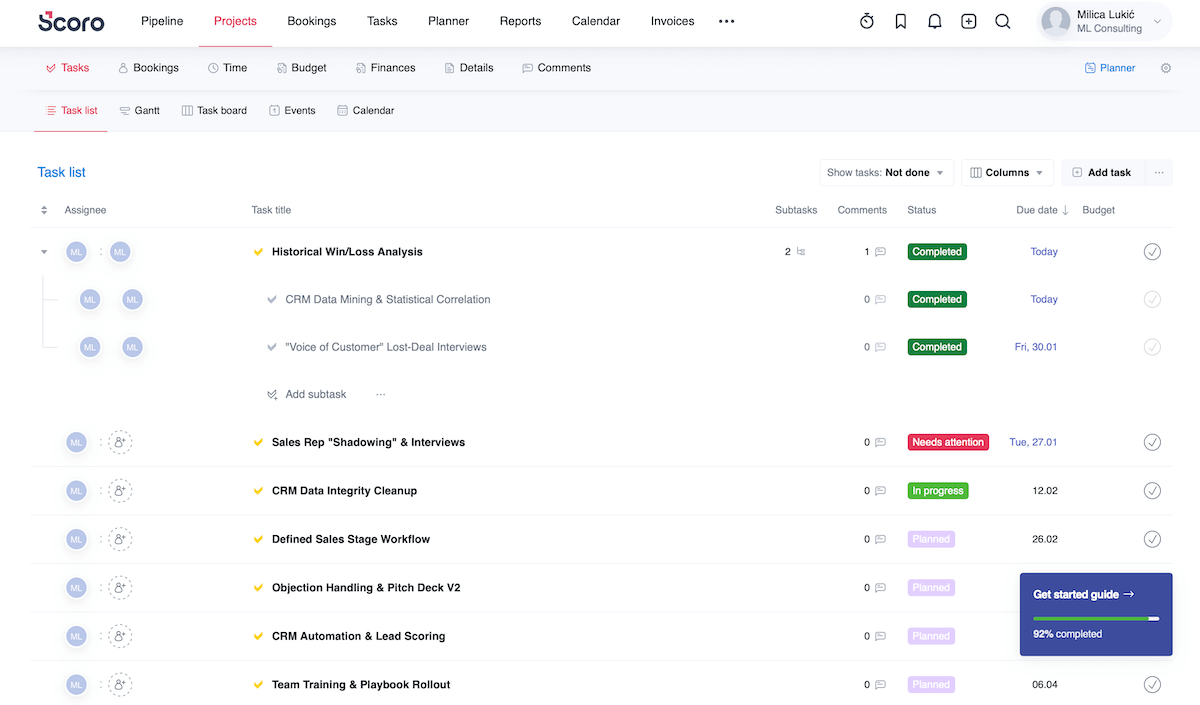
From what I’ve seen, Scoro can be very helpful for operationally sharp consultancies, considering features such as:
- Resource and time tracking — Built-in timers and utilization dashboards make it convenient for teams to log hours and for managers to balance workloads/forecast capacity.
- Process automation — You can automate routine operational tasks (e.g., invoice generation, notifications) to carry out consistent business processes.
- Cost and margin visibility — Tracking real-time budget vs. actual cost lets you catch profit leaks early.
- End-to-end reporting — Pulling reports from across the platform makes it easier to measure efficiency and forecast performance.
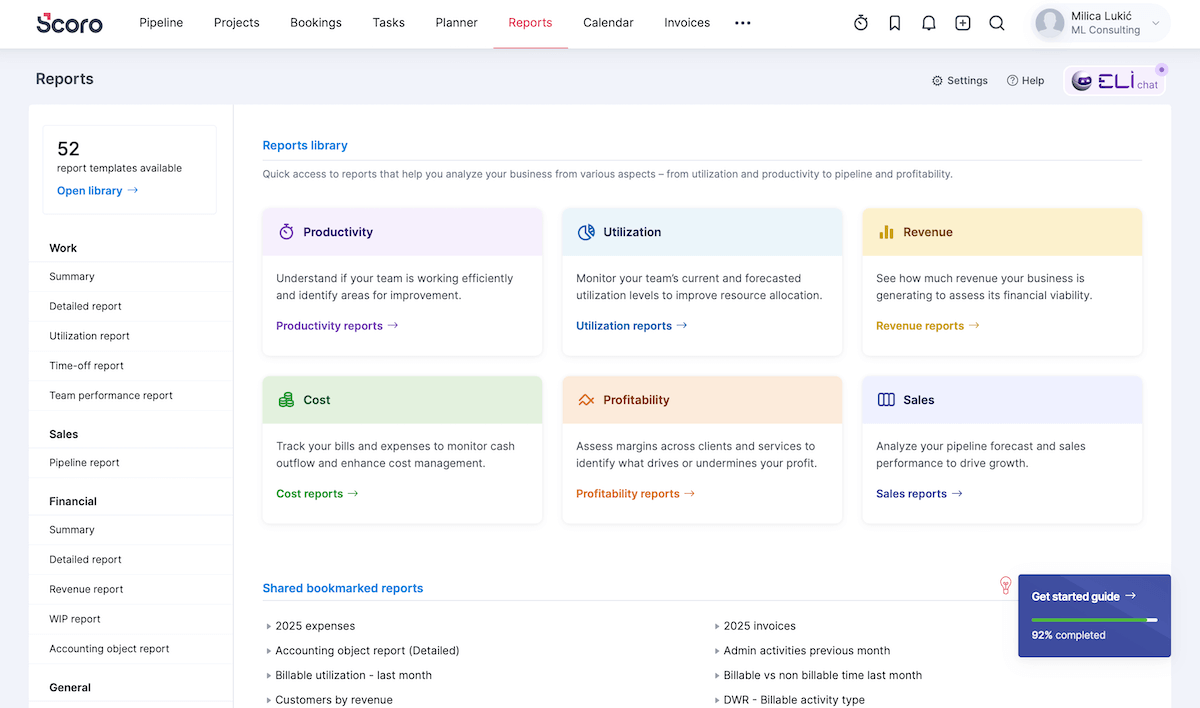
Finally, I must point out that Scoro’s depth comes at a pretty high cost compared to many competitors, and there’s no free plan at all. So, if a simpler or single-purpose tool can do the job for you, don’t invest your time and money in Scoro.
What’s new in Scoro?
The latest Scoro updates include automated alerts for key metrics in retainer projects, booking context notes (adding notes to resource bookings), and exporting roles (your roles list in CSV/XLS, which you can edit and re-import — great for bulk updates).
Available for: web, iOS, Android
| Plan | Price |
|---|---|
| Core | $19.90/user/month* |
| Growth | $32.90/user/month* |
| Performance | $49.90/user/month* |
| Enterprise | POA |
*billed annually
#10 Podio — best for highly customizable workflows
Podio (now part of Progress Software, hence it’s sometimes referred to as Progress Podio) is a work management and collaboration platform for building tailored digital spaces.
Why choose Podio?
You should consider Podio if you follow unique processes and want software for consulting firms that doesn’t force uniformity.
| Pros | Cons |
|---|---|
| – Built-in chat – Robust automation – Custom apps | – No native time tracking or Gantt charts – Sync & data refresh can lag |
Exploring this platform, I first focused on the basics:
- Project and task management — Task tracking, reminders, reports, and different project views (table, Kanban, and calendar) are quite standard — nothing groundbreaking, but they’re intuitive enough.
- Centralized collaboration — Comments, file attachments, and a native chat ensure deliverables and internal coordination stay aligned.
- No-code automations — You can save time by automating task assignment, status updates, emails and texts, and even actions involving integrations (3rd-party tools).
That said, I was disappointed to see that Podio doesn’t have built-in time tracking or true Gantt functionality. You can get those via extensions, but that can add setup overhead or occasionally inconsistent UX.
It also seems that Podio offers no direct email/chat support to free users, but I wasn’t able to find a definitive answer to that, so I wish their pricing page stated it clearly.
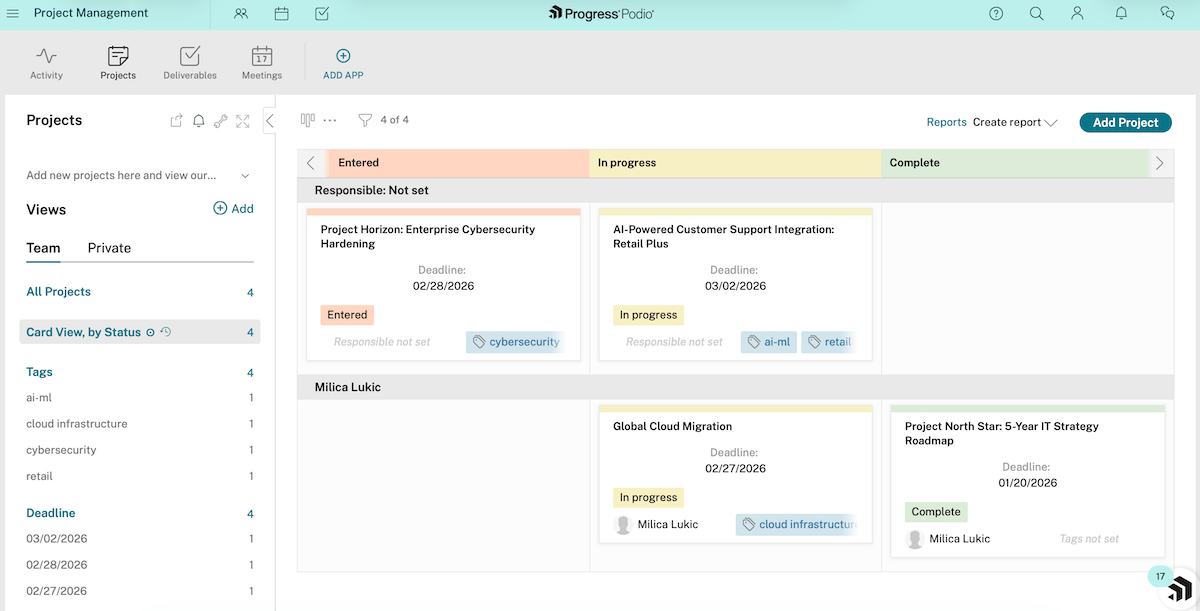
If I had to name Podio’s forte, I’d go with highly customizable workflows, with features like:
- Custom app building — Make custom structures for storing and managing info (clients, deliverables, project risks, and so on) with custom fields and statuses. Simply drag and drop elements for setting up visual, intuitive workflows.
- App Market — Find pre-made apps for common business needs (including consulting) if you don’t want to build from scratch.
- Open API — Connect Podio to other software your agency uses through its API. While not plug-and-play for everything, it lets you move data between systems to avoid duplicate work.
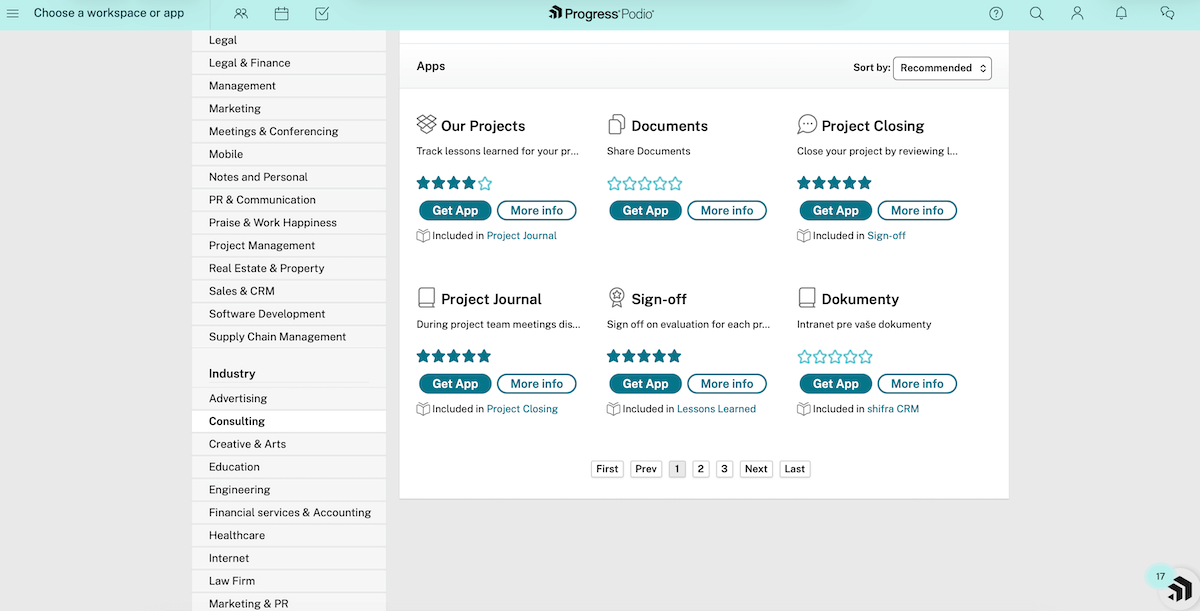
Since most other apps on this list primarily use gray and blue tones, I found Podio’s pastel palette refreshing.
However, I didn’t appreciate it when task cards wouldn’t update until I refreshed the page and when deleted projects kept appearing in the interface. These glitches can slow down workflows and reduce trust in the tool.
What’s new in Podio?
As it completed its brand transition to become Progress Podio, the app got a new visual identity. That includes UI tweaks and improved in-app elements that help users navigate Podio more smoothly.
Available for: web, iOS, Android
| Plan | Price |
|---|---|
| Free | $0 (up to 5 users) |
| Plus | $11.20/user/month* |
| Premium | $19.20/user/month* |
*billed annually

#11 ProWorkflow — best for smaller to mid-size teams
ProWorkflow is a PM platform for tracking projects and time while collaborating efficiently with your team.
Why choose ProWorkflow?
With ProWorkflow, small-to-mid-size teams can get all the essentials for project management without the bloat or learning curve of enterprise-level tools.
| Pros | Cons |
|---|---|
| – Unlimited guest access – Internal messaging – Neat reporting | – No free plan – Limited automations |
My overall impression is that ProWorkflow balances internal PM with client-facing transparency well thanks to:
- Task organization — Specify task details with fields such as description, category, stage, assignee, and more.
- Time tracking and invoicing — Use built-in time tracking and invoicing for accurate billing without juggling separate spreadsheets and apps.
- Unlimited but controlled guest access — Give access to as many clients as needed to share updates without revealing internal data.
- Integrations — Connect with other apps if needed using ProWorkflow’s native integrations and many others via Zapier.
Unfortunately, ProWorkflow doesn’t offer a free plan, so if you’re budget-conscious, you’ll probably prefer apps like Plaky or Freedcamp.
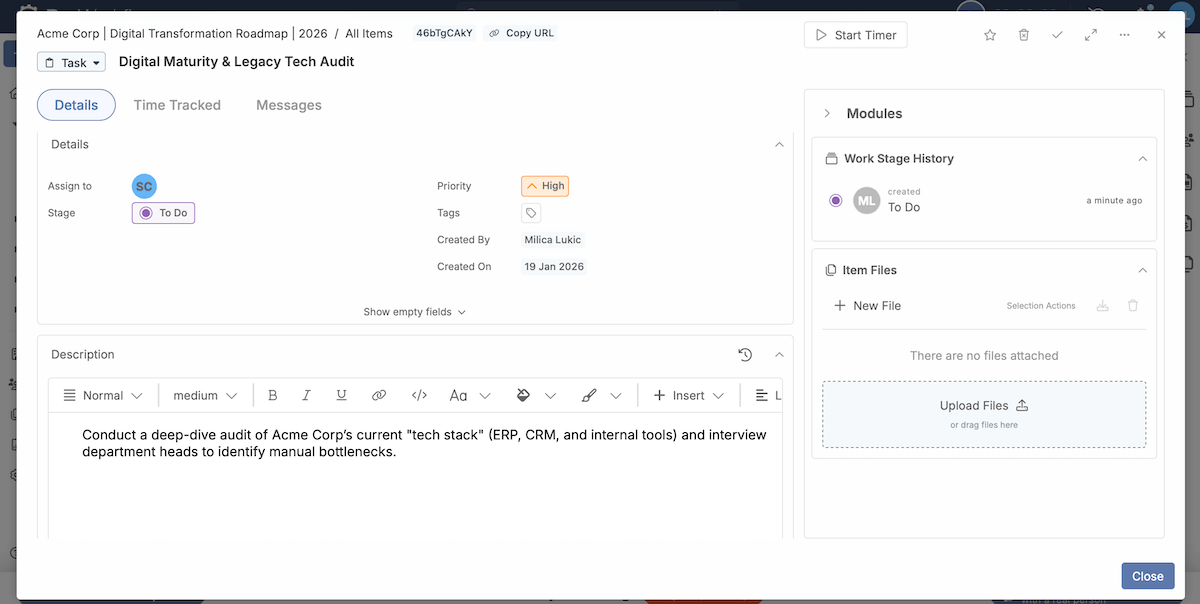
If you ask me, ProWorkflow is more suitable for smaller to mid-size teams rather than big enterprises — here’s why:
- Quick onboarding — Smaller teams often don’t have dedicated admins or PM specialists, but ProWorkflow is intuitive enough to let you start managing work right away.
- Internal messaging system — As small and mid-size teams often juggle multiple roles and fast changes, built-in messaging helps centralize discussions and preserve project history.
- Straightforward reporting and insights — You get useful reports on time, budgets, and workload that you can easily share with teammates or project stakeholders.
Similarly to Avaza, ProWorkflow doesn’t have rule-based automations natively. There are features like recurring tasks, but rule- or event-based automations require integrating with Zapier.
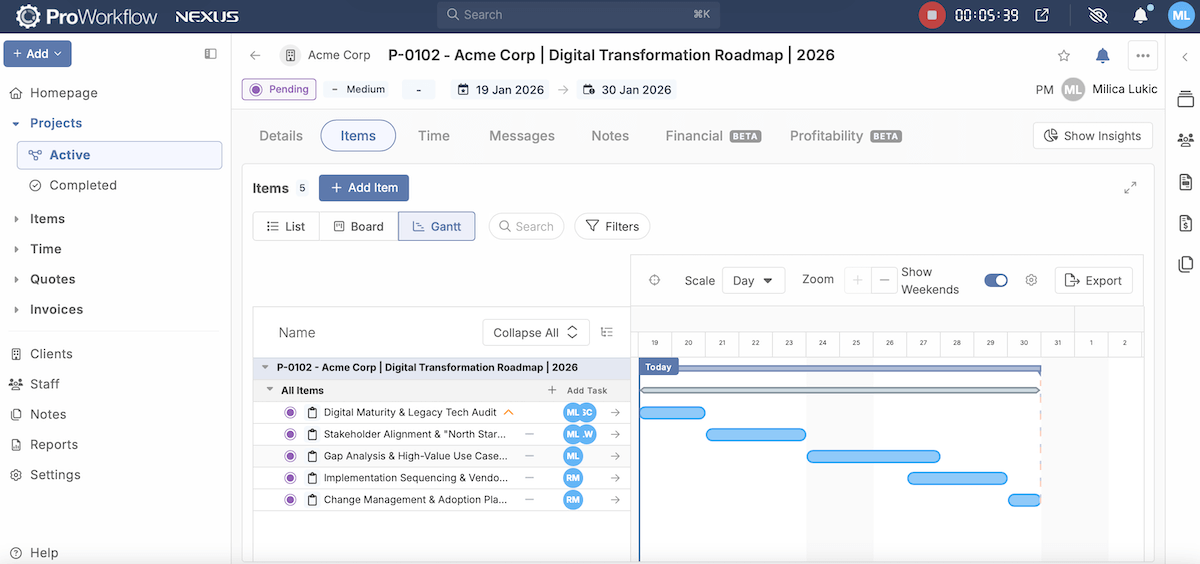
While definitely usable, I must say ProWorkflow is too visually cluttered for my taste. This is most obvious in the Gantt view, causing compressed spacing. Additionally, most interface elements rely on similar blue tones, which reduces visual distinction.
The app was also quite slow to load in the web version for me. It makes ProWorkflow feel heavier and could hurt momentum during planning or client calls.
What’s new in ProWorkflow?
ProWorkflow recently launched its Nexus Financial Suite, bringing real-time financial visibility directly into the platform. Users can see live project profitability, budgets, costs, and more without switching to another app.
Available for: web, macOS, iOS, Android
| Plan | Price |
|---|---|
| Professional | $18/user/month* |
| Advanced | $27/user/month* |
| Enterprise | POA |
*billed annually
#12 Teamwork — best for direct client collaboration
Teamwork is a platform for monitoring projects and resources, with time tracking, billing, and client collaboration features.
Why choose Teamwork?
Unlike more internally focused PM tools, Teamwork feels intentionally designed for client participation, which is important for companies whose consulting model heavily relies on that dynamic.
| Pros | Cons |
|---|---|
| – Neat clients overview – Custom branding – In-app chat | – No live support for free users – Not ideal for experimental workflows |
Based on what I’ve learned about this line of business, Teamwork feels like consultant management software that can support how agencies operate thanks to:
- Clients view — This is a tab with all client details like name, projects, budget, client health, and more in a single list that you can search and filter.
- Clear task management — Tasks, subtasks, dependencies, and priorities are straightforward to keep users aligned and help them avoid missed deadlines.
- Native time tracking and billable hours — Tracking time directly against tasks in Teamwork helps you understand effort and profitability.
Although Teamwork’s free plan covers some features most competitors reserve for paid tiers (e.g., automations, timesheets), it lacks project history and live customer support. I find the latter especially inconvenient, as customer care quality is a big factor for me when deciding whether to buy an app subscription.
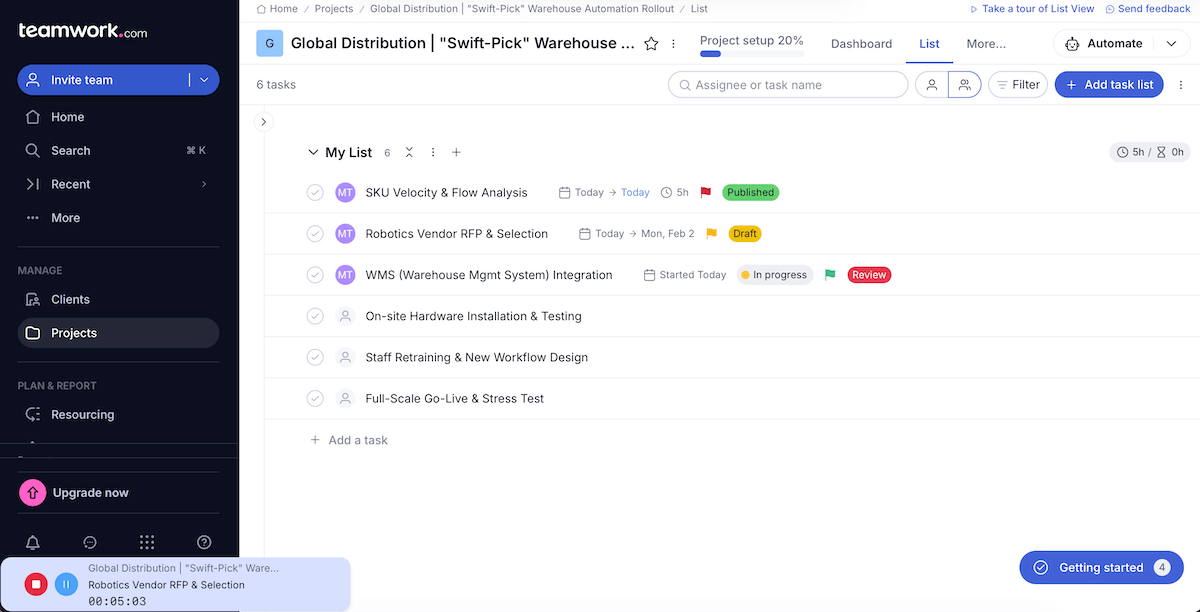
Back to the positives — I believe Teamwork is excellent for direct client engagement. Here’s what stood out:
- Personalized branding — Adding your logo, colors, and domain to client-facing areas makes the workspace feel more professional.
- Centralized communication — Comments, files, in-app chat, and updates are tied directly to tasks, reducing back-and-forth email threads and lost decisions.
- Milestones and timelines clients can follow — Visual milestones and task progress give clients a clear sense of where things stand without constant status calls.
All of that improves client trust and reduces micromanagement.
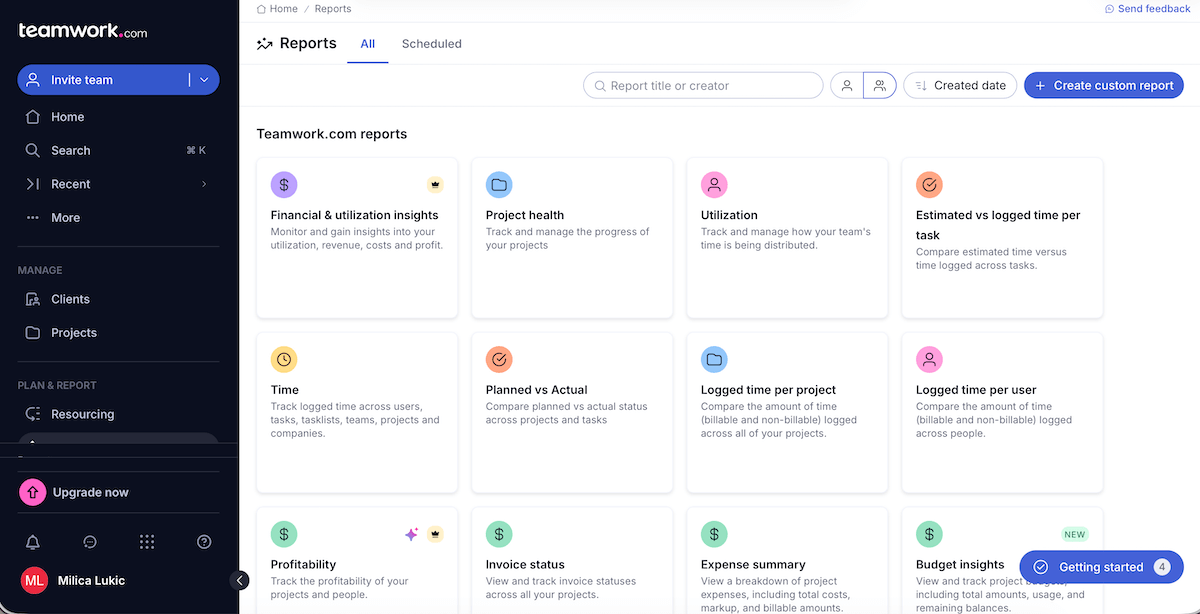
Overall, Teamwork doesn’t come with a steep learning curve, but the UI can feel busy as projects grow unless you maintain it carefully.
And, if your consultancy constantly reinvents its processes, Teamwork may feel rigid over time, especially compared to platforms like Podio or Airtable.
What’s new in Teamwork?
In addition to Google Calendar sync, Teamwork now also supports Outlook calendar sync in the Planning views. The app has also improved its reporting with the Budget Insights Report and custom report filters.
Available for: web, macOS, Windows, Linux, iOS, Android
| Plan | Price |
|---|---|
| Free | $0 (up to 5 users) |
| Deliver | $10.99/user/month* (3+ users) |
| Grow | $19.99/user/month* (5+ users) |
| Scale | POA |
| Enterprise | POA |
*billed annually
Get reliable consulting project management software — Plaky
There’s no single perfect PM app for every consulting team. What became clear through testing for me, though, is that the best tools reduce friction more than they add features.
So, for all of you who wish to handle projects of different complexity without feeling heavy, I encourage you to try Plaky by CAKE.com. Our platform is:
- Equipped with PM essentials — Your work is visible, responsibilities are transparent, and progress is easy to monitor.
- Secure — Plaky ensures security by complying with industry standards, as well as allowing you to set up different user roles and permissions.
- Affordable — From a generous free plan to a reasonably priced premium tier, Plaky supports companies at different stages of their professional journey.
Want a tool that grows with you instead of getting in the way? Get Plaky right now!