 Published: December 10, 2025
When businesses hire a consulting company to help them, they want 2 things: fast delivery and high quality.
But, when projects vary from client to client and everyone expects you to be a wizard who can quickly map out and implement strategies, keeping everything under control becomes a real challenge.
Still, there’s a simple and cost-free solution to this chaos called Plaky by CAKE.com.
This tool helps you:
- Move away from messy spreadsheets,
- Update clients with ease,
- Track billable hours accurately, and
- Organize client requests and projects in one place.
Let’s see how you can use Plaky to meet clients’ expectations and bring order into everyday work!

Why consulting companies need Plaky by CAKE.com
What consultants usually do is diagnose business problems and create tailored strategies to fix them — they’re something like doctors for business matters.
But, to keep up with all client requests and projects, consultants need a reliable project management tool as a sidekick. Here’s why they usually go for Plaky:
- Ease of use — Plaky’s intuitive UI makes it easy to navigate through the app and organize clients, teams, and tasks in no time.
- Affordable plans — With Plaky, you don’t have to break the bank to invite a client to a board as Plaky’s Pro and Enterprise plans are totally pocket-friendly. Also, if you want to use Plaky for your company’s needs only, you can do so free of charge as Plaky offers all basic project management features combined with unlimited users on its free forever plan.
- High visibility — In Plaky, you and your clients can view projects from different angles thanks to multiple board views. Plus, you can use different custom fields to add relevant details and structure workflows to suit your needs.
- Great transparency — Plaky provides real-time information on project progress, so your client can always get an insight into a project’s current status.
- Efficient billing — Once you integrate Plaky with Clockify (a time tracking app), you can track the time spent on creating strategy plans for clients, run time reports, and prepare invoices without fragmenting your workflow.
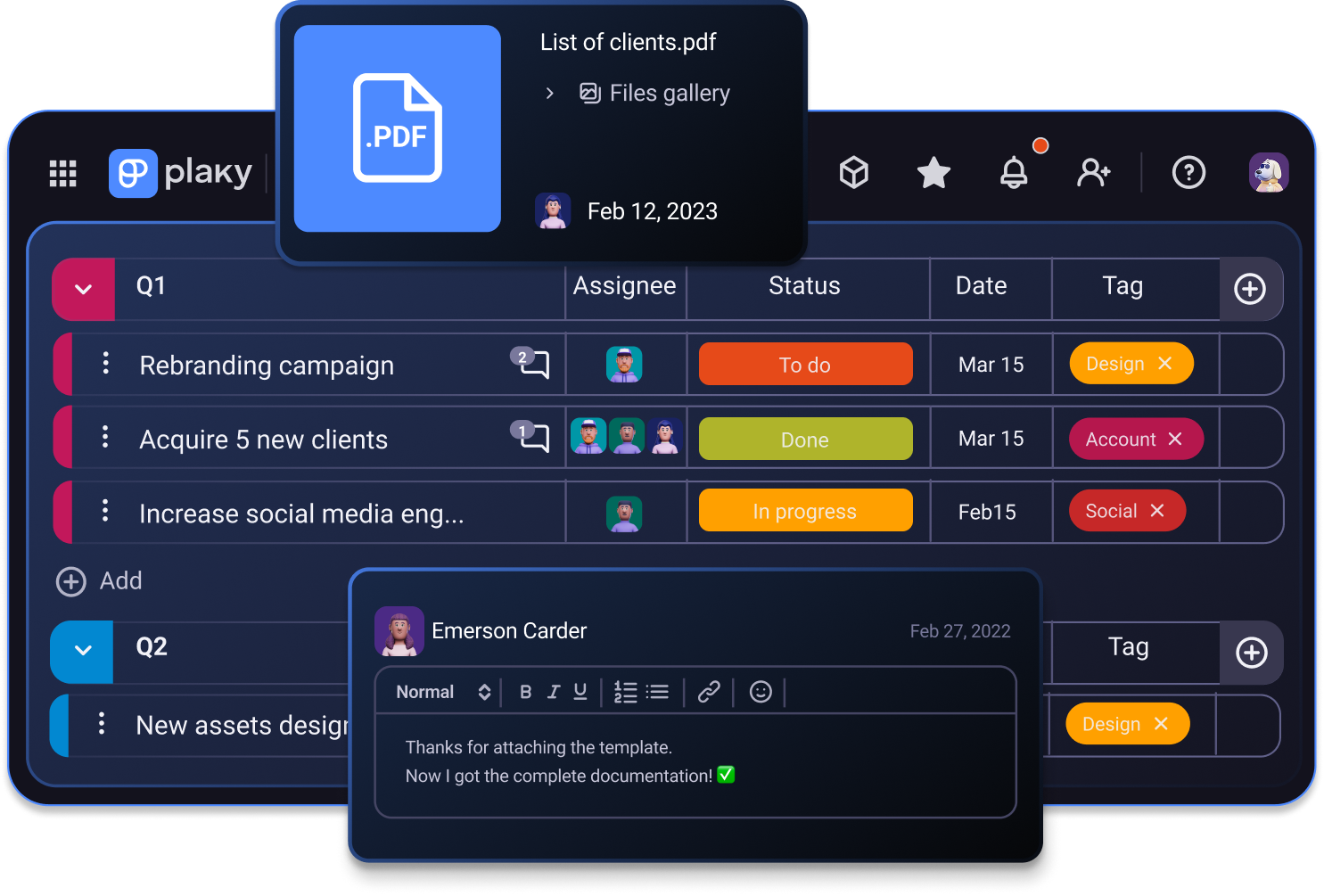
How Plaky by CAKE.com solves common challenges for consulting companies
From defining problems their clients face to creating effective solutions and managing their implementation — consultants have a lot on their plate.
The good thing is they can rely on a tool like Plaky by CAKE.com to keep everything in order.
As flexible consulting management software, Plaky helps you to:
- Organize projects and tasks and track their progress — Move away from complicated spreadsheets and organize all clients’ projects and tasks within one board. You can add fields like due date, priority, status, assignee, or description to each task so that both you and the client know how work is progressing and who’s working on what at any moment.
- Keep track of clients — Gather all your clients in one place for easier tracking. Plaky’s pre-built Contacts template allows you to quickly build a board that will store all clients’ info such as company, position, phone, email, etc.
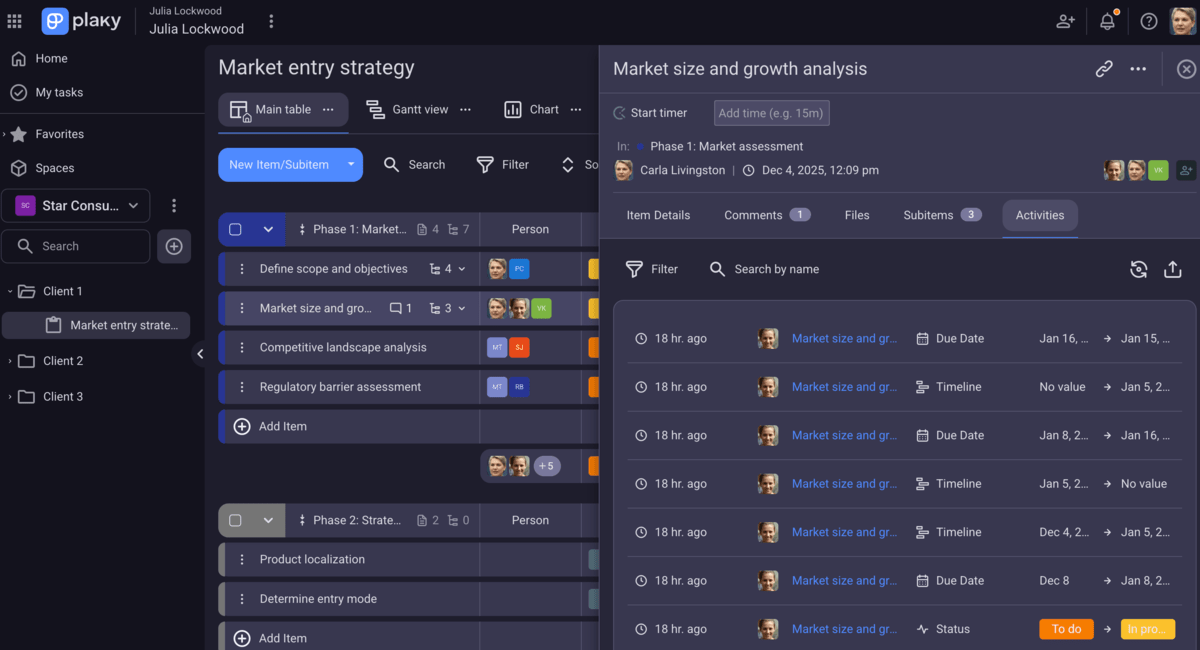
- Provide a real-time project overview to clients — Let your clients stay in the loop at all times via Plaky’s activity log. When invited to a board, each client can get an insight into the latest changes on the board or a particular task.
- Control schedules and staff — Set your consulting team for success by assigning tasks to team members and defining deadlines to get the work done. With time tracking integration, you can track the time spent on tasks and use the results to improve deadline management.
- Keep scope creep in check — Stay in control of all new clients’ requests, and don’t let your projects fall victim to scope creep. Use Plaky’s customer inquiries template to create a board where you’ll keep track of all requirements.
- Manage talent acquisition — Keep the best people with you by planning the talent acquisition process from start to finish in Plaky. You can use Plaky’s recruitment template to set up a board where you’ll manage the entire process and ensure it runs smoothly.
Try Plaky by CAKE.com for free
💡 Plaky Pro Tip
Plaky claims the top spot on our list of PM apps for consultants. Keep reading to discover the other essential tools we’ve selected:
Here’s how to use Plaky by CAKE.com for your consulting services
As a consultant, you’re valued for your know-how. From problem solving and data analysis to new technology implementation and change management — your expertise is exactly what businesses need to make headway.
However, keeping an eye on different projects, clients, and invoices becomes an uphill struggle once your consulting business starts getting ahead.
That’s why a tool like Plaky is perfect to bring order into your everyday work.
Let’s see how you can use Plaky to streamline your processes.
#1 Create a neat project structure
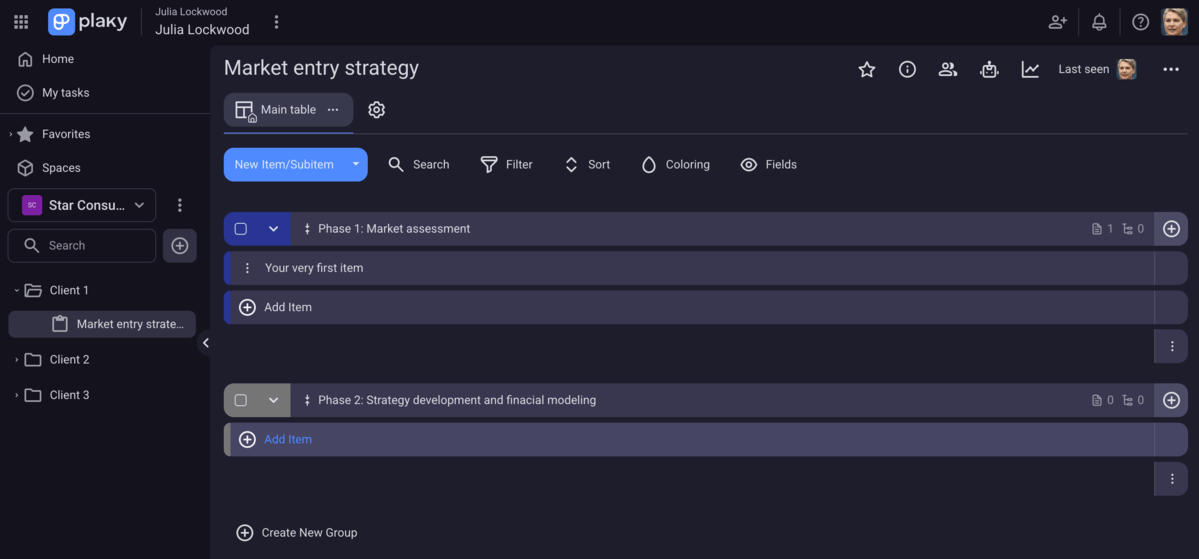
Good organization and structured workflows are a must for any consultant. With Plaky, you get a clear visual overview of all your project workflows thanks to its practical hierarchy:
- Space — Spaces are the top layer in the hierarchy and represent a homebase for your department, team, or project group.
- Board — Boards are located within a dedicated space, and you use them to build and manage projects.
- Folder — Folders are optional, but useful for placing related boards together to enhance organization. For example, you can create a folder for a client and keep all project boards you’re managing for that client within this dedicated folder.
- Item groups — Item groups are color-coded sections created within a board that you use to group items (single tasks, activities, or to-dos) effectively. You can organize items based on a project phase, a time frame, or any other criteria that makes sense to you.
You can start from scratch and build your first project in Plaky in less than 15 minutes, or choose one of the ready-to-use templates from Plaky’s template center.
💡 Check out Plaky’s Organization and Hierarchy article to get a deep understanding of how Plaky works.
#2 Manage your boards and tasks properly
With Plaky, you can create any type of project and set up completely different boards depending on your client’s needs.
Plaky provides flexibility that you won’t find in spreadsheets. Namely, you can list your tasks and group them in any way you want to keep the board clear and transparent.
Additionally, you can break down complex tasks into more digestible chunks thanks to subitems. This will improve clarity and secure easier task prioritization.
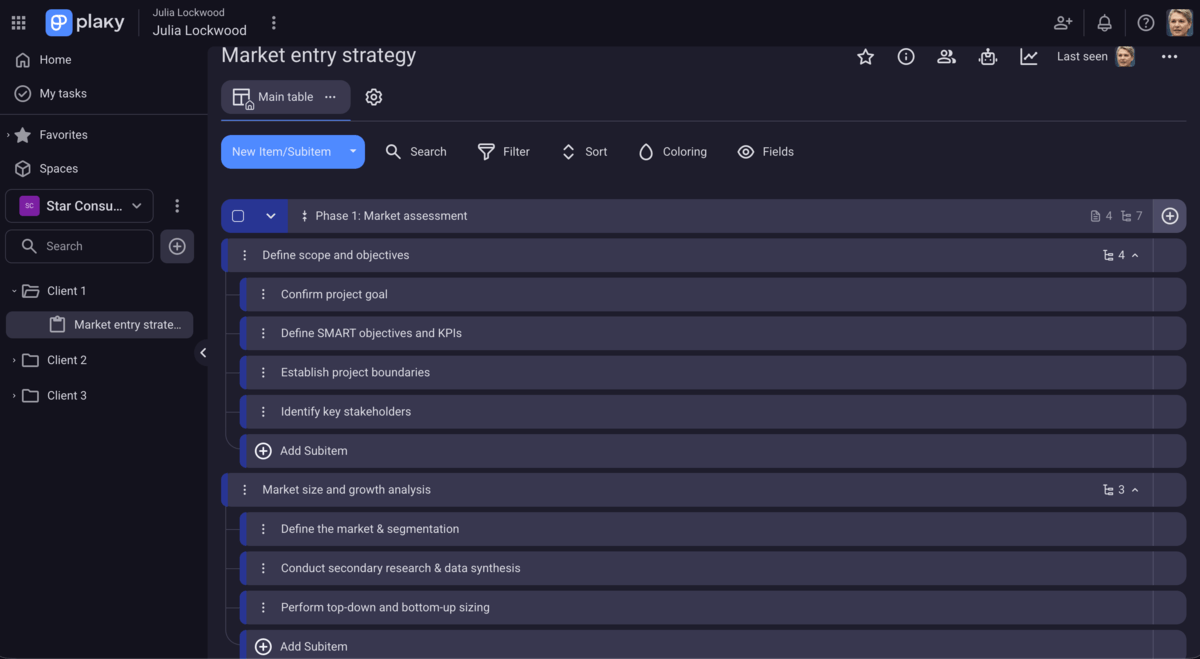
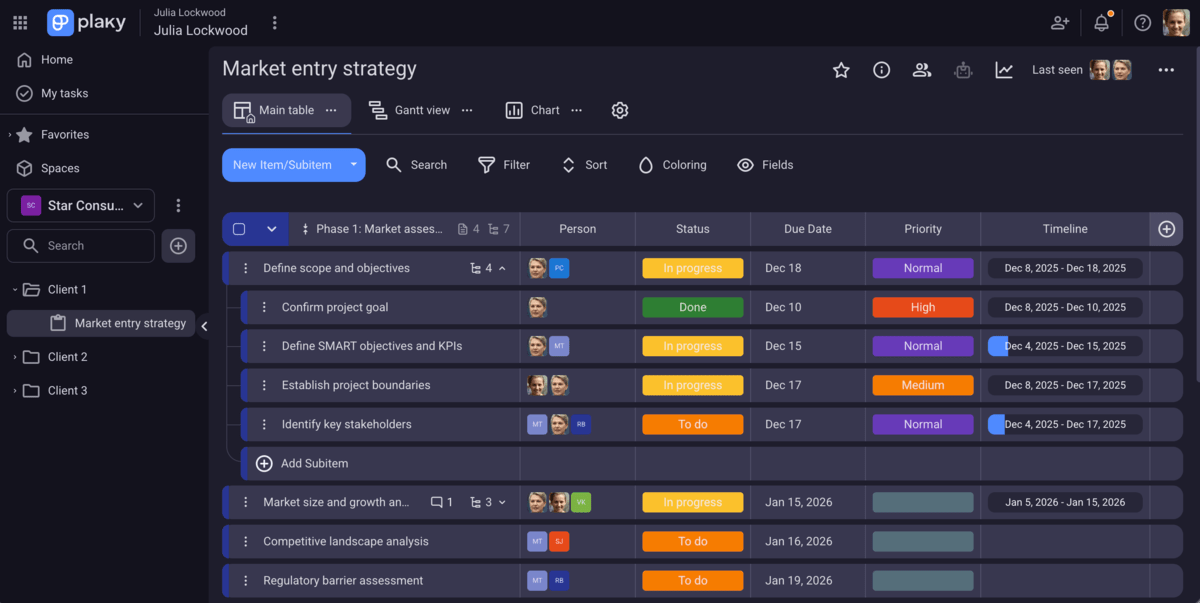
Once you’ve listed your tasks, you can add different custom fields to personalize your board. There are 9 fields you can choose from to define key task details:
- Date — Set a start date, deadline, review date, or any other time-related info.
- Status — Use color-coded labels to better track task progress and differentiate task statuses (To Do, In progress, Done, Stuck, etc.) and task priority (Low, Medium, High).
- Person — Add assignees and reviewers to your tasks to keep track of who is working on what.
- Number — Include any countable information like budget, costs, hours worked, etc.
- Text — Describe what task is all about, and give instructions to assignees.
- Rich text — Add more context to your task by including links, checklists, emoticons, etc.
- Link — Attach relevant URLs directly to tasks. These can be files, client websites, social media posts, reports, etc.
- Tag — Define keywords for each task to find what you need faster. You can tag teams, clients, departments, etc.
- Timeline (available on paid plans) — Visually track task duration by adding start and end dates.
💡 PLAKY PRO TIP
Plaky allows you to export a board in CSV format and share it with stakeholders. Also, if you want to transfer your project data from another tool to Plaky, here are our detailed guides:
#3 Collaborate with coworkers and clients effectively
According to the 2025 Workplace Communication Statistics, a stunning 63% of participants in one survey experienced wasted time at work due to broken communication.
Luckily, you won’t have to worry about such issues with Plaky as it has great solutions for effective project collaboration and communication.
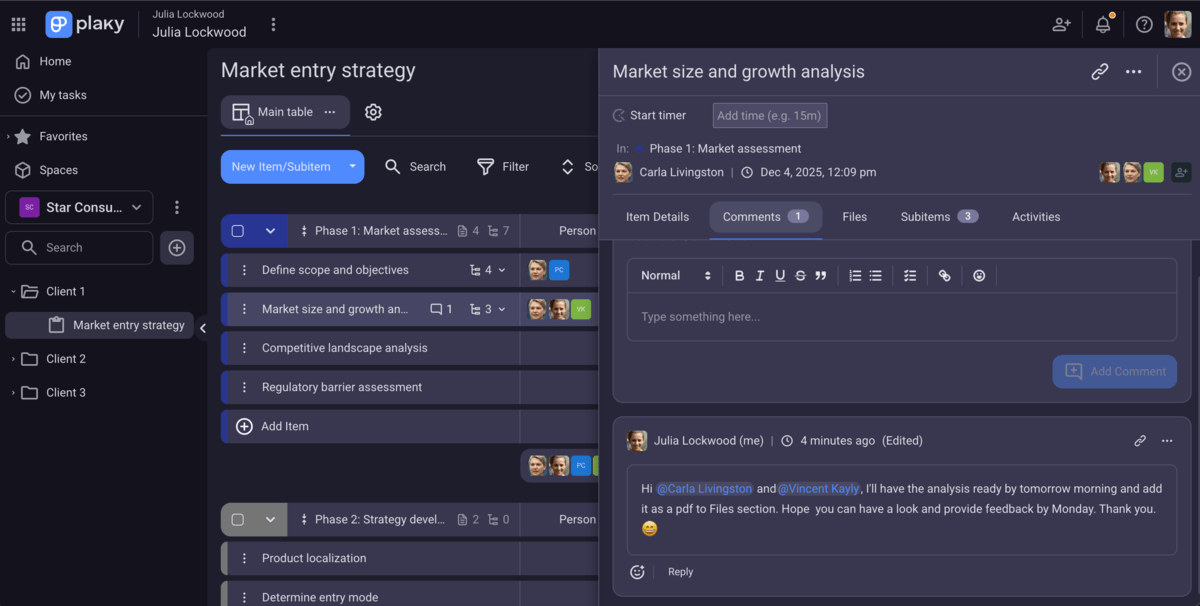
In Plaky, all task-related communication is kept within a task card so everyone involved can easily stay up to date. That said, team members can make comments, give feedback, and share related files within a task card, which speeds up the collaboration process.
And, if you @mention your coworker in the comment section, they’ll be immediately notified and be able to react in due course.
Another plus? Plaky keeps everyone on the same page with real-time notifications. They help team members track all project updates and ensure teams stay connected and work more efficiently.
But, how can you keep clients in the loop with Plaky?
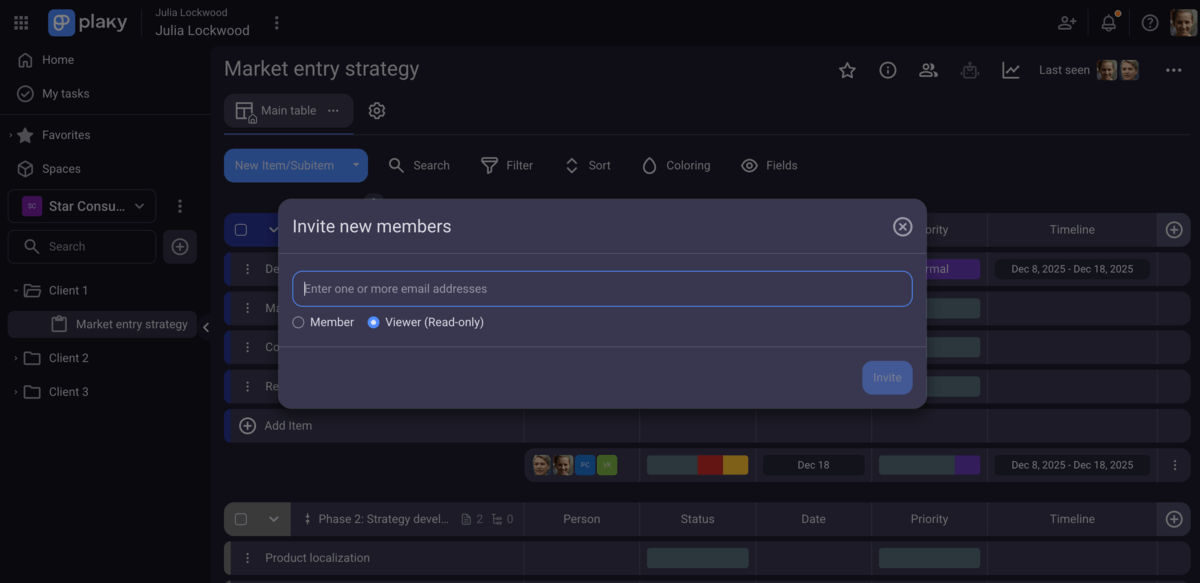
Well, Plaky’s paid plans allow you to add clients as viewers and subscribe them to both open and private boards. This role allows clients to read all the content available (read: keep track of project progress and see files, documents, and comments), but doesn’t give them editing permissions. Viewers get access to the user menu and can see team members and teams as well.
Note: Each paid seat in your Workspace allows you to invite up to 5 viewers at no additional cost.
#4 Easily track your project’s progress
Providing your clients with a first-rate service leaves little room for mistakes and missed deadlines. That’s why tracking projects’ progress is essential for any consulting team — and Plaky’s got your back here.
So, Plaky gives you 4 types of board views you can use to view your project from different perspectives, depending on what you need to keep tabs on:
- Table view — A default spreadsheet-like overview of your project tasks. You can use it to easily list tasks, group them, and add key fields. For example, if you have a dedicated board for your clients’ requests, this view is ideal to group requests per client or per status (e.g., Active, Completed, On hold, etc.)
- Kanban view — This view shows your tasks as cards organized into columns based on their status (or another category of your choice). You can detect bottlenecks easily and drag and drop your cards around the board to reprioritize them.
- Gantt chart view — This is the view all consultants love. With Gantt view, you’ll be able to get a visual roadmap of your project with each task appearing as a horizontal bar spanning its start and end dates. It’s a perfect view to monitor task progress and understand how tasks and deadlines relate to each other.
- Chart view — This view allows you to see your project progress in the form of interactive visuals. You can choose a pie or bar chart to spot trends and understand proportions of the work that is complete, in progress, or yet to be done.
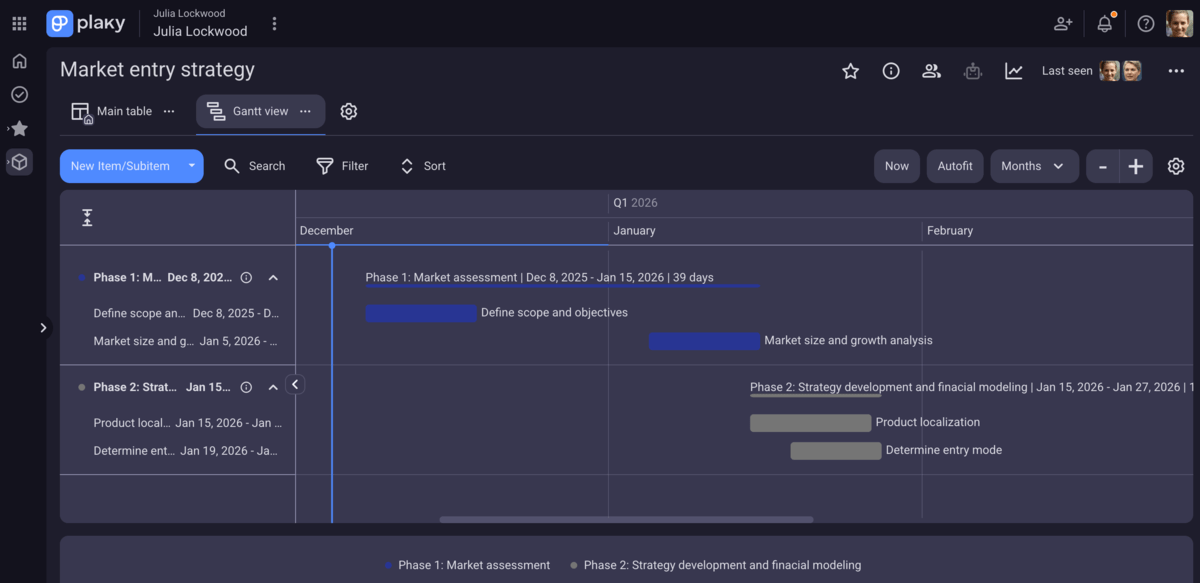
Mind you, these views are fully customizable and offer a good deal of sorting and filtering options so that you can find the data you need in a jiffy.
Bonus? With Plaky’s conditional coloring, you can track deadlines more effectively. This feature allows you to highlight an item as the deadline approaches, so you always know what to focus on first.
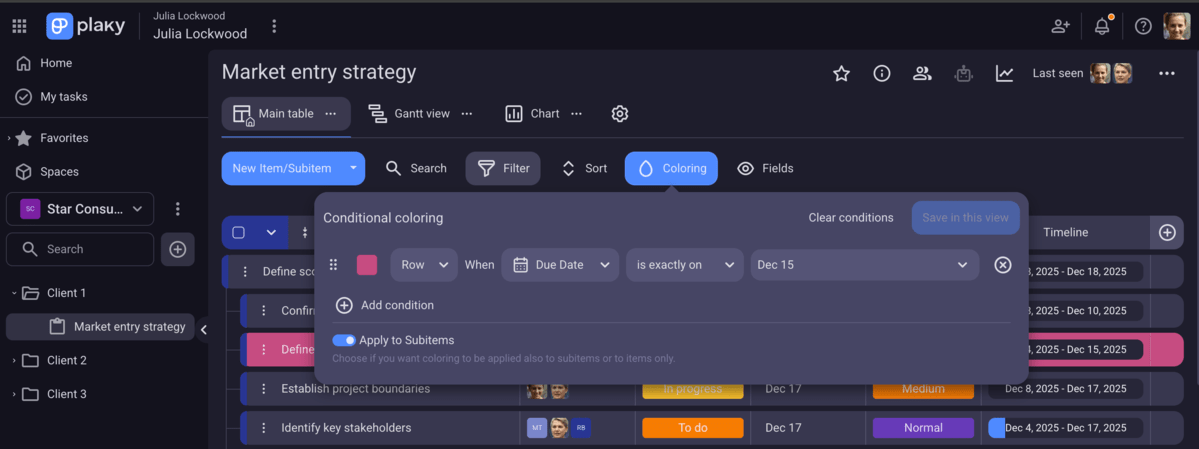
💡 Having trouble hunting your tasks among a bunch of others? Go to My tasks tab in Plaky’s sidebar, and find all the tasks assigned to you right here.
#5 Accurately track billable hours and streamline billing process
With tight deadlines and clients breathing down your neck, tracking the time you and your consulting team spend on tasks comes to the fore.
However, while you’re juggling your tasks and clients at the same time, the last thing you want is to waste time on tracking billable hours.
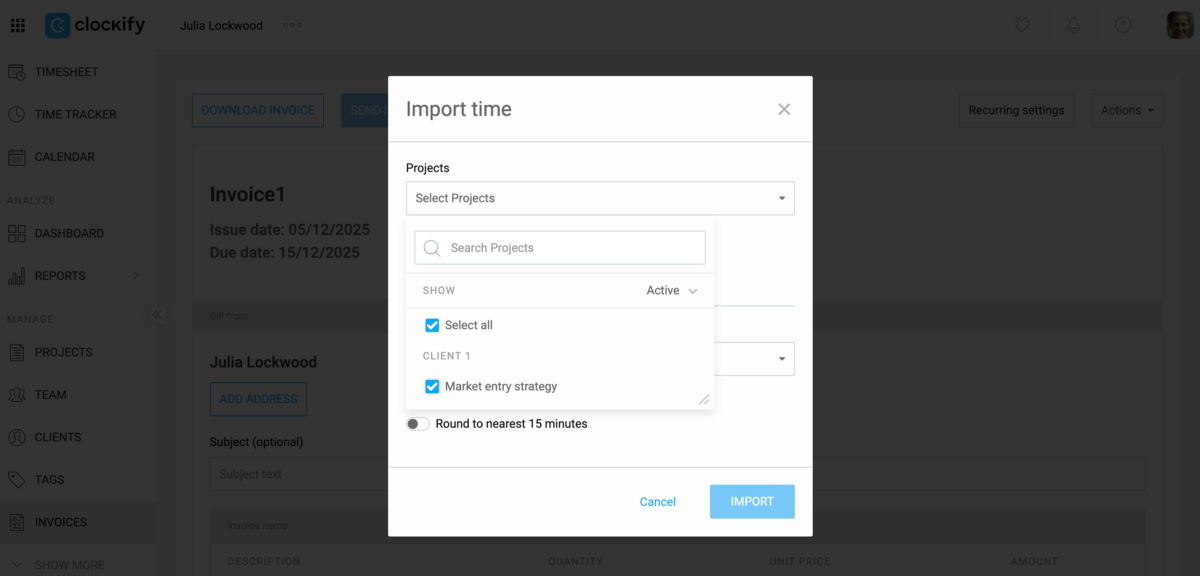
And that’s exactly where Plaky’s integration with Clockify can save the day. You can track the time spent on tasks in Plaky and generate invoices using this data in Clockify. What’s best, it’s completely free of charge (you only need a free Clockify account).
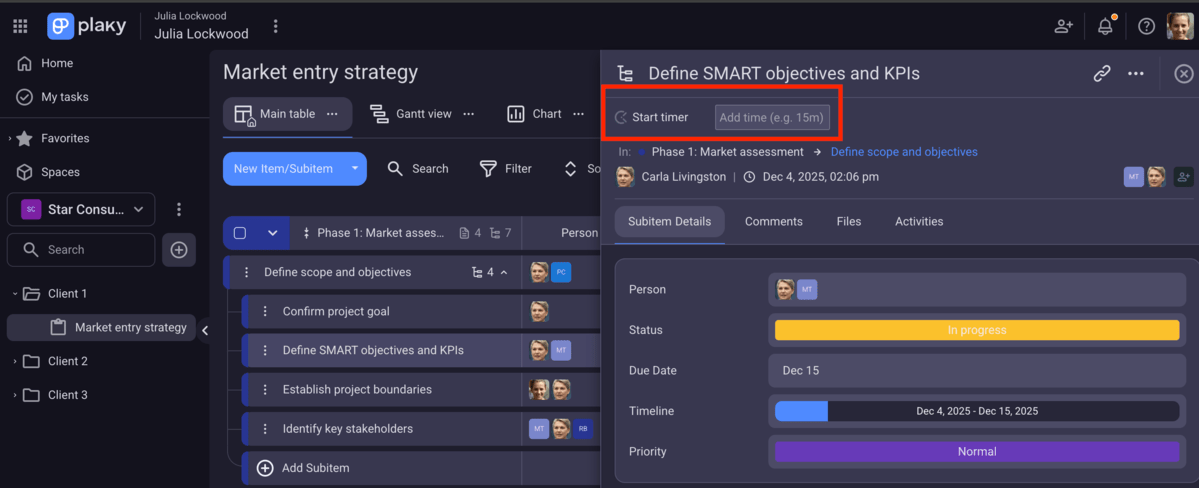
Once you set it all up, the Clockify timer button will automatically appear in all your tasks. You just need to start the timer at the beginning of your task in Plaky and stop it once you finish. Clockify will then ask you to add time from a popup window and have it all recorded. As simple as that!
To issue an invoice for your client, just go to your Clockify account to create it. It’s a pretty straightforward process, so you’ll have your invoice ready in less than no time.
Apart from helping you run time reports and streamline billing process, this integration enables you to:
- Improve future project estimations (cost and time),
- Get an insight into your team’s productivity, and
- Manage deadlines and progress better.
#6 Eliminate repetitive tasks with automation
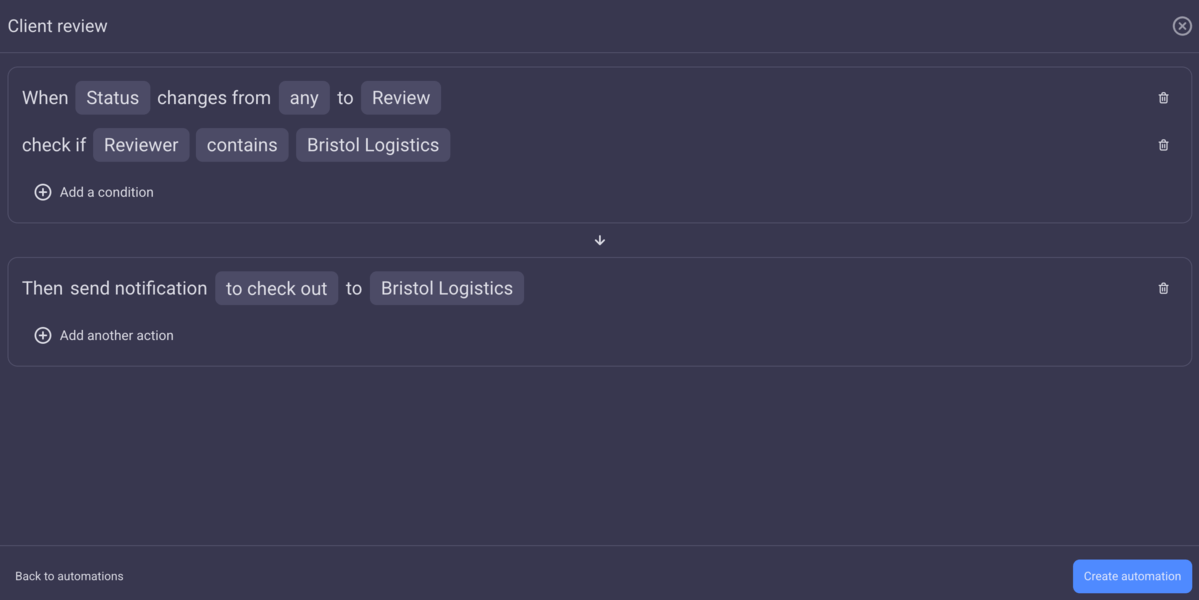
When your working day is chaotic, you can hardly find time for tedious repetitive work like moving tasks to the Done group or notifying your team about updates. With automations, you can stay focused on your strategic work, improve productivity, and reduce the chance of burnout.
By using the simple formula When this happens (Trigger) → Then do this (Action), you can apply automations to items, subitems, or a combination of both and save precious time. For example, you can use automation to add a client as a reviewer of a task once it’s done.
💡 PLAKY PRO TIP
Plaky’s dev team is working hard on improving current features and adding new ones. If you want to stay up-to-date with recent or upcoming functionalities, visit the pages below:
FAQ
If you’re still in doubt about whether Plaky is the right choice for your consulting business, here are the answers to some of the questions you might have.
What is the best free project management tool for consultants?
Plaky is the best free project management tool for consultants. It offers a generous free plan that includes unlimited users, spaces, boards, and tasks allowing you to plan and track as many client projects as you want. Plus, it offers many useful customizable templates you can use to speed up your work and save time.
Is Plaky actually free for commercial use?
Yes, Plaky is actually free for commercial use. You can try out Plaky’s Enterprise plan thanks to its 14-day free trial, which gives you a chance to put all of its advanced features to test and see whether it fits your needs. But, there’s also a robust free forever plan you can use for business.
Plaky vs. monday.com: Which is better for small agencies?
Definitely Plaky. Small agencies usually look for budget-friendly solutions, and Plaky is much more affordable in every way. For example, Plaky’s highest plan costs like monday.com’s Basic plan (the lowest paid plan).
In addition, Plaky’s free forever plan allows you to include unlimited users and boards, whereas monday.com has a 2-user cap on its free plan and is limited to just 3 boards.
Can I invite external clients to Plaky boards without paying?
Yes, you can invite external clients to Plaky boards without paying — as viewers. Once you upgrade to any of Plaky’s paid plans, each paid user seat gets the chance to invite up to 5 viewers at no additional cost. For example, if you have 10 user seats, you can invite 50 viewers.
Does Plaky integrate with Clockify for billable hours?
Yes, Plaky integrates with Clockify for billable hours. To enable this awesome integration, you need to have a free Clockify account and install the Clockify Time Tracker extension. This way your tasks get a timer, and Clockify registers the time spent once you confirm it right from Plaky. Then, Clockify takes the stage and handles the billing process.
How secure is Plaky for confidential client strategy data?
Your confidential client strategy data are completely safe with Plaky thanks to its 24/7 security audits and penetration tests. Plus, the platform is compliant with various security standards and certifications such as ISO/IEC 27001:2022, GDPR, (SOC) 2 Type II, and more.
Secure smooth client delivery with Plaky
Consulting business is all about delivering successful business strategies on time and making sure your clients are satisfied with the service.
However, when clients hire you, they expect you to solve their problems and pull them out of the fire. And, in case anything goes wrong, you’ll be the one to blame.
With Plaky to help you, you can simply plan, track, and execute clients’ projects and never lose control of a situation. What’s more, you can invite clients to take part in the process and keep them in sync at all times.
Best of all? With Plaky, there’s no limit on what you need most — users, spaces, boards, and tasks. And, you can have it all for free!
Plus, when your consulting team is ready to scale and upgrade, Plaky can lend a hand and offer one of its affordable paid plans.
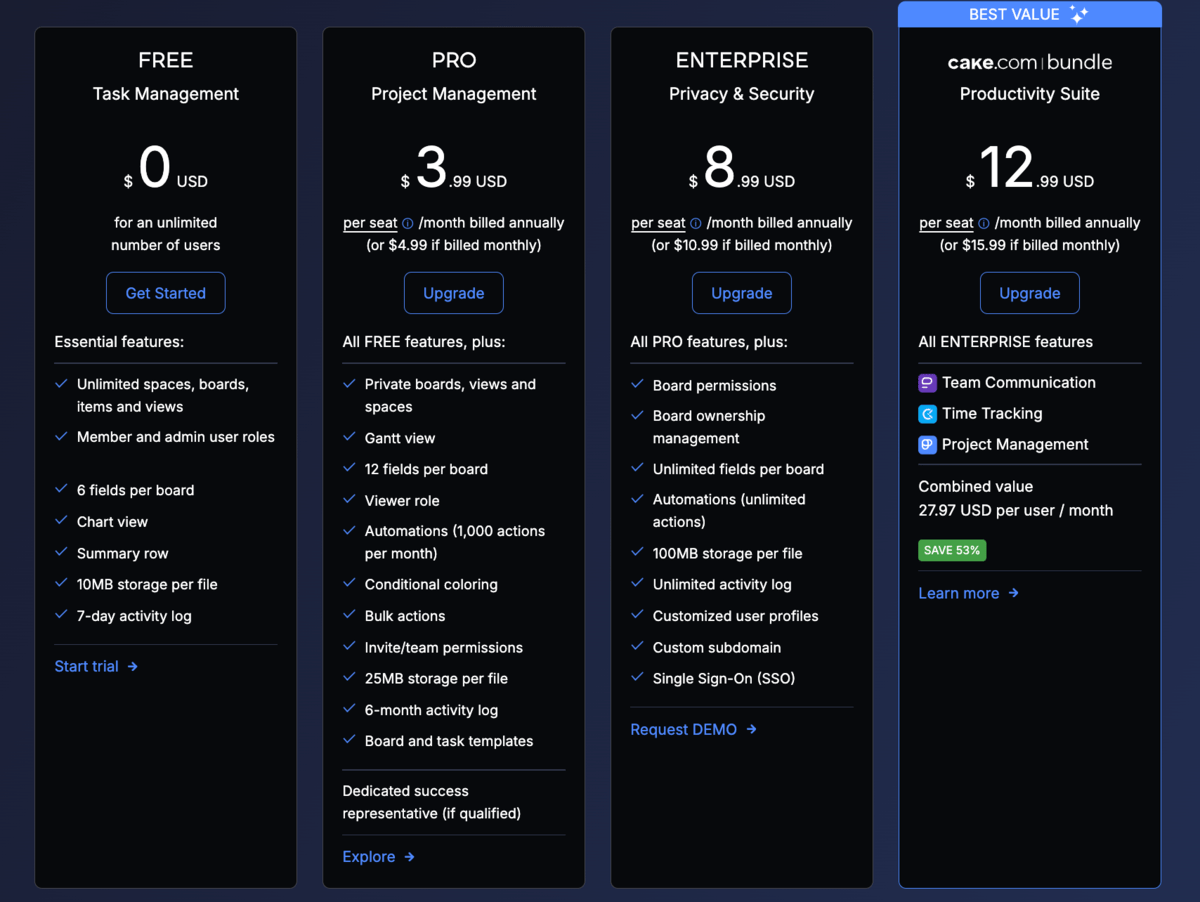
Moreover, you can opt for the CAKE.com Bundle, which includes Plaky, Clockify (a time tracking tool), and Pumble (a team communication app). For only $12.99/seat/month, you get a powerful productivity suite with access to 3 fully upgraded tools.
Keep your clients happy and manage projects smoothly! Try Plaky today!

