


Las ventas exigen agilidad mental; pocas industrias son tan dinámicas y aceleradas.
Para tener éxito, necesitas una forma de organizar el caos que conllevan las ventas y lograr una claridad total. Pero para ello, necesitas una herramienta que te ayude.
Así que elige la mejor herramienta para optimizar los flujos de trabajo de ventas: Plaky by CAKE.com.
Veamos por qué deberías usar Plaky para ventas, así como la mejor configuración para tu tablero de ventas.
- El plan Gratis de Plaky y sus asequibles planes de pago ayudan a los pequeños equipos de ventas con presupuesto limitado a mantenerse organizados.
- Los equipos de ventas utilizan Plaky para simplificar la incorporación de clientes con una herramienta fácil de usar, estar al tanto de los procesos diarios y proteger sus datos.
- Plaky ofrece diversas vistas de tablero (Gantt, Kanban, Gráfico y Tabla) para personalizar el intercambio de información, así como plantillas de ventas útiles para un inicio rápido y sencillo.
- Las automatizaciones del tablero de Plaky permiten a los equipos de ventas agilizar la transferencia de clientes, automatizar el pipeline de ventas y configurar recordatorios, mientras que el seguimiento del tiempo ayuda a identificar el coste de adquisición.
Por qué los equipos de ventas eligen Plaky by CAKE.com
Los equipos de ventas que quieren optimizar sus flujos de trabajo y potenciar el trabajo en equipo están optando por Plaky.
Veamos qué hace que Plaky sea perfecto para ventas.
1. Incorporación sencilla
La frase “el tiempo es oro” puede sonar a cliché, pero es muy cierta en la gestión de proyectos de ventas. Gracias a la facilidad de uso de Plaky, ahorrarás tiempo que de otro modo dedicarías a la incorporación de empleados, lo que también te permitirá ahorrar dinero.
Todas las funciones son intuitivas, por lo que familiarizarse con la aplicación es muy sencillo. Esto no solo es importante para ti y tu equipo, sino también para la incorporación de clientes.
¡No pierdas tiempo! ¡Descarga Plaky hoy!
2. Excelente seguridad de la información
Los representantes de ventas manejan mucha información de clientes, la mayoría de la cual es confidencial y no debe caer en manos equivocadas.
Plaky garantiza la seguridad de todos los datos almacenados en la aplicación, cumpliendo con los estándares de seguridad más recientes, como:
- ISO 27001,
- SOC 2, y
- RGPD.
Además, cada etapa del proceso de desarrollo de Plaky se lleva a cabo con personal altamente capacitado, pruebas exhaustivas y almacenamiento en la nube.
El mantenimiento de Plaky es el más confiable del mercado: sus servidores tienen una disponibilidad del 99,99 %. Así, puedes estar seguro de que nunca te encontrarás en situaciones complicadas donde la información del cliente no esté disponible y un representante de ventas la necesite.
3. Aplicación móvil útil
Las ventas pueden ser impredecibles: si un cliente potencial solicita una reunión presencial, debes estar preparado.
Por suerte, Plaky te acompaña a todas partes con su práctica aplicación móvil. Toda la información del cliente está a tu alcance: estarás listo para esa llamada inesperada en cualquier momento y lugar.
Además, siempre podrás comunicarte con tus colegas. Las notificaciones son instantáneas, y si necesitas información adicional mientras estás con el cliente, solo puedes comentar y mencionar al representante de ventas anterior para obtener una respuesta rápida.
En resumen, la aplicación móvil de Plaky garantiza que todo el equipo esté al día, sin importar dónde se encuentre.
4. Planes de suscripción asequibles
Plaky es una de las herramientas de gestión de proyectos más económicas del mercado; con ella, puedes reducir costes y obtener un rápido retorno de la inversión.
Simplemente elige el plan que mejor se adapte a tu flujo de trabajo:
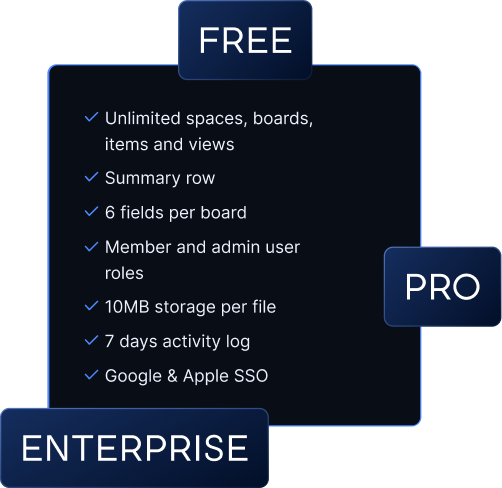
- El plan gratuito: obtendrás usuarios, elementos y vistas ilimitados, además de la fila de resumen, que te brinda información rápida sobre los datos del proyecto,
- El plan Pro por 3,99 $: obtendrás la vista de Gantt para gestionar fácilmente el cronograma del proyecto o acciones masivas para modificar varios elementos a la vez,
- El plan Enterprise por 8,99 $: gestiona los permisos del tablero para aumentar la seguridad de la información y consulta el registro de actividad ilimitado para ver todos los cambios realizados en tu tablero, y
- El paquete CAKE.com Bundle por 12,99 $: obtendrás Clockify para el control del tiempo, Pumble para la comunicación en equipo y Plaky para la gestión de proyectos. ¡Lo mejor de todo es que obtienes 3 herramientas por el precio de 1!
Cómo usar Plaky by CAKE.com para liderar una campaña de ventas exitosa
Los principios básicos de Plaky se alinean con las necesidades de los equipos de ventas. Pero, ¿qué hay de lo realmente importante: las funciones que ofrece?
Aquí tienes una guía paso a paso de todo lo que puedes hacer para crear un tablero de campaña de ventas perfecto en Plaky.
1. Configura tu sistema fácilmente con plantillas de ventas
Ya hemos mencionado que la incorporación a Plaky es rapidísima, pero esa no es la única razón por la que configurar un tablero es tan sencillo.
Plaky también ofrece una gran variedad de plantillas prediseñadas para que empieces a trabajar de inmediato. Hay muchas para elegir, pero las mejores para los equipos de ventas son:
- Pipeline de ventas: La plantilla básica de ventas que te ayuda a visualizar tu pipeline de ventas. Mantén toda la información de los clientes potenciales y realiza un seguimiento del progreso de la venta en tiempo real con campos personalizados ya configurados para el éxito. Toma nota de todas las conversaciones en curso y asegúrate de que no se te escape ninguna oportunidad.
- Acuerdos: Gestiona a tus clientes de la forma correcta con esta plantilla de CRM. Determina la probabilidad de cerrar una venta y realiza un seguimiento de los clientes potenciales por prioridad para asegurarte de no perder el tiempo en tareas menos valiosas. Esta plantilla también se centra en las etapas clave de tu pipeline de ventas y te permite estar al tanto de las necesidades de los clientes.
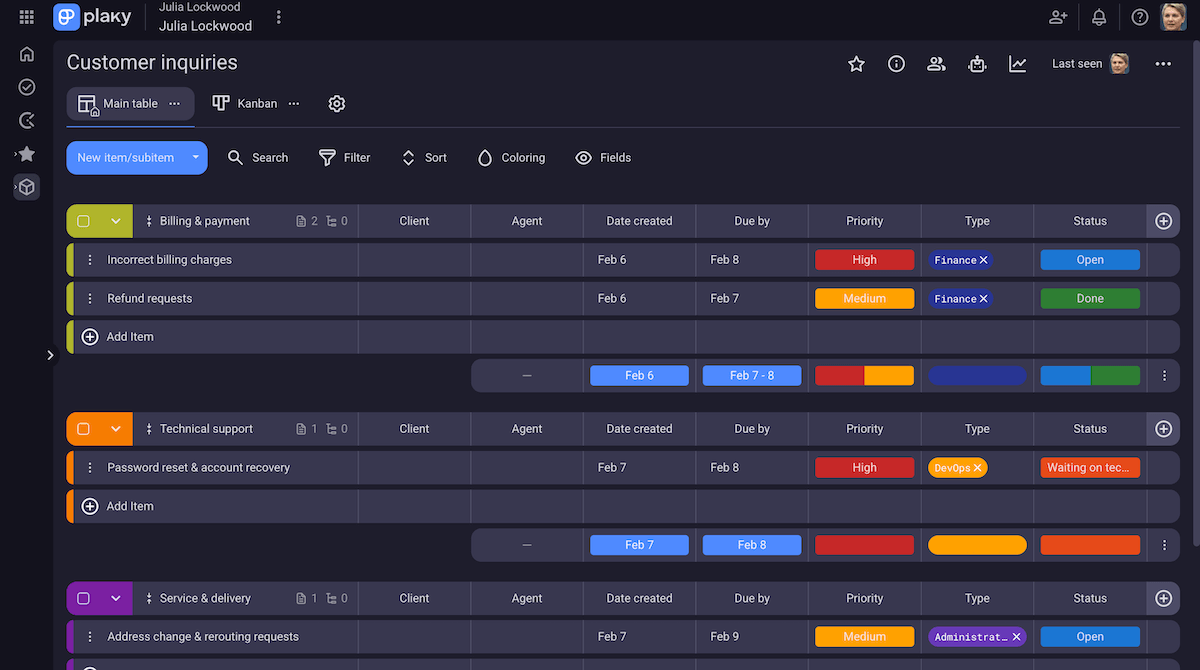
- Consultas de clientes: Las consultas de los clientes requieren respuestas rápidas. Con esta plantilla, puedes mantener todos los tickets organizados con grupos de elementos claros y aumentar la responsabilidad asignando responsables específicos. Esto te ayuda a mantener a los clientes satisfechos con un servicio rápido y a guardar soluciones para problemas similares en el futuro.
- Plantilla de gestión de inventario: No hay nada más incómodo que cerrar un trato y darte cuenta de que no tienes el producto en stock. Evita que esto vuelva a suceder con esta plantilla de gestión de inventario. Te ofrece una visión general clara de los identificadores de producto, ubicaciones, precios, etc. De esta manera, siempre podrás proporcionar la información más actualizada y precisa al realizar una venta.
Hay aún más opciones en el centro de plantillas de Plaky, desde listas de contactos de clientes hasta plantillas sencillas de gestión de proyectos. Seguro que encuentras una que se adapte a tu equipo.
💡 CONSEJO PRO DE PLAKY
¿Quieres más plantillas que mejoren tu proceso de ventas? Consulta este útil artículo:
2. Visualiza todo en tu tablero con vistas personalizadas
Con Plaky, obtienes transparencia total gracias a las diferentes vistas del tablero.
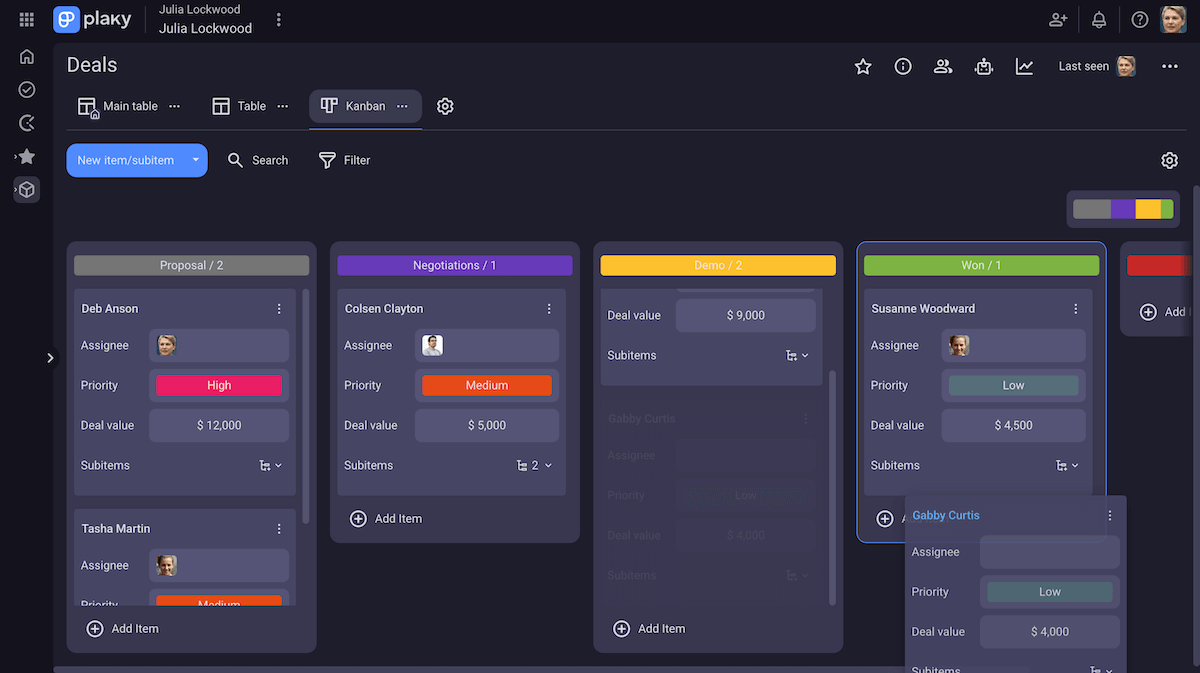
La mejor vista para los equipos de ventas es Kanban: es la forma perfecta de visualizar tu pipeline de ventas.
Visualiza tus tareas como tarjetas y divídelas en grupos que pueden representar cualquier campo personalizado. Idealmente, uno de ellos es la fase de ventas, para que puedas mover a los clientes claramente a lo largo del pipeline con la sencilla función de arrastrar y soltar que ofrece la vista Kanban.
De esta forma, actualizar el progreso de las oportunidades en el tablero es intuitivo y rápido.
También puedes aprovechar la vista de tabla y la total transparencia que ofrece. Tendrás una visión general clara de todos los datos de las tareas.
3. Automatiza el pipeline de ventas
Ahora que todo está configurado, es hora de optimizarlo.
Las automatizaciones de Plaky te ayudan a acortar el ciclo de ventas eliminando las tareas innecesarias que tu equipo no necesita realizar. ¿Por qué hacer algo que Plaky puede hacer por ti?
Todos los procesos y responsabilidades manuales del tablero se pueden eliminar mediante la automatización. De esta forma, tu equipo no sufre sobrecarga de trabajo y te aseguras de que no haya errores debido a la entrada de datos por parte del usuario.
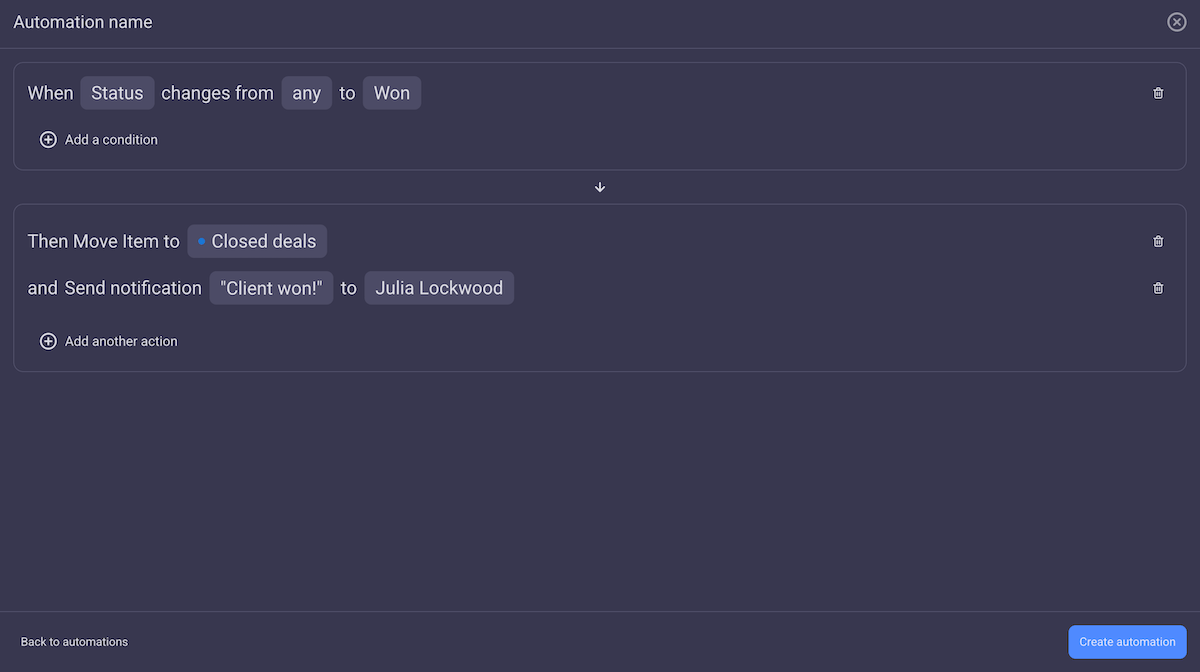
Esto se debe a que cada automatización se basa en una función "SI-ENTONCES", lo que significa que se ejecuta siempre de la misma manera. Por ejemplo: “SI el estado de una venta es 'ganada', mueve el elemento a 'Hecho' y notifica al gerente.” Con la automatización de tareas de Plaky, eliminas dos pasos que un representante de ventas debe seguir cada vez que realiza una venta.
💡 CONSEJO PRO DE PLAKY
Si quieres sacarle el máximo a las automatizaciones de Plaky, consulta esta increíble guía:
4. Configura recordatorios claros
Hacer seguimiento a los clientes potenciales es fundamental; sin embargo, con tanto trabajo y un sinfín de clientes a los que llamar, es fácil olvidarse de una o dos reuniones.
Tu equipo necesita recordatorios constantes. Pero si te toca a ti, nunca tendrás tiempo para tareas de gestión. ¡Así que deja que Plaky se encargue de eso!
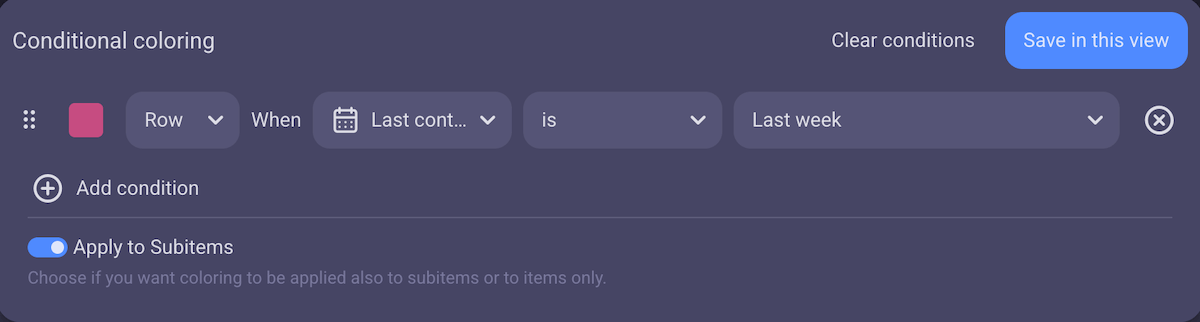
Con la coloración condicional, puedes configurar una automatización que se active según fechas específicas. Una vez que se active, puedes asignar un color específico a toda la tarea.
Por ejemplo, puedes configurar una condición para que la página se ponga roja si el campo “Fecha de contacto” corresponde a la semana pasada. De esta forma, sus representantes de ventas recibirán un recordatorio visual claro en cuanto deban ponerse en contacto con un cliente.
5. Gestiona la transferencia de clientes sin problemas
Uno de los mayores problemas a los que se enfrenta cualquier equipo de ventas es cuando un cliente debe pasar de un vendedor a otro. Si el nuevo vendedor no puede ponerse al día fácilmente con el progreso de la venta o no encuentra la información del cliente, la venta prácticamente se pierde.
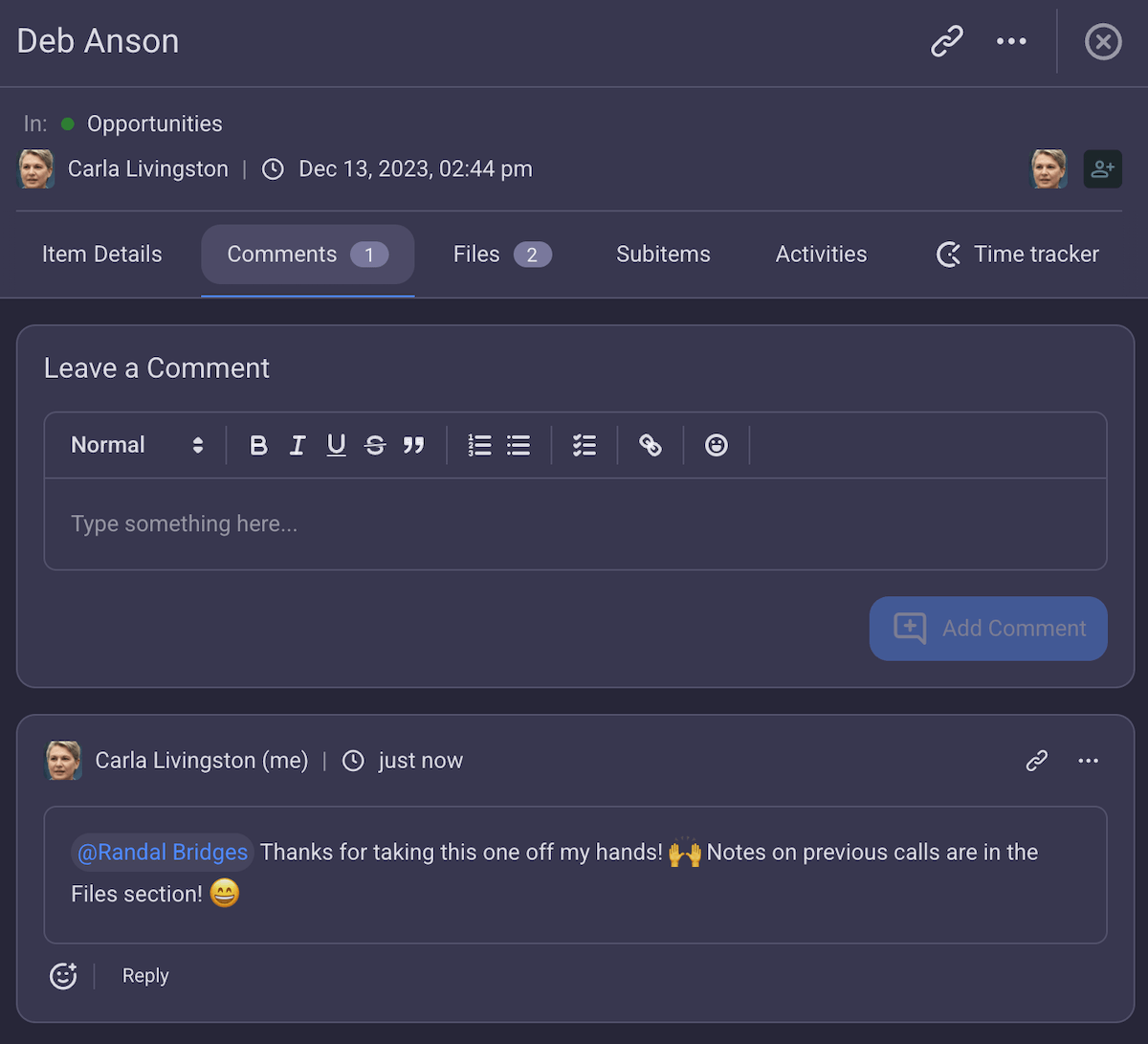
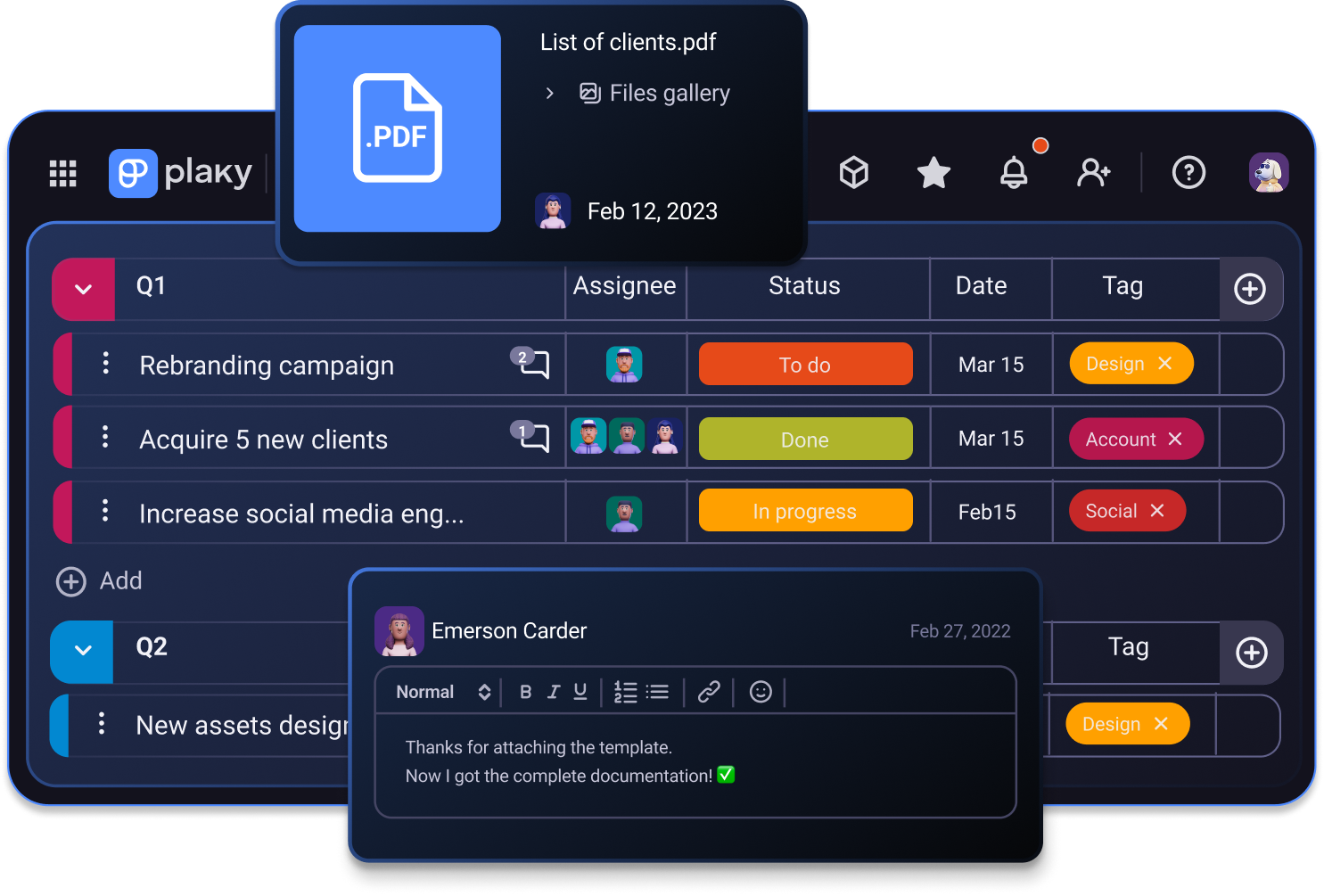
Plaky garantiza que la información del cliente nunca se extravíe, proporcionándote un lugar fijo para almacenarla: la pestaña de compartir archivos. Con un espacio dedicado en cada elemento para compartir archivos, los miembros de tu equipo siempre sabrán dónde encontrar los datos del cliente.
Esto significa que no tienes que depender de que los miembros de tu equipo transmitan toda la información durante la transferencia del cliente.
En cambio, puedes tener una única fuente de información fiable: Plaky.
Además, si necesitan aclarar algo, pueden dejar un comentario @mencionando a otro vendedor. La respuesta permanece en ese hilo de comentarios, disponible para los miembros del equipo con la misma pregunta, lo que ahorra tiempo y mejora el trabajo en equipo.
Además, en Plaky los comentarios tienen respuestas directas, así que si varias personas se comunican, no hay confusión sobre quién habla con quién. Estos hilos de respuestas también organizan la información de forma más clara, por lo que encontrar información en conversaciones antiguas es muy rápido.
6. Analiza el éxito de ventas con la vista de gráficos
No puedes estar seguro de que un nuevo flujo de trabajo funcione sin analizar el éxito de tu equipo.
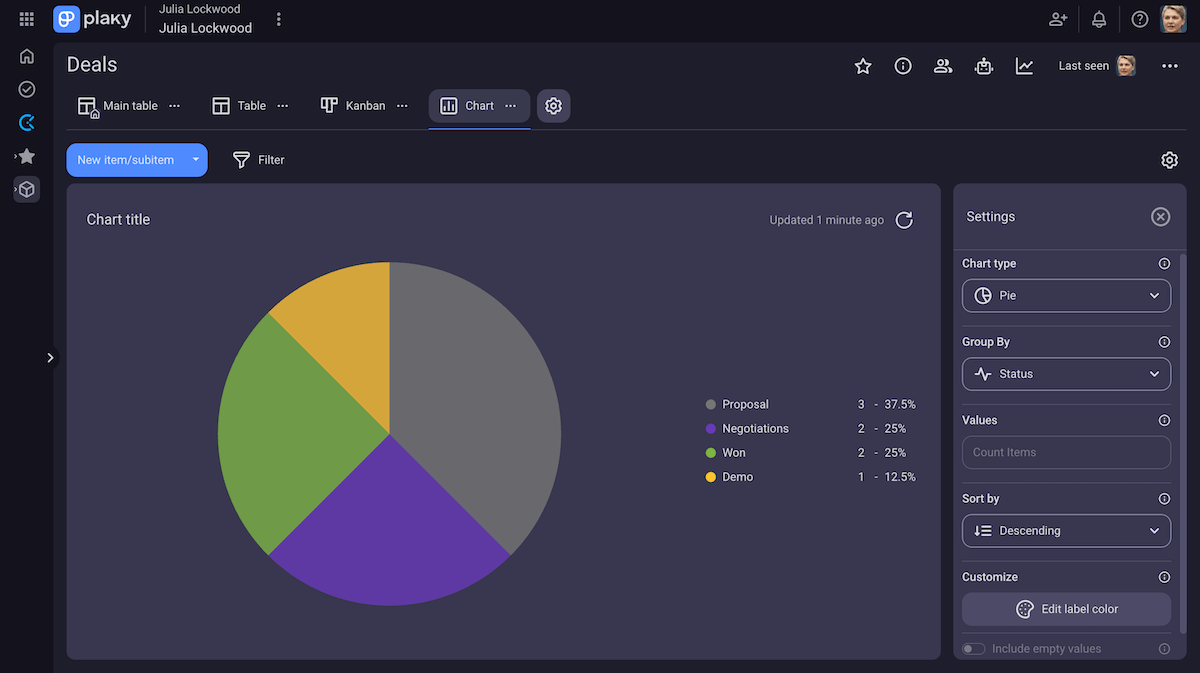
Por eso necesitas una evaluación práctica: la vista de gráficos de Plaky. Esta vista desglosa de forma clara y visual todos los datos de tu tablero en un gráfico circular o de barras.
Cada gráfico es totalmente personalizable y te permite monitorear elementos según cualquier campo personalizado. Esto significa que puedes monitorear muchos indicadores clave de rendimiento para los equipos de ventas, como:
- Ventas que pasaron a la demo,
- Satisfacción del cliente,
- Motivos de fracaso de las ventas, y
- Porcentaje de respuesta de propuestas.
Estos resultados se sincronizan con tu tablero en tiempo real para que recibas actualizaciones instantáneas.
Te ayudan a tomar mejores decisiones para el trabajo futuro mostrándote cómo debes asignar los recursos. Por ejemplo, si la mayoría de tus ventas provienen de un sector específico (que puedes rastrear con un campo de Etiqueta personalizado), sabrás dónde concentrar tus esfuerzos de venta.
7. Determina el CAC con el control del tiempo
Una de las métricas clave para el seguimiento en un equipo de ventas es el Coste de Adquisición de Clientes (CAC). Esto te indica si debes seguir adelante con un cliente potencial o no, y qué tan valioso es realmente.
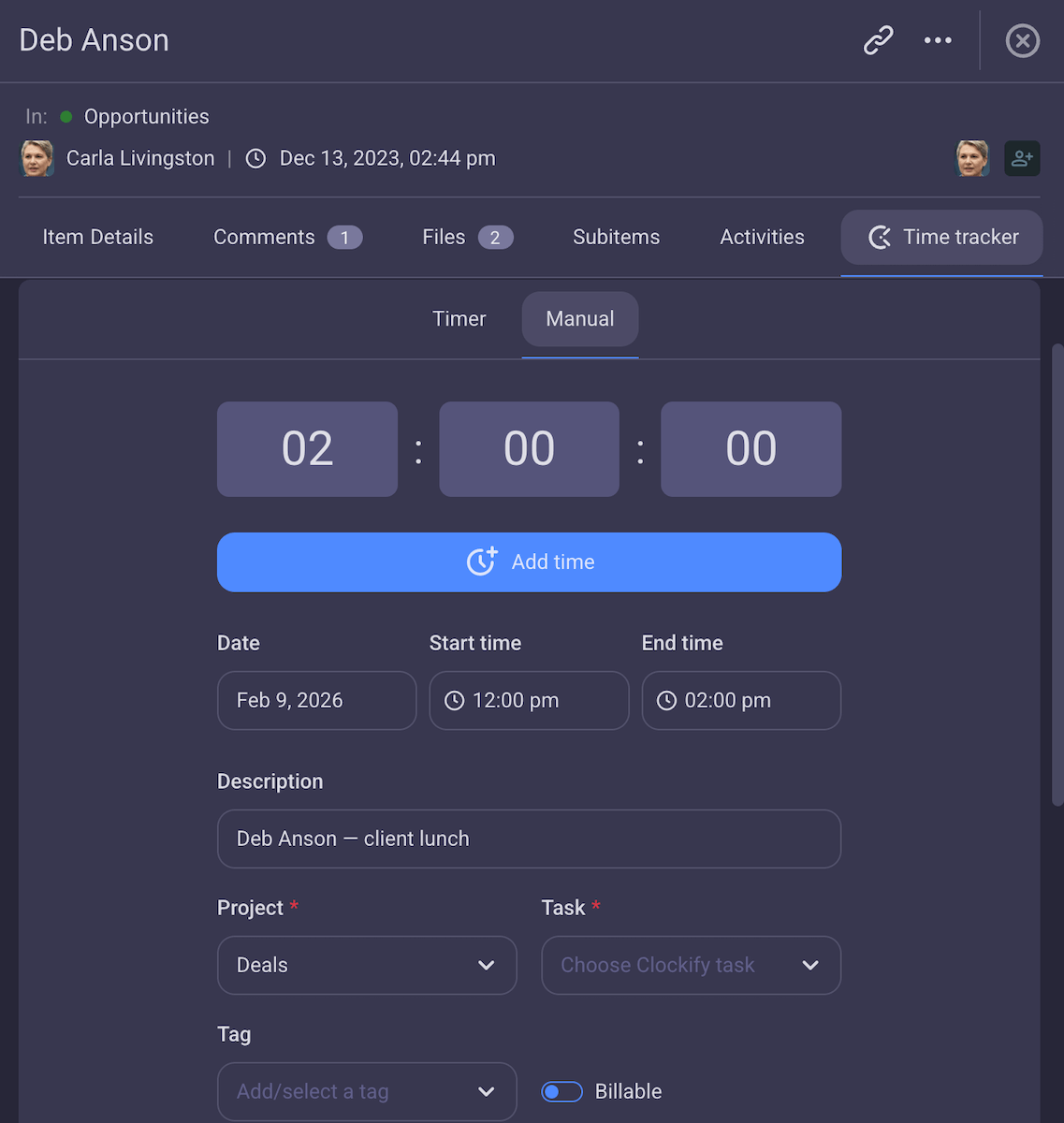
Para eso, necesitas saber cuánto esfuerzo se requirió para cerrar la venta, y la integración del seguimiento del tiempo de Plaky con Clockify te ayuda a lograrlo.
Con esta integración, cada elemento tiene una pestaña independiente dedicada al seguimiento del tiempo. Con cada llamada, los representantes de ventas pueden registrar cuánto tiempo les tomó. Lo mejor de todo es que puedes convertir este tiempo en tiempo facturable; si bien no le cobrarás al cliente por el tiempo, puedes usar los resultados para calcular el CAC fácilmente.
Además, también sabrás cuánto tiempo se pierde en reuniones, actualizaciones de CRM, etc. De esta manera, puedes eliminar las consultas innecesarias y asegurarte de que tu equipo dedique tiempo a tareas que realmente generen ingresos.
Simplifica los flujos de trabajo de ventas con Plaky by CAKE.com
Deja de perder tiempo organizando a tu equipo de ventas por tu cuenta: ¡deja que Plaky by CAKE.com te ayude!
Utiliza los campos personalizados, las vistas y los comentarios para que tu proceso sea transparente y mantén a tu equipo informado.
Aprovecha la vista de gráficos y el control del tiempo para mejorar la toma de decisiones y supervisar el rendimiento de tu operación.
Optimiza las tareas de ventas mediante la automatización de Plaky y ahorra un tiempo valioso.
Obtén todo lo que necesitas para optimizar tus ventas: ¡toma la decisión correcta con Plaky!
Cómo revisamos esta publicación: Nuestros escritores y editores monitorean las publicaciones y las actualizan cuando hay nueva información disponible, para mantenerlas frescas y relevantes.