



Looking for a project management (PM) tool worthy of your team’s trust and budget?
Perhaps I can make that choice a little easier for you.
As you can tell from the title of this article, I’m comparing Plaky by CAKE.com and monday.com AI work platform. Both promise to boost productivity and streamline work, but which one actually delivers the best value?
While the 2 apps are similar in some aspects, once you dig deeper, the differences in pricing and user experience reveal which one could be a much better fit for you.
Let’s dive right in!
- Unlike monday.com, Plaky doesn’t limit the number of users on its free plan.
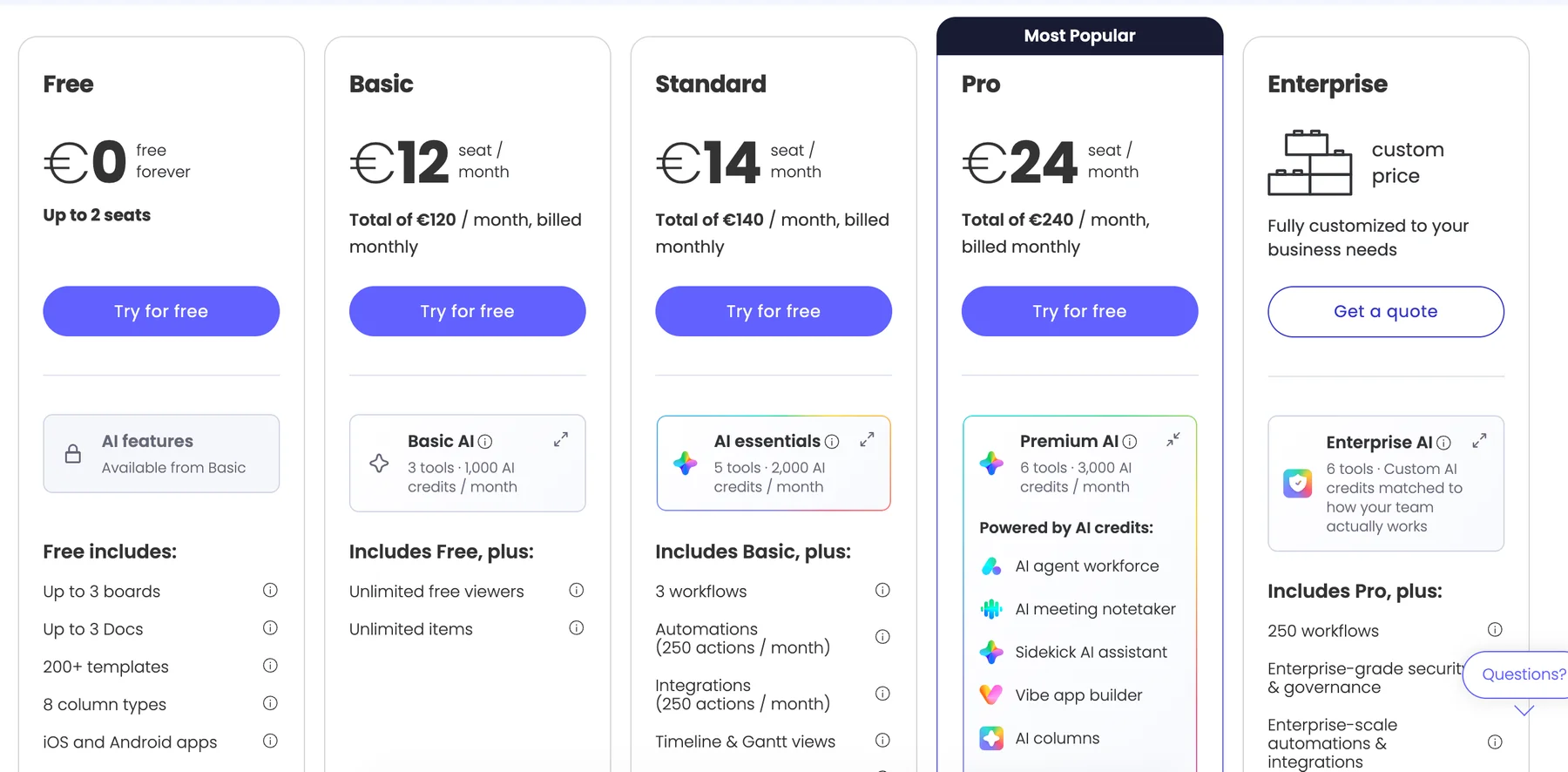
- monday.com offers AI features paid through mandatory AI credits starting with 1,000 credits on the Basic plan. The Standard plan has 2,000 AI credits, and the Pro gets you 3,000 credits.
- Plaky has a flexible pay-per-user model whereas monday sells seats in fixed increments (3, 5, 10, 15, etc.).
- Plaky provides 24/7 customer support to users across all its tiers while monday.com offers this kind of support to paid plan users only.
- monday.com has over 850 integrations available at higher paid plans.
Plaky by CAKE.com vs. monday.com: A quick overview
The main difference between the 2 platforms has to do with their pricing and accessibility to small and/or budget-conscious teams.
Plaky offers unlimited tasks and users — in other words, there’s no minimum/maximum number of users, regardless of the plan you choose.
On the other hand, monday.com is much more restrictive in that sense, as you’ll see if you keep reading.
Other than that, both apps offer advanced task management and top-grade security, so it’s the more nuanced differences that’ll help you decide which one’s better for you.
Here’s a quick side-by-side overview of how Plaky and monday.com compare.
| Feature | Plaky by CAKE.com | monday.com |
|---|---|---|
| Pricing | Free plan Paid plans start at $3.99/seat/month (billed annually) | Free plan (up to 2 seats) Paid plans start at $9/seat/month (billed annually, min. 3 seats) |
| Platforms & devices | web, iOS, Android | web, macOS, Windows, iOS, Android |
| UI/UX | Neat menus Light/dark theme Intuitive and responsive | Clean design Light/dark/night theme Laggy with large boards |
| Task management & progress tracking | Advanced | Advanced, supported by AI |
| Team collaboration | Comments & reactions @mentions File sharing | Comments & reactions @mentions File sharing & annotation |
| User roles & permissions | Different user and ownership layers Admin settings | Different user roles Admin settings Audit log and panic mode (paid plans) |
| Notifications & activity tracking | Real-time notifications Activity log | Real-time notifications Activity log |
| Integrations | Clockify, Pumble | 850+ integrations |
| Segurança | Advanced | Advanced |
| Suporte | 24/7 email, chat, and phone support Ajuda Knowledge hub, guides, and tutorials | Email and chat support (24/7 on paid plans) Ajuda Community forum Daily live webinars (paid plans) |
If you’re looking for a quick verdict on which app suits which team best, without going into the details on each app, jump ahead.
💡PLAKY PRO TIP
Want to calculate your exact savings on team collaboration software? Give our savings calculator a try:
What’s new in Plaky by CAKE.com?
The most notable novelties in Plaky are:
- Protected board view — you can give members access to a filtered board view, which can’t be changed.
- Public board link — you can share a public board link with people outside of your organization so they can view and track status changes.
- Chart export — you can download individual widgets as PDF, SVG, PNG, and JPG files or export entire charts as PDF, PNG, and ZIP files.
- Dashboards — use dashboards to summarize and better visualize information and get better insight into what your team is working on.
To see other new features and improvements, visit Plaky’s changelog. And, if you’re interested in upcoming releases, check out Plaky’s roadmap.
What’s new in monday.com?
One of the biggest changes to monday.com in 2026 is its new AI-credit pricing model.
For customers who joined monday.com from May 6, 2026, AI credits are purchased as part of the setup alongside seats. The minimum monthly allocation is:
- Basic: 1,000 AI credits
- Standard: 2,000 AI credits
- Pro: 3,000 AI credits
- Enterprise: Custom
You can purchase larger credit buckets on Standard and Pro if your team uses AI more often.
Recent product updates include improvements to board organization, connected-board visibility, and AI-powered workflows.
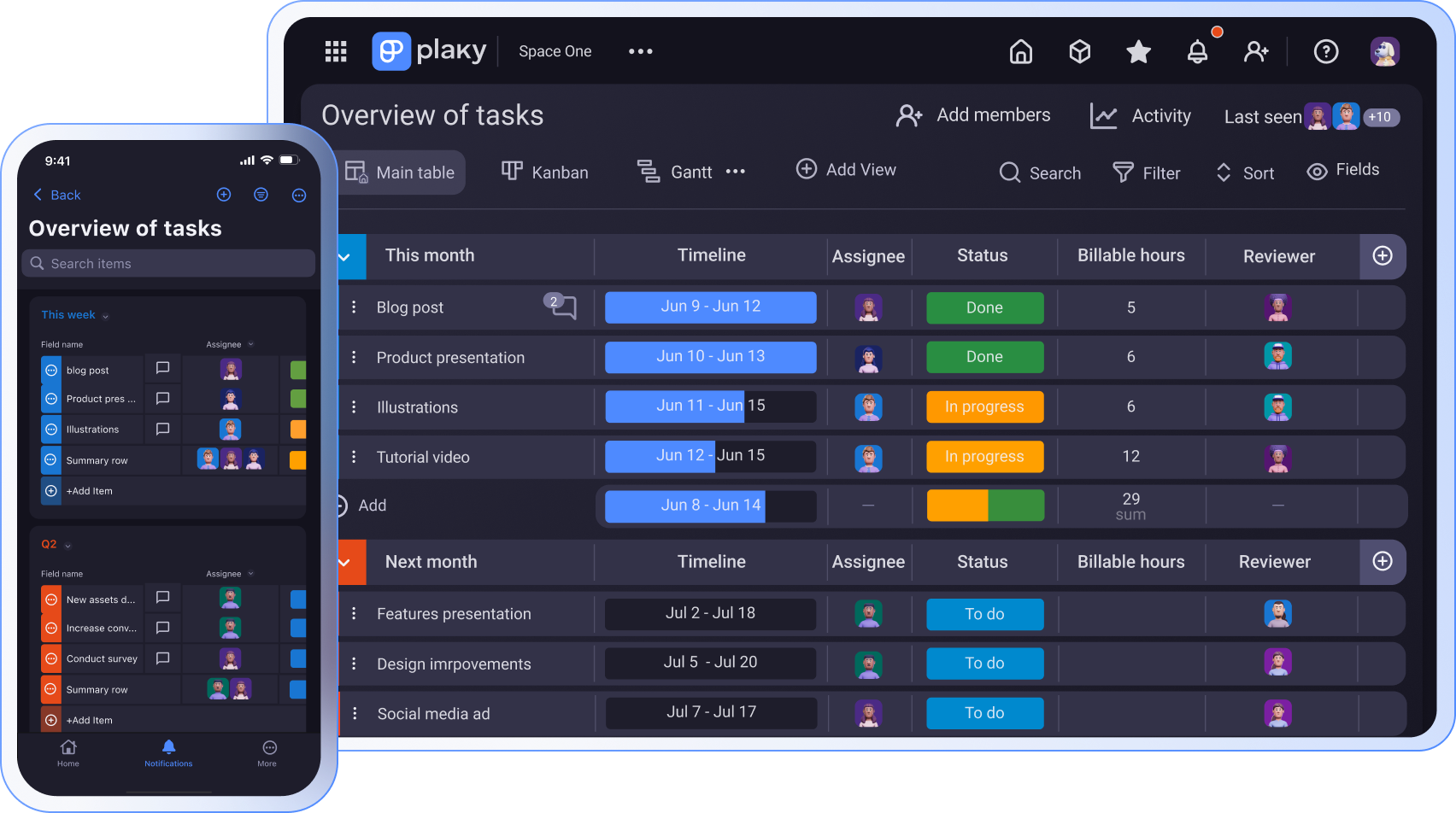
Plaky by CAKE.com vs. monday.com: Main features comparison
Let’s break down the main features Plaky and monday.com offer, including their strengths and weaknesses.
Plaky’s tiers are much more affordable than monday.com’s
Looking at monday.com’s pricing, I noticed some frustrating limitations right away.
For any paid plan, monday.com requires a minimum of 3 seats, even if your team consists of only 1 or 2 members.
What’s more, this platform sells seats in fixed increments (3, 5, 10, 15, etc.), so if you have, say, 6 users, you’re forced to pay for 10.
This can quickly make the tool feel overpriced for small and medium-size teams falling between those neat “bundled” numbers. Instead of a flexible pay-per-user model, you’re stuck covering extra seats you don’t need.
| monday.com plan | Monthly subscription | Yearly subscription |
|---|---|---|
| Free (max. 2 seats) | $0 | $0 |
| Basic (min. 3 seats) | $12/seat/month + 1,000 AI credits/month ($12.5) | $9/seat/month + 1,000 AI credits/month ($10)* |
| Standard (min. 3 seats) | $14/seat/month + 2,000 AI credits/month ($25) | $12/seat/month + 2,000 AI credits/month ($20)* |
| Pro (min. 3 seats) | $24/seat/month + 3,000 AI credits/month ($37.5) | $19/seat/month + 3,000 AI credits/month ($30)* |
| Enterprise (min. 3 seats) | POA | POA |
*billed annually
Unlike monday.com that offers a wealth of AI options, Plaky is still focused on simple and straightforward project management without AI frills. This gives project managers full control over project organization and ensures higher reliability.
Moreover, Plaky doesn’t impose a certain number of users on paid plans. You pay what you actually use, so solo users and small teams aren’t punished with inflated costs.
What’s equally important is that Plaky is notably cheaper than monday.com, making it a great choice for budget-conscious teams that prefer transparent workflows without AI bloats.
With Plaky, scaling up is more natural — your costs rise predictably with your team size and advanced features the team needs, so financial planning is easier.
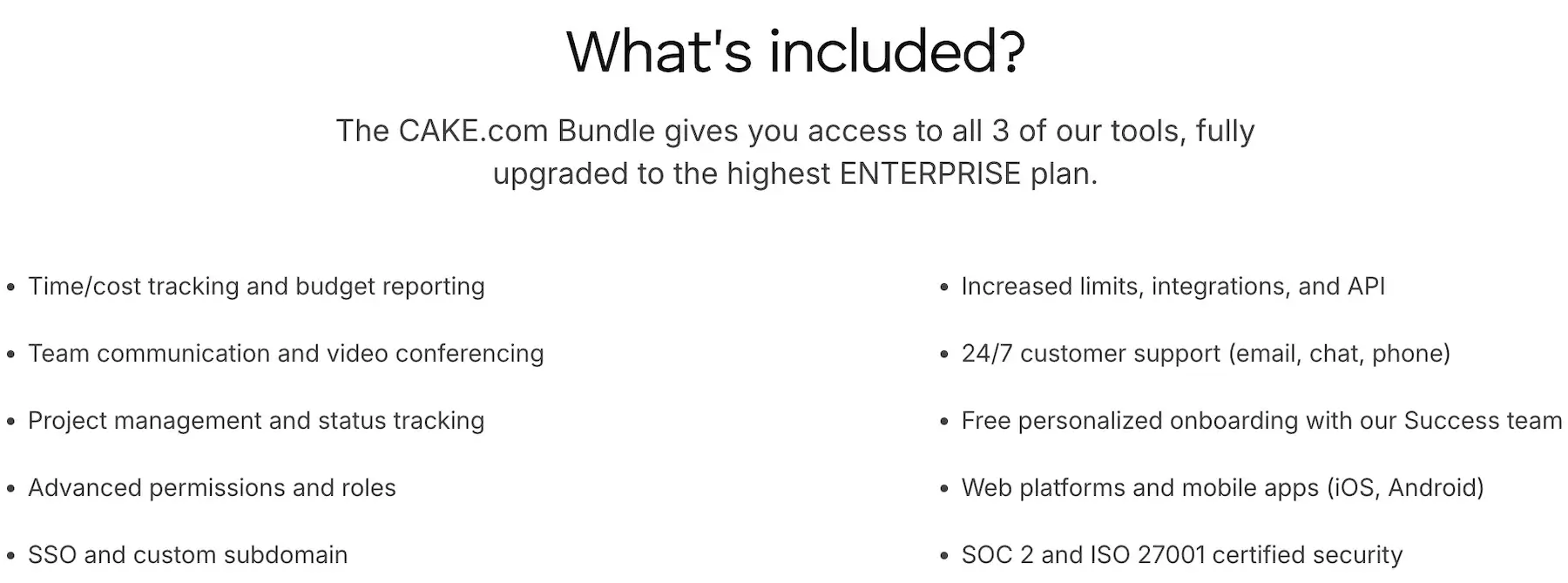
As a cherry on top, you can opt for the CAKE.com Bundle, essentially getting 3 fully upgraded professional tools for the price of 1:
- Plaky — for efficient project management
- Clockify — for precise time tracking
- Pumble — for smooth business communication
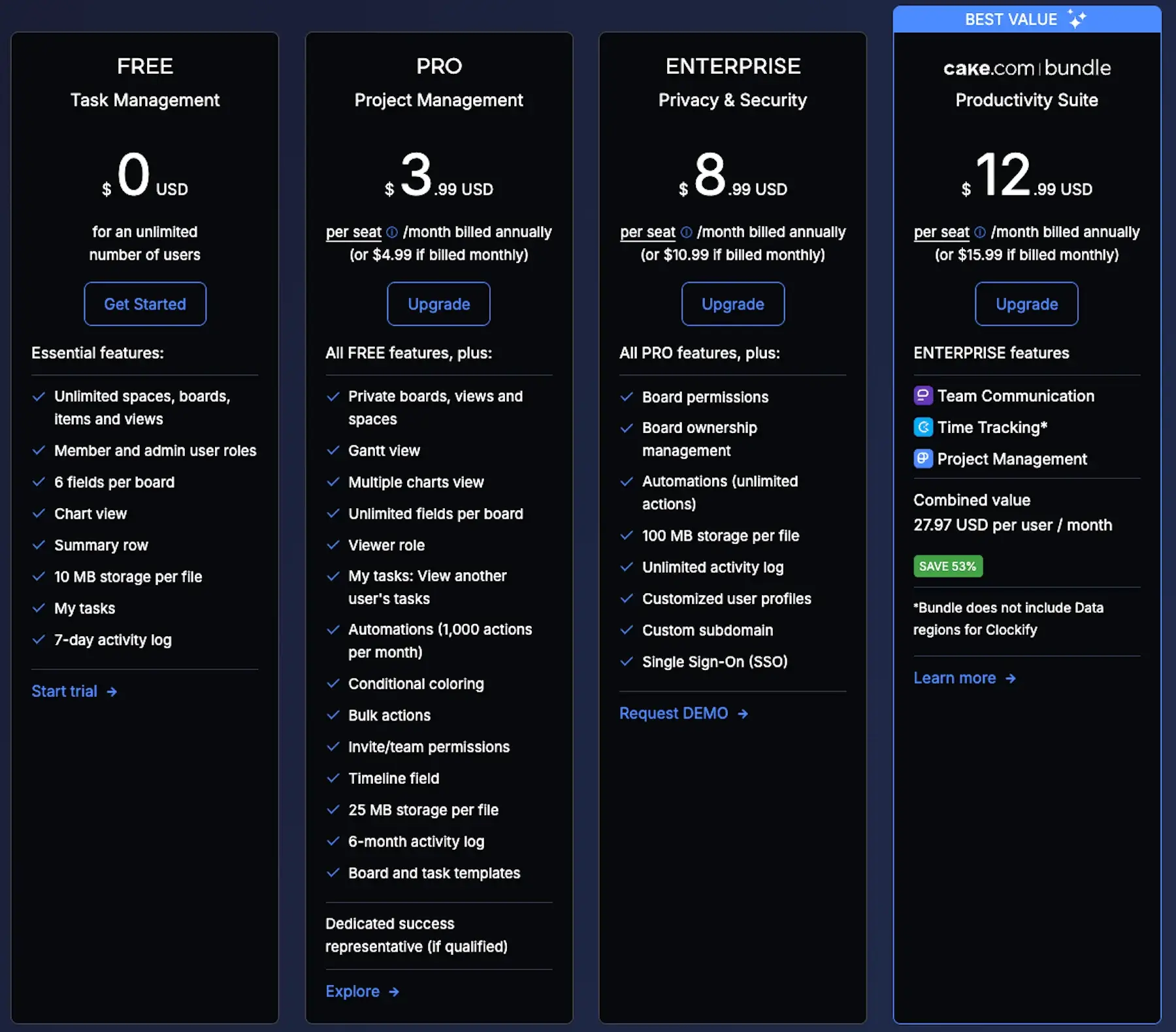
| Plaky plan | Monthly subscription | Yearly subscription |
|---|---|---|
| Free | $0 | $0 |
| Pro | $4.99/seat/month | $3.99/seat/month* |
| Enterprise | $10.99/seat/month | $8.99/seat/month* |
| CAKE.com Bundle | $15.99/seat/month | $12.99/seat/month* |
*billed annually

Plaky has a better free plan than monday.com
A solid free plan is important because it sets the stage for trust and long-term use.
With monday.com, it’s quite obvious that the free plan has several weak points:
- 2-user cap — Allowing up to 2 seats on the free plan makes it essentially useless for even the smallest teams. If you need more than 2 seats on monday.com, you’re immediately pushed into a paid plan.
- 3 boards maximum — Limiting the free plan to just 3 boards basically means you can only manage 3 projects at once, which is super-impractical.
- No custom fields — Without custom fields beyond the default ones (monday.com calls them columns), there’s no flexibility to build workflows around your needs. This strips away one of the platform’s main selling points.
- No 24/7 support — Unfortunately, 24/7 customer support here is reserved for those with paid accounts. If monday.com wants its free plan to be an entry point, this downside undermines that.
Taken together, these flaws suggest that monday.com’s free plan isn’t much more than a glorified to-do list.
In contrast, Plaky’s free plan is generous, offering benefits such as:
- Unlimited users — The free plan is inclusive and scalable because Plaky cares about growing teams instead of gating them at the door.
- Unlimited spaces, boards, and items — You can actually run your entire workflow on Plaky’s free plan. Manage multiple clients, internal tasks, and side projects without worrying about deleting boards to make space.
- Custom fields — Customizable fields are what makes a PM tool flexible. Choose different fields in Plaky to track budgets, clients, story points, and more.
- 24/7 human support — Providing human customer support around the clock to everyone shows that Plaky values all users, not just the paying ones.
In short, Plaky is designed to support teams at every stage of growth.
Learn how growing teams use Plaky
💡 PLAKY PRO TIP
Want to take a closer look at Plaky’s plans? You’ll find the info here:
Both apps have neat UI, but Plaky is more user-friendly
Let’s start with some positives about monday.com’s design. It’s rather neat and bright with clear icons, and color-coded labels make it easy to check task progress at a glance.
Another plus is the drag-and-drop functionality — tasks and columns can be moved around easily.
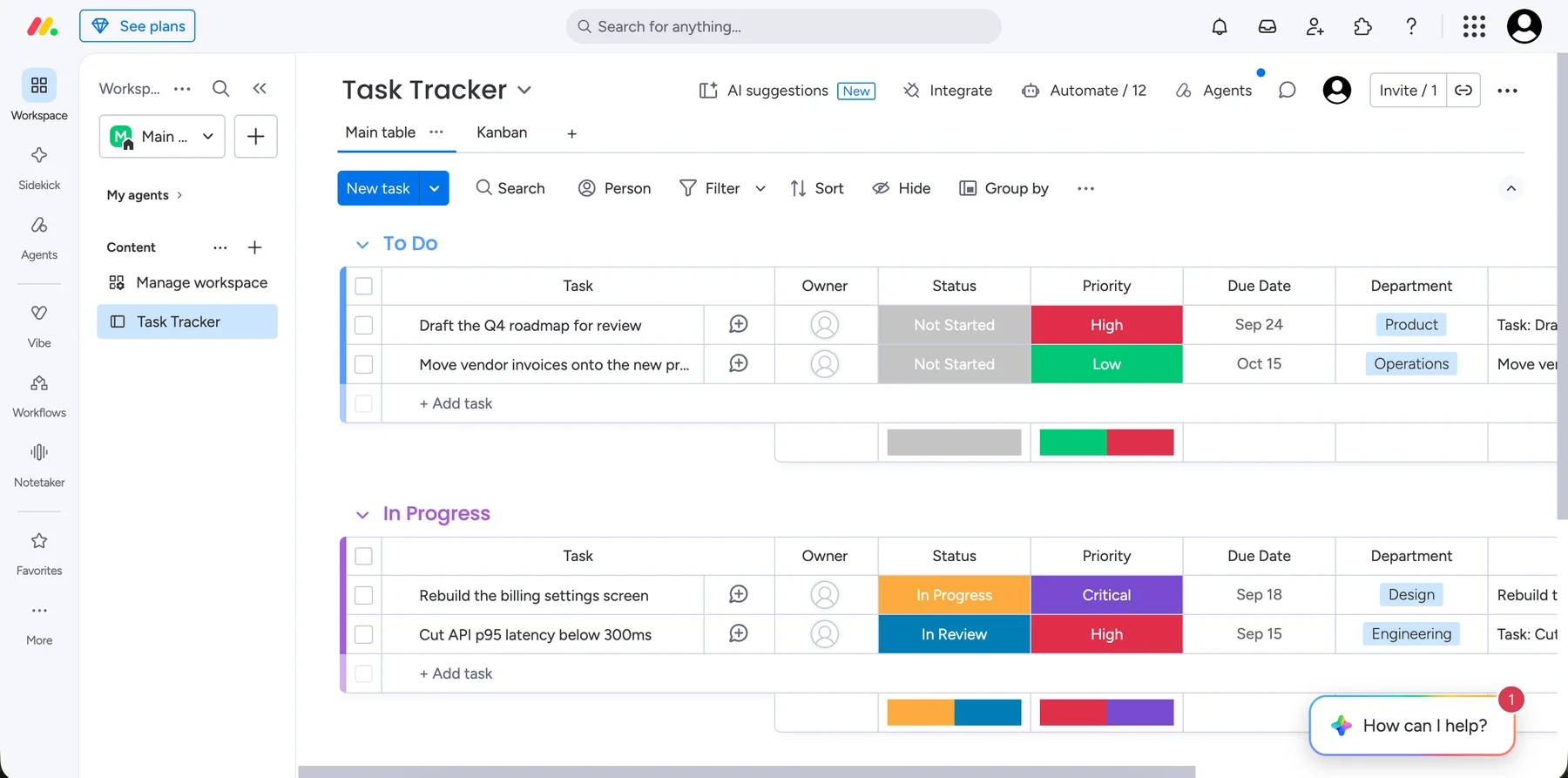
However, I’ve also noticed some drawbacks:
- Visual clutter — With so many colors and buttons, it can be a lot to take in when working with lots of boards and items. This might be particularly problematic for first-time users.
- Performance issues with large boards — I had a somewhat large board on the web version of monday.com, which made scrolling laggy.
- Limited customization on the free plan — As mentioned, some interface perks (like custom columns or dashboards) are locked behind monday.com’s paid plans, making the free one feel stripped down.
Moving on to our second candidate, I really enjoy Plaky’s balance of efficiency and design clarity thanks to:
- Intuitive navigation — It’s easy to switch between projects and tasks. Also, Plaky’s menus and buttons follow common patterns, making the app super-organized.
- Flexibility without overwhelm — You can customize boards and views without burying the functionality under dozens of advanced options.
- Fast performance — Items load quickly, while drag-and-drop and scrolling feel instantaneous.
- Accessibility of key features — Important actions (like adding assignees or deadlines) are 1 or 2 clicks away. Advanced features (e.g., automations, integrations) are easy to discover without overwhelming the core interface.
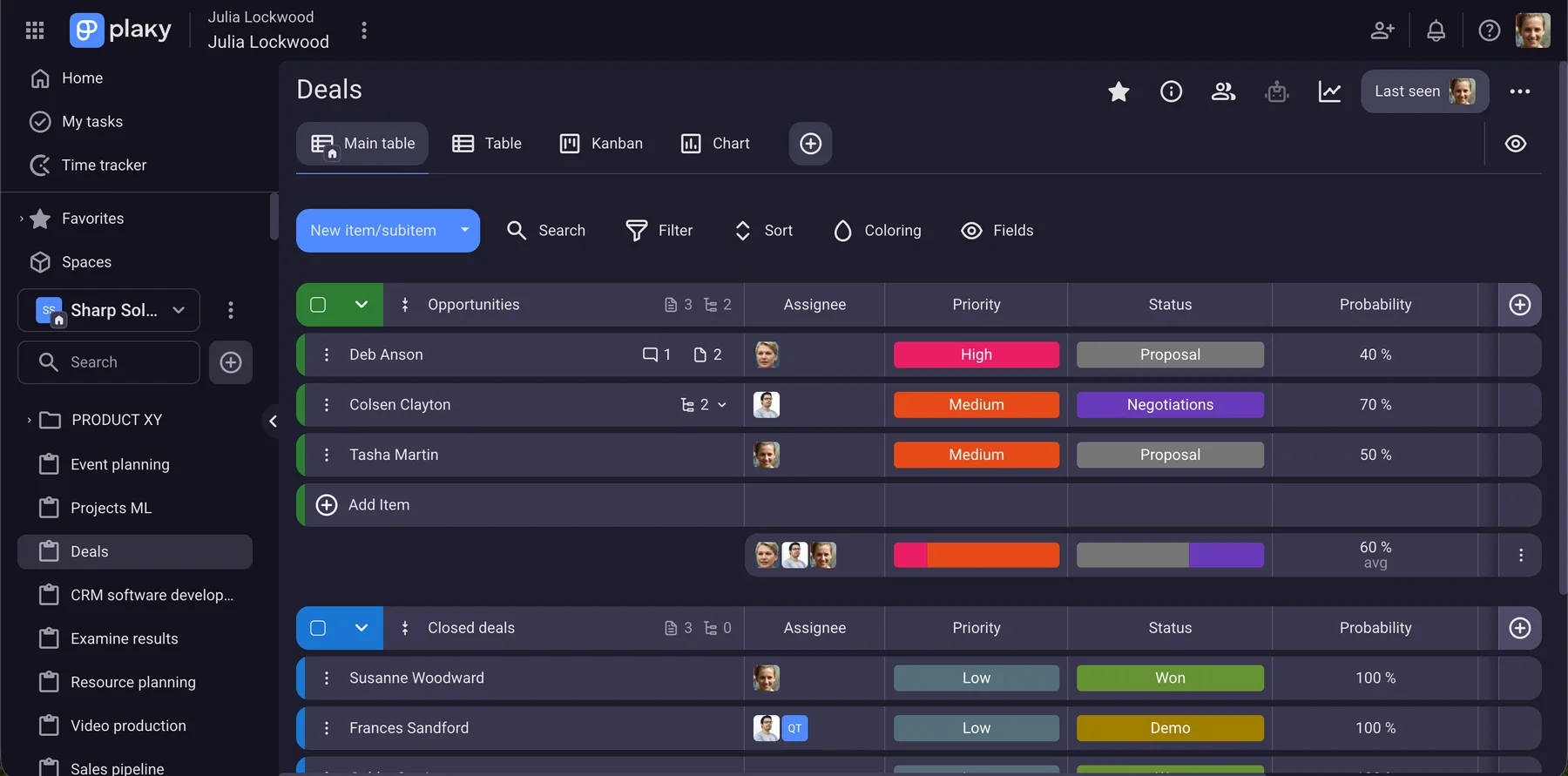
In conclusion, I can say that both platforms are neat and modern-looking, but Plaky’s interface deserves more praise because of how responsive and logical it is.
💡 PLAKY PRO TIP
See how Plaky compares to other popular project management tools:
Task management and progress tracking feel more natural in Plaky
Both Plaky and monday.com support advanced project/task management.
Here’s how monday.com does it:
- Flexible boards and columns — projects and tasks can be organized into boards and folders with columns like status, date, priority, etc.
- Automations — the platform lets you automate actions like sending reminders, triggering status changes, assigning tasks, and more.
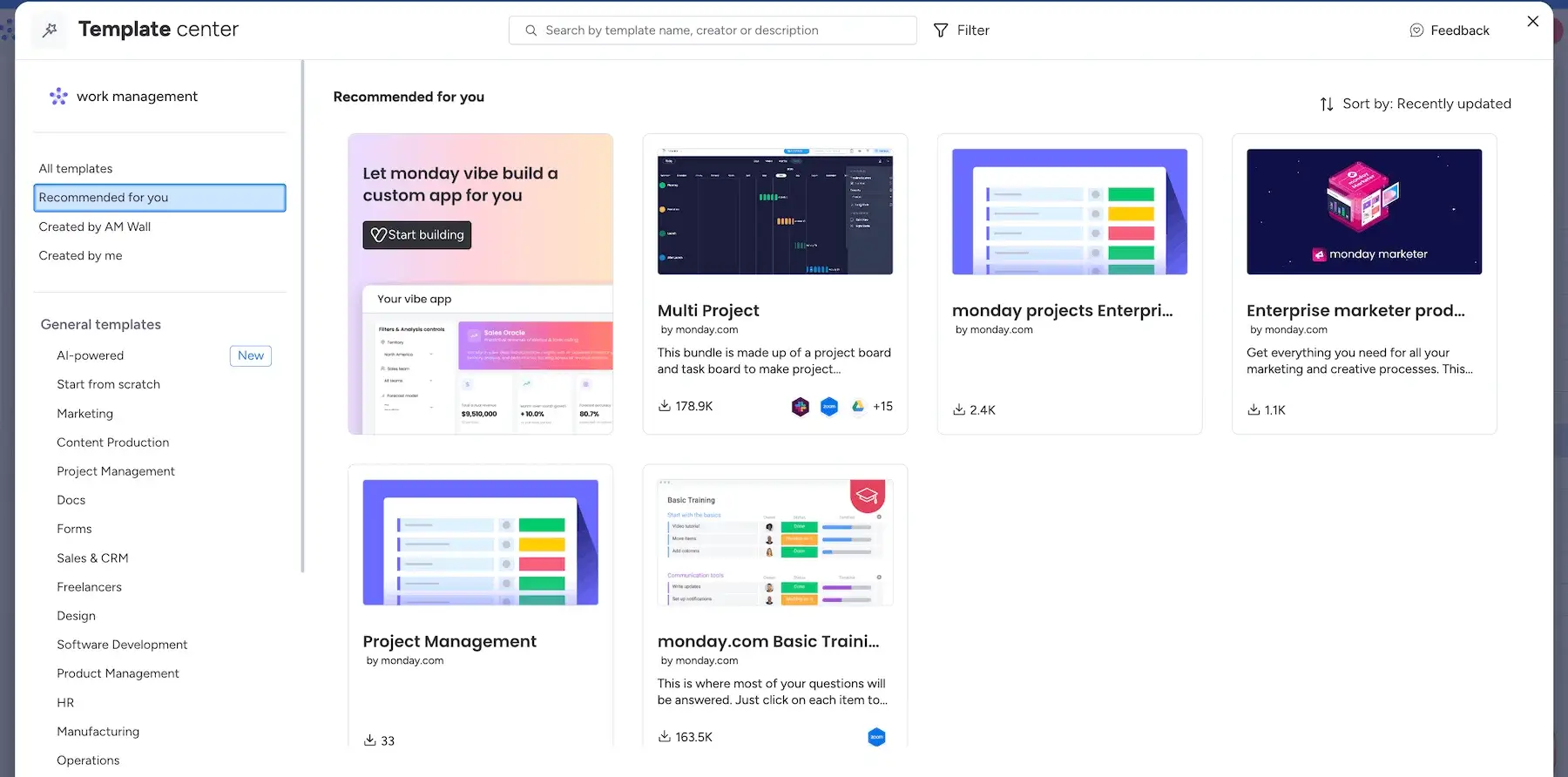
- Templates — monday.com’s template center offers a variety of pre-made templates for common workflows across industries.
I must underline that the range of column types on the free plan is limited compared to the paid ones (for instance, no Formula or Files column).
As for our other contender, I found that Plaky’s task management features are simpler yet equally powerful:
- Boards and groups — quickly create boards for different projects and group tasks within each board however you wish.
- Custom fields — describe each task in detail through versatile custom fields (text, person, date, link, and more).
- Template center — when you don’t want to build boards from scratch, rely on Plaky’s pre-built customizable templates.
- Board automations — use no-code automations to minimize manual work (status changes, moving items, auto-alerting managers, and so on).
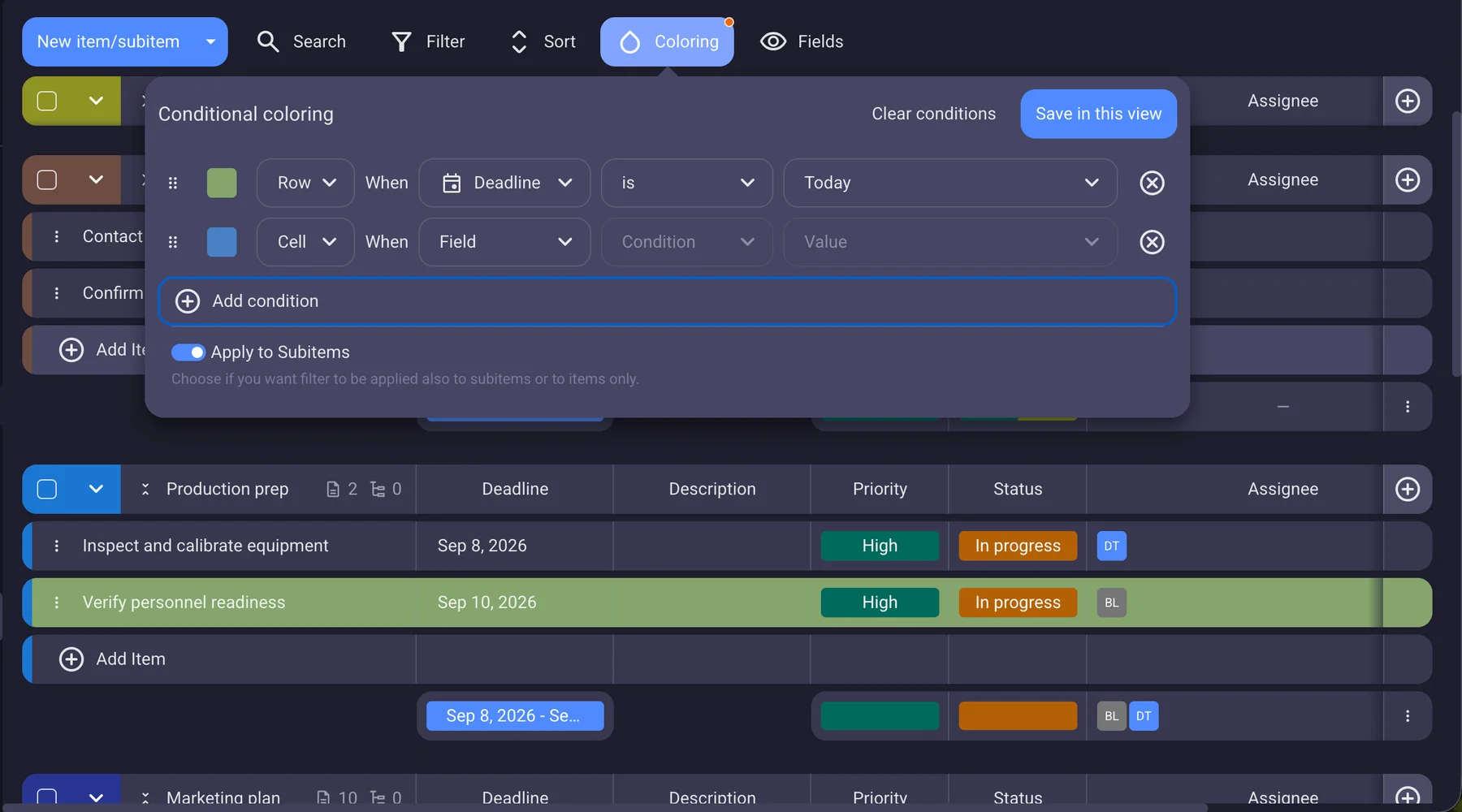
- Conditional coloring — highlight important information by auto-coloring certain tasks based on different criteria (e.g., approaching deadlines, exceeded budgets).
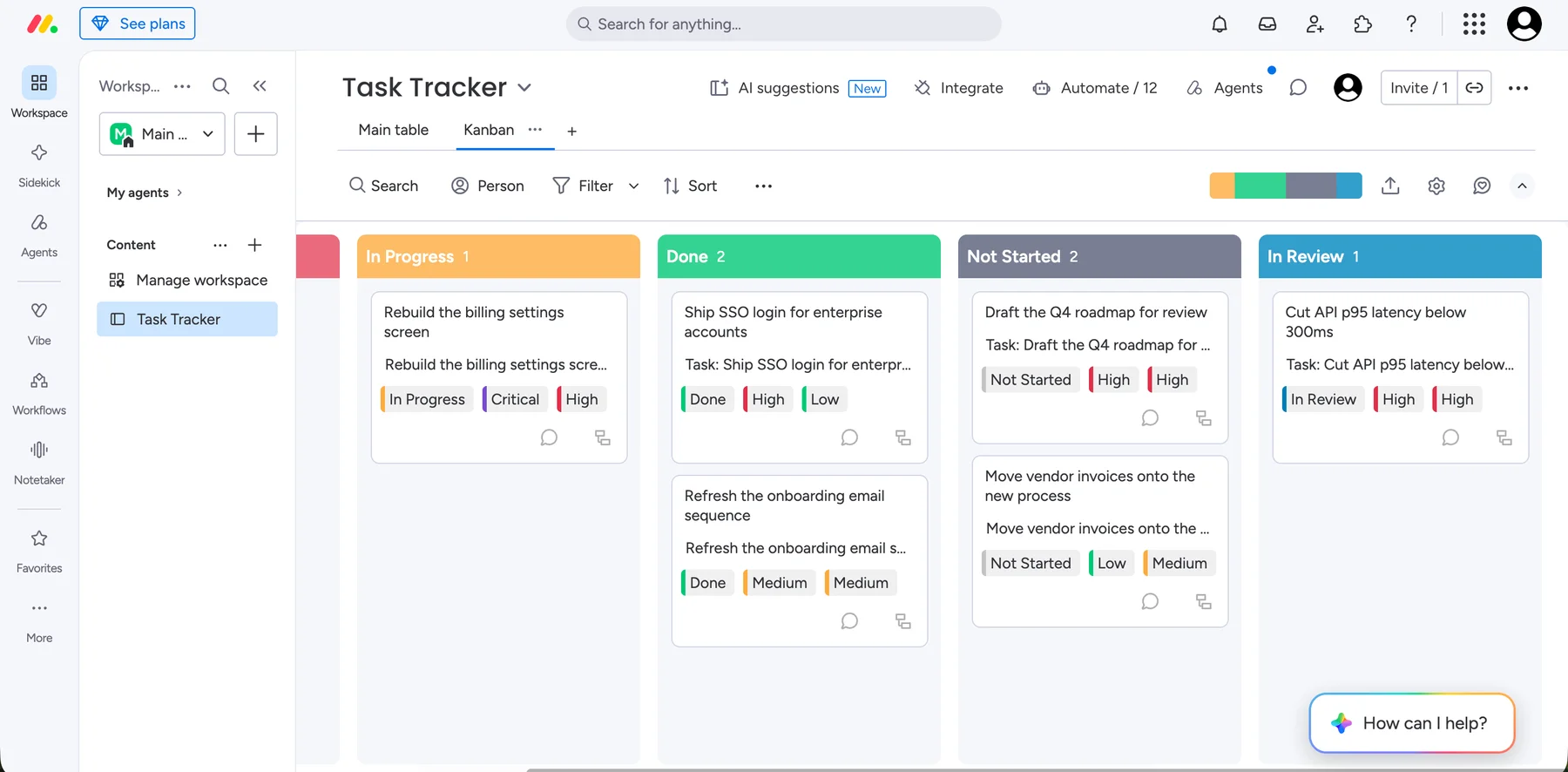
We can’t talk about task management without progress tracking. In monday.com, users monitor their projects and tasks using:
- 15+ project views — There are common Board views (e.g., Kanban, Timeline) and some more advanced ones (e.g., Workload, Velocity).
- Time tracking column — Pro and Enterprise users can track time within the app (for instance, to compare time spent vs. planned).
- AI dashboards — AI helps you see project status from one or more boards if you need to compare them. Plus, with AI sidekick, you can easily get a complete analysis of your project progress in real-time.
- Activity log — You can look at all the changes made on the monday.com platform to stay in the loop.
It’s important to note that the availability of project views depends on your monday.com plan. For example, Timeline and Calendar views are reserved for those on the Standard and higher plans, whereas the Chart view is for Pro+ users.
But Plaky makes it even easier to monitor updates and deliverables. With just a few clicks, you can track progress by using:
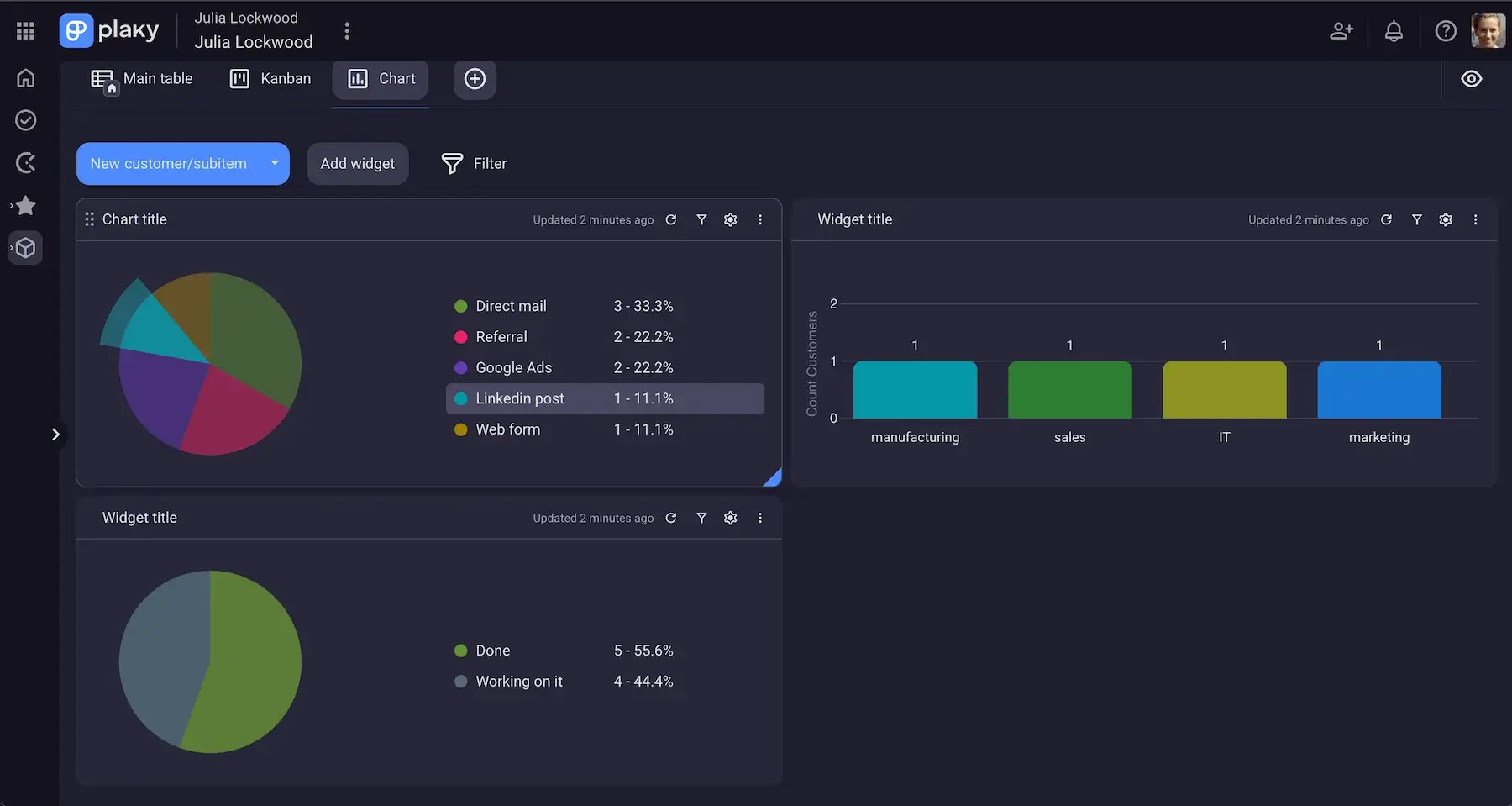
- Multiple Board views — Apply different Board views (Table, Kanban, Gantt chart, or Chart) to visualize data according to your needs and preferences. By adding widgets to your Chart view, you get a great overview of project progress.
- Flexible status field — Customize the status field (name and color) to reflect your project stages.
- Activity log — Peek into the chronological history of changes on each board and item for full transparency.
- Time tracking — Track time within Plaky using Plaky’s free integration with Clockify, and then use the insights to analyze and improve your productivity.
What’s more, whatever project view you go for, Plaky gives you full control by letting you choose the colors of its elements and applicable criteria for displaying data.
💡 PLAKY PRO TIP
We’ve also compared monday.com with other popular PM tools. Check these out:
Team collaboration is more intuitive in Plaky
Good team communication and collaboration features are a must in your PM tool. Otherwise, confusion and miscommunication are practically inevitable.
Here’s what monday.com has to offer in this area:
- Updates — Leave comments and reactions to communicate with ease. Tag teammates on the board or (sub)item level.
- Update feed — Use this section (in the upper right corner) to see updates from all the boards you’re subscribed to in one place.
- File sharing — Upload different files, and use the annotation feature to add feedback.
All of this is quite standard for a PM platform, so I don’t have any issues with the features — it’s the terminology I find clunky.
For example, in most tools, an update suggests a status change, not a discussion thread. Using the term comment or conversation would be better.
Also, the update feed works more like an inbox, so labeling it like that would instantly make more sense, especially to new users.
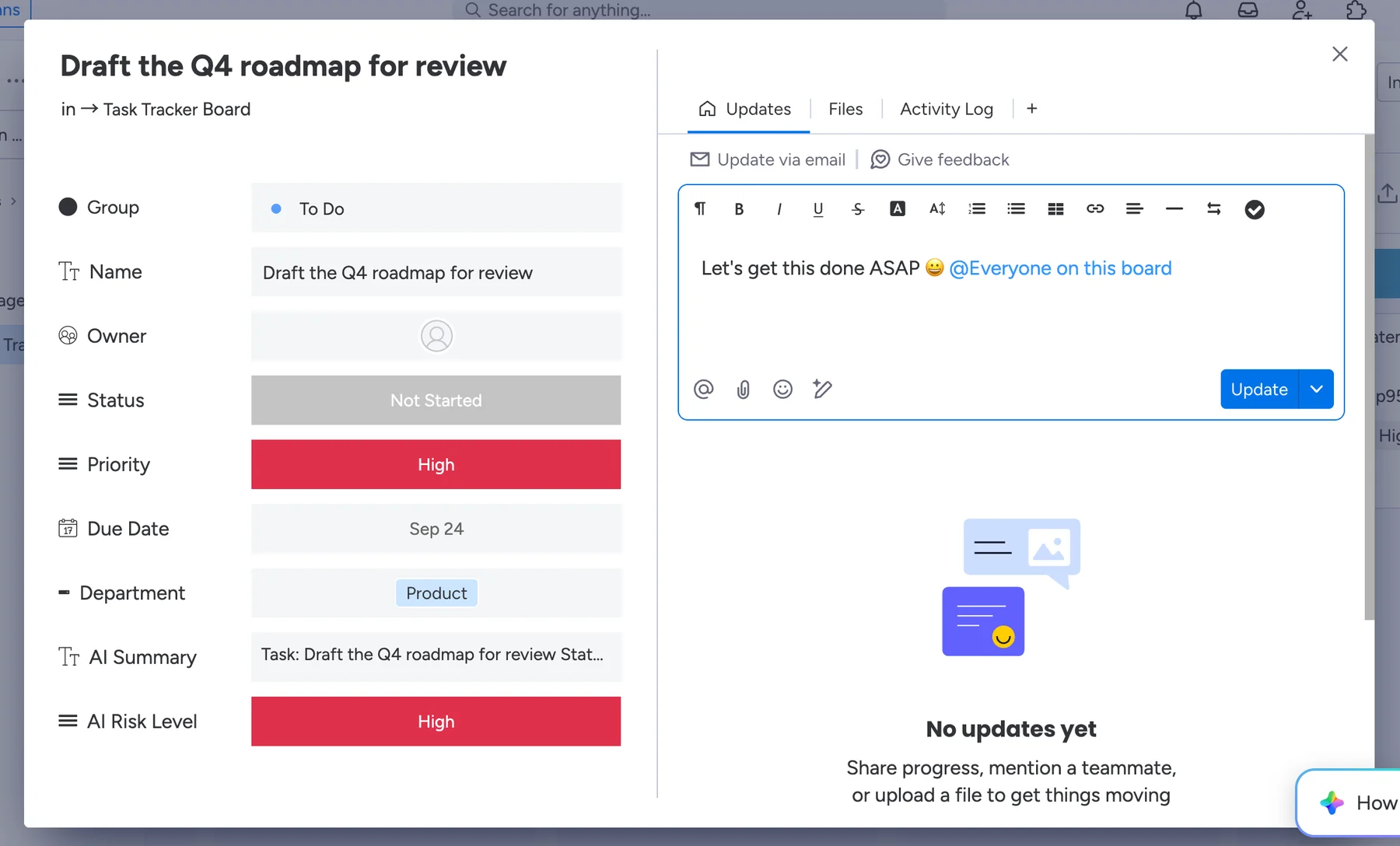
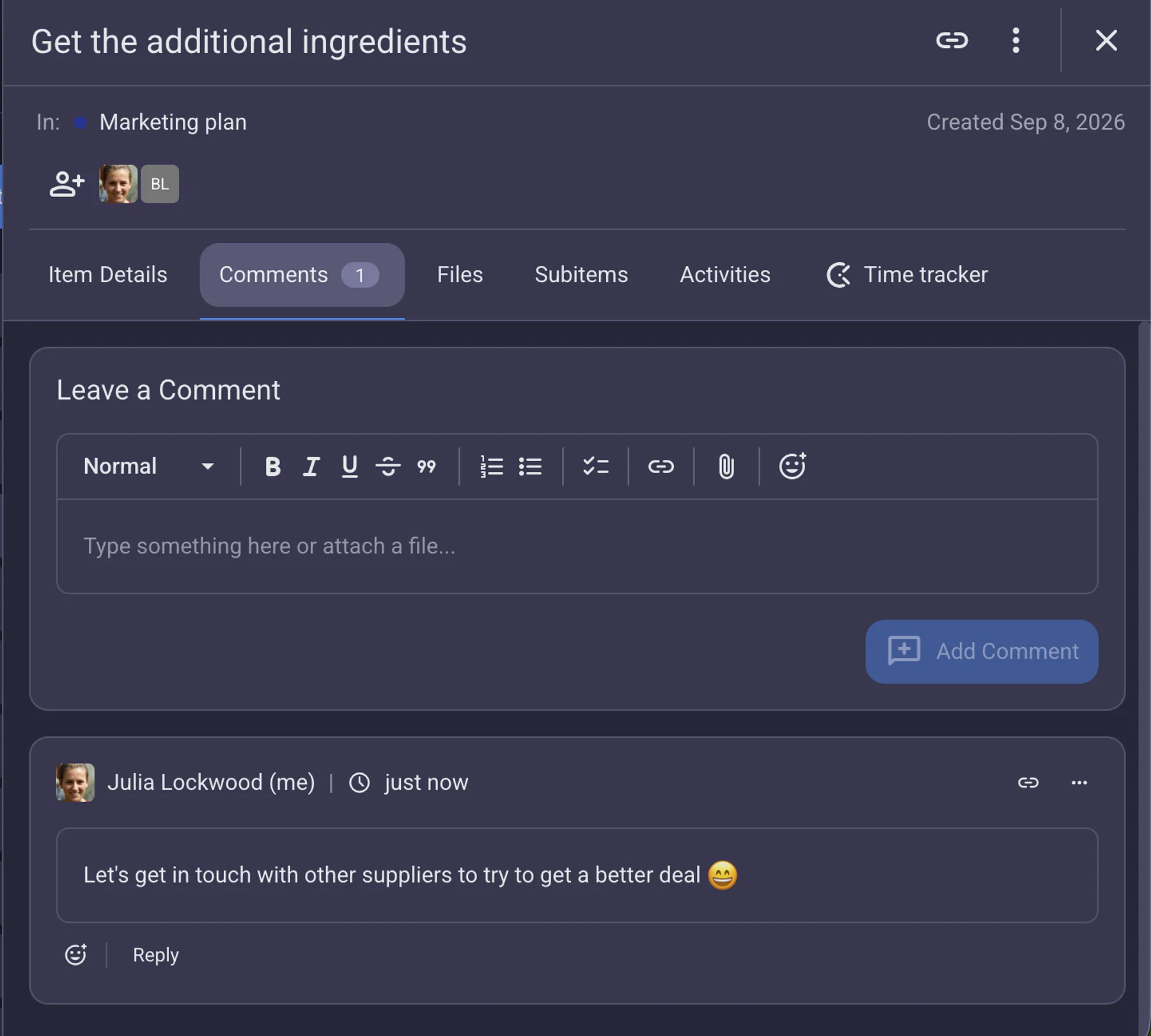
In comparison, Plaky calls everything what it is, so team collaboration is smooth and confusion-free. The platform offers:
- Comments and reactions — Leave comments within task cards to provide feedback and updates. When words aren’t needed, react with an emoji.
- @mentions — Tag team members or entire teams to grab their attention quickly.
- Real-time notifications — Receive instant notifications to never miss an update.
- File uploads — Share meeting notes, screenshots, design assets, reports, and other kinds of files to avoid digging through emails and folders.
With all that, Plaky saves you time and reduces the need for external communication tools.
Monday.com has more integrations, but they’re expensive and limited
Integrations are a way to connect your PM software with other handy tools you use often.
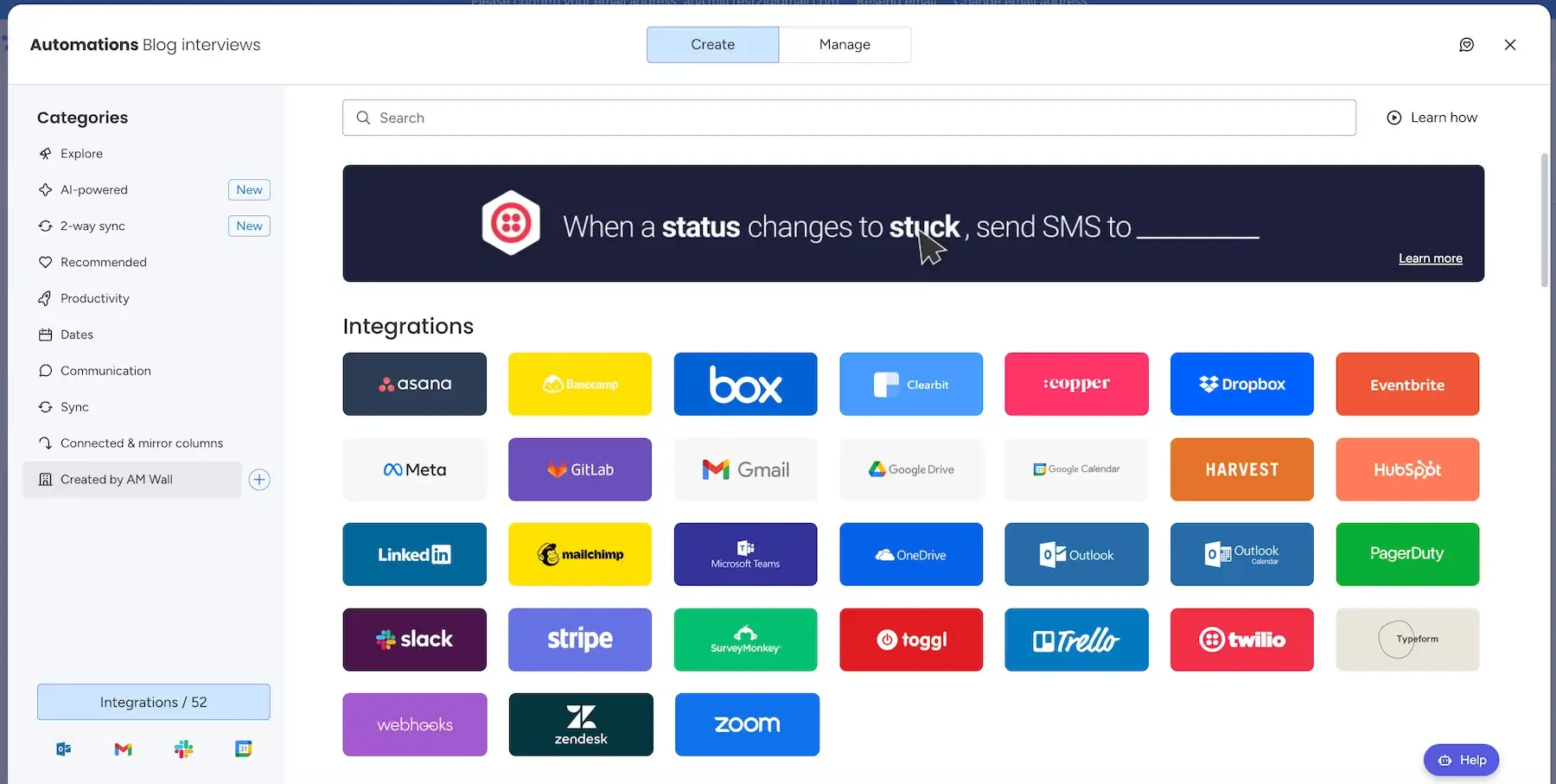
In terms of monday.com, the number of integrations is impressive (over 850), including big names such as Gmail, GitLab, Excel, etc. What’s bad news is that none of these integrations are available in the free or even Basic plan.
Also, the number of integration actions you get each month in monday.com depends on your tier, ranging from 250 on Standard to 250,000 on Enterprise.
As for Plaky, the platform is yet to expand its integration options. It currently integrates only with other CAKE.com products — Clockify for effortless time tracking and invoicing and Pumble for seamless business communication.
Still, with CAKE.com’s productivity suite, it’s easy to:
- Organize work across all departments.
- Plan resources.
- Connect with team members.
- Monitor task progress.
- Analyze productivity.
Use 3 CAKE.com apps to drive success
To sum up, monday.com has way more integrations than Plaky, but they come at a steep price.
Both Plaky and monday.com are very secure
PM tools typically contain sensitive business information, so top-notch security measures are vital.
Monday.com is compliant with:
- SOC 1 Type II, SOC 2 Type II, and SOC 3
- Several relevant ISO/IEC standards
- HIPAA (Enterprise only)
- GDPR
To enhance security even more, monday.com supports different types of account-level user roles:
- Admins — those managing everything from users and boards to security and billing
- Members — teammates with editing access to boards
- Viewers — users that can only view boards (no editing permissions)
- Guests — external users with an email domain different from that of your organization
- Custom roles — unique, account-level roles made by Enterprise admins
However, it seems that every single role and permission has some elements that are only available on higher tiers, which is a drawback for cost-conscious teams.
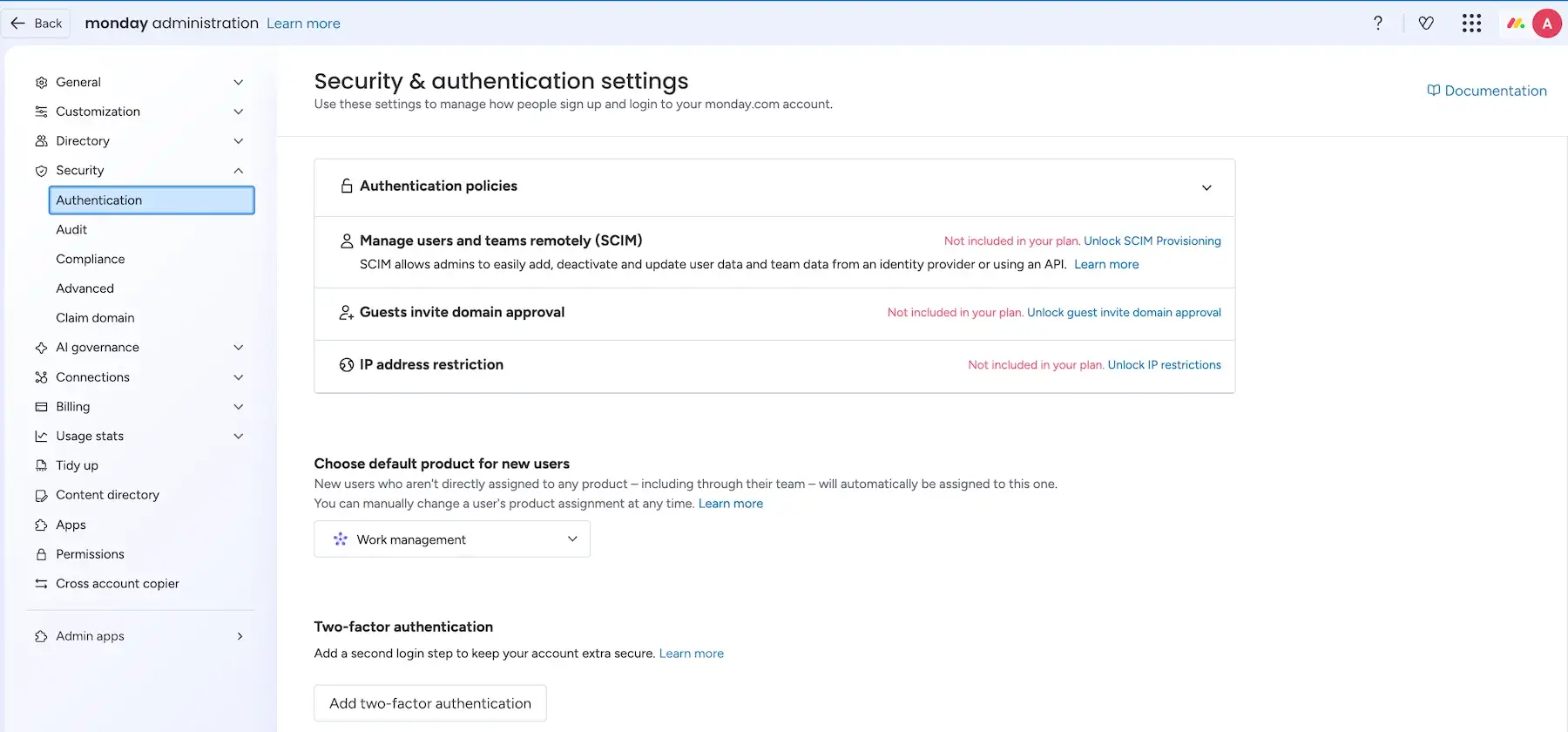
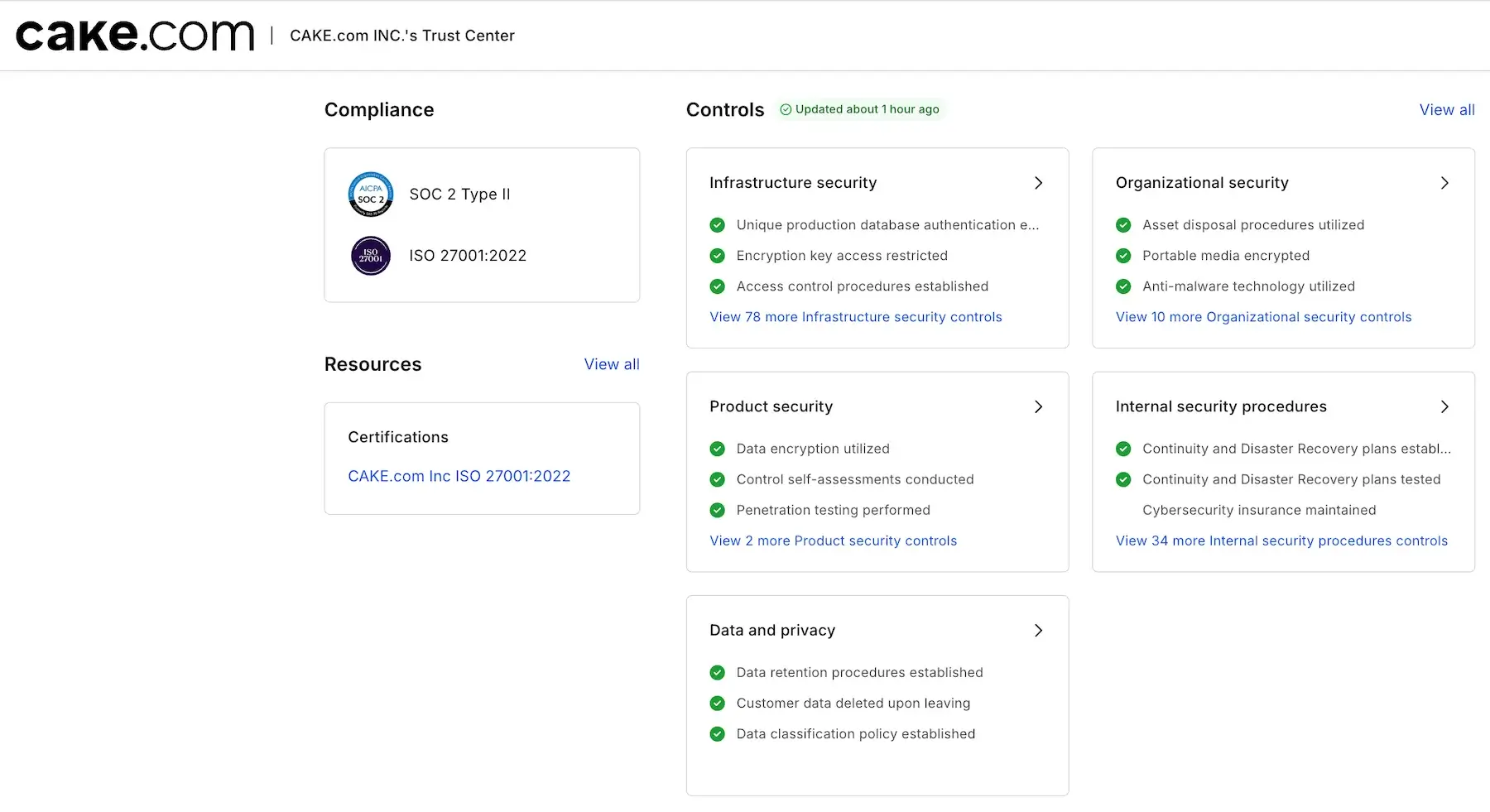
Plaky also prioritizes industry-standard compliance and certifications, including:
- SOC 2 Type II
- ISO/IEC 27001:2022
- GDPR
All CAKE.com products, including Plaky, also guarantee the following:
- Secure personnel
- Secure development
- Secure testing
- Cloud security
In addition, Plaky boosts data safety and prevents unauthorized changes through different user roles:
- Admins — users who create the workspace and control all boards, access permissions, and ownership changes
- Members — users that can create/edit boards and items, invite new members, add comments and files, etc.
- Viewers — users that see all the content in the workspace they’re invited to but don’t have any editing permissions
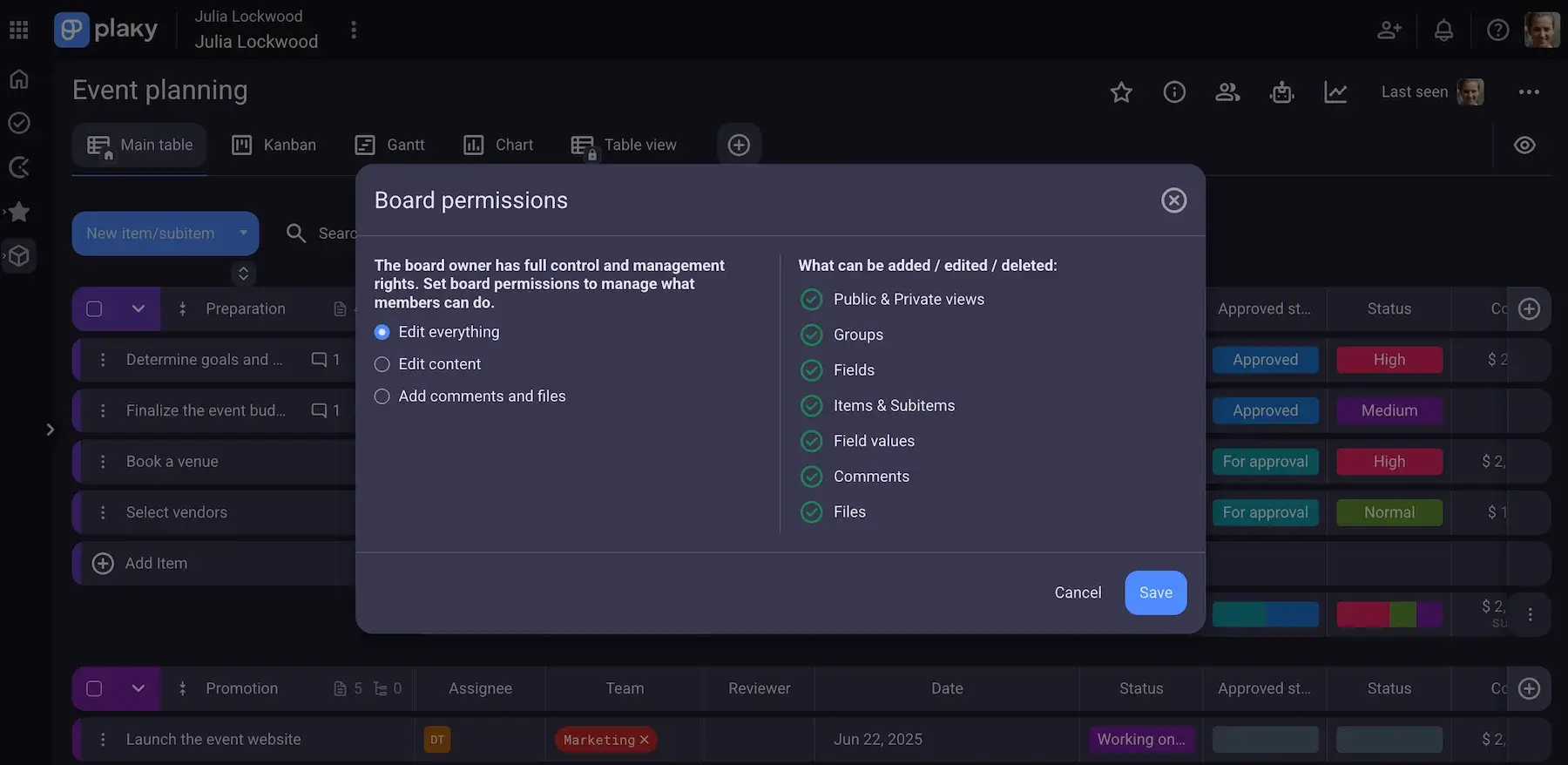
All in all, both monday.com and Plaky are secure, but Plaky’s security measures and user roles are much more straightforward to me. The platform lets you collaborate confidently and keep fine control as your team grows.
Unlike monday.com, Plaky offers 24/7 support to all users
When looking for any kind of tool, especially a professional one, I consider customer support a crucial factor. Put simply, I need to know I can count on quick problem resolution in case anything goes wrong.
In terms of monday.com, the main ways to get help include:
- Email and chat support — You can send an email to support representatives. There’s also a platform-integrated live chatbot for instant assistance, with the ability to switch to human help if necessary.
- Help Center — There are various articles and video tutorials for all monday products.
- Dedicated customer success manager (Enterprise) — Users on the most extensive plan can get personalized help from a dedicated professional.
An important note: monday.com offers 24/7 support to paid plan users only, which is a huge minus in my eyes. If a person on the free plan faces a problem — like login issues or lost data — it’s stressful to wait hours or days to hear back.
This frustration would be a legit reason for free users to walk away before ever becoming paying customers.
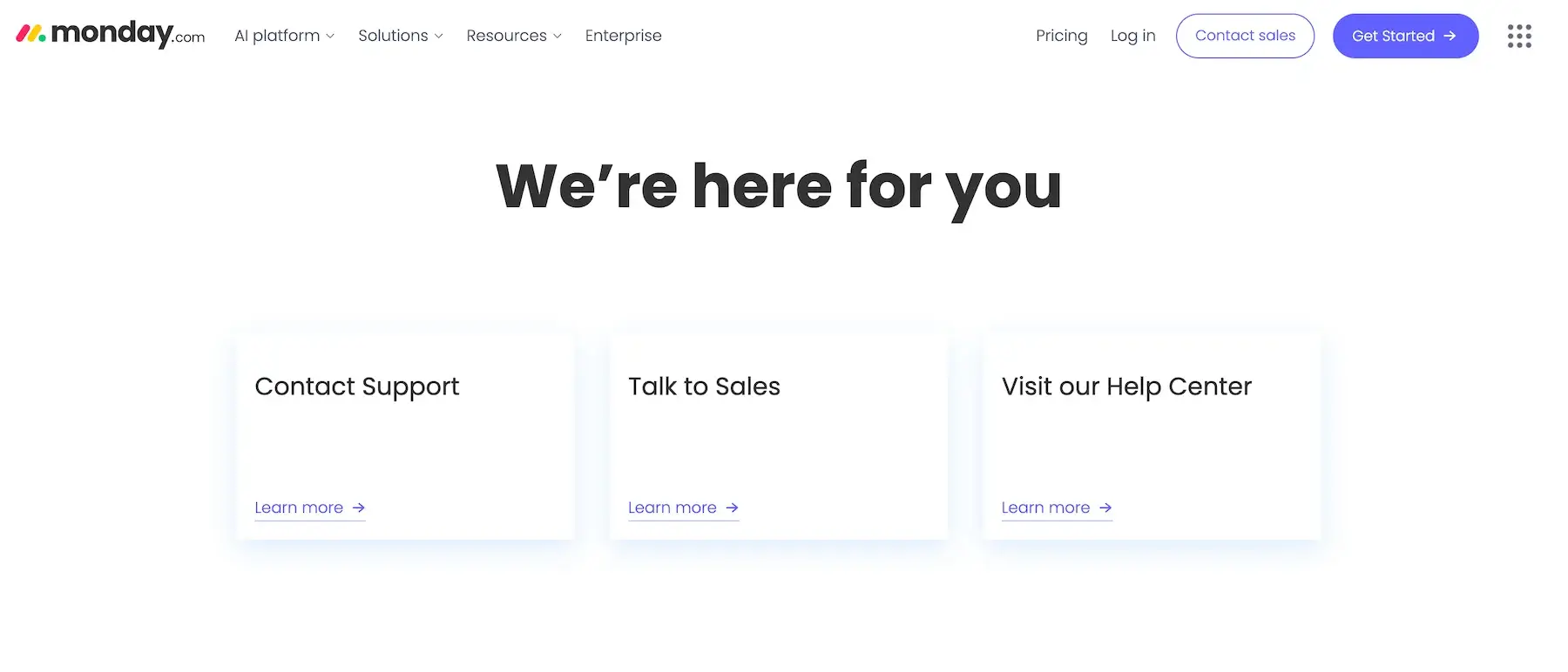
In comparison, Plaky provides 24/7 customer support to users across all its tiers. Plus, there are more ways to contact support agents compared to monday.com.
Both free and paid plan users can get support from Plaky via:
- Email — Simply send an email to Plaky’s knowledgeable support team if you have any questions or issues.
- Phone — If you prefer phone calls, feel free to call the telephone number available on Plaky’s support page.
- Chat — Get help fast using Plaky’s support chat (bot or human help). Most users prefer this channel because you automatically have a transcript of the conversation and can refer back to it if needed.
- Dedicated success representative (if qualified) — Get personalized support and proactive guidance (Pro plan users with 120+ seats and Enterprise users with 50+ seats).
- Plaky Learn and Help Center — Access detailed free guides and tutorials to master Plaky in no time.
Quick verdict: Plaky vs. monday.com
If all of these details were overwhelming, here’s a summarized version of how Plaky and monday.com compare and which teams would benefit most from which choice:
| Team | Recommendation | Why |
|---|---|---|
| Budget-conscious teams | Plaky | Offers a simpler and cheaper pay-per-user pricing model without requiring you to pay for unused seats in predefined seat buckets. |
| Teams needing broader work management | monday.com | Provides a larger ecosystem with over 850 integrations, extensive automation options, and built-in AI capabilities. |
| Teams wanting straightforward PM | Plaky | Focuses on core, intuitive project management features without unnecessary complexity or AI frills. |
| Growing or large teams needing free access | Plaky | Includes an unlimited-user Free plan with no caps on spaces, boards, or items, unlike monday’s 2-user limit. |
| Non-technical teams | Plaky | Features clear terminology, quick onboarding, a clean interface, and 24/7 support across all tiers. |
FAQ
Still in a dilemma about which tool is best for you? Here are the answers to some of the questions you might have.
Who is monday.com’s biggest competitor?
There isn’t one single competitor that dominates every use case. monday.com competes with project management platforms such as Plaky, Asana, ClickUp, Trello, and Smartsheet. The right alternative depends on factors such as team size, workflow complexity, collaboration needs, and budget.
Is Plaky any good?
Yes, Plaky is an excellent project management tool designed to help teams organize tasks, collaborate, and track project progress in one place. Its Free plan includes unlimited users, projects, boards, items, and views, while paid plans add features such as Gantt charts, advanced dashboards, automations, and private workspaces.
What is Plaky used for?
Plaky is used to plan, organize, and track projects and day-to-day work. Teams can create boards for projects, break work into tasks and subtasks, assign responsibilities, add deadlines and custom fields, communicate through comments, and monitor progress through different views and dashboards.
It can be used for workflows including marketing, product development, HR, sales, resource planning, inventory management, and more.
What is the best project management software in 2026?
There is no single project management tool that is best for every team. The choice depends on your team’s size, workflow, required features, and budget. Monday.com, Plaky, Asana, ClickUp, and other tools take different approaches to project planning and collaboration, so it’s worth comparing pricing and features against your team’s specific requirements.
What is the best free project management software for teams?
The answer depends on what your team needs from a free plan. Plaky’s Free plan supports an unlimited number of users and projects and includes unlimited spaces, boards, items, and views. It also includes features such as Chart view, Dashboards, My tasks, and a Summary row, although some advanced capabilities are reserved for paid plans.
When comparing free project management tools, check user limits, project limits, storage, available views, and collaboration features.
What are the top 5 project management software?
Five widely used options to consider are Plaky, monday.com, Asana, ClickUp, and Trello. They differ in their approach to project planning, task management, collaboration, automation, and pricing. For a team choosing between them, the most useful comparison is how each tool handles the specific workflows and number of users you need.
Is Plaky better than Asana?
That depends on what your team needs. Plaky may make more sense for teams looking for a straightforward PM platform with a Free plan for unlimited number of users and a per-seat paid model. Asana offers its own set of project and collaboration features, so the practical choice comes down to the workflows, features, and budget that matter most to your team.
Which tool is easier for my non-technical team members to adopt?
Plaky is the best choice for non-technical users for several reasons:
- Minimal setup required — You can add projects and task details in just a few clicks. Also, there are templates to help you standardize the workflow.
- No tech jargon — Plaky uses everyday terminology (files are files, comments are comments, and so on), not abstract labels.
- Clear hierarchy — There are no confusing structures, just spaces, boards, folders, and (sub)tasks.
- Multi-channel support — Besides fast help via email and chat, Plaky offers phone support too.
Is monday.com really worth the price for a small team?
This really depends on your team’s needs. If you need a lot of integrations, templates, and automations, monday.com could be able to deliver. However, its pricing structure isn’t really friendly to smaller groups (as noted in more detail earlier in this article).
While we did include monday.com on our list of the best PM tools for small teams, there are a few equally good or even better options that cost less.
Plaky’s robust & affordable. Try it!
What Plaky features make it stand out?
Plaky has many handy features, but the most noteworthy ones are the following:
- Custom fields — with different customizable fields (text, date, link, and more), you can easily specify task details and standardize the terminology your team uses.
- Automations — automating repetitive work results in more time for meaningful work and fewer human errors.
- Progress-tracking features — thanks to different Board views and Activity logs, Plaky users are always informed about relevant work updates.
Plaky by CAKE.com is the optimal PM tool for teams of all sizes
All software users want that balance of intuitive UI, powerful features, and affordability. This combo isn’t easy to achieve, which makes Plaky a true gem among modern PM platforms.
Organize your projects and automate tasks with ease without overwhelming features and clunky design. Plaky is a budget-friendly monday.com alternative, offering:
- Unlimited users and projects
- A more intuitive design
- Smoother task management
If you’re using monday.com and want to switch to our platform, just follow our guide on how to import data from monday.com to Plaky.
You can import existing data from other PM tools as well to make the transition to Plaky seamless.
Choose the app that ensures smooth work management for ALL its users — get started with Plaky today!
Como revisamos esta publicação: Nossos redatores e editores monitoram as publicações e as atualizam quando novas informações são disponibilizadas, para mantê-las atualizadas e relevantes.