Here’s what I admire about product teams: you spend as much time managing tools, tasks, and handoffs as you do managing the actual product. This takes so much effort and creativity!
Most often, the real pain isn’t the strategy or the stakeholders — it’s the mess between ideas and execution, scattered across different tools, boards, and email threads.
This article isn’t just another tool roundup. I built workflows and tested 10 product management platforms that you might finally stick with — so there’s a good chance these tools can help you gain clarity and finally move the product forward.
Let’s dive right in!

WHY TRUST US?
The apps we talk about are selected, tested, and written about by human reviewers who follow strict review and editorial guidelines. We pick solutions that are practical, purposeful, and can offer real value for the specific use case or business context we’re covering — while also being justified in their pricing. Our methodology is transparent, clear, and available to everyone:
What are product management tools?
Product management tools are software solutions that help product managers and their teams manage work throughout the entire product life cycle. This includes:
- Planning,
- Prioritizing,
- Developing, and
- Delivering products.
Therefore, you use a product management tool to ensure order, clear communication, and progress-tracking from ideation to final product.
How I chose and tested the product management tools
I approached this research with a product mindset, choosing reputable platforms and exploring how they could function in a real-world setting to support typical product management workflows.
Most importantly, every tool I tried out is either free or offers a free trial — it’s always smart to test software before fully committing.
Also, not every tool on this list is a dedicated product management solution, but product teams use them to enhance planning and alignment. So, I wanted to reflect that reality and see how such tools contribute to the bigger picture of managing a product.
Top 10 tools for effective product management
Here’s a glance at all the apps I tested. Detailed reviews, including pros and cons, are available in the following sections.
| Tool | Best for | Free trial | Free plan | Lowest price |
|---|---|---|---|---|
| Plaky by CAKE.com | Simple product & task tracking | ✔ | ✔ | $3.99/seat/month |
| Jira Product Discovery | Idea management & prioritization | ✔ | ✔ | $10/creator/month (billed monthly) or $500/year for 1-5 creators (billed annually) |
| Aha! Roadmaps | Strategic roadmapping | ✔ | ❌ | $59/user/month |
| Clockify by CAKE.com | Time tracking & productivity | ✔ | ✔ | $3.99/seat/month |
| Craft.io | Planning digital products | ✔ | ❌ | $19/editor/month |
| ProdPad | Feedback gathering & analysis | ✔ | ❌ | $24/editor/month |
| Pumble by CAKE.com | Team communication | ✔ | ✔ | $2.49/seat/month |
| Linear | Issue tracking | ✔ | ✔ | $8/user/month |
| Miro | Strategic brainstorming | ✔ | ✔ | $8/member/month |
| Notion | Knowledge organization | ✔ | ✔ | $10/member/month |
#1 Plaky by CAKE.com — best for simple product & task tracking
Plaky is a clean, user-friendly work management tool for teams of all sizes, even complete beginners. It also doubles as a project and task management tool.
Why choose Plaky?
Plaky is ideal for product teams that want a free/affordable solution that still packs power and can offer focused task management.
| Pros | Cons |
|---|---|
| – User-friendly – Product roadmap template – Highly customizable – Board automations | – Lack of integrations |
My team uses Plaky every single day. Although we’re not a product team, I could argue that there are many parallels between managing content and products in a more narrow sense of the word.
What I’m trying to say is that we both build solutions for user pain points and follow structured yet creative workflows. So, here’s what I can highlight as Plaky’s strengths for product management:
- Product roadmap template — Make a product roadmap quickly by using Plaky’s pre-made template. You can still edit it to match your unique needs, though, or create other kinds of roadmaps from scratch.
- Customizable fields — Build boards for ideas, feature specs, bug tracking, internal docs, and more. Plaky’s versatile custom fields (text, number, person, date, etc.) let you plan and track virtually anything.
- Multiple board views — Choose from 4 kinds of views (Table, Kanban, Gantt chart, or Chart view), depending on your visualization preference and needs.
- Board automations — Set up triggers and resulting actions in Plaky to reduce manual work (for example, assign tasks to a team member and notify the manager when a priority label or feature stage changes).
Build better products with Plaky
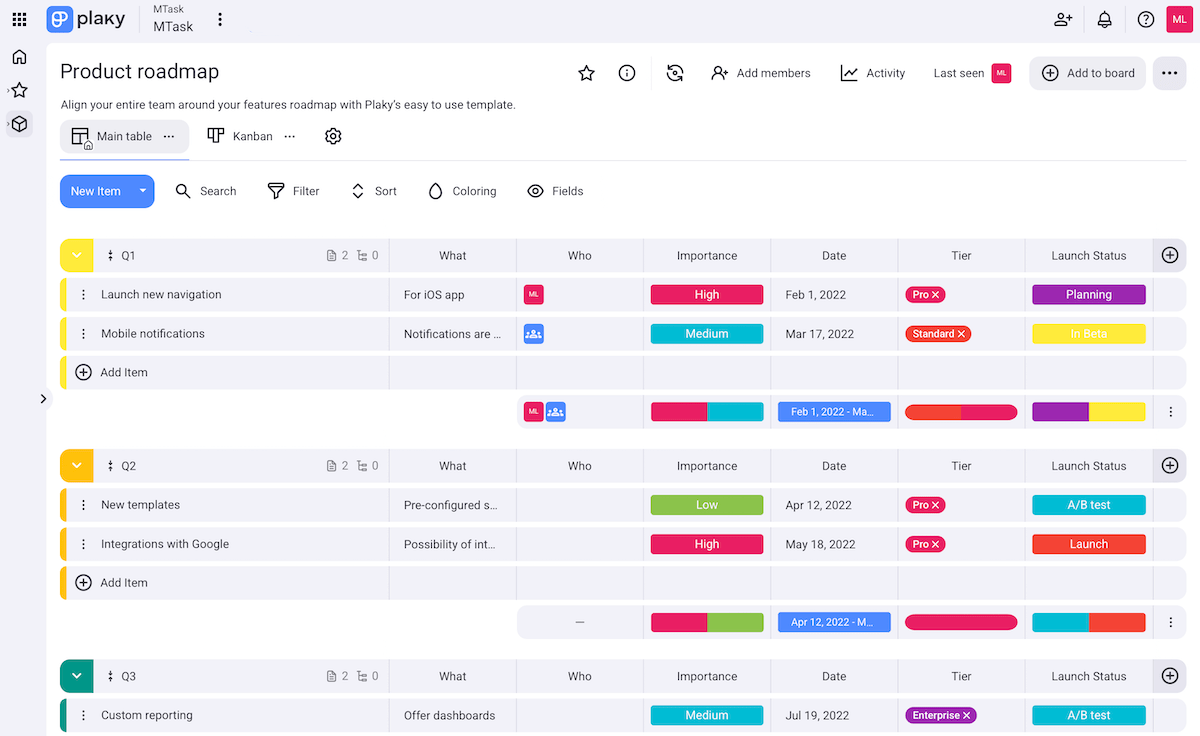
Moreover, Plaky ensures simple product and task tracking thanks to its sleek design and transparency. Our platform offers:
- Ultra-polished UI — Plaky is highly intuitive and fast thanks to clear layouts. While many similar work management tools get bloated quickly, Plaky remains clean.
- Centralized workspace — Having all product-related info, tasks, files, links, and more in a single place minimizes confusion. Everyone can see task owners, due dates, budgets, etc.
- Easy communication — Adding comments and @mentions enables focused discussions about your products and reduces the need for meetings and emails.
- Activity log — There’s a chronological record of all changes made on the platform, so you’ll never miss who did what and when.
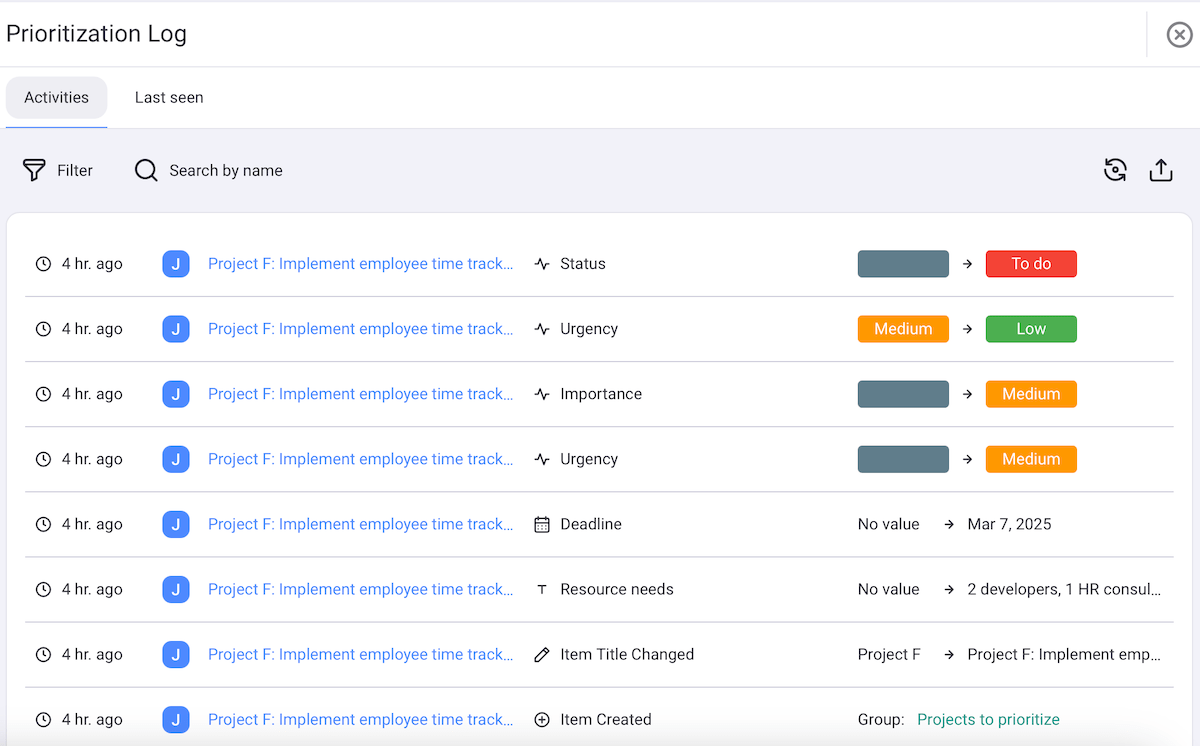
The only downside to Plaky is the lack of integrations. At the moment, Plaky integrates with Clockify, for easier time tracking. There’s also Pumble integration, for improved team communication. You can find these apps’ reviews in this article as well.
What’s new in Plaky?
Apart from board automations, Plaky recently came out with its chart view as well. There have also been various UX/UI improvements and bug fixes to make the app even more streamlined and enjoyable (find more details in Plaky’s changelog).
Available for: web, iOS, Android
| Plan | Price |
|---|---|
| Free | $0 |
| Pro | $3.99/seat/month* |
| Enterprise | $8.99/seat/month* |
*billed annually

#2 Jira Product Discovery — best for idea management & prioritization
Jira Product Discovery (JPD) helps product teams organize, prioritize, and share ideas in a single place. It’s part of the Jira ecosystem, so it integrates well with Jira Software, making it extra useful for those already using Jira for development.
Why choose Jira Product Discovery?
This tool’s forte is capturing scattered product ideas and turning them into focused work, primarily thanks to custom prioritization frameworks.
| Pros | Cons |
|---|---|
| – Clean UI – Handy automations – Prioritization frameworks | – Overkill for non-technical teams – 3-creator limit in the free plan |
I realized right away that JPD is both intuitive and organized. The most noteworthy features that speak volumes about this include:
- Customizable views — Create roadmaps and feature pipelines with just a few clicks. Choose from 20+ custom fields to satisfy your unique needs.
- Automation — Save time by defining rules to automatically update statuses, move ideas through stages, archive items, etc.
- Comments & mentions — Add comments directly on ideas and tag teammates for smooth collaboration.
- Feedback channel — Integrate with Jira Service Management to easily receive feedback from customers and internal teams. Share views with other teams and gather their feedback via fields and votes.
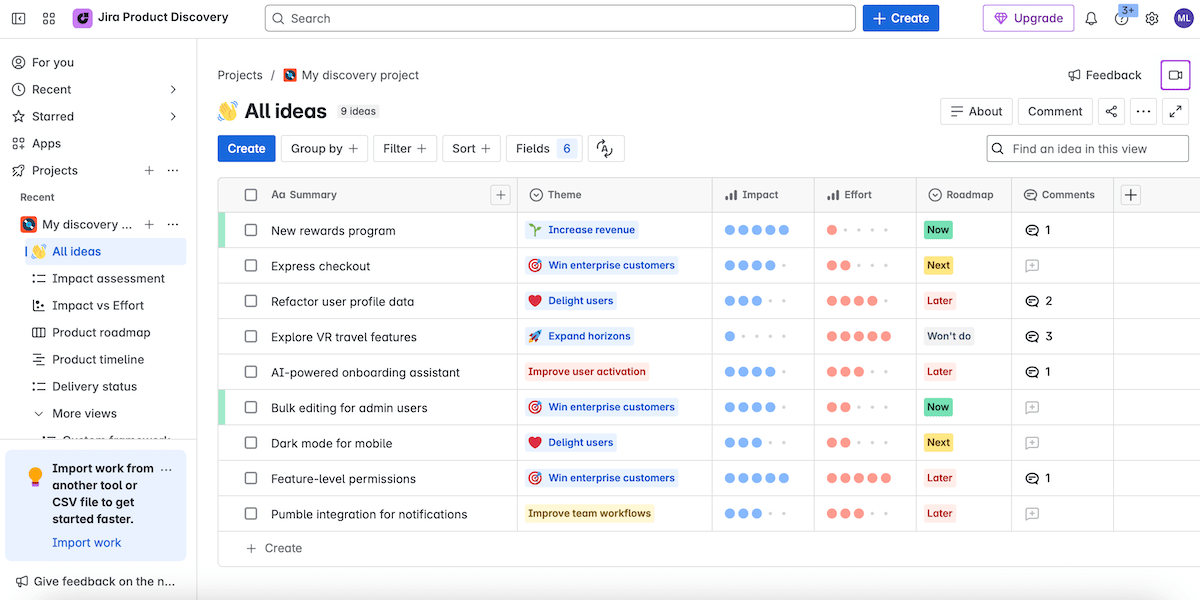
You can surely sense the dependency on the Jira ecosystem. Indeed, JPD works well if your team already uses Jira — but if not, it might feel unnecessarily complex for non-technical teams.
That said, I believe JPD is a solid choice for idea management and prioritization. Consider the following:
- Idea consolidation — Merge multiple ideas and integrate JPD with Jira Software or third-party tools. This way, you can link or convert issues to ideas, capture messages from communication tools, etc.
- Custom prioritization frameworks — Use the impact-effort matrix or define your own criteria and scoring models to prioritize ideas as objectively as possible.
- Alignment with delivery — Once you choose the most impactful ideas, link them to Jira epics or stories and track the delivery, keeping strategy and execution aligned.
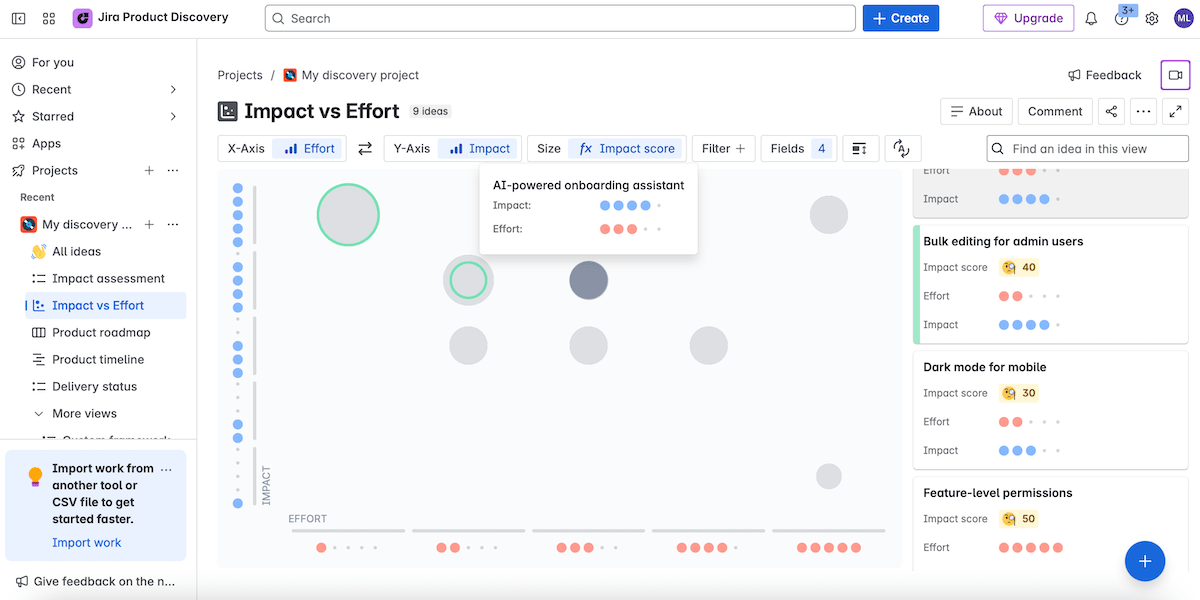
As for the downsides, I’ll mention the lack of a native mobile app. Jira does have one, but JPD-specific features aren’t supported. You can still use JPD on your phone via a browser, though.
My other complaint is that the free plan allows only 3 creators. This may work for solo product managers or very small teams, but not for those with even modest cross-functional collaboration needs.
What’s new in Jira Product Discovery?
JPD recently introduced a new premium tier for advanced governance. It caters to larger product organizations that wish to scale their planning across multiple teams. There have also been several integration and team onboarding enhancements.
Available for: web
| Plan | Price |
|---|---|
| Free | $0 (for 3 creators) |
| Standard | $10/creator/month or $500/year (1–5 creators; for bigger teams, check the website) |
| Premium | $25/creator/month or $1,250/year (1–5 creators; for bigger teams, check the website) |
#3 Aha! Roadmaps — best for strategic roadmapping
Aha! Roadmaps is designed for strategic planning, roadmapping, and sharing visual plans. This tool comes with essentials from other Aha! solutions (Ideas, Whiteboards, and Knowledge, sold separately for full functionality).
Why choose Aha! Roadmaps?
While some similar tools just help you track features, Aha! Roadmaps supports thinking, planning, and communicating strategically — primarily thanks to rich roadmaps.
| Pros | Cons |
|---|---|
| – Strong roadmapping – Good for cross-team collaboration – Custom prioritization | – Expensive and no free tier – Notable learning curve |
At the beginning of my Aha! Roadmaps journey, I felt overwhelmed by the number of tabs and dropdown menu options. However, I was able to grasp everything eventually since the features are logical and neatly arranged.
Here’s what stood out to me:
- Comprehensive approach — Aha! Roadmaps can be a space for a knowledge base, managing ideas, planning and tracking features/releases, setting goals, and more.
- Collaboration features — This tool supports cross-functional collaboration through comments and mentions, shareable roadmap views and dashboards, and custom portals for stakeholders who don’t need full access.
- Prioritization — You can streamline work by prioritizing ideas/features, i.e., creating custom scoring systems, sorting by score, grouping by category, setting priority limits, etc.
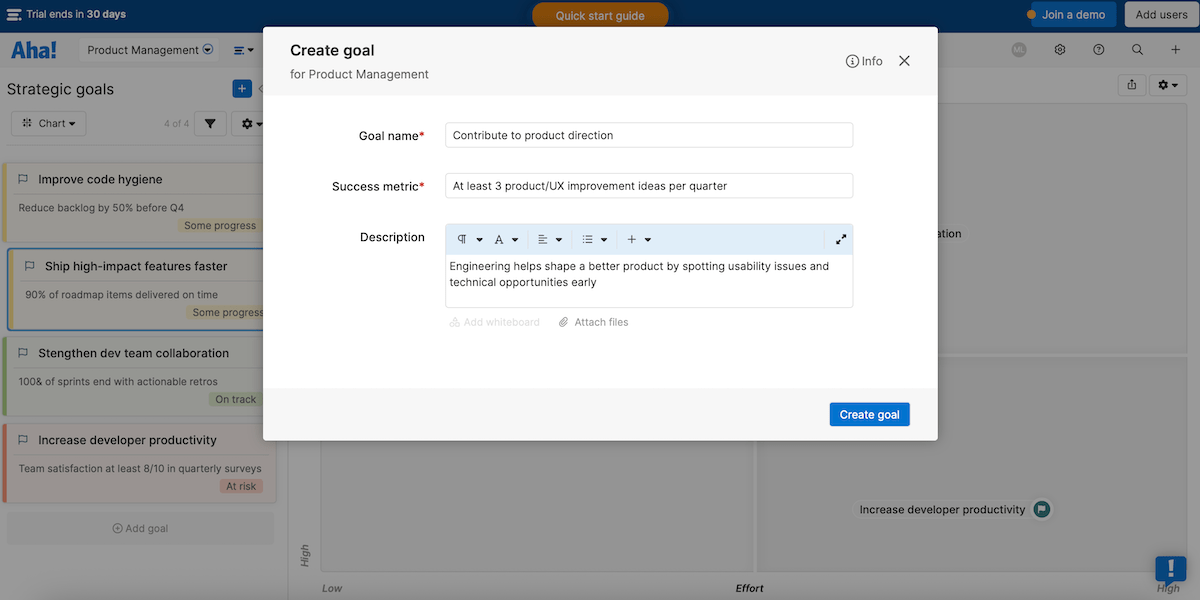
Moreover, as this tool’s name suggests, I’d say roadmapping is its strongest feature thanks to:
- Versatile strategic models — Choose from a list of popular formats (Features, Now-Next-Later, Portfolio, etc.) or make a custom roadmap. They’re polished with soft, understated colors.
- Clear vision — Tie every piece of work in your roadmap back to strategy (e.g., goals, initiatives) to ensure you’re building with purpose.
- Roadmap presentations — Turn your product plans into PDFs, PowerPoint slides, or webpages to deliver relevant information to other teams and stakeholders.
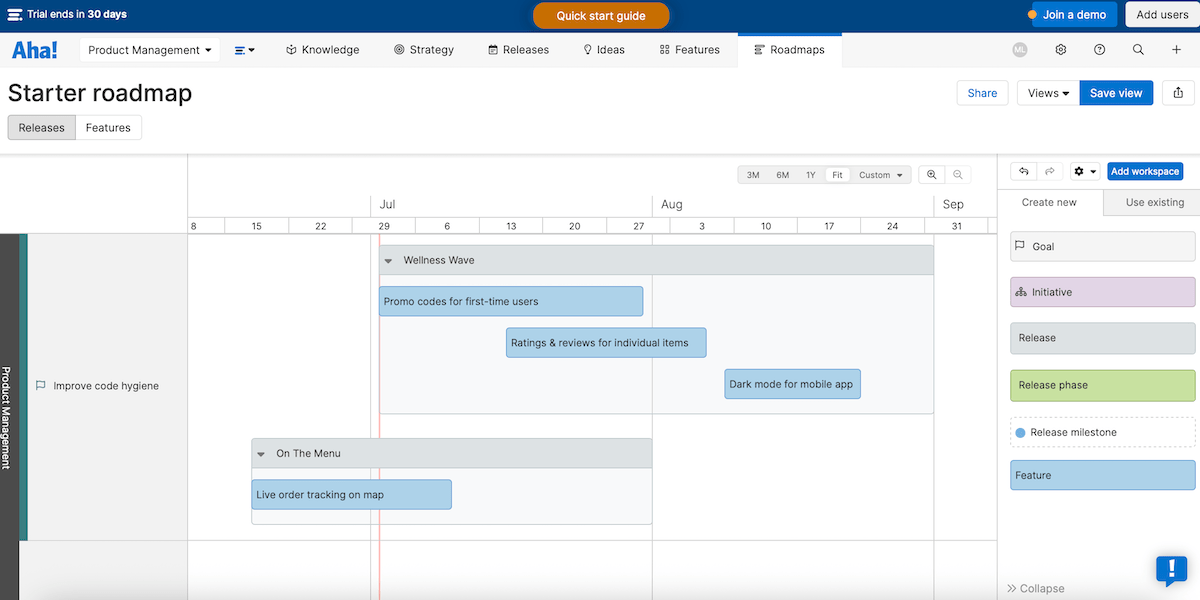
As for some drawbacks, I’ll mention that Aha! Roadmaps has no free tier. It starts expensive and scales quickly for more users, which is far from ideal for small startups or budget-conscious organizations.
You should also know that automation rules are reserved for Enterprise+ users. It’s a shame you need to cough up a staggering $149/user each month to automate repetitive tasks.
And, since there are so many features, Aha! Roadmaps is probably too heavy for simple use cases. If you want a light roadmap or Kanban board, then you’ll probably like Plaky or Linear better.
💡 Plaky Pro Tip
Want to check out different roadmap types and examples? Read this blog post:
What’s new in Aha! Roadmaps?
Aha! Roadmaps has had several useful improvements lately, such as smarter prioritization filters and more powerful automations for Enterprise+ users.
Available for: web, iOS, Android
| Plan | Price |
|---|---|
| Premium | $59/user/month* |
| Enterprise | $99/user/month* |
| Enterprise+ | $149/user/month* |
*billed annually

#4 Clockify by CAKE.com — best for time tracking & productivity
Clockify is an app that lets teams and individuals track work hours, manage timesheets, and analyze how time is spent.
Why choose Clockify?
Clockify stands out in the field of time trackers because it blends user-friendliness and detailed reports. This allows you to gather useful insights and continuously improve productivity.
| Pros | Cons |
|---|---|
| – Affordable and user-friendly – Precise time tracking – Dashboard and reports | – No screenshot recording on mobile |
While it isn’t a dedicated product management tool, Clockify is a powerful asset when paired with tools that product managers use to get the full picture of priorities, product ideas, Sprint planning, etc.
The most important Clockify features for product management include:
- Accurate time tracking — Track how long tasks take to compare estimated vs actual time on features, research, meetings, etc.
- Project and task management — Organize time logs by project, task, or tag for full clarity.
- Cost tracking — Set hourly rates for users/projects and monitor billable vs non-billable hours when justifying product costs.
- Timesheet approvals — Submit/approve tracked time entries and expenses to improve precision and workload management.
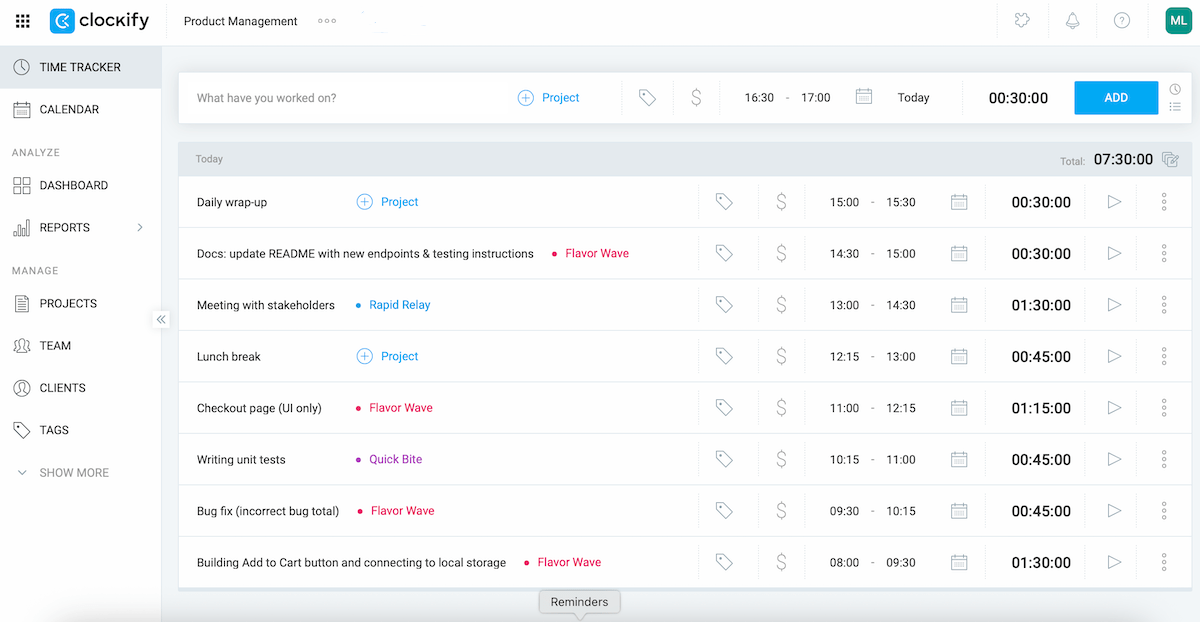
Furthermore, Clockify is the best time tracker for boosting productivity for several reasons:
- Ease of use — The app is clean and intuitive, requiring minimal setup. You start the timer with just one click or manually enter hours at the end of the day.
- Excellent free plan — Clockify has a free version that supports unlimited users, unlimited tracking, billable rates, and other features that most similar apps only offer in paid tiers.
- Multi-platform availability — Available on web, desktop, mobile, and browser extensions, Clockify lets you monitor productivity whether you work in the office, remotely, or hybrid.
- Dashboard and reports — You get to see a clear overview of who did what in a custom date range, top activities, total time tracked, and more for full visibility and pattern capturing.
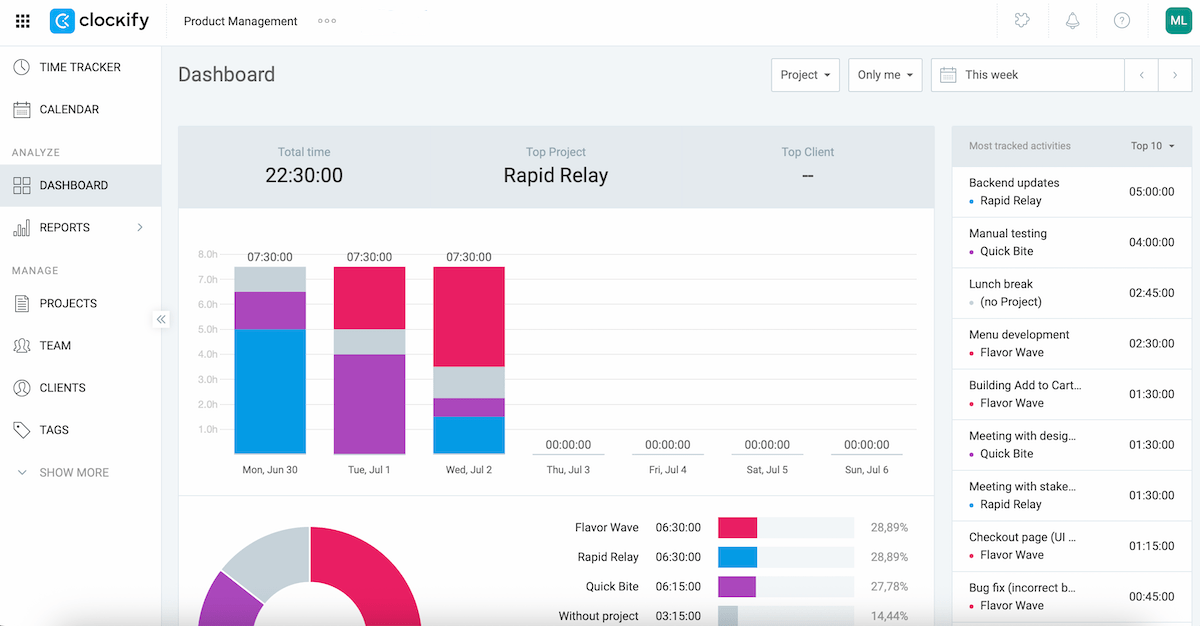
Given all this, Clockify can also help you prevent burnout and practice healthier time habits, ultimately boosting your work-life balance.
Now, as you’d probably expect, certain functionalities are desktop-first and aren’t available on mobile, like recording screenshots. Still, this is pretty minor compared to everything Clockify gets right.
What’s new in Clockify?
Clockify now offers a native integration with the work messaging app Pumble (another CAKE.com product). This lets users get Clockify notifications directly in Pumble (e.g., time-tracking reminders or time off approvals).
Available for: web, macOS, Windows, Linux, iOS, Android
| Plan | Price |
|---|---|
| Free | $0 |
| Basic | $3.99/seat/month* |
| Standard | $5.49/seat/month* |
| Pro | $7.99/seat/month* |
| Enterprise | $11.99/seat/month* |
*billed annually
#5 Craft.io — best for planning digital products
Craft.io is a product management platform that works best for digital products. It allows teams to strategically plan their apps, websites, games, and more.
Why choose Craft.io?
Digital products evolve fast, and Craft.io excels in supporting feature changes, priority shifts, and team growth since it’s flexible and insight-driven.
| Pros | Cons |
|---|---|
| – Narrow focus on product management – Auto-sync with dev tools – Strong prioritization tool | – No free plan and pricey – No native Android app |
Immediately upon seeing the terminology in its menus, I realized Craft.io is oriented toward digital products. The tool’s planning and monitoring is efficient thanks to:
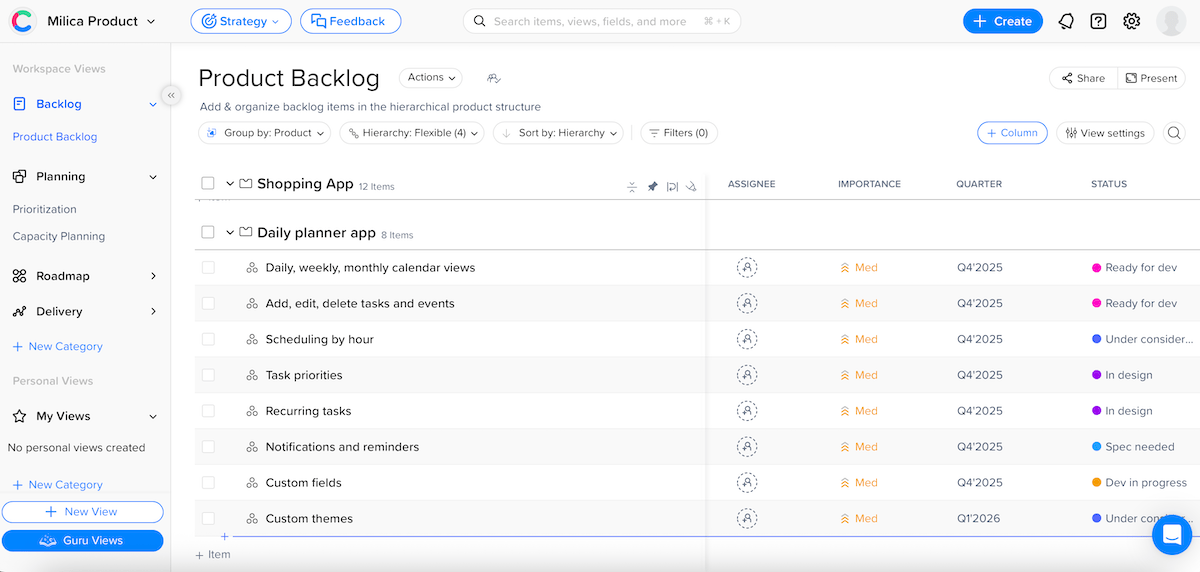
- Custom fields and views — Use predefined and custom fields to categorize work, assign owners, set deadlines, etc. For a better overview, pick a preferred view (table, capacity planning, Kanban, and more).
- Auto sync to dev tools — After writing product specs and planning Sprints in Craft.io, use Auto Sync to connect them automatically to your preferred dev tool (like DevOps or Jira).
- Roadmapping — Choose from 3 different roadmap views (strategic, timeline, and swimlanes) to share the vision of your product over time. All of it is drag-and-drop with color-coding and dependencies for full flexibility.
- Prioritization frameworks — Apply MoSCoW, RICE, WSJF, and other popular prioritization frameworks to justify every decision with certainty.
All of this is highly useful, but just know that the depth of the features means onboarding can take quite some time.
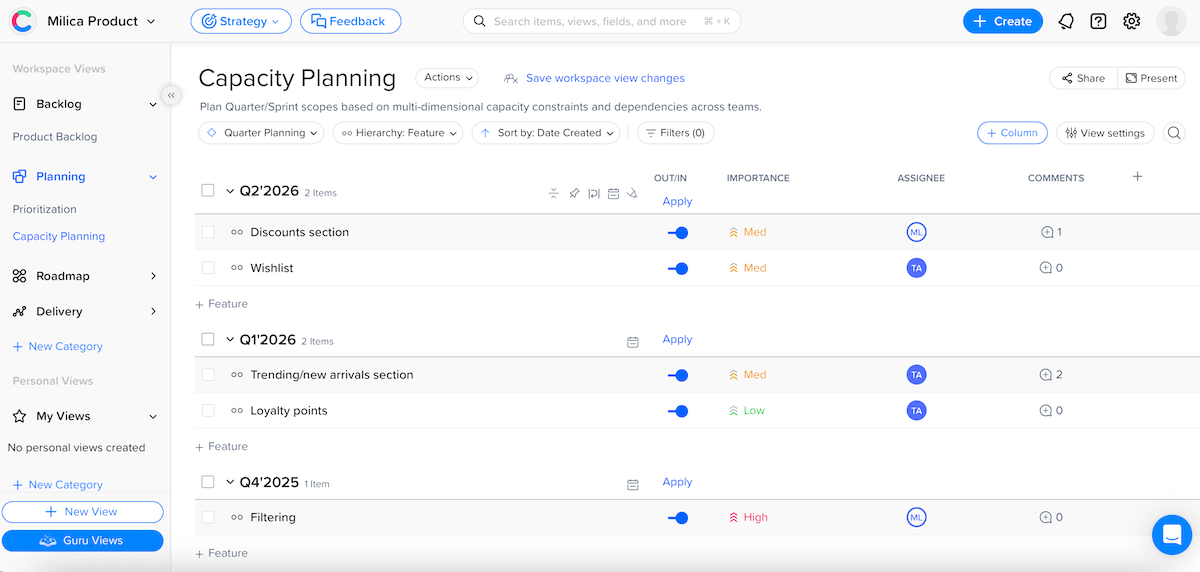
Here’s why I think this platform is best suited for planning digital products:
- Matching digital product life cycle — Craft.io follows a feature > epic > roadmap > delivery structure, reflecting how digital teams work.
- Bridge between strategy and execution — Business and dev sides are connected by pushing product specs and features from Craft.io to dev tools. Plus, external stakeholders can review read-only roadmaps through the LiveShare feature without accessing the platform.
- Feedback portals — You can set up a feedback portal and have team members or customers answer various questions (for example, specifying the most requested features).
I was just disappointed to learn that Craft.io doesn’t have an Android app. As an Android user, I couldn’t test it on my phone other than via a browser, which isn’t quite the same experience. There is a native iOS app, though.
Another downside: there’s no free plan, just a free trial. Also, Craft.io’s pricing is on the higher end, especially if you have a large team or want advanced features.
What’s new in Craft.io?
Craft.io recently added Slack, Microsoft Teams, and Salesforce to its integration options. There have also been navigation menu enhancements — users can now resize the left navigation panel and assign custom icons to view categories.
Available for: web, macOS, Windows, iOS, iPadOS
| Plan | Price |
|---|---|
| Starter | $19/editor/month* |
| Pro | $79/editor/month* |
| Enterprise | POA |
*billed annually
#6 ProdPad — best for feedback gathering & analysis
ProdPad is a modular product management platform that helps you connect the dots between ideas, roadmaps, feedback, and strategy.
Why choose ProdPad?
As opposed to tools that just store feedback, ProdPad allows you to analyze it and make it actionable.
| Pros | Cons |
|---|---|
| – Tying feedback to ideas – Over 1,000 automations – Lean roadmaps | – No free plan and modular pricing – No native mobile app |
To be honest, I was confused by ProdPad’s pricing structure at first. Then, I realized it has 3 separate modules that aren’t all automatically included forever. During my free trial, I got to access all of them, and this is what stood out:
- Idea management — Provide idea descriptions, related customer personas, and more in order to act on your ideas faster.
- Automated workflows — Use code-free automations to reduce manual work (e.g., move ideas based on their stage).
- Roadmapping — Build various roadmaps to match your product process and sharing needs.
- Communication features — Add comments and mentions to keep feedback in context.
- Prioritization — Use the priority chart to recognize quick wins and time sinks. You can also use other frameworks, but those require a manual setup.
- Integrations — Choose from 1,000+ integrations to streamline workflows (development, feedback, collaboration, etc.)
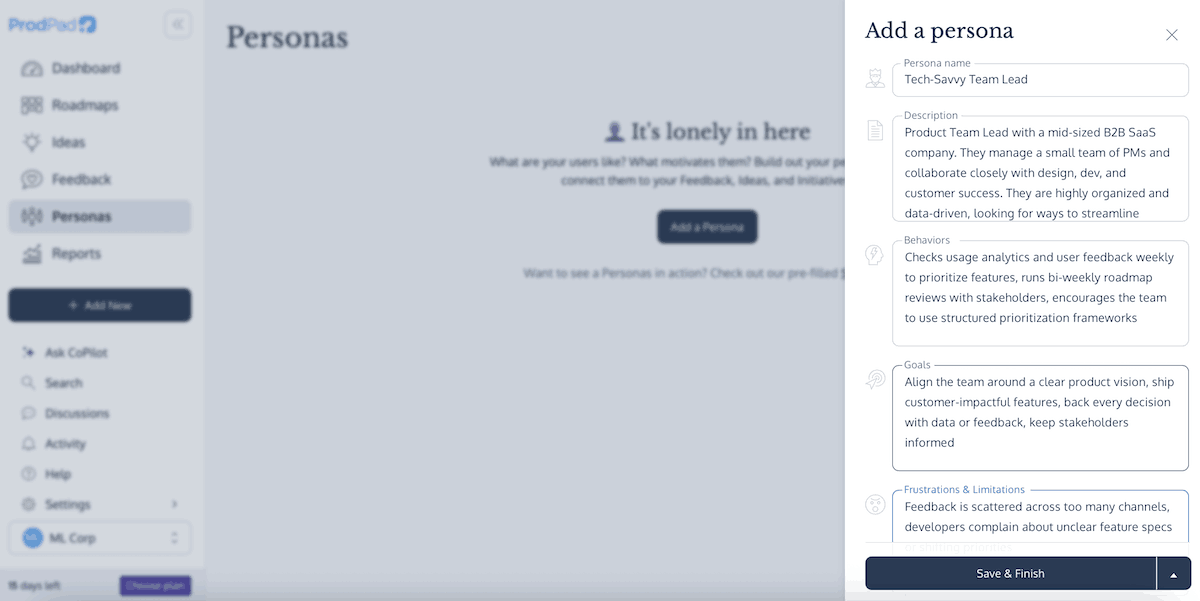
Now, onto the feedback functionality: ProdPad doesn’t just help you collect feedback — it makes it central to your product planning. Here’s what I liked:
- Multiple feedback sources — Feedback can come from portals, support tickets, emails, messaging apps, and more, flowing into one centralized place.
- Direct link to ideas/roadmaps — You can link feedback to ideas and roadmap items, never having to guess why something was requested.
- Gathering insights — The frequency chart, custom tags, and filters help you compare data, spot pain points, conclude which personas are most vocal, etc.
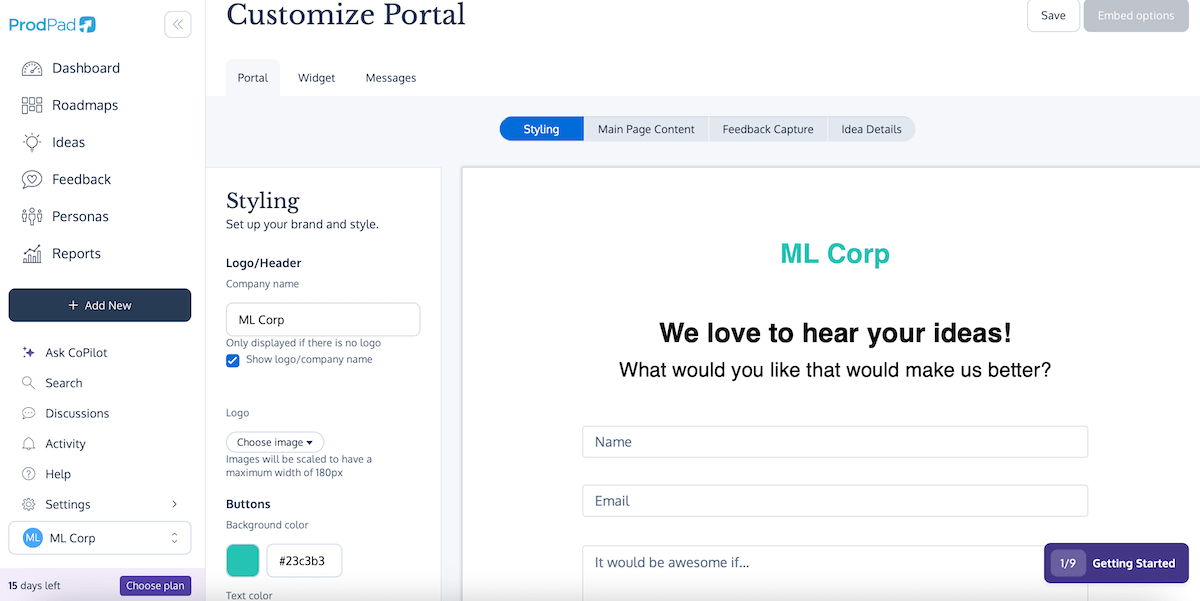
Let me emphasize again that the pricing is modular, so if you want Roadmaps + Ideas + Feedback, the monthly total can jump significantly. On the other hand, some users may like the fact they can choose to pay for what their team actually uses.
I must also mention that ProdPad is usable on mobile browsers, but there’s no native mobile app for seamless on-the-go-access.
Lastly, I thought ProdPad’s design was neat but quite uninspired. While the color palette is calm and professional, there’s not enough visual contrast between interface elements for my taste.
What’s new in ProdPad?
ProdPad has made CoPilot model improvements, boosting memory and accuracy when recalling all your product details. Also, Microsoft SSO support was added, along with a new automated feedback triage feature in beta.
Available for: web
| Plan | Price |
|---|---|
| Roadmaps Essential | $24/editor/month* |
| Roadmaps Advanced | $44/editor/month* |
| Ideas Essential | $24/editor/month* |
| Ideas Advanced | $36/editor/month* |
| Feedback Essential | $24/editor/month* |
| Feedback Advanced | $36/editor/month* |
| NB: Users can opt for 1, 2, or all 3 modules and choose between Essential and Advanced for all of them (reviewers are free and unlimited). | |
*billed annually
#7 Pumble by CAKE.com — best for team communication
Pumble is a work communication app built to keep teams of all sizes aligned without getting lost in clutter.
Why choose Pumble?
Designed with ease of use in mind, Pumble offers smooth UX whether you’re messaging or (video) calling your teammates.
| Pros | Cons |
|---|---|
| – Intuitive – Audio and video messaging – Affordable and secure | – No read receipt or manual offline option |
While Pumble isn’t a dedicated product management tool, it absolutely helps product teams streamline communication. Some of the best features are:
- Channels and direct messages — Create public or private channels for different projects, teams, or topics. Send 1:1 or group messages to quickly clarify instructions, get feedback, and more.
- Voice and video messages — If chatting doesn’t suffice, send voice and video messages that your team members can replay if needed.
- Search — Quickly search through old convos to find relevant information, links, or files.
- Video conferencing — Share ideas and updates via video meetings, with the help of screen sharing and in-call messaging.

In addition to everything mentioned, here’s why I consider Pumble the best app for team communication as someone who uses it in everyday work:
- Centralized communication — My team has long stopped using emails for collaborative work. We keep all major conversations in Pumble. This way, everyone stays aligned without chasing info across tools.
- Notification control — You can get alerts for every single message, mute certain channels, or turn off notifications completely — whatever works for your efficiency and team dynamic.
- Security — Pumble supports different roles and permissions to let admins decide who can invite people to channels, send messages in specific channels, etc. Plus, there’s guest access, enabling you to collaborate with people outside your organization without compromising security.
- Pumble API — Pumble integrates with several other apps (e.g., Google Calendar, GitHub, Zapier), while the Pumble API add-on enables custom integrations.
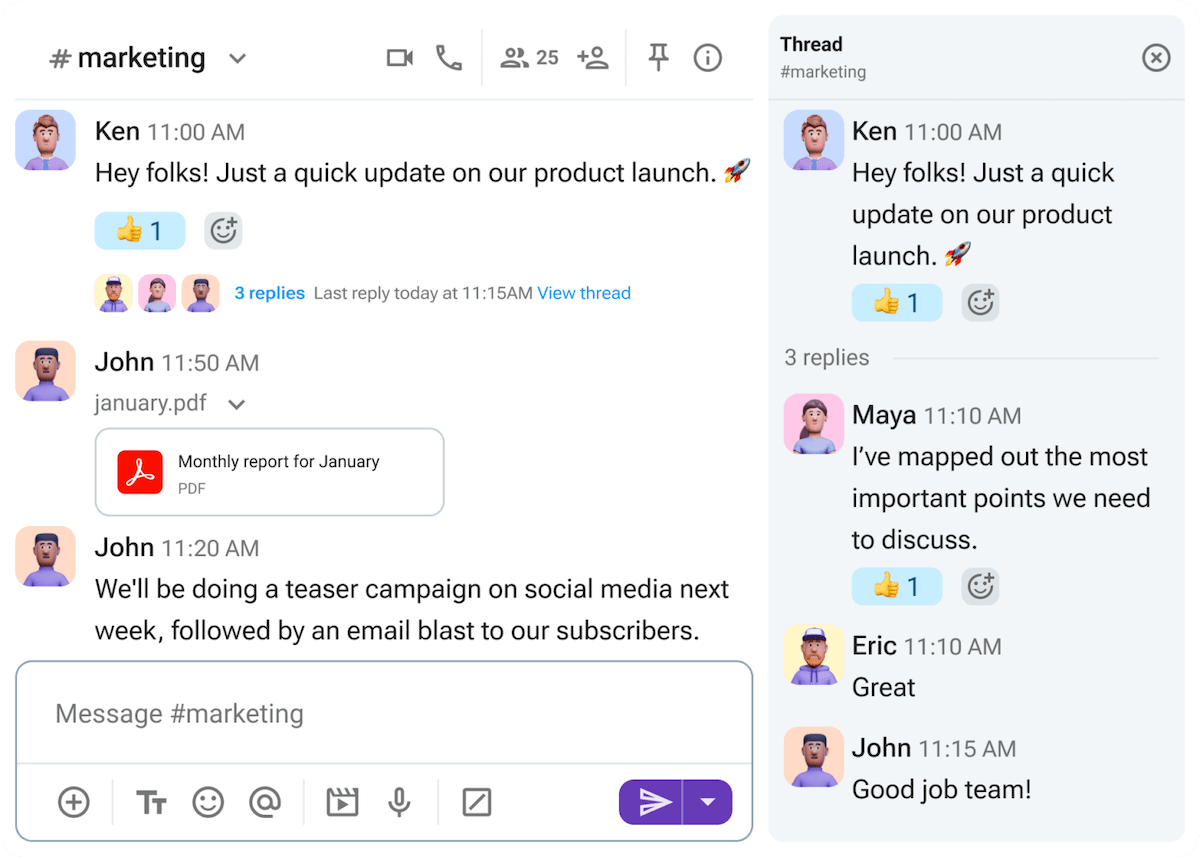
Now, if we’re talking about room for improvement, I’d sometimes like to set myself to “offline.” You do go idle in Pumble after some inactivity, but I guess I prefer having agency over how I appear instead of relying on auto status. You can add a custom status, though.
It would also be nice to have read receipts to be sure that the recipient has seen your message.
What’s new in Pumble?
Most recently, Pumble introduced a native integration with Plaky, another CAKE.com product. Other new features include polls directly in your channels and DMs and recurring messages.
Available for: web, macOS, Windows, Linux, iOS, Android
| Plan | Price |
|---|---|
| Free | $0 |
| Pro | $2.49/seat/month* |
| Business | $3.99/seat/month* |
| Enterprise | $6.99/seat/month* |
*billed annually
#8 Linear — best for issue tracking
Linear is a project and issue management tool primarily designed for software and product teams. It can help you streamline workflows, handle bugs, plan roadmaps, and more.
Why choose Linear?
Linear’s core strength lies in issue tracking, as this functionality is fast, context-rich, and developer-friendly.
| Pros | Cons |
|---|---|
| – Sleek, minimalist design – Fast performance and instant updates – Excellent issue tracking | – Limited customization – Basic roadmaps and prioritization |
Here’s what I think makes Linear effective in real-world product workflows:
- Templates — Setting up templates streamlines repetitive tasks and saves time.
- Comments and reactions — You can communicate with teammates via comments on issues, projects, and documents to ensure alignment.
- Integrations — Linear connects seamlessly with GitHub, GitLab, Figma, Zapier, and more to keep your work flowing across tools.
- Prioritization — While there are no built-in prioritization frameworks like those in Craft.io or JPD, you can prioritize items using labels, project grouping, and filters.
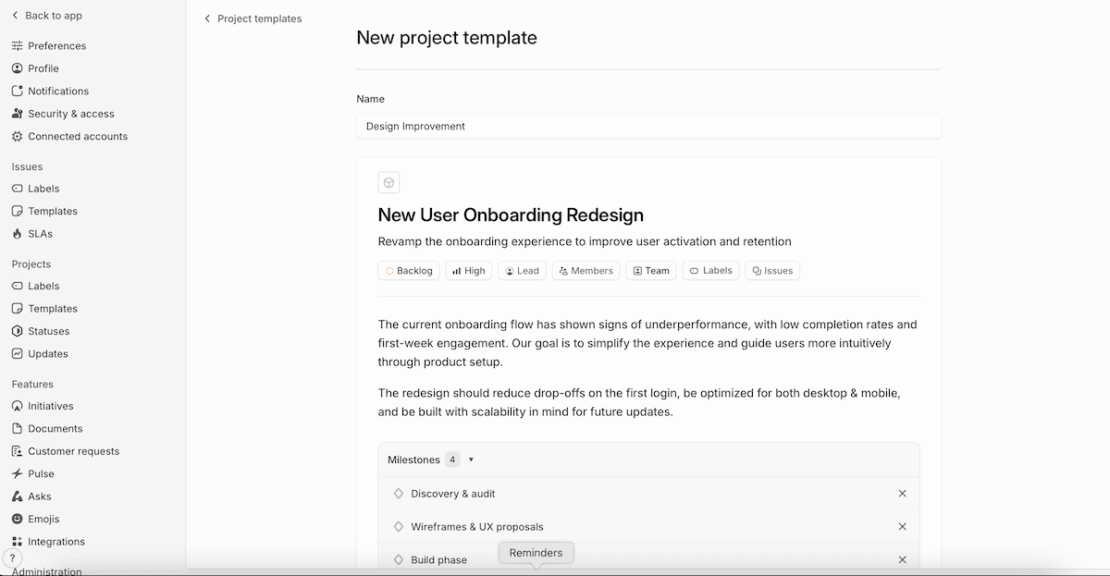
I was quite confused when I couldn’t find roadmaps in Linear. I soon realized this feature is called initiatives, and it needs to be toggled on in the workspace settings.
That said, Linear’s roadmaps are suitable for live status-tracking and internal alignment, but you should know they’re intentionally minimalistic. There are no Gantt charts, goals, personas, etc. So, roadmaps in Linear aren’t exactly for sharing with customers.
When it comes to issue tracking, I found this to be Linear’s highlight thanks to:
- Fast performance and keyboard shortcuts — Linear prides itself on lightning-fast interface and data syncs. With a variety of keyboard shortcuts, issue management and tracking feel effortless.
- Automated issue updates — If you connect Linear with GitHub or GitLab, it can automatically keep your issue statuses in sync with your code. This way, you always know where each issue stands.
- Smart triage — Triage is a special inbox for all newly created issues that lets product managers review issue details, assign them to team members, add tags, and more. Quick issue sorting keeps your backlog clean and improves prioritization.
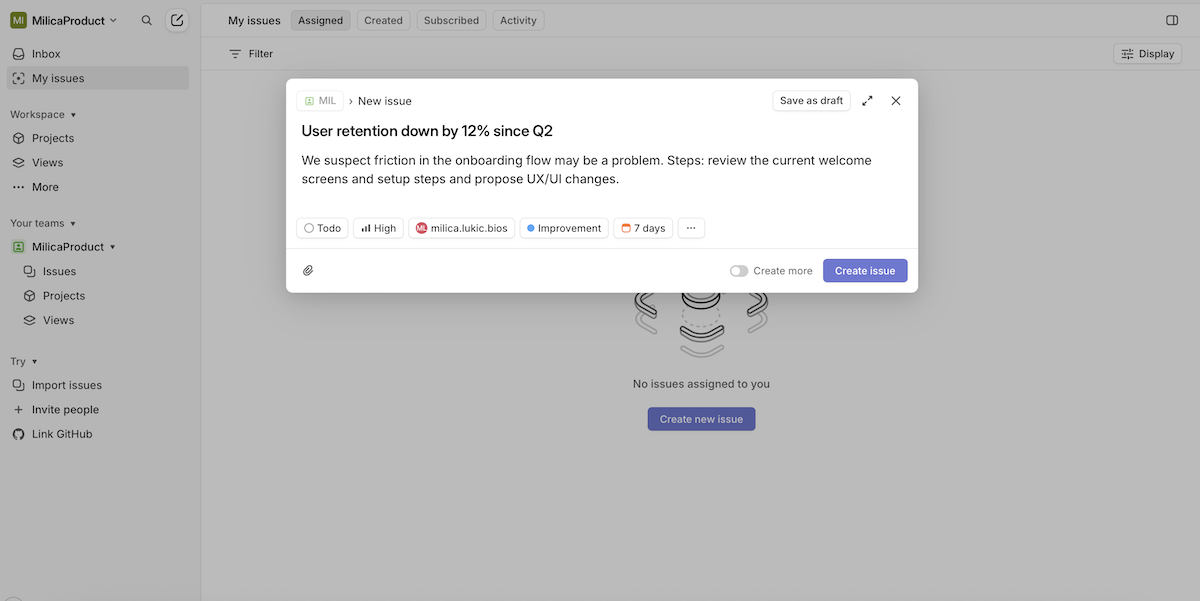
As you can probably tell, Linear is best suited for dev/product contexts and is not so ideal for non-technical teams. Larger organizations with complex workflows would need more customization and better cross-team collab functionality.
I’ll also say I like Linear’s minimalist design in light mode, but the dark theme suffers from low contrast in some areas, making it difficult to read secondary text.
What’s new in Linear?
Linear has recently introduced Pulse, a personalized activity feed that provides AI-generated summaries and even audio digests concerning workspace updates (currently available on desktop and iOS).
Available for: web, macOS, Windows, iOS, Android
| Plan | Price |
|---|---|
| Free | $0 (2 teams) |
| Basic | $8/user/month* |
| Business | $14/user/month* |
| Enterprise | POA |
*billed annually
#9 Miro — best for strategic brainstorming
Miro is a popular platform for visual collaboration — all kinds of brainstorming, planning tasks, managing projects, and more.
Why choose Miro?
As an infinite digital whiteboard, Miro excels at visual planning and cross-functional workshops, allowing teams to smoothly plug into strategic flows.
| Pros | Cons |
|---|---|
| – Extensive template collection – Rich in communication features – Cross-team-friendly | – Can get messy quickly – Laggy with large boards |
While it isn’t a specialized product management solution, Miro can make a product manager’s life easier thanks to:
- Templates — Use Miro’s rich template collection for prioritization frameworks, roadmaps, product positioning etc. to save time.
- Smart automations — Automate repetitive work with low- or no-code automations (if you opt for the Enterprise plan).
- Integrations — Choose from 160+ integrations (with tools for software development, project management, communication, and more) to streamline workflows.
- Sharing insights — Share Miro boards with your team, the rest of the company, or people outside your organization (e.g., external stakeholders, clients, freelancers collaborating on brainstorming sessions).
Just note that Miro relies heavily on your device’s RAM, CPU, and GPU. In other words, performance can degrade on large boards. I’m talking delayed cursor movement, slow zooming, occasional browser freezes — all of which are quite frustrating.
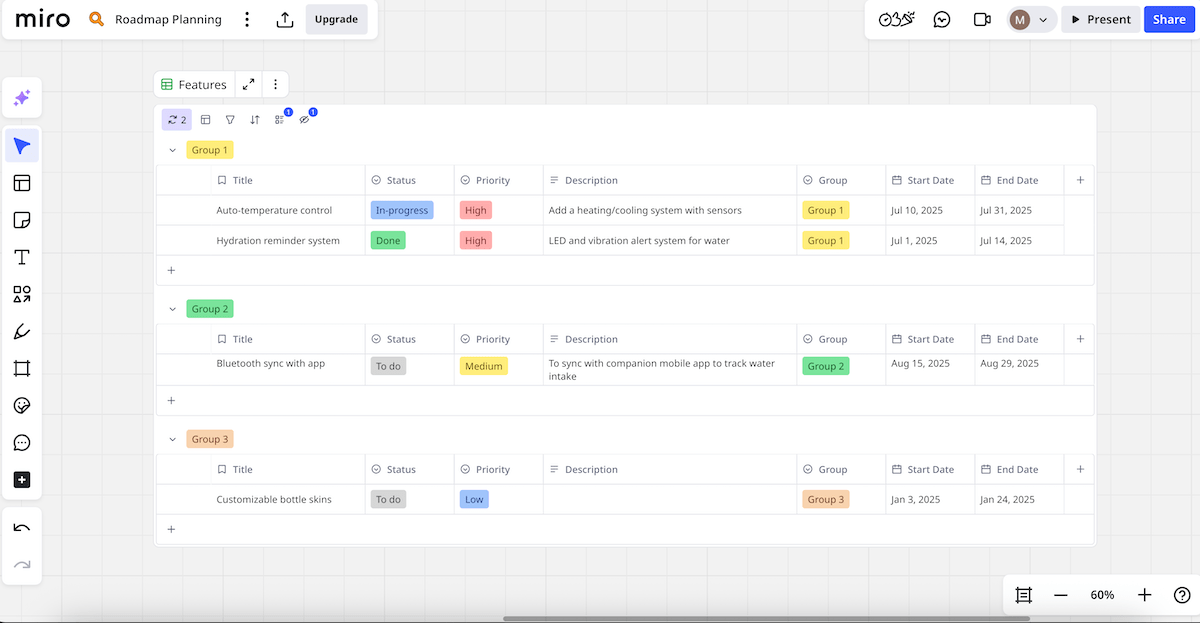
As for why I recommend Miro for strategic brainstorming, consider these factors:
- Real-time co-editing — Multiple users can work on the same board at the same time, which boosts collaborative spirit.
- Structured sessions — Voting mechanisms and timers turn passive meetings into interactive discussions, boosting proactiveness.
- Sticky notes & comments — Sticky notes are a quick way to organize and share ideas. Comments allow for feedback, questions, discussions, and more, directly on the board.
- Freehand drawing — Sometimes, words just don’t cut it. You can use freehand drawing to sketch rough workflows or low-fi UI mockups, underline elements, etc. This can help you think faster and communicate more naturally.
- Cross-team-friendliness — All these features work for diverse groups and play particularly well in remote setups.
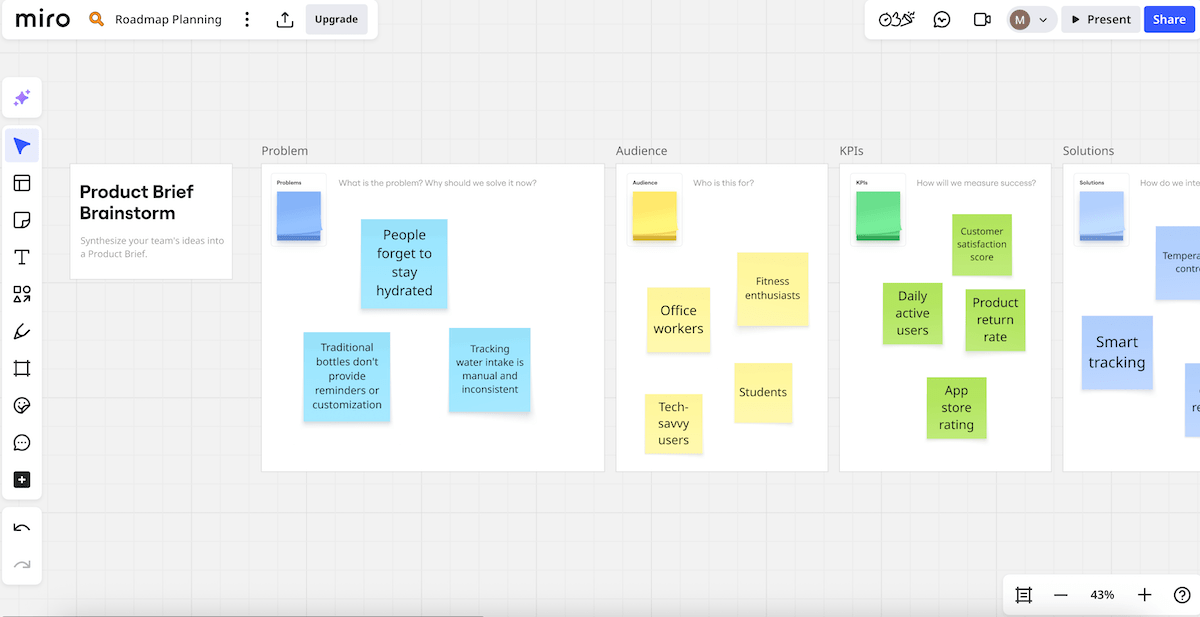
As you may sense, I thoroughly enjoy feature-rich software for creative tasks, but even I see how Miro might seem daunting to new users. Plus, it can get messy without discipline, considering the infinite canvas.
And, admittedly, while Miro is great for ideation, it isn’t optimized for execution. So, keep your product boards organized and use Miro in tandem with execution tools to avoid chaos.
What’s new in Miro?
The Miro Diagrams toolkit has recently become available to all users (including 3,000+ shapes and AI-assisted creation). Catch-up (AI-powered summaries of board changes and comments) is also new, and so are table formulas, which allow users to make calculations across columns.
Available for: web, macOS, Windows, iOS, Android
| Plan | Price |
|---|---|
| Free | $0 |
| Starter | $8/member/month* |
| Business | $16/member/month* |
| Enterprise | POA (30 members minimum) |
*billed annually
#10 Notion — best for knowledge organization
Notion is a flexible platform that blends task management, note-taking, and knowledge organization.
Why choose Notion?
Notion shines when you need a centralized, searchable knowledge repository, which many product teams could benefit from.
| Pros | Cons |
|---|---|
| – Highly flexible – Rich template library – Linked databases | – Learning curve – Laggy with large databases |
This platform works well for documentation-first teams or those who prefer DIY over rigid structure. There are building blocks of all sorts, so you can add text, tables, images, and more.
The most practical Notion features for product teams include:
- Templates — There are many editable templates, including those for product management (roadmaps, strategy prioritization frameworks, and more).
- AI and automations — Notion AI can automate tasks, translate languages, summarize information, and more. Automations can help you assign items to teammates, send emails, and perform similar tedious tasks.
- Real-time collaboration — Real-time edits, comments, and mentions let the entire product team discuss specs and update statuses promptly.
- Feedback management — Notion Forms means you can add live forms to your Notion site and collect feedback. Embed research, user interviews, and support tickets into feature pages for a unified review.
Note, however, that this tool offers only basic roadmapping. Plus, advanced automations are locked behind a paywall.
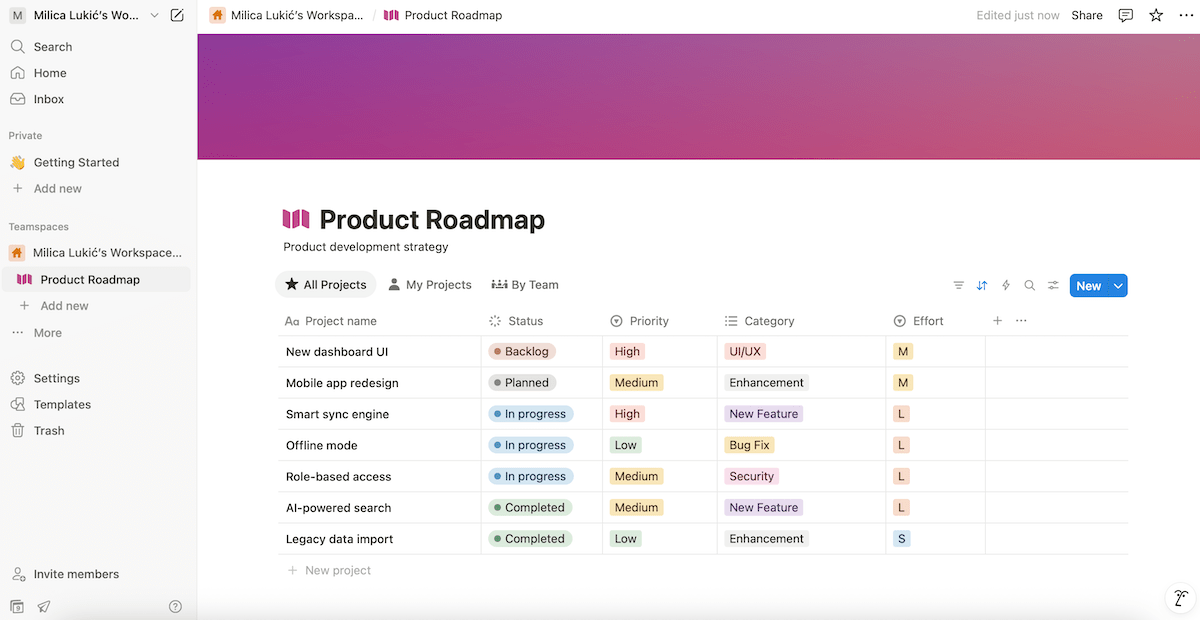
And now, Notion’s strongest point — knowledge organization. I’ve personally used Notion for this purpose in several scenarios over the past year, and this is what stands out:
- Hierarchical pages — Create pages with parent-child structures to ensure full clarity and logical information grouping.
- Linked databases — Connect documents, tasks, and feedback so that everything exists in context across your product cycle.
- Rich media support — Embed images, videos, PDFs, and more directly inside your Notion page to avoid digging through folders or tabs.
- Public sharing — Create view-only pages for stakeholders and external users without giving them full access.
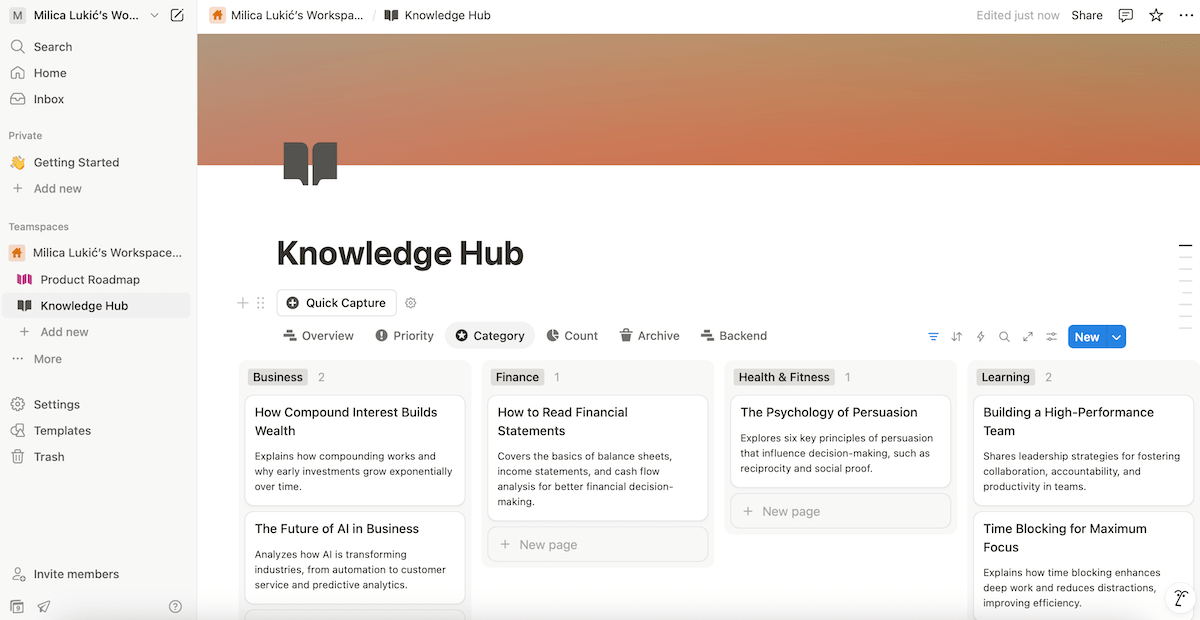
If you’re wondering about Notion’s cons, I’ll admit that its high flexibility can be daunting at first. When you open Notion for the first time, you get a blank page and endless options — Kanban, calendars, tables, toggle lists… This may intimidate newbies and require careful setup.
Also, large pages and databases may load slowly, which can kill momentum or even make small tasks feel heavy. Imagine wanting to update a priority, and then it stretches into 20 seconds or more — very frustrating!
What’s new in Notion?
Notion has recently introduced AI meeting notes, a new kind of block that transcribes your conversations and creates summaries. There has also been a pricing update where Notion bundled all AI features into the Business and Enterprise plans, ending the standalone AI add-on.
Available for: web, macOS, Windows, iOS, Android
| Plan | Price |
|---|---|
| Free | $0 |
| Plus | $10/member/month* |
| Business | $20/member/month* |
| Enterprise | POA |
*billed annually

FAQ
What features should I look for in a product management tool?
The right pick depends on your team size and workflow, but there are core features that any effective product management tool should offer, such as:
- Roadmapping — for clear strategy visualization and alignment,
- Prioritization — for data-driven decision-making,
- Custom fields and views — for flexibility and scaling,
- Collaboration features — for good teamwork and accountability, and
- Templates — for better onboarding and workflow speed.
What are some common pitfalls to avoid when using new product management software?
There are a few mistakes you should avoid when implementing a new product management tool, for instance:
- Having no clear purpose — Don’t choose a tool just because it looks modern or popular without considering what problem you’re solving. Define your key use cases and test the tool with 1-2 product squads to see how it works.
- Overcomplicating the setup — Avoid using too many fields, priority labels, boards, tags, etc. right away. Start simple and scale complexity after you’ve built team habits.
- Overlooking team training — Remember to offer brief onboarding sessions or how-to guides to your team instead of assuming people will just figure it out. Encourage questions and feedback to ensure comprehensive training.
How often should we review and optimize our use of product management tools?
You should review your product management tool use regularly, but the frequency may depend on your team size and business needs. In general, we recommend users to review and optimize their use at least quarterly by:
- Updating roadmap themes,
- Archiving unused boards and views,
- Analyzing team usage, and
- Considering new templates and best practices.
Is it better to use an all-in-1 product management solution or combine several specialized ones?
This depends on your team size, workflow complexity, and priorities.
An all-in-1 solution means less tool-switching, unified UX, and cost-effectiveness. However, it may lack depth in certain areas or become bloated.
Using several specialized tools enables best-in-class functionality in each area. On the other hand, this requires additional setup, and there’s a higher risk of information silos.
Both options have pros and cons, so it might be best to use specialized tools for different segments of your product work while connecting them to keep the team in sync (via integrations, URLs, copy/pasting summaries into a centralized hub, etc.).
Get 3 CAKE.com products for the price of 1
Enjoy smooth product management with Plaky
After exploring various product management apps, I can only advise you to do the same and see what actually fits your workflow. However, if you want to skip the trial-and-error, my top pick already strikes the desired balance between cost, simplicity, and security.
Our platform, Plaky, hits the sweet spot by being:
- Affordable — The free plan is excellent, offering unlimited users and boards. For more storage and premium features, go for paid tiers, which are much more affordable than what any competitor offers.
- Easy to adopt — Even non-technical users are quick to master Plaky. Faster onboarding means less resistance, which fuels motivation and productivity.
- Secure and reliable — Product data isn’t something you want floating around unprotected. Plaky guarantees security via different user roles and permissions, secure development and personnel, compliance with international standards, and more.
No guesswork, just product management that works — get Plaky for free right now!