 Published: December 17, 2025
Social media becomes a whole new game once you stop improvising your posting schedule. Instead of scrambling for ideas last minute, you should look for ways to make your messaging clearer and your posting schedule consistent.
That’s why using a social media calendar template is a good idea — and we have 11 free options to share with you. Use them as-is or tweak them to fit your style. Either way, building your content flow will feel easier and faster.
Let’s dive right in!

#1 Plaky’s social media calendar template
Whether you manage social media for clients or handle internal marketing within a company, the easiest way to stay organized is to use a marketing project management tool.
Take a look at Plaky’s free social media calendar template, for instance. Within seconds, you get a ready-made board where you can input information like:
- Post title/short description,
- Assignee,
- Reviewer,
- Channel,
- Copy and design status,
- Publish date, etc.
All those elements allow for clear categorization and precise planning.
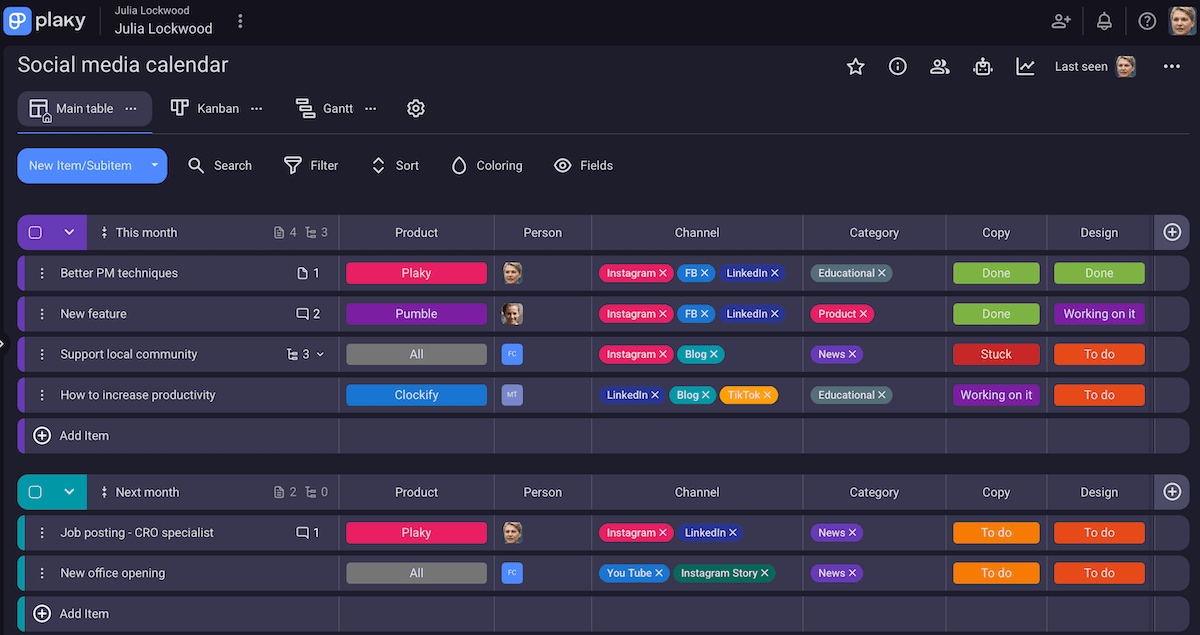
What’s more, each Plaky item supports file sharing to centralize assets and avoid version chaos (by uploading files directly or using the link field to add URLs).
And, the best thing about Plaky’s template is that it’s customizable, so you can:
- Rename item groups or add new ones,
- Reorder the columns or add new ones,
- Quickly delete what you don’t need,
- Change field types, and more.
This way, our platform adjusts to your needs, not the other way around. Plus, once you establish your perfect workflow, you can mark that customized board as a template and reuse it whenever you want.
Here are some additional Plaky features that make life easier for social media managers:
- Comments & @mentions — to keep feedback and decisions in one place,
- Board automations — to reduce manual work (e.g., status updates, approval handoffs), and
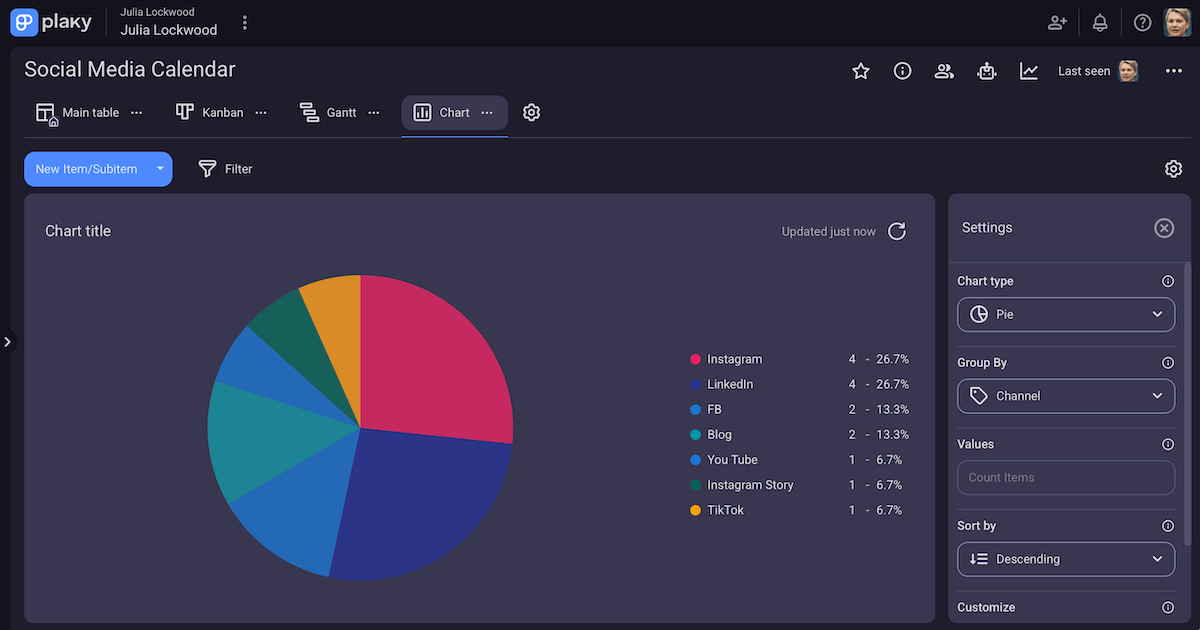
- Multiple board views — to see data in Table (quick editing), Kanban (status-based tracking), Gantt (timeline), and Chart view (pie/bar charts).
💡 Plaky Pro Tip
Want to learn how to make the most out of Plaky’s board automations? Check this detailed guide:
#2 Weekly social media calendar template
Download: Google Sheets | Microsoft Excel
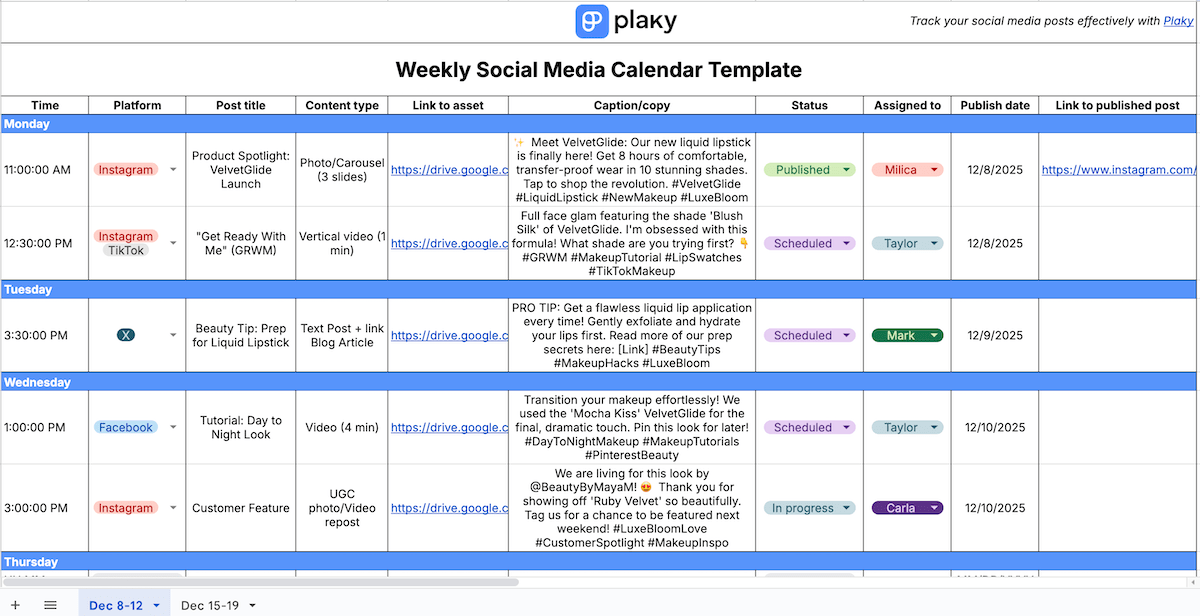
If you like short-term planning for social media, this template will help you stay focused without overcomplicating your workflow.
The weekly social media content planner template includes:
- Posting time — for maximizing reach,
- Platform — for tracking channels (select multiple for cross-posting),
- Post title — for quick content recognition,
- Content type — for ensuring balanced formats,
- Link to asset — for instant access to files,
- Caption/copy — for reducing last-minute writing,
- Status — for tracking progress from backlog to publication,
- Assigned to — for clear ownership,
- Publish date — for maintaining schedule, and
- Link to published post — for easy review and reporting.
All in all, planning social media posts week by week lets you easily react to trends and reduce mental load.
#3 Monthly social media calendar template

Download: Google Sheets | Microsoft Excel
The monthly content calendar template essentially works the same way the weekly one does, but it offers a bigger picture and enables you to spot overcrowded weeks.
Here are the columns you’ll find in the monthly template:
- Time — for optimal and balanced posting,
- Title, format, platform — for quick context,
- Link to asset — for easy access to visuals,
- Copy/caption — for ready-to-go copy,
- Status — for tracking progress instantly,
- Assignee — for clear ownership (especially when multiple people are involved),
- Publish date — for precise due dates,
- Link to published post — for simplified review/reporting, and
- Notes — for extra context or reminders.
So, with monthly social media calendar ideas, you get visibility, control, and intentional posting.
#4 Quarterly social media calendar template
Download: Google Sheets | Microsoft Excel
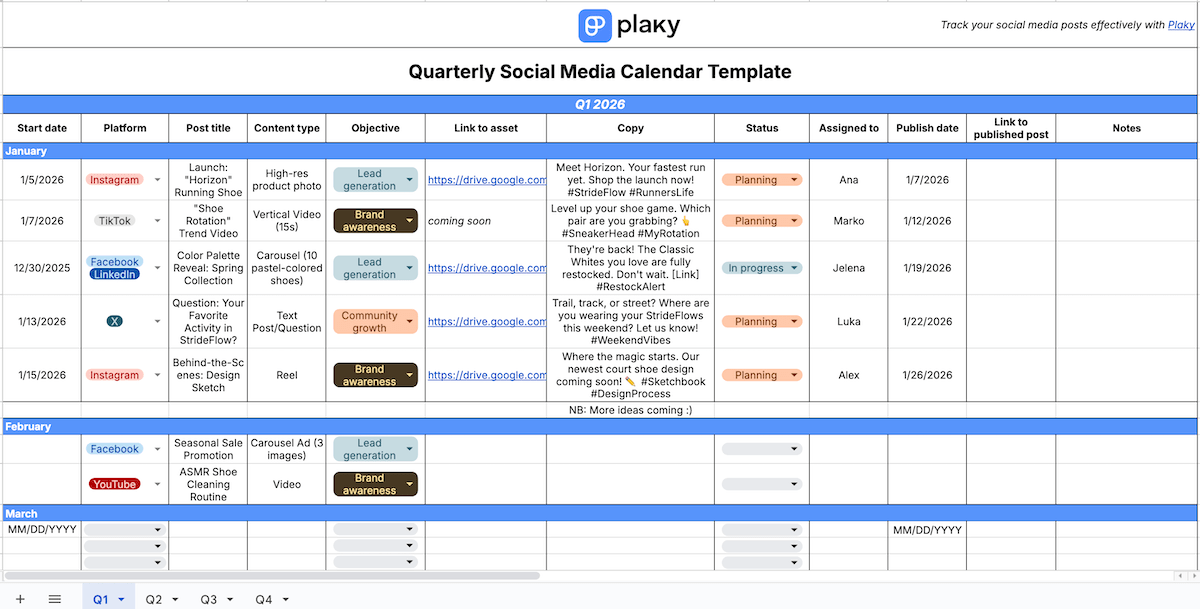
The structure of the quarterly social media planning template resembles the monthly one, but it provides a wider picture and helps you align posts with business goals.
Each column serves a specific purpose:
- Start date — when planning begins,
- Basic post info — title, platform, and format as quick references for each post,
- Objective — clarifying the purpose (e.g., brand awareness, lead generation),
- Link to asset — centralizing visuals/videos,
- Copy — ready-to-publish text,
- Status — progress at a glance,
- Assignee(s) — clear responsibility,
- Publish date — precise scheduling,
- Link to published post — simplified tracking/reporting, and
- Notes — extra context, ideas, or reminders.
With a 3-month plan, it’s easier to allocate resources efficiently (designers, copywriters, or budget) and maintain consistent posting across platforms.
#5 Social media calendar template for a SaaS/tech business
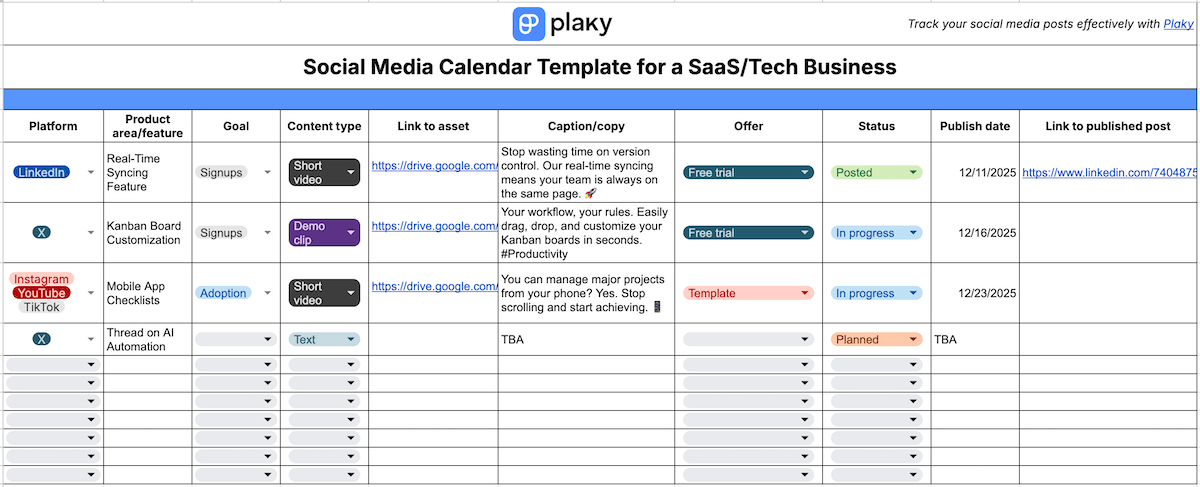
Download: Google Sheets | Microsoft Excel
A social media calendar allows Saas/tech businesses to coordinate content across multiple products, features, and channels. That’s why this template covers:
- Platform — showing where each post will go to achieve proper audience targeting,
- Product area/feature — linking posts to specific products/features for clarity and relevance,
- Goal — ensuring measurable outcomes (e.g., signups, demos),
- Content type — identifying format (text, image, video, etc.) for variety,
- Link to asset — centralizing visuals/graphics,
- Caption/copy — providing text ready for posting,
- Offer — highlighting trials or promotions,
- Status — monitoring progress from draft to live,
- Publish date — keeping schedules organized, and
- Link to published post — making post-publish tracking easier.
By using a social media calendar, tech/SaaS businesses can streamline collaboration between marketing, product, and design teams, reducing errors and last-minute chaos.
#6 Social media calendar template for solopreneurs
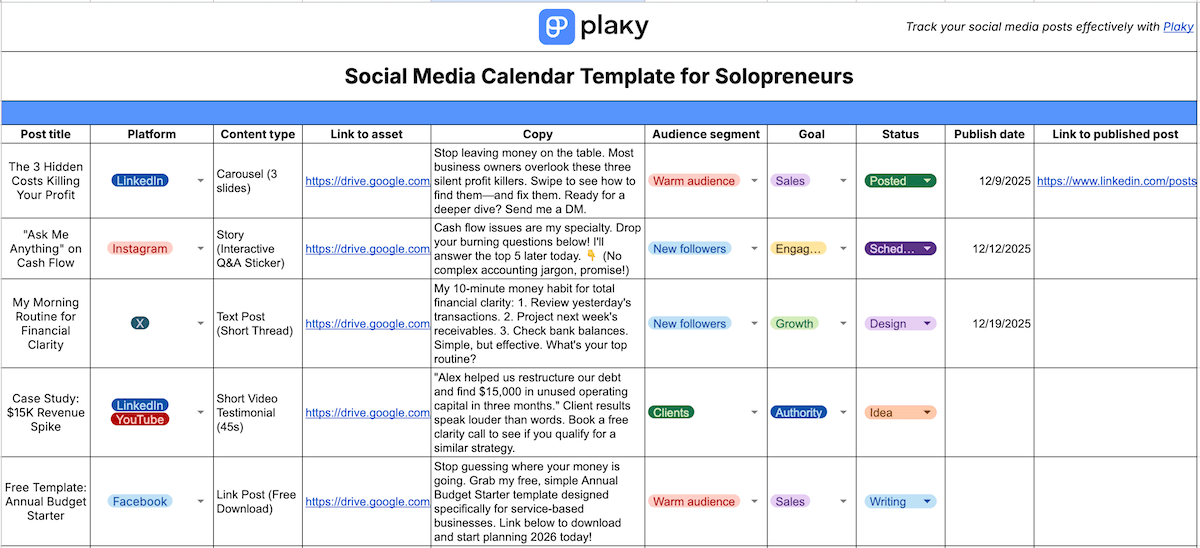
Download: Google Sheets | Microsoft Excel
Without a social media team, inconsistency and scattered planning can become the norm. That’s why solopreneurs benefit from a social media calendar — no more lost ideas or unintentionally repeated content!
This template for solopreneurs includes:
- Post title, platform, format — at-a-glance snapshot of the basic info,
- Link to asset — all visuals in one place,
- Copy — ready-to-publish caption,
- Audience segment — target audience (e.g., new followers, warm audience, clients),
- Goal — a clear purpose (e.g., engagement, sales, growth, authority),
- Status — progress tracking until publishing,
- Publish date — keeping the schedule on track, and
- Link to published post — all posts in one place for monitoring results and repurposing.
So, a content creator calendar helps solopreneurs turn loose ideas into a neat plan and keep content aligned with business goals.
#7 Social media calendar template for e-commerce
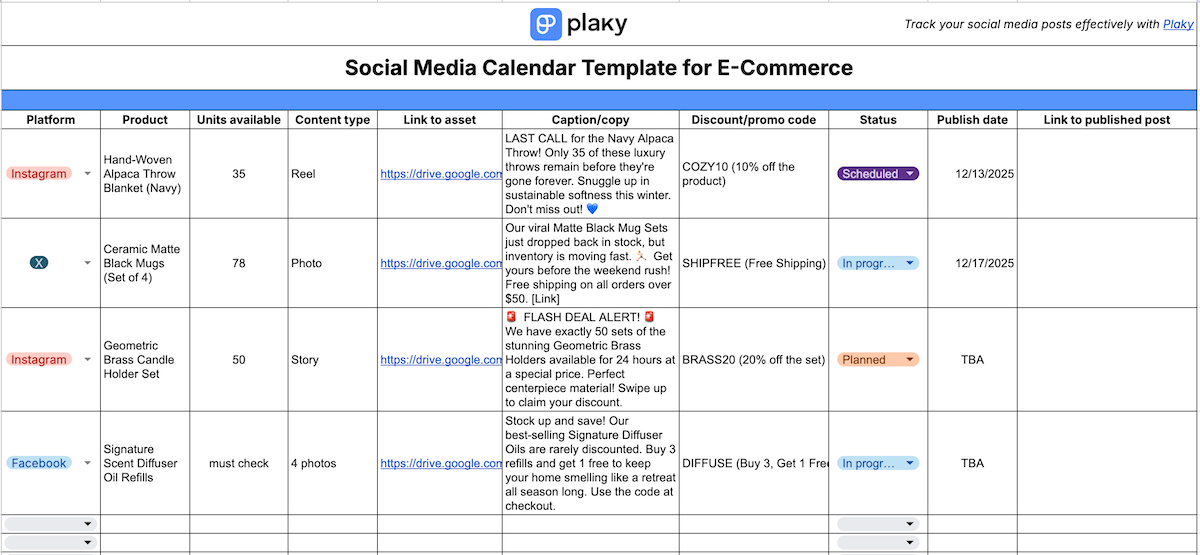
Download: Google Sheets | Microsoft Excel
A social media planner plays an important role for e-commerce businesses, helping them align posts with inventory, launches, and sales periods.
So, this template focuses on:
- Platform — to confirm all sales & marketing channels are consistently covered,
- Product — to clarify exactly what’s being promoted,
- Units available — to prevent promoting low or out-of-stock items,
- Content type — to define format (reel, carousel, story, etc.),
- Link to asset — to centralize access to visuals,
- Caption/copy — to have ready, on-brand copy for publishing,
- Discount/promo code — to avoid conflicting offers and missed discounts,
- Status — to show progress from planning to live,
- Publish date — to align posts with sales and stock timing, and
- Link to published post — to enable quick checks and reuse.
Tracking all that leads to better coordination between marketing, stock, and sales.
#8 Social media calendar template for a restaurant/café
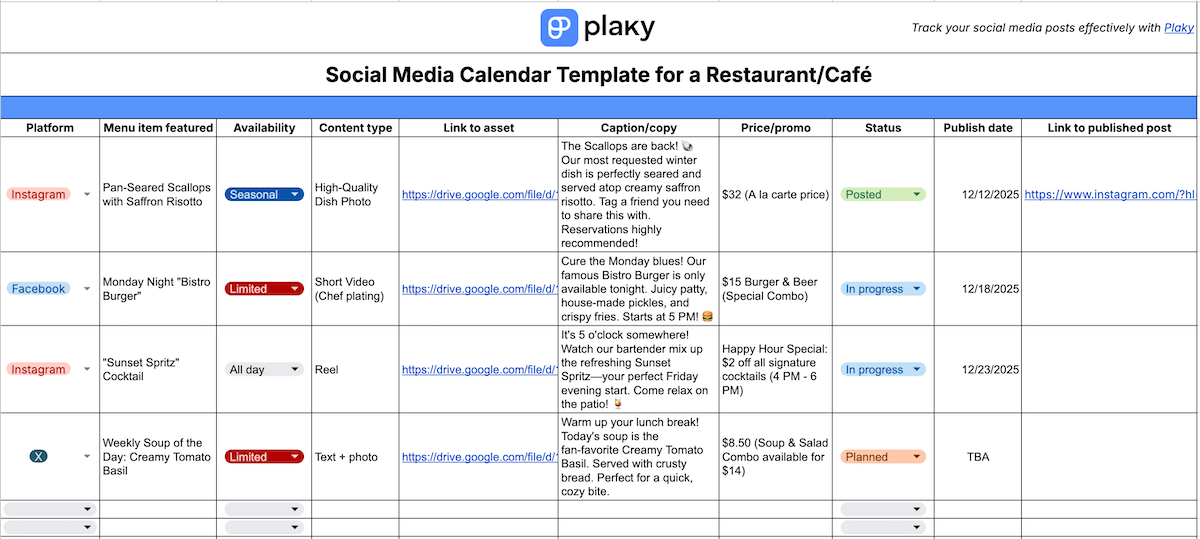
Download: Google Sheets | Microsoft Excel
A social media posting schedule template can save restaurants and coffee shops lots of time during busy service hours. It also keeps their marketing predictive instead of reactive with information such as:
- Platform — to ensure visibility across all active social channels,
- Menu item featured — to clarify which dish/drink or event is being promoted,
- Availability — to avoid promoting items that aren’t currently offered,
- Content type — to define format (e.g., photo, reel, story),
- Link to asset — to have quick access to relevant photos/videos,
- Caption/copy — to prepare well-thought-out copy in advance,
- Price/promo — to keep pricing and offers accurate and aligned,
- Status — to show progress until publication,
- Publish date — to time posts around specials, events, or peak days, and
- Link to published post — to simplify engagement checks and reuse.
By planning their social media posts this way, restaurants and cafés coordinate content with menu availability, daily specials, events, and promos — so posts actually reflect what guests can order.
#9 KPI-driven social media calendar template

Download: Google Sheets | Microsoft Excel
A KPI-driven social media calendar is most valuable for businesses whose goal isn’t just to stay active online but to achieve measurable outcomes. So, this template covers:
- Post title, format, and channel — stating the most basic information to understand your calendar at a glance,
- Link to asset — providing a direct link to visuals to cut out file-finding delays,
- Caption — storing captions you can simply copy and paste,
- Primary KPI — defining the main purpose of the post (e.g., reach, sales, retention),
- Secondary KPI — using a backup success metric for multi-layered goals (e.g., engagement, saves),
- Business objective — noting the why behind the goal,
- Status — seeing where the post is in the workflow,
- Publish date — balancing weekly/monthly content distribution,
- Link to published post — accessing published content without platform digging,
- KPI hit? — checking if the post met the primary KPI target, and
- Notes — having space for remarks, insights, tweaks, etc.
All that makes this calendar more like a decision-making system that forces each post to have a clear purpose tied to a measurable result.
#10 Social media calendar template with a simple dashboard
Download: Google Sheets | Microsoft Excel
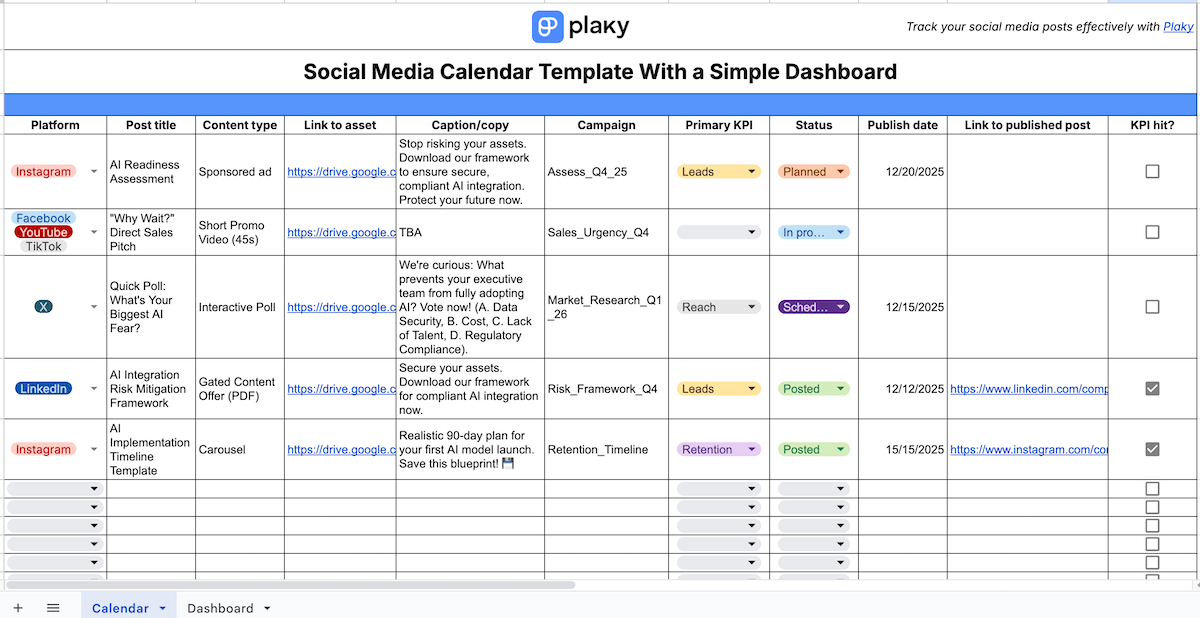
A social media content plan is good on its own, but adding a simple dashboard turns it into a quick, visual performance snapshot. That’s why this template has 2 parts.
First, the calendar consists of:
- Post title, platform, and format — the standard basic information,
- Link to asset — a direct link to the creative file to save time,
- Caption/copy — the final caption with hashtags and CTAs,
- Campaign — which campaign the post belongs to (e.g., launch, promo),
- Primary KPI — the main reason the post exists (e.g., reach, lead generation),
- Status — the current stage (e.g., Planned, In progress, Scheduled, Published),
- Publish date — the exact date the post goes live to avoid confusion,
- Link to published post — the final post link for easy sharing with your/team client or checking performance, and
- KPI hit? — a simple yes/no indicating whether the post met its goal.

Then, the dashboard includes:
- Post status distribution chart — to reveal bottlenecks and show team capacity,
- Total posts per platform chart — to confirm balanced distribution, and
- KPI hit distribution chart — to indicate strategy effectiveness.
With all that, this template helps you make faster decisions, with clearer reporting and less manual checking.
#11 Social media calendar template with integrated tasks

Download: Google Sheets | Microsoft Excel
While a regular social media planner tells you what to post and when, a calendar with integrated tasks also shows what needs to happen for the post to actually exist.
So, this template is great for any business that has multiple people working on content or has multiple steps to complete before posting.
The template includes:
- Platform — to achieve a balanced cross-platform strategy,
- Post type — to clarify production needs,
- Tasks — to create a clear checklist,
- Task deadline — to keep production on schedule,
- Task status — to see the production pipeline at a glance,
- Task owner — to improve accountability,
- Task reviewer — to guarantee quality and consistency,
- Link to asset — to centralize materials,
- Caption/copy — to keep creative and text elements together,
- Published (yes/no checkbox) — to simplify tracking,
- Publish date — to manage deadlines with ease, and
- Link to published post — to help teams review how posts performed.
Overall, this approach turns your social media calendar into a true production pipeline, letting writers, editors, designers, and managers work asynchronously while staying aligned.
FAQ
Still unsure about how to use social media calendar templates? We’ve got you covered!
What should be included in a social media calendar?
The structure of your social media calendar can vary depending on your industry and workflow, but most calendars share a few essentials:
- Post description,
- Platform/channel (e.g., YouTube, LinkedIn),
- Caption/copy (text, hashtags, CTA),
- Post type (image, video, reel, etc.),
- Status (like Planned, In progress, Done),
- Publishing date, and
- Attached asset or file link.
You may also choose to add task owners, reviewers, notes, or other elements, so it’s best to use flexible organizational software.
💡 Plaky Pro Tip
A social media calendar is a type of content calendar, which is not to be confused with the term editorial calendar (big-picture publishing plan). To learn more, read this:
How far in advance should I plan my content?
The answer depends on your business, posting frequency, and resources.
For small businesses or solopreneurs, planning 2 or 3 weeks ahead is practical, providing enough time to create and schedule posts without becoming overwhelmed.
For larger teams or campaigns, a monthly or even quarterly plan works better, letting you harmonize content with events, promotions, and strategic goals.
The key is to plan far enough to stay organized, but leave room for flexibility to react to trends or unexpected opportunities.
How can I customize templates from this article?
You can make all these templates fit your workflow by:
- Adding/removing columns or rows,
- Changing suggested dropdown menu options,
- Color-coding status, platforms, or content types,
- Adding formulas or charts, and so on.
Of course, it’s easier to personalize Plaky by CAKE.com than Google Sheets or Excel because our platform is built for workflow management, not just spreadsheets. That means perks like drag-and-drop functionality, automations, in-task comments and attachments, etc.
Social media calendar planning is easy with Plaky by CAKE.com
A social media calendar turns vague or random ideas into an actionable plan, so use it to save time and reduce stress.
If you’re serious about scaling your social media strategy and managing multiple channels, consider Plaky by CAKE.com. Besides everything mentioned when describing our social media content calendar template, Plaky also offers:
- User roles & permissions — to control who can edit or view items,
- Real-time notifications — to never miss updates and comments,
- Activity log — to monitor all changes on the platform,
- Bulk actions — to update multiple posts or tasks at once, and
- Mobile access — to manage content on the go.
If you’re a visual learner, check out this video explaining the Plaky basics:
Start planning smarter with Plaky — you’ll feel like your social media calendar is running itself!
