


Work is often chaotic and we just keep juggling tasks, calls, chats, and meetings while trying to make it through the day.
But, when the day ends, we simply can’t remember most of the things we’ve managed to accomplish. The listing gets really tricky when you have a lot on your plate.
That’s why we’ve prepared 19 free daily report templates — from those suitable for any business to those tailored for specific business types. They save you lots of time and ensure nothing gets lost in the shuffle.
Feel free to use any version (Word, Excel, Google Docs, or Google Sheets) and further customize the templates to your needs. And, if you prefer to put pen to paper, you can download the PDFs and print them out.
#1 Basic daily report template
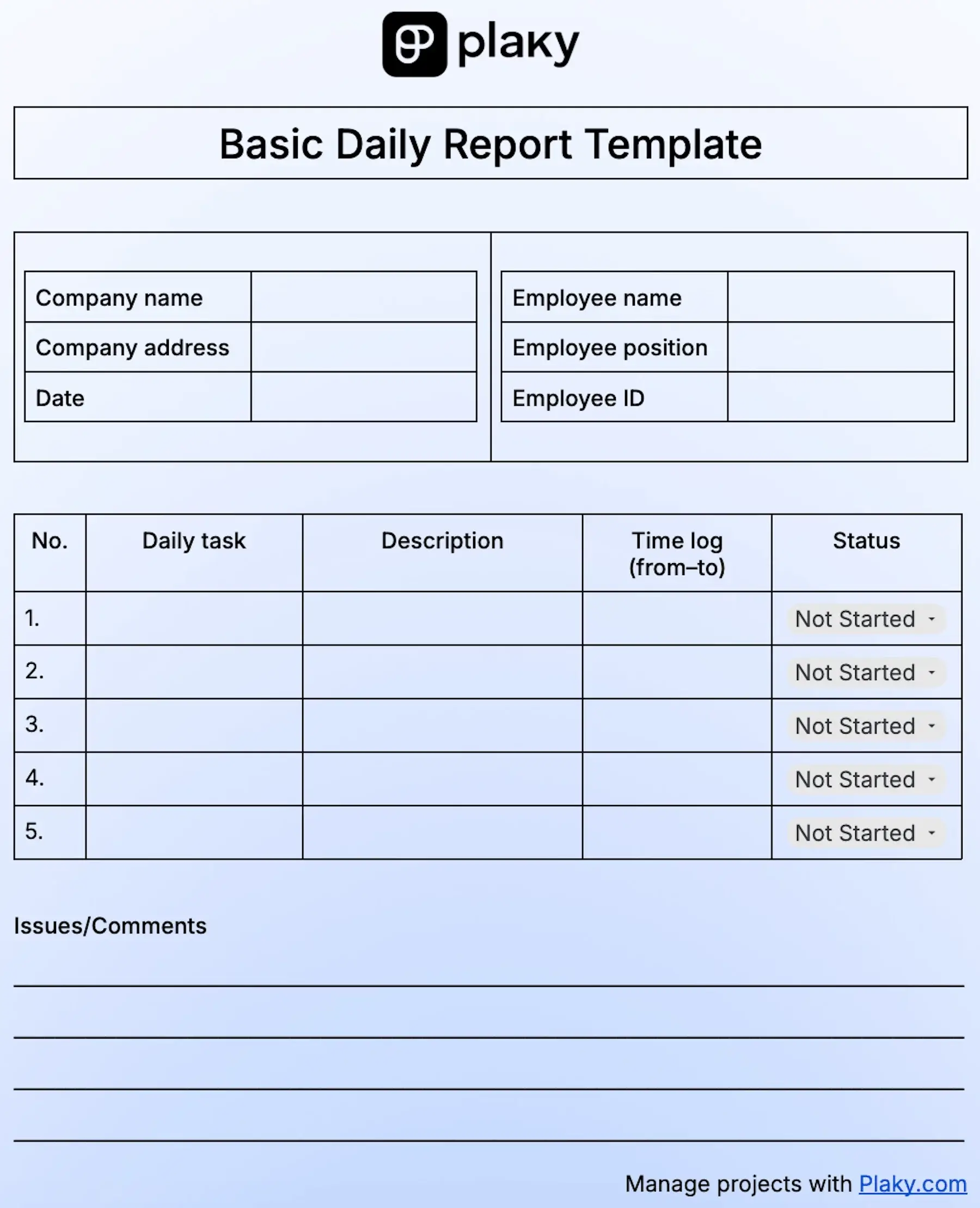
Download: Google Docs, Google Sheets, Word, Excel, PDF
If you only want to ensure you stay on track with tasks and time you spend on them, this template is your go-to tool. It has all the essentials you need to list your daily tasks in a simple way and keep your workdays streamlined.
You can use it to:
- List your daily tasks,
- Describe them and/or plan what you need to do,
- Fill in the time needed for each task,
- Choose an adequate status from the dropdown menu, and
- Add necessary comments.
By using this template to keep track of your tasks every single day, you can get an insight into how much time you need for different task types and identify where excessive time is spent.
This way, you’ll be able to improve your time management, and make necessary changes in your work schedule.
💡 CONSEJO PRO DE PLAKY
Trying to improve your task planning? Choose one of our 20 fully customizable and free to-do list templates, and organize your tasks with ease.
#2 Daily work report template
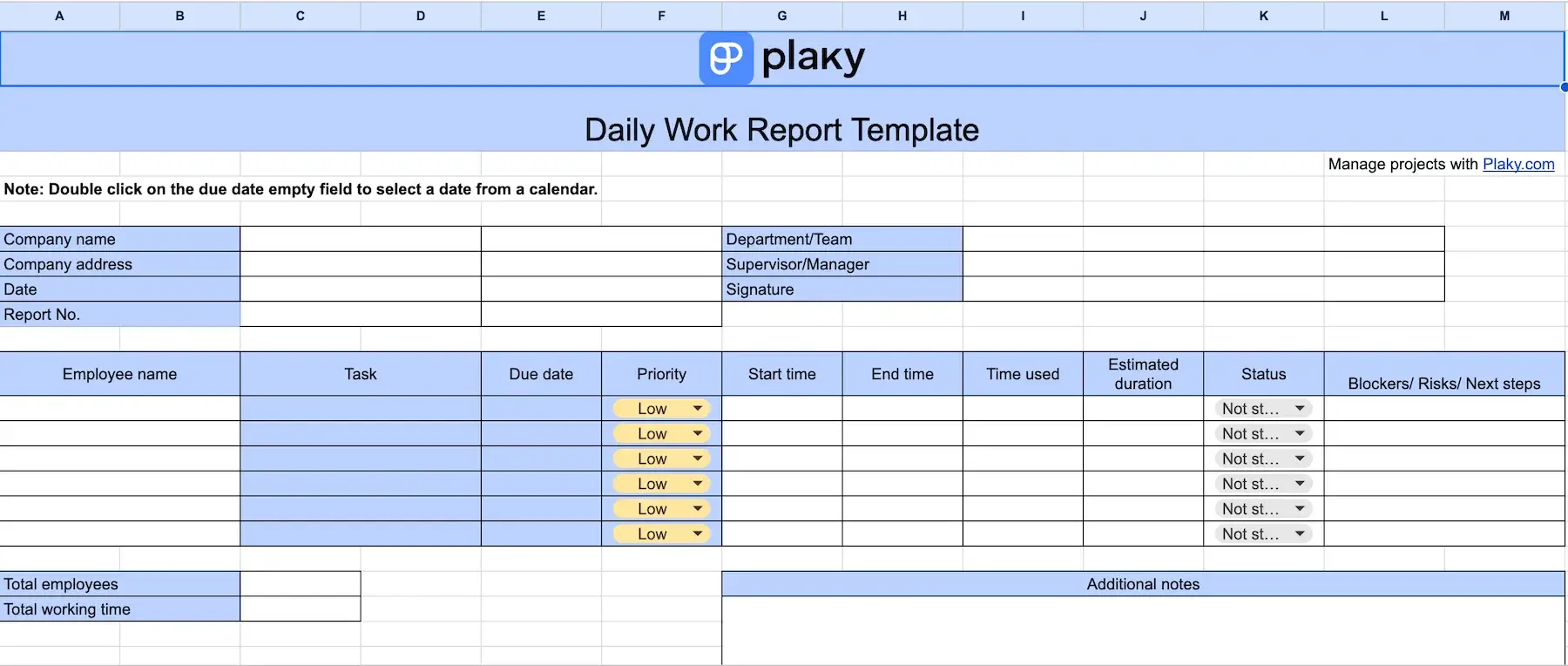
Download: Google Docs, Google Sheets, Word, Excel, PDF
This template is perfect for managers and supervisors, as it offers a detailed overview of daily work and the time used for tasks.
The template allows you to:
- List employees and the tasks they’ve worked on,
- Show tasks’ due dates through the calendar,
- Mark priority and task status thanks to the dropdown menu,
- Fill in start and end time for each task, the actual time used for them, and estimated duration, and
- Jot down any blockers, risks, and next steps for every task.
You can also record the total number of employees and the total working time in dedicated boxes. Plus, there’s a box for additional notes that allows you to leave comments on the overall daily work progress.
Essentially, this template lets you compare the actual time used for tasks with the estimated time, allowing you to spot the rights and wrongs in time management.
Still, the best thing about this template is that you get a standardized document fit for reporting and decision making.
#3 Daily activity report template
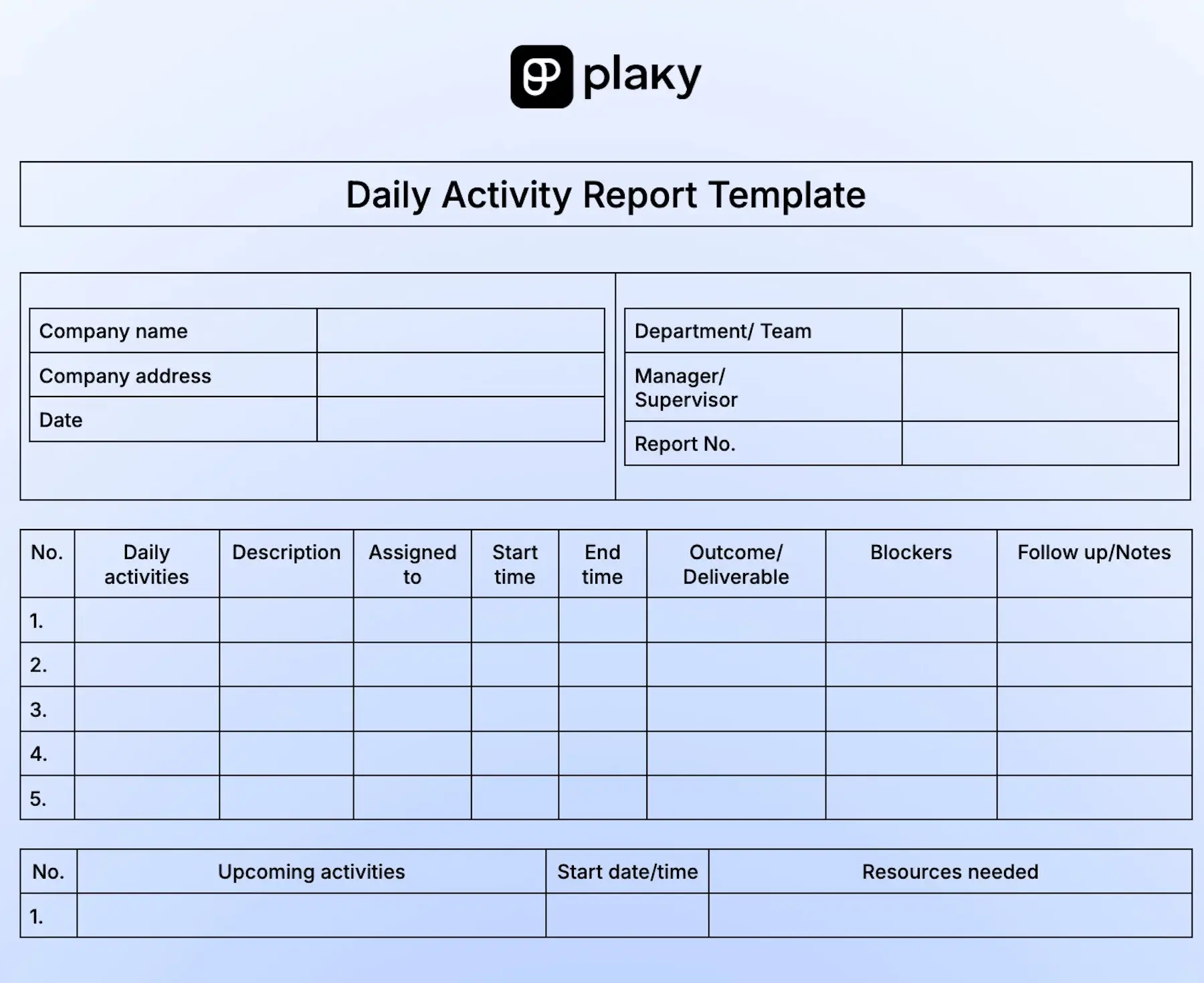
Download: Google Docs, Google Sheets, Word, Excel, PDF
Our daily activity template is a great choice when you need to record all the activities your team takes part in during a day. Its main focus is on the outcome of those activities and potential blockers.
With this template you can note down:
- All the activities and their brief descriptions
- Assignees
- Start and end time of each activity
- Outcome or deliverable
- Blockers
- Follow ups
You can also list upcoming activities with start dates and resources needed in a separate table. Plus, you can add additional comments or clarify any issues that come up during the day.
Overall, by keeping track of all daily activities your team deals with daily, you get an idea where you should make improvements to be more productive.
Manage daily activities with Plaky
#4 Daily report for employees template
Download: Google Docs, Google Sheets, Word, Excel, PDF
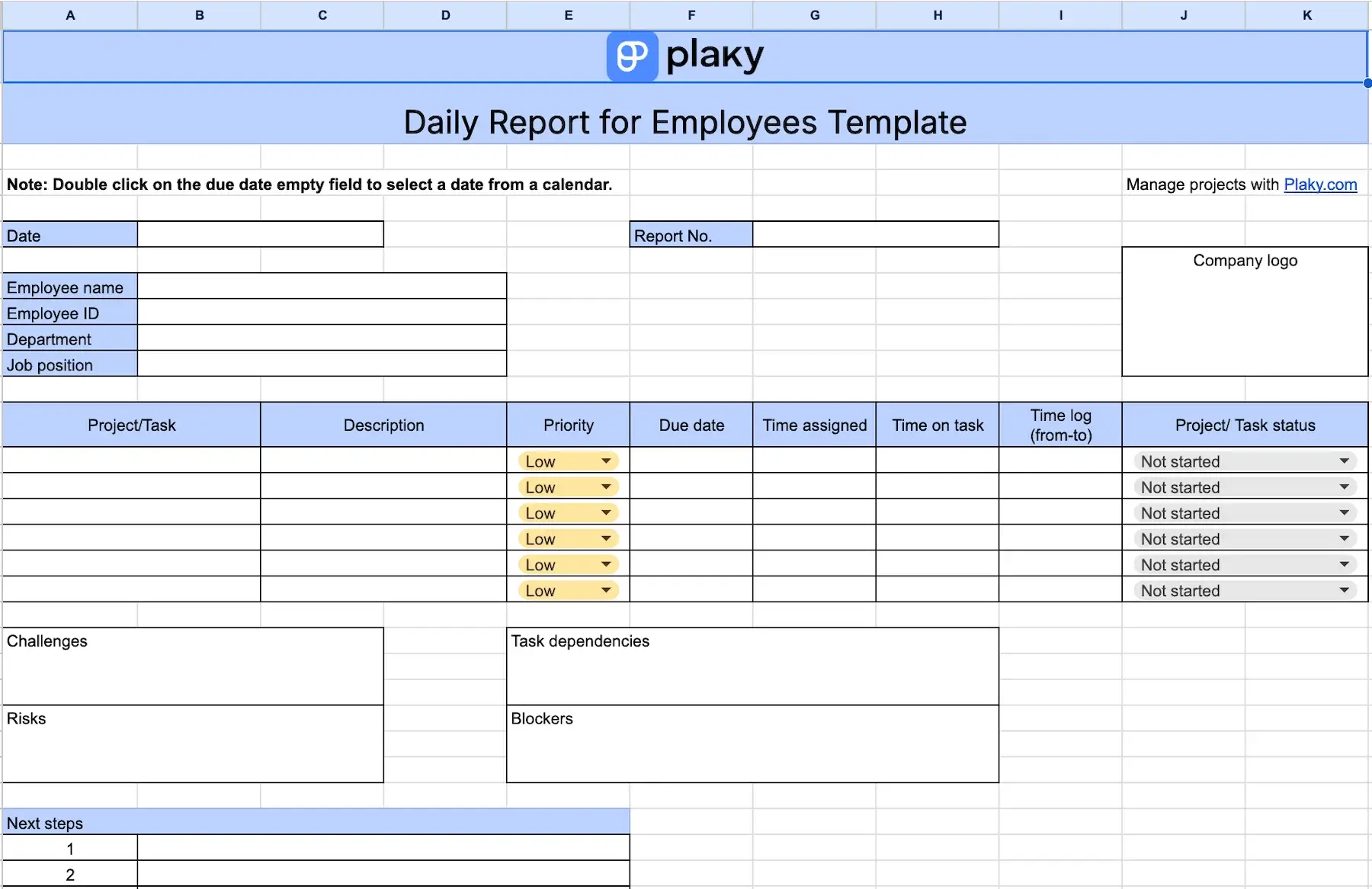
This template is a great choice if you prefer to summarize your workday and get a clear overview of everything you’ve done.
You can use it to:
- List all the tasks you’ve worked on and provide a brief description,
- Choose the relevant priority level and status from dropdown menus,
- Set due dates, and
- Note down the assigned time and the time you spent on tasks along with the exact time log (from-to).
You’ll also find a section to record any:
- Challenges
- Task dependencies
- Risks
- Blockers
On top of that, you have a dedicated section to list next steps and write down notes.
Our daily report template for employees aims to help you figure out the rights and wrongs in your own time management and detect tasks that require more or less time. This way, you’ll know exactly what to reschedule for tomorrow, how to organize your day better, and how to be more productive.
Finally, if you’re a manager, make sure your team members develop a habit of filing out the template and sharing it with you each day. You’ll get up-to-date progress reports to review on your own time — without interrupting your team’s flow with daily stand-ups.
#5 Daily progress report template
Download: Google Docs, Google Sheets, Word, Excel, PDF
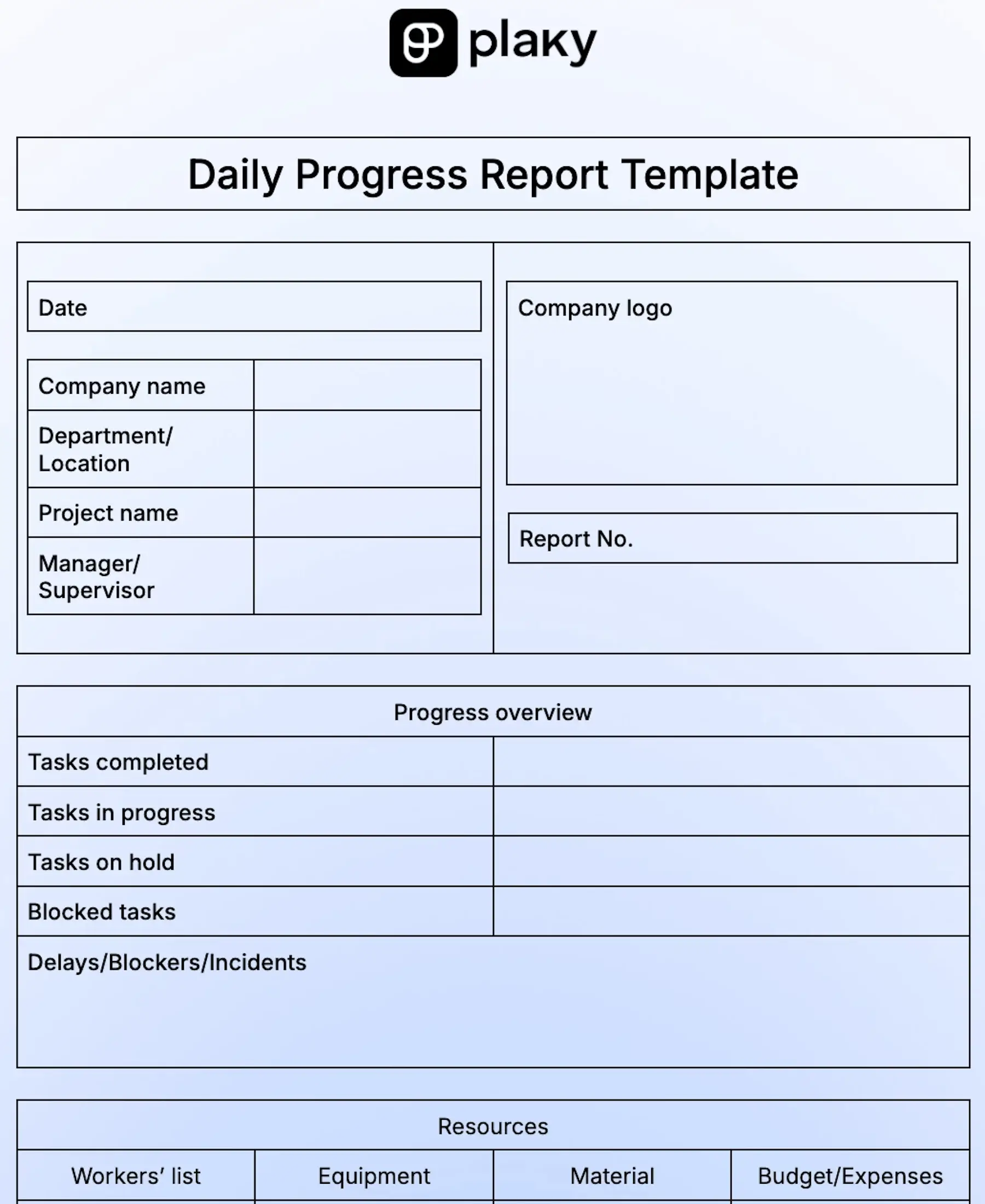
This template is perfect for project managers and team leaders who need to stay updated about project progress on a daily basis.
All they have to do is fill in the progress overview section and list the resources.
The progress overview section allows you to record the number of tasks that are:
- Completed
- In progress
- On hold
- Blocked
Within the same section, you can specify any delays, blockers, or incidents that have taken place during the day and deal with those red flags on time.
The resource section of the template lets you keep track of:
- Workers
- Equipment
- Material
- Expenses
You’ll also have a dedicated box to jot down the next steps your team will take to deal with any issues and stay on track.
With our daily progress template, you’ll be able to efficiently track tasks, risks, and overall project performance. Based on the day’s output, you can re-allocate tasks and adjust the timeline.
Try real-time progress tracking now
#6 Daily project report template
Download: Google Docs, Google Sheets, Word, Excel, PDF
If you’re a project manager searching for a simple and yet comprehensive template for daily reporting, this one will certainly do the trick.
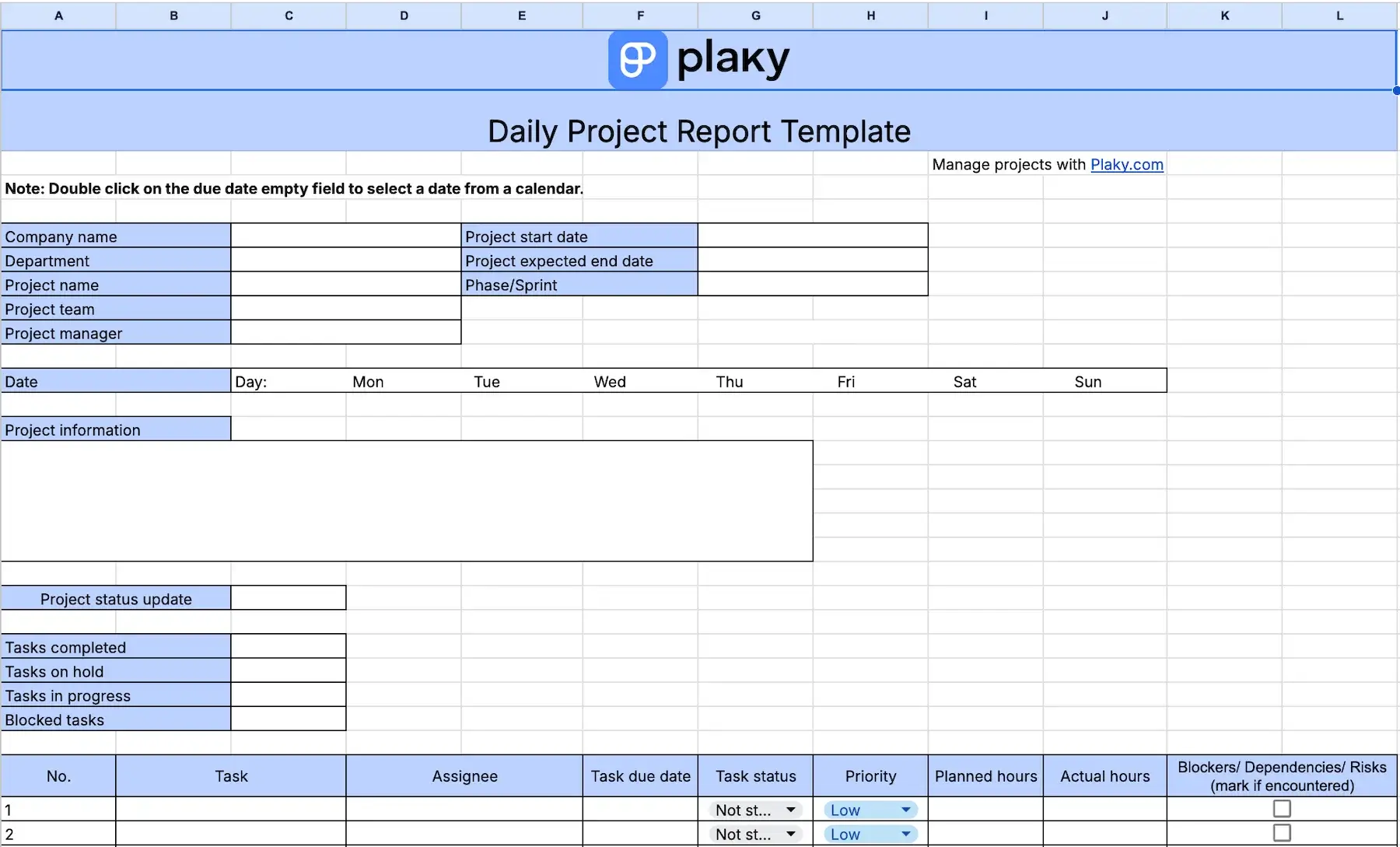
The first part of the template lets you add the most important project information and project status update.
Then, you’ll need to fill in a table with major task info including:
- Descripción de la tarea
- Assignee
- Due date (calendar included)
- Status (dropdown menu)
- Priority (dropdown menu)
- Planned and actual hours
- Blockers/dependences/risks (yes or no)
In case your team has encountered any problems, you can write down the details within a dedicated table, set due date, and mark if the escalation is required.
Other sections included in our daily project report are:
- Milestones
- Quality control and testing performed
- Scope change requests (approved or rejected)
- Lessons learned
- Next steps
By having important project data in one place — and all that on a daily basis — you can adapt schedules and prevent bottlenecks promptly.
Another advantage of this template is that it gives you data-driven oversight of the progress thanks to the priority, status, and planned vs. actual hours columns. As a manager, you get the accountability data without micromanagement.
💡 CONSEJO PRO DE PLAKY
Make sure every project is a total success with one of our Google Sheets project management templates:
#7 Daily marketing report template
Download: Google Docs, Google Sheets, Word, Excel, PDF
Our daily marketing report template helps you keep up with all the activities taking place during your marketing campaigns and ensure you don’t lose track of any important details.
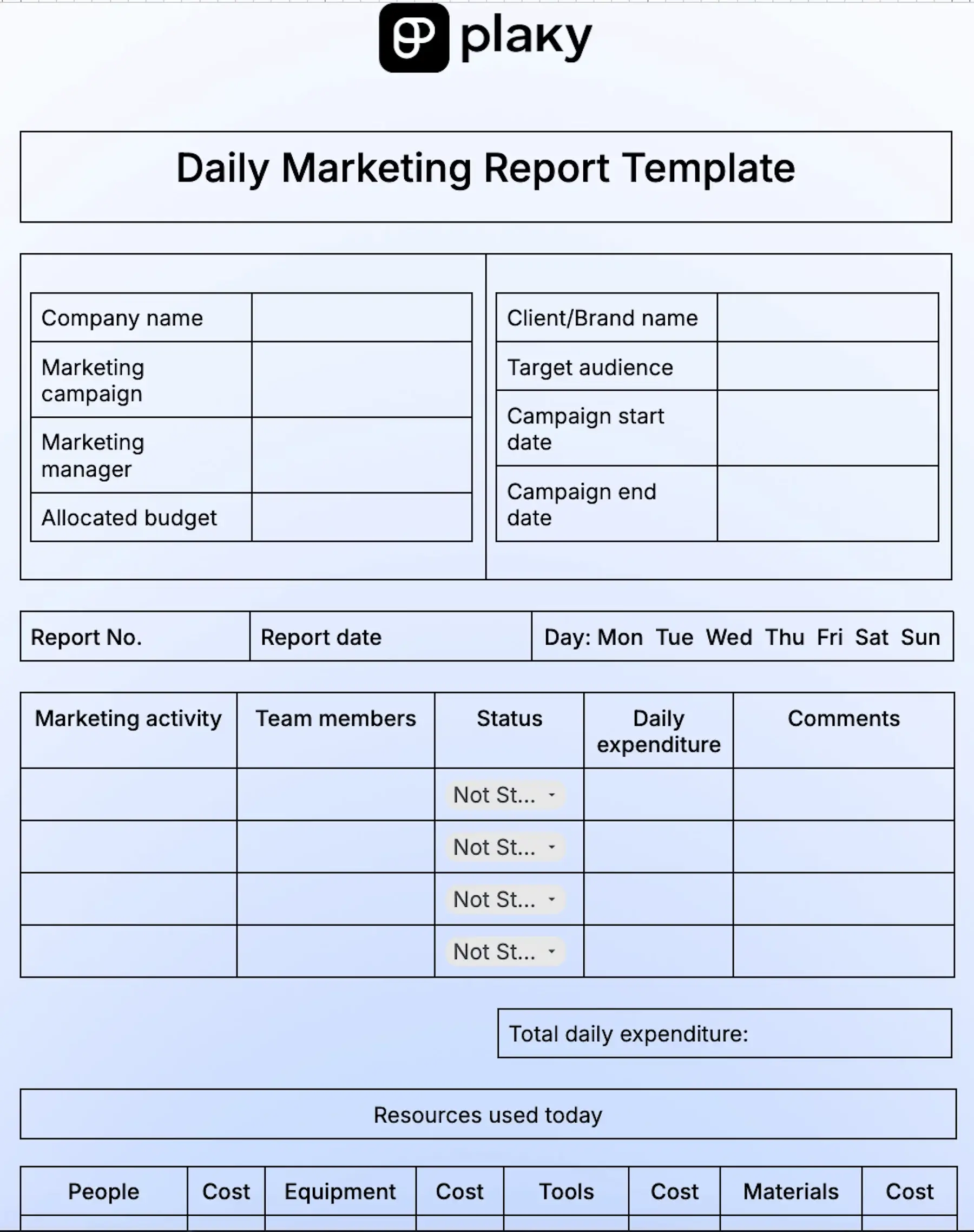
So, once you add the info about the campaign name, start and end dates, as well as the allocated budget and target audience, you’re ready to record all daily marketing activities.
Along with them, you can add information on:
- Team members
- Status (not started, in progress, blocked, completed, on hold)
- Daily expenditure
- Comentarios
The template provides ample space for listing details about the people, equipment, tools, and materials used for your marketing activities during the day as well as their cost. Right below this table, there’s a box where you can insert the total cost of each type of resource.
Additionally, you can keep track of the 7 most important marketing metrics, including the conversion rate, ad reach, and unique visitors. If needed, you can add more metrics and keep tabs on them as well.
Last but not least, you can note down all the challenges you face daily, the received feedback from clients or audience, and recommendations for improvement.
With this template, you can create a clear trail of the daily success of your marketing campaign and spot inconsistencies on time.
#8 Daily social media report template
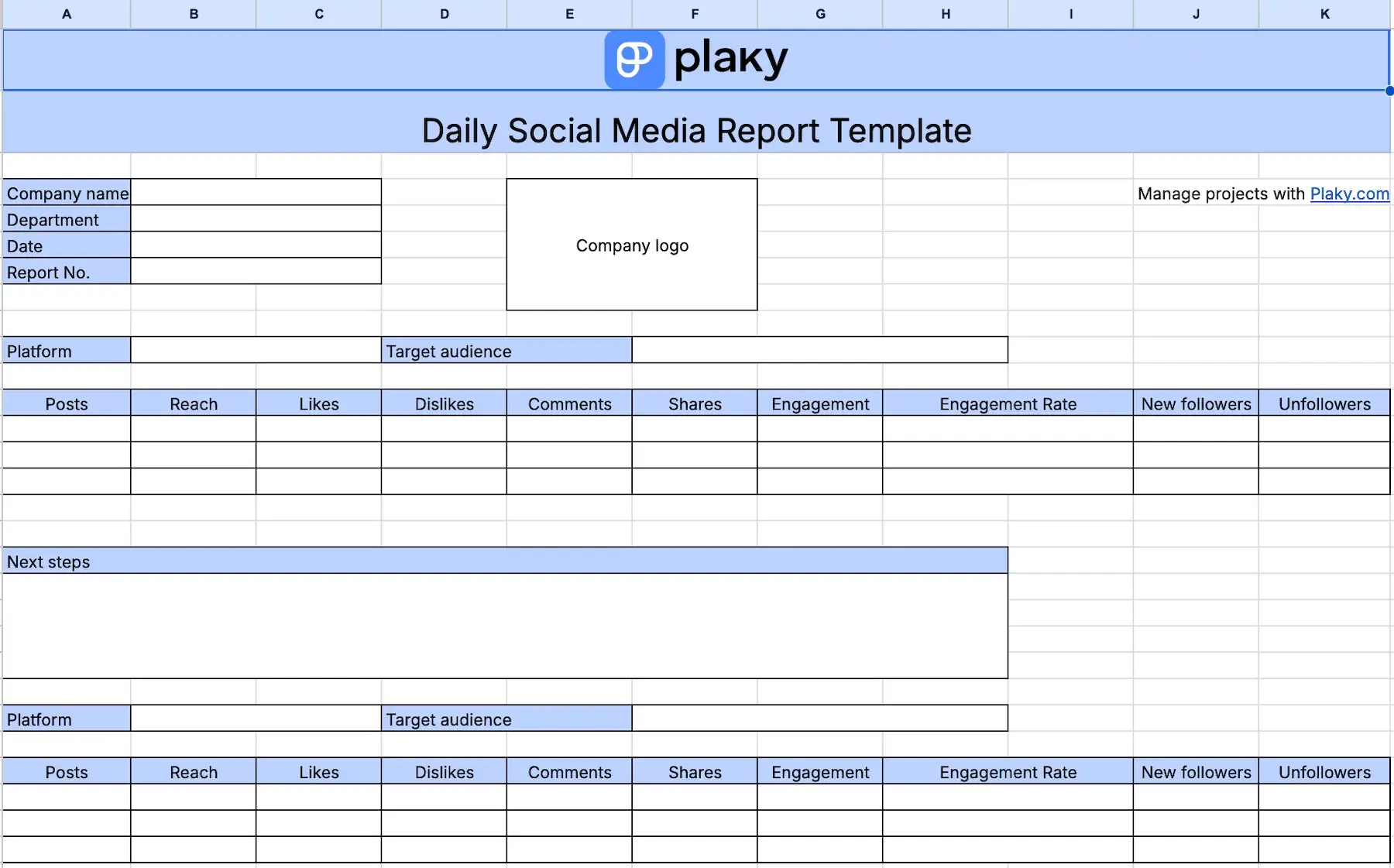
Download: Google Docs, Google Sheets, Word, Excel, PDF
With our social media report template, you can keep track of all the platforms you’re using to engage your audience and your key success metrics.
For each platform, you can fill in your target audience and list daily data on:
- Posts
- Cobertura
- Likes/Dislikes
- Comentarios
- Shares
- Engagement (rate)
- New followers
- Unfollowers
Right below each table, you can jot down the next steps you should take to better optimize your content.
By tracking your social media growth on a daily basis, you’ll be able to understand how your customers/audiences react to your posts on each of the platforms. In turn, this will help you learn what you need to improve to get even better engagement.
💡 CONSEJO PRO DE PLAKY
Explore our social media calendar templates ideas, and post your content on a regular basis:
#9 Daily film production report template
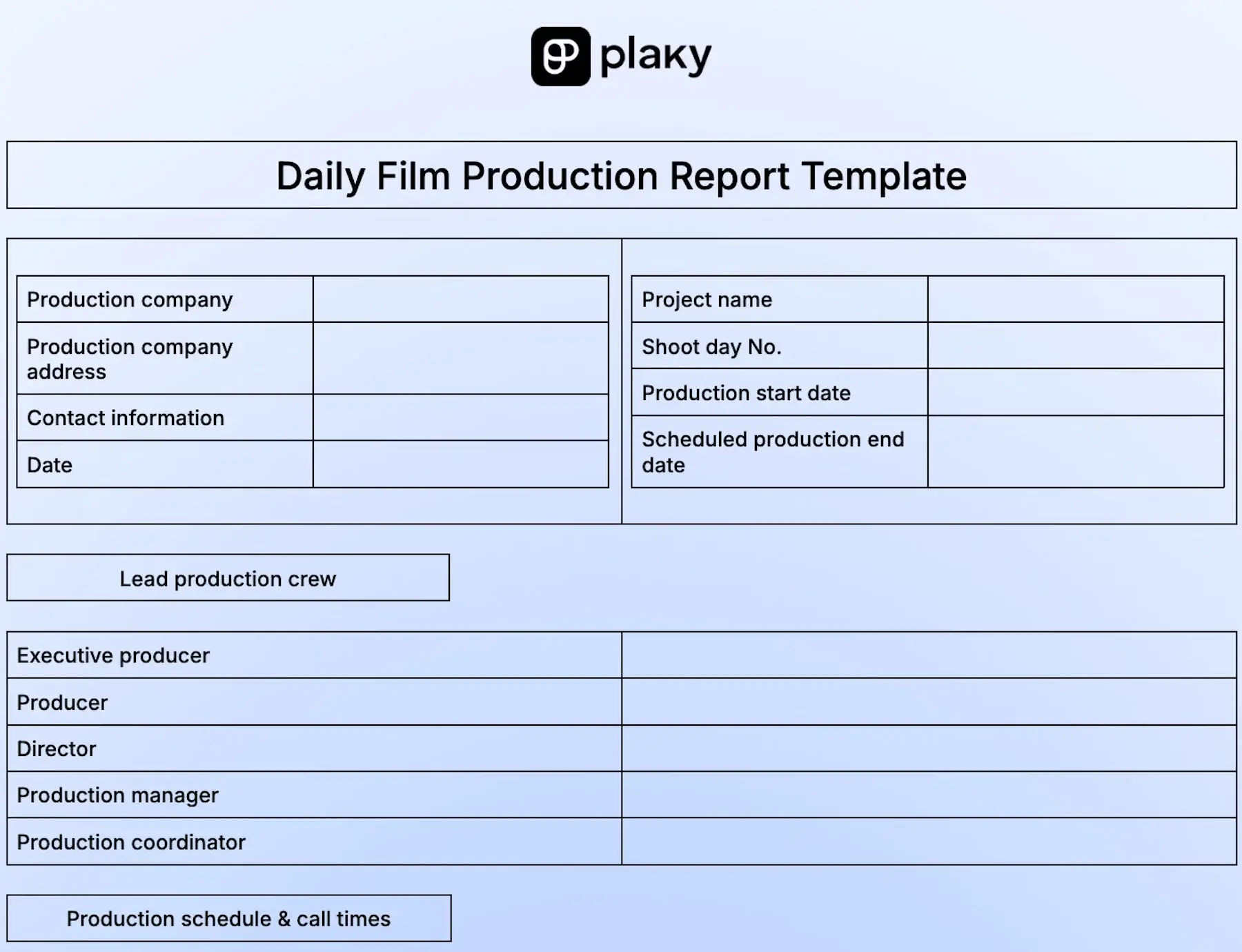
Download: Google Docs, Google Sheets, Word, Excel, PDF
With all the hustle and bustle involved in film production, production managers need a simple way to sum up all daily activities. This is why we created our daily production report template — to help you gather all shoot day operations and relevant data in order.
This template helps you stay on top of your duties by including information on:
- Lead production crew
- Production schedule and call times
- Scenes
- Location
- Crew schedule
- Talent schedule
- Media and cards
- Equipment used
- Expenses
It’s a great aid to planning and organization of future sets, expenses, equipment, and more. By summing up all daily activities, you can prevent any issues and potential delays in production.
#10 Daily construction report template
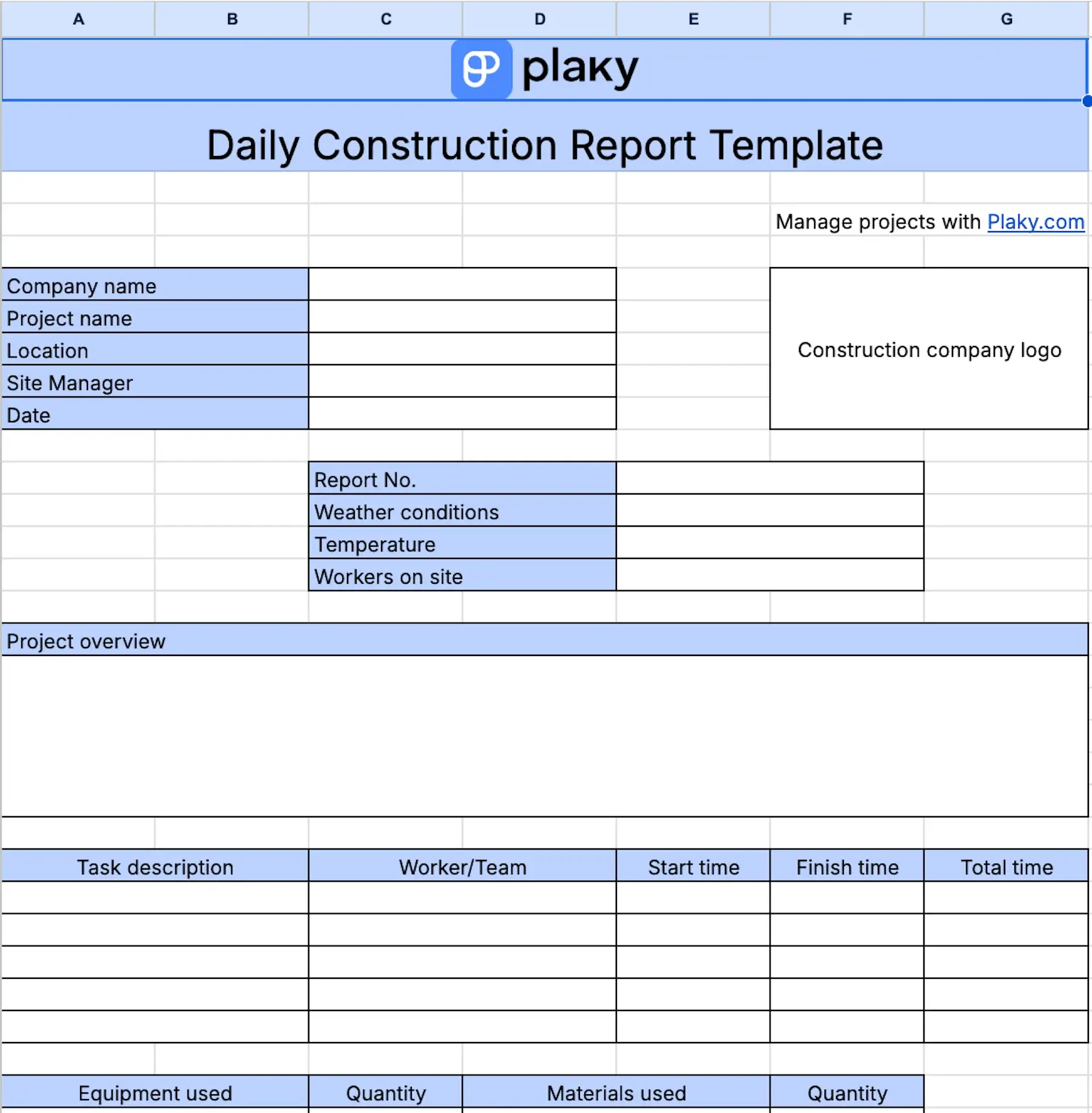
Download: Google Docs, Google Sheets, Word, Excel, PDF
This template offers a snapshot of your construction project and its day-to-day operations.
There’s a box where you can write down a daily project overview, followed by a table dedicated to tasks, workers assigned to them, and relevant times.
Next, this template includes separate tables for:
- Equipment and material (list the equipment and materials used as well as their quantities)
- Expenses (note down the service or purchase you make and their cost)
- Task status (summarize task status and leave comments)
The template helps you track workers, tasks, equipment, and material quantities along with expenditure so that you always have a detailed overview of the project. With a daily rundown of your work, you can spot issues on time, and prevent missed deadlines.
Another pro of this template is that you get a client-ready document and professional-looking evidence of progress. If that’s not enough, you can choose one of our free construction project management templates.

#11 Daily training report template
Download: Google Docs, Google Sheets, Word, Excel, PDF
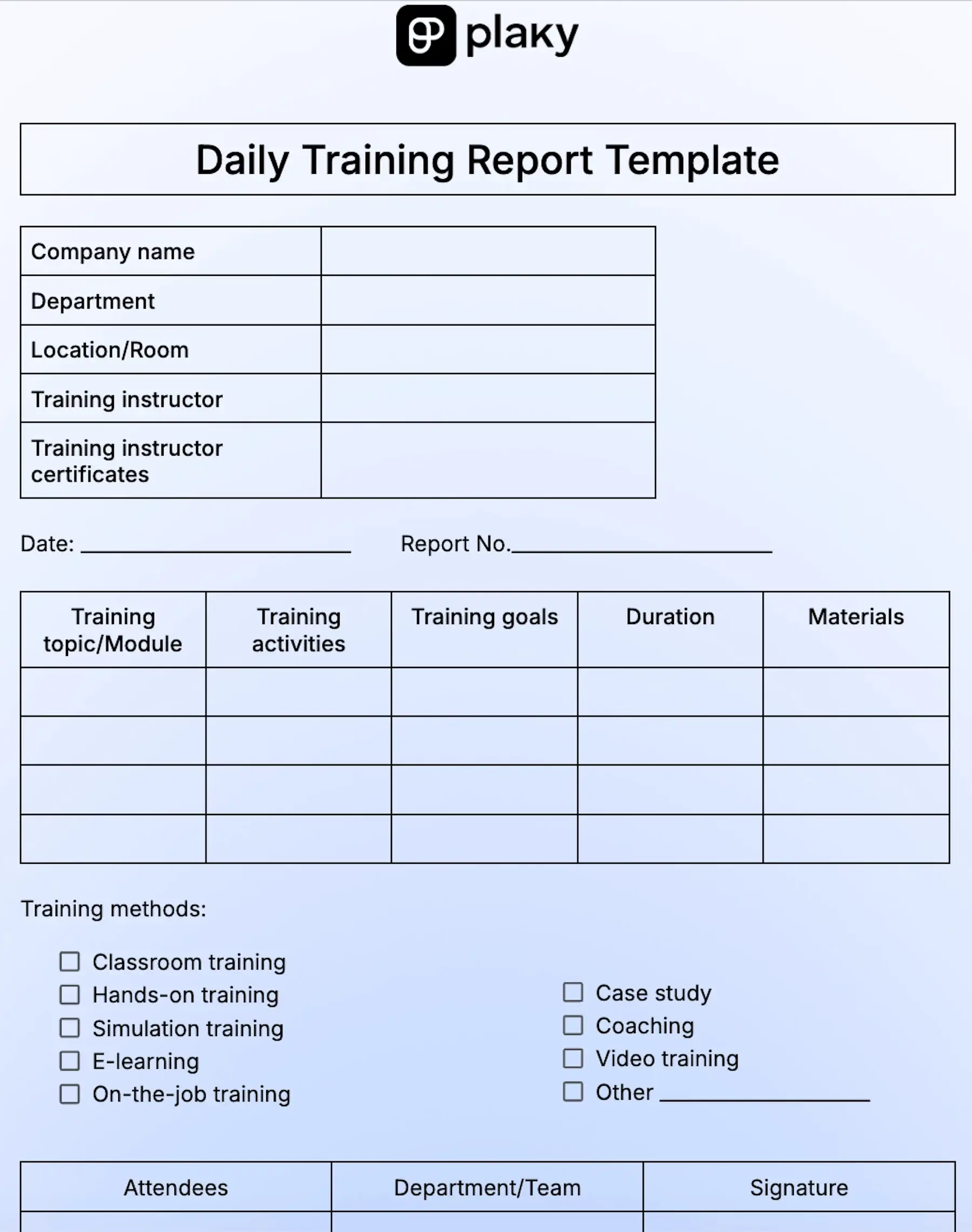
This daily training report template for instructors can be used to list the following:
- Training topic or module
- Training activities
- Training goals
- Duration of each activity
- Materials
You can also check the training method(s) you use each day on the available options list, or add any other method.
There’s a dedicated table where you can list attendees, the team or department they are in, and get their signature to confirm attendance.
In addition, instructors can leave notes on the training progress, next steps, recommendations, and additional resources.
This template helps you keep records of attendees and monitor their training progress every day. By keeping close tabs on daily activities, you’ll be able to adjust your training plan according to your attendees’ learning pace, but still make sure you cover everything important.
#12 Warehouse daily activity report template
Download: Google Docs, Google Sheets, Word, Excel, PDF
Whether they receive goods or ship them out, warehouses have many standardized procedures they must follow on a daily basis.
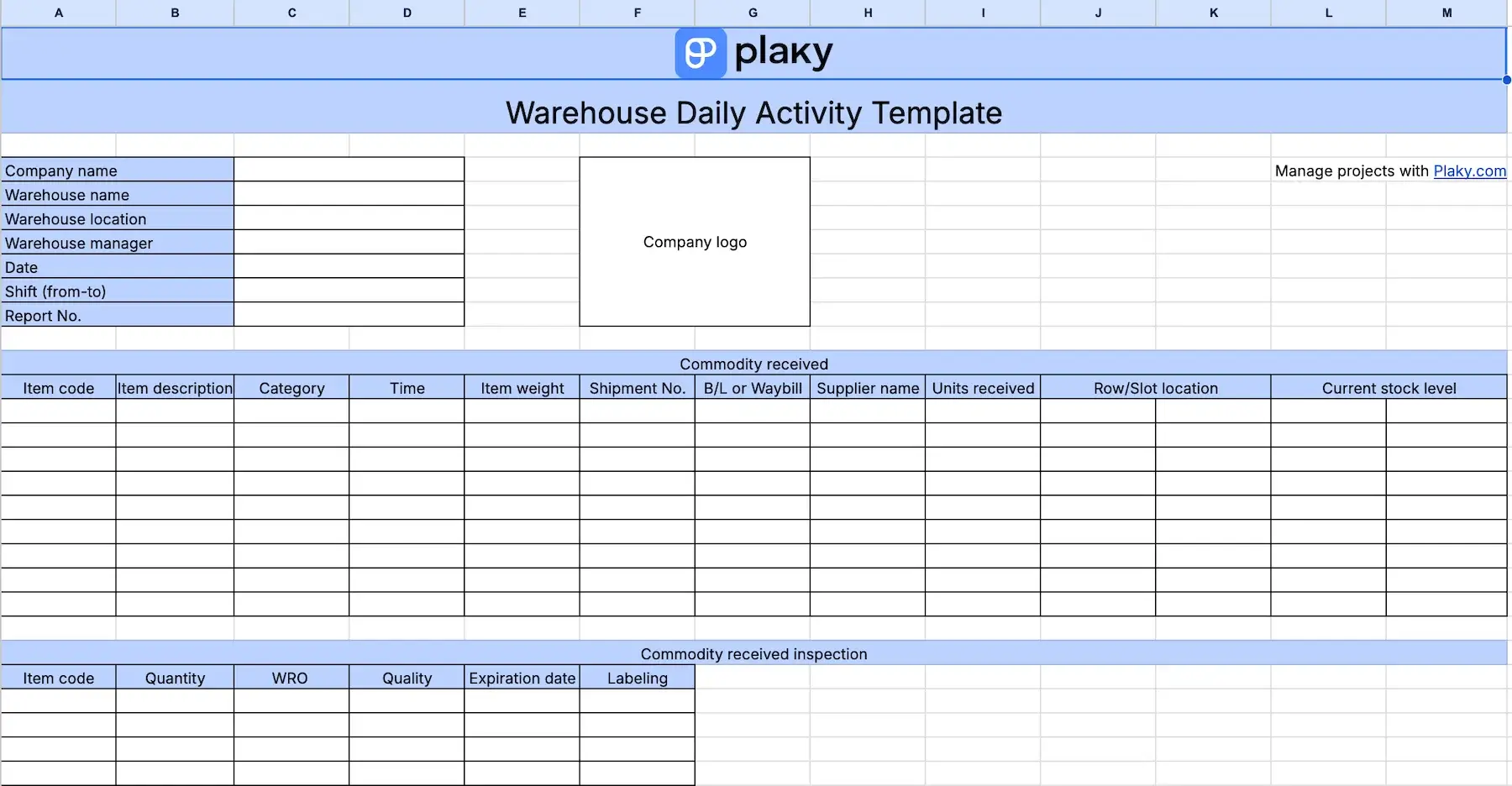
So, to help warehouse workers keep close tabs on all their daily activities, we’ve created a simple yet all-around template where they can:
- Add data on commodities received (item code, units received, supplier name, etc.),
- Record important information after the initial inspections of goods received (WRO, quantity, expiration date, etc.), and
- Add data on commodities dispatched (category, time, shipment No., etc.).
This daily report template allows you to create a brief summary of all received and dispatched items enabling streamlined cooperation between shifts.
Also, by using this kind of template you ensure accuracy and fewer mis-ships.
#13 Daily inventory report template
Download: Google Docs, Google Sheets, Word, Excel, PDF
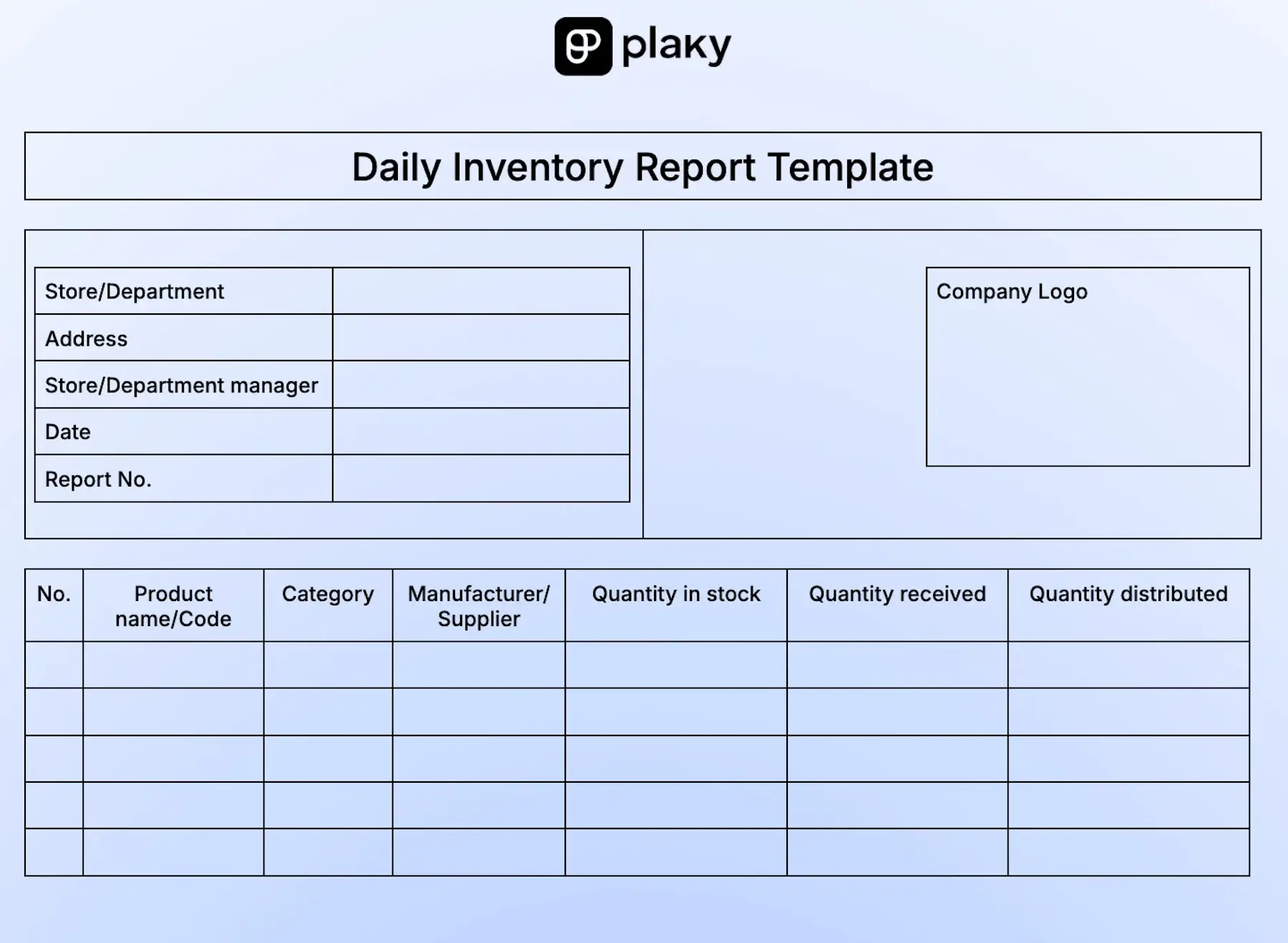
This template is ideal for keeping track of your inventory day by day in a simple way. Here, you can record the following:
- Product name or code
- Product category
- Manufacturer/supplier
- Quantity in stock
- Quantity received
- Quantity distributed
Also, you can easily create a list of items that should be reordered, their quantity, and the exact date when the order should be placed.
If you have to add additional notes, or you just want to leave comments for your colleagues, you can do so in the notes section.
With our customizable daily inventory template, you can easily record stock movements and reduce the risk of stockouts and overstocking.

#14 Daily safety report template
Download: Google Docs, Google Sheets, Word, Excel, PDF
Safety reports are necessary for any business that must ensure compliance with relevant safety laws and regulations.
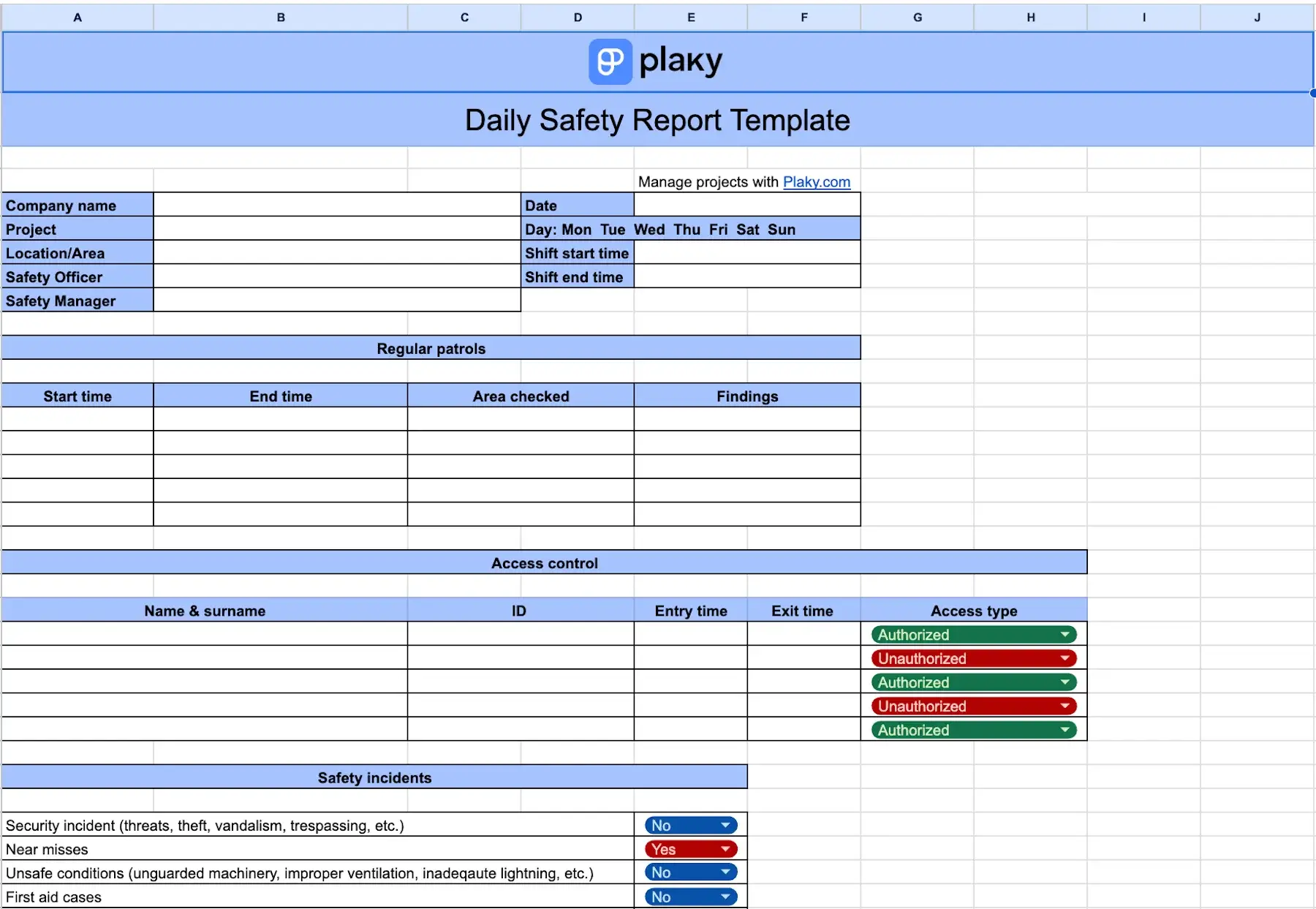
Our comprehensive daily safety report template starts with essentials like company name, location, safety officer name, and shift start and end time.
Then, you can fill in data about regular patrols and access control in their dedicated tables.
The template offers you a long list of possible safety incidents, and all you need to do is to check “yes” or “no” to show whether any of them occurred. In case they did, you have ample space to provide more details about what happened.
The major part of the template is a table for equipment and system checks, where you’ll find a list of everything you need to inspect including:
- Property conditions (doors, windows, smoke detectors, etc.)
- Electrical equipment and plumbing (wiring, lighting, water heaters, etc.)
- Exterior (roof, stairways, gutters, etc.)
- Surveillance system (cameras, monitoring software, etc.)
This template also allows you to log communication details and leave handover notes for the next shift.
You can even keep records of site conditions and protect your business against potential insurance claims or legal disputes.
#15 Student daily progress report template
Download: Google Docs, Google Sheets, Word, Excel, PDF
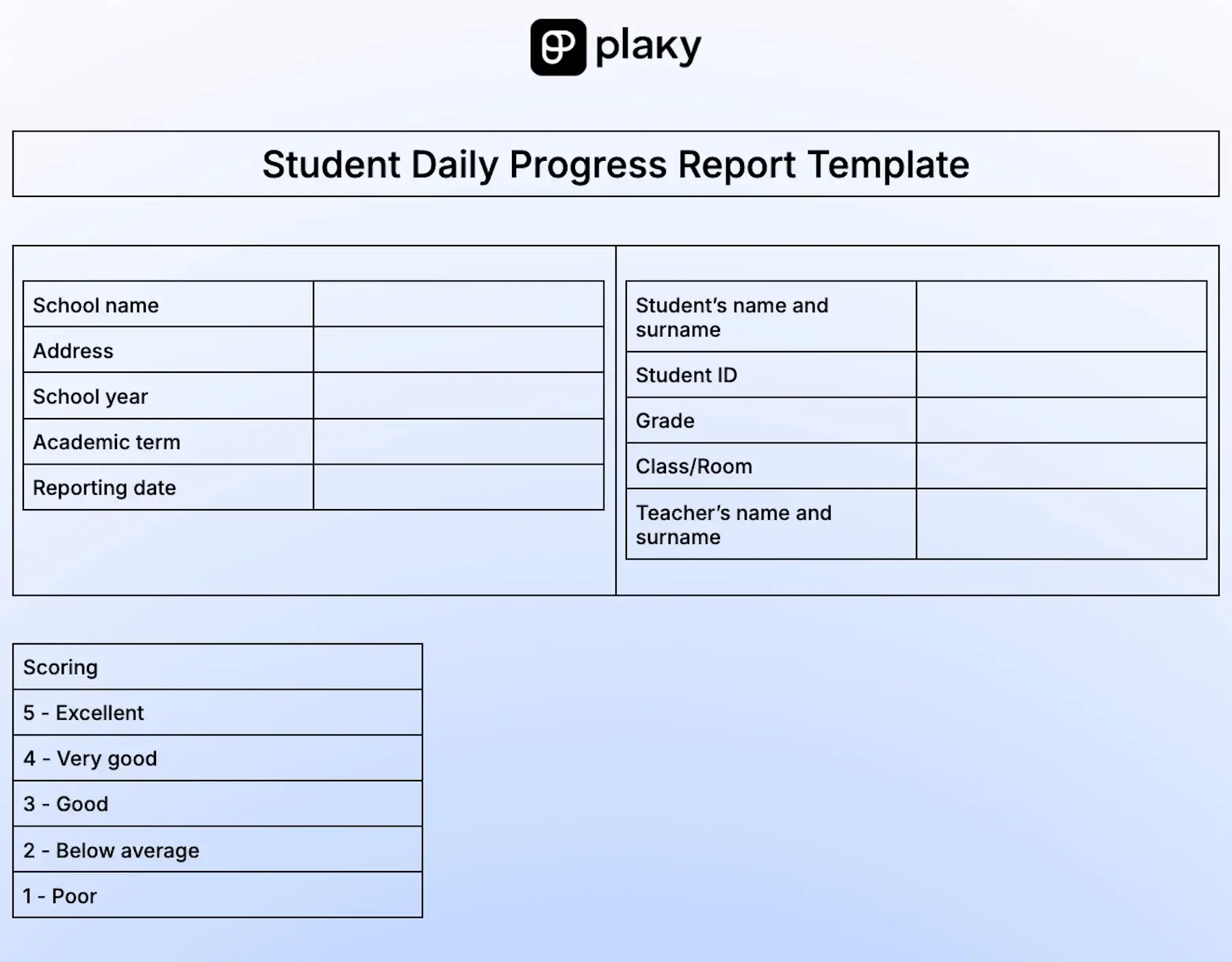
If you’re looking for a simple template you can use to follow your students’ progress day by day, feel free to download our student daily progress report template we’ve created for educators and instructors.
This template allows you to:
- Add subjects covered in a day,
- Describe daily activities and goals related to subjects,
- Mark participation,
- Mark contribution to class or homework assignments,
- Provide the score, and
- Note down challenges students face during the activities.
Also, there’s a separate table where you can add data on daily attendance as well as mark behavior regarding engagement, respect, and class preparedness.
What’s more, you’ll find boxes dedicated to giving feedback and recommendations for improvement.
Finally, there’s a space for a parent’s name, signature, and date, which serve as a proof of their own review.
It takes you only a few minutes to fill in the report, but you can gather enough information to track your students’ progress and see whether they have any problems with a particular subject, behavior, or attendance. Once you identify the problem, you can inform parents, and help students overcome challenges on time.
#16 Daily customer service report template
Download: Google Docs, Google Sheets, Word, Excel, PDF
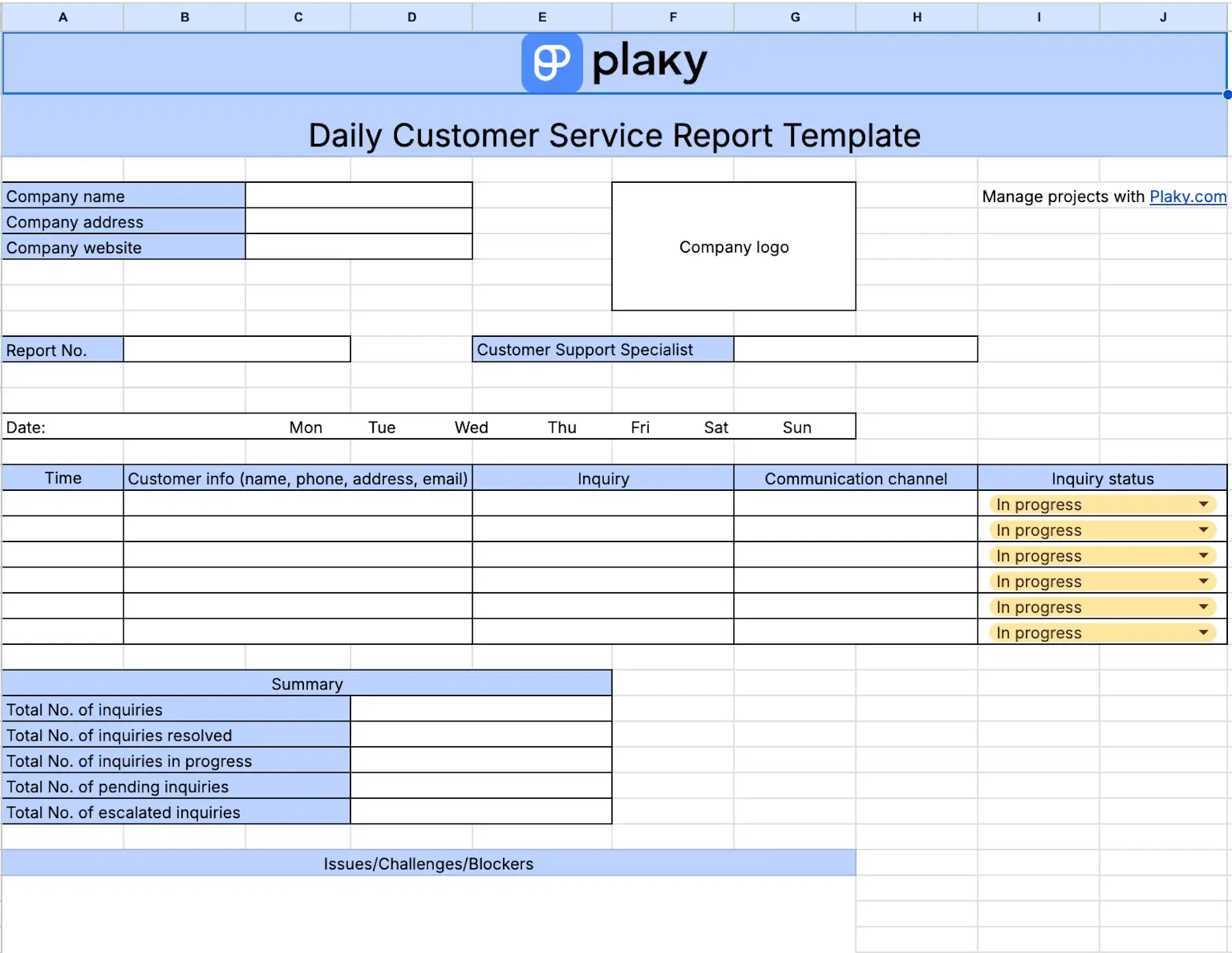
Made to be an ally to customer service specialists, this daily customer service report template includes columns for recording all kinds of valuable data like:
- Time of the customer inquiry
- Customer information
- Inquiry description
- Communication channel used
- Status of the inquiry (dropdown menu)
Customer service representatives can use this template to summarize their workdays and record the total number of various inquiries (resolved, in progress, pending, and escalated).
Once you make a summary of your inquiries, you can write down any issues, challenges, or blockers. Plus, there’s a separate space for additional notes.
By using this template, you’ll easily keep track of the number of inquiries, their nature, and the channels customers prefer. This type of data helps customer service departments upgrade their services and address users’ needs and preferences much better.

#17 Daily shift handover report template
Download: Google Docs, Google Sheets, Word, Excel, PDF
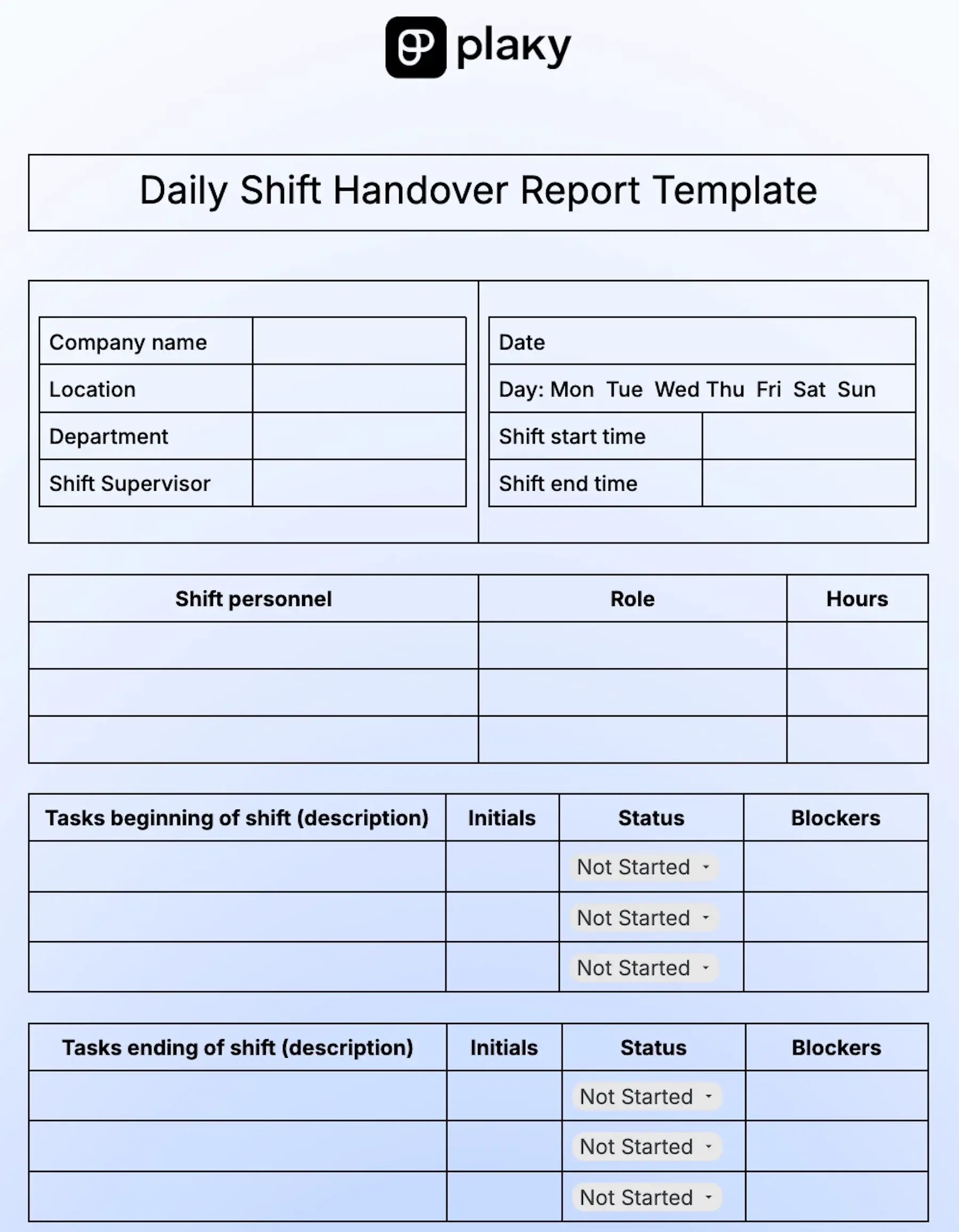
With our simple daily shift handover report template, you can:
- List your shift personnel, their roles, and work hours,
- Add tasks beginning of shift (system activation, inventory prep, organizing work stations, etc.), their status, and blockers,
- Add tasks ending of shift (cleaning equipment, restocking, reconciling cash drawers, etc.), their status, and blockers, and
- Write down tasks for the next shift and leave messages for coworkers.
The template also includes dedicated spaces for:
- Handover notes
- Equipment and inventory notes
- Incidents and other notes
A standardized form such as this template ensures that the handover process is fast and focused and reduces costly mistakes caused by miscommunication.
#18 Daily sales report template
Download: Google Docs, Google Sheets, Word, Excel, PDF
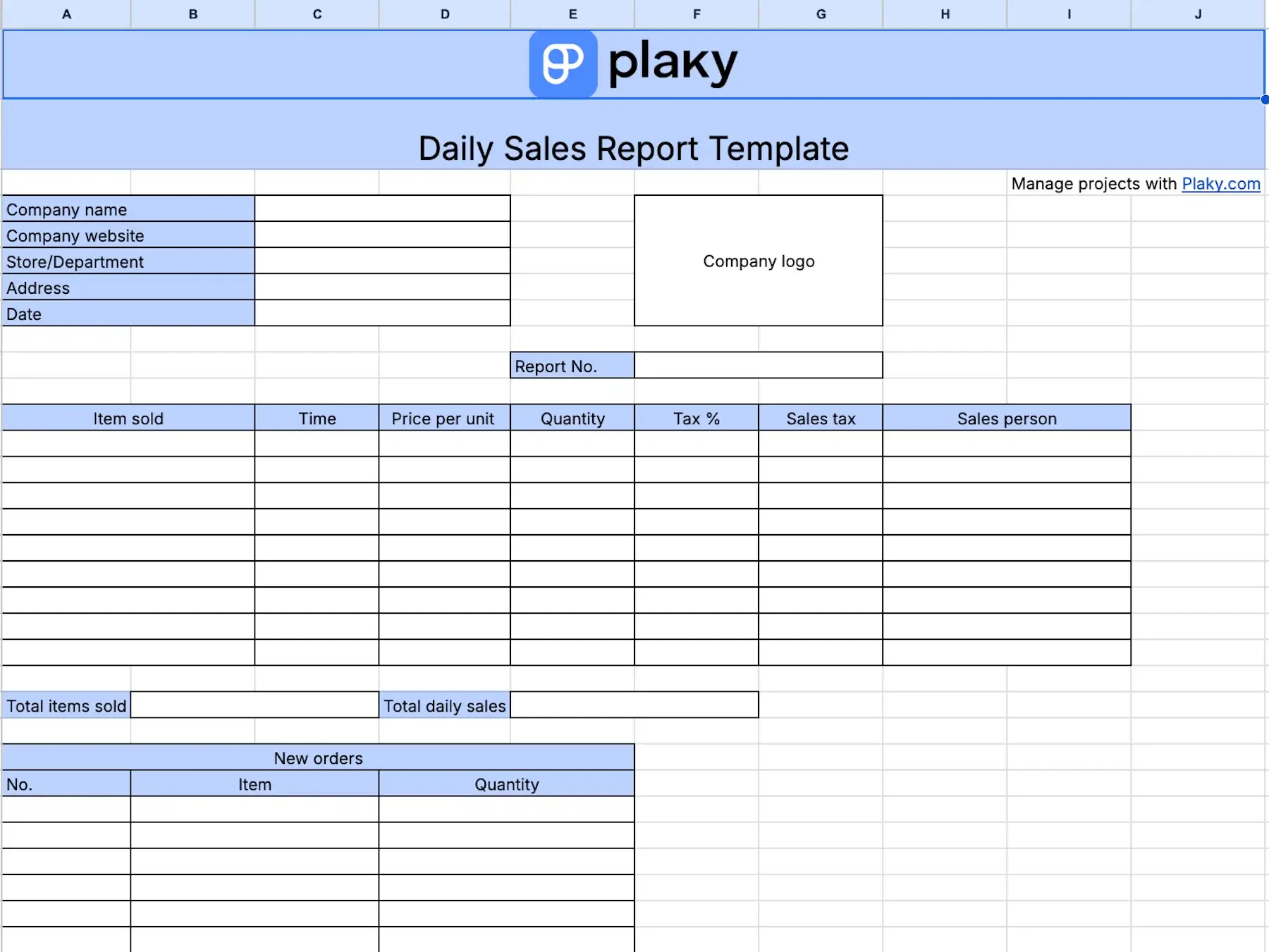
This template is ideal for keeping track of your major daily sales results. The table divided into 7 columns lets you record:
- Items sold
- Purchase time
- Price per unit
- Cantidad
- Tax in percentages
- Sales tax
- Salesperson
Also, you can track the total number of items sold and the total daily sales. In another table, you can even add items that should be reordered and their quantity.
The purpose of this template is to record all relevant sales data so that nothing falls through the cracks — and help you stay focused on your sales goals.
Try Plaky for free sales management
#19 Daily employee business expense report template
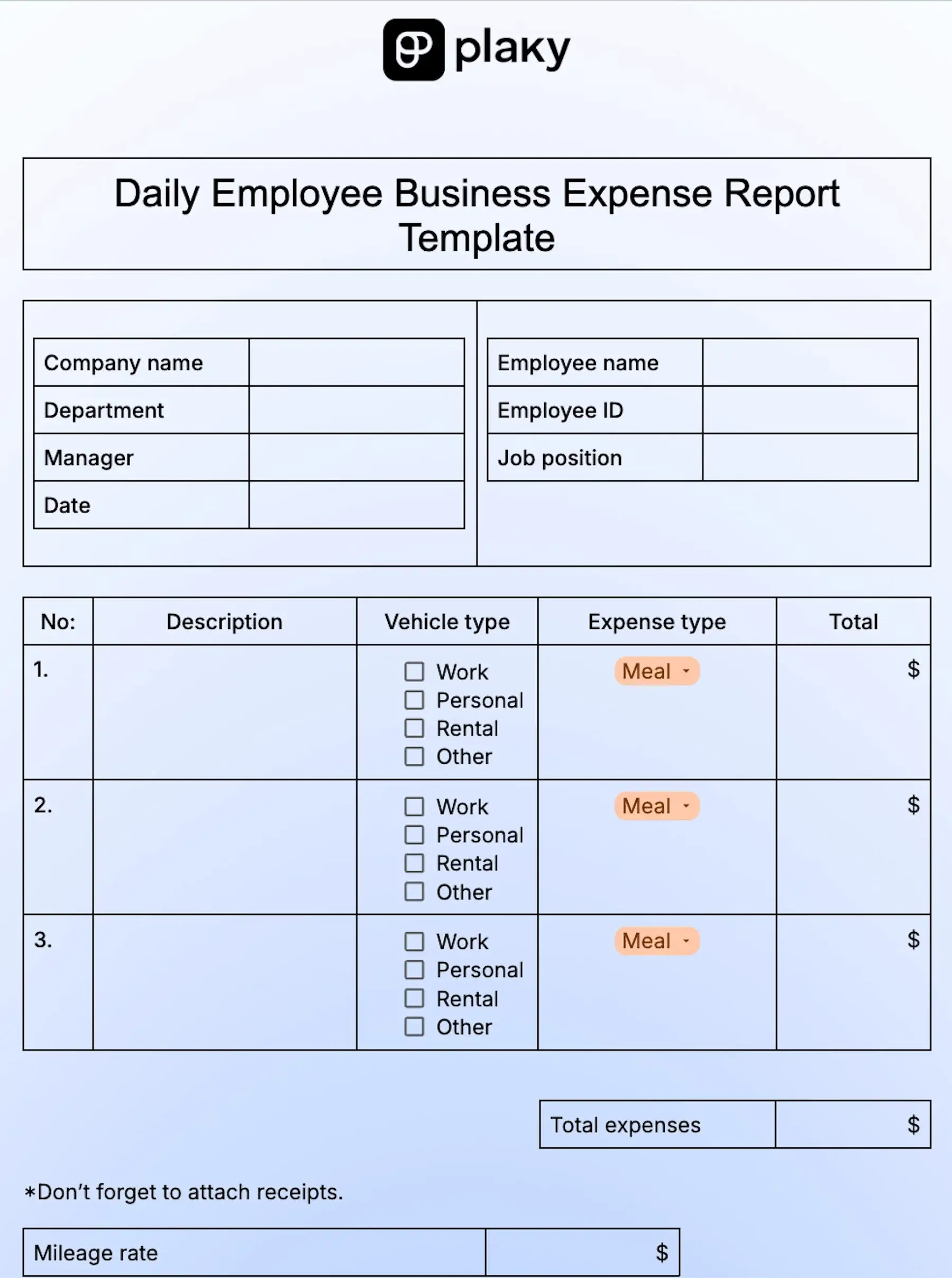
Download: Google Docs, Google Sheets, Word, Excel, PDF
If you find it difficult to track your employees’ daily expenses, share this easy-to-use template with them.
The main table allows you to:
- Describe the purpose for expense,
- Check the vehicle type used,
- Choose the type of expense from the dropdown menu (meal, gas, parking, etc.), and
- Write down the total sum for each expense.
The template reminds employees to attach receipts when they send the expense report, and it offers spaces for data on mileage rate, advances, and total reimbursement.
If necessary, you or your employees can leave additional comments.
By tracking employee business expenses through a standardized template, you ensure accurate processes in cash flow management. Also, you can spot spending trends and keep control of the budget.
Plan your resources with Plaky
Why you need a daily report template
Whether you find daily reports useful for your or your team’s performance tracking, or you simply have stakeholders on your back — writing those reports is inevitable.
Even if it can be exhausting, remember that daily reporting is highly beneficial, as it:
- Gives you a sense of security since you’ll know exactly where your project stands,
- Helps you with progress monitoring,
- Lets you spot blockages on time, and
- Keeps your project and team performance on track.
However, it’s neither practical nor effective to generate new reports every day. And that’s exactly why you need a daily report template.
These templates are usually customizable, so you can easily add or delete sections and adapt them to your needs.
Plus, they all have the same formatting and design. This lets stakeholders and team members quickly get familiar with the template layout and know what info to expect and where.
In addition, daily report templates help you:
- Get a clear overview of the workday,
- Keep everyone involved within a project updated,
- Monitor your team’s progress,
- Spot tasks that are behind schedule,
- Identify issues and challenges, and
- Reorganize for the next day.
Most daily report templates come in digital forms, so all you have to do is fill in the necessary fields, and voilà — they are ready to be sent.
When to use daily report templates
Use daily report templates when you want to:
- Save yourself some time for other duties during the day,
- Provide standardized and/or branded daily reports,
- Maintain consistency when reporting,
- Quickly insert relevant data into pre-made fields,
- Be more productive, and
- Monitor your team activities and task statuses.
Plan and track your tasks and business operations with Plaky by CAKE.com
Using templates to record all your tasks, activities, and industry-related operations takes you one step closer to proficiency.
For any advanced progress monitoring, (re)scheduling, or simple recording of important operations, you need a reliable tool — and that’s exactly where Plaky by CAKE.com takes over.
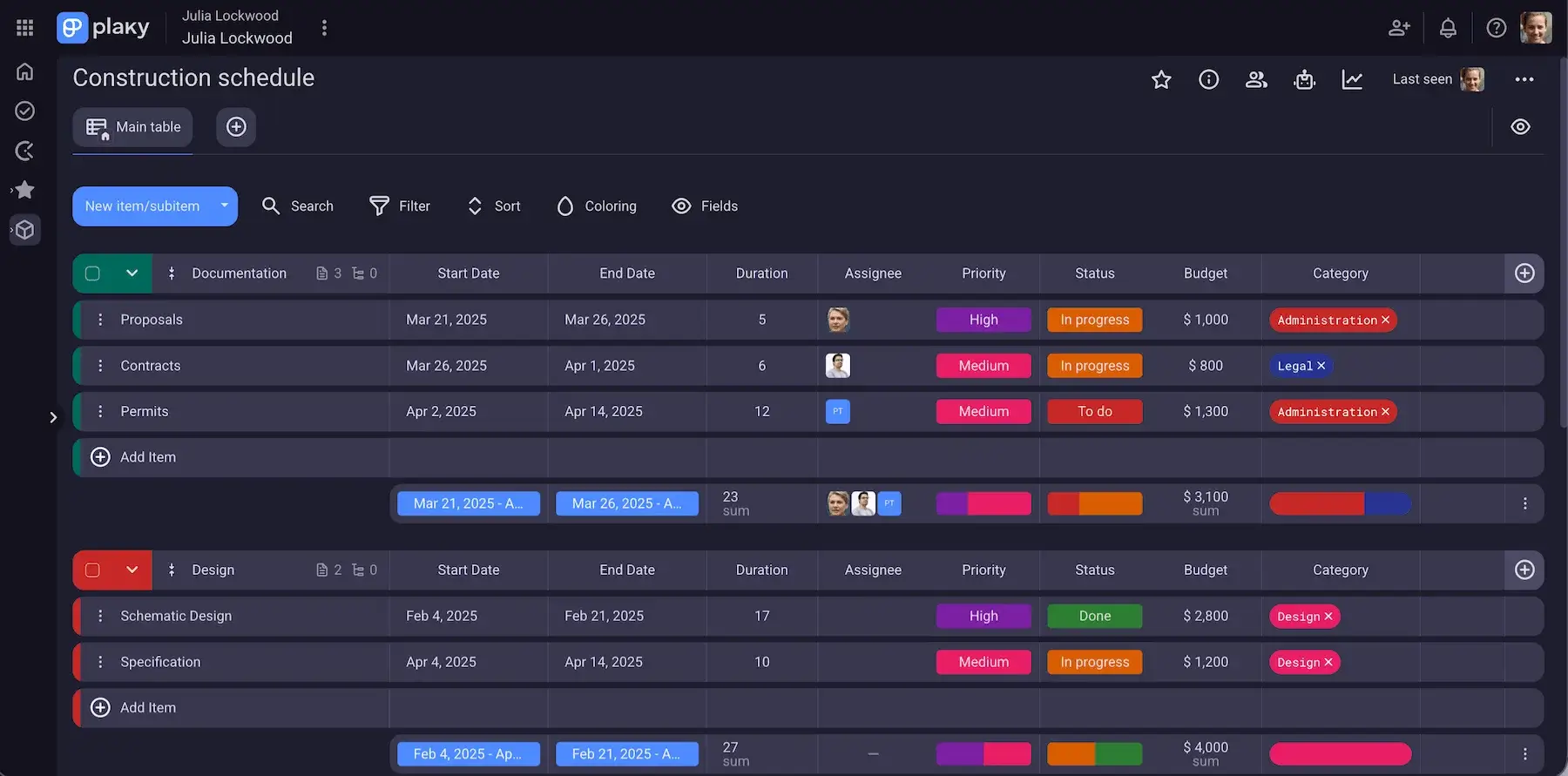
Use construction schedule template in Plaky to keep tabs on all project details
With Plaky, you can create unlimited lists of your project tasks, activities, and operations — and organize and reorganize them whenever necessary in just a few clicks.
Also, Plaky enables you to:
- Organize and keep all task-related information in one centralized place — get a clear overview of task status, timeline, due dates, and more.
- Get real-time updates — get immediately notified of any project updates, which helps your team stay informed at all times and streamline cooperation.
- Keep your project and team’s files in one place — store all task-related files within a dedicated task card’s “Files tab”, and enable easy access for your team.
- Track the time spent on tasks — integrate Plaky with Clockify (a world-renowned time tracker) to track time on your tasks, run time reports, and secure accurate billing.
- Share project information with stakeholders — make sure your stakeholders stay on track with project progress by exporting a board in CSV format and sending it to them for analysis.
¿Y qué más?
As a Plaky user, you get access to its template center where you can find a variety of pre-built templates for a great number of industries such as marketing, software development, sales, and more.
What’s best, Plaky offers unlimited spaces, boards, items, and views on all plans — even the free one! You can easily streamline your tasks and activities and collaborate seamlessly with your team, other departments, and clients.
Stay on top of your daily tasks, and never lose sight of your goals — a free 7-day trial is only a click away!
