 Updated: março 23, 2026

Nothing beats a simple to-do list when organizing daily tasks. Depending on how complex your daily routine gets, though, you might need something a bit more powerful.
So, we’ve prepared a master list of free to-do list templates that cater to — quite literally — everyone.
Most of our to-do list templates have Word, Excel, Google Docs, and Google Sheets versions you can download and further customize to your needs. This is perfect if you like to organize your tasks digitally and collaborate with colleagues at the same time.
On the other hand, if you like the trusty pen and paper, you can print out these templates and fill them out by hand.
Simple to-do list templates
These templates are for people who prefer to keep things simple.
They work great if you want to use them digitally or online, but more than anything, they’re perfect for printing, as they don’t lose any of their functionality in physical form.

#1 Simple to-do list template with checkboxes
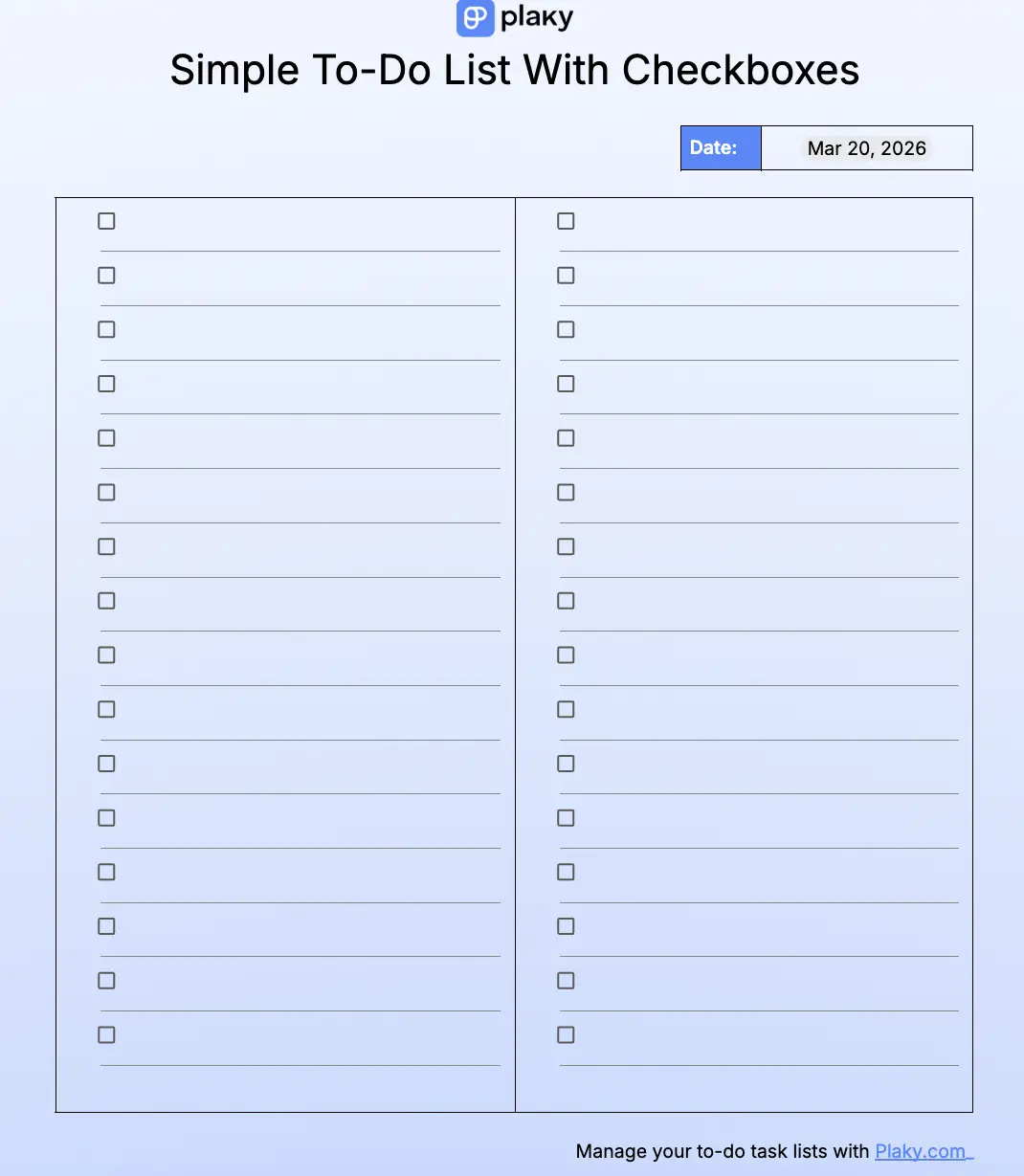
This is a simple to-do list template with checkboxes next to each item. Once you complete a task, simply click the checkbox to mark the task as done with a checkmark.
Who or what is it for?
This template is best for people who just want a straightforward to-do list they can easily pull up on any device. Since it’s so simple, this template is perfect if you prefer to print out your to-do lists.
What problems does it solve?
Use this template if you’re dealing with:
- A time crunch and need to track list items quickly,
- Overcomplicated, time-consuming to-do lists, or
- Digital to-do lists that require you to be near a device constantly.
Download: Google Docs, Google Sheets, Word, Excel
#2 Simple weekly to-do list template
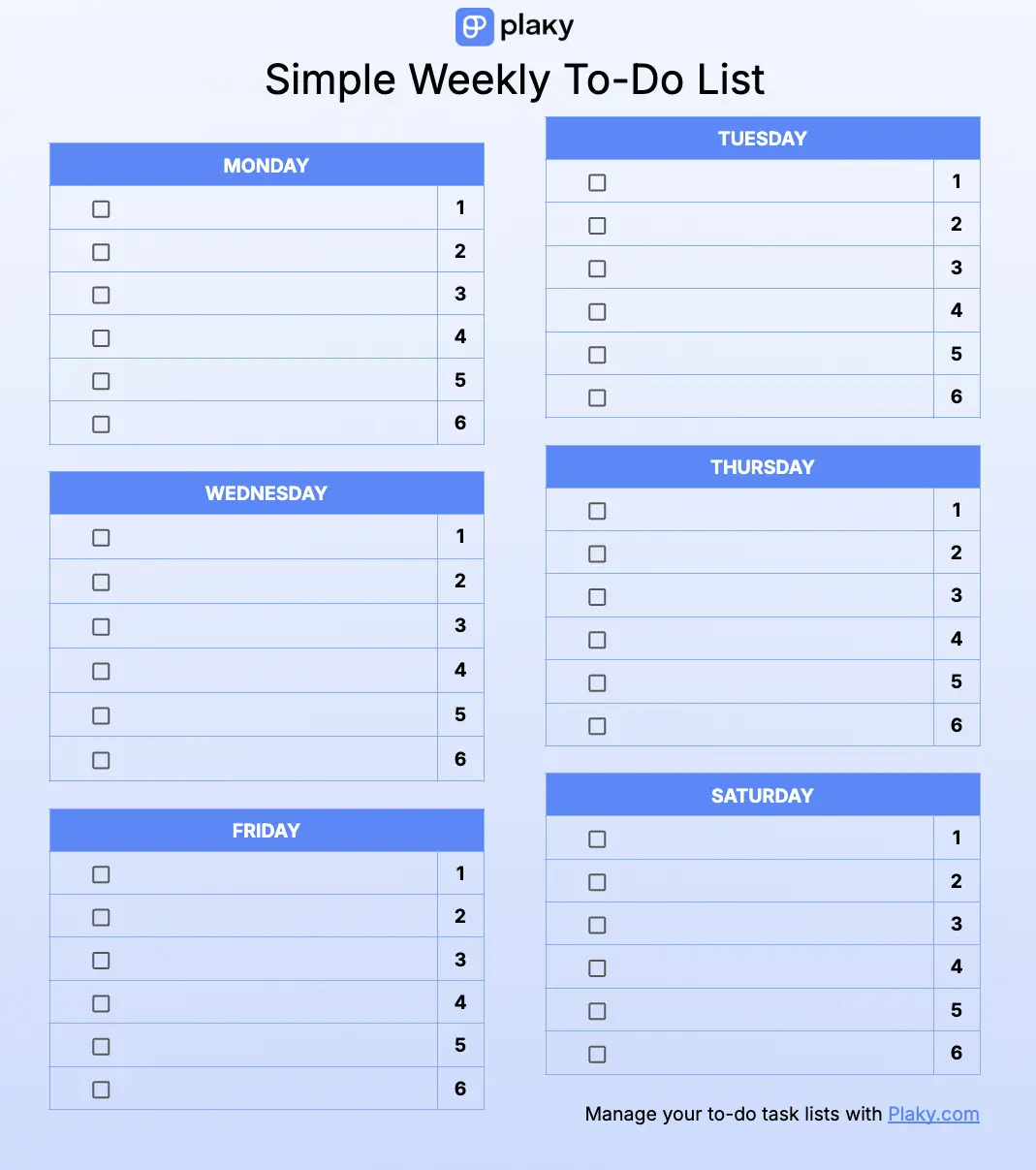
The simple weekly to-do list template is made up of 6 smaller lists — one for each day of the week (except Sunday, because you need at least one day of rest).
Just like the previous list, once you complete a task, you can simply click on the checkbox next to it. Or, print it out, and tick it manually for that satisfying “chk!”.
As a bonus, at the end of the week, this template becomes a clear overview of how productive you were. Use it regularly, and you can get an insight into how your productivity changed on a weekly basis.
Who or what is it for?
This simple weekly to-do list is perfect for folks who like to plan every day out in advance. It’s also great for people who prefer to have a bird’s-eye view of their tasks for the entire week instead of making a new list every day.
What problems does it solve?
This template is best if you:
- Deal with complex tasks that need to be broken down into chunks,
- Can’t fit all your responsibilities into one to-do list, or
- Don’t have the time to plan your responsibilities on a daily basis.
Download: Google Docs, Google Sheets, Excel
💡 Plaky Pro Tip
Have you tried using digital tools to boost your productivity? Here are the best apps to consider:
#3 Simple weekly to-do list template with notes
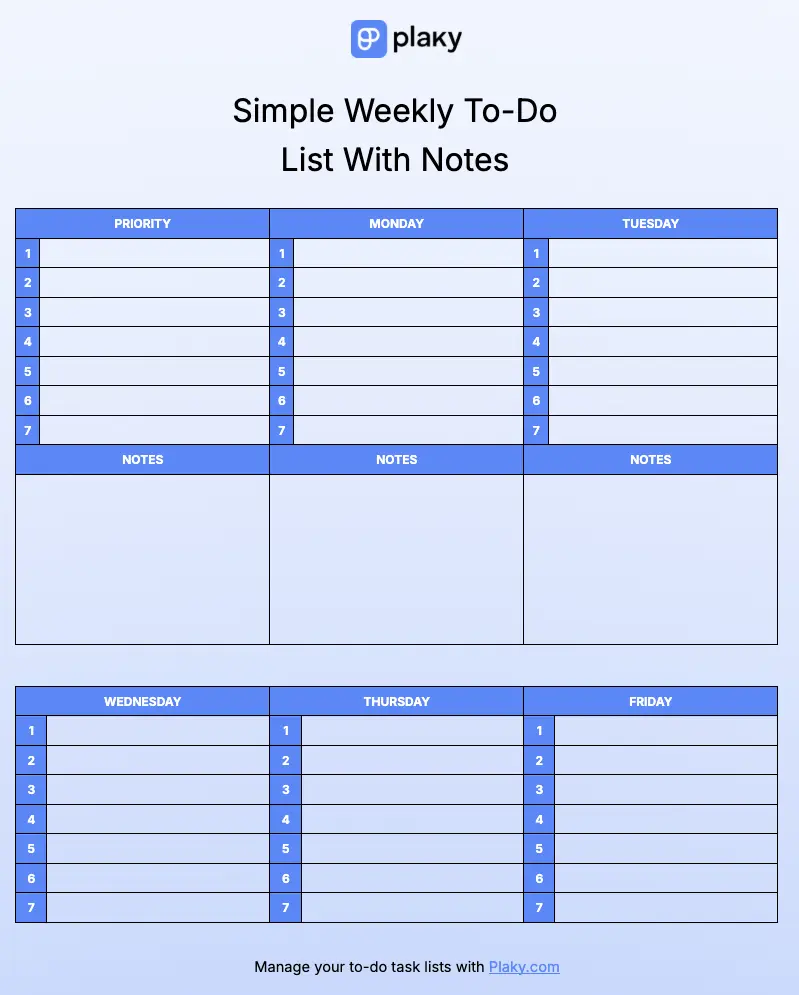
This free to-do list template is fairly similar to the last one. It has a to-do table for each day of the week (except Sunday). But, there are some key differences — we’ve added a notes section at the end of each day to collect your thoughts, and we’ve removed the checkmarks for a cleaner look.
Use the rows to enter your to-dos and the notes section to jot down any impressions over this week’s work or reminders for the upcoming week.
Not sure how to check your tasks as complete without a checkbox? Simply cross out the text with Command+Shift+X on MacOS or Alt+Shift+5 on Windows. Or, go the more satisfying route — print out the template, and cross out points manually.
Who or what is it for?
Like the previous template, this one is great for people who like to plan their week in advance. It’s also useful for anyone who values introspection and wants to look back on their thoughts over the week.
What problems does it solve?
This template can help you out if you have:
- Scattered thoughts and unclear impressions about to-do task success,
- No time to create a new to-do list daily, or
- Difficulty organizing tasks on a more long-term basis.
Download: Google Docs, Google Sheets, Excel
Track your weekly to-dos in Plaky
#4 Weekly to-do list template with monthly goals
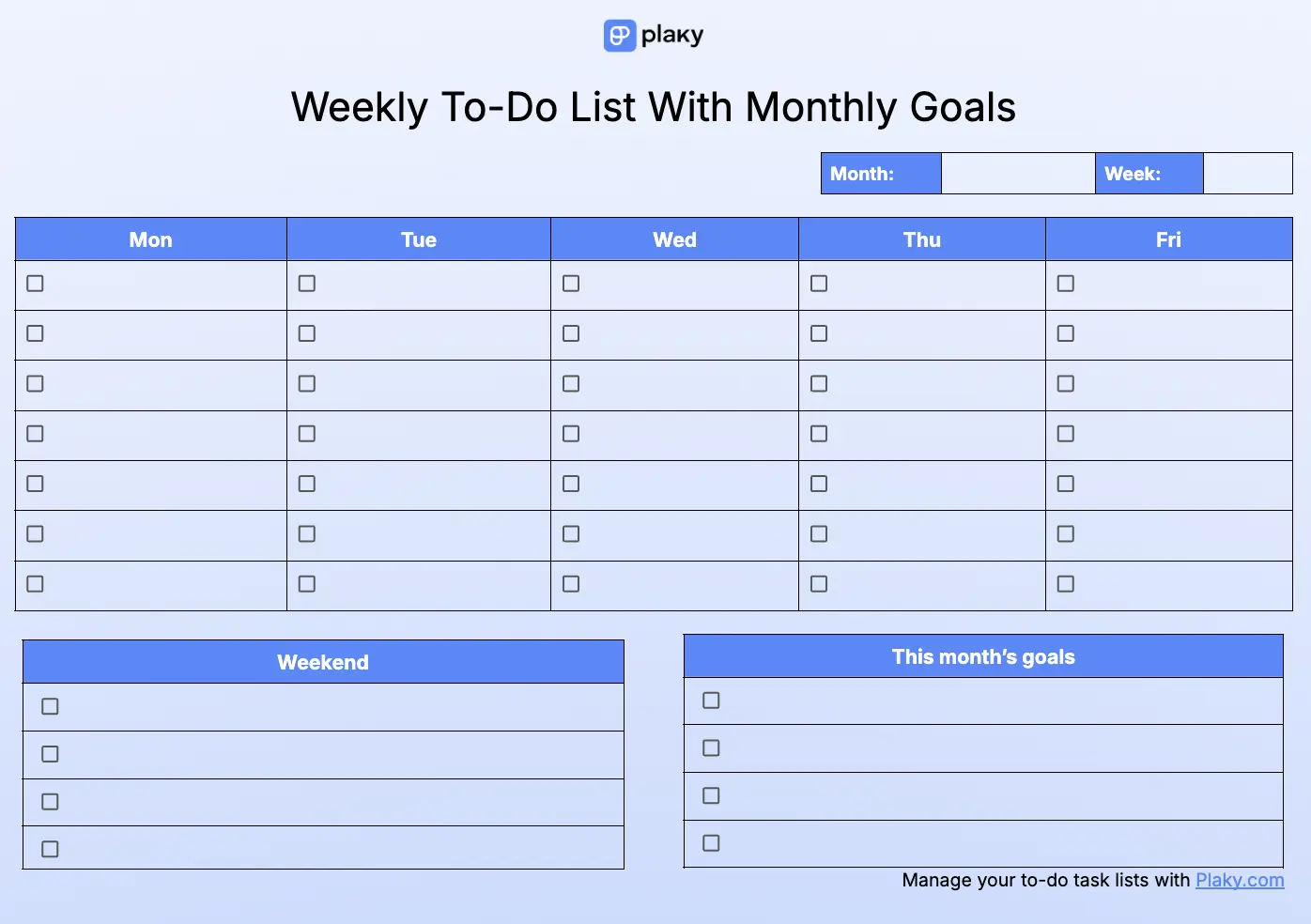
Keep yourself on track with the weekly to-do list template with monthly goals, and get a broader overview of all of your tasks.
This template is made up of 3 segments:
- 5 checkable to-do lists, 1 for each weekday,
- A separate, smaller list for weekend responsibilities,
- A list to track the current month’s goals so that you stay focused.
Pro tip — make sure your goals are S.M.A.R.T. to get better results.
Who or what is it for?
This template is best for people who like to stay focused on their goals as they plan responsibilities for the week. It’s perfect if you like to have a wide-angle lens on your tasks and see how they come together.
The division between weekday and weekend tasks also serves well for anyone who needs to keep work and personal responsibilities separate.
What problems does it solve?
This template helps you out if you struggle with:
- Keeping your overall goals in mind when planning out your to-do list,
- Getting a solid work-life balance, or
- Focusing on more long-term goals.
Download: Google Docs, Google Sheets, Excel
#5 To-do list template for today, this week & this month
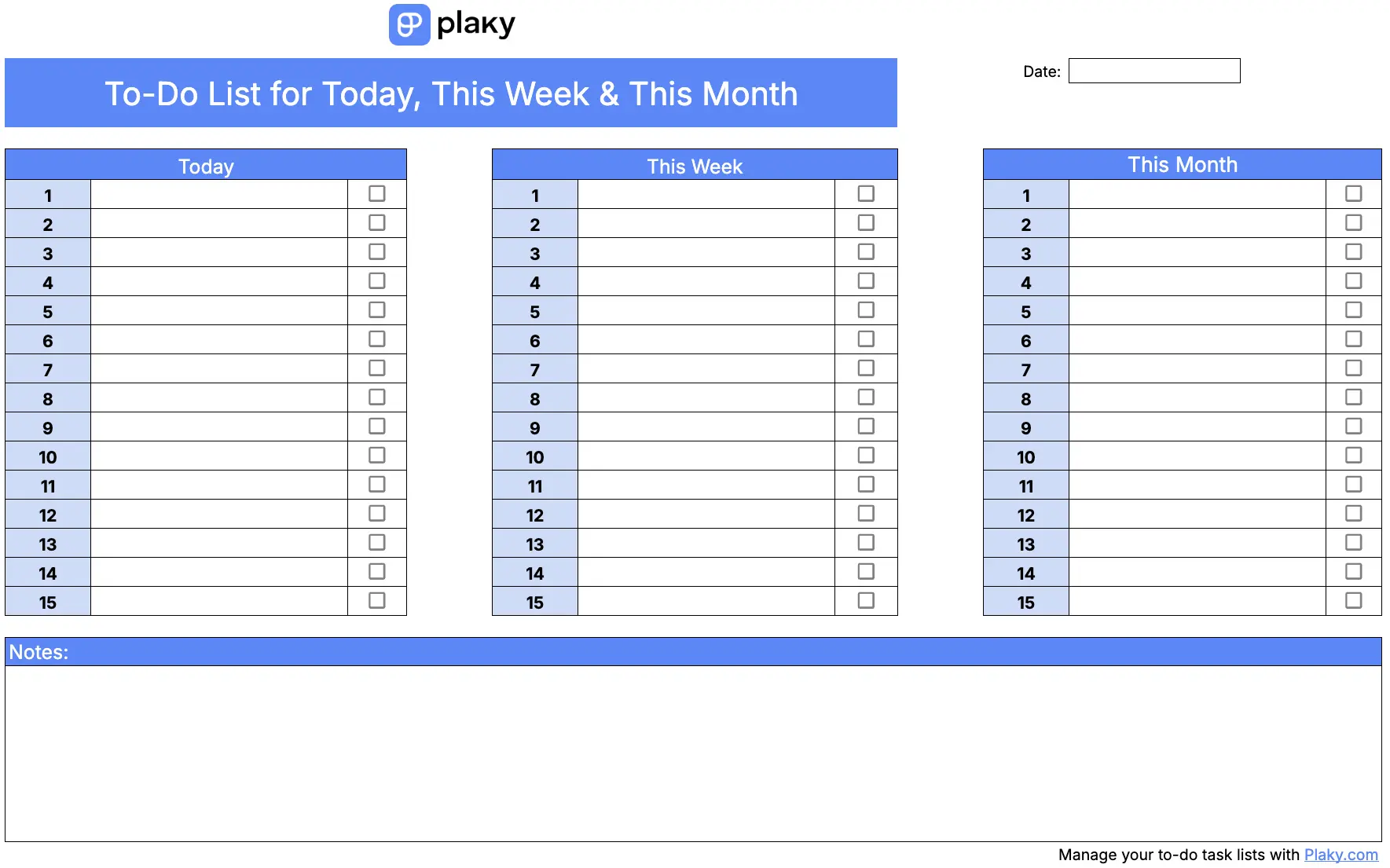
The today, this week & this month to-do list template works best for prioritizing responsibilities. It’s made up of 3 separate to-do lists:
- Today — urgent tasks,
- This week — tasks that need to be completed soon,
- This month — tasks that are not urgent at all, but you still want to get them done at some point over the month.
You can also use the “This week” and “This month” tables to set reminders for important appointments in the future.
The notes section under the lists serves a similar purpose — you could list appointments and meetings, or you could note down thoughts and impressions during the day, week, and month. This’ll help you implement lessons learned into your future task planning.
As with the other templates in this collection, you may use the checkbox next to the task to mark it as completed.
Who or what is it for?
This template is best for anyone who has plenty of tasks and needs to clear up the clutter and prioritize well.
The real benefit of this template is that it makes you acknowledge the tasks that need to be completed. If you’re struggling with procrastination and are constantly putting off tasks, the today, this week & this month template forces you to stop by setting a specific time to complete them.
What problems does it solve?
You should use this template if you:
- Struggle with putting off tasks indefinitely,
- Have a bunch of tasks to-do that cause you brain clutter and need to be sorted out, or
- Want to stay on top of the whole month.
Download: Google Docs, Google Sheets, Excel

#6 Weekly task habit tracker template
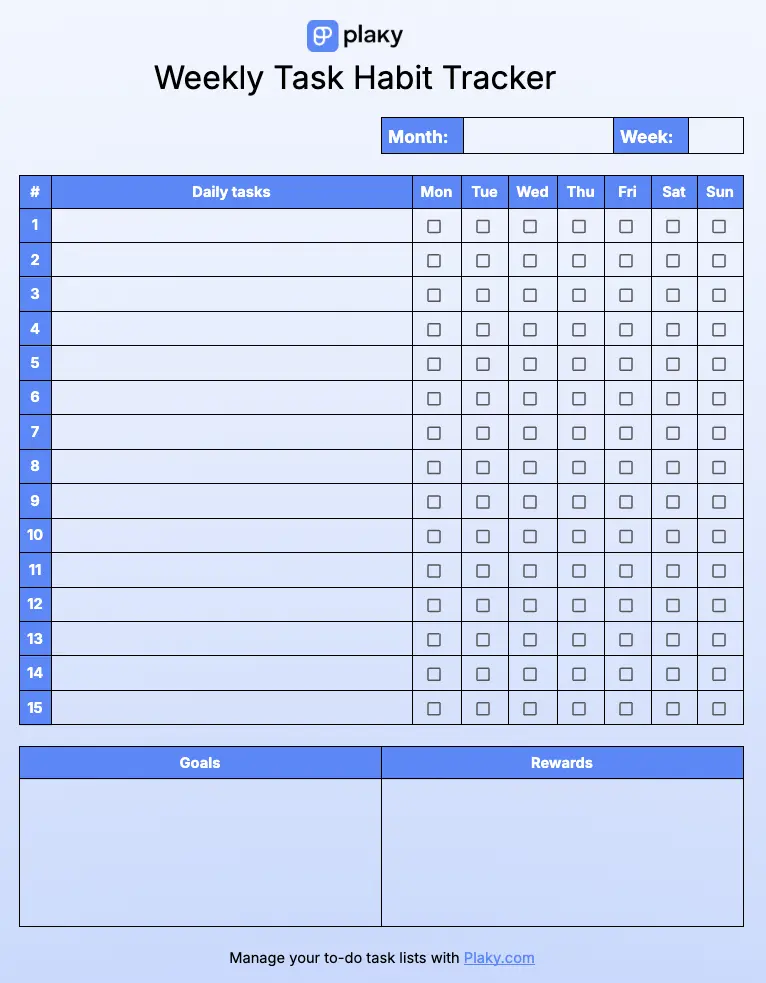
If you’re looking to build habits and stay consistent, this weekly task habit tracker template will definitely help.
It’s made up of 3 parts:
- Daily tasks — to track tasks you want to complete every day, along with a week-wide checkbox to make sure you’re consistent,
- Goals — to always keep in mind why you’re building the habits,
- Rewards — to stay motivated and reward yourself for a job well done.
Then, check off a task every day, and be sure to track your habit building process easily.
Who or what is it for?
If you’re looking to build new habits through your daily routines, this template is perfect for you.
It’ll make sure you stay dedicated, consistent, and successful in building habits.
What problems does it solve?
This template is right for you if you struggle with:
- Staying true to your habit-building goals,
- Keeping yourself motivated to show up every day, or
- Tracking the success of your weekly habit building progress.
Download: Google Docs, Google Sheets, Word, Excel
#7 To-do list template with deadlines
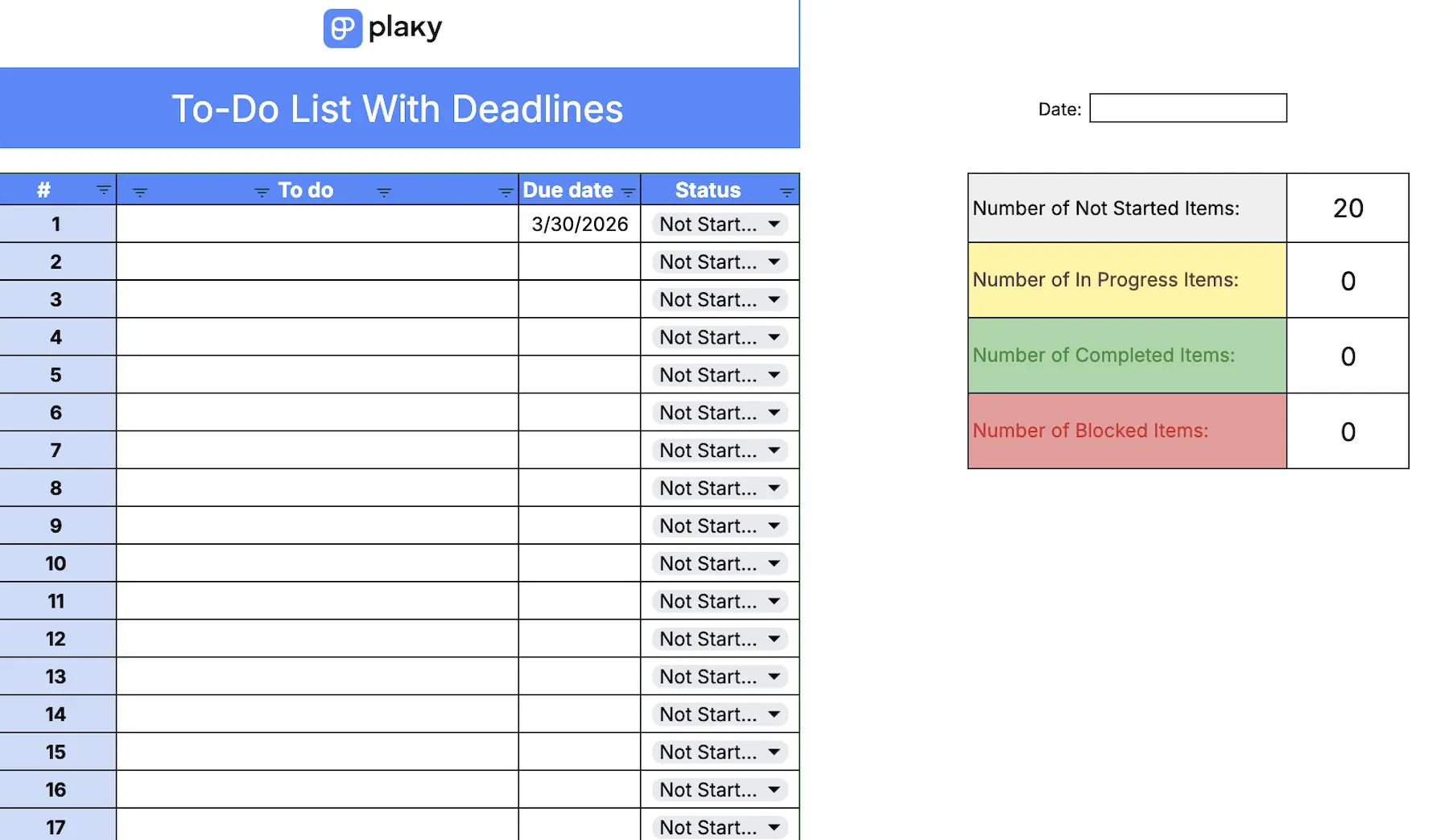
Need to stay focused on time-sensitive tasks? Track the due dates and status of each to-do list item to make sure your progress is on point and you don’t deal with missed deadlines.
The status field is completely customizable — so you can change values’ colors and text to fit your specific needs. This customization is available in most formats, but it’s easiest to do in Google Docs and Google Sheets.
Additionally, instead of just adding the date a task should be completed by, you can also add exact times — neat for tracking appointments.
Who or what is it for?
This to-do list template is best for people whose work relies on exact deadlines they need to keep track of.
It makes sure your due dates are at the forefront, so deciding on which task to tackle next doesn’t take any time at all.
What problems does it solve?
This template is perfect if you:
- Struggle to meet deadlines,
- Need to keep an eye on task progress, or
- Can’t prioritize tasks by urgency without concrete numbers.
Download: Google Docs, Google Sheets, Excel, Fillable PDF
Keep up with task deadlines in Plaky
To-do list templates with prioritization
This group contains to-do list templates that are all about having a dedicated space for your top-priority to-do items.
They’re perfect for people who like to take one look at their to-do list and know which task to get to next.
#1 Priority to-do list template with a stopwatch
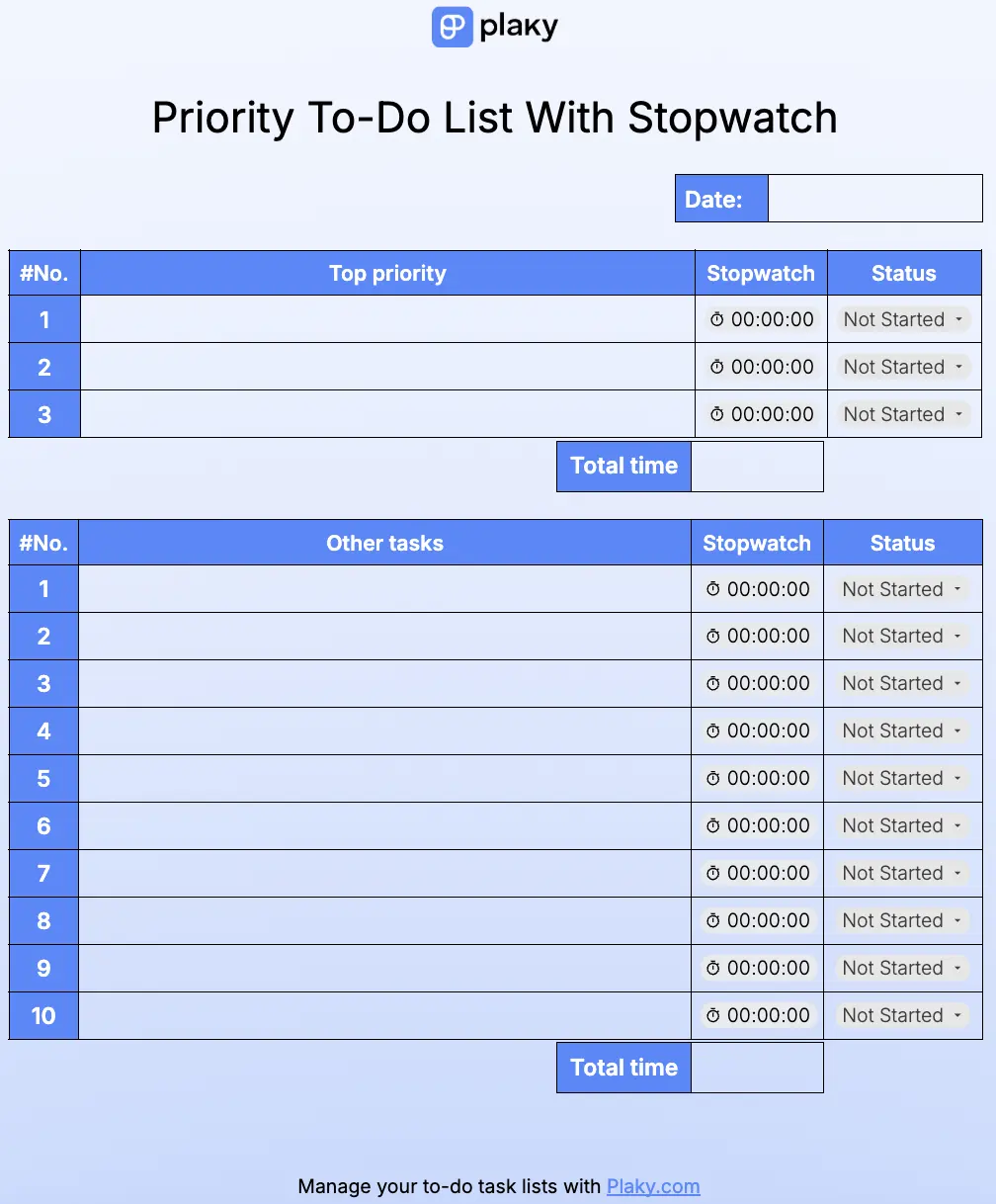
The priority to-do list template with a stopwatch offers 2 simple tables — one for the 3 top-priority tasks for the day and one for all “Other tasks”.
The key element of this template is the stopwatch next to each task. Use it to track how much time it takes you to complete each task — just click the stopwatch button when you start the task, and then click it again when you’re done.
It also makes it easier to track status — if the timer is running, the status should be “In progress”, and when you shut it off, simply change the status to “Done”. This simple but smooth system means you’ll never forget to keep the list updated.
At the end of the day, you’ll have a clear answer to that age-old question: “Where did all my time go?”
Who or what is it for?
This priority to-do list template with a stopwatch is made for people who want to keep track of exactly how their time is spent.
What problems does it solve?
This template can help you if you’re dealing with:
- Time disappearing without you knowing where it’s gone,
- A struggle to predict how long future tasks will take, or
- Too many tasks stuck in progress at the same time.
Download: Google Docs
#2 Priority to-do checklist template
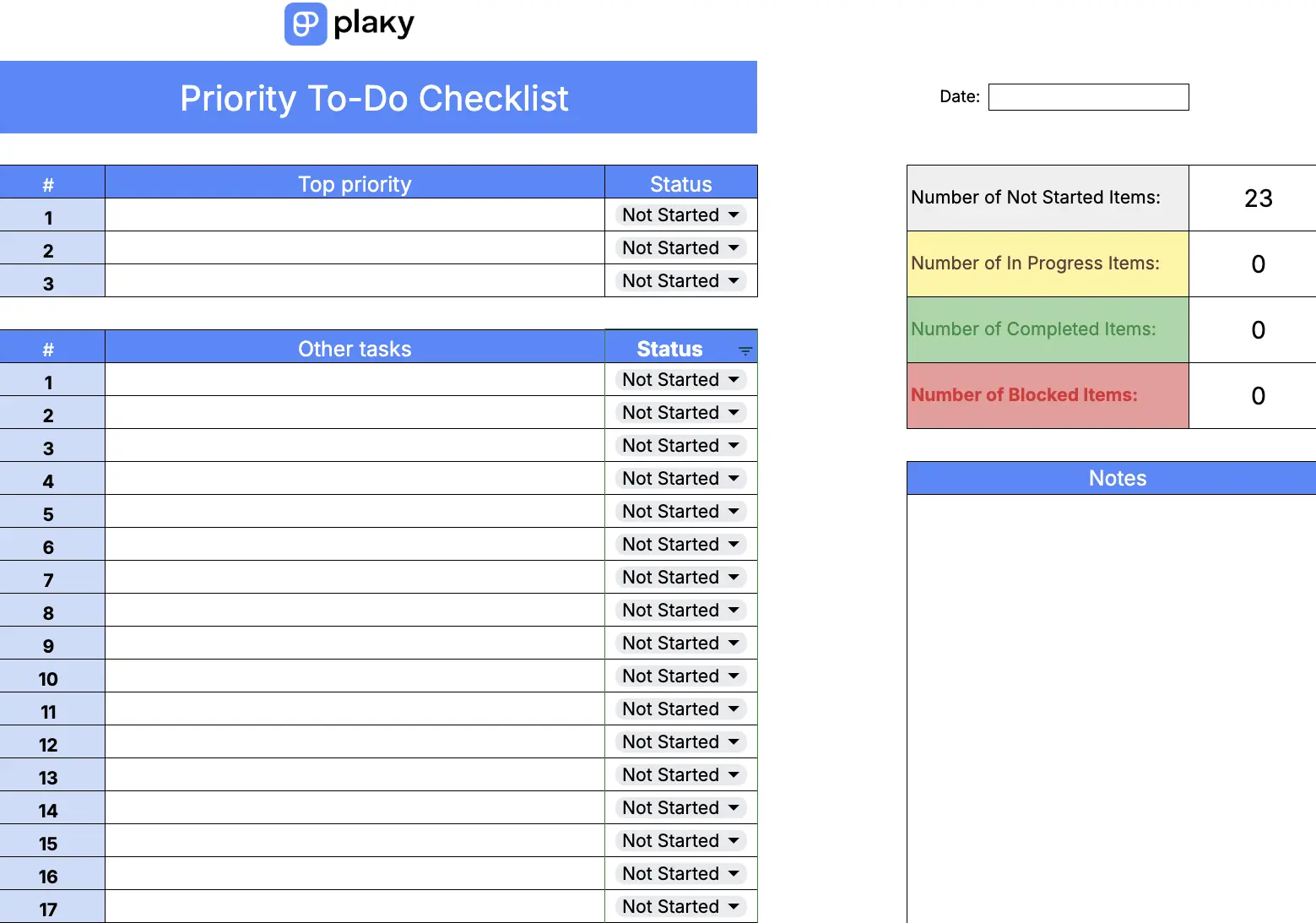
This is a simple priority to-do checklist with a color-coded dropdown list to mark your task status.
It’s fairly customizable — you can change the color and text of the dropdown and fit it to your needs.
Every one of these status values is connected to a separate cell that counts out how many tasks have that value. So, you can see how many tasks you’ve completed, how many you have left, etc., which can do wonders for motivation.
Like with some other templates, you can take notes to track impressions, motivation, and progress.
Who or what is it for?
Use this template if you’re a visual person who likes color-coding your tasks, but don’t like overcomplicated, cluttered to-do lists.
It’s also great if you like to be straightforward when prioritizing tasks — with a limited count of high-priority tasks, you won’t be able to make all tasks urgent.
What problems does it solve?
This template is great if you:
- Over-prioritize by setting too many tasks as high-priority,
- Struggle to visualize your task progress, or
- Need a way to keep your thoughts organized.
Download: Google Docs, Google Sheets, Excel, Fillable PDF

#3 Today’s to-do list template
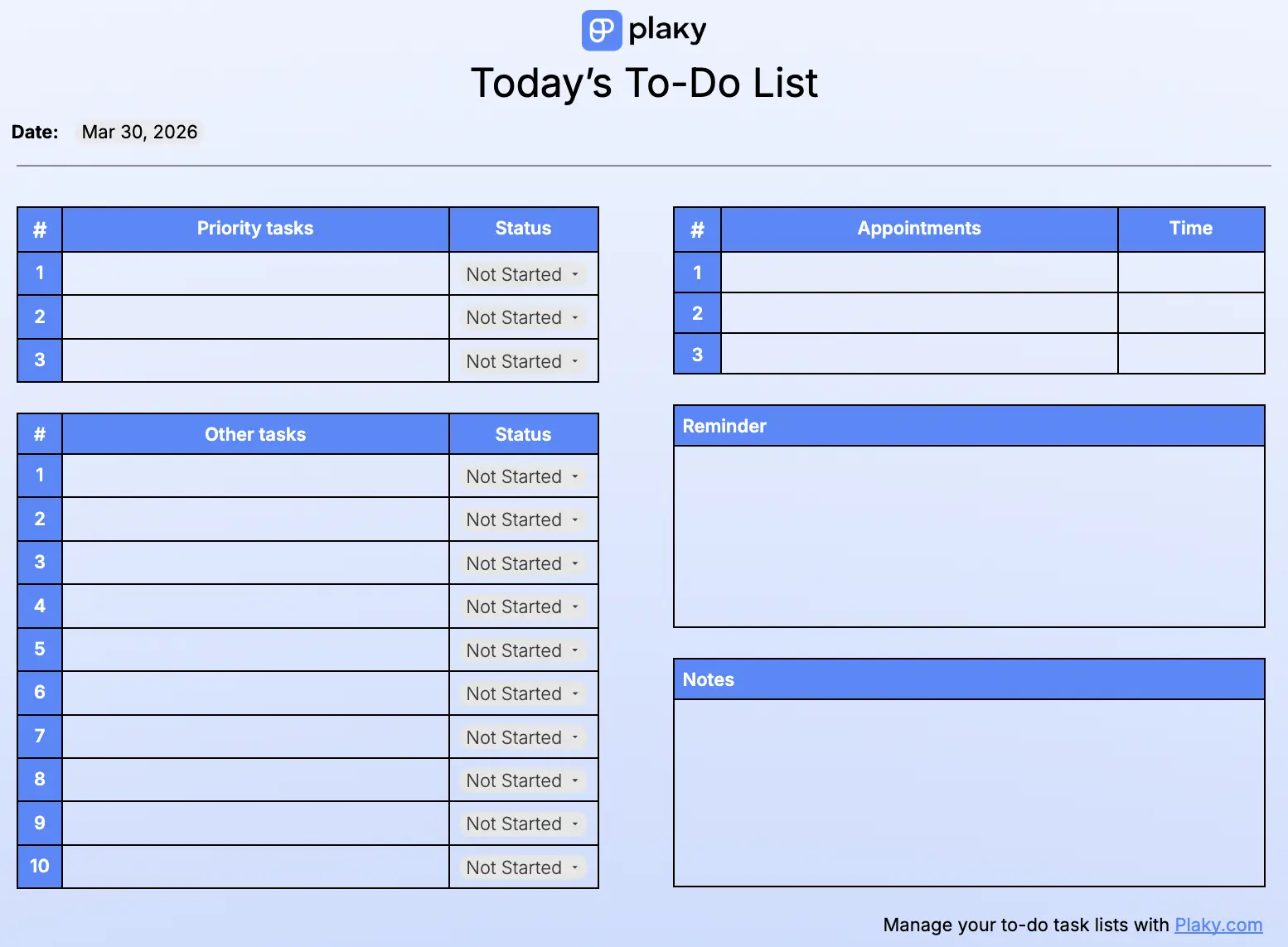
The today’s to-do list template keeps you organized and focused on high-priority tasks.
Like with other lists, the status drop-down field is color-coded so you can visually track your progress with ease. Similarly, the notes section is great to track ideas and opinions about your day-to-day work.
Besides your priority and other to-do lists, the ”Appointments” list lets you track exactly when you need to block out time in your day. To set the exact time, click on the smart chip in the column, and select the desired time in Google Docs.
And lastly, use the “Reminder” section to make sure you don’t forget any important responsibilities over the day.
Who or what is it for?
This template is best for people who like to keep daily tasks organized and divided as priority tasks, non-priority tasks, and appointments.
It’s also great if you like to arrange your thoughts and separate notes and reminders.
What problems does it solve?
You should use the today’s to-do list template if you:
- Struggle to remember your appointments and need clear reminders,
- Have too many tasks on a day-to-day basis and need to organize them, or
- Need a way to quickly determine priority tasks.
Download: Google Docs, Google Sheets, Excel
Prioritize with Plaky’s custom fields
Advanced to-do templates
In the “advanced” category, you’ll find more creative ways to track your to-dos. You’ll also get some useful tips on how to use some of these templates to maximize your productivity.
Let’s get into it!
#1 Step-by-step to-do list template
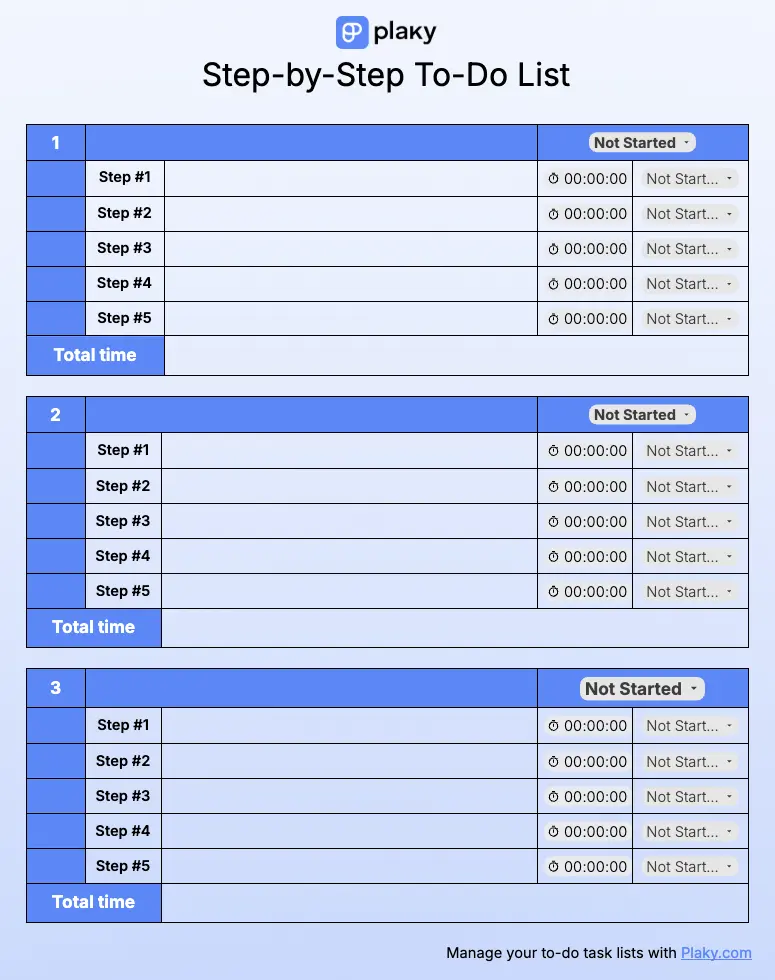
Some tasks are too complicated to tackle as a whole — so you need to break them down into smaller bits to get them right. This step-by-step to-do list template lets you do just that.
Enter the name of your task in the topmost field of each table, and then use the table to divide it into more tasks.
Each slot in the table also contains a status bar and a stopwatch — use this stopwatch to track how much time each of your steps take. This’ll improve planning in the future and let you know exactly where your time is going.
Once you complete all the steps, you can also enter the total time it took at the bottom of the table for a clear overview of productivity.
Who or what is it for?
This template is for anyone dealing with complex tasks who needs to break them down into manageable, focused steps.
What problems does it solve?
Use this template if you struggle with:
- Handling tasks that don’t have a clear angle of attack,
- Losing too much time on tasks, or
- Not knowing which parts of a task eat away at your time.
Download: Google Docs
#2 Daily schedule to-do list template
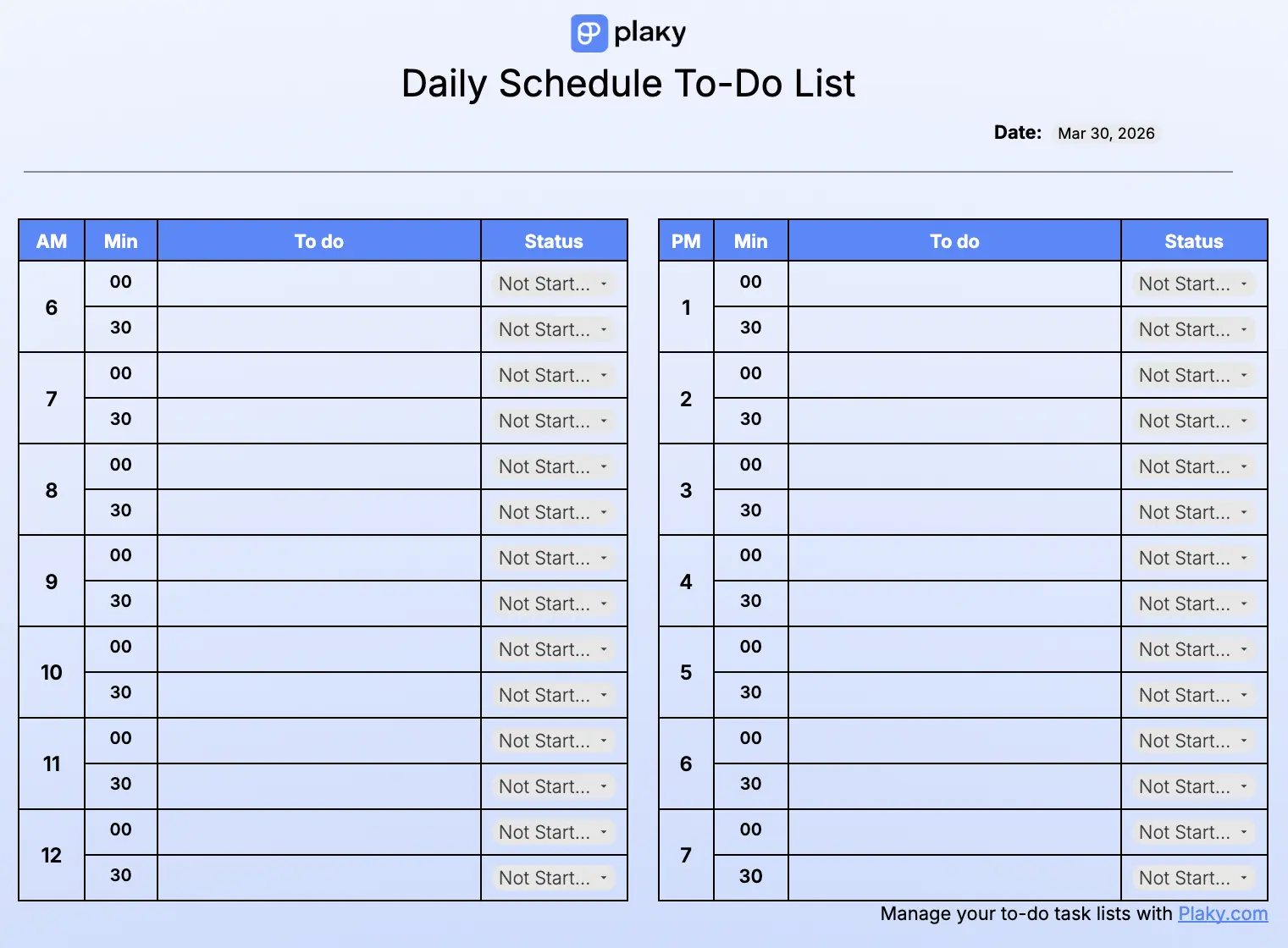
The daily schedule to-do list template is perfect for keeping up with your day. It consists of 2 tables (morning and afternoon), each of which covers the time between 6 a.m. and 8 p.m. in 30-minute increments.
Determine what time of the day you’ll take for a specific task, and then write it into the corresponding slot in the template. This schedule also makes the status field easy to update — if you reach or pass a specific time, you know that you should update the status of your task.
You can also customize this template, e.g., if you’re a night owl, and need different times.
Who or what is it for?
This template is right for people who like to have their whole day’s time planned out. It’s also great if you’re busy and have a lot of tasks you need to sort out.
What problems does it solve?
This template is perfect if you:
- Deal with a tight schedule and tasks with quick turnarounds,
- Have a lot of appointments or meeting that you need to track, or
- Need a clear visual on the progress of daily tasks.
Download: Google Docs, Google Sheets, Excel, Fillable PDF
#3 Get things done to-do list template
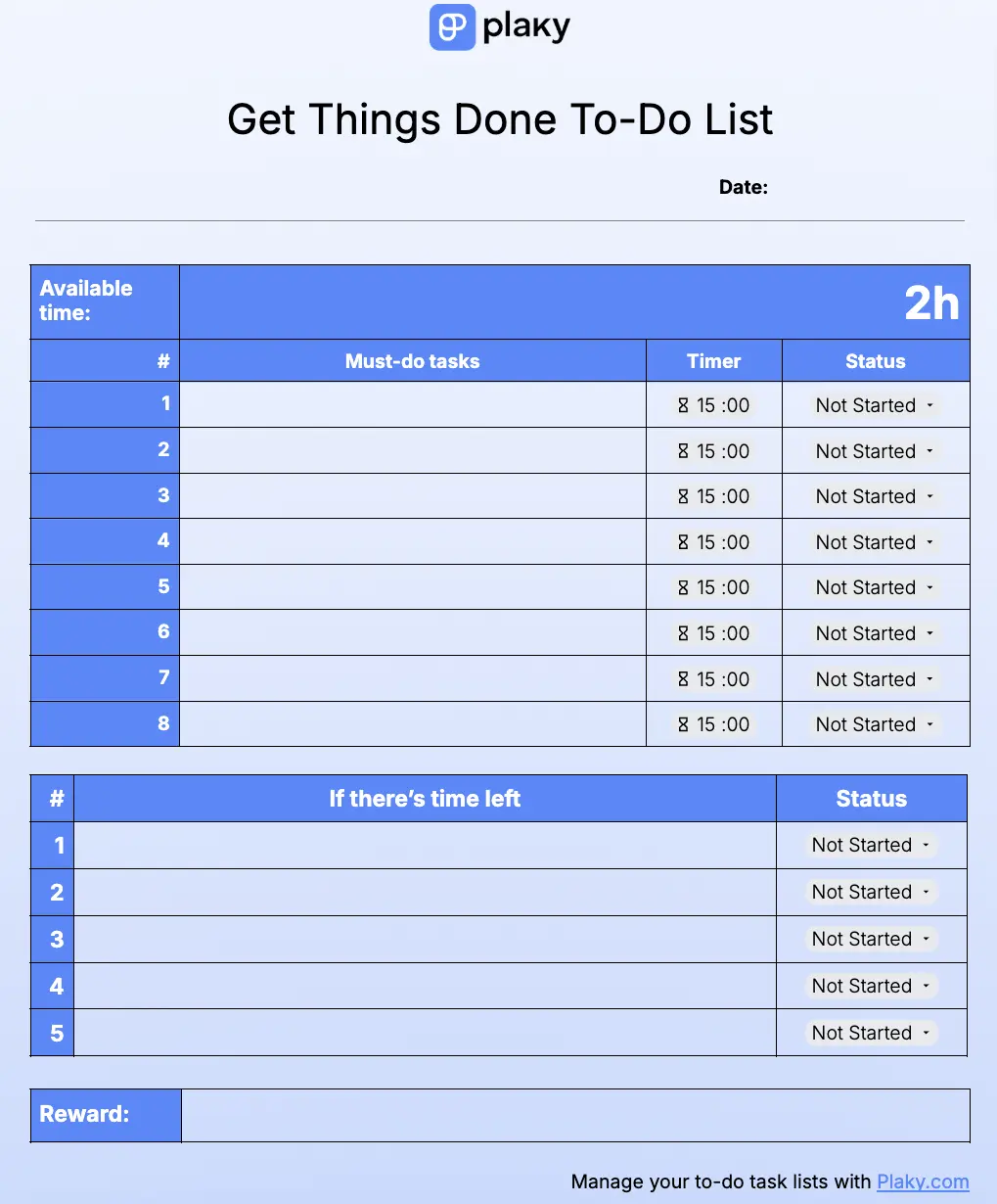
This to-do list template was specifically designed to help you clear out — or at least declutter — a growing list of tasks you’ve been putting off for a long time.
Write each task down in this list, and set a specific time to perform it. A hint — use the time tracked with our other templates to make the right estimate for task times in this list.
Then, turn it into a game, and race against the clock. This’ll help you get in “the zone”, and you’ll likely finish all tasks regardless of the timer.
Pro tip — if the tasks allow it, try listening to music or an audiobook in the background. This will make the time pass faster, and you’ll even have fun doing otherwise boring tasks.
Who or what is it for?
This template is perfect for when you’re ready to tackle the tasks you’ve been putting off.
You can also use it as a motivator for everyday tasks and turn those into a game against the clock, too.
What problems does it solve?
You should use this template if you’re dealing with:
- A ton of tasks that have piled up,
- A lack of motivation when completing tasks, or
- A sudden outbreak of urgent tasks.
Download: Google Docs
#4 In a pinch to-do list template
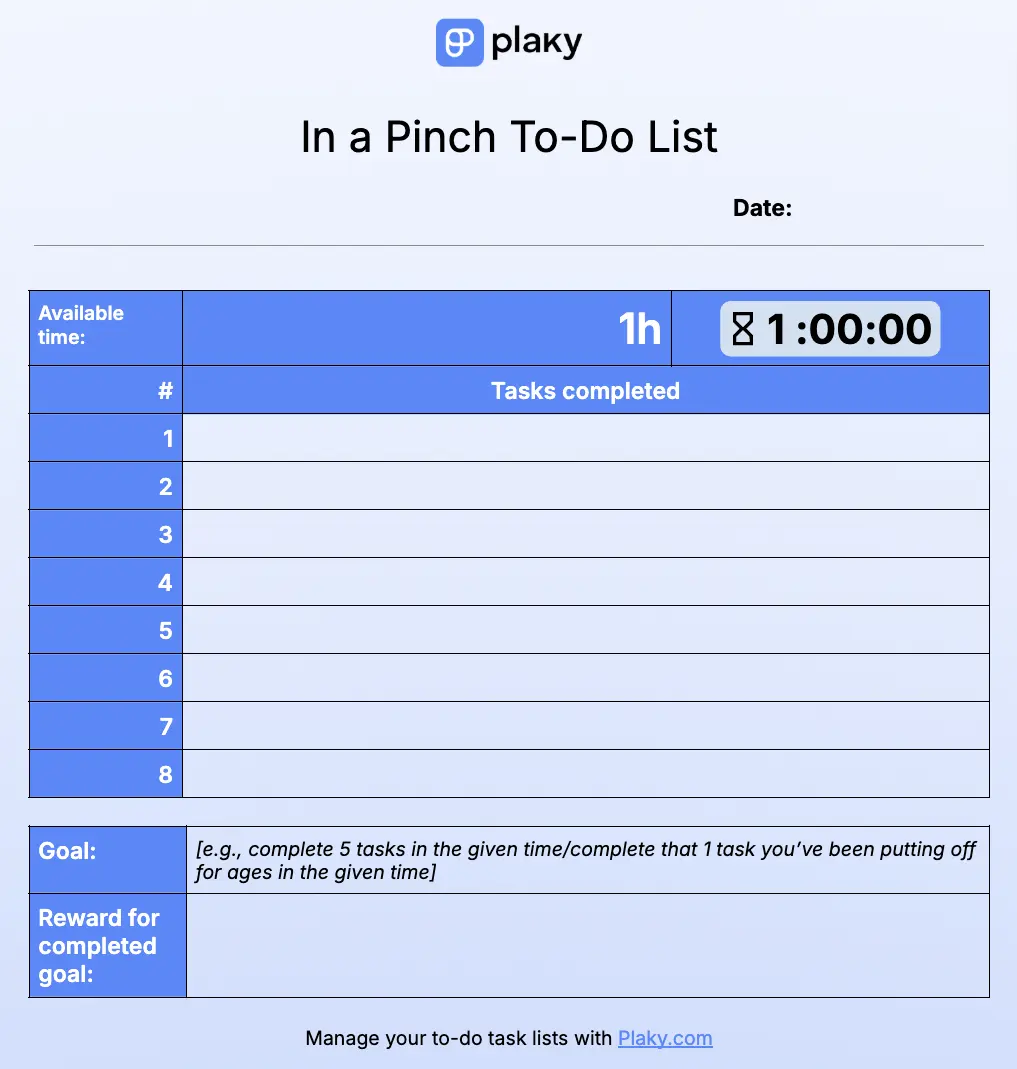
This is the perfect template for when you’re in a pinch, and need to do as much as possible, as quickly as possible.
Simply set the timer to the amount of time you have to complete the tasks, and write down your tasks in a list. Pro tip — you can also use the numbers in this to-do list to list tasks by priority.
Every time you complete a task, simply cross it out from the list and move on to the next. Alternatively, you can leave the list blank and add the tasks in as you complete them.
While this template is a great tool for when you’re in a pinch, you can also incorporate it into your daily routine. Only 1 hour a day of this kind of work can do wonders for your daily productivity.
And, like with the previous template, you can make a game out of this one, too!
Who or what is it for?
This template is meant for people who have a list of tasks they need to complete but have very little time to do them.
It’s also a great motivator to complete boring daily tasks — much easier to say “I’ll just do as much as I can over the next hour” than “I’ll do this entire task list”.
What problems does this template solve?
This template is right for you if you:
- Struggle with a bunch of boring (ideally unimportant) tasks,
- Are dealing with a time crunch, or
- Can’t get yourself motivated to complete piled-up tasks.
Download: Google Docs, Word
#5 Daily to-do list template + mood and water tracker
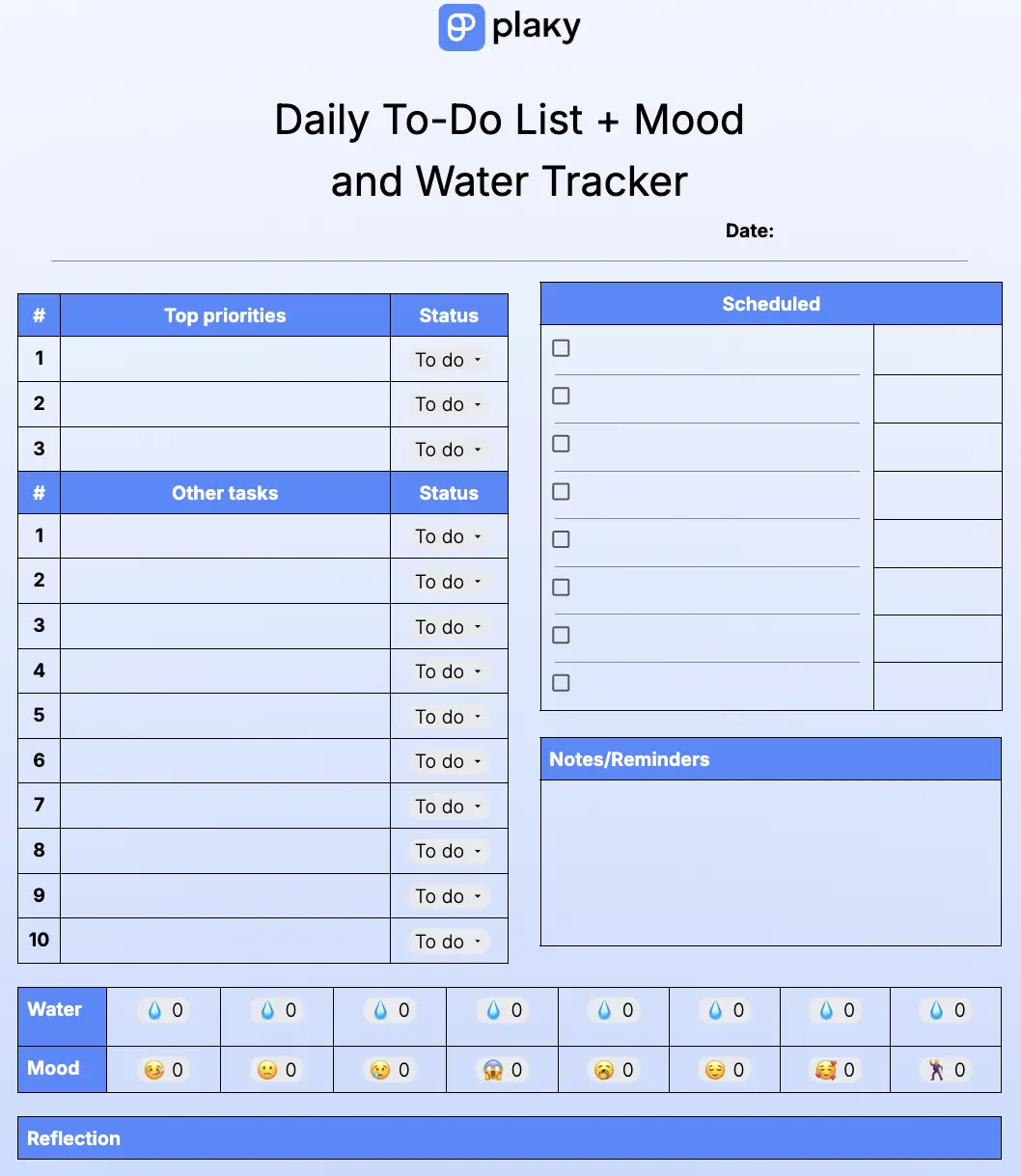
This template is a priority to-do list with a separate list for your scheduled tasks.
But, the key feature is at the bottom of the template — the mood and water trackers. To mark your water intake, simply click the water droplet every time you get a glass of water. When you’ve marked each drop, you’re properly hydrated!
As for the mood, just choose the emoticon that reflects your mood for the day.
At the very bottom of the page is a “reflection” space, where you can journal about the day, your productivity, your mood, or anything else you wish to mull over.
Who or what is it for?
Use this template if you like to make sure you’re properly hydrated and want to track your daily mood along with your to-dos and appointments.
What problems does it solve?
This template is ideal if you:
- Forget to drink enough water during working hours,
- Like to stay insightful about your emotions throughout the day, or
- Need a way to reflect on how your tasks influence your daily mood.
Download: Google Docs
#6 To-do list template for today, this week and this month with a stopwatch
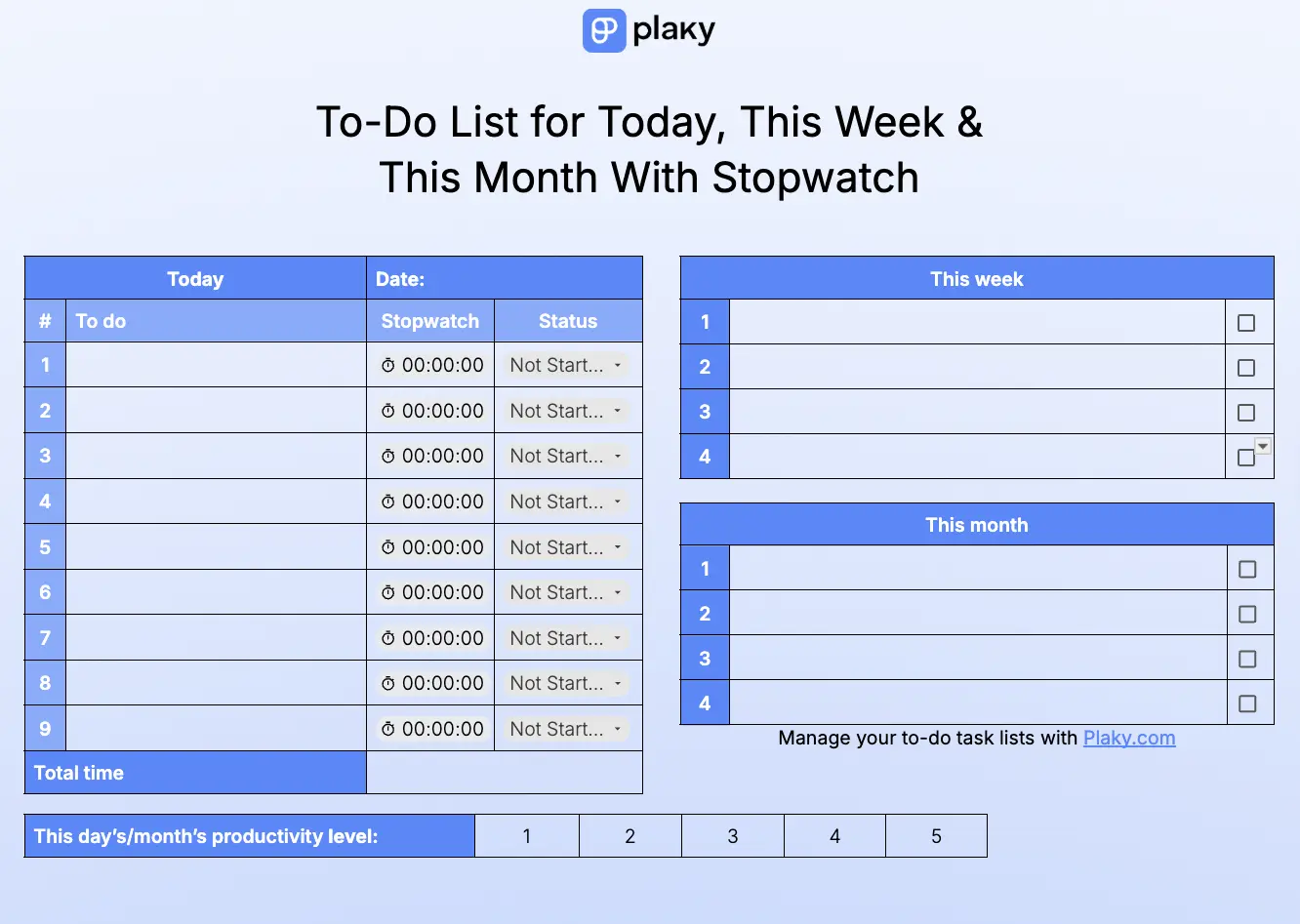
This is a more advanced version of the template we had in the simple category. It has 3 dedicated tables for:
- Daily tasks,
- This week’s tasks, and
- This month’s tasks.
But, this template has even more to offer — like the stopwatch and status columns in the “Today” list.
The very bottom of the page is dedicated to self-assessment, where you can mark down your productivity on a scale of 1 to 5.
Who or what is it for?
This template is great for people who want more insight into their high-priority tasks, but still like to note down and track less important responsibilities.
It offers just the right blend of planning current tasks, looking ahead, and retrospective to keep your to-dos balanced.
What problems does it solve?
This template is for you if you:
- Lose track of lower priority tasks while focusing on urgent ones,
- Need a clearer grasp on monthly productivity, or
- Lose too much time on high-priority tasks.
Download: Google Docs
Blaze through your to-dos in Plaky
Business to-do list templates
While all of the templates we’ve provided are suitable for a business setting, the “business” category is specifically made for:
- More complex business tasks,
- Projects that require a team effort, or
- New entrepreneurs in the process of starting their own businesses.
💡 Plaky Pro Tip
If you want to use actual project management software but are afraid they’re too complicated or expensive, check out an affordable and beginner-friendly alternative to popular PM software:
#1 Project to-do list template
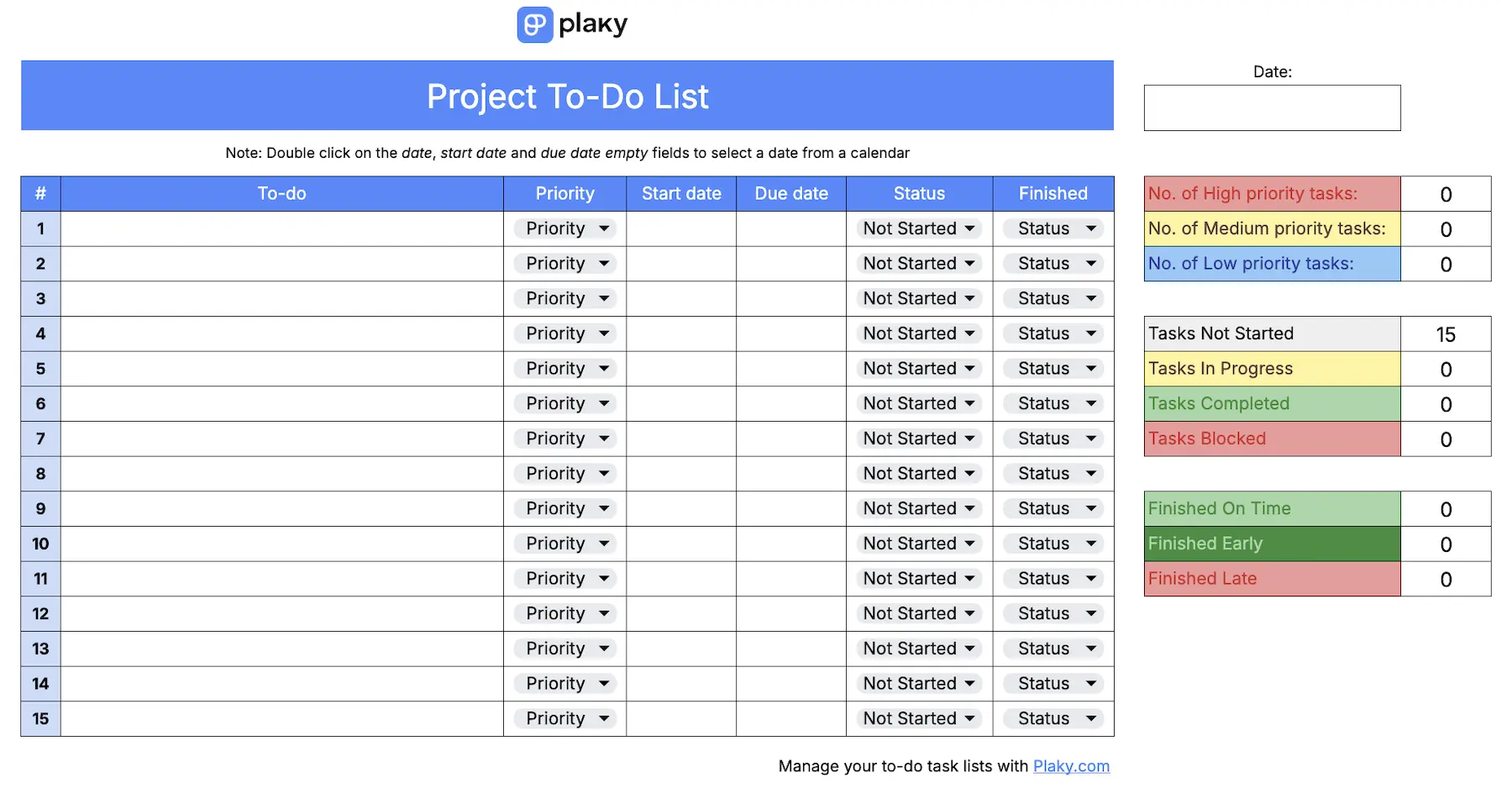
The project to-do list template is an advanced tool for more complex and lengthy projects with strict deadlines.
It helps you set up a project task list with clear data:
- Start and end date,
- Priority level,
- Current status, and
- Finished status (on time, early, or late).
This template is printable, but it’s best used online. If you prefer Google Sheets or Excel, you’ll get an additional table that shows the exact number of tasks for each data category — giving you a great overview of results and progress.
This template is inspired by project management software such as Plaky by CAKE.com.
Who or what is it for?
This template is best for people who work on larger-scale projects and need a clear overview of their tasks and progress. It’s also good if your projects need a collaborative effort — you and your team can leave comments in both Excel and Sheets.
What problems does it solve?
This template is perfect if you struggle with:
- Too many complex project tasks,
- Unclear task info that’s difficult to view, or
- A poor overview of task progress and results.
Download: Google Docs, Google Sheets, Excel
💡 Plaky Pro Tip
Find out how to improve your project management efficiency with PM templates:
#2 Work schedule to-do list template
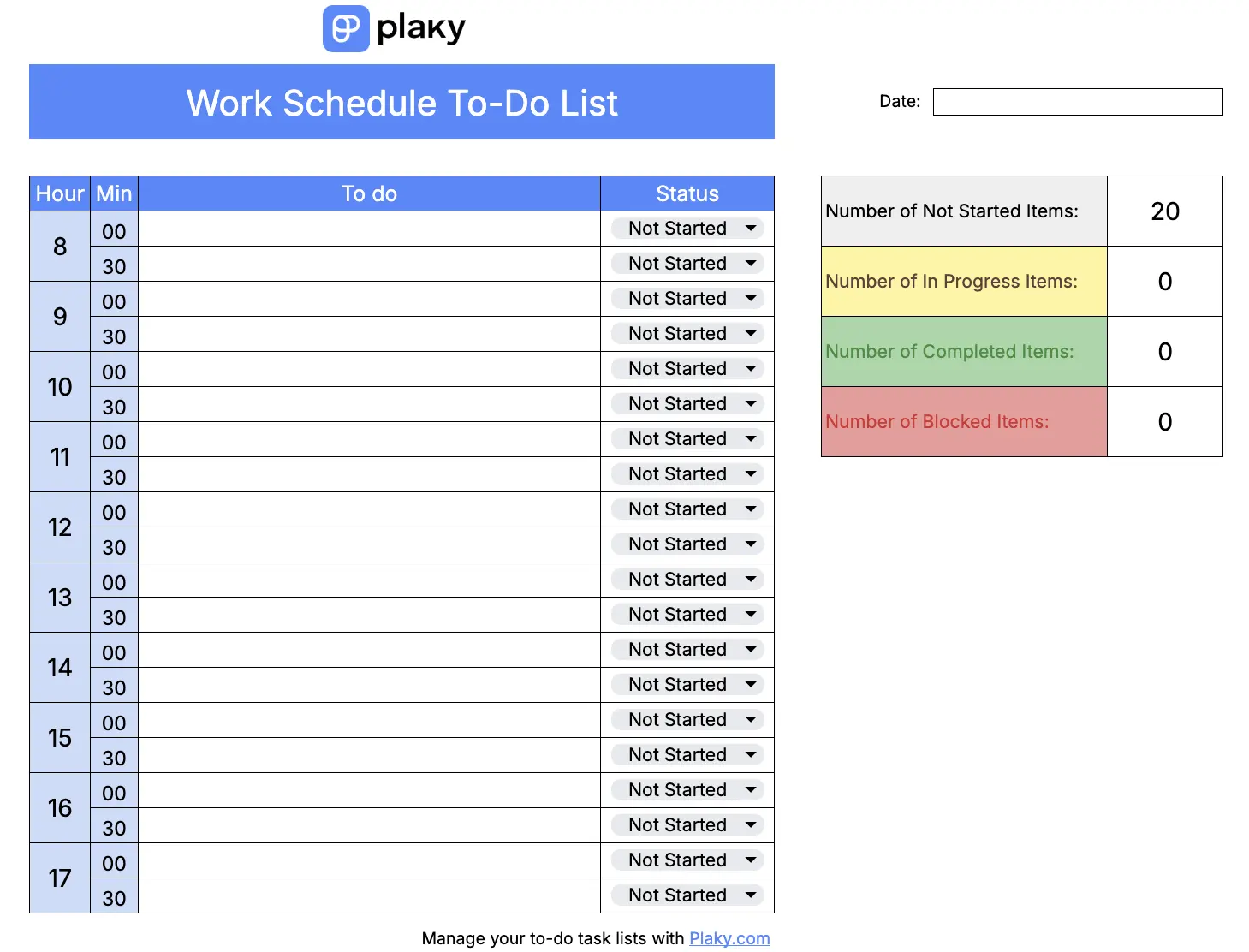
The work schedule to-do list is ideal for getting your workday in perfect order. It covers the time between 8 a.m. and 6 p.m. in 30-minute intervals with a simple dropdown list to mark the progress of your tasks.
In case your work hours aren’t exactly 8 to 6, simply change the hours to fit your schedule. Speaking of customization, you can also change the colors and status options in the dropdown list to fit your project workflow.
Who or what is it for?
This template is ideal if you like your workday to be organized to a tee and want to know what you’re up to every hour of the day.
It’s also great if you want to create a clear visual representation of your schedule.
What problems does it solve?
Use this template if you’re bothered by:
- Constantly shifting and tight deadlines,
- A large number of meetings you need to organize, or
- A hard-to-visualize daily timeline.
Download: Google Docs, Google Sheets, Excel
💡 Plaky pro tip
The schedule template is perfect if you’re planning an event and need everything to be on point. Check out more templates that’ll help you with event planning:
#3 Entrepreneur daily to-do list template
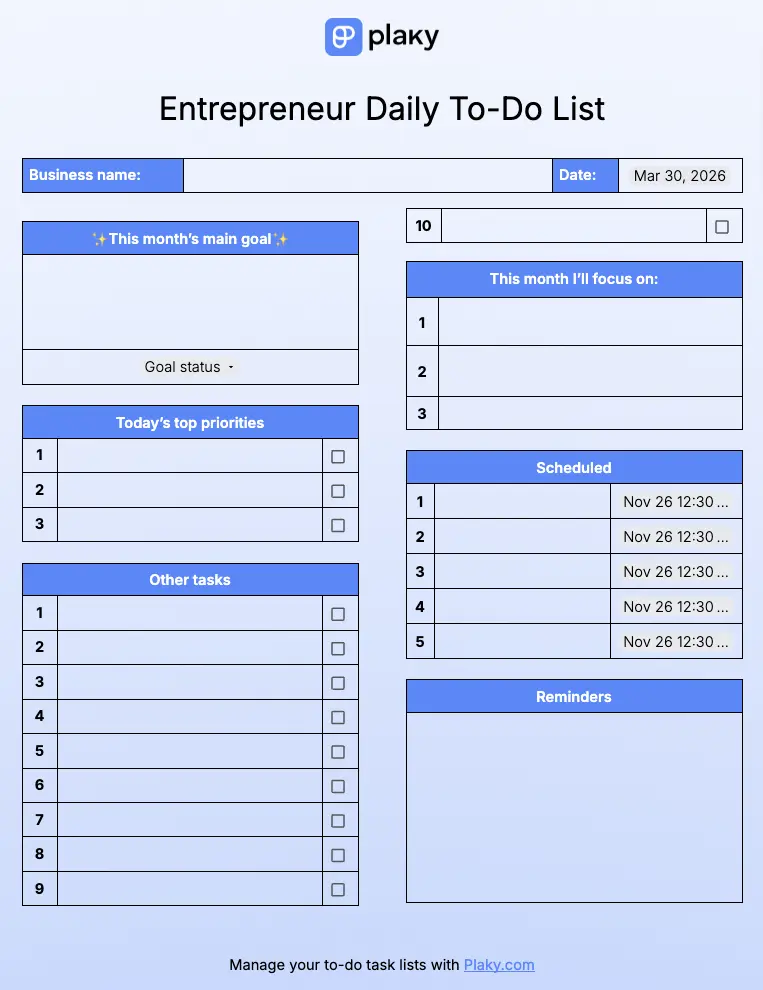
This entrepreneur daily to-do list template is made for — well — entrepreneurs and small business owners. It’s a relatively simple template that lets you track:
- Monthly main goal — The key thing to focus on this month. The status option is there to keep you grounded and motivated across all other tasks.
- Monthly focus — The other goals and objectives for this month.
- Today’s top priorities — All urgent tasks you need to complete today that can’t be put off for tomorrow. Alternatively, you can use this list for daily goals.
- Other tasks — All other responsibilities you need to complete today.
- Scheduled — Appointments you need to attend to, with a field to specify their exact time and date.
- Reminders — Any info that doesn’t fit into the other lists, e.g., things that you want to reflect on during the day and remember for the future.
Who or what is it for?
Use this template if you’re an entrepreneur or small business owner who needs quick and easy reminders of their monthly or daily goals and responsibilities.
It’s especially useful if you’re just starting out and want insight into those first project milestones.
What problems does it solve?
This template is perfect if you have:
- No clear direction at the beginning of leading your business,
- Difficulty keeping track of all of your goals, or
- A hard time aligning your business goals and everyday tasks.
Download: Google Docs, Google Sheets, Excel

#4 Entrepreneur monthly to-do list template with goals
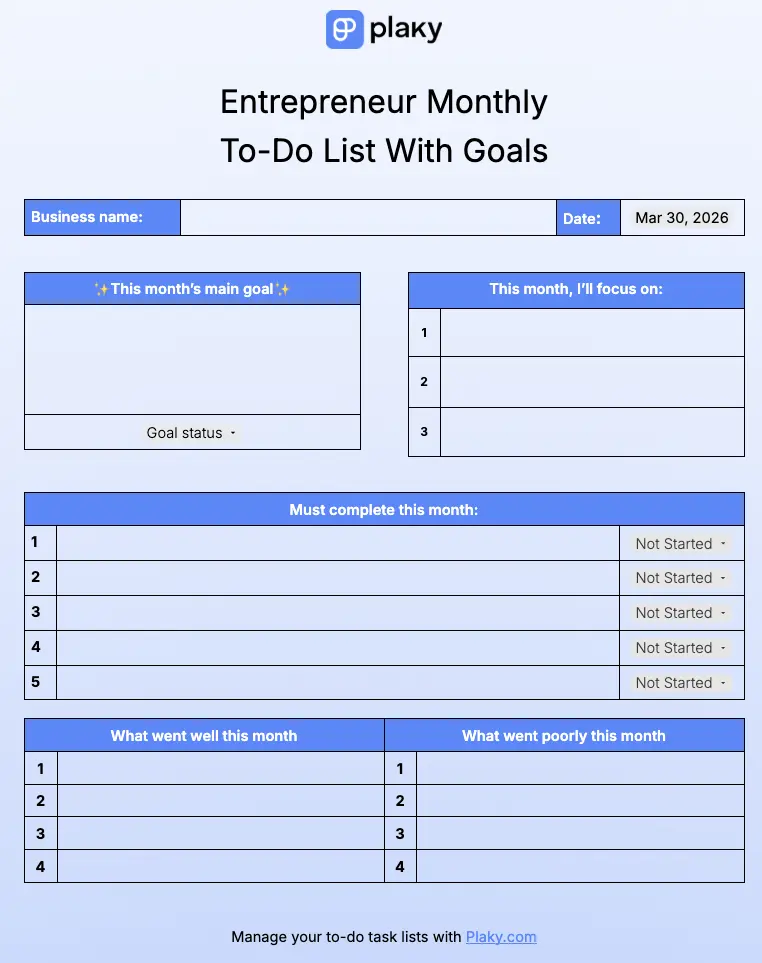
The monthly to-do list template for entrepreneurs offers a more improvement-oriented task list to focus on, with designated spaces for goals and reflection.
Write down the monthly goals in their designated lists, and then write down the tasks you need to complete to achieve those goals. Use the status bar, as usual, to track your progress.
At the end of the month, reflect on your work — both your successes and failures. Note down what led to each, and you’ll know what to keep or stop doing over the next month.
Who or what is it for?
This template is best for goal-oriented entrepreneurs who want a clear path to improving their business.
It’s perfect if you want to look ahead without getting bogged down by tedious day-to-day activities.
What problems does it solve?
This template is best if you:
- Set a lot of goals but don’t know where to start,
- Fail at achieving goals but aren’t sure why, or
- Want to avoid keeping track of day-to-day work and focus on the long-term.
Download: Google Docs, Google Sheets, Excel
💡 Plaky Pro Tip
Want more templates to take your business to the next level? Create a baseline for all work in your company with these incredible templates:
Check off the entire list with Plaky by CAKE.com
To-do lists are more useful if they’re digital — especially when you’re running a business. High-quality to-do list software lets you organize tasks, collaborate with your team, and boost clarity.
Our software, Plaky, is a powerful, yet beginner-friendly tool for creating advanced to-do lists.
In Plaky, you can build elaborate to-do lists with as many items as you need. To help you organize and reorganize your to-dos whenever necessary, Plaky also lets you:
- Create tasks groups to keep responsibilities organized.
- Use custom fields to clearly show all task info, like status, priority, due date, assignee, or anything your specific list needs.
- Create and assign to-dos for your entire team, and make sure they’re up-to-date with their work.
- View your to-do lists deadlines in a Gantt chart to see the timeline of all your tasks.
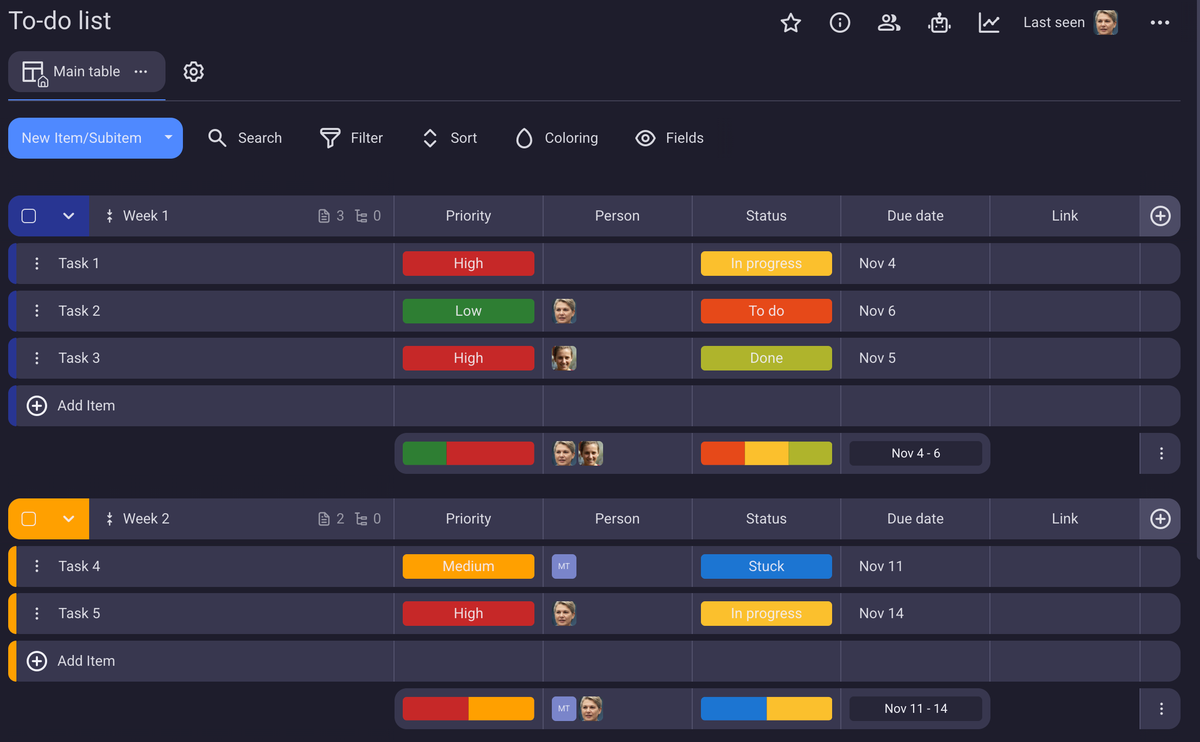
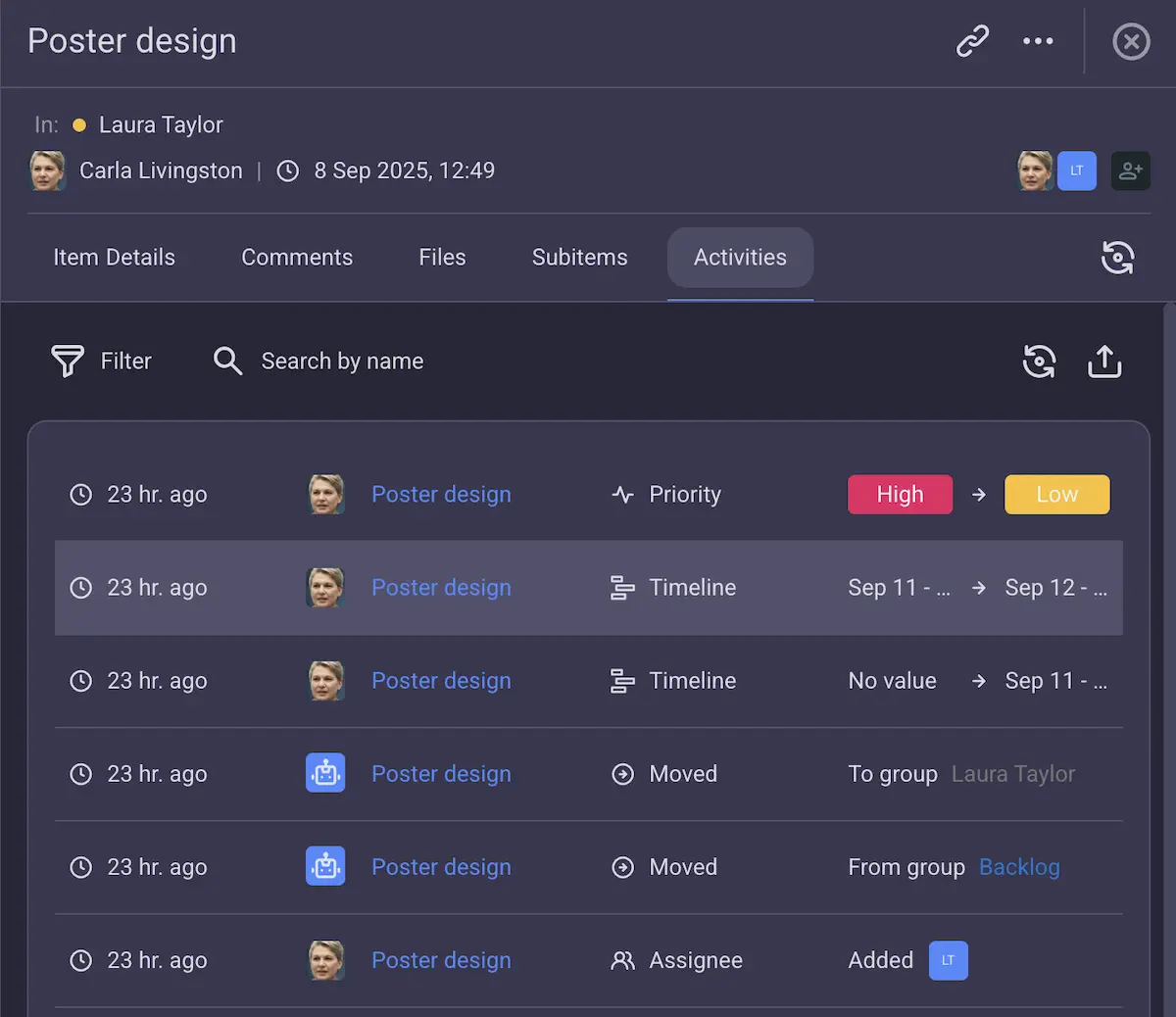
But that’s not all! Once you’ve created your to-do list, you can:
- Add files to keep all relevant information in one place,
- Leave comments to communicate with your team quickly and efficiently,
- Create subtasks to break down more complex to-dos, and even
- View the history of changes made to a task so that you never miss an important update.
And if your list ever gets too long or starts to span too many different project boards, you can always switch to the My tasks view.
This view will let you focus only on the tasks assigned to you — so no matter how complicated your business gets, you can still have a simple, straightforward task list to focus on.
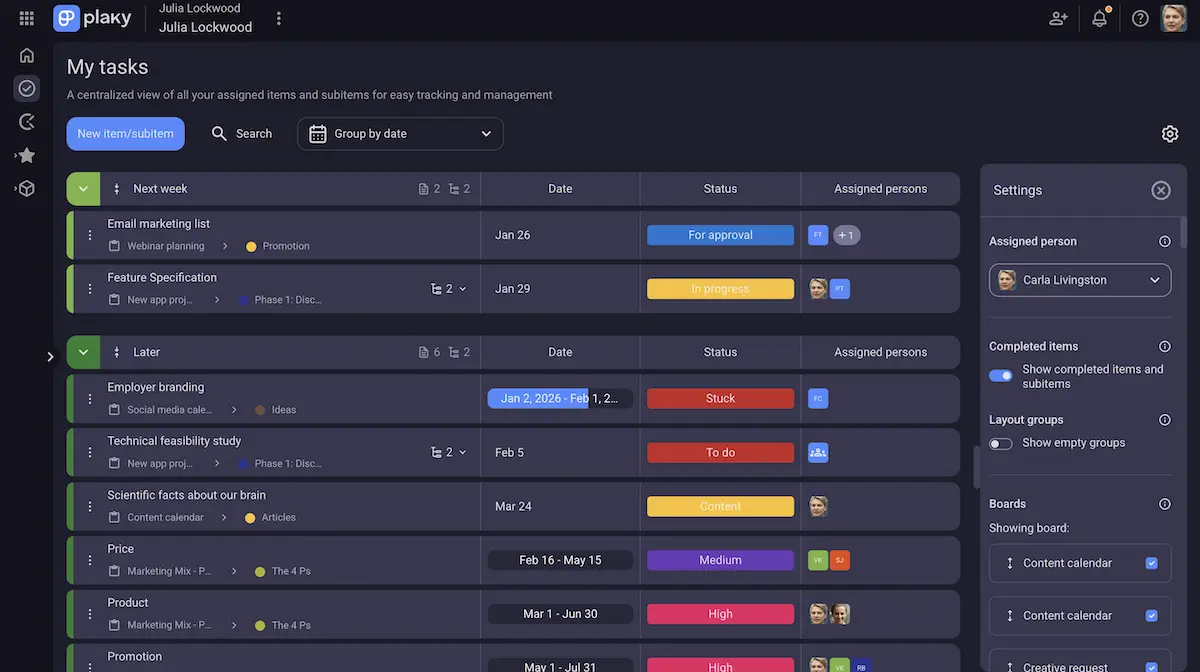
As you can see, Plaky is perfect for businesses that deal with a long list of tasks on a daily basis and need a reliable tool to manage them.
On top of this, it’s one of the most affordable software on the market — so you won’t be spending a fortune to get a successful to-do list, no matter the plan you choose.
Create detailed and customizable to-do lists in a matter of minutes with Plaky.
How we reviewed this post: Our writers & editors monitor the posts and update them when new information becomes available, to keep them fresh and relevant.