 Published: January 20, 2026
Let’s be realistic: most days at work don’t allow for perfect focus or interrupted time. Multiple projects or tasks are active, priorities shift, plans change…
If there’s no system to hold it all together, motivation has to do all the heavy lifting — and that gets tiring fast.
So, how do you organize your workday effectively? Most productivity advice promises dramatic changes through quick hacks, but not this time! We’ll suggest some practical, repeatable habits you can start implementing right away for balanced daily organization.
Keep reading to learn more!
9 tips for planning your day at work
Here are some handy tips for building a daily plan that’s easier to navigate.
#1 Centralize your work
When your work is scattered across different folders and emails, staying organized is much more difficult than it needs to be.
The solution is to rely on a single reference point for what needs to be done, when, and why. This reduces mental load and enables stronger focus throughout the day.
You have several options here:
- Daily planner apps — A digital planner gives you access to your tasks and schedule wherever you are, making it easy to update or share plans.
- Paper planners — A paper planner can minimize distractions, but it comes with many limitations — space is finite, collaboration is difficult, and there’s always the risk of losing/damaging the planner.
- A hybrid approach — Mixing both approaches works well if you let digital tools handle scheduling and anything that needs to stay flexible and synced, while paper is for brainstorming and goal setting.
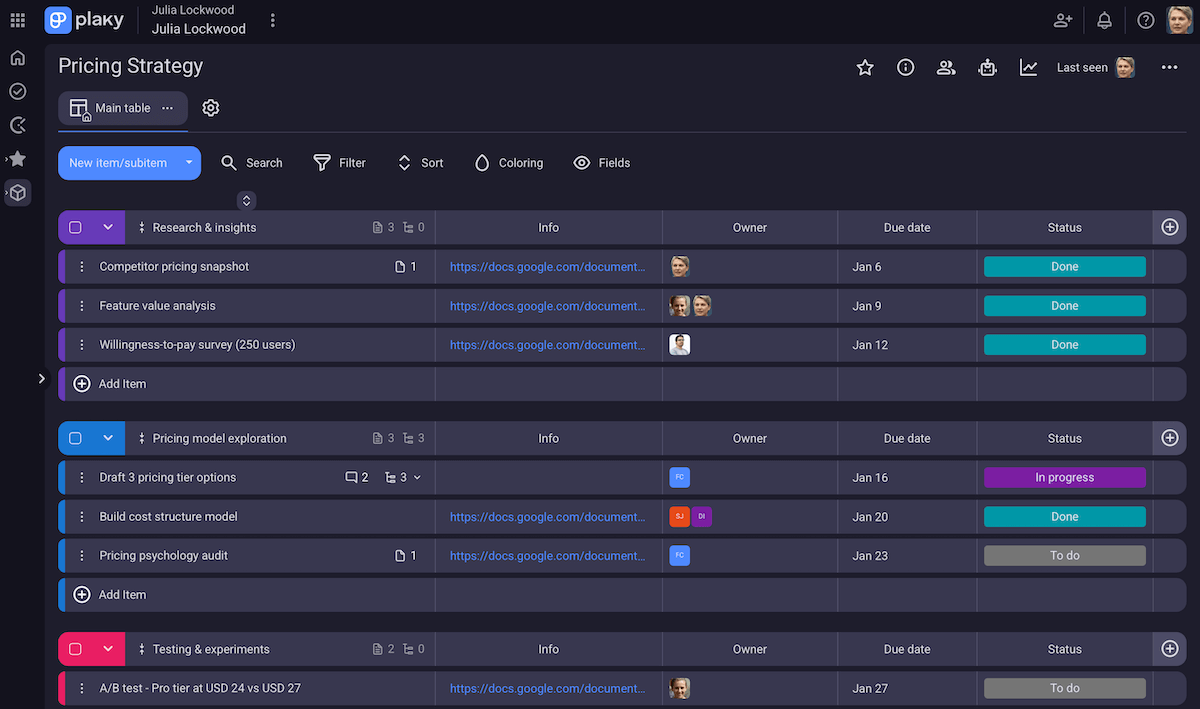
However, reliable software works best here because it’s a place where all your work can live safely and stay up to date. For example, a task management app like Plaky lets you:
- Fully customize boards — Track details that matter to your work with custom Fields (text, date, status, link, and more).
- Make quick task changes — Easily add or reschedule tasks so that your system stays accurate.
- Store relevant files — Use in-task file sharing to reduce time spent searching.
- Use multiple board views — See tasks across a list, Kanban board, Gantt chart, or pie/bar chart depending on your needs and preferences.
💡 Plaky Pro Tip:
Wish to move from another planner app to Plaky by CAKE.com? You can simply migrate your CSV data, just follow this guide:
#2 Create a daily to-do list
A daily task list turns vague intentions into actionable steps. But, for it to be effective, the list has to be realistic. In other words, don’t capture everything you wish you could do, but reflect what you can reasonably handle in a day.
In that context, it’s vital to distinguish between your:
- Master list — all ongoing projects and future tasks, and
- Daily list — a focused selection pulled from that larger pool.
By building your daily list this way, you’re actually moving projects forward instead of defaulting to small, low-effort tasks that feel productive but don’t actually create progress.
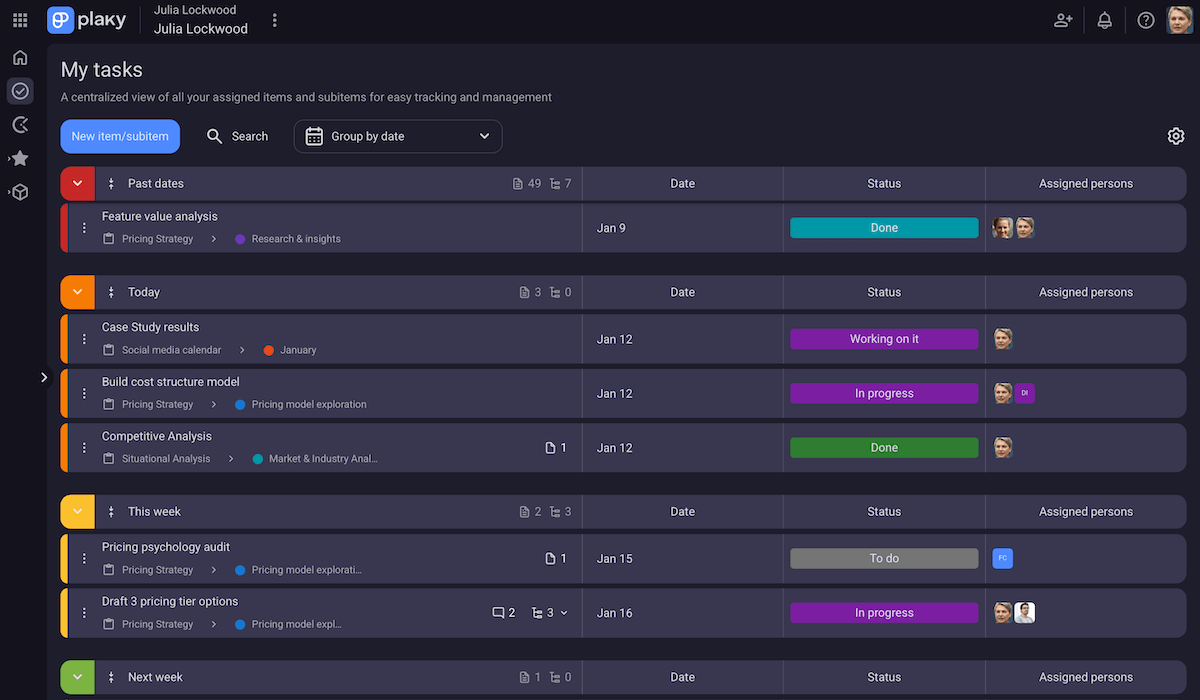
A feature like the My tasks page in Plaky comes in really handy here. It shows all items assigned to you in one place, essentially serving as your master list. Then, to see what needs your attention now, you can group tasks by date or status.
Moreover, here’s what our contributor, Mark Coffie — a CEO and expert in enterprise & corporate development — had to say:

“I intentionally keep the list short and manageable, concentrating on a small number of tasks to move work forward rather than trying to include everything. I seek tasks that will unblock others, clarify what comes next, or prevent small problems from becoming big ones.”
To sum up, a to-do list gives your day structure before it even begins, letting you direct energy toward execution instead of constant planning.
#3 Segment tasks into manageable chunks
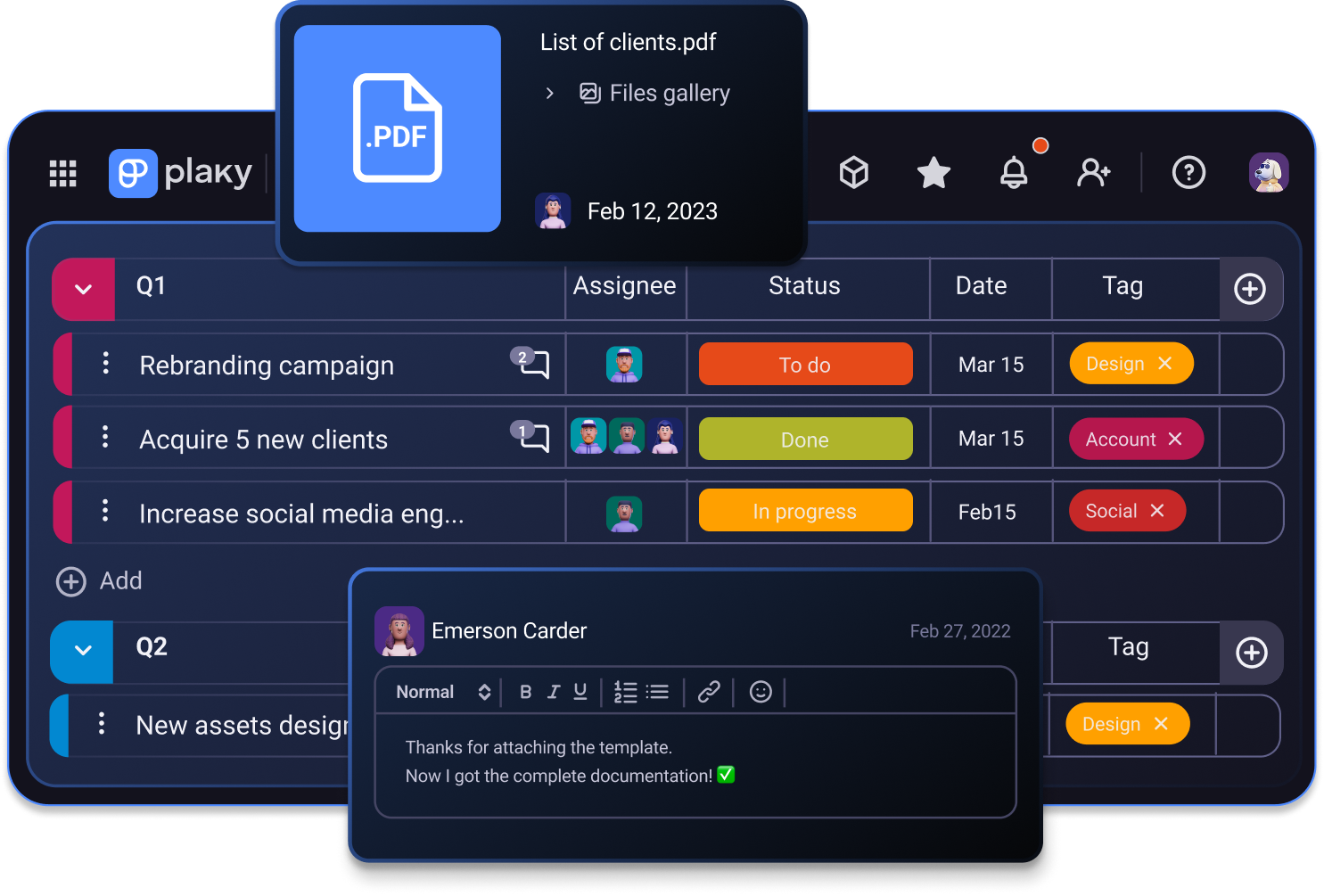
Large or vague assignments make it harder to get started. A simple rule of thumb helps here: if a task can’t be completed in one sitting, it should be divided into smaller chunks.
For instance, “Write a report” can seem too big and overwhelming, but breaking it down into “outline → research → draft → edit” helps a lot because the first step is clear.
Other benefits of task segmentation include:
- Reduced procrastination — Instead of the broad notion of “write a report,” you’re deciding between concrete, actionable choices.
- Improved time estimation — Smaller tasks are simpler to schedule realistically and reveal how much work is actually involved.
- Better visibility — Hidden steps surface early, before they become last-minute surprises derailing your day. Plus, task dependencies become more obvious, seeing what truly needs attention now and what can wait.
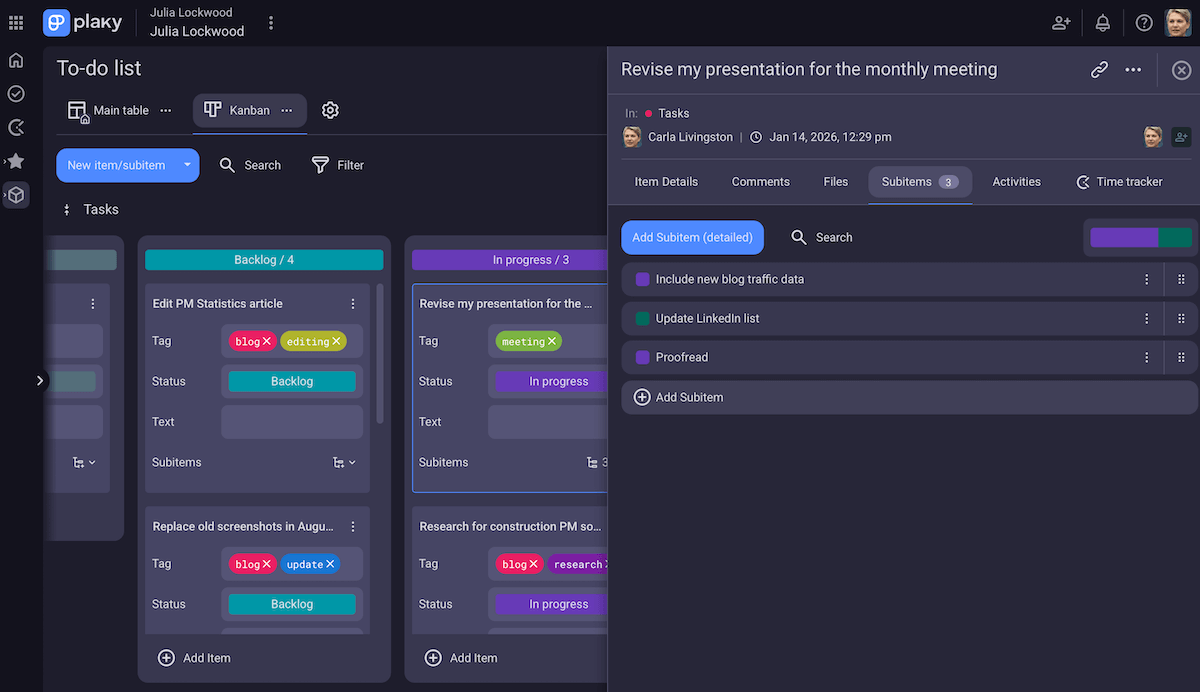
Because of all that, it’s important for your work planner app to support subtasks. Bonus perk: different parts of the same task can have different deadlines and assignees, and this feature makes it crystal clear.
#4 Prioritize your tasks
Prioritization is what turns a list into a plan — otherwise, it’s just a bunch of options, all of which may seem urgent.
Using proven prioritization frameworks can make this step less daunting and more consistent. Some examples include:
- Eisenhower matrix — Separate tasks by importance and urgency so that you don’t spend the day on work that feels pressing but doesn’t move anything forward.
- Impact-effort matrix — Compare tasks based on the value they create vs the effort they require to concentrate on high-impact work.
- Most Important Task (MIT) — Identify 1–3 most important tasks for the day to anchor your attention and prevent other items from competing for it.
Remember, however, that priorities aren’t fixed. New information or unexpected requests can change what matters the most. So, don’t think of reprioritization as a failure, but a sign that your system is flexible enough to reflect reality.
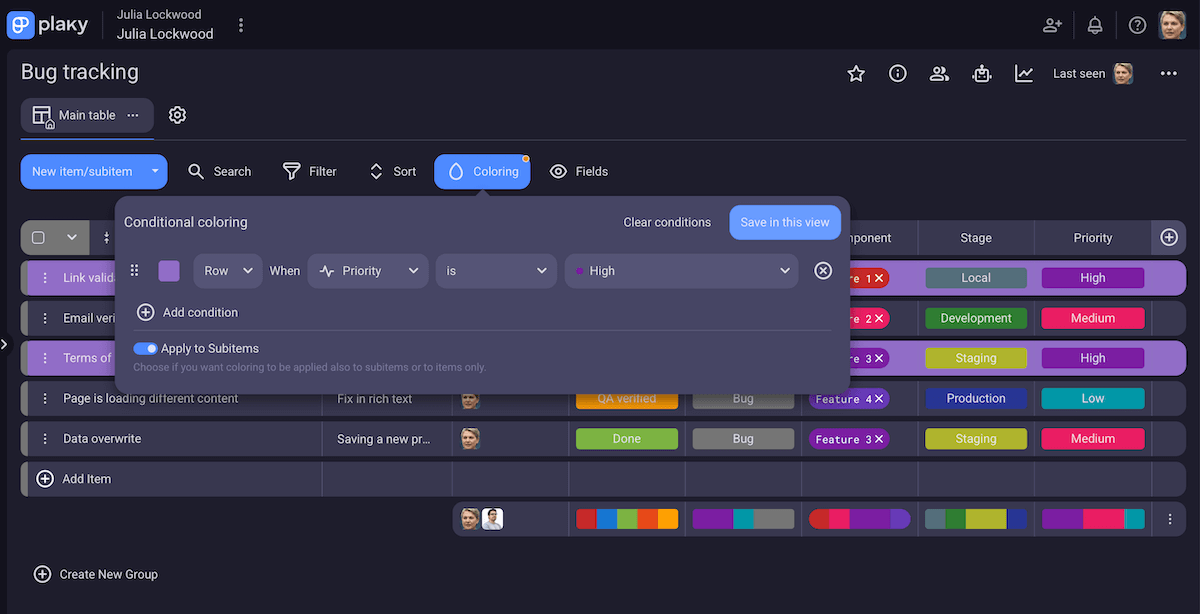
Color-coded labels in your task management app are great for marking and adjusting priorities without rewriting your to-do list. Plus, features like filtered views or conditional formatting can help you see only high-priority or due-today items.
#5 Use a productivity method
Once you know what to tackle and in which order, you can add even more structure to your day by applying a productivity method. Some of the most widely used ones include:
- Pomodoro — Work in focused intervals (traditionally 25 minutes) followed by short breaks (typically 5 minutes), repeating the cycle to maintain momentum.
- Time blocking — Assign specific blocks of time to tasks (or types of work, combining it with task batching) to prevent deep work from being crowded out by meetings or small requests.
- 3–3–3 rule — Spend 3 hours on your most important task, then complete 3 medium tasks (necessary but less demanding), and finish by doing 3 small tasks (admin and maintenance) to avoid overloading your list.
- Eat the frog — Tackle your most important or difficult task (your “frog”) first to overcome procrastination and take immediate control of your day.
There’s no single best method, so test what feels like a good fit for at least a week before judging whether it works.
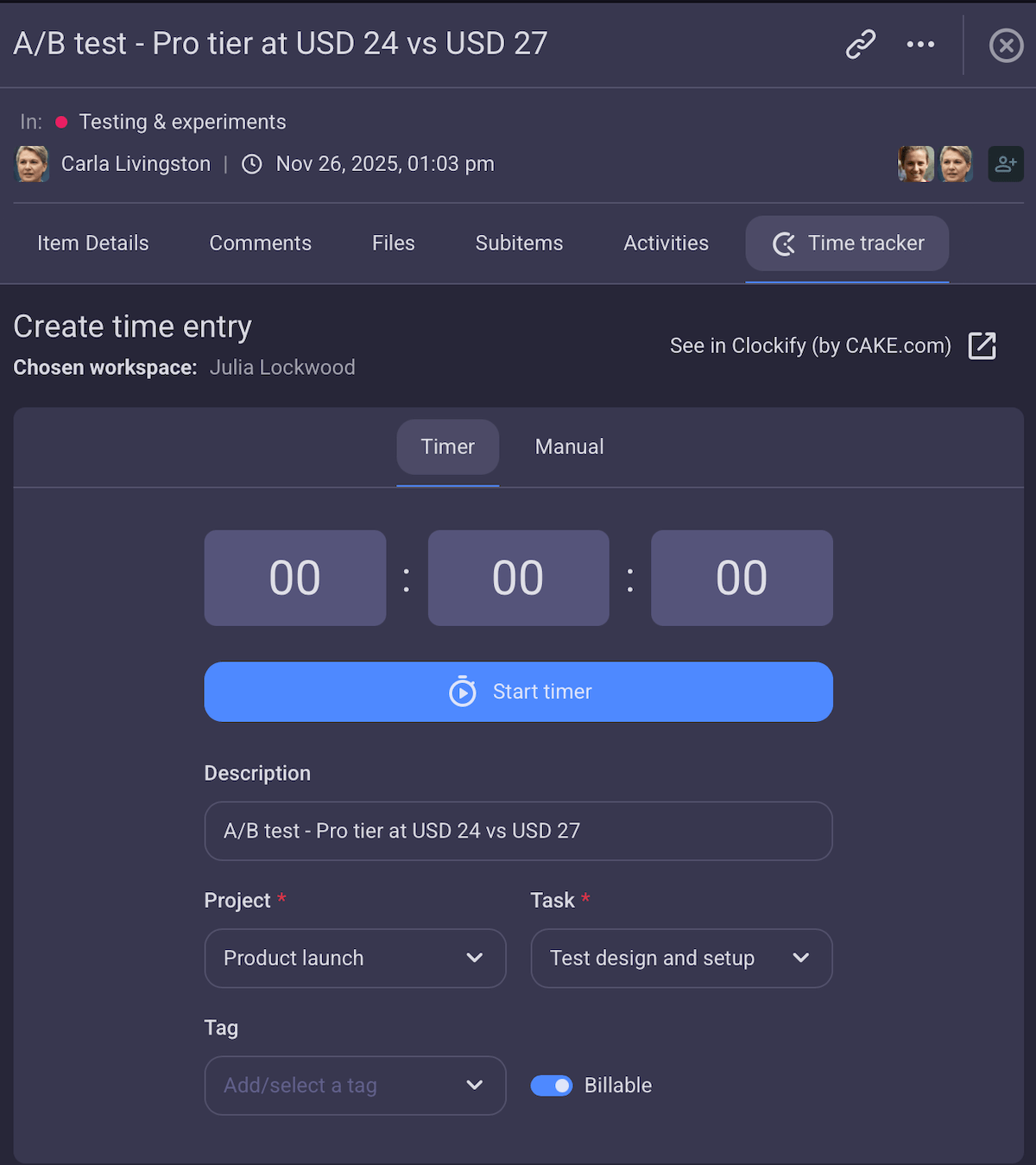
A built-in timer can help you stick to the method you’ve chosen. When the timer lives inside the same system as your tasks, you don’t have to switch apps or remember to log anything afterward, reducing friction and preserving context.
💡 Plaky Pro Tip:
Want to learn more about time logging in Plaky with the help of Clockify? Check this out:
#6 Manage time with realistic scheduling
Managing your time well is less about maximizing hours and more about setting realistic limits on your day.
Being realistic starts with estimating task duration before scheduling (even roughly) and adding buffers to account for delays and interruptions.
Estimating time gets easier when you consider the type of work you’re doing. Here’s how to plan your day at work depending on different levels of energy that different kinds of tasks draw on:
- Deep work — Estimate based on focused time, and assess how long you can really stay concentrated.
- Admin or routine tasks — Use past averages. These are usually predictable but also easy to underestimate when grouped together, so be careful about that.
- Collaborative tasks — Factor in waiting time for approvals and feedback, not just your own effort.
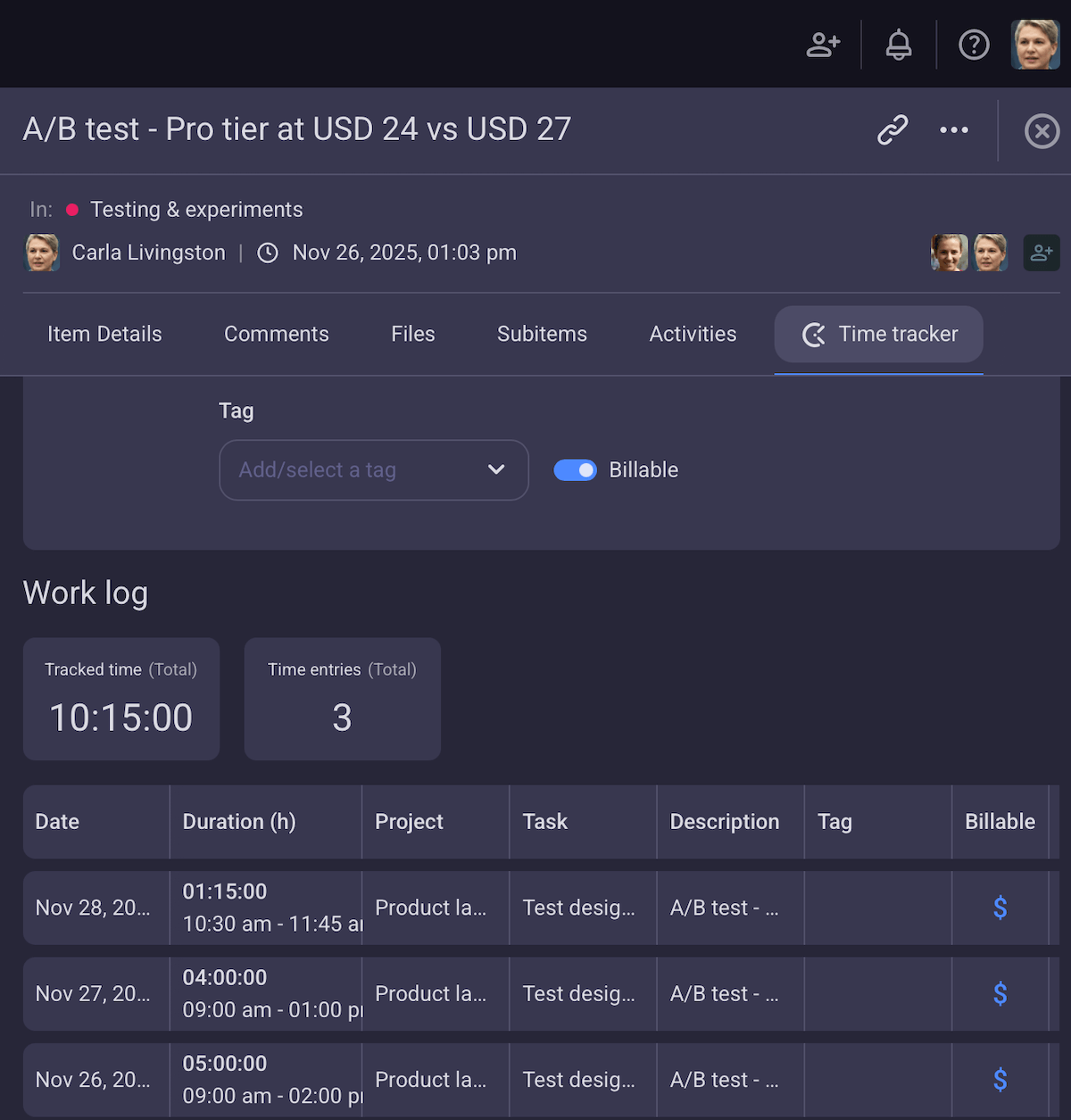
Time tracking features can support more realistic planning when they’re connected to your tasks — for example:
- Time reports — showing how much time you actually spend on each project,
- Billable vs. non-billable hours — balancing client-focused work and necessary overhead, and
- Custom time targets — setting a daily hours target for clear goals.

#7 Plan breaks to avoid burnout
A productive day includes breaks — opportunities for your brain and body to recharge.
Breaks work best when they’re intentional, not reactive. So, instead of waiting until you feel drained, include them in your daily plan, just like meetings or deep work blocks.
Even short pauses can restore focus and improve overall efficiency. Here are a few ideas for you:
- Go for a 10-minute walk,
- Stand up and stretch,
- Make tea/coffee (and drink it without multitasking),
- Tidy your desk, or
- Listen to your favorite song.
The key is that a break should change your state — physically or mentally — so that you return to your tasks refreshed.
Bonus: It’s common to underestimate how much basic needs affect focus. Keeping water nearby and treating lunch as a non-negotiable break help stabilize energy levels throughout the day. Simply put, when you fuel your body properly, your schedule becomes easier to follow!
#8 Automate repetitive tasks whenever possible
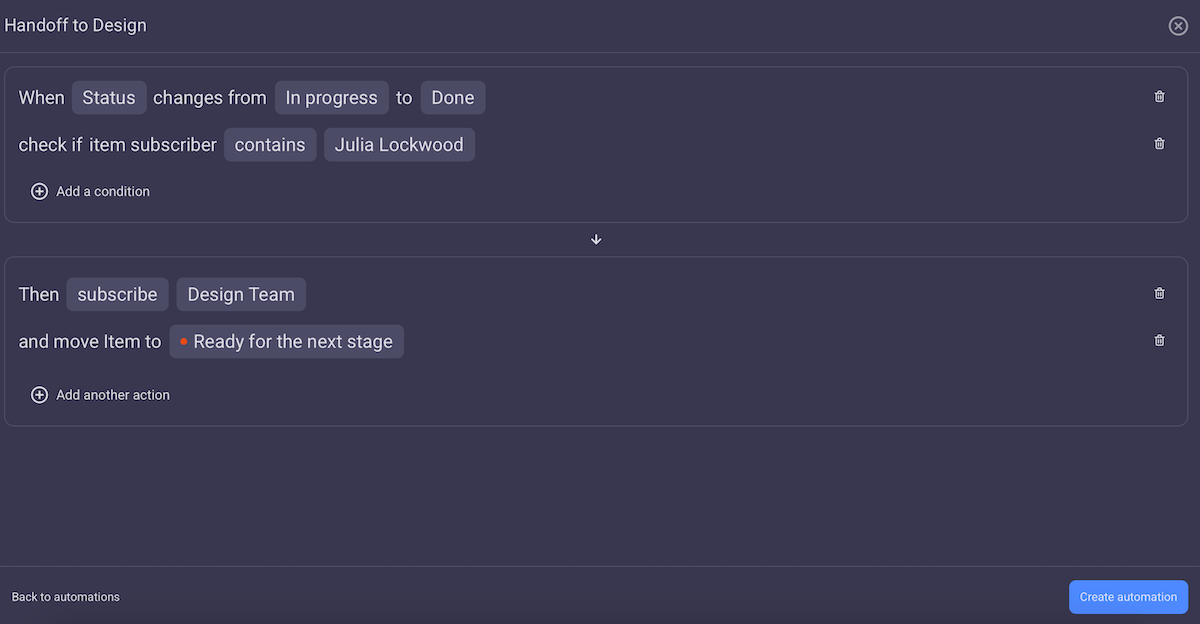
Once your work is standardized and more predictable, automation can be a powerful tool. It removes friction from status updates, task handoffs, and other routine processes.
These actions may seem minor day-to-day, but over weeks and months, even small automations add up and free up hours of mental and manual effort — effort you can then redirect toward higher-value work.
That’s why most task management platforms support board automations, streamlining repetitive actions such as:
- Auto-assigning users when a task moves to a new stage — Once you finish your part, your planner app can automatically assign a teammate or your reviewer.
- Updating status fields when conditions are met — As tasks progress, their status updates automatically (e.g., from In progress to Done) to make sure your daily to-do list always reflects reality.
- Moving tasks between groups based on progress — Tasks shift to the right group (e.g., from Design to Development) without extra effort, keeping your daily plan visually aligned with what needs attention.
This way, your daily agenda becomes more reliable, and you spend less time micromanaging your lists and more time executing the work.
#9 Reflect on your approach, and improve it regularly
No daily organization system works perfectly forever, as workload, priorities, tools, and processes change over time. That’s why regular reflection helps you notice what’s working and what’s quietly getting in the way.
This step doesn’t have to be complicated or time-consuming. A short check-in once every week or two is often enough — just make sure to look at:
- What you completed,
- What kept getting postponed, and
- Where your time went compared to what you planned.
Our contributor, Mark Coffie, agrees:
“I reflect once a week instead of daily. I take a look at what is continually being postponed and wonder if it’s that vague, too big, or just not important. If a task gets shelved repeatedly, I either break it apart into smaller tasks or eliminate it completely.”
In addition, patterns tend to surface quickly, as in tasks that were constantly underestimated or productivity methods that worked well for certain types of work but not others.
So, your goal is to make small, intentional adjustments: tweaking priorities, changing time estimates, and adjusting break placements. Over time, small improvements accumulate and ensure your daily planning reliably supports how you work.
Organize your daily task list with confidence — try Plaky by CAKE.com
The question “How do you plan your workday?” doesn’t have a single answer, but having an answer matters.
The tips above are meant to help you find a system that fits your work, and as you could see, a flexible task management app like Plaky by CAKE.com is a great companion.
Beyond the features mentioned throughout this guide, our platform also supports daily organization, especially for team environments, by:
- Keeping remarks and conversations in one place — Task-level comments ensure that feedback and decisions stay connected to the work itself.
- Storing task history — The Activity log shows who changed what and when, making progress monitoring clearer.
- Providing mobile access — Our mobile app lets you review and adjust your daily plan on the go.
As a cherry on top, Plaky’s affordable pricing makes it easier to stick with the platform long term — and you know daily planning only works if you’re consistent.
Bring structure to your workday — with Plaky by CAKE.com!
Sign up for Plaky by CAKE.com today
How we reviewed this post: Our writers & editors monitor the posts and update them when new information becomes available, to keep them fresh and relevant.