 Published: September 15, 2025
Are you fed up with using too many work apps that can’t actually interact with each other? Not to mention the onboarding complexity every time a new teammate joins — and the high costs that pile up from multiple subscriptions.
These issues drain time and money, the very resources most companies can’t afford to waste.
It’s rare to find a single solution that tackles all these problems at once. Yet that’s exactly what the CAKE.com Bundle offers!
Keep reading to learn more about the productivity suite that combines project management, time tracking, and team communication into one affordable package.

What is the CAKE.com Bundle?
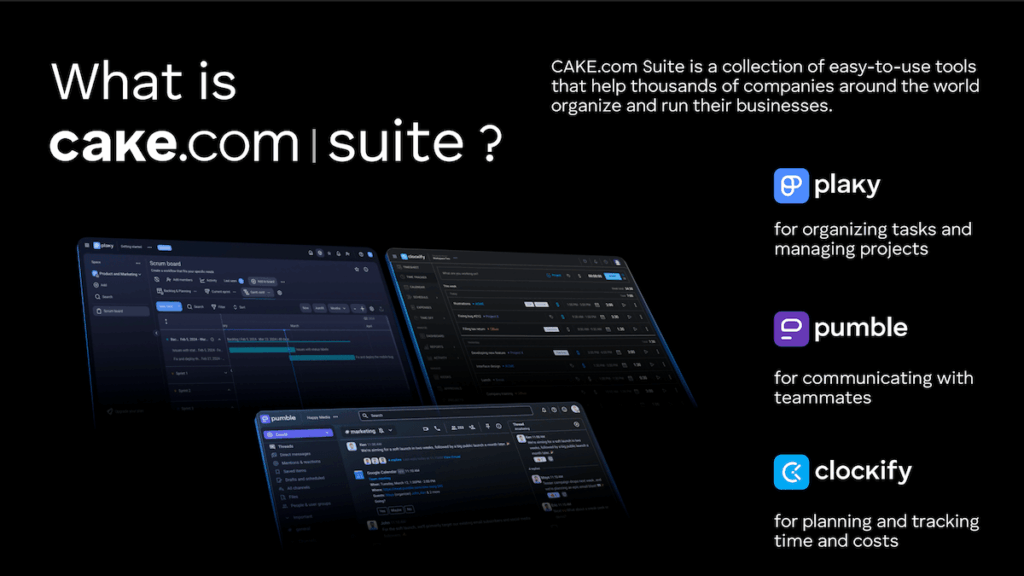
The CAKE.com Bundle is an enterprise-level subscription that gives you fully upgraded access to the CAKE.com Productivity Suite.
This includes 3 professional tools:
- Clockify — for effortless time and budget tracking,
- Pumble — for smooth team communication, and
- Plaky — for efficient project and task management.
In other words, you get all the premium features across the 3 platforms without having to subscribe to them separately.
Bonus? We’ve introduced the unified CAKE.com account, which lets you use a single login for everything. Plus, if you make changes to your account (e.g., email, profile photo), those changes are reflected across all 3 apps.
Get 3 fully upgraded work tools
Why you should get the CAKE.com Bundle
Our Bundle deal is crafted to provide teams with everything they need to organize work, collaborate, and track progress. The key benefit is doing all that without juggling multiple subscriptions and additional tools.
Here’s why you should consider it.
#1 Cost savings
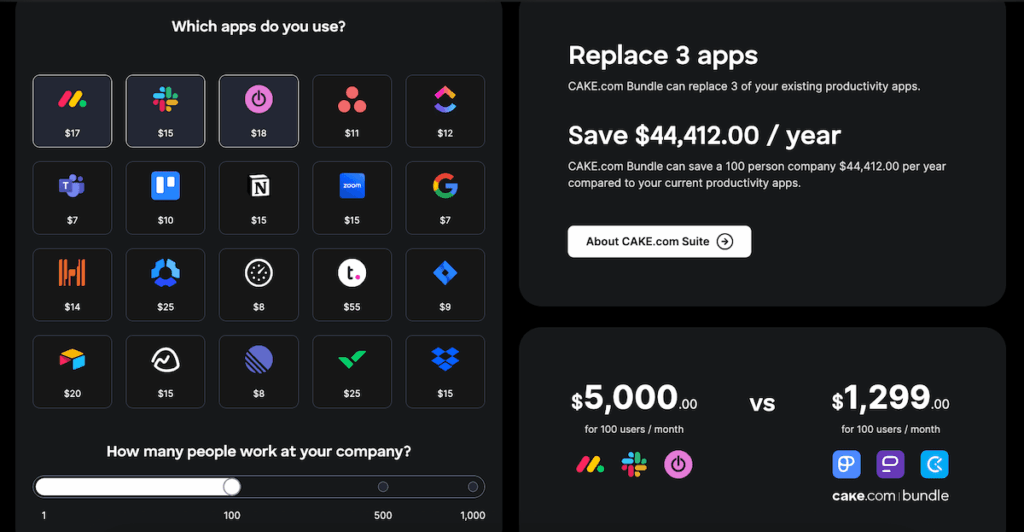
The CAKE.com Suite provides tools that are essential for virtually any modern business. If your team uses one of our apps, chances are you’ll benefit from the others too. Plus, instead of buying them separately, you’ll save more than 50% with the Bundle!
| Enterprise plan | Monthly billing | Annual billing |
|---|---|---|
| Clockify | $14.99/seat | $11.99/seat |
| Pumble | $7.99/seat | $6.99/seat |
| Plaky | $10.99/seat | $8.99/seat |
| Bundle (all 3 tools) | $15.99/seat | $12.99/seat |
In addition, the Bundle is even more cost-effective when you’re billed annually. Although the monthly billing of $15.99/seat is already affordable, you’ll pay just $12.99/seat per month with the annual plan.
And when compared to other all-in-1 solutions or similar separate apps, the CAKE.com Suite stands out as far more affordable.
If that’s hard to believe, feel free to see for yourself — check out the calculator on the CAKE.com Bundle page and compare the pricing of similar products for teams of different sizes!
💡 Plaky Pro Tip
Want to switch from other platforms to CAKE.com’s Productivity Suite without losing old data? It’s easy! Check out these tutorials:
#2 Improved productivity
Communication, time tracking, and task management are tightly connected, so it’s important to rely on a system that removes any friction.
The CAKE.com Bundle allows for:
- A seamless workflow — Conversations in Pumble can lead directly to action items in Plaky, and time spent on tasks can be logged instantly in Clockify, all without losing context.
- Sharper business insights — With everything connected, managers and team leads can see which tasks take the most time, how workloads are distributed, and more. This holistic overview makes it easier to optimize resources and plan effectively.
- Less tool fatigue — Every extra app means another login and another interface to learn. By using a single suite, teams simplify their digital workspace and avoid distractions.
#3 Simplified administration
Managing multiple subscriptions and invoices becomes tiresome fast. In contrast, the CAKE.com Bundle consolidates everything into a single, smooth experience.
The main benefits are:
- A single bill — You’ll receive just one invoice for the Bundle, which not only simplifies accounting but also makes budgeting easier (one predictable expense).
- Transparent user management — The Members page within your CAKE.com account shows your workspace users across all our products, along with their role and access level.
- Unified admin experience — The Bundle brings consistency to security and support. Features like SSO and custom subdomain apply across all apps, enabling a more polished, unified digital workspace.
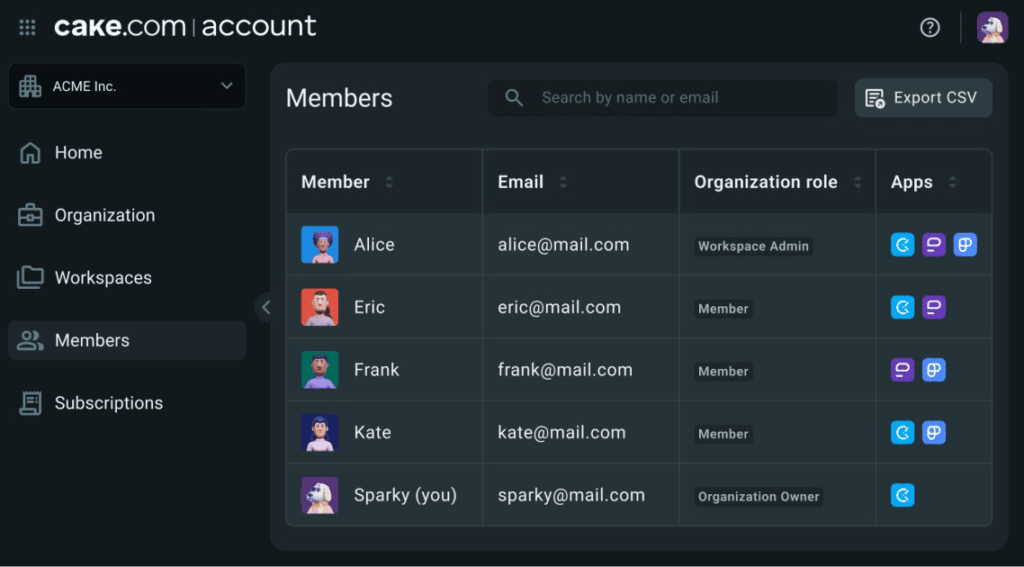
In the future, you can expect more administration features, such as centralized user and subscription management.
How to get started with the CAKE.com Bundle
Buying the CAKE.com Bundle is super-simple — just follow these steps:
- Log into any of our web apps — Create a free Plaky, Clockify, or Pumble account, or simply log in if you already have one. In any case, you need to use the web version.
- Find the Upgrade button — Click on the Upgrade button at the top of the page.
- Choose the Bundle — Make sure you select the Bundle plan on the far right.
- Provide payment information — Enter the required info (country, number of seats, etc.) and make the payment.
As a result, every new workspace you create will automatically have the Bundle plan activated on all our platforms.
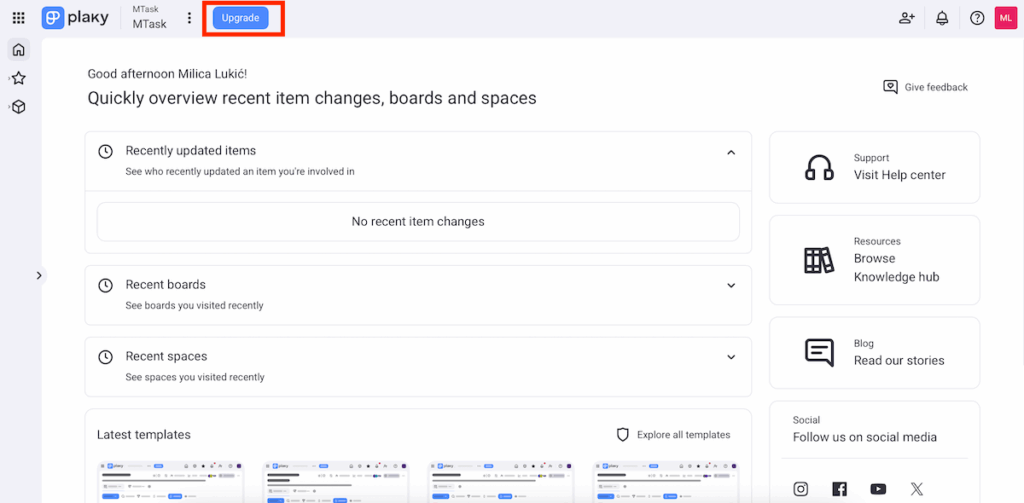
What’s more, admins can easily add new users to any of the 3 apps — just enter their email address using the invitation button. We offer unlimited users, so you’ll never worry about seat restrictions or scaling as your organization grows.

How to use the CAKE.com Suite
To get the most out of the CAKE.com Suite, you should know how its 3 tools work together. Here’s a step-by-step guide to help you get started if you’re new to CAKE.com — or to fill in the gaps if you’re already using one of the apps.
#1 Organize work in Plaky
Plaky is a versatile project management tool that helps you structure all your work in a clear hierarchy:
- Workspaces — the top-level environment, ideal for representing departments, teams, or large projects,
- Boards — segments within workspaces for organizing specific projects or workflows,
- Folders — optional groups of related boards that make navigation easier,
- Items — groupable elements representing individual tasks or deliverables, and
- Subitems — smaller chunks of an item, great for segmenting complex tasks for better clarity.
Start building boards in Plaky
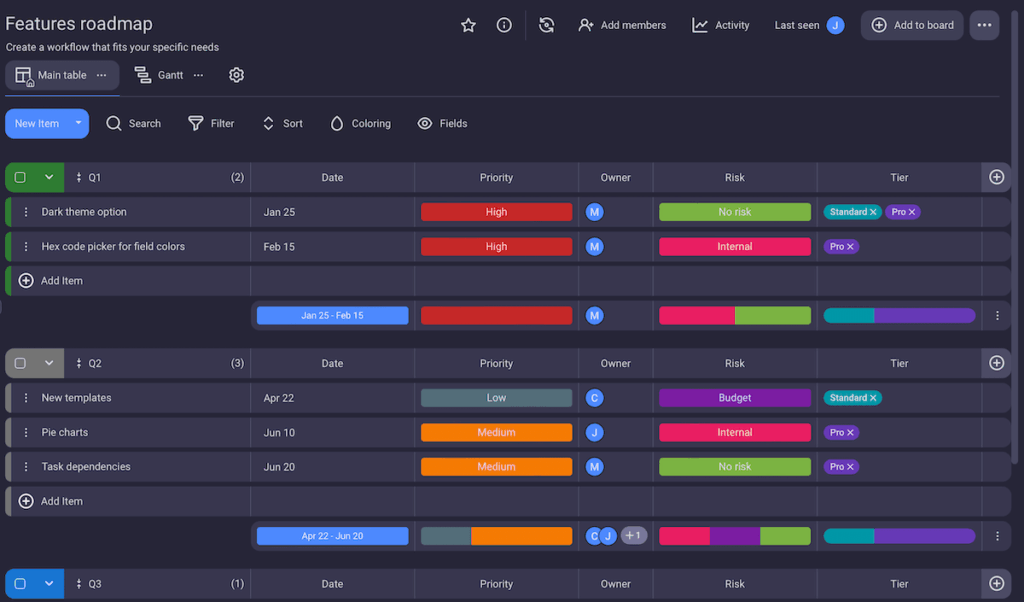
Moreover, you can describe each item in detail thanks to Plaky’s custom fields. Put simply, every team works differently, so it’s crucial to offer flexibility when specifying:
- Text — descriptions or notes,
- Person — assigning responsibility to team members,
- Date — deadlines or start/finish dates,
- Numbers — budgets, hours, or quantities,
- Link — URLs to files and resources, and more.
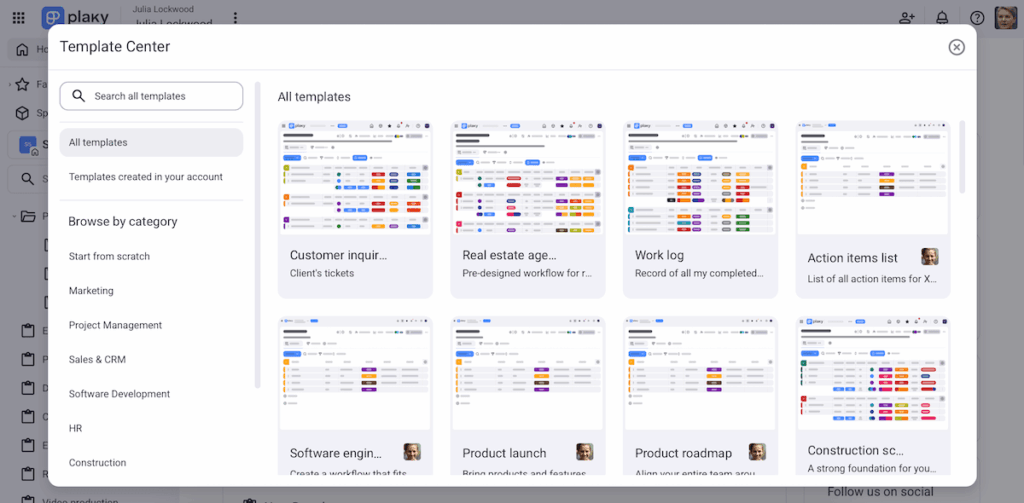
Thanks to this level of customization, Plaky is used across industries, such as marketing, real estate, software development, and many more.
And, if you’re not entirely sure where to begin, Plaky provides ready-made templates for common use cases, like those mentioned above. This is an excellent way to save setup time and customize templates to fit your team’s unique needs.
#2 Connect with teammates through Pumble
Project collaboration is at its best when team communication is clear and accessible. With Pumble, you have a central hub for brainstorming, updates, and quick issue resolution.
First, Pumble helps you keep conversations organized with:
- Channels — a way to bring entire teams together around a certain topic/project,
- Direct messages — private, 1-on-1 or small group conversations, and
- Threads — side discussions neatly tied to the original message that prevent clutter in busy channels.
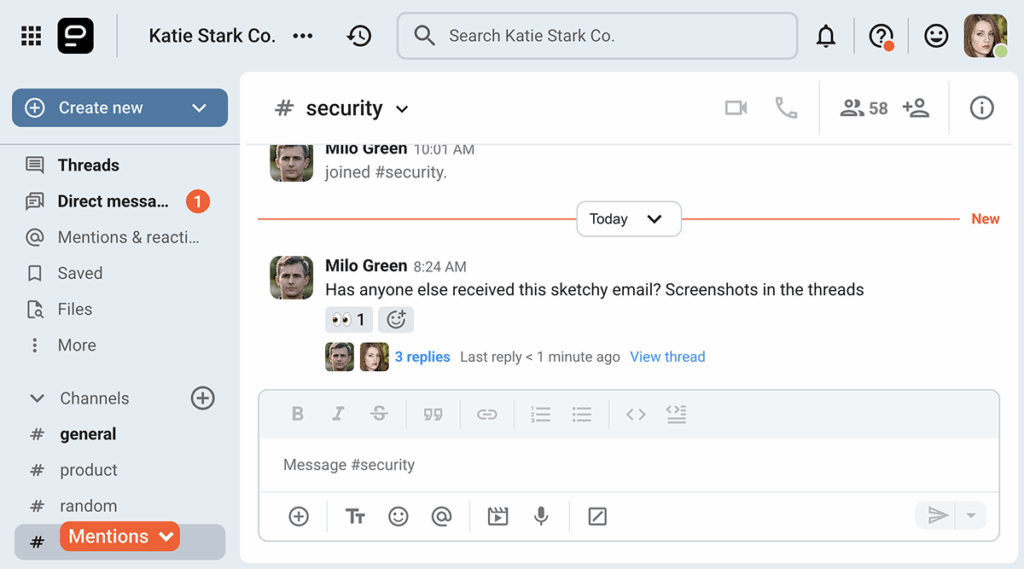
Pumble’s structure ensures that everyone knows where to talk and where to look for the information they need. That also includes shared files and documents, keeping the right resources in the right context.
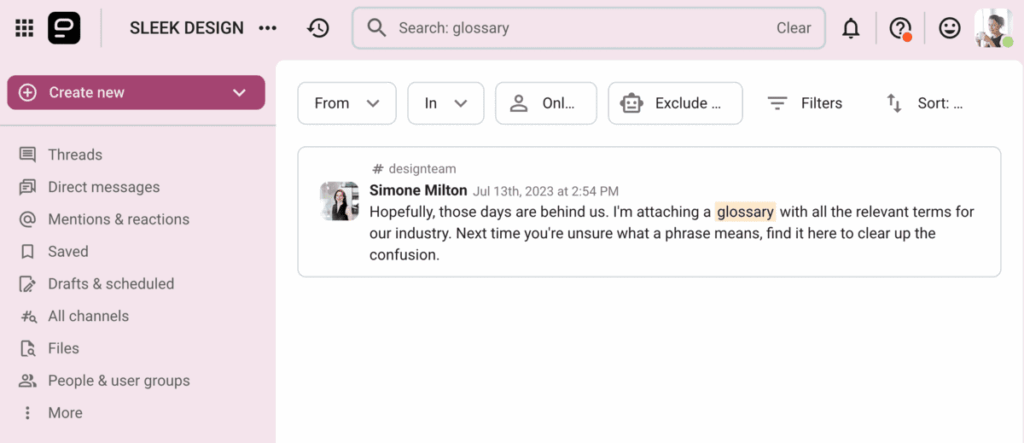
Plus, your conversations and files are searchable forever. No more endless scrolling, as Pumble lets you quickly locate specific conversations, links, and attachments.
What’s more, you can use the people filter to search messages from just one or more teammates. Also, there’s an option to limit results to a certain time frame, which speeds things up even more.
It’s also important to note that Pumble lets you stay in the loop without feeling overwhelmed. With customizable notifications, you may choose to get alerts for every message or just direct ones and @mentions.
#3 Plan your resources & track time with Clockify
Clockify serves as a powerful layer of time and resource management in the CAKE.com Suite. Here’s how this app ensures projects stay profitable and on schedule:
- Planning labor hours and costs — Assign labor hours to tasks and attach cost rates to get a realistic picture of project investment.
- Budget estimates — If you work on fixed fee projects, monitor how much of the budget has been spent by setting monetary estimates. Receive alerts when you risk exceeding the budget.
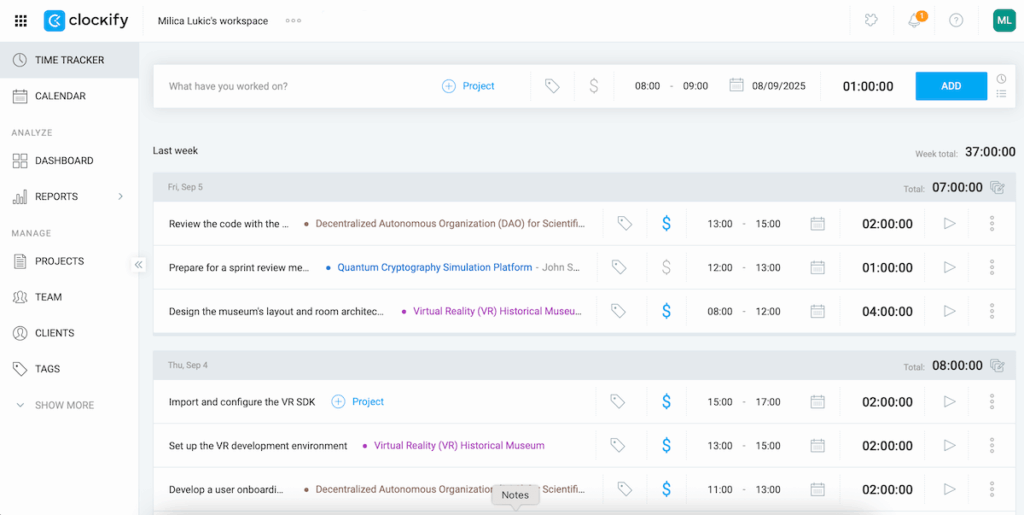
- Timekeeping — Log hours (manually or using the timer) directly against tasks within different projects. This shows where time is going and which assignments may be taking longer than expected.
- Project forecasting — Visualize where a project is heading and reorganize as needed. Compare scheduled vs tracked hours to predict when your projects are likely to be finished.
These features enable proactive adjustments, with fewer surprises near deadlines.
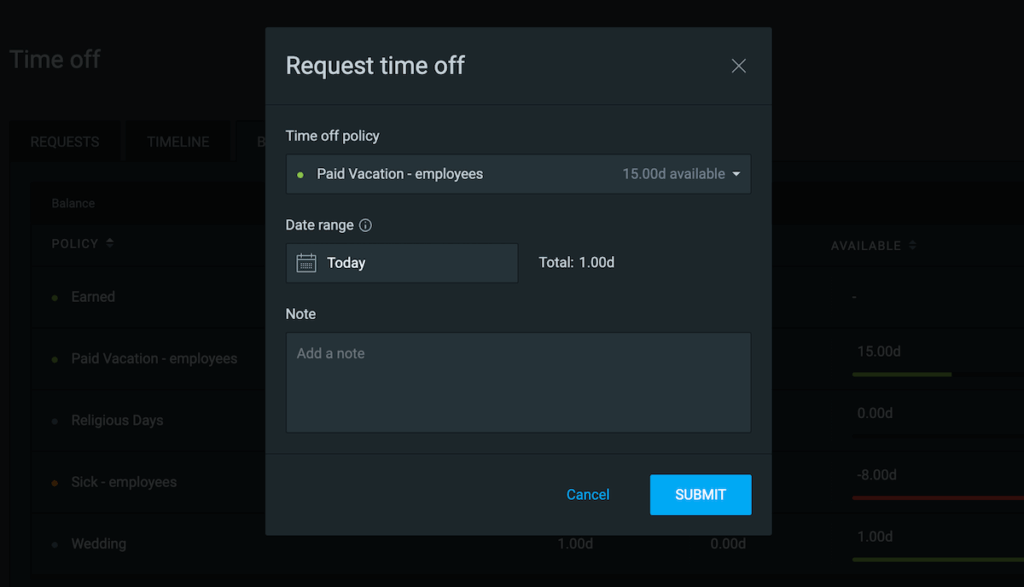
In addition, Clockify includes a time off feature, letting users record paid vacation, holidays, sick days, and other absences. This way, managers always have a clear picture of resource availability — which means you can plan projects around who’s present.
#4 Track progress with Plaky
After all that planning and coordinating, you’ll want to keep everything on track. That’s where Plaky’s progress-tracking features shine.
To begin with, there are several board views to meet different user needs and preferences:
- Table view — a spreadsheet-style overview, perfect for quick data entry and bulk editing,
- Gantt chart view — a timeline view that makes it easy to spot overlaps and establish realistic deadlines,
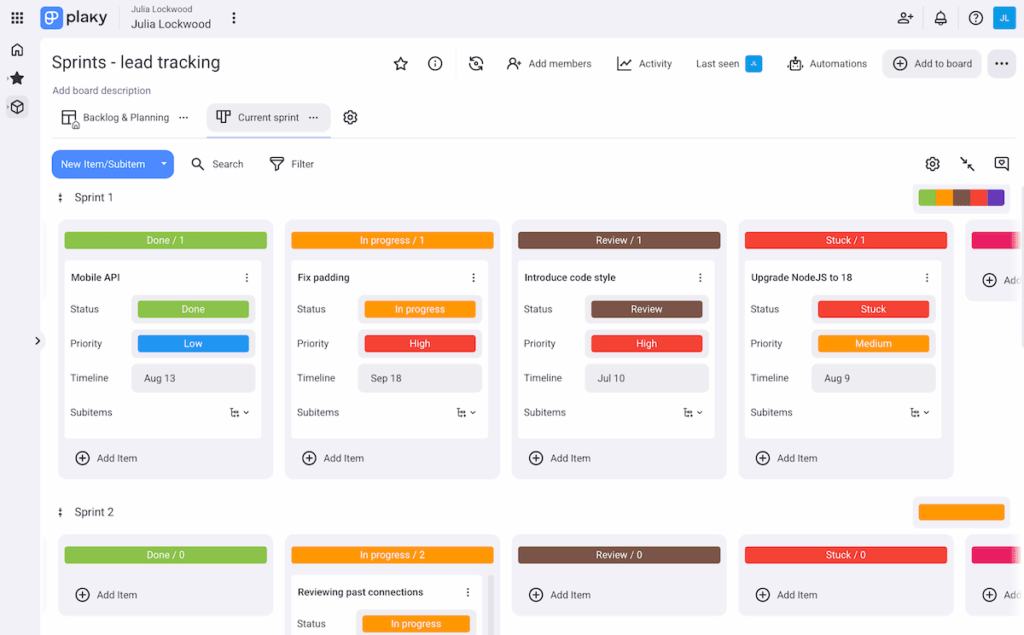
- Kanban view — task cards across columns (e.g., To Do, In Progress, Done) for visualizing progress through stages, and
- Chart view — pie/bar charts that help you quickly grasp task distribution, statuses, etc.
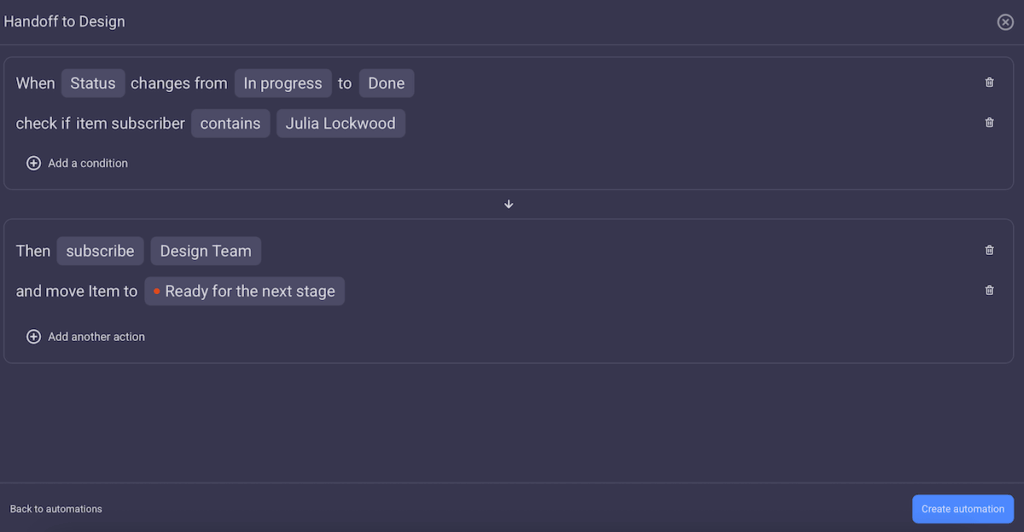
Plaky can even mark progress on its own if you set up board automations. There’s no coding involved — just set up triggers, optional conditions, and resulting actions. For example: “When the status field changes from Ongoing to Done, move the item to Finished Tasks.”
Automations are great because they save time spent on manual tasks and reduce human error, letting you focus on more meaningful activities.
Start automating tasks in Plaky
Finally, Plaky supports efficient progress monitoring through the activity log. All updates (status changes, new comments in Plaky, and so on) are automatically recorded. This ensures transparency and quick troubleshooting if something seems off.
#5 Discuss work further using Pumble
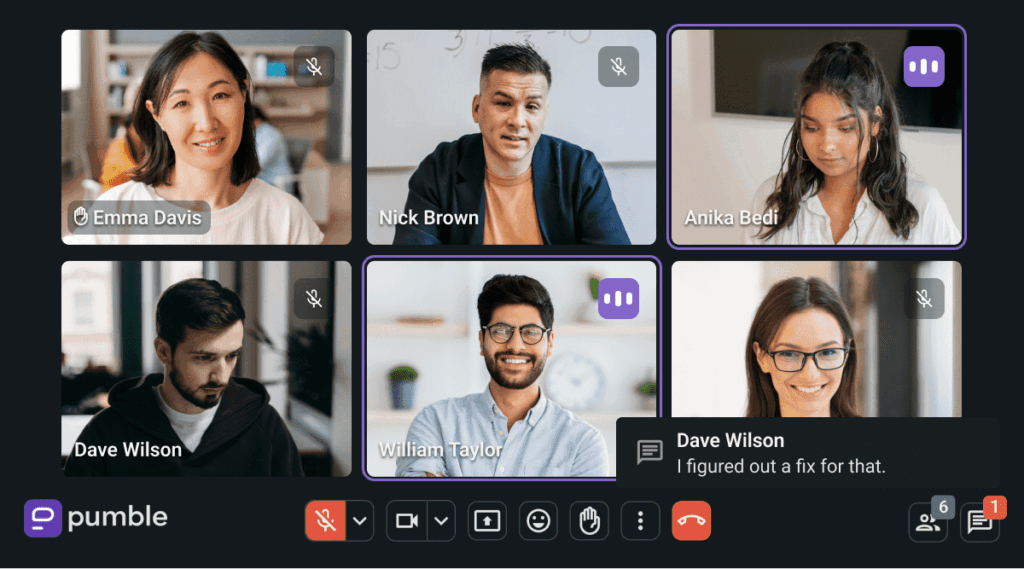
Sometimes, teams deal with complex tasks or issues that require a richer way to collaborate. That’s why Pumble offers voice and video features, allowing users to turn quick exchanges into deeper conversations without leaving the app.
For example, you can send video and voice messages to teammates. Messages are replayable to preserve context and make sure that no one misses vital details.
Another important feature is video conferencing, which includes:
- Organizing meetings — Pumble makes it easy to schedule and host meetings inside the app, helping you avoid juggling multiple tools.
- Screen sharing — Teams can go through designs and documents together, speeding up feedback loops and minimizing misunderstandings.
- In-call messages — During meetings, Pumble lets participants exchange messages in a side chat. This is ideal for dropping links or clarifying points in real time.
- Hand raising — If you do want to say something out loud, the hand-raising feature signals you’re ready to do so without talking over someone else.
And, for remote and hybrid teams in particular, Pumble helps recreate the feel of an office conversation while respecting diverse work environments.
#6 Track productivity and billable hours in Clockify
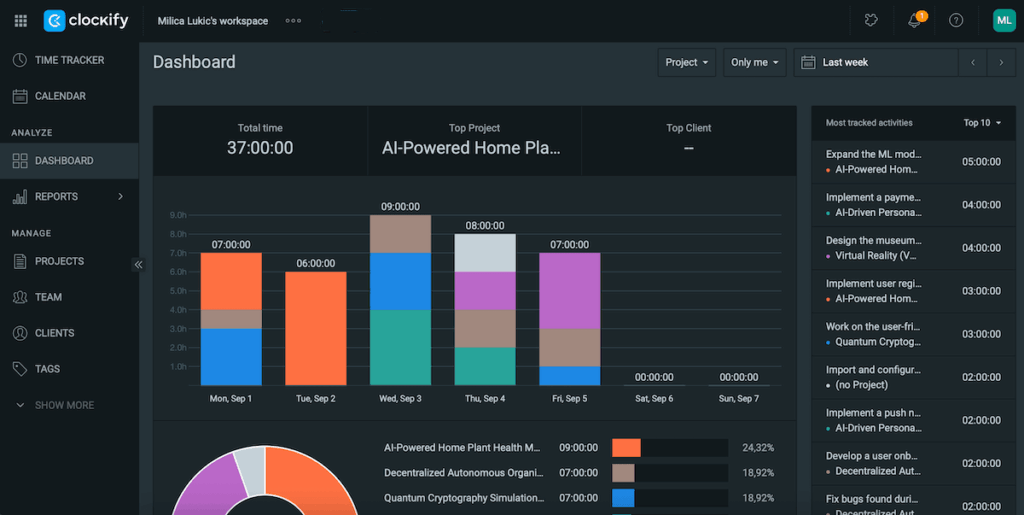
Beyond planning and scheduling, Clockify allows you to analyze your team’s productivity and make sure that work translates into revenue.
Here are the Clockify features that’ll help your organization stay accountable and profitable:
- Dashboard — Look at the breakdown of all the activity in your workspace by project or billability status. See the total time spent on tasks during a specific period, your top project and client, and more.
- Reports — Get full visibility into your team’s efforts. Filters (status, client, tag, etc.) will help you narrow your focus. You can also export reports to easily share them with clients or your accounting team.
- Invoicing — Generate professional invoices directly from logged hours, download them, and send them to clients. Record payments when they’re received to keep the process error-free.
- Location — Use location tracking for on-site or field teams in the mobile version as an extra layer of accountability.
#7 Take advantage of CAKE.com’s integrations
While each app in the CAKE.com Suite is powerful on its own, their integrations create a unified ecosystem where information moves effortlessly. This minimizes errors, saves time, and keeps everyone on the same page.
Here’s how each integration pair works.
Plaky-Pumble integration
The Plaky-Pumble integration means that the Pumble bot delivers Plaky notifications straight to your chat — field updates, new comments, and more, depending on what you choose to be alerted about.
For instance, if a project’s status changes from On Hold to To Do in Plaky, the notification appears in Pumble, signaling the relevant people to start working.
Plus, these Pumble alerts always contain links to the items in question, so you can be taken to Plaky within seconds if needed.
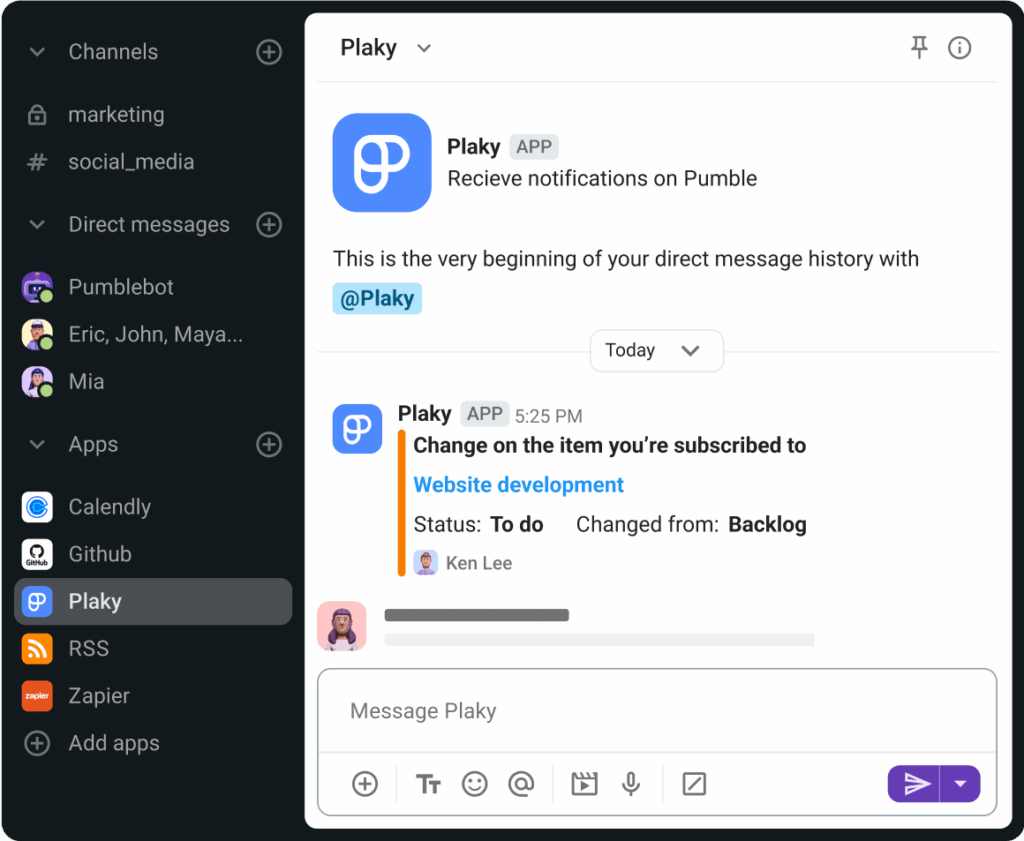
To set up this integration, you just need to:
- Go to Pumble’s sidebar,
- Find the Apps section,
- Choose Plaky from the list, and
- Enable Plaky notifications in Pumble.
As you can see, this native integration lets you respond promptly to project updates and issues.
Pumble-Clockify integration
The Pumble-Clockify integration works similarly to what we just described above — the Pumble bot relays notifications from Clockify, namely:
- Reminders — when you or your teammates miss/exceed time tracking targets or forget to submit/approve timesheets and expenses,
- Approvals — when a timesheet is submitted, withdrawn, rejected, or approved, and
- Time off — when the time off balance is updated or a time off request gets submitted, approved, or rejected.
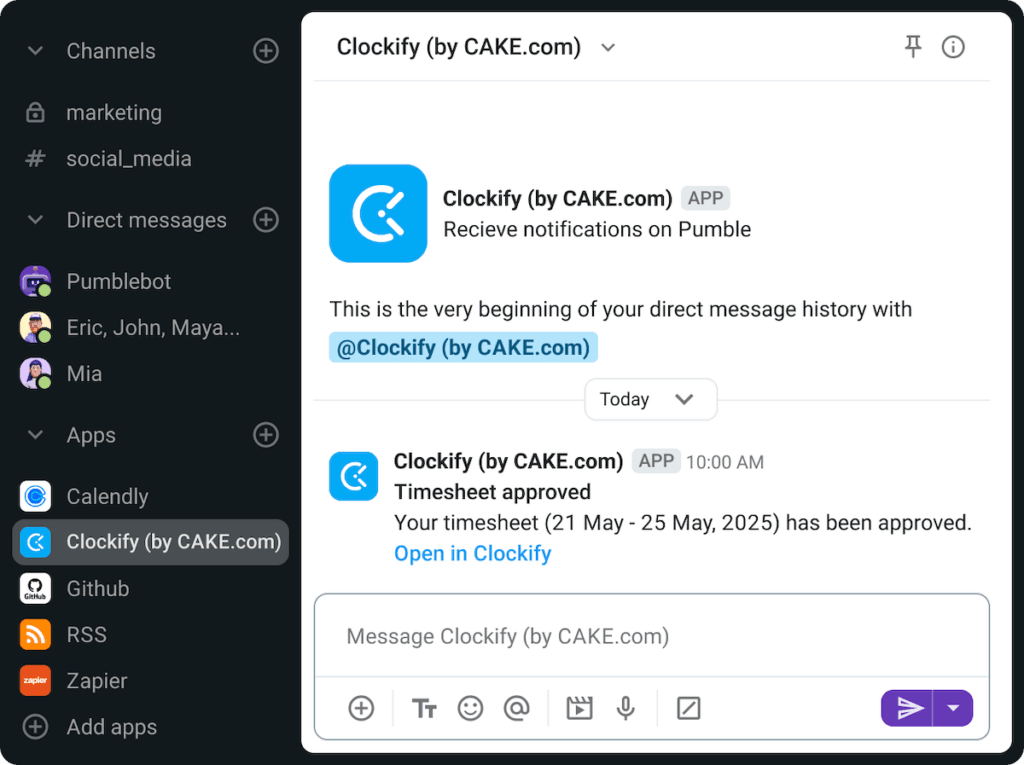
Once again, these alerts in Pumble include links that take you directly to the source in Clockify, which helps keep your workflow smooth.
To start using this native integration, just choose Clockify in the Apps section in Pumble’s sidebar and enable Pumble notifications in Clockify.
Clockify-Plaky integration
The Clockify-Plaky integration allows you to track time directly from Plaky (sub)items in 2 ways:
- Timer mode — Start and stop the built-in timer for each task as you wish.
- Manual mode — Manually type in the date, start time, and end time for each task.
In any case, you can also add a description, tags, and the billable/non-billable distinction for each time entry directly in Plaky. All updates sync up immediately in Clockify and vice-versa — if you change any elements in Clockify, it’ll reflect in Plaky.
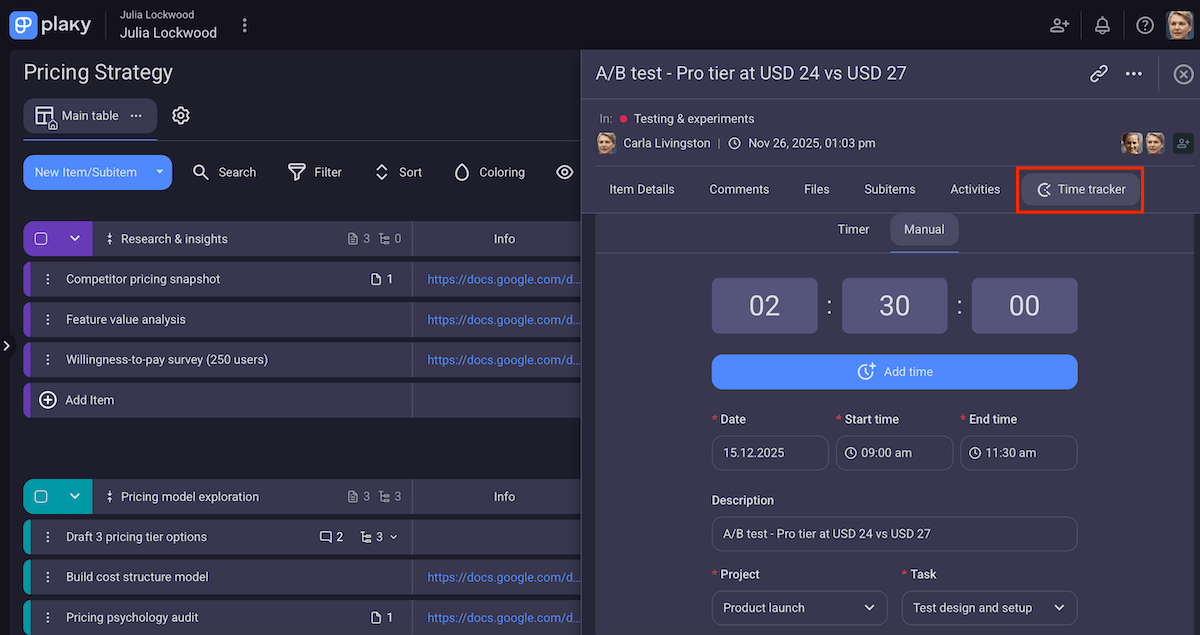
This seamless integration saves clicks and ensures accuracy, as time-tracking data flows directly from Plaky into Clockify’s reports and dashboards.
To set it all up, simply find the 3 dots in the upper right corner of the Plaky board in question, click on Time tracker, and choose the corresponding Clockify project. Alternatively, you can install Clockify’s time-tracking browser extension (for Chrome and Firefox). This also lets you connect time entries with existing or new projects, specify billability, add tags, etc., but Clockify won’t pick up your boards and (sub)items as projects and (sub)tasks like it does with the native integration.
Work smarter, not harder — get the CAKE.com Bundle
The CAKE.com Bundle offers more than just a collection of tools. With Plaky, Pumble, and Clockify working together, you have a seamless ecosystem that’s easy to use — no prior technical knowledge required!
At the same time, our apps offer robust features that satisfy even tech-savvy users who like customization and intricate workflows.
Still, if you end up needing help or have any questions, we offer multi-channel customer support 24/7.
Bonus: Since all 3 tools have native mobile apps for Android and iOS, you can stay on top of work no matter where you are.
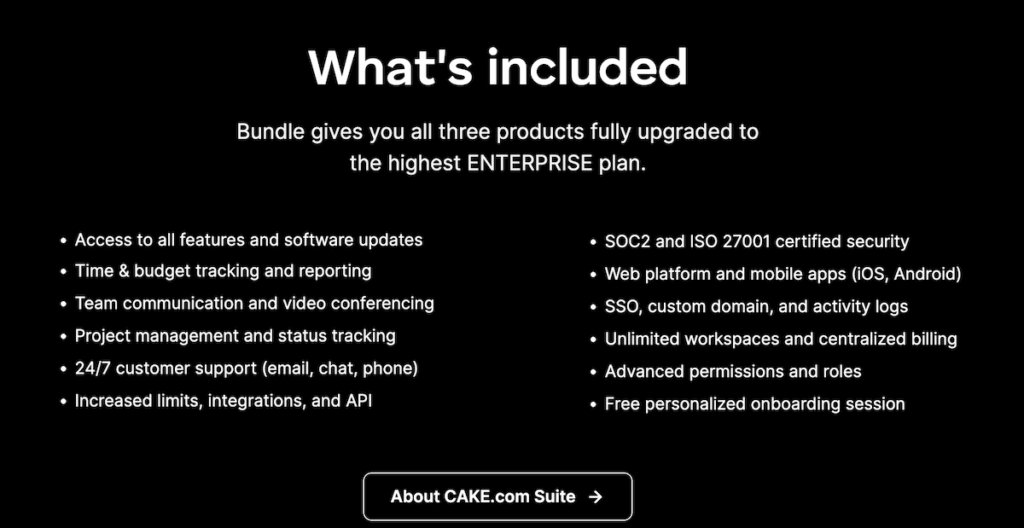
In addition to all the powerful features, you can rest assured that your data is secure and fully under your control. All 3 apps rely on enterprise-grade security, with relevant certifications and industry standards.
Additionally, Plaky, Clockify, and Pumble all let you assign different user roles and permissions so that people in charge can decide who can see/edit what.
And yes, you can test the premium features — for 14 days in Plaky and Pumble and 7 days in Clockify. After trying everything the CAKE.com Bundle offers, you’ll feel certain that you’re ready to commit to the purchase!
One suite, endless possibilities — turn ideas into impact with the CAKE.com Bundle!
