 Published: September 19, 2025
Feeling nostalgic about those days when you managed a team of 5-10 people? You knew who was working on what and who was making coffee after lunch each day.
But, things have changed once your team started to grow, right? No matter how hard you try, it’s impossible to remember all the deadlines, tasks, and, well, even people.
This is why managing a growing team is nearly impossible without proper project and task management software.
Luckily, Plaky promises to enable smooth project management and help you overcome the growing pains of scaling your business.
Interested in how Plaky does this? Keep reading!

3 reasons why growing teams go for Plaky
Did you know that Plaky was developed to fit the needs of our teams at CAKE.com? From the moment Plaky was launched in February, 2022, our company has more than doubled, and Plaky has grown and improved with us as well.
Here are the 3 main reasons why growing teams trust Plaky.
#1 High customization abilities
Growing teams are already swamped enough, and working with a complex tool only makes things worse. Luckily, Plaky provides flexibility without overwhelm.
In short, you can customize the tool to suit your needs with:
- Different board views — to view information in different ways and from different perspectives,
- Customizable task fields on all plans — to include important task details, and
- Customizable pre-made templates — to save time and ensure a quick project setup.
Customize boards and items with ease
#2 Centralized communication
With Plaky, everyone involved within a task/project has access to the same updates. By keeping all task-related discussions and information in one place, you can:
- Reduce miscommunication and misunderstandings,
- Enable knowledge retention, and
- Prevent information from getting lost.
Also, Plaky allows clear handoffs between individuals and/or teams, ensuring no detail is missed during information transfer. Plaky provides a real-time record of all project activities, so everyone can get quick updates and find important information right where they should be — within a task.
#3 Easy onboarding
Growing teams also have a growing need for new hires. You want to integrate them into your company as quickly as possible, but there’s a chance your employee onboarding process isn’t as smooth as you would like it to be.
Don’t worry, though, as you can use Plaky to:
- Keep track of all newcomers,
- Save relevant employee documentation in one place, and
- Track progress of the new hires.
Moreover, newbies are expected to quickly learn the ropes of all the processes and digital tools used for work. But Plaky doesn’t take much time to figure out as it offers a user-friendly interface and transparent task organization and allocation.
That said, if you do run into any issues, there’s 24/7 customer support on all plans!
💡PLAKY PRO TIP
Wanna know how and why we built Plaky? Check out the article below:
Team growing pains
Growth is always welcome. However, no growth comes easy. The road to success is often paved with some growing pains you need to go through.
Now that you know why growing teams opt for Plaky, have a look at some other common team growing pains this tool can help you with.
#1 Lack of scalability
Whether your team grows in size or in complexity, it’s essential to use a tool that can grow with you. You might be running a small business now, but if you strive for something bigger, make sure your software supports you.
So, when choosing the right software, ask yourself the following:
- Is the tool user-friendly and has a small learning curve?
- How many users and boards can you add to your plan?
- Can you easily upgrade to a more extensive plan once your company grows?
- Do you get enough storage to keep all your project-related files and docs in one place?
With Plaky, you can rest assured that:
- You’re relying on a simple and intuitive tool with no learning curve. But even if you need some help, you’ve got a whole blog + help section to browse through!
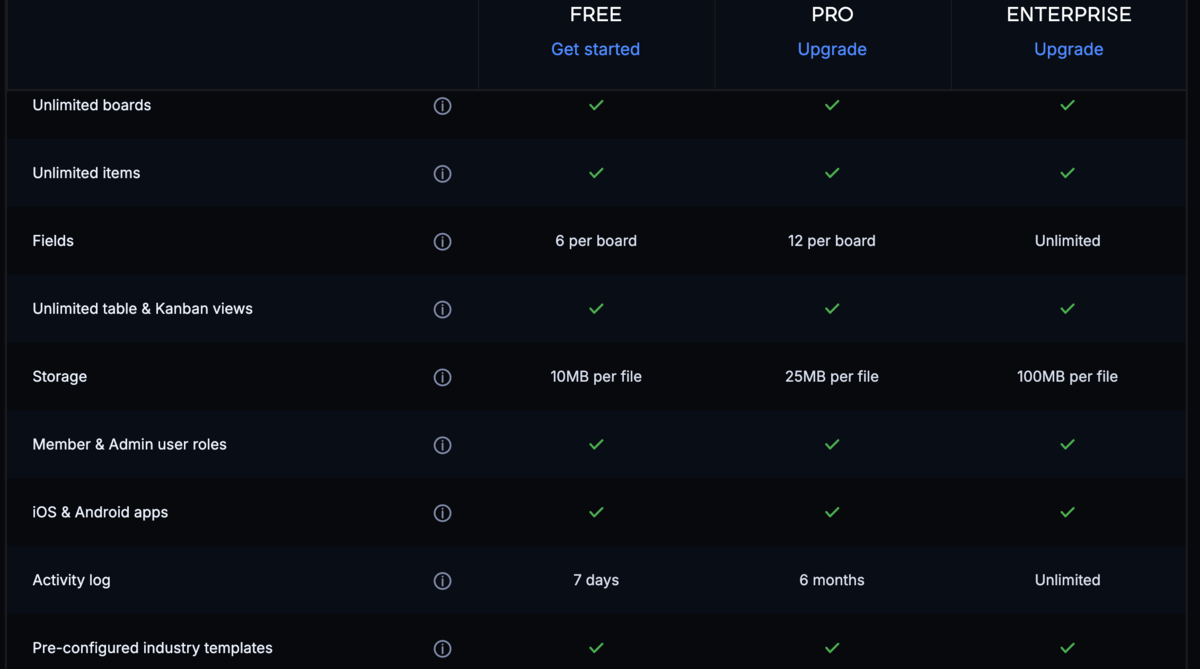
- You can add an unlimited number of users and boards across all plans. Yes, that goes for the free plan too!
- You can upgrade to a higher-tier plan whenever you want, or rather, whenever you decide you’re ready to try out some more premium features.
- You’ll have enough storage for all your files (you can add an unlimited number of files — just know that there are file size limits on all plans).
#2 Maintaining hierarchy
As your team scales, it gets harder to know everyone’s roles and responsibilities. By defining them, you establish a strong management hierarchy — which makes it easier to understand who’s responsible for what and who you should consult in case problems pop up.
Plaky stands out for its clear organization and hierarchy within the platform.
In Plaky, you can control who can see and edit information as well as define access based on roles (e.g., team manager, team member, stakeholder). This comes in quite handy, especially when it’s important to maintain clear responsibility and accountability in a growing team.
With Plaky’s granular system of control, you can easily set up who can have access to what project information and make modifications to it.
#3 Ensuring team cohesion
Your growing team can hardly function effectively without strong team cohesion. However, team cohesion doesn’t come naturally — you need to build trust among your new and existing employees so that they can work toward common goals.
Keep in mind that transparency is crucial in maintaining teamwork unity. Effective information sharing, direct feedback, and real-time updates help everyone stay in the loop at all times. And that’s where Plaky shines!
As a centralized space for collaboration and communication, Plaky unites your growing team. When everyone knows the overall plan, you can stay assured that all your team members are aligned and working toward the same target.
How to use Plaky to manage your growing team
Plaky is a versatile tool used across different industries such as marketing, sales, consulting, and software development.
By incorporating a tool like Plaky in your day-to-day work, you allow your team to grow without any restrictions. Even on the free plan, you can count on:
- Unlimited users — Plaky sets no limits on the number of users in your account, allowing your team(s) to grow freely.
- Unlimited teams — In Plaky, you can create as many teams as you like to group together team members working on the same project.
Now, here’s a general overview of how growing teams and their managers can use Plaky in their everyday work.

#1 Create a clear and user-friendly project structure
Growing teams need a neat project structure as it helps them maintain control over their workload and enables them to easily organize and track projects and tasks.
This is the hierarchy Plaky uses to provide a clear visual overview of all your project workflows:
- Workspaces — the top layer in the hierarchy used to set up project groups, departments, or teams in your organization.
- Boards — the next level down created within workspaces that represents the actual project boards where you manage all tasks and projects.
- Items — individual tasks or project activities containing details like people involved, task descriptions, attachments, etc.
To boost organization even more, you can also create folders (used to group related boards together) and item groups (used to group your items by different stages, statuses, or work phases).
The initial setup shouldn’t take you much time. However, if you want to speed things up, feel free to browse Plaky’s template centre.
#2 Organize your team’s tasks
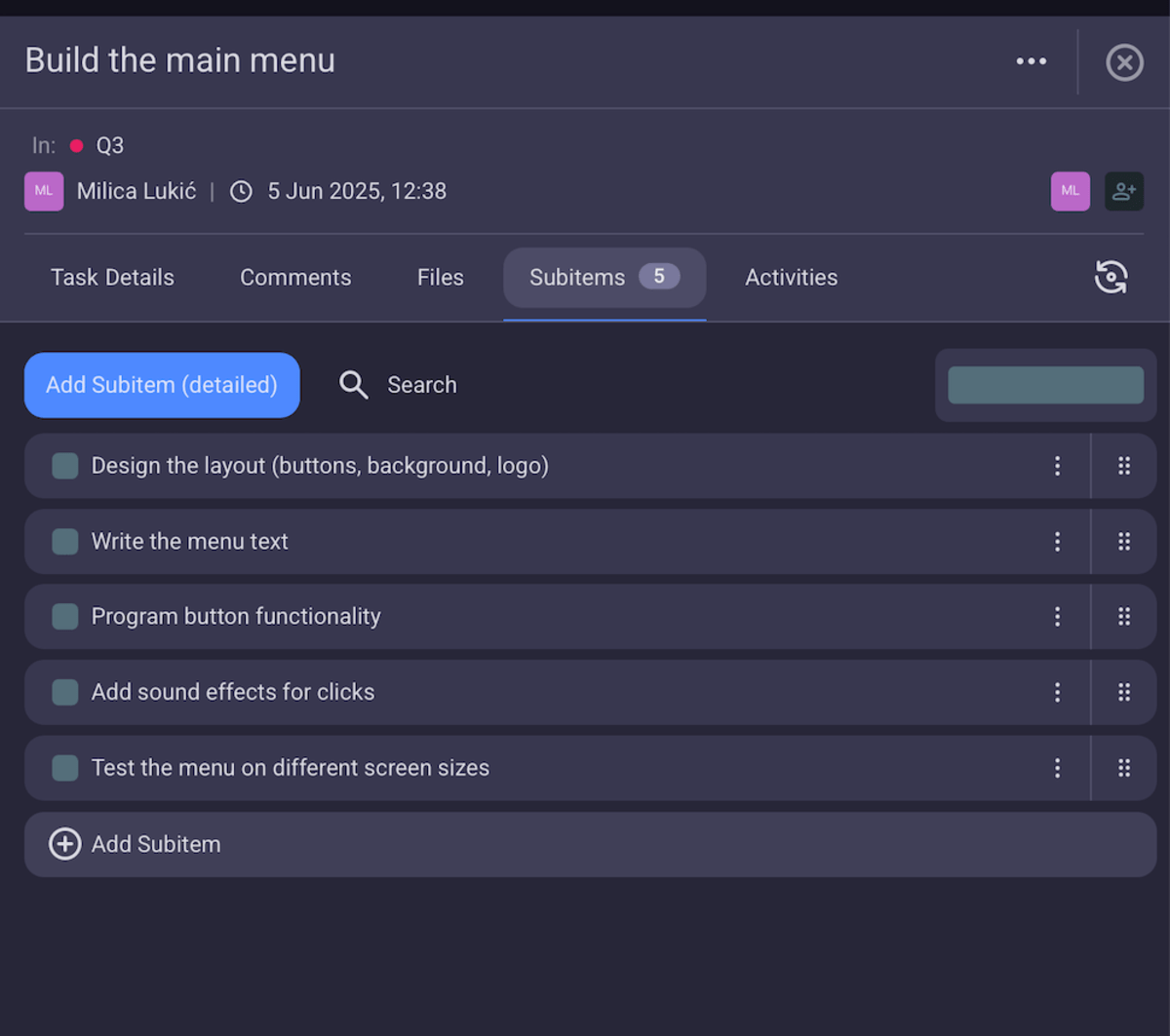
Proper task organization is a must if you want to be able to track your team’s tasks with ease. By dividing large tasks into more manageable chunks, you can get a better idea of the progress.
In Plaky, you can create subitems for each of your tasks, which should make project monitoring more granular and efficient.
Moreover, Plaky offers a structured way to categorize task information within your board.
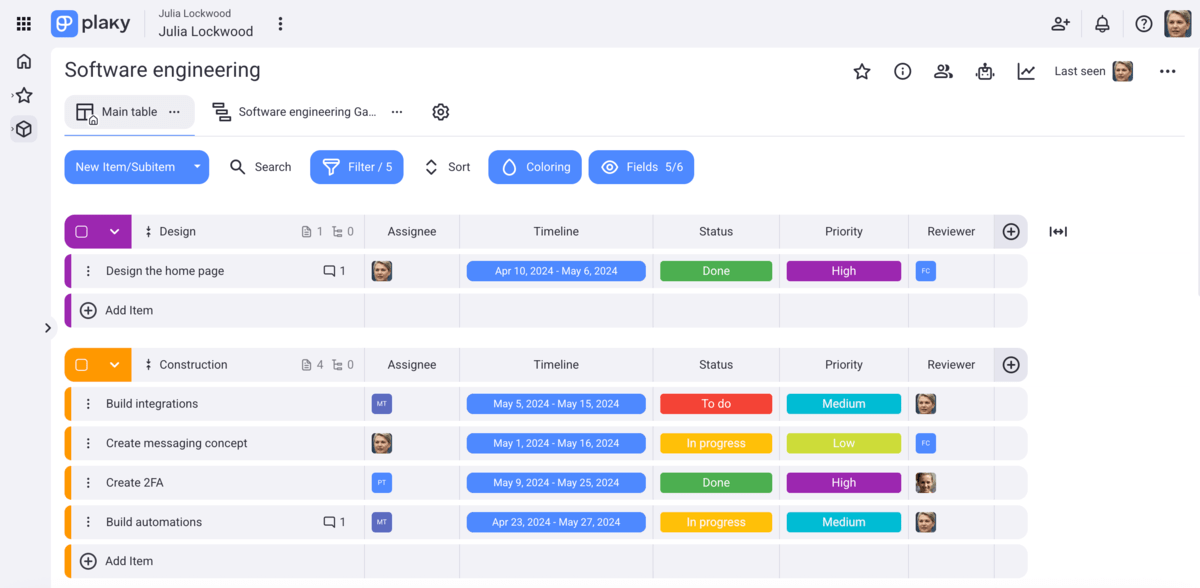
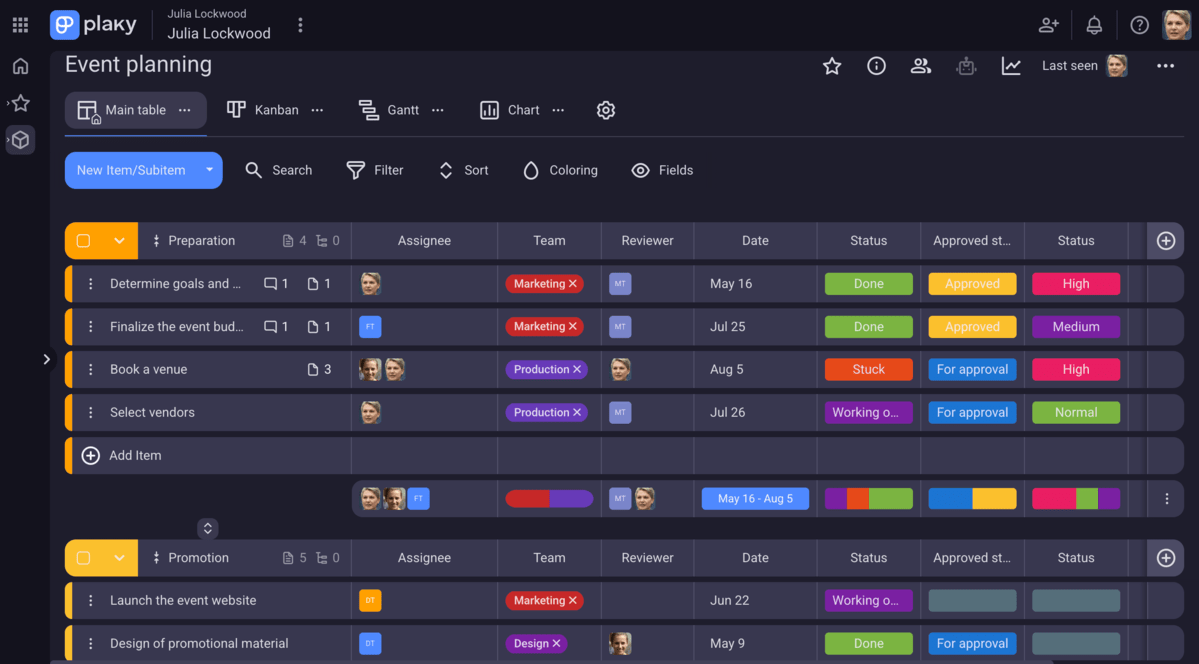
Efficient task organization brings clarity to your tasks and forever prevents confusion over who’s doing what. You can use different custom fields (date, text, person, number, etc.) and adapt them to your unique needs.
Plaky’s fields help you define key task details, e.g.:
- Due date,
- Priority status,
- Progress status,
- Assignees,
- Budget, and more.
Useful tip: Use colored labels to better identify teams and differentiate task statuses and/or stages. The Status field is an ideal option for that!
#3 Assign responsibilities and roles properly
As your team grows, you get a fair share of difficulties with resource allocation, as you need to assign the right people or teams to each task.
Plaky helps you play your cards right.
Use Plaky’s Person field to easily assign tasks to team members and always know who’s responsible for which task. Once you assign people to a task, they’ll be notified right in the app or via email.
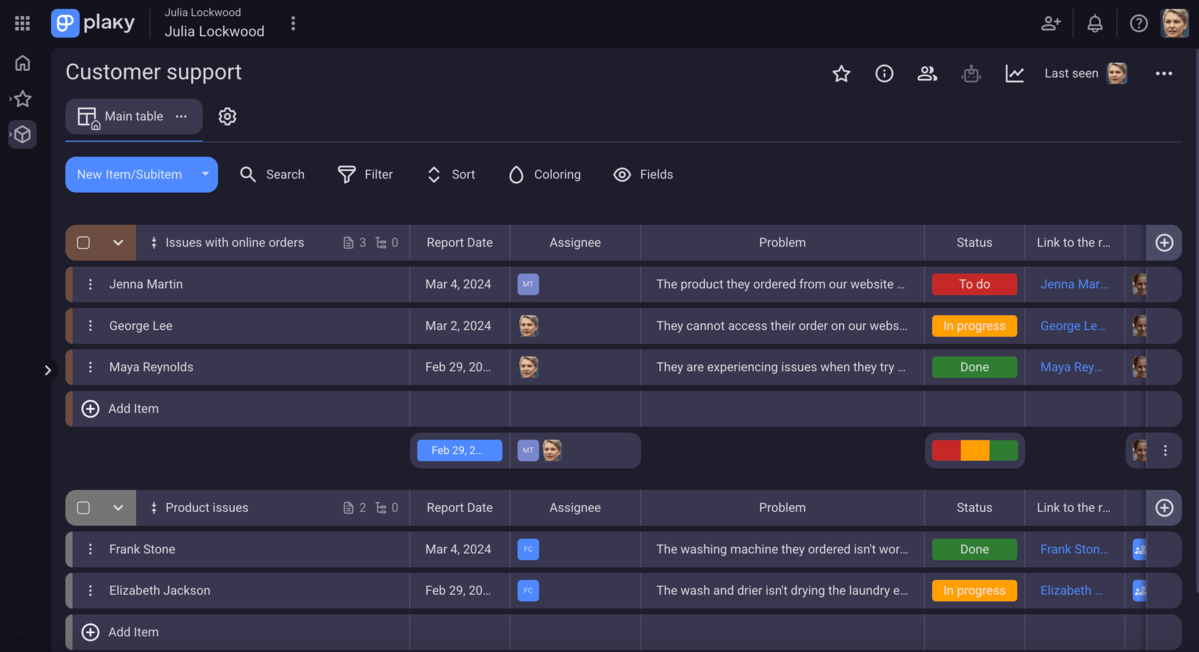
You can also apply board automations to enable smart task handling. For example, you can add a reviewer (team manager) in the assignee field when a task is labeled as Done.
The result? You reduce manual work and repetitive tasks, which, in turn, lets your growing team concentrate on strategic work. Plus, you enable smooth collaboration, which is especially important for new employees as they’re still learning the ins and outs of the job.
#4 Choose the best view to visualize projects
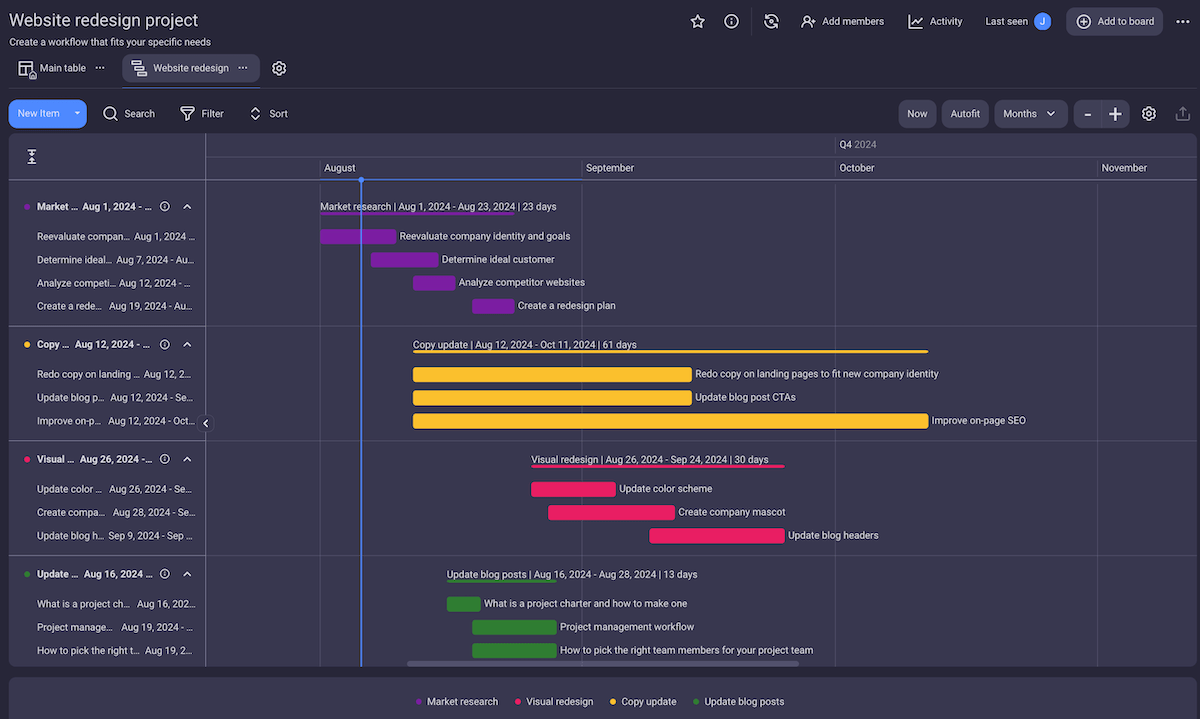
In Plaky, you have 4 different views (Table, Kanban, Gantt, and Chart) to choose from as each helps you see project information from multiple angles.
Plaky’s Gantt chart is particularly useful for managing growing teams because you can use it to:
- Get a visual roadmap that helps you track progress, spot roadbumps, and stay on top of critical deadlines.
- Adjust project timelines with a simple drag-and-drop.
- Anticipate resource needs by visually tracking important dates and overlaps.
- Keep stakeholders aligned and give them a real-time insight into project progress.
#5 Track time spent on tasks
Time tracking gives you valuable productivity insights as it helps you identify how team members spend their time on tasks. By understanding how long it takes your team to finish their tasks, you can:
- Manage deadlines and progress better,
- Improve future project estimations, and
- Lessen under-work and overload.
To track time properly, you can bring Plaky’s integration with Clockify into play — free of charge (you only need a free Clockify account). Once you set it up, the Clockify timer button will automatically appear in all your Plaky tasks.
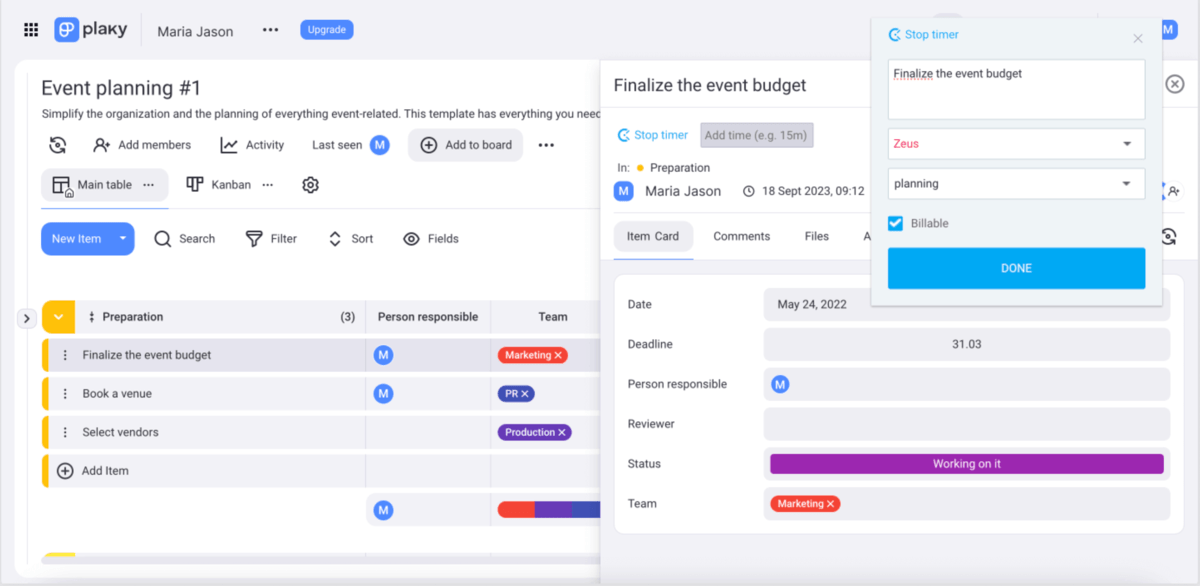
Once you’re done with your tasks, you can then switch to Clockify to:
- Run time reports,
- Estimate project costs more accurately,
- Make better project plans and organize people more efficiently, and
- Improve transparency in billing.
#6 Enable simple team communication and collaboration
Growing teams often experience difficulties with communication lines. Soon you become aware of all the dangers of working in silos, such as the lack of information sharing, delays, and repeated work.
Plaky easily solves poor information flow as it unites growing teams under one communication hub, minimizing misalignment among team members.
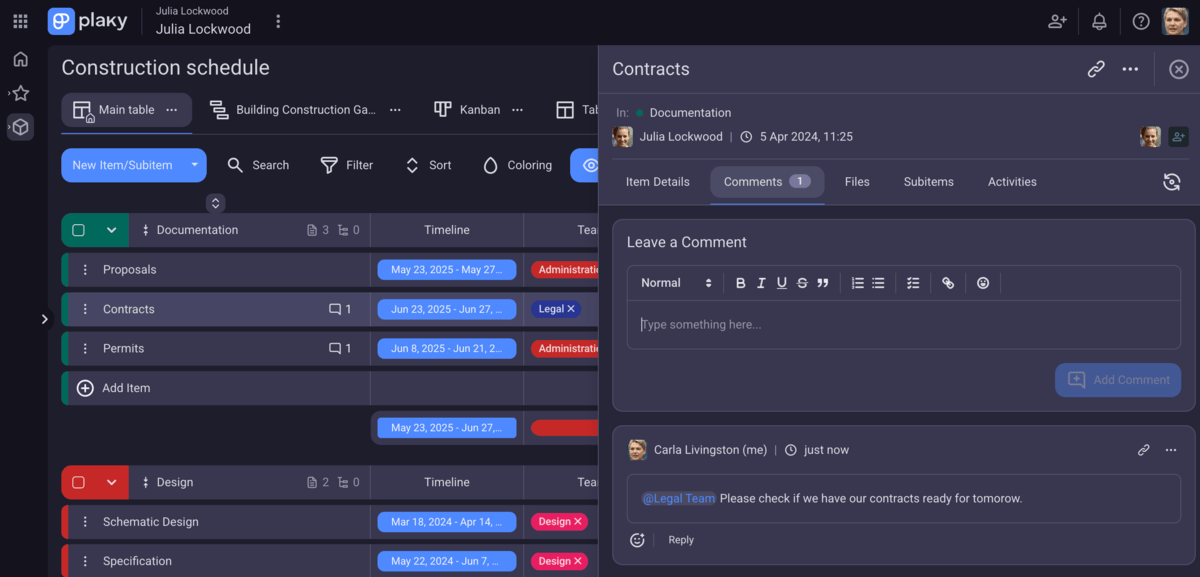
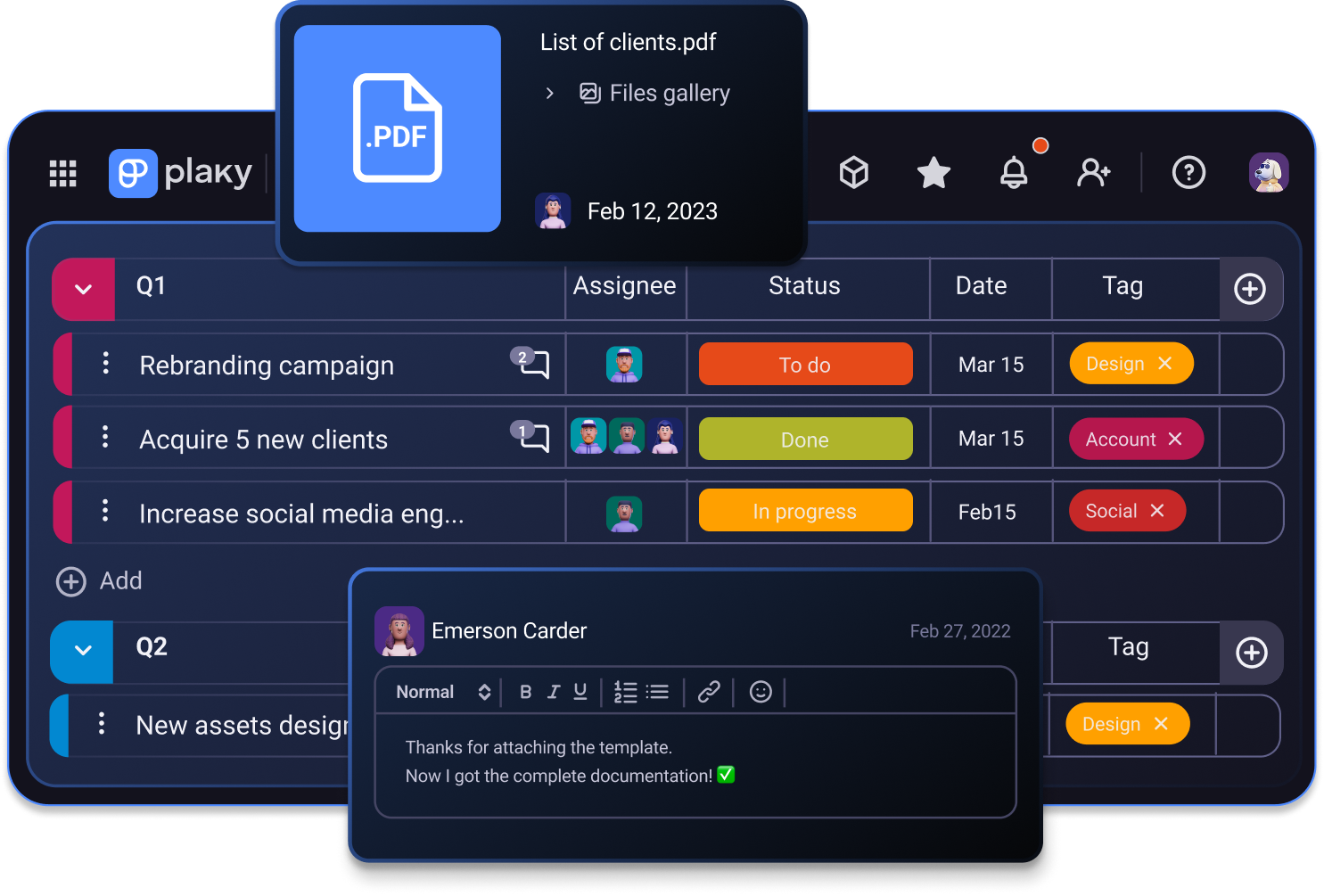
In Plaky, each item has a comments section where team members can share task-related information and keep it in one place. Everyone involved with a task has the same access to the same updates and can reply in threads to give feedback or react to comments with emojis.
The extra handy part is the @mention feature that you can use to tag teammates or entire teams to get their attention fast.
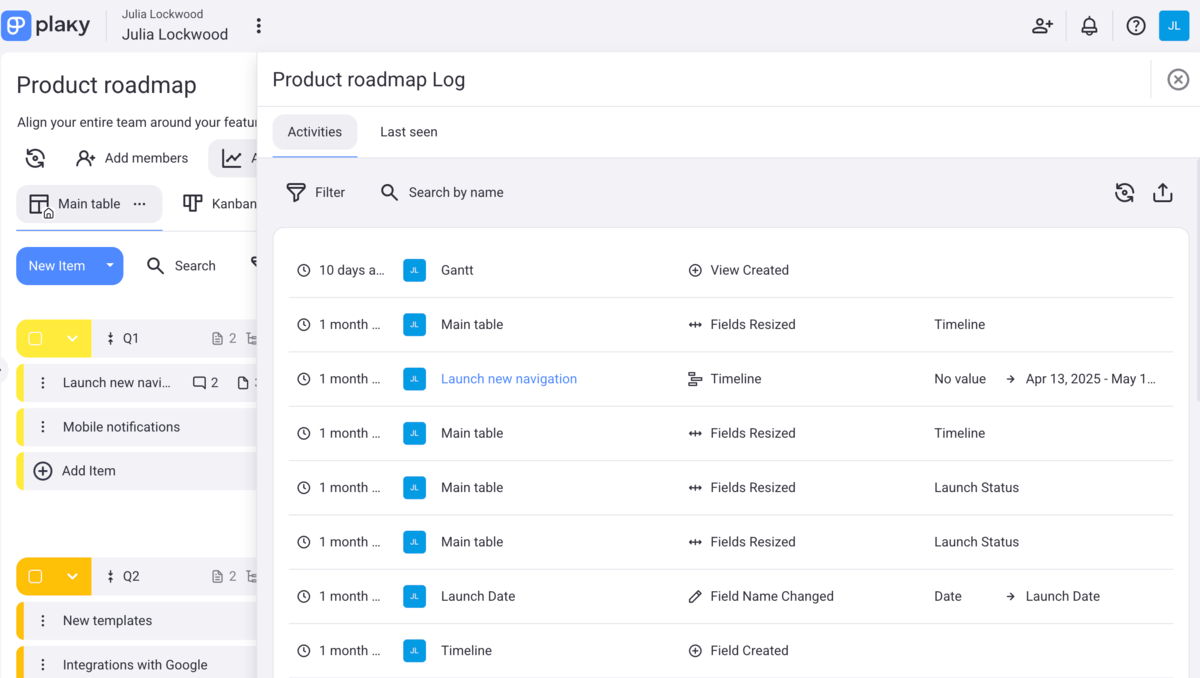
With every update on the item card, you get real-time notifications right in Plaky too. That said, you can always check the activity log to get a chronological record of all the changes made to each board or item.
Make communication easy with Plaky
#7 Keep all docs and files in one location
Whatever project your team is working on, keeping all project documentation in one place is essential.
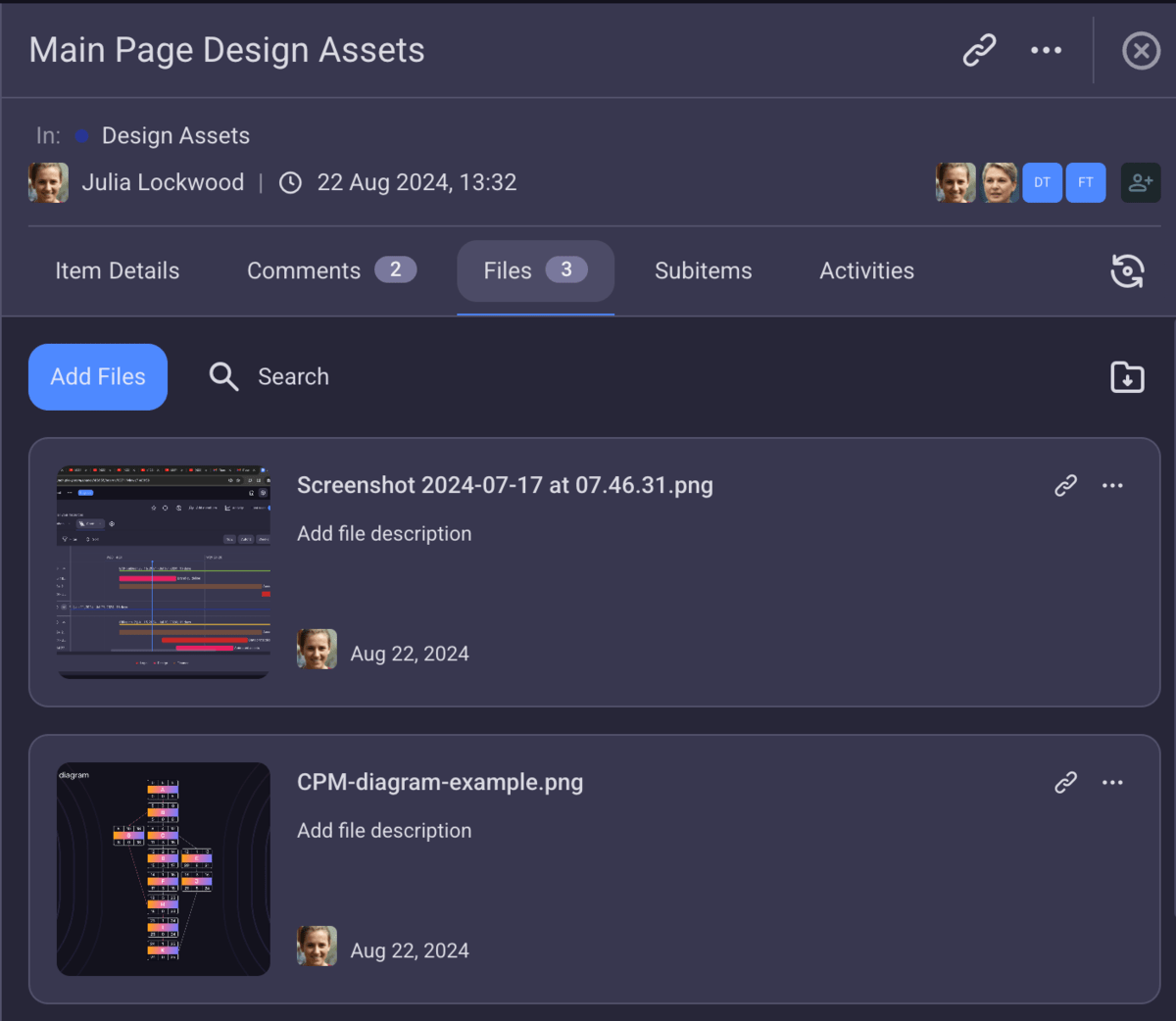
Plaky allows you to upload all your team’s files directly within tasks, under the Files tab. This means no more digging through emails, chat threads, or the entire drive to find what you need.
By keeping all project-related information in one place, Plaky serves as a single source of truth that both team members and stakeholders can rely on. This way, you won’t have to waste time searching for data. Instead, everything you need will be kept safe within one centralized hub.
Support your growing team with Plaky
Growing teams need an efficient and flexible system that can help them plan, track, and execute their projects on time while keeping them aligned around the same goals.
Admittedly, Plaky is a tool you can trust not only in terms of smooth project management but also in terms of:
- Security — Plaky keeps your project data safe thanks to 24/7 security audit and penetration tests. The platform is also compliant with various external security standards. Plus, with user roles and permissions, you can control who has access to what information.
- Support — With Plaky, you can rest assured that any software issues will be resolved as soon as possible thanks to Plaky’s support team (available 24/7 via phone, chat or email).
Bonus?
Plaky stands out because of its affordability as well.
For one, Plaky’s free plan has got all the basic project management features you may need, so your team can actually start growing cost free.
But, in case you need some more advanced features, you can opt for the Pro or Enterprise plan that can help you scale your business even more by giving you access to:
- Private boards and workspaces,
- Bulk actions,
- Board permissions, and much more.
Scale your business and grow your team with ease. Try Plaky today!
