
If you are struggling to manage your construction projects, this guide is for you.
Explore all the stages construction goes through, as well as challenges and how to overcome them. Finally, discover an intuitive and budget-friendly project management tool you can use to better organize your construction project management workflow.
What is construction project management?
Construction project management is the professional service that includes managing all aspects of a construction project from initiation to completion.
Achieving this is not an easy task, so it’s no surprise that project management in construction requires many roles, namely:
- Client/project owner
- Construction project manager
- General contractor
- Architect/designer
- Subcontractors
- Suppliers
- Safety officer
Types of construction projects
Depending on the purpose of the building that’s being constructed, there are many types of construction projects, the main being:
- Residential (houses, apartment buildings, townhouses)
- Industrial (power plants, warehouses, factories)
- Commercial (office buildings, restaurants, hotels)
- Institutional (schools, hospitals, libraries)
- Infrastructural (roads, bridges, airports)
- Mixed-use (buildings with both offices and residential homes or with retail and residential units)
Construction project manager’s key skills and responsibilities
Construction project managers coordinate all construction processes, i.e. they are in charge of planning, organizing, and overseeing the construction project.
Their responsibilities include:
- Creating a construction schedule,
- Deciding on the project budget,
- Employing subcontractors,
- Obtaining necessary permits, and
- Supervising the construction site.
Construction PMs also serve as the link between the client and the project. They are not, however, involved in day-to-day activities, which are handled by the general contractor.
In order to fulfill all the responsibilities at a high level, construction manager needs to possess a rich skill set and have exceptional:
- Communication skills,
- Technical skills,
- Leadership skills,
- Problem-solving skills, and
- Decision-making skills.
They also often have a construction project management certification, such as PMI Construction Professional (PMI-CP) or Certified Construction Manager (CCM).
For all of this, a construction project manager earns a median annual wage of $106,980 according to the US Bureau of Labor Statistics’ Occupational Outlook Handbook.
7 stages of construction project management
Here are the 7 stages that all construction projects go through.
#1 Initiation
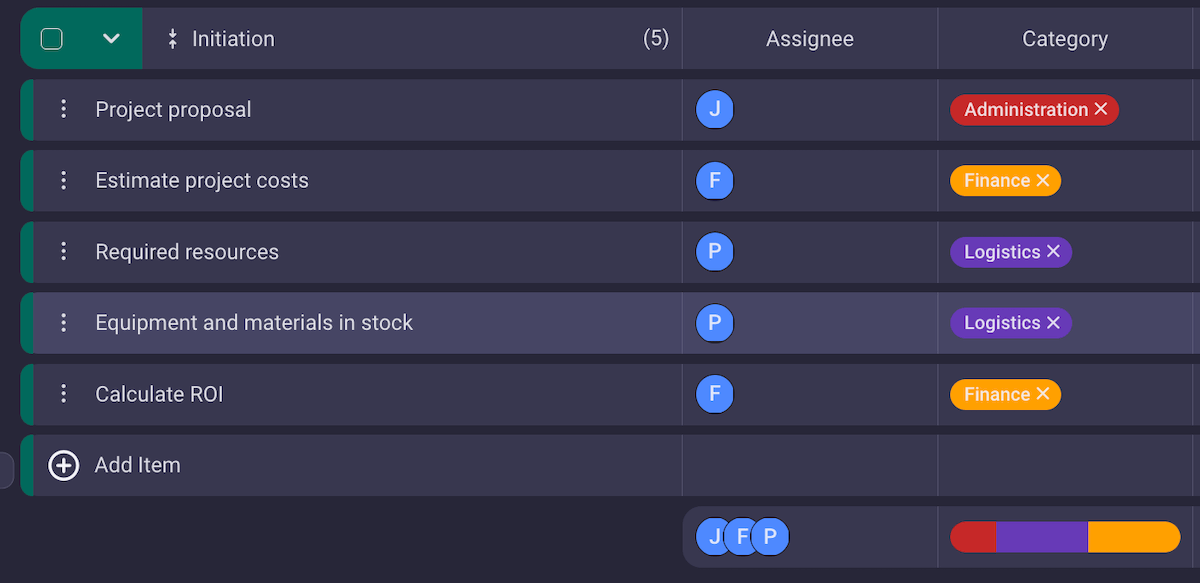
In the initiation stage, you need to decide if it’s even possible to deliver the project. To do this, you must carry out a feasibility study — an assessment of all aspects of the project that should help you estimate its chances of success.
A feasibility study should answer the following questions:
- Can you finish the project within the needed time frame?
- Do you have the required project resources? And if not, can you attain them?
- What will be the project costs?
- What would be the project’s ROI (return on investment)?
To make sure you have the right answers to these questions, you should meet with all involved parties, hear all sides of the story, and negotiate the details before you even begin working on the project.
This is also the moment when you need to determine the project scope and make a project plan.
#2 Design
After the initial stage, a detailed design is created in accordance with the project scope and plan. To put it simply, the idea the owner has is now put on paper by the architect and their design team.
Sometimes the project owner is not 100% decided on the design they want, and is open to creative solutions. Then, several design teams may compete for the job — each submitting their designs for the project owner to choose from.
#3 Pre-construction
In the pre-construction stage, the contract is signed between the client and the contractor. We’ll get into more details about contract types a little later. (Skip to types of construction contracts.)
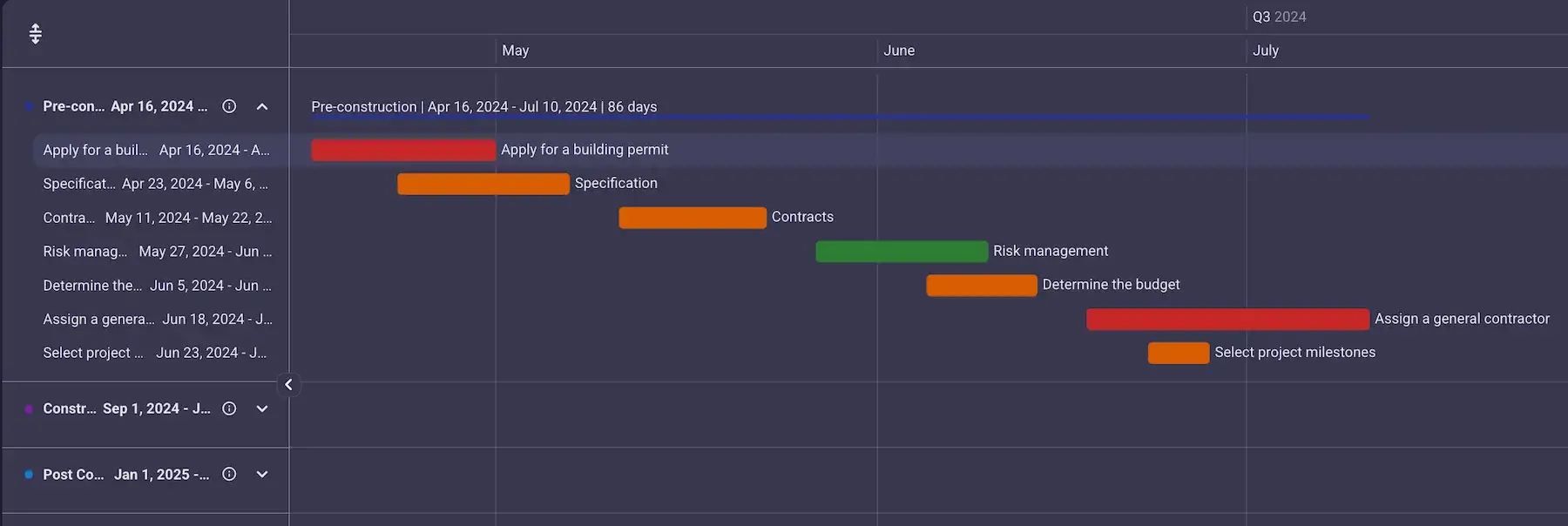
Once the contract is signed, you have to prepare for construction. More precisely, you need to:
- Determine your project milestones,
- Make a list of all project risks,
- Create a realistic project timeline,
- Pinpoint dependencies,
- Decide on the budget,
- Obtain the building permits,
- Assign the general contractor, and
- Assemble the team.
This may seem like a huge amount of work before you even start building, but it is vital for overall project success to prepare well.
#4 Procurement
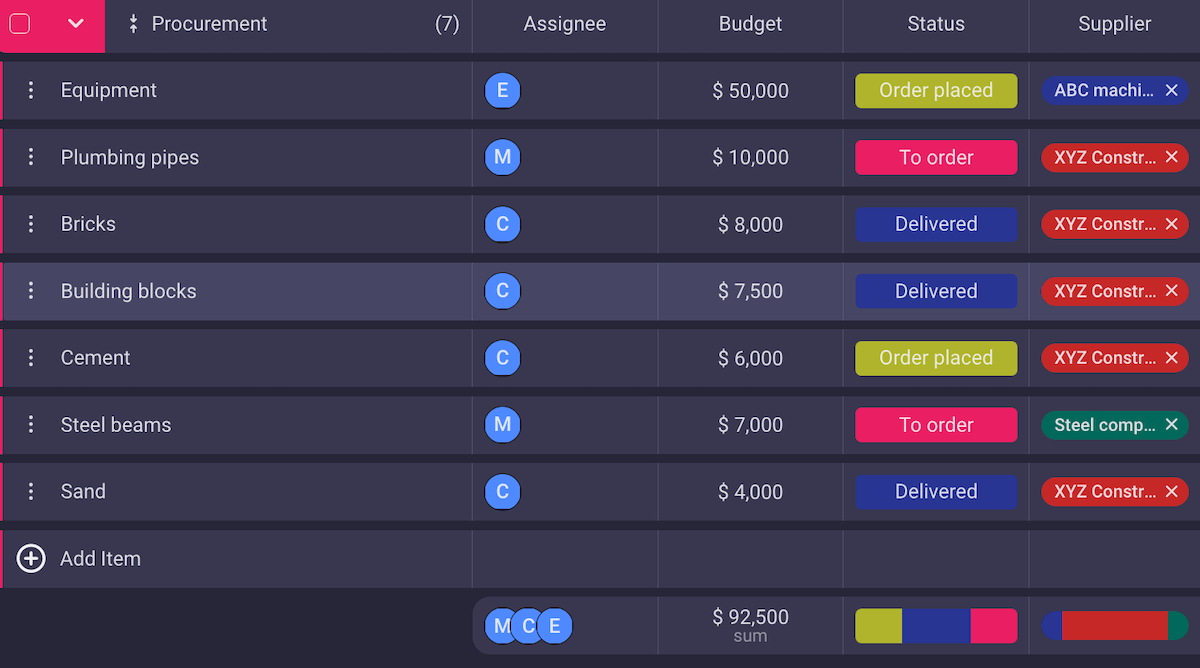
You need to plan out all the materials, equipment, and manpower you will need, and ensure that everything is prepared for the start of construction.
One way to make sure that the process goes smoothly is to have a reliable supplier you know will deliver high quality products on time.
In the case of a large construction company, you may have multiple projects at the same time. This is why it’s important to organize equipment and manpower adequately, so there are no delays or overlaps.
An important factor here is storage. In an ideal world, you could order all the materials to be delivered beforehand, but then you’d have to put it somewhere until you need it, and no one has that much storage space.
A good idea is to consider how much space you have, and then stock up on the most crucial supplies before you even start working. Then, calculate when you’ll need the rest of the equipment and materials, and schedule the order.
#5 Construction
Congratulations — after all that preparation, it’s finally time for construction!
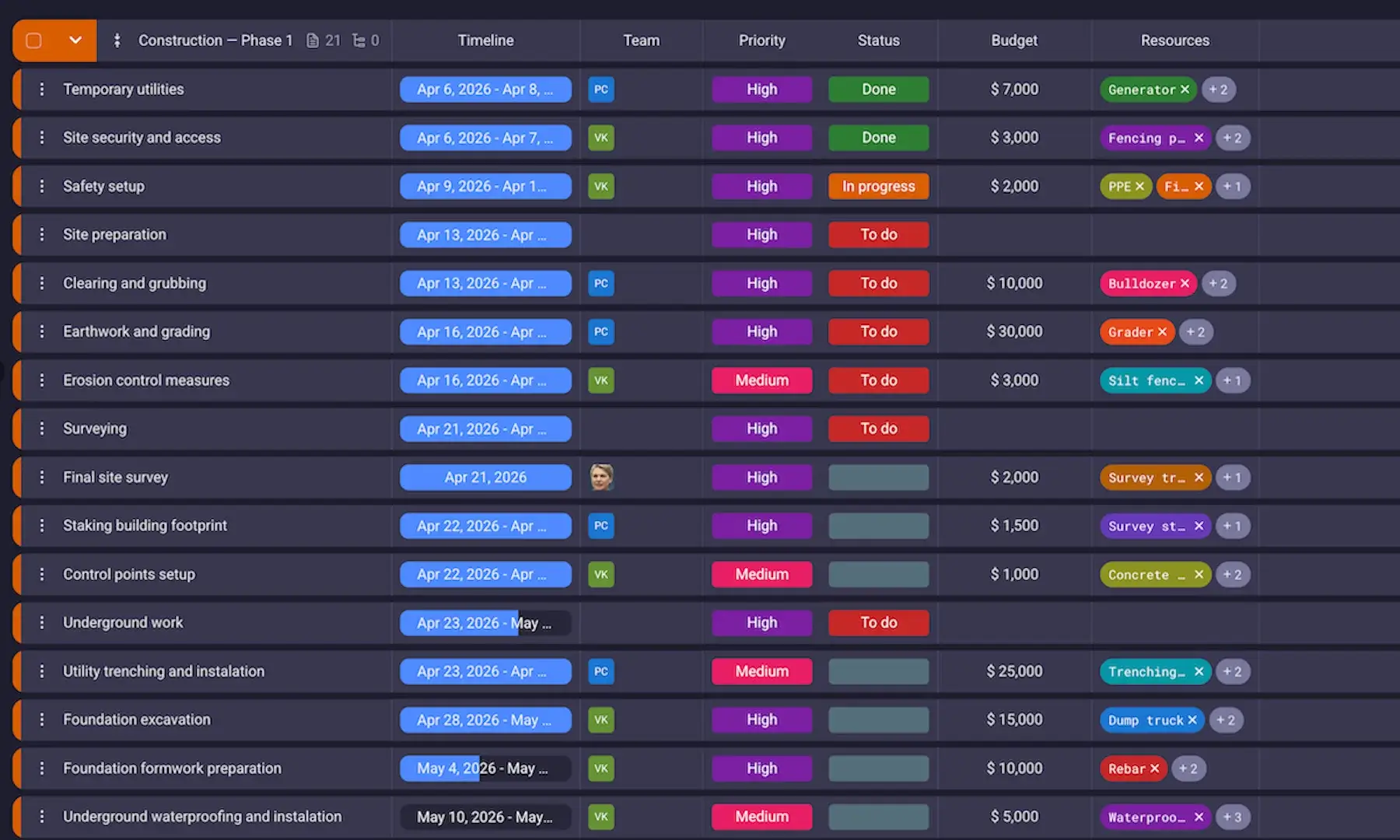
In the construction stage, also called the execution stage, the actual building and construction starts. So, this is when your meticulous construction project planning should (finally) pay off.
If you’ve organized your project well, the construction will function without too much trouble.
Of course, some problems may pop up from time to time. However, if you’re aware of potential risks — and you’ve allocated some space in your project timeline for unforeseen circumstances — your construction project will progress smoothly.
#6 Post-construction
Once the building has been constructed you need to do the site walkthrough to make sure that everything is up to standard and safe.
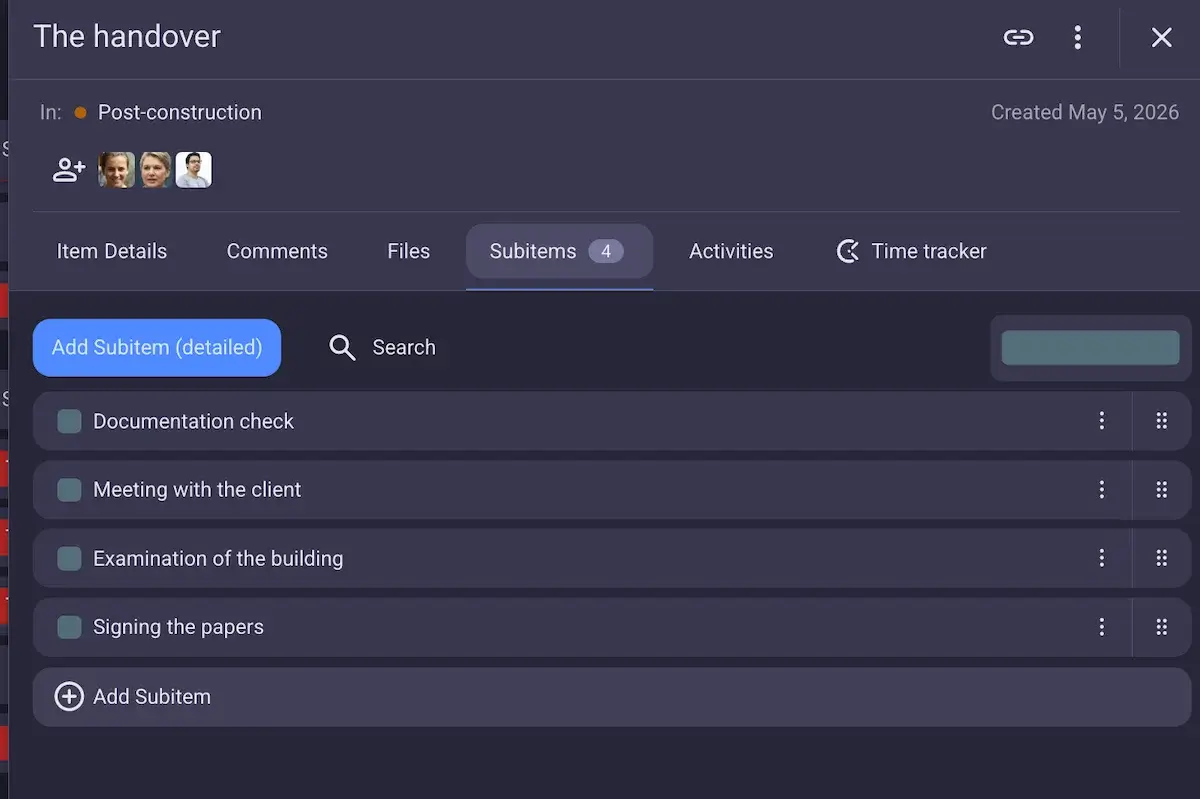
Once you’ve confirmed that all the aspects of the contract have been fulfilled, it’s time for the handover process, i.e. the process of transferring the project from the project manager or contractor to the client. This includes the examination of the construction site and building, gathering and signing necessary documents, as well as discussing any potential issues the client may have with the final result.
#7 Closeout
Now, finally, the project is done.
All that’s left to do is look back at the whole project and assess its success — what worked and what caused problems?
Be sure to note down lessons learned from this project, and use them to improve your work in the future.
Get our lessons learned template
Types of construction contracts
There are many types of contracts in the construction industry, differing mostly on the payment plans.
Some of the most common types of contracts are:
- Lump sum contract — Contract with a fixed price for the construction project. This benefits the owner as they know the final cost from the start. The contractors, on the other hand, have the opportunity for better earnings if they finish the job with higher efficiency and earlier than initially expected.
- Guaranteed maximum price contract — Contract which sets a top price for the job, and the contractor is responsible for covering any additional costs. This contract serves to keep the owners at ease, as they are sure the price for the project cannot skyrocket unexpectedly. However, this guarantee comes with a higher fee for the contractor, who takes on the risk of covering for unforeseen costs.
- Unit price contract — Contract where each unit of work is charged separately. This makes invoicing easier for the contractors, while making cost monitoring simpler for the project owner.
- Cost plus contract — Contract in which expenses are charged separately from the contractor’s earnings. This type of contract suits contractors since they have a guaranteed income even if the cost of construction increases. On the other hand, owners appreciate this contract because it means that the contractor doesn’t have an incentive to cut corners when it comes to materials, leading to high quality products.
- Time and materials — Contract where time spent working and cost of materials are charged separately. Unlike cost plus contract, here the contractor is paid per hour, instead of a fixed fee. This makes for a straightforward and transparent pricing system.
(Get back to the pre-construction stage of construction)
Challenges and best practices in construction project management
Construction projects are one of the most complex of all. You depend on many external factors while having to juggle a large number of different teams and subcontractors. Here’s just a glimpse of the biggest problems construction PMs deal with.
#1 Budget issues
Staying within budget is one of the most challenging aspects of construction projects. Since there are a lot of moving parts, and project plan and scope can change, it’s easy for project costs to explode.
Best practice: Create a contingency plan
No matter which budgeting method you choose when allocating a budget for the project, make sure you set aside enough money for contingencies such as additional materials, more manpower, unplanned fees, etc. Usually, around 10% of the budget is enough to cover all this. However, if you are starting a new type of project, and you aren’t confident in your ability to predict budget needs, you should consider increasing that number.
#2 Breach of deadline
Another common challenge for construction project managers is finishing everything on time. Most of the work done in construction is dependent on the previous stage being finished (no walls without foundation, no roof without walls, no interior work without the roof, etc.). So, even one small delay can cause a chain reaction.
This, combined with the unpredictable nature of construction projects (materials not arriving on time, workers taking sick leaves, difficulty getting permits), means breaches of deadlines are quite common.
What makes this even worse is that breach of deadline directly influences the budget issues we mentioned above — more time means more paid working hours, and potential fines.
Best practice: Create a realistic and generous construction project management timeline using a PM tool
You need to plan a timeline as realistic as possible. Take into account all the possible delays and plan around them. Don’t rely on faith that everything will go according to plan. Accidents happen and plans change — so make sure you’re prepared for it.
The best way to create a construction project timeline is to use a PM tool, like Plaky by CAKE.com. That way, you can adjust the timeline as you go, track all changes, and have a clear idea of what needs to be done by when.
#3 Safety challenges
Safety is a top priority in construction. Construction sites can be highly dangerous — according to the US Bureau of Labor Statistics, 1,032 construction and extraction workers died in 2024 alone. That’s why project managers and subcontractors have to pay constant attention to keeping the site safe for their workers.
Best practice: Carefully choose a safety controller and be rigorous with penalties
You need to have a capable and dedicated safety controller who will ensure all the safety protocols are followed to the letter. They need to inspect the site, identify potential risks, and organize safety training before the construction even starts.
But, this is only half the work. You also need to install strict punishments for those who don’t respect the safety instructions. The workers must know you’re serious when it comes to following the rules.
#4 Lack of communication
Since the manager can’t be at the site constantly, they need to communicate with the people doing the work.
Often, poor communication can cause a world of problems. For example, the construction worker has an urgent question, or needs to check up on some information, but neither the manager nor the general contractor are answering their email. This can lead to time and budget issues, and in extreme situations, even safety problems.
Best practice: Invest in a high-quality PM and communication software
Choose a PM tool which will allow you to communicate with the team wherever you (or they) are. Make sure the app allows you to chat with your team, share important updates, and track work. Plus, ensure you can access all the necessary information via mobile phone so you’re always available when needed.

#5 Weather conditions
No matter how organized and dedicated you are, you can’t control the weather conditions.
The weather can be a major issue — strong wind and rain can cause problems when raising a structure. Even very hot weather is problematic since it makes working on site more difficult.
Best practice: Plan your building schedule around the long-term weather forecast
When creating your construction schedule, keep a close look on the long-term forecast and adjust construction accordingly. Namely, schedule to finish setting up the roof of the house before the rainy period, or plan more breaks for your workers during hotter periods.
Manage a project schedule in Plaky
Construction management software solutions
Now that we’ve covered all the stages and potential problems that may arise, we come to the main aid any construction project manager has — a high-quality project management solution.
If you’re not sure what would make the best construction project management software for you, here are some features your solution should excel at.
Centralized hub
As a construction PM, you know that successfully handling all the moving parts of a project is a Herculean feat. But, if you have a centralized hub like Plaky by CAKE.com, it all becomes much simpler.
Plaky’s workspace is divided into project boards that include:
- A clear project structure, i.e. individual tasks grouped into stages,
- Task assignees for clear accountability,
- Project documentation attached to relevant tasks,
- Task deadlines and stages, and
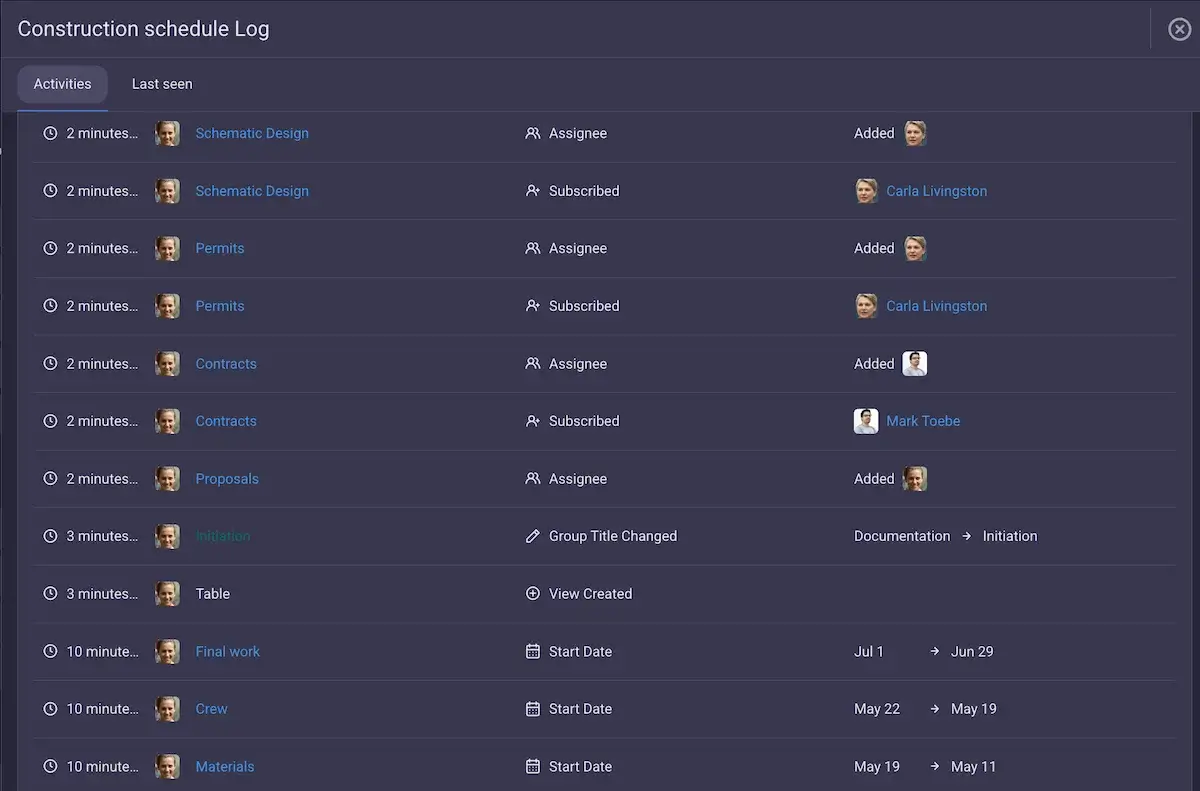
- Activity log that tracks all changes made to any task or board.
There’s also a Sort and Filter option, which allows you to find any information quickly, e.g. you can set the board to show you only tasks in progress sorted according to their priority.
All this gives you a 360 degree view of your project so you never have to stress about missing something important.
Mobile app
Building project management demands you are often out of the office — on the site, visiting suppliers, meeting with clients, etc.
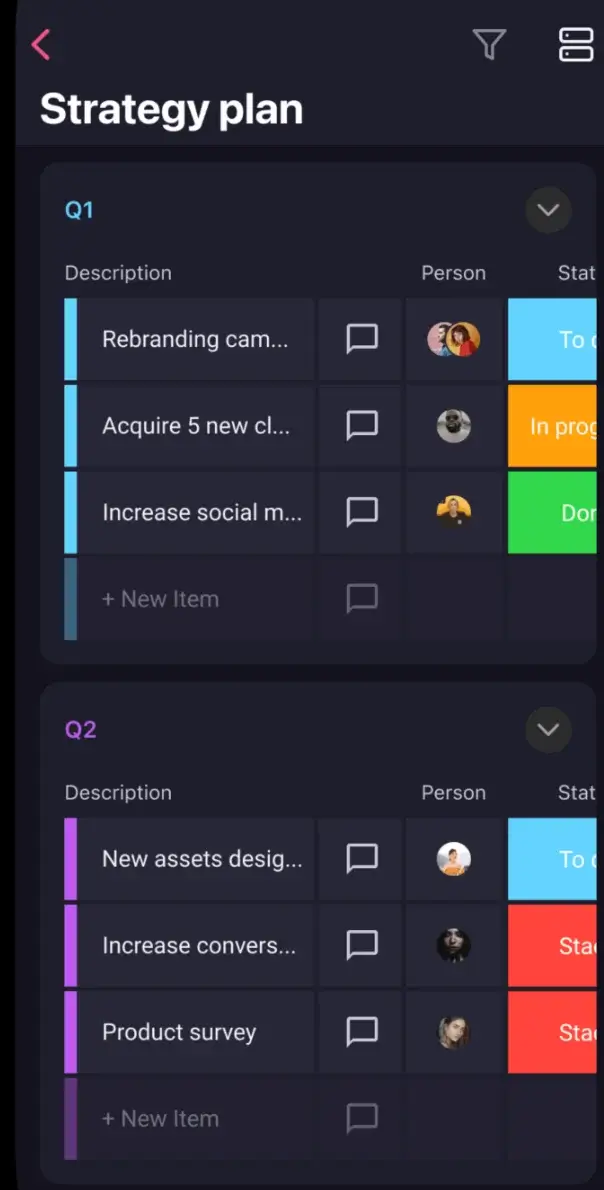
So, any software you use for managing the construction project has to have a mobile version. This way, even when you are in the middle of a construction site, you can easily stay in touch with your team and in the loop regarding any project changes.
Plaky has iOS and Android apps that enable you to do just that.
Collaboration and communication platform
Communication via mail and phone calls that often remain unanswered is not efficient and costs you time, nerves, and, ultimately, money.
That’s why PM software with communication features like Plaky is a must in the construction industry. It boosts collaboration between those working on site and behind the desk, and also helps you make informed decisions quickly.
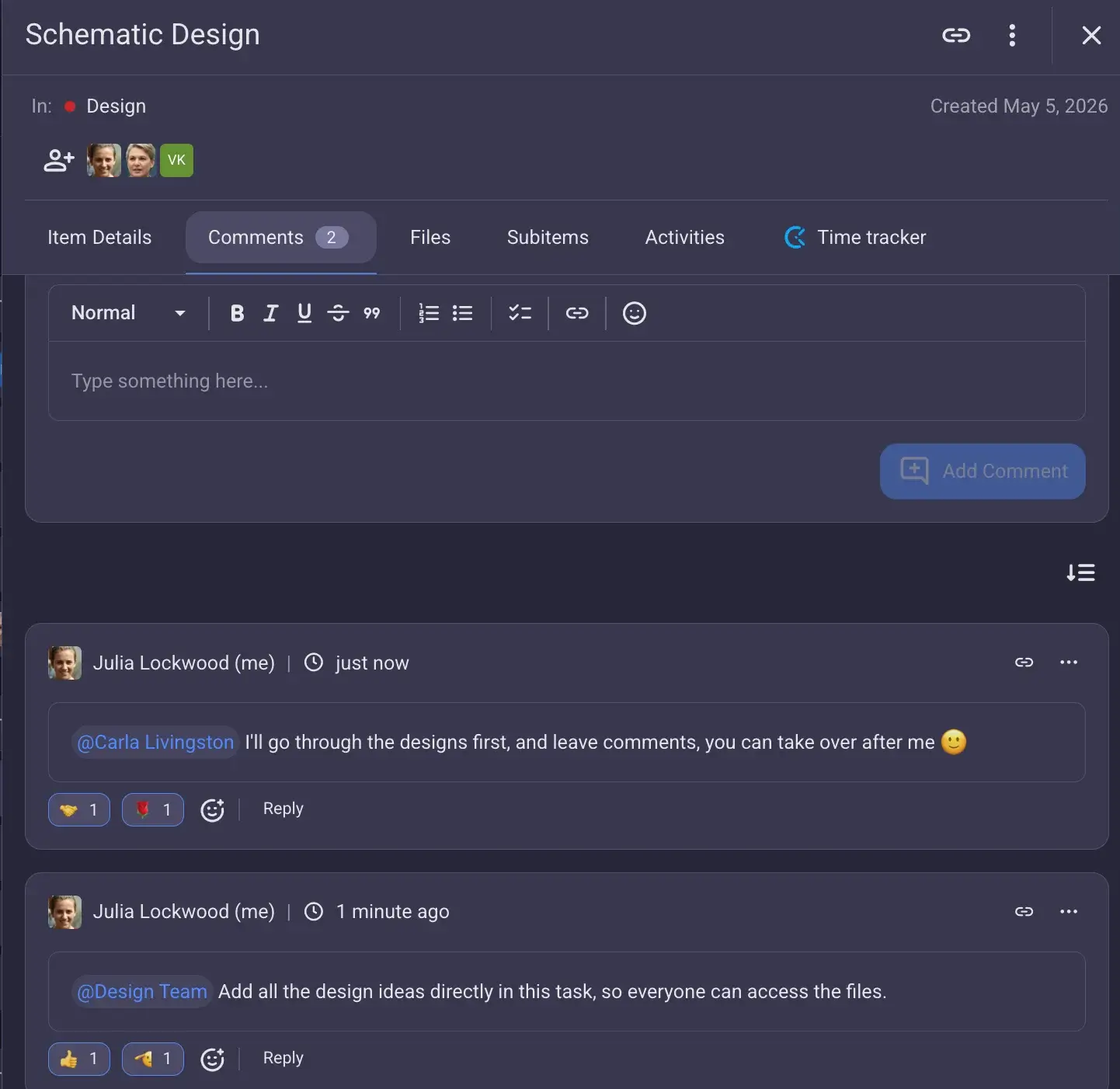
Every task in Plaky has a comment section where you can ask questions, send updates, and have discussions in threads.
And if you need a more robust communication option, there’s Plaky + Pumble integration which keeps your messages and task updates in the same place.
Timelines in Gantt chart
A lot of construction managers handle their project timelines in Excel or Google Sheets. But, as you probably know, these solutions are complex and often cumbersome. They require you to become a tech expert or otherwise get lost in the mountain of formulas just to get a simple project timeline. And, this, in turn, makes it easy to make a mistake you won’t even notice, leading to bigger issues.
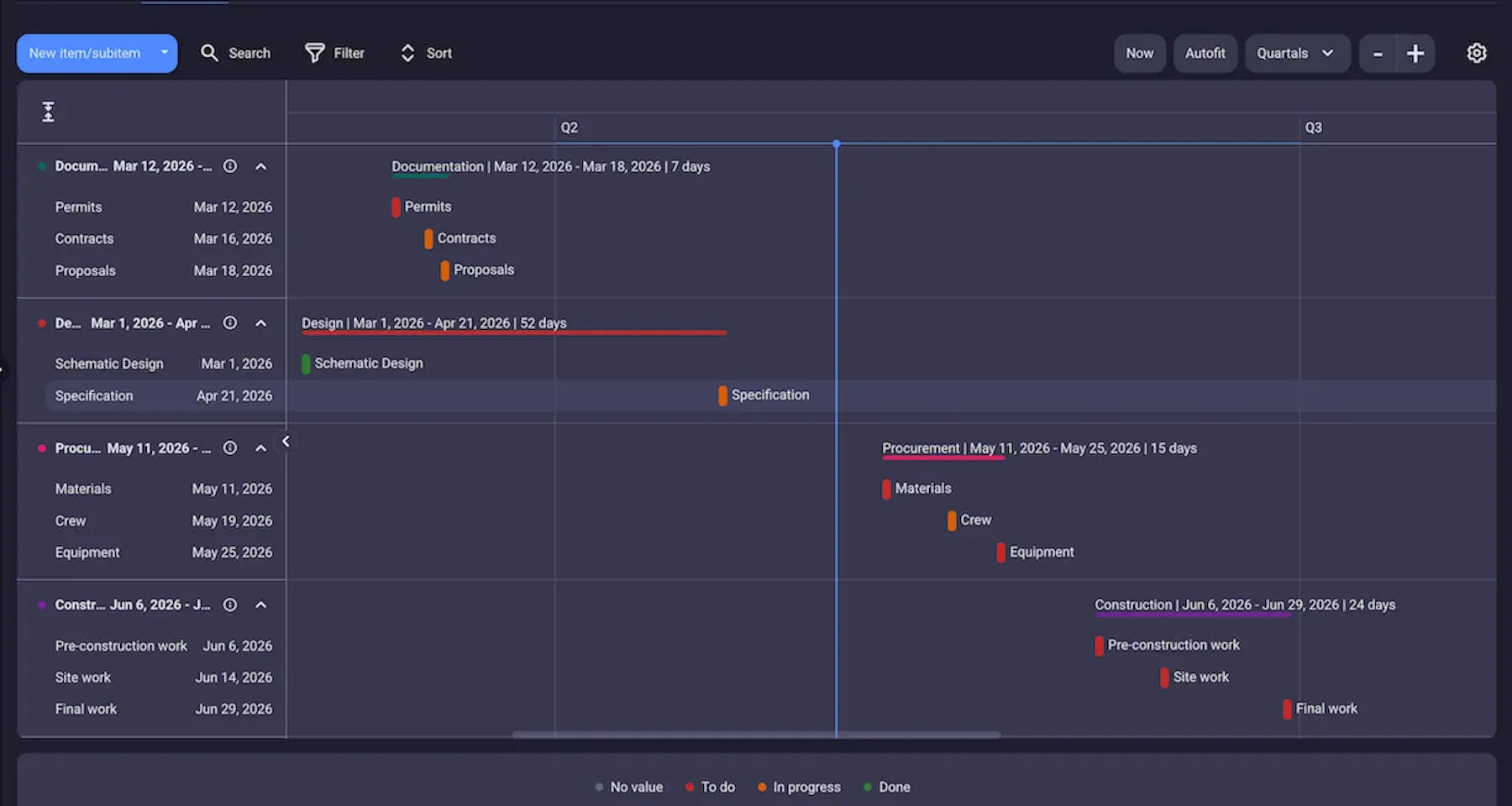
Plaky, on the other hand, offers an intuitive way to create a colorful and customizable construction project management timeline in Gantt chart.
All you need to do is add tasks with date/timeline fields and generate a Gantt chart view. It’s that simple! Of course, you can also add any kind of information you need such as assignees, priority, status, storage unit, equipment labels, etc. and then group your tasks on the timeline according to them.
Plus, if you need to make changes to your schedule, simply drag and drop the tasks across the timeline.
Try Plaky’s efficient Gantt charts
Time tracking
With so many subcontractors and teams involved in the various stages of the project, keeping a close eye on tracking work hours is paramount.
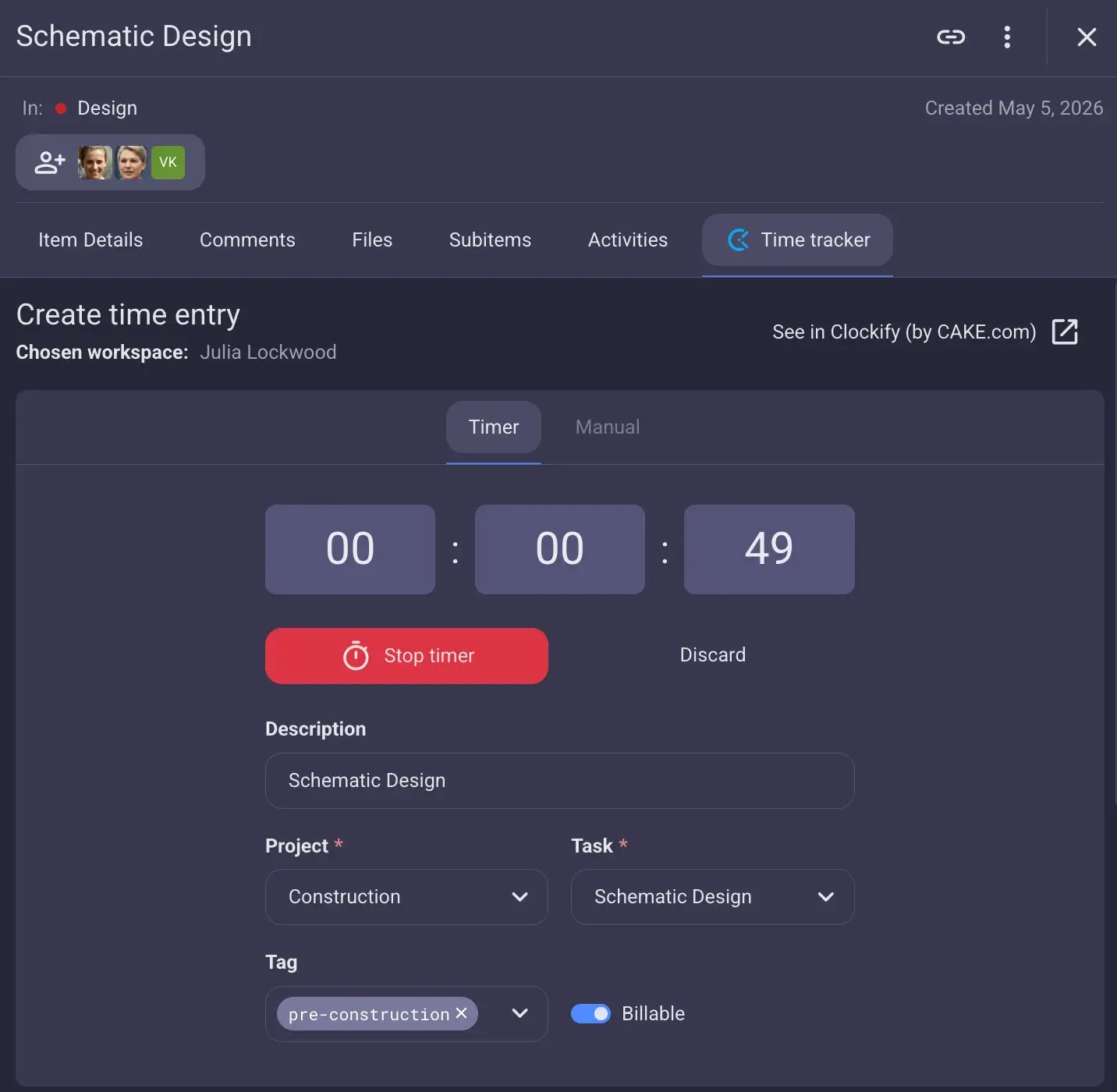
You can easily track time in Plaky and know how much time each worker spent on which task. This provides you with a straightforward path to clear invoices and accountability. Simply add employees to task, and let them track billable hours in the PM tool itself, without any unnecessary fuss.
Plaky also offers a viewer role, so the project owner and other stakeholders can see the board with all tasks neatly written down, without any edit access.
This is especially useful if you have a cost plus or time and materials contract and have to present the project owner with expenses.
💡 Plaky Pro Tip
For even more efficient time tracking, try Clockify’s Kiosk — yet another elegant solution from the CAKE.com team. Naturally, Clockify, and Plaky integrate without a glitch.
Construction project template
When you have a lot of similar construction projects, a template saves you a significant amount of time since you don’t have to build your project board from scratch every time.
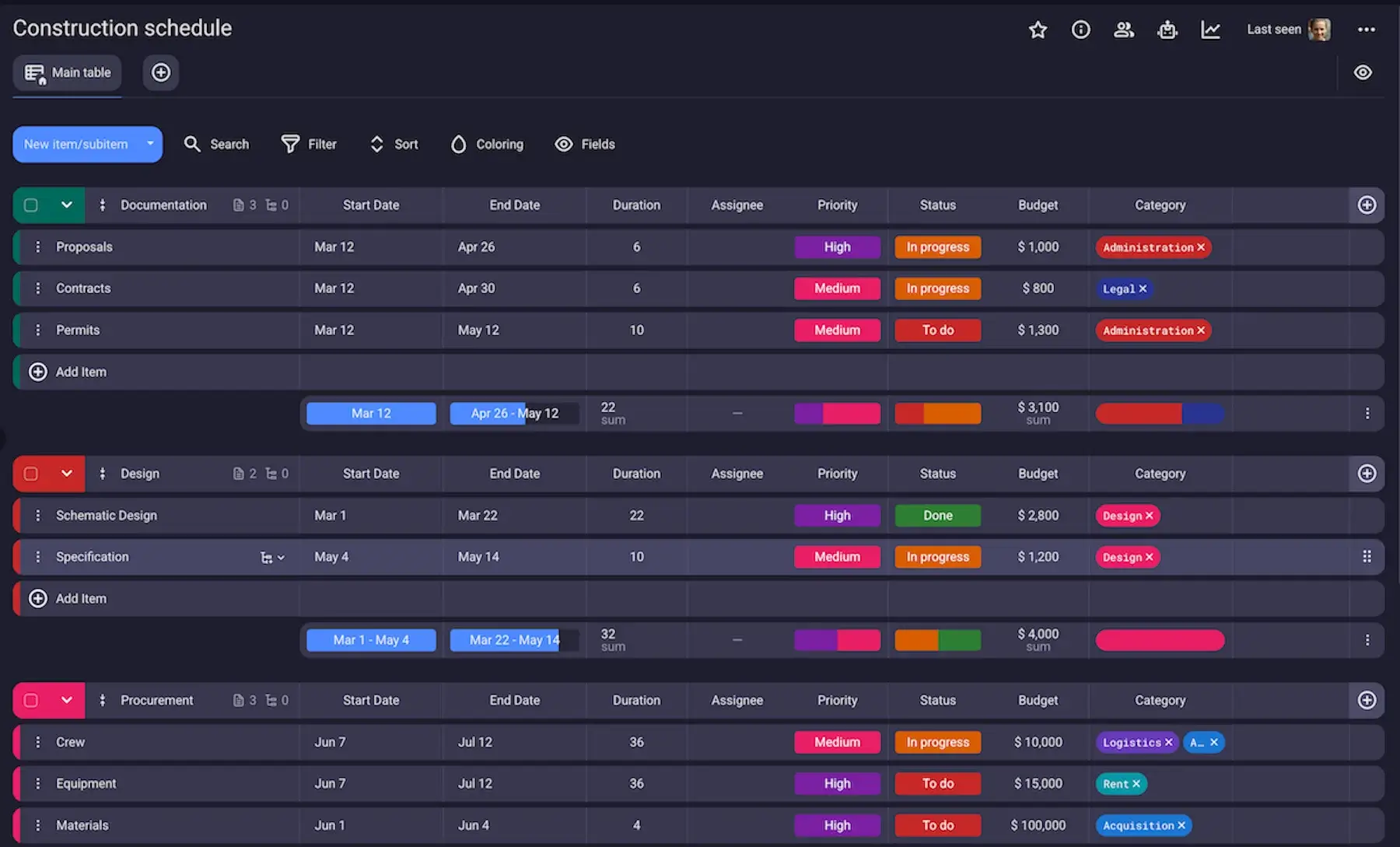
Luckily, Plaky by CAKE.com offers a fully customizable pre-made construction schedule template in its project management templates hub.
While you can easily adapt it to fit your project, our construction schedule template comes with pre-configured fields, such as:
- Status — to help you see how each task is progressing,
- Priority — so that you know which tasks should be done first,
- Assignee — so that you can see which team member is responsible for which task, and
- Budget — to have an idea of how much of the overall project budget should be allocated to each task.
Moreover, the template already has the key item groups — documentation, design, procurement, and construction — providing you with a clear overview of all relevant construction tasks.
Get Plaky’s construction schedule template
Bonus: you can also save your customized project boards as templates! Once you create an elaborate construction project board with all the necessary fields and item groups, just click on ‘Mark as template’ — now you can use it again for any future projects.
💡 Plaky Pro Tip
To get more tips, check out our guide on how teams can use Plaky as construction scheduling software.
Skyrocket your construction projects with Plaky by CAKE.com
Plaky gives you control over the entire construction project lifecycle — from the initiation to closeout. Its intuitive interface makes this powerful platform easy to use. But, that’s not all — Plaky is also:
- Budget friendly — it offers 3 highly affordable pricing plans,
- Secure — Plaky keeps your data safe thanks to end-to-end encryption combined with independent security audits and bug bounty programs.
- Customer-oriented — any user (even on the free plan) gets 24/7 human customer support via call, chat, or email.
Eliminate stress from your construction projects with Plaky!
How we reviewed this post: Our writers & editors monitor the posts and update them when new information becomes available, to keep them fresh and relevant.