Imagine this — you’re launching a project. You wrote an extensive project plan, shared it with your team, and covered everything in it. And we mean everything.
No room for error, right? But then, not a day passes, and you get swarmed with questions — fairly simple ones, at that. All the answers are in the plan, but your team can’t seem to find them easily.
That’s why the project brief exists — to give all the stakeholders easy access to key project information.
So how do you write one? Let’s take a look at what a project brief is, how to write it, and even offer a template you can use.

What is a project brief?
A project brief is a concise document that shows the most important information about your project. You use it to give key project stakeholders an insight into the project goals and responsibilities, without bogging them down with too much detail.
As with most other project documents, you want to complete the brief before your project kicks off. Still, you should create the project brief last — only after the project’s been approved, and right before it begins.

Project brief vs project charter
The main difference between the project brief and project charter is that the project charter is used to approve the project, while the brief is written after the project’s been approved.
| Project brief | Project charter | |
|---|---|---|
| When is it written? | After the project’s been approved and before the start of the project. | Before the project’s been approved. |
| Why is it written? | To give your team and stakeholders an overview of the key project information. | To be presented to key stakeholders or clients so you can agree on a project scope and get the project approved. |
| How detailed is it? | Little to no detail — as direct and concise as possible. | Mild detail — detailed enough to be reviewed and approved, but without the nitty-gritty. |
| Who is it written for? | For your team and stakeholders. | For key stakeholders. |
Project brief vs project plan
The key difference between the project brief and the project plan is in the level of detail — while the brief is — well — brief, the project plan is highly detailed, and contains all information on the project.
| Project brief | Project plan | |
|---|---|---|
| When is it written? | After the project plan has been outlined. | After the project charter, in the planning phase of the project life cycle. |
| Why is it written? | To give your team and stakeholders an overview of the key project information. | To give your team and stakeholders access to all project information, from the most to least important. |
| How detailed is it? | Little to no detail — as direct and concise as possible. | High detail — a compilation of all project information. |
| Who is it written for? | For your team and stakeholders. | For your team and stakeholders. |
Share your project documents in Plaky
Why is a project brief important?
The project brief is a crucial document — after all, without it, your team and stakeholders would have to sift through the project plan over and over again just to find the same 3 pieces of information.
The key benefits of writing a project brief are:
- Project clarity — The key information listed in your brief makes the project direction clearer and lets everyone know how they fit into the bigger picture.
- Improved efficiency — When your team doesn’t know key project details, they lose plenty of time trying to catch up, asking questions that should’ve already been answered, etc.
- Team cohesion — The brief gets your whole team on the same page, so they can work more fluidly. Once they know each other’s roles, teamwork becomes a breeze.
- Goal alignment — Once your team is familiar with everyone’s responsibilities, they can work more effectively towards a common goal.
- Stakeholder inclusion — You want to share the brief with your project sponsors, so they’ll be reassured and informed on the project’s direction.
Elements of a project brief
What should you include in your project brief then?
Let’s take a look at the key elements you need:
- Description — A short, clear description of your project, stating why you’re doing it and why it’s relevant, plus an overview of the rest of your brief elements.
- Goals — The results you want to achieve at the end of the project, whether that’s a physical output, a change in your organization, an improved brand image, etc.
- Responsibilities — How every team member will influence the result of your project (for example, who will handle result tracking, who will be responsible for quality control, etc.).
- Target audience/clients — Who will be using the final result of your project? Who commissioned it?
- Timeline/Milestones — The key steps your project needs to take, and the deadlines to achieve them.
💡Plaky Pro Tip
Struggling with missed deadlines? Check out this useful article on how to deal with them and how to bounce back easily:
5 steps to write a perfect project brief
Now that we know all the necessary elements let’s see how to approach each of them to get a high-level project brief.
#1 Write a project summary
Usually, we tell you to write the project summary (in most cases, an executive summary) last. This makes it easier — you can only summarize a document after you’ve written it.
However, when you’re writing the project brief, you already wrote every other project document — so you’re just summarizing them.
This summary should include:
- The problem or opportunity your project focuses on,
- How you’ll tackle it,
- How the project ties into overall business goals, and
- A summary of your team, goals, target audience, and milestones.
This gives everyone an idea of why your project is important, without wasting much of their time.
#2 Define clear goals
The best way to get your team on the same page is to set clear project goals. It gives your whole team an idea of what they’re working towards, and your key stakeholders know what the project output should look like.When outlining project goals for your brief, think: “What should the end results of my project be?”
But, keep in mind, you should avoid vague goals, like: “My team will lead a successful marketing campaign.” Instead, try to implement S.M.A.R.T. goals. These goals are:
- Specific,
- Measurable,
- Attainable,
- Relevant, and
- Time-bound.
With this technique, your once vague goal would now sound something like this:
“My team will lead a social media marketing campaign focused on our new product, aiming to increase sales by 13% by December.”
Track and achieve project goals in Plaky
#3 Outline everyone’s responsibilities
You need to clearly define everyone’s roles and responsibilities within the project. This is crucial if you want to increase accountability in your team.
When team members don’t know who’s accountable for a task or task group, they’ll have the mindset of “I’m not responsible for this, so I won’t deal with it.” In short, they won’t care as much.
Another reason to include this element is improved collaboration. If a team member needs information about a certain part of the project, they can use the brief as a kind of phonebook — so they’ll know exactly who to speak to.
Say your team is working on the previously mentioned marketing campaign. A designer needs the exact measurements of a billboard they’re designing. Using the brief, they can see exactly who oversees the billboard acquisition and ask them directly — no need to use the PM as a walkie-talkie.

#4 Describe the target audience or clients
When your teams are creating the project output — whether it’s an app, a physical product, a marketing service, etc. — they need to create it with the target audience or specific client in mind.
So, you need to outline your target audience in the project brief, by answering the following questions:
- What are your potential clients’ struggles or issues you’re trying to solve?
- What are their needs/wants?
- How tech-savvy are they?
- How experienced are they with the type of output you’re creating?
Of course, you can add any other project-specific questions you think are relevant.
This’ll help your team adjust the project output to fit your target audience perfectly — making your project more successful.
#5 Set time-bound milestones
Your project goals are the results you want to achieve in the end — but that can be months, even years away. If there’s no clear path set toward them, your team will stray pretty easily.
That’s why you need to set project milestones. They serve like stepping stones to your goals. Plus, they give your team something short-term to focus on.
Then, set a project timeline based on those milestones. Give your team clear limits on when each step should be completed.
This way, you, your team, and key stakeholders can easily track project progress by simply comparing what’s been achieved to the milestone timeline in your brief.

Project brief template + example
Even though it’s based on other documents, writing a project brief from scratch can be irritating. Worse yet, as you run more and more projects, starting with a blank paper every time is a real headache.
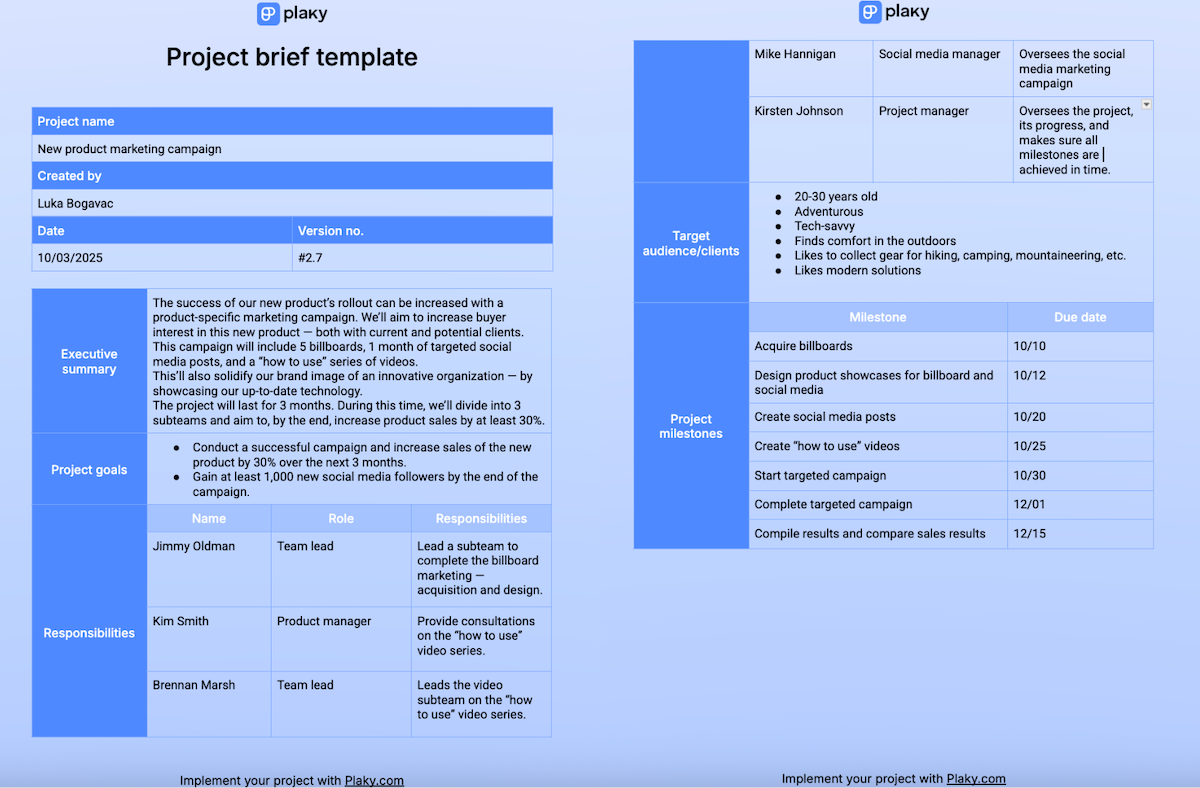
That’s why we made a nifty template for you that you can use as a Google Doc or a PDF.
We also took the liberty to fill in the template with an example, so you can get an idea of what the elements of a project brief look like when described.
Share your brief and implement your project in Plaky by CAKE.com
Once your brief is filled in and you share it with your stakeholders, it’s time to start the project.
But, you can’t use the brief to lead the whole project. You can’t use the project plan, either. It’s too difficult to sift through it daily — that’s why we write a brief in the first place.
So what do you need to lead a successful project? You need Plaky by CAKE.com, the best reliable and affordable project management tool.
Thanks to Plaky, clarity in your project doesn’t stop with the brief. With custom fields, you can make sure all relevant task information is categorized, no matter which industry you’re in. You can also use the Person field to clearly assign responsibilities and task ownership, which increases accountability and team dedication.
Then, you can make sure everything is going according to plan, with:
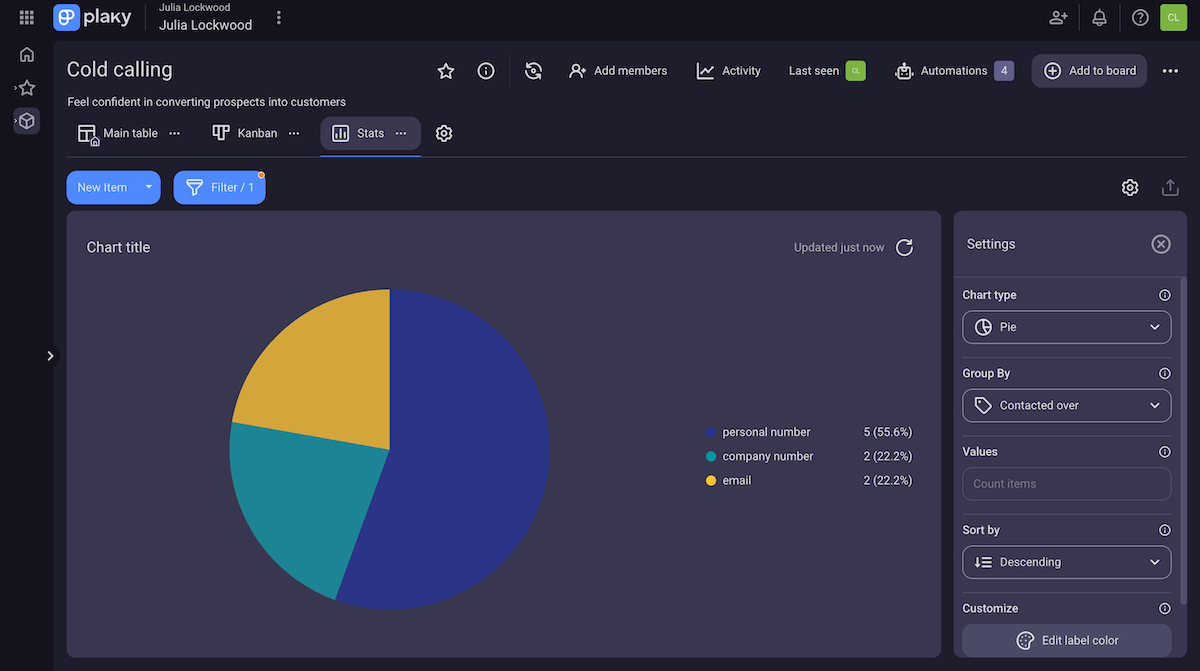
- Chart view — Set up colorful charts based on your project fields, with lots of customization and filtering options. Pretty neat for result tracking as your project nears its end.
- Summary row — Get a quick, visual overview of an item group’s progress. The summary row is particularly useful because you can view every field’s state (for example, how many tasks are set with a certain status).
- Activity log — Track each change made to your board. This helps you make sure everything is on track, avoid scope creep, and keep an eye on your project health.
But, referring back to the brief to check your timeline every other day can get tedious. Plus, the brief doesn’t offer a dynamic, visual overview of the whole timeline.
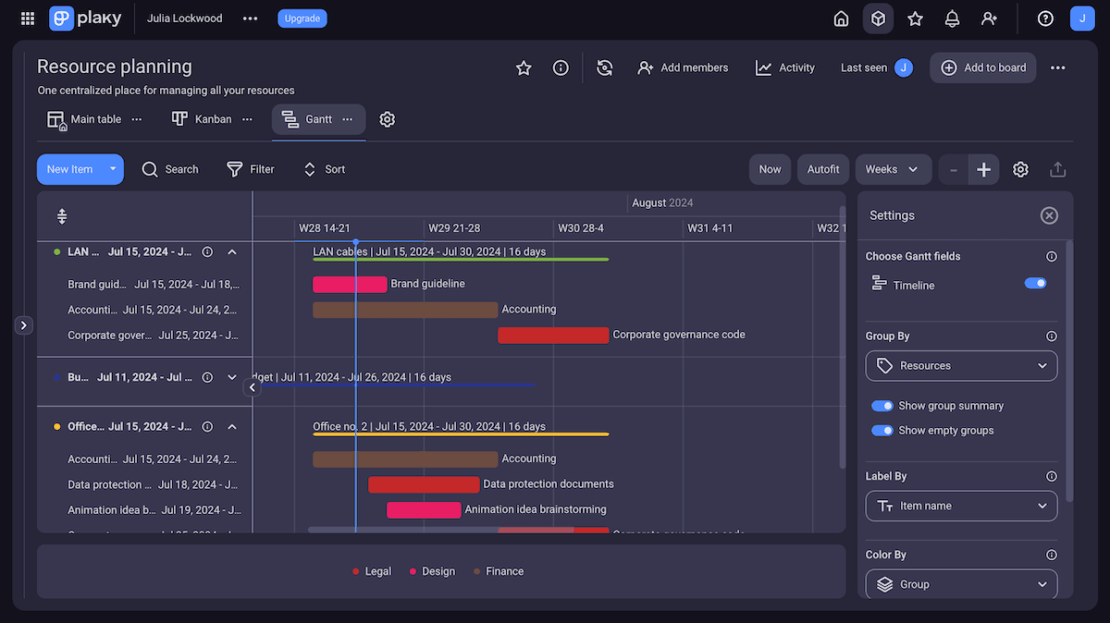
Plaky, however, does — in the form of a Gantt chart.
With Gantt charts, you can get a timeline of your whole project — you can easily get an overview of all of your tasks and their deadlines, which helps you:
- Identify bottlenecks,
- Manage and spot work overload in your team, and
- Check project progress at a glance.
Then, you can adjust your tasks accordingly. Plus, Plaky’s Gantt chart is highly customizable — with plenty of filtering options available. So, no matter how swamped with items your project gets, you’ll find the exact info you need with no time wasted.
And to top it off, you can include the project brief in your board thanks to Plaky’s file sharing, so it’ll be right at hand, whenever you need it.
In the end, Plaky will help you translate your brief into a functional, successfully executed project.
The brief is a vision of your project — make that vision a successful reality with Plaky by CAKE.com!