 Published: December 1, 2025
If you’re sitting in front of a blank paper, wondering how to write a sales plan from scratch, the simple answer is — don’t. Not unless you absolutely have to.
Use a template instead!
In this text, you’ll find 7 clear and detailed templates to help you organize your sales plan in a blink of an eye.
We also included a step-by-step guide to creating high-level sales plans. But if you already know all about it, you can jump straight to the sales plan templates and download them for free.

What is a sales plan?
A sales plan is a document that outlines your sales goals and other relevant data that will help you achieve them, such as target customers, expected revenues, KPIs (key performance indicators), role distribution in the team, resources, etc.
How to write a sales plan — a step-by-step guide
The trick to writing a high-quality sales plan is to make it clear and succinct, but at the same time detailed enough that everyone has all the information they need.
Sounds difficult, but it really isn’t — just follow the steps we outlined here, and you’ll manage it without a problem!
#1 Determine sales goals
The first step is to determine your sales goals — what you hope to achieve. Make sure your goals are S.M.A.R.T., aka specific, measurable, achievable, relevant, and time-bound.
For example, your goal might be: “Increase revenue by 15% by the end of the year.” In this case you know exactly what you need to achieve (increase revenue), how much (15%), and by when (the end of the year). Moreover, increasing your revenue is highly important in sales, and the 15% increase is a realistic and achievable goal.
#2 Define target customers
Don’t fall into the trap of attempting to reach a broad audience — you’ll just fail on all fronts.
Instead, create an ICP (ideal customer profile) so that your team has a clear understanding of who they are trying to reach. Fine-tune your sales strategies to your ICP, and you’ll have a much higher chance of success.
This ideal customer profile should be as detailed as possible and contain information such as the industry they’re in, business size, and the pain points your product/service could resolve.
For example, if you’re a finance consultant company, your ICP might be a startup business with 50–100 employees that struggles with budgeting and resource management.
#3 Analyze the market and competition
When creating a sales plan, consider the current state of the market and who your main competitors are. Then, research the competition as thoroughly as you can. To put it more dramatically — know thy enemy.
You have to pay attention to what your competitors are working on so you know what you’re up against. This way, you can outperform them and offer more value to potential customers.
#4 List the necessary resources
Make a detailed list of the resources you need. These resources may refer to the budget you need, additional team members, office space, a new CRM tool, etc. — whatever you require to meet the sales goals you set.
The finances are always a touchy subject in any business, so make sure you have your resource requirements approved before you embark on your sales journey.
#5 Assign roles for the sales team
Before you start, make sure everyone knows what their role is. So, decide who’s going to:
- Lead the sales team,
- Do market research,
- Distribute the budget,
- Handle cold calls, demos, etc.
This will ensure your sales team works like a well-oiled machine.
Assign roles to tasks in Plaky by CAKE.com
#6 Choose the KPIs to track results
You need clear metrics in order to accurately track sales progress from start to finish. That’s why you must decide on the KPIs in the planning stage of the sales process.
The most important KPIs to include are:
- Win rate,
- Number of new leads,
- Number of new clients,
- Average deal size, and
- Customer retention rate.
But, you can track various other KPIs depending on the type of the sales plan, such as the number of referrals you get from current customers, the number of cold calls and demos, etc.
Track KPIs with ease in Plaky by CAKE.com
#7 Submit your plan to the stakeholders
Once you’ve finished with your sales plan, organize a meeting with all the stakeholders and present your plan to them. In case they have suggestions or requests, make the changes to the plan. It’s best to get everyone on board at the very beginning, instead of being forced to make changes as you go.
💡 Plaky Pro Tip
Interested to find out how sales teams organize their workflows? We have just the article for you:
7 sales plan templates (+ examples)
Here are 7 templates to help you create clear and functional sales plans every time.
In the images, you will see an example of how you can fill out each of the templates.
Plaky sales deals template
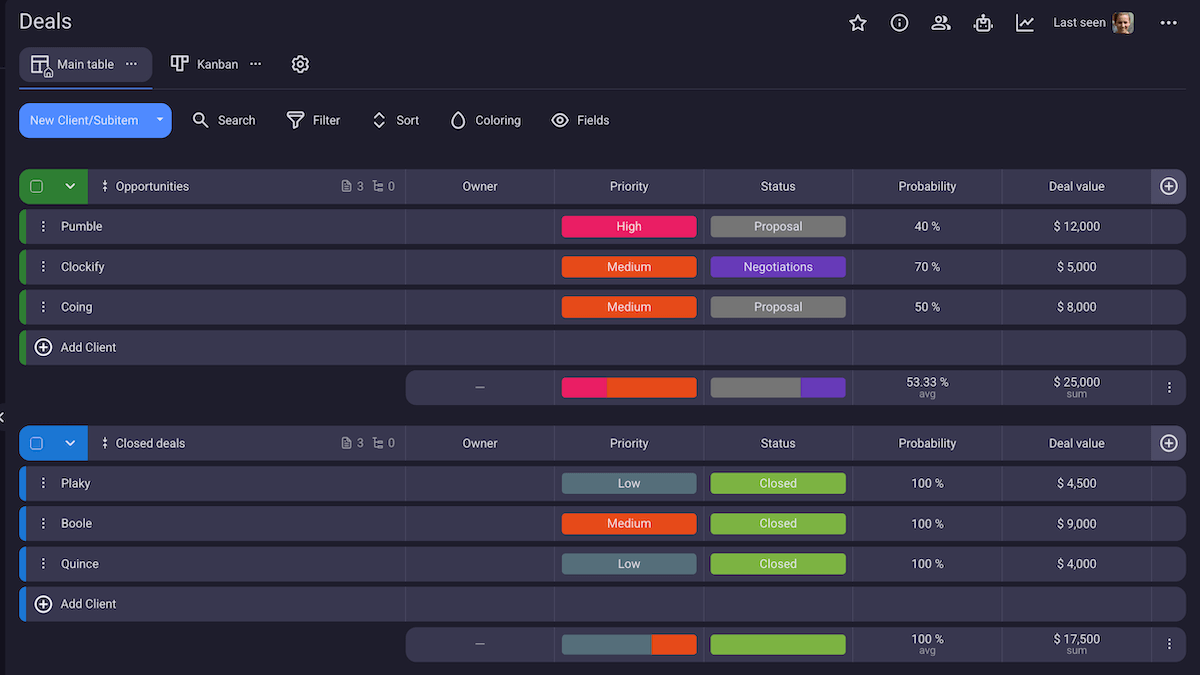
Get Plaky sales deals template
In this template, you can organize your entire sales funnel and plan all your sales deals.
The template consists of prospects divided into 2 sections:
- Opportunities — sales deals you plan (or hope) to achieve, and
- Closed deals — successful deals (i.e., opportunity deals you managed to close).
You can add any information you need about the prospects, thanks to the custom fields, including:
- Priority (High, Medium, Low),
- Deal value expressed in dollars,
- Status (Proposal, Negotiation, Closed),
- Probability of the deal coming through, and
- Owner who is in charge of closing the deal (you can assign more than one or more team members if you want).
But, you can add more information — for example, you can add a link field where you can include all relevant URLs (prospect’s web page, email address, etc.), or a text field for instructions or more details.
The best thing about this template is that it’s created within a project management tool — Plaky by CAKE.com. Having a sales plan in a PM tool brings many benefits:
- You can view your sales plan in the form of a Table, Kanban, or Chart view.
- Your sales plan is in the same place as your other project boards, client lists, sales pipelines, etc.
- Everyone subscribed to a sales deal is immediately notified of all changes (e.g., when the status or priority changes or someone leaves a comment).
💡 Plaky Pro Tip
Sales plans are just one aspect of a sales team’s daily business. Luckily, Plaky has a whole arsenal of templates to help a sales team breathe easier. Check them out:
Simple sales plan template
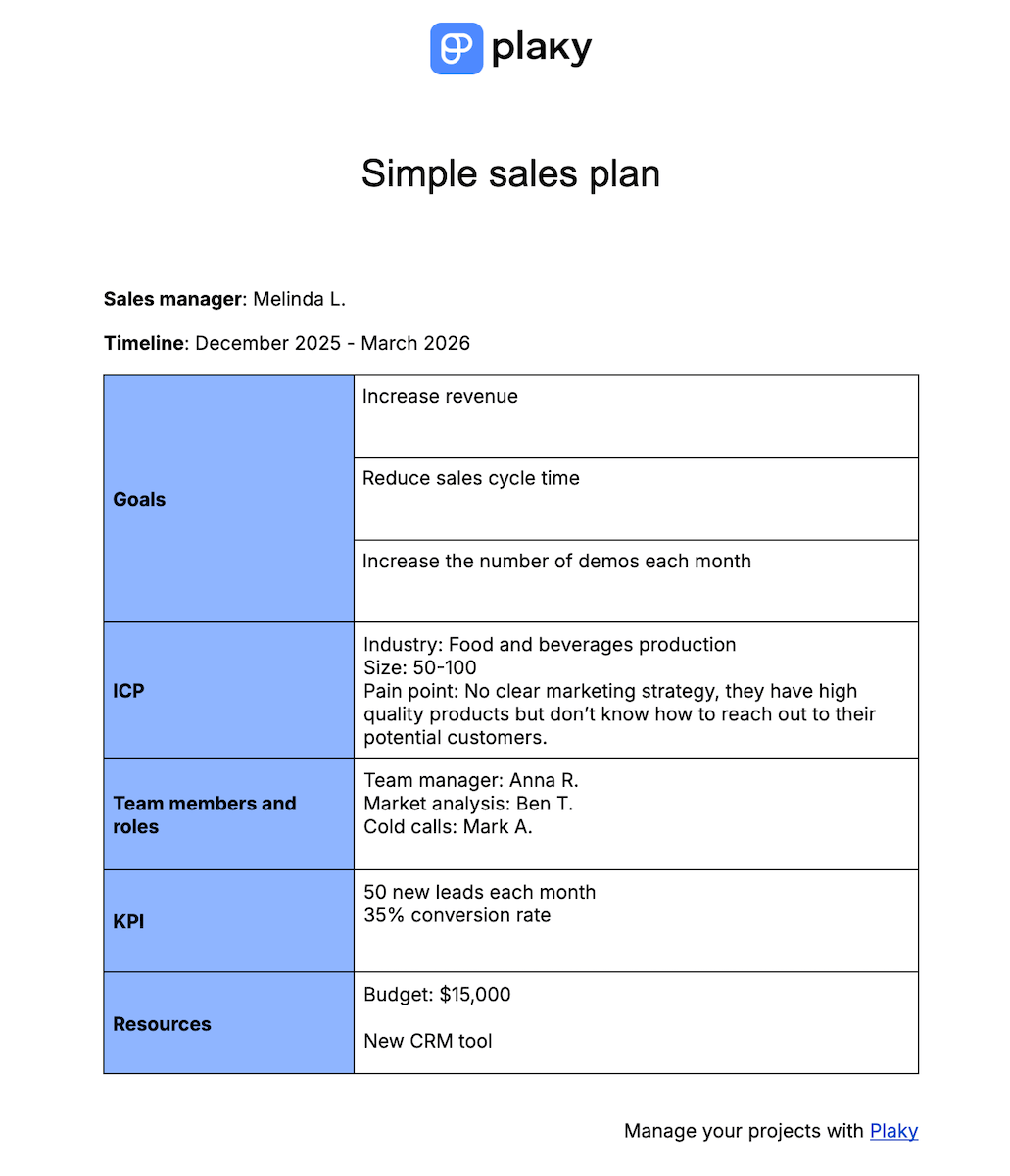
Get our simple sales plan template
If you don’t need the highly customizable and functional sales plan template as the one above, but are instead looking for something more basic, we have a simple sales plan template for you.
In this template, you can plan your:
- Sales goals,
- ICPs,
- Revenue targets,
- Team members and their roles,
- Resources you need, and
- Metrics to measure success.
The simple sales plan template serves as your go-to sales plan for teams of all sizes and in any industry.
Annual sales plan template
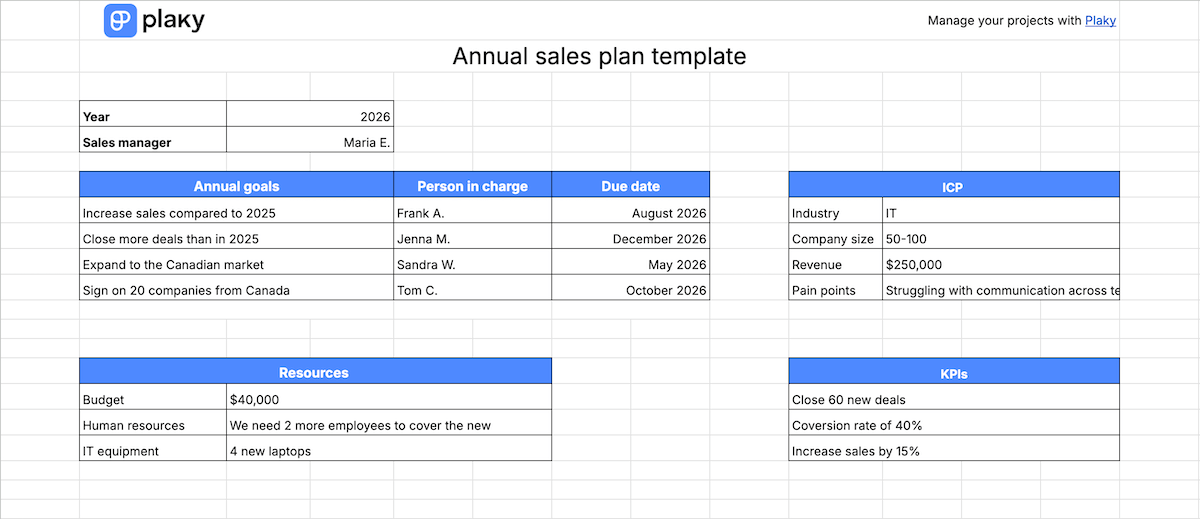
Get our annual sales plan template
The annual sales plan template helps you plan out your sales processes across the entire year.
The main part of this template is a table where you plan sales goals for the upcoming year and assign a member of your team to them. There’s also space to add a due date for each goal — a year is a long time in the business world, and you may reach your goals at different points throughout the year.
Besides this table, there’s also:
- Table listing KPIs,
- A separate sheet with goals divided across months,
- Table with ICP details such as industry, company size, revenue, and
- List of resources, including budget, human resources, and equipment, etc.
Marketing and sales SLA template
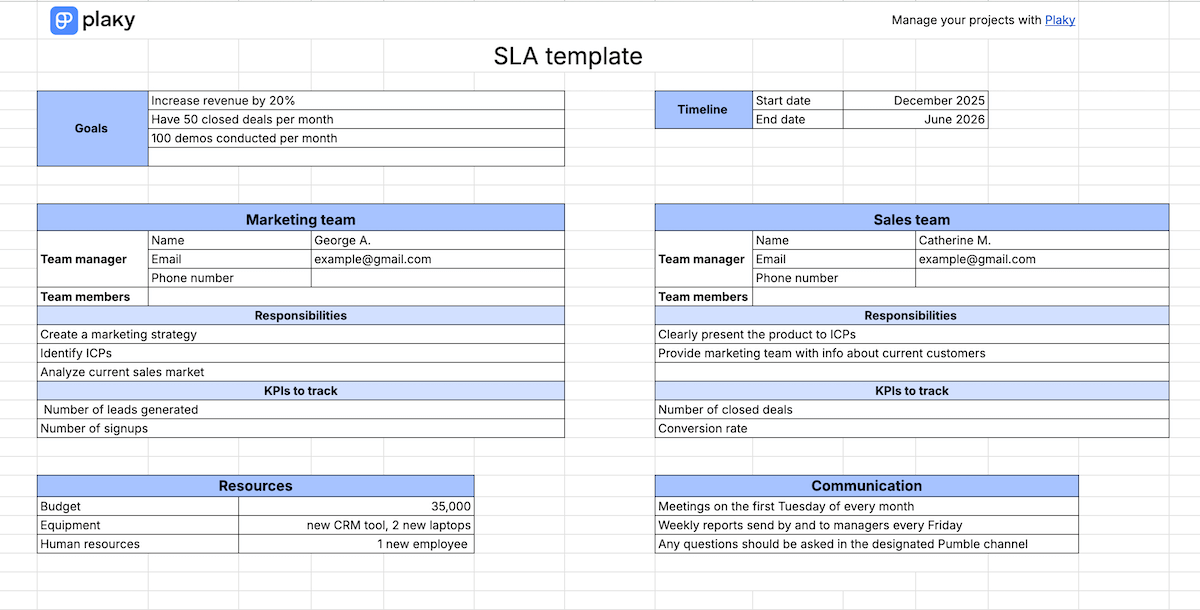
Sales and marketing teams often need to collaborate to achieve the best results possible.
The SLA (Service Level Agreement) serves as a contract between the sales and marketing teams that helps them define common goals, allocate resources, and agree on KPIs and tracking systems.
Besides this, our SLA template defines the responsibilities of both teams, so there’s no confusion or overlap between them.
It also specifies the communication channels — so everyone knows who to ask for assistance and who to keep posted on their progress.
Sales forecasting template
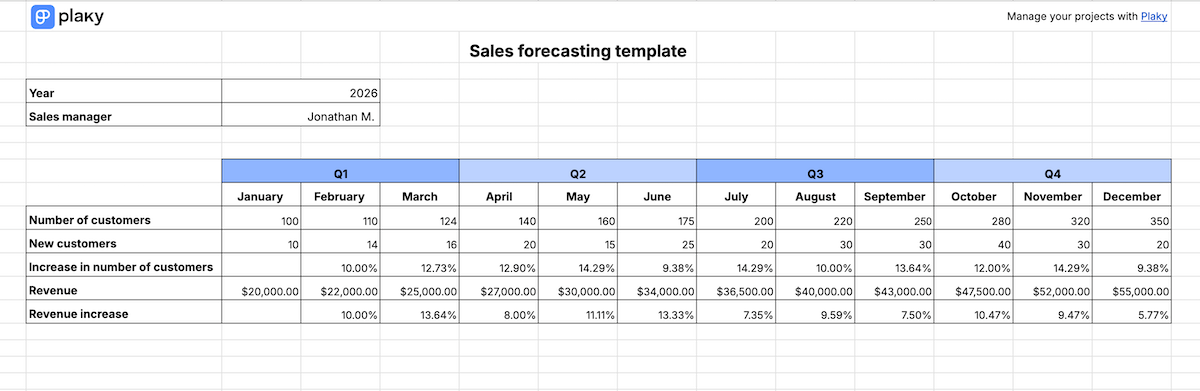
Get our sales forecasting template
You can use this sales forecasting template to predict how many customers you’ll get and how much revenue you’ll generate.
It covers the span of a year divided into months. For each month, you can forecast:
- The total number of customers,
- The expected number of new customers,
- The expected revenue,
- The increase in revenue compared to the previous month, and
- The increase in the number of customers compared to the previous month.
The increase in the number of customers and revenue will be calculated automatically and expressed in percentages.
30-60-90 sales plan template
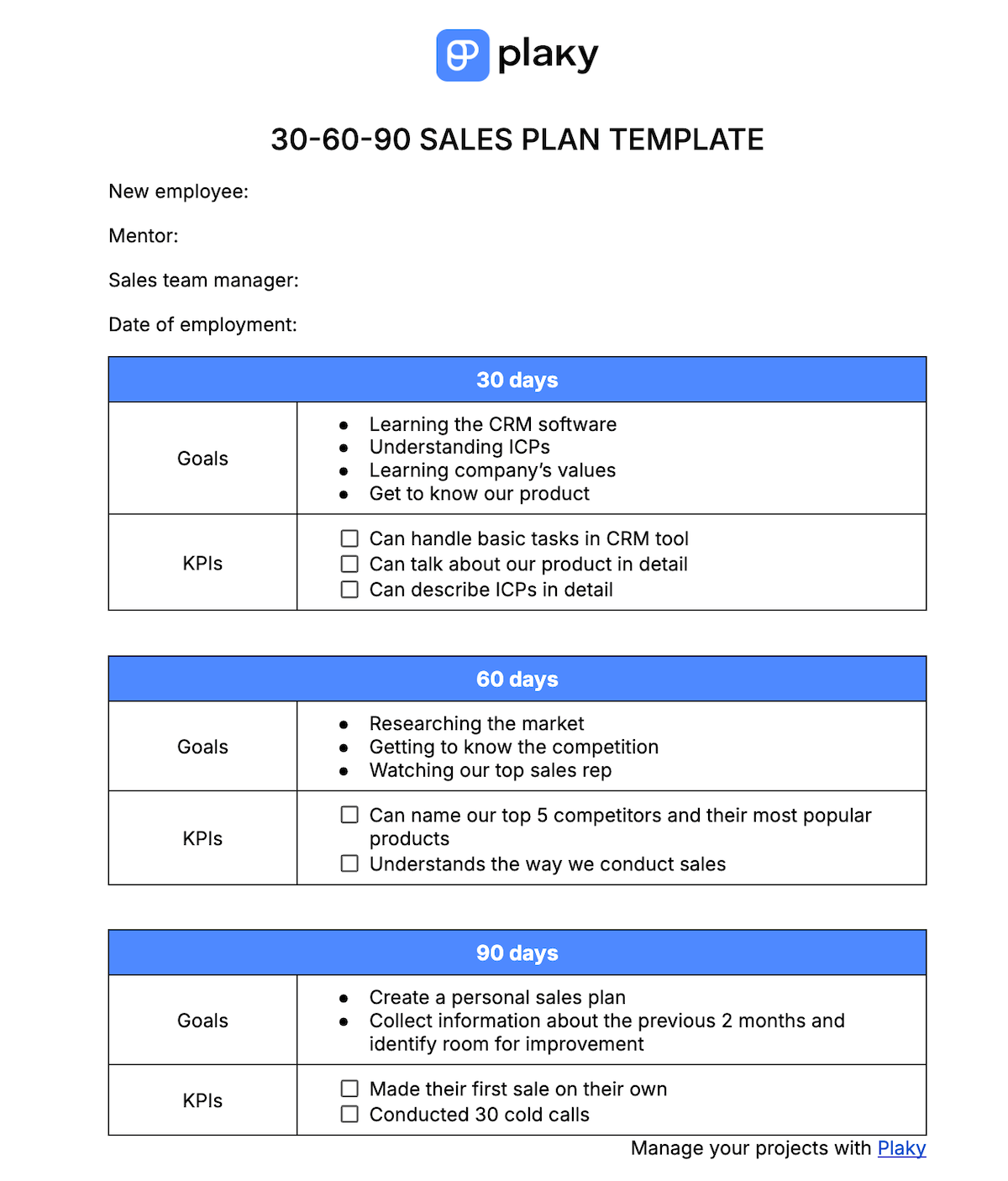
Get our 30-60-90 sales plan template
The 30-60-90 sales template serves as a guideline for new employees in the sales team through the first 90 days on the job. It lists exactly what is expected of them in the first, second, and third month.
The template includes general information about the new employee: name, date of employment, their mentor, and the manager of the sales team they have been placed into.
There’s also a table for each month where you should list the goals you have for the employee and the KPIs used to measure if the goals have been achieved.
Territory sales plan template
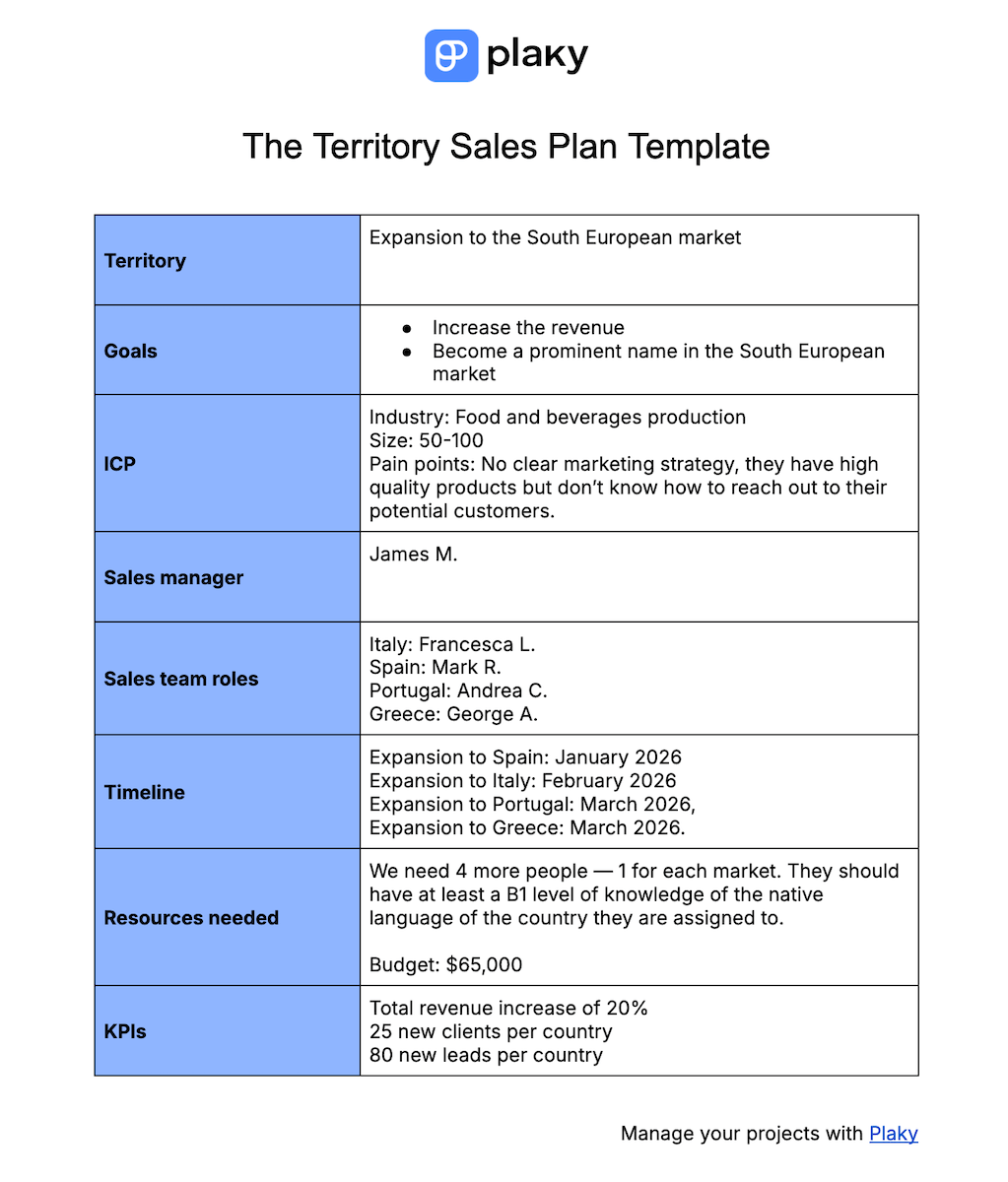
Get our territory sales plan template
This sales plan template focuses on your team’s plan for an expansion to a new territory. This territory may be geographical (e.g., expanding to the European market) or more abstract (e.g., pursuing SMB companies or educational institutions).
In the template, you should write:
- The territory you want to cover,
- Your sales goals,
- ICP details,
- The role each team member will cover,
- The timeline,
- Resources you need, including the budget, and
- KPIs you’ll use to track the success of the expansion.
FAQ
Here are some of the most frequent questions sales managers have when it comes to creating sales plans.
What should be included in the sales plan?
The basic sales plan should include:
- Sales goals,
- ICP (ideal customer profile),
- KPIs (key performance indicators),
- Resources needed,
- Timeline, and
- Role distribution in the team.
Of course, there might be additional information you need to include, depending on the type of the sales plan, such as the prediction of sales rates or the territory you want to cover.
What’s the difference between a sales plan, a business plan, and a sales playbook?
Unlike the sales plan, which focuses on sales goals and how to achieve them, the business plan is broader and includes general company goals and strategies.
A sales playbook, on the other hand, serves as a guide to sales team members. It documents the sales team’s strategies, processes, and best practices.
What is the 30-60-90 rule in sales?
The 30-60-90 rule in sales refers to the 3-month-long onboarding of a new sales team employee. It divides the onboarding process into 3 phases, each lasting 30 days.
What is the 10-3-1 rule in sales?
The 10-3-1 rule in sales is a general rule of thumb that states that for every 10 leads, 3 will move on to the meeting stage, and 1 of them will end up as a closed deal or sale.
Boost your sales with Plaky by CAKE.com
You’ve already seen how you can adopt Plaky’s sales template to simplify your work. But, that’s just the tip of the iceberg as far as Plaky’s functionality’s concerned.
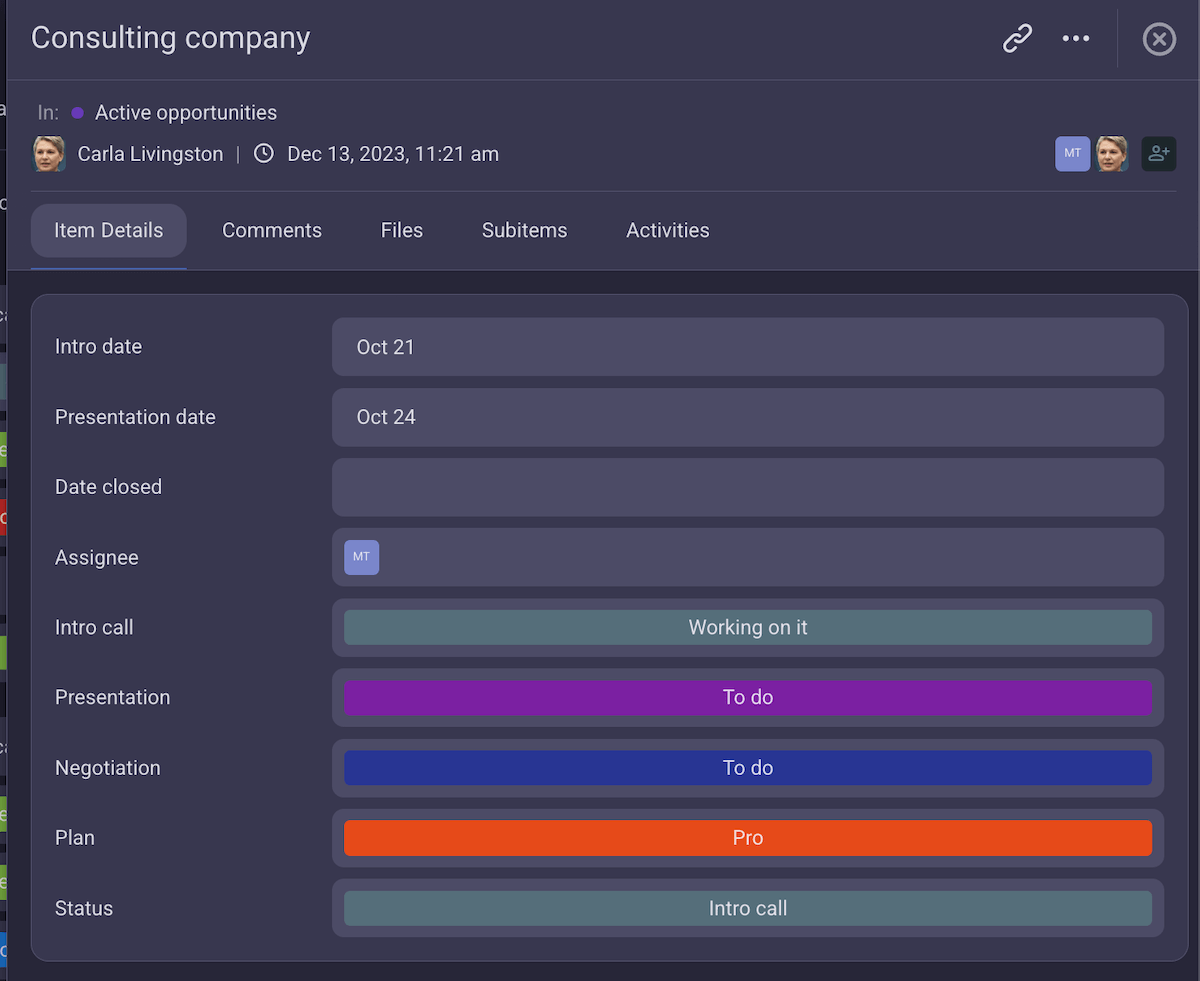
Plaky by CAKE.com is a project management tool organized on the basis of boards filled with items. You can create a board for all types of sales projects — pipeline, client data, tracking revenue, you name it.
Each item card on the board is a vault of information, where you can:
- Include all relevant data (assignee, status, priority, timeline),
- Leave comments and @mentions,
- Share files (e.g., sales proposals, reports, etc.), and
- Create subitems to break complex tasks into manageable chunks.
Plaky’s creators know that not everyone is a technical mastermind, so this PM tool is created to be highly intuitive and user-friendly no matter your skill level. But, if you do find yourself needing help, contact Plaky’s support — its customer support agents are available 24/7 via phone, chat, or email.
Most importantly, all of your data is kept secure thanks to Plaky’s high safety levels.

Finally, Plaky by CAKE.com offers A LOT of functionality for an affordable price. It has 3 pricing options:
- Free forever plan — unlimited users, boards, items, and teams, Table, Kanban, Chart views, summary row, sort & filter options, 7-day activity log, etc.
- Pro plan ($3.99/seat/month) — everything you get for free, plus private boards and spaces, Gantt chart view, automations, bulk actions, conditional coloring, and more, and
- Enterprise plan ($8.99/seat/month) — everything in Pro, plus custom subdomain, SSO, board permissions, unlimited custom fields, customized user profiles, and more.
Bring structure and clarity into your sales processes. Sign up for a free Plaky account today!
How we reviewed this post: Our writers & editors monitor the posts and update them when new information becomes available, to keep them fresh and relevant.