 Updated: June 3, 2025

Notion is a multi-purpose software solution that combines note-taking, task management, knowledge organization, and project management into a single, unified platform for individuals, small teams, and companies.
Let’s explore Notion’s pricing plans and the platform’s free and paid features in more detail.

2025 Notion pricing — key takeaways
In May 2025, Notion introduced a few key changes:
- The Plus and Business plan prices were increased.
- The platform’s feature set was restructured.
- The AI add-on was removed.
The changes will take effect on August 13, 2025.
Users who’ve already purchased the AI add-on will still be able to access its features even after the new pricing has been officially implemented.
How much does Notion cost?
There are 4 Notion pricing plans in total:
- Free,
- Plus,
- Business, and
- Enterprise.
Here’s a quick comparison of Notion’s monthly and yearly fees.
| Notion plan | Monthly price | Yearly price |
|---|---|---|
| Free | $0 | $0 |
| Plus | $12/user/month | $10/user/month |
| Business | $24/user/month | $20/user/month |
| Enterprise | POA | POA |
Notion’s pricing changes in 2025
Notion changed its prices in mid-2024 and again in May 2025, leaving users confused and losing trust. The main concern Notion’s users have shared is that the feature sets included in each plan will reshuffle again, and that they will lose access to their data.
Let’s compare the monthly fees before and after the latest pricing change:
| Notion plan | Old monthly price | Old monthly price + AI add-on | New monthly price | Old yearly price | Old yearly price + AI add-on | New yearly price |
|---|---|---|---|---|---|---|
| Free | $0 | $10 | $0 | $0 | $8 | $0 |
| Plus | $12 | $22 | $12 | $10 | $18 | $10 |
| Business | $18 | $28 | $24 | $15 | $23 | $20 |
| Enterprise | POA | POA | POA | POA | POA | POA |
As you can see, the base price of the Plus plan is the same as before, while the Business plan is more expensive now, if we don’t count the AI add-on.
For users who purchased the add-on, the prices are actually lower now. However, new Plus plan users won’t have access to the Notion AI features — because those are now included only on the Business and Enterprise plans.
Existing users express frustration as Notion seems to have shifted its focus from those who use the app for personal reasons toward business users. The new pricing pushes users to use the Business plan in order to make the most of Notion features, leaving many feeling left out and looking for other options.

Notion free vs paid
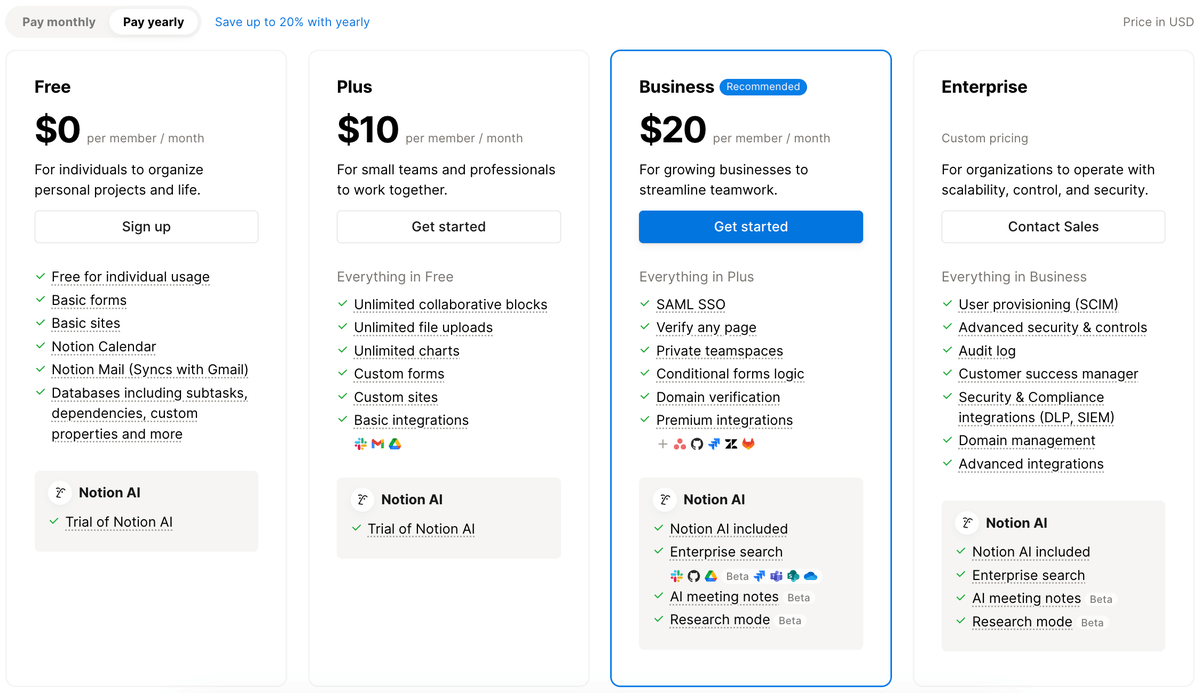
Here’s a quick comparison of Notion’s free plan and its paid counterparts:
| Free | Plus | Business | Enterprise | |
|---|---|---|---|---|
| User type | Individuals | Small teams | Medium and growing teams | Large organizations |
| Page history (days) | 7 | 30 | 90 | Unlimited |
| Guest seats | 10 | 100 | 250 | 250+ |
| Private teamspaces | ❌ | ❌ | ✔ | ✔ |
| Notion AI | Limited trial | Limited trial | ✔ | ✔ |
| Custom database automations | Basic | ✔ | ✔ | ✔ |
| Price | $0 | $10/user/month | $20/user/month | POA |
Notion has changed its pricing and feature set in its paid plans several times since mid-2024, pushing users to higher pricing tiers. Businesses can benefit from Notion’s pricier plans while individuals and smaller teams may find it hard to justify the expense for features they don’t usually need.
Is Notion 100% free?
Yes, Notion is 100% free if you choose Notion’s free plan. In case you require additional work organization and task management features, you’ll have to opt for one of its paid plans:
- Plus — $10/user/month (billed annually),
- Business — $20/user/month (billed annually), or
- Enterprise – POA.
Up until May 2025, it was possible to purchase the Notion AI add-on with any plan, including the free plan. All the users who had the add-on before this date can now keep some of Notion’s AI features, while new users only get a trial of these features.
Is Notion free for students?
Yes, Notion offers a free Education Plus plan for individual students and educators at accredited colleges or universities. You need a valid school email address to sign up for this one-member workspace.
What is Notion’s nonprofit pricing?
Notion is not free for nonprofit organizations. A 50% discount is, however, available for the Plus plan. Only US-based nonprofits are eligible for this discount.
💡Plaky Pro Tip
If you need help choosing the best project management tool for nonprofits, we have just the article for you:
Notion’s pricing plans explained
Let’s delve into Notion’s pricing plans and get a closer look at their distinct feature sets.
Free plan
Notion’s Free plan is an excellent choice for individuals seeking to manage household tasks and personal endeavors, or freelancers looking to organize their tasks and projects.
Attention-worthy features of Notion’s free plan include:
- Unlimited pages and blocks for individual users,
- Unlimited storage,
- Basic page analytics,
- Access to Notion Calendar,
- 7-day page version history,
- Open and closed teamspaces, and
- Basic automations.
Understandably, the Free plan may not fully meet the needs of larger teams or businesses with more complex project requirements due to a lack of various privacy and security options and the following limitations:
- 10 guest collaborators only,
- Only 1 synced database,
- Limited block trial for teams with 2+ members, and
- 5 MB cap on file size.
Because of this, users may be pressured to upgrade their plan to Plus, even though they don’t need additional features.
Plus plan
Notion’s Plus plan is ideal for small teams or groups seeking improved collaboration and organizational features.
This plan is a step up from the free plan and includes several additional features and upgrades, such as:
- Unlimited blocks for teams,
- Unlimited synced databases,
- No file size limit,
- 100 guest collaborators,
- 30-day page history,
- Custom notion.site domains for publishing web pages,
- Custom automations in databases, and
- Priority support.
Overall, the Notion Plus plan is a balanced choice for enhancing project collaboration and organization within small teams.
However, it may not meet the needs of larger businesses with greater security and privacy needs as it’s missing:
- Enhanced security with SAML Sign-On (SSO) and user provisioning (SCIM),
- Workspace analytics, granular admin roles, and audit logs,
- Dedicated success managers,
- Private teamspaces, and
- Advanced teamspace permissions.
The Notion Plus plan costs $10/user/month when paid annually, totaling $120/user/year. If paid monthly, the price rises to $12/user/month, which comes up to $144/user/year.
When it comes to Notion’s AI features, the same rule applies to the Plus plan as to the free plan. Users who already had the AI add-on will be able to continue using these features, while new users can only try them out and upgrade to the Business plan to use Notion AI fully.
New teams can also sign up for a free trial of the Plus plan and test out all its features for up to 30 days.
Business plan
The Business plan is designed for companies seeking to unify multiple teams and tools within Notion.
This comprehensive plan encompasses everything in the Plus plan and a few other additional features and upgrades, such as:
- 90-day page history,
- Advanced page analytics,
- 250 guest collaborators,
- Private teamspaces,
- SAML Single Sign-On,
- Workspace PDF exports, and
- Notion AI features.
Despite this diverse set of powerful functionalities, the Business plan still fails to provide key security features, such as granular admin roles and audit log. Moreover, Business plan users still don’t get access to dedicated customer success managers.
The Notion Business plan costs $20/user/month when paid annually, totaling $240/user/year. If paid monthly, the price rises to $24/user/month or $288/user/year.
Another con is that teams with personal or educational domains aren’t eligible to trial the Business plan and its features. This is only available to teams with a professional domain.
Enterprise plan
Notion’s Enterprise plan is designed to meet the specific needs of larger organizations. It enhances security measures and provides advanced features that streamline workflows, collaboration, and project management.
The most notable features and upgrades offered with this plan include:
- Unlimited page history,
- Advanced teamspace permissions,
- Advanced workspace and teamspace security controls,
- Managed users dashboard and controls,
- Guest invite requests,
- Workspace analytics,
- Audit logs,
- Granular admin roles,
- User provisioning (SCIM),
- Admin content search,
- Domain management, and
- Workspace consolidation.
Notion’s most expensive plan also includes security and compliance integrations, as well as HIPAA compliance.
Enterprise users are also the only ones with access to dedicated customer success managers.
Notion’s AI pricing
New users who want to use Notion AI features without restrictions can pick the Business plan, which starts at $20/user/month when paid annually.
Notion AI enhances productivity and writing quality within the Notion workspace using artificial intelligence. Some of the features include:
- Q&A — Get information about your workspace and tasks instantly.
- Autofill — Automate tasks, e.g., summarize meeting notes and generate action items.
- Writer — Get writing assistance and access to AI-generated content.
- Database creation — Watch as a ready-to-go database is created based on your needs.
How does Notion compare to its competitors?
Before deciding whether Notion is the right choice for you, you can compare it to its main competitors.
We’ve selected 3 apps people use instead of Notion and created an overview of their prices and features.
Notion vs Evernote pricing
Evernote is a popular alternative to Notion and has similar pricing tiers. Here’s how the prices of these 2 platforms compare per person per month if paid annually:
| Notion | Evernote | |
|---|---|---|
| Free plan | ✔ | ✔ |
| Plus/Personal | $10 | $10.83 |
| Business/Professional | $20 | $14.16 |
| Enterprise | POA | POA |
Evernote also offers AI features, and similarly to Notion, they’re available on the Professional plan, which is the equivalent of Notion’s Business plan.
Both apps have a free plan, but the difference is that Evernote limits the total monthly uploads to 250 MB rather than limiting the individual file size upload to 5 MB.
Confluence vs Notion pricing
Confluence is a collaboration app that tailors its pricing tiers to different team sizes, meaning there’s no difference in the price between an individual and 10 people, for example.
Let’s break down the monthly prices of Confluence and Notion for a team of 10 when paid annually:
| Notion | Confluence | |
|---|---|---|
| Free plan | ✔ | ✔ |
| Plus/Standard | $100 | $650 |
| Business/Premium | $200 | $1,225 |
| Enterprise | POA | POA |
The Confluence Enterprise plan is only available to teams with 801+ members.
The trend of enabling AI features only for higher pricing tiers is notable here as well, as Confluence doesn’t offer them on Free and Standard plans.
Coda vs Notion pricing
Coda is a similar app to Notion that focuses more on data management. Many Notion users found Coda to be a good alternative for their daily use.
Here’s how their prices compare per person per month if paid annually:
| Notion | Coda | |
|---|---|---|
| Free plan | ✔ | ✔ |
| Plus/Pro | $10 | $10 |
| Business/Team | $20 | $30 |
| Enterprise | POA | POA |
Both Notion and Coda offer a free plan and a 30-day page history on the Plus/Pro plans.
The main difference between these 2 apps is that Coda includes AI features in their Pro plan while Notion leaves them out in their equivalent Plus plan.
💡 Plaky Pro Tip
What are the best team management tools for boosting team collaboration and productivity? Learn in the article below:
Is Notion the right option for you?
Notion offers a range of advanced features and benefits that make it a valuable choice for individuals and teams looking to maximize their productivity and organization.
However, whether Notion is worth paying for will depend on your specific needs and preferences.
Based on our research, the most widespread positive feedback from the average Notion user centers around the software’s:
- Versatility — The platform adapts to a wide range of use cases, from personal note-taking to collaborative project management, making it one of the best daily planner apps.
- Customization options — Users can tailor their workspaces to their unique needs with ease.
Users also often commend Notion’s:
- User-friendly interface,
- Real-time collaboration features,
- Cross-platform compatibility, and
- Wide range of deployment options (web, mobile, desktop).
That said, Notion isn’t without fault. Though experiences vary, some of the drawbacks users generally mention include:
- The platform’s steep learning curve,
- Pricing, especially for larger teams,
- No true offline mode,
- Limited built-in integrations,
- Unpredictable changes in pricing and feature sets,
- Performance issues that arise with larger databases, and
- Limited functionalities of the mobile app.
💡 Plaky Pro Tip
How does Notion compare to similar task and project management platforms? Learn more about it here:
Need an affordable Notion alternative + more features? Try Plaky by CAKE.com
If you like Notion’s extensive features but find its pricing to be too high, you should give Plaky by CAKE.com a try.
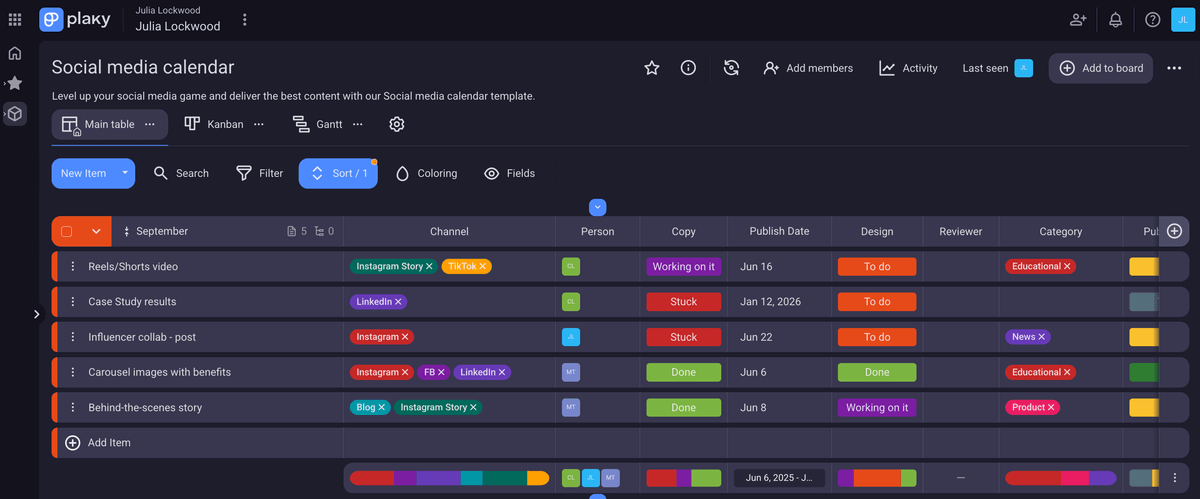
Plaky is a flexible project management tool you can use as an individual or within a team. The robust free plan doesn’t restrict the number of:
- Spaces,
- Project boards,
- Users,
- Items, and
- Files.
You also have the option to start from scratch or utilize pre-made project management templates tailored to specific industries like:
- Software development,
- Marketing,
- Sales,
- HR, and more.
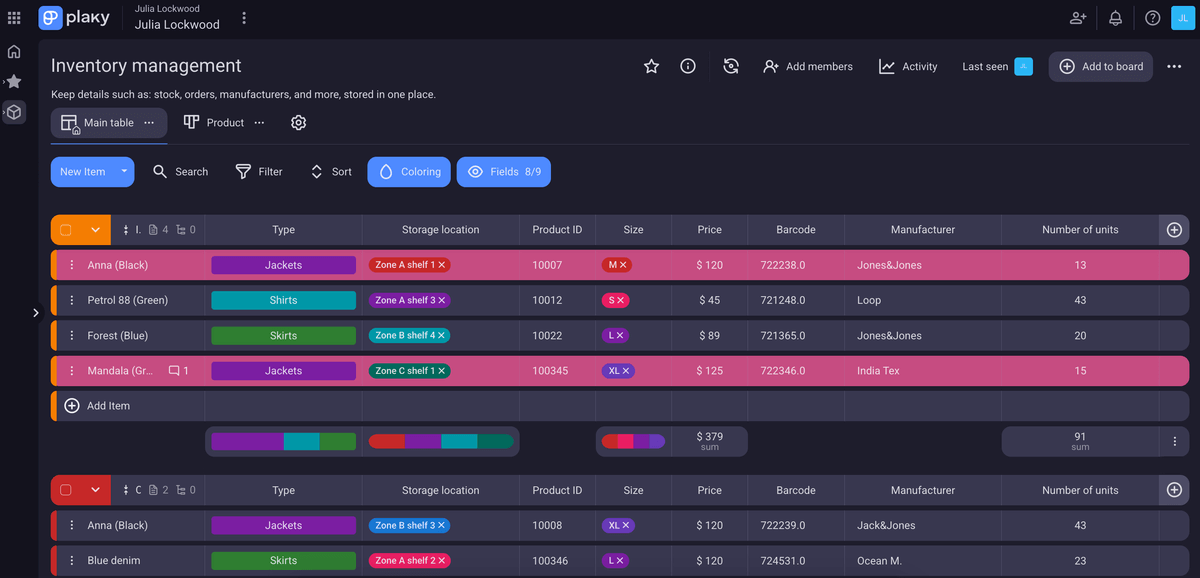
With its highly customizable features, Plaky can adapt to the needs of different teams and industries, offering ways to visualize project data in an easily accessible and manageable way.
Plus, teams and organizations that want to further invest in project excellence and upgrade for more features can choose between 2 affordable paid plans — Plaky Pro and Plaky Enterprise.
Notion vs Plaky by CAKE.com comparison
Plaky and Notion — while both valuable in the field of project management and collaboration — have notable distinctions.
Here’s a quick comparison of Notion vs Plaky:
| Notion | Plaky by CAKE.com | |
|---|---|---|
| Main use | Note-taking, knowledge management, and task management software | Project and task management, as well as team collaboration software |
| Main features | Note-sharing, document collaboration, and knowledge sharing | File sharing, real-time team communication via comments and mentions, and instant notifications |
| Free plan limits | Limited to individual use and only 10 guest collaborators, 5 MB cap on file size, AI-generated customer support | Unlimited users and teams, 10 MB cap on file size, 24/7 customer support |
| Paid plans start at | $10/user/month | $3.99/user/month |
A major difference between Notion and Plaky is that Plaky has made essential project management features unlimited across all of its plans.
In Plaky, you can invite all your team members and collaborate with them on projects without restrictions.
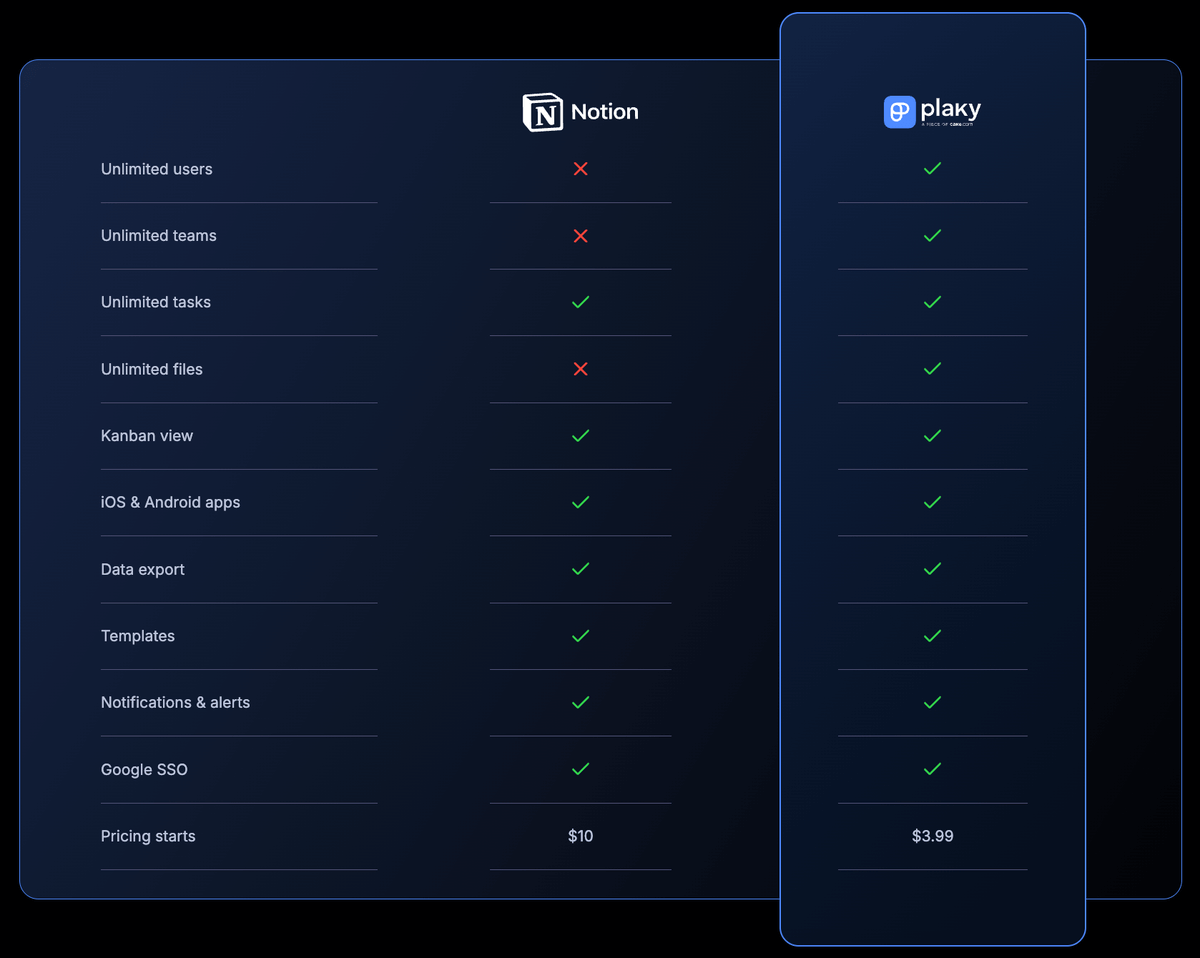
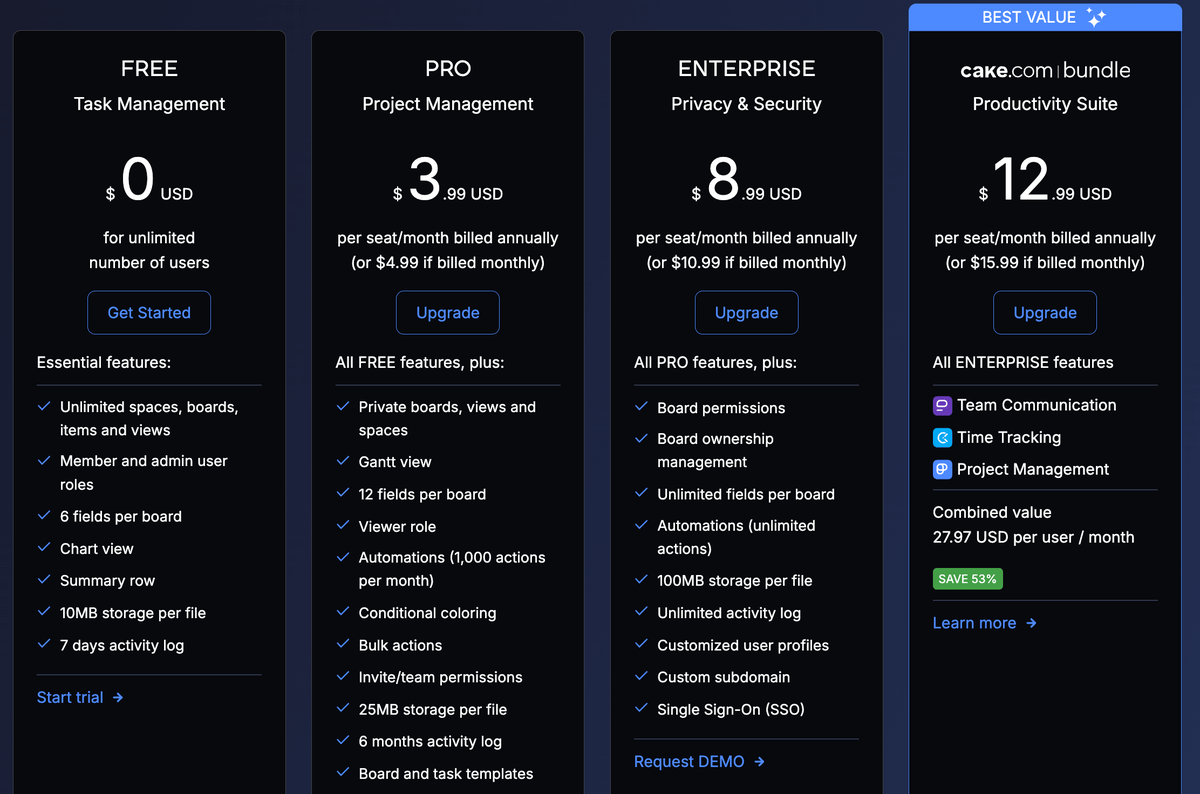
Plaky’s Pro and Enterprise paid plans encompass all the project management features available in the free version — and provide some major upgrades, including:
- Larger file size cap (up to 100 MB per file),
- Additional or unlimited custom fields,
- Additional board views and user groups,
- Extended activity log history,
- Advanced board and workspace permissions, and
- Additional security options.
But how much would you save if you opted for Plaky instead of Notion? Here’s how much you’d have to pay for these apps based on your team size (when billed annually):
| Team size | Plaky Pro | Plaky Enterprise | Notion Plus | Notion Business |
|---|---|---|---|---|
| 10 | $39.9 | $89.9 | $100 | $200 |
| 50 | $199.5 | $449.5 | $500 | $1,000 |
| 100 | $399 | $899 | $1000 | $2,000 |
Overall, Notion stands out as a versatile platform that serves various purposes and offers several paid plans to meet different user requirements.
However, Notion’s steep learning curve and pricing can easily deter users and prompt them to look for more affordable and overall more user-friendly options.
As one of Notion’s best alternatives, Plaky shines as a reliable, flexible, and budget-friendly organizational tool.
Offering an extensive feature set even in its free plan, Plaky by CAKE.com is a cost-effective choice that caters to individuals and teams of all sizes and across many different industries.
Eager to streamline work processes and maximize your savings? Sign up for Plaky’s free account today!
Get started with Plaky by CAKE.com
How we reviewed this post: Our writers & editors monitor the posts and update them when new information becomes available, to keep them fresh and relevant.