When people are showing interest in your product or service — through your website, newsletters, ads, etc. — it’s all so exciting… Until it gets overwhelming and you risk losing their interest and missing opportunities.
If you’re serious about your business, you must rely on lead tracking to know where potential customers stand and what action to take instead of guessing what’s next.
Let us take you through the essentials of lead tracking — what it is, why it matters, and how to build a process that’ll help your teams close more deals.

What is lead tracking?
Lead tracking means recording and analyzing interactions that potential customers (leads) have with your business. It’s part of lead management, which is the entire process of handling leads from initial contact to conversion.
The aim of lead tracking is to provide visibility into where each lead is in the sales funnel and which activities or channels yield the best results.
The term lead is closely related to prospects and opportunities, but these are separate notions:
- Leads — They have shown some interest, but you know little about them beyond contact info and source.
- Prospects — They are leads qualified based on certain criteria (like fit or budget) who you consider high-potential customers.
- Opportunities — They are prospects who have expressed a clear intent to buy, so your team can create forecastable deals.
Key concepts in lead tracking
Now that we’re clear on what a lead is, let’s explain some other key concepts in lead tracking before we delve deeper into the topic:
- Lead source — the channel or campaign where the lead originated,
- Lead status/stage — where the lead is in your sales process,
- Lead ownership — the person responsible for managing and following up with the lead,
- Ideal Customer Profile (ICP) — the blueprint of your best-fit customer, helping you assess whether a lead is worth pursuing, and
- Pipeline — a visual workflow showing all leads by stage.
All of this falls under customer relationship management (CRM) — a system for storing and tracking all lead- and customer-related information and communication.

Types of leads to track
Most businesses track 3 main types of leads based on their readiness to buy:
- Marketing Qualified Leads (MQLs) — These leads have shown interest in your business through marketing interactions and are curious, but they aren’t ready for a sales conversion yet.
- Sales Qualified Leads (SQLs) — These leads have responded to outreach, so they are further down in the sales funnel and ready for 1-on-1 sales engagement.
- Product Qualified Leads (PQLs) — These leads (common in SaaS and product-led companies) tried your product (e.g., through a free trial) and showed buying intent (like exploring premium features).
You may also come across the term Service Qualified Lead (ServQL) — a less common one that service-based businesses use for customers who express interest in upgrading or adding services.
How to optimize your lead tracking process
Tracking leads isn’t just storing information. Here are 5 steps you can follow to stay organized and win more leads.
#1 Define a clear pipeline
Your team needs a shared understanding of where each lead stands in the buying journey. So, start by defining stages from first contact to customer — for example:
- New lead — someone who’s entered your system but hasn’t been contacted yet,
- Contacted — a lead who you reached out to but haven’t received a response yet,
- Qualified — a lead that’s shown genuine interest, so sales considers them worth pursuing,
- Opportunity — a lead that’s actively considering your product/service,
- Negotiation — a lead in the final stage, discussing prices, terms, or contract details, and
- Closed-won/lost — the outcome stage where your lead either becomes a customer or decides not to proceed (at least for now).
Just make sure to use consistent criteria — if one team member considers a lead sales-ready after a demo and another one does so after an email reply, your reporting becomes unreliable.
So, each stage should reflect a specific level of engagement, and it should be obvious what comes next.
#2 Standardize data entry
Accurate planning and automation rely on clean, consistent data. If your team enters information in different formats or leaves fields blank, your CRM system quickly becomes cluttered and confusing.
Decide which fields are essential, such as:
- Name/company,
- Email,
- Phone,
- Lead source,
- Lead owner, and
- Current stage.
Bonus tip: For fields such as lead source, it’s best to have a predefined list (e.g., web form, referral, social media) — it’s easy to pick 1 option from the dropdown menu and then later track which channels perform best.
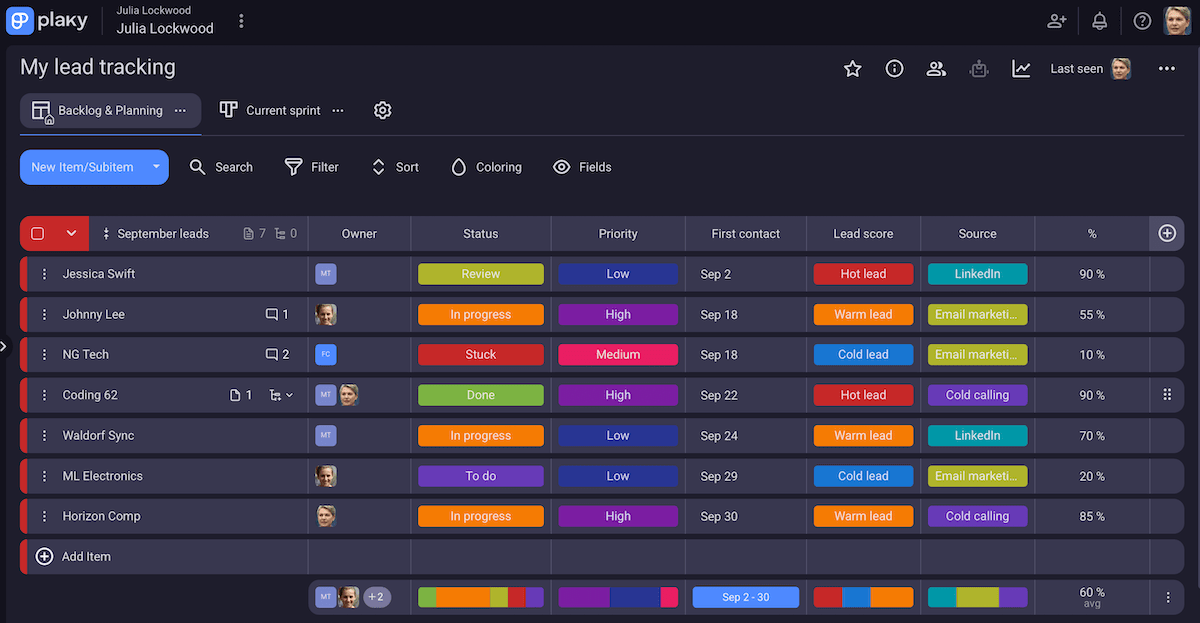
#3 Segment your leads
Not all leads are equal, so don’t treat them the same way if you want to save time and money. In contrast, when you segment leads into meaningful groups, you can prioritize promising opportunities more easily.
Besides the lead source, common segmentation criteria include:
- Demographics — industry, company size, location,
- Behavior — freebie downloads, email opens, demo requests, and
- Lead score — assigning points based on closeness to your ideal customer or engagement.
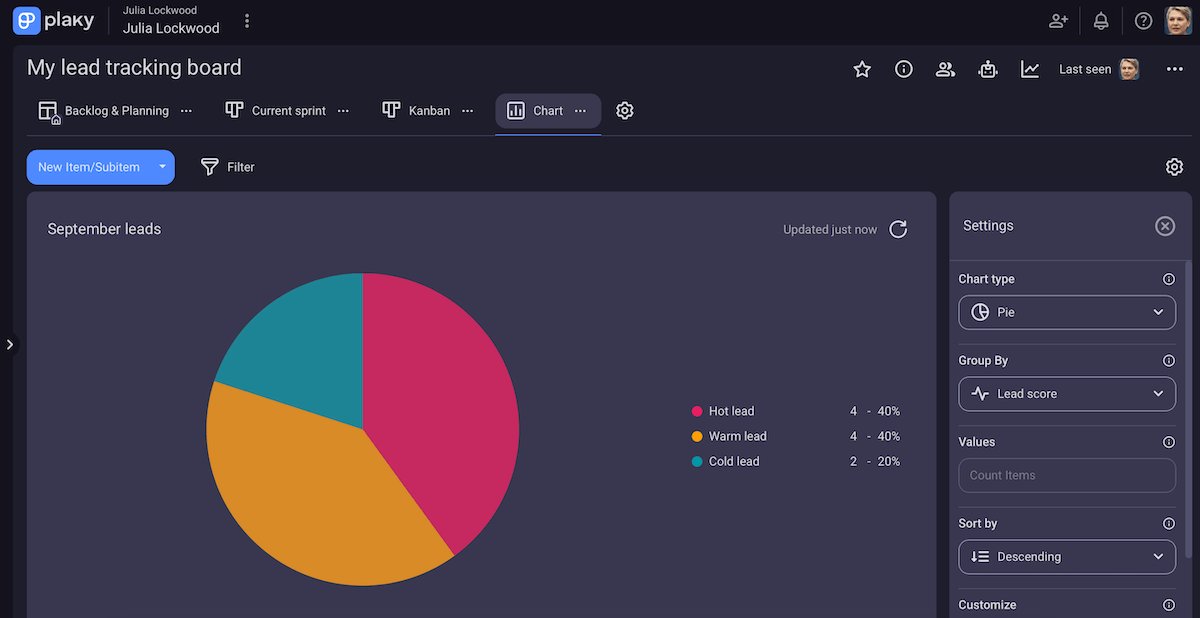
Lead scoring, in particular, is one of the most effective ways to identify which leads are sales-ready. In addition to the previously mentioned MQL/SQL/PQL distinction, this is another popular one:
- Cold leads — They show low engagement and don’t fully match your ICP. Still, you might want to keep them in a nurturing campaign (e.g., send educational content to build trust over time).
- Warm leads — They show some interest (attending your webinar or visiting your pricing page) and align well with your target market, but they aren’t ready to buy yet. So, your next step should be providing more personalized communication.
- Hot leads — They are highly engaged (for instance, they responded to outreach) and fit the ICP. The next step is handoff to sales for direct proposal or negotiation.
#4 Automate repetitive tasks
Automation is one of the biggest advantages of modern CRM software. The goal isn’t to replace human judgment, but to handle repetitive, time-consuming tasks and focus on strategy instead of admin work.
So, you can automate tasks such as:
- Lead assignment — Auto-assign new leads to reps based on certain rules (like territory or industry).
- Moving tasks — Have your CRM tool automatically move completed items to avoid crowding the list of active tasks.
- Notifications — Subscribe the manager when the status field changes to Stuck.
These automations ensure consistency and save time — 2 important factors in lead management success.
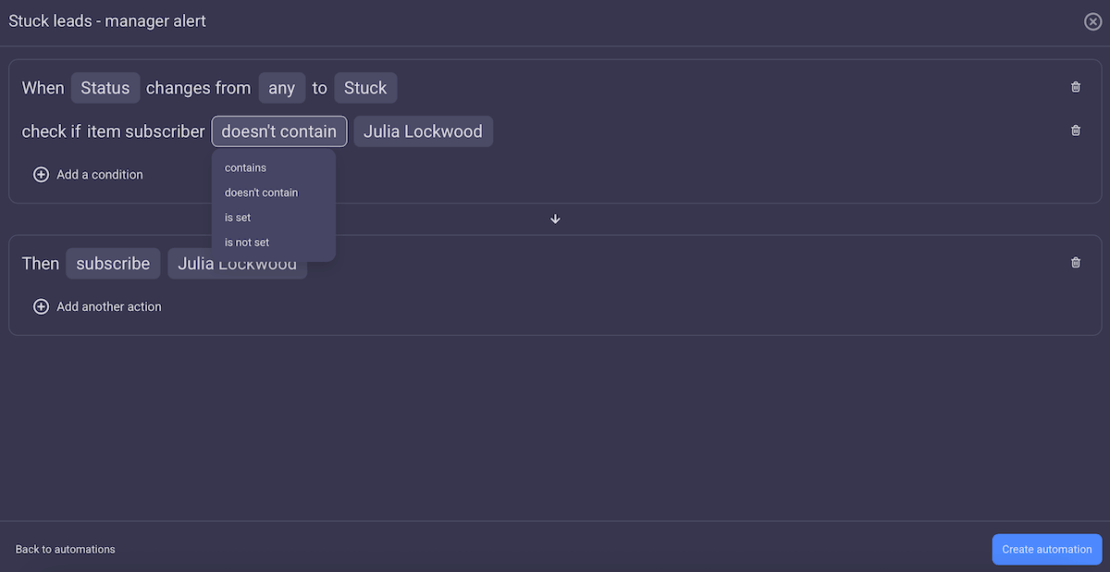
However, you shouldn’t automate everything. Tasks that require judgement or strategic thinking should stay manual — for example, deciding when a lead is truly qualified for the next stage.
#5 Keep your CRM updated
Over time, old records and irrelevant fields can pile up, making your CRM tool difficult to navigate. So, don’t forget to have regular maintenance sessions (monthly or quarterly) to merge duplicates, archive outdated activities, and so on.
In addition, review your fields, automation rules, and pipeline stages to make sure they still reflect how your team actually works.
Keeping your system current results in accurate reports and better adoption from your team.
Try Plaky by CAKE.com for free
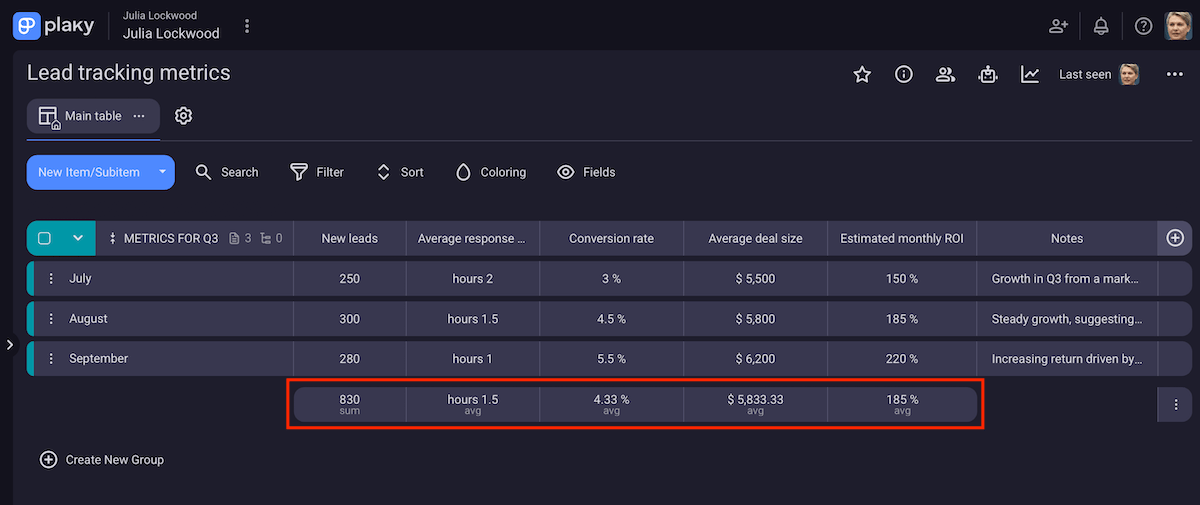
Key lead metrics to monitor
Let’s look at key metrics every sales manager should track:
- Number of new leads — how many leads entered your system during a specific period,
- Lead response time — the average time it takes your team to contact a new lead,
- Pipeline velocity — how quickly and efficiently leads move through your pipeline to generate revenue,
- Sales cycle length — the average time it takes for a lead to become a customer,
- Lead conversion rate — the percentage of leads who become paying customers,
- Average deal size — the average value of closed-won leads,
- Customer lifetime value (CLV) — the total revenue you expect from a customer throughout their relationship with your business, and
- Return on investment (ROI) — how much profit you earn from your lead generation and sales activities compared against the money you spend on them.
When viewed together, these metrics give a complete picture of how effectively your team is transforming interest into revenue.
Why is lead tracking important?
Tracking leads is the foundation of data-driven sales and strategic marketing planning.
For marketing teams, tracking shows which channels, campaigns, and content generate the best leads. Those insights help marketers to:
- Optimize campaigns,
- Allocate budgets effectively, and
- Demonstrate ROI.
For sales teams, tracking ensures that no lead is lost after the handoff. Knowing where each lead is in the pipeline and what previous interactions have occurred allows sales reps to:
- Focus on the most promising leads,
- Respond faster, and
- Improve forecasting accuracy.
Moreover, lead tracking fosters better communication and alignment between marketing and sales. Shared insights into lead status and behavior enables both teams to coordinate follow-ups and nurturing strategies.
This further leads to benefits such as enhanced efficiency and better customer experience overall.
Here’s what our contributor, Jason Smit — a senior digital marketing leader — had to say:

“Our sales and marketing teams use our lead tracking system to stay synchronized. Marketing can see exactly which content pieces are turning into conversions, while sales get real-time insights into prospect behavior.
Lead tracking also reduces data silos; by centralizing your lead data, you can get a holistic view that’s absolutely critical, especially in the B2B space. We can now trace a lead’s entire journey, from their first blog visit to their latest sales call, which helps us identify bottlenecks and opportunities we might never have known even existed.”
Track leads effortlessly with Plaky by CAKE.com
Optimizing your lead tracking process is only possible if you have an effective system — which includes reliable CRM software like Plaky.
In fact, Plaky’s handy features make it a safe, centralized workspace where you can:
- Store lead information — Use custom fields to add different kinds of data (text, numbers, links, dates, etc.) and adjust Plaky to your specific flow. Also, upload files to avoid scattered folders and outdated attachments.
- Collaborate with your team — Leave comments to preserve context on the platform and @mention colleagues to quickly grab their attention.
- Set up automations — Have Plaky take care of repetitive tasks with built-in board automations, leaving you more time to actually build relationships and close deals.
- Use the Kanban view — Track how leads move forward with a Kanban tool. Each column in Plaky represents a certain stage, allowing you to drag-and-drop leads or have automation rules move them when you change the status.
- Manage other tasks and activities — Beyond tracking leads, use Plaky by CAKE.com to assign responsibilities, plan budgets, create to-do lists, and more.
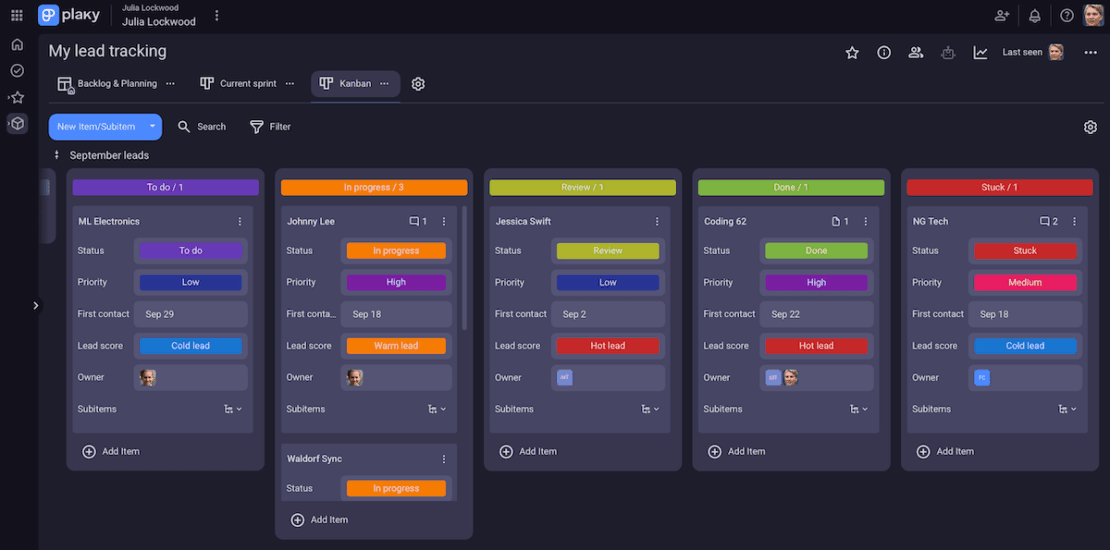
In case you need inspiration for your boards or want to save setup time, check out Plaky’s template center (e.g., contact list, deals template).
And, for professionals who travel or work remotely, Plaky’s mobile apps (iOS and Android) can significantly improve speed and consistency in lead tracking.
Visit Plaky’s pricing page to see which package suits your team the most:
- The generous free tier,
- The popular Pro plan (only $3.99/seat/month), and
- The all-encompassing Enterprise plan (available at an incredible $8.99/seat/month).
Streamline your lead tracking, save time, and close more deals — all with Plaky by CAKE.com.