



Notion is a multi-purpose software solution that combines note-taking, task management, knowledge organization, and project management into a single, unified platform for individuals, small teams, and companies.
Notion has recently updated their pricing plans, with different tiers for different use cases.
But, what do you actually get at each level — and what will you pay once you move beyond the Free plan?
Let’s explore Notion’s pricing plans and the platform’s free and paid features in more detail.
How much does Notion cost?
Prices last verified: October 13, 2026
There are 4 Notion plans: Free, Plus, Business, and Enterprise.
The Plus plan costs $10 per member per month (billed annually). The Business plan costs $20 per member per month (billed annually). For price details for the Enterprise plan, you have to contact their sales representative.
Here’s a breakdown of Notion’s prices:
| Notion plan | Precios anuales | Precios mensuales | Best for |
|---|---|---|---|
| Gratis | $0 | $0 | Small-scale personal use |
| Plus | $10/member/month | $12/member/month | Small teams and professionals |
| Business | $20/member/month | $24/member/month | Growing businesses |
| Enterprise | Custom | Custom | Large organizations |
The annual rates are the more useful benchmark for comparing Notion with other SaaS tools because they represent the lower advertised price. With annual billing, you can save up to 20% compared to monthly billing.
Additionally, Notion charges paid plans by member, while guests are free. Guests can access the individual pages they are invited to but don’t get the same workspace-wide access as members.
Is Notion free? Free vs. paid plans
Yes, Notion has a 100% free plan. But, if you require additional work organization and task management features, you’ll have to opt for one of its paid plans:
- Plus — $10/user/month (billed annually)
- Business — $20/user/month (billed annually)
- Enterprise – POA
Here’s a quick comparison of Notion’s free plan and its paid counterparts:
| User type | Individuals | Small teams | Medium and growing teams | Large organizations |
|---|---|---|---|---|
| Page history (days) | 7 | 30 | 90 | Ilimitado |
| Guest seats | 10 | Ilimitado | Ilimitado | Ilimitado |
| Private teamspaces | ❌ | ❌ | ✔ | ✔ |
| Notion AI | Limited trial | Limited trial | ✔ | ✔ |
| Custom database automations | Basic | ✔ | ✔ | ✔ |
| Price | $0 | $10/member/month | $20/member/month | POA |
Is Notion free for students?
Yes, Notion offers a free Education Plus plan for individual students and educators at accredited colleges or universities. You need a valid school email address to sign up for this one-member workspace.
What is Notion’s nonprofit pricing?
Notion is not free for nonprofit organizations. A 50% discount is, however, available for the Plus plan. Only US-based nonprofits are eligible for this discount.
💡 CONSEJO PRO DE PLAKY
If you need help choosing the best project management tool for nonprofits, we have just the article for you:
Notion’s pricing plans explained
Let’s delve into Notion’s pricing plans and get a closer look at their distinct feature sets.
Plan gratis
Notion’s Free plan is an excellent choice for individuals seeking to manage household tasks and personal endeavors, or freelancers looking to organize their tasks and projects.
Attention-worthy features of Notion’s free plan include:
- Unlimited pages and blocks for individual users
- Unlimited storage
- Basic page analytics
- Access to Notion Calendar
- 7-day page version history
- Open and closed teamspaces
- Basic automations
Understandably, the Free plan may not fully meet the needs of larger teams or businesses with more complex project requirements due to a lack of various privacy and security options and the following limitations:
- 10 guest collaborators only
- Only 1 synced database
- Limited block trial for teams with 2+ members
- 5 MB cap on file size
Because of these limitations, users may be pressured to upgrade their plan to Plus, even though they don’t need additional features.
Plus plan
Notion’s Plus plan is ideal for small teams or groups seeking seamless collaboration and organizational features.
This plan is a step up from the free plan and includes several additional features and upgrades, such as:
- Unlimited blocks for teams
- Unlimited synced databases
- No file size limit
- Unlimited guest collaborators
- 30-day page history
- Custom notion.site domains for publishing web pages
- Custom automations in databases
- Priority support
Overall, the Notion Plus plan is a balanced choice for enhancing project collaboration and organization within small teams.
However, it may not meet the needs of larger businesses with greater security and privacy needs as it’s missing:
- Enhanced security with SAML Sign-On (SSO) and user provisioning (SCIM)
- Workspace analytics, granular admin roles, and audit logs
- Dedicated success managers
- Private teamspaces
- Advanced teamspace permissions
The Notion Plus plan costs $10/member/month when paid annually, totaling $120/member/year. If paid monthly, the price rises to $12/member/month, which comes up to $144/member/year.
When it comes to Notion’s AI features, the same rule applies to the Plus plan as to the free plan. Users who already had the AI add-on will be able to continue using these features, while new users can only try them out and upgrade to the Business plan to use Notion AI fully.
New teams can also sign up for a free trial of the Plus plan and test out all its features for up to 30 days.
Business plan
The Business plan is designed for companies seeking to unify multiple teams and tools within Notion.
This comprehensive plan encompasses everything in the Plus plan and a few other additional features and upgrades, such as:
- 90-day page history
- Advanced page analytics
- Private teamspaces
- SAML Single Sign-On
- Workspace PDF exports
- Notion AI features
Despite this diverse set of powerful functionalities, the Business plan still fails to provide key security features, such as granular admin roles and audit log. Moreover, Business plan users still don’t get access to dedicated customer success managers.
The Notion Business plan costs $20/member/month when paid annually, totaling $240/member/year. If paid monthly, the price rises to $24/member/month or $288/member/year.
Another con is that teams with personal or educational domains aren’t eligible to trial the Business plan and its features. This is only available to teams with a professional domain.
Plan Enterprise
Notion’s Enterprise plan is designed to meet the specific needs of larger organizations. It enhances security measures and provides advanced features that streamline workflows, collaboration, and project management.
The most notable features and upgrades offered with this plan include:
- Unlimited page history
- Managed users dashboard and controls
- Guest invite requests
- Workspace analytics
- Audit logs
- Granular admin roles
- Domain management
- Workspace consolidation
Notion’s most expensive plan also includes security and compliance integrations, as well as HIPAA compliance.
Enterprise users are also the only ones with access to dedicated customer success managers.
Notion AI, Agents, Custom Agents, and Workers: what costs extra?
Free and Plus users can try Notion AI with limited usage.
Business and Enterprise users get the core Notion AI experience, including features such as:
- Notion Agent
- AI Meeting Notes
- Enterprise Search
There’s an important distinction between Notion AI and Custom Agents, so let’s clear that up.
Notion AI
Notion AI can help with tasks such as:
- Generating and editing documents
- Answering questions about your workspace
- Autofilling databases
- Taking and summarizing meeting notes
- Searching connected tools
- Researching and creating detailed documents
It is included with Business and Enterprise plans, while Free and Plus users get a limited trial rather than unlimited access.
Custom Agents
Custom Agents are designed for recurring, automated work rather than one-off AI prompts. They can run on schedules or triggers and perform multi-step tasks across Notion and connected tools.
They are available on Business and Enterprise, but their usage is billed through Notion credits.
The current rate is $10 per 1,000 monthly Notion credits. Credits are shared across the workspace and reset monthly. The number of credits a Custom Agent consumes depends on how much work it performs, how much information it reads, how many steps it takes, how often it runs, and which model it uses.
That makes Custom Agent costs harder to predict than a simple per-seat subscription.
For example, Notion’s current estimates put some relatively simple Custom Agent workflows at only a few cents per run, while more complex workflows can cost considerably more. Teams should therefore monitor actual usage rather than assuming a fixed AI cost.
Workers
Workers are another usage-based feature designed to run code in the background for tasks such as syncing data, handling events, and executing actions triggered by Custom Agents.
Workers are currently in beta. During the beta period, they are free to try on Business and Enterprise. Starting October 15, 2026, Workers will require Notion credits.
Notion currently estimates a typical Worker run at around $0.0023, although actual usage depends on the work performed.
For teams considering Notion automation, the practical takeaway is that the Business subscription isn’t necessarily the complete cost of a heavily automated Notion setup.
What does a team actually pay for Notion?
The per-member price can look reasonable until you multiply it across an entire team.
For teams comparing Notion cost, these are the basic subscription totals for the 4 team sizes most likely to matter when evaluating a new tool.
Here’s what Notion costs for 5 seats:
| Plan | Precios mensuales | Precios anuales |
|---|---|---|
| Plus | $60/month | $600/year |
| Business | $120/month | $1,200/year |
Here’s what Notion costs for 10 seats:
| Plan | Precios mensuales | Precios anuales |
|---|---|---|
| Plus | $120/month | $1,200/year |
| Business | $240/month | $2,400/year |
Here’s what Notion costs for 25 seats:
| Plan | Precios mensuales | Precios anuales |
|---|---|---|
| Plus | $300/month | $3,000/year |
| Business | $600/month | $6,000/year |
Here’s what Notion costs for 50 seats:
| Plan | Precios mensuales | Precios anuales |
|---|---|---|
| Plus | $600/month | $6,000/year |
| Business | $1,200/month | $12,000/year |
These totals don’t include Enterprise pricing or additional usage-based Notion credits.
For a 50-person team, for example, the difference between Plus and Business is $6,000 per year when billed annually. That can be worth it if the team needs Notion’s AI and advanced business controls. However, it is harder to justify it if most employees only need basic documentation, task tracking, and collaboration.
Notion pricing changes timeline
Notion has changed its pricing and AI packaging several times, which is worth keeping in mind when reading older pricing comparisons.
The biggest recent restructuring happened on May 13, 2025. Notion introduced new plans that bundled its core AI capabilities into Business and Enterprise plans rather than continuing with the previous standalone AI add-on model.
Here are the updates and what exactly changed:
| Change | What happened |
|---|---|
| AI add-on | Removed for new Free and Plus users |
| Business plan | Increased to $20/member/month when billed annually |
| Business & Enterprise plans | Core Notion AI included |
| Existing customers | Transitioned under the new pricing structure later in 2025 |
| In 2026 | Custom Agents moved to credit-based pricing |
The important point for anyone researching Notion app pricing is that older articles may still show the previous AI add-on or older Business pricing. Those figures shouldn’t be used to calculate a 2026 software budget.
💡 CONSEJO PRO DE PLAKY
How does Notion compare to similar task and project management platforms? Learn more about it here:
Is Notion overkill for personal use?
Notion can be too complicated and overwhelming for personal use.
And yet, Notion is powerful precisely because it can be customized into almost anything:
- A personal planner
- Knowledge base
- Project tracker
- Content calendar
- CRM
- Documentation hub
But that flexibility comes with a learning curve.
If you only need a simple task list, notes app, or calendar, building a customized Notion workspace may create more work than it saves. For people who enjoy organizing information and want everything in one place, however, the flexibility can be worth it.
The Free plan also makes this easy to test without commitment.
Is Notion worth paying for?
Whether the paid version is worth it depends mostly on how much of Notion’s advanced functionality your team will actually use.
For a small team that primarily needs shared documents and basic project organization, Plus may be enough. At $10/member/month billed annually, a 10-person team pays $1,200 per year.
Business becomes more compelling when the team needs AI, private teamspaces, SSO, granular database permissions, advanced analytics, and other administrative features. The trade-off is that a 10-person team now pays $2,400 per year before any additional Notion credit usage.
Why teams like Notion
Common reasons to choose Notion include:
- Versatility — You can use the same workspace for documentation, knowledge management, databases, and project work.
- Customization — Teams can structure databases and pages around their own processes.
- Collaboration — Multiple people can work in the same workspace and share information.
- AI capabilities — Business and Enterprise plans bring AI directly into the team’s workspace.
- Cross-platform access — Notion is available across web, desktop, and mobile, with offline access.
Where Notion can become frustrating
Notion isn’t necessarily the best fit for every team. Common drawbacks include:
- A steep learning curve
- Increasing costs as the team grows
- Advanced functionality concentrated in higher-priced plans
- Additional usage costs for Custom Agents
- Performance concerns with very large or complex databases
- A mobile experience that may feel less capable than the desktop version
- Frequent changes to plans and feature packaging
In short, while Notion is still widely used and can be beneficial, you need to consider which features you actually need and will use. Does your team need enough of Notion’s flexibility to justify its cost and complexity?
How does Notion pricing compare to other tools?
Notion competes with several tools that approach knowledge management, documentation, and project work differently.
We’ve selected 3 apps people use instead of Notion and created an overview of their prices and features.
| Tool | Current pricing model | Key differentiator |
|---|---|---|
| Notion | – Plus plan: $10/user/month – Business plan: $20/user/month | Combines docs, databases, project work, and AI |
| Evernote | – Starter plan: $8.25/user/month – Advanced plan: $20.83/user/month – Business pricing available separately | More focused on note-taking and information capture |
| Confluence | – Standard plan: $5.42/user/month* – Premium plan: $10.44/user/month* – Enterprise plan: Contact sales | Strong focus on team knowledge and documentation |
| Coda | – Pro plan: $12/user/month – Business plan: $33/user/month – Enterprise plan: Contact sales | Editors and viewers are free |
*billed monthly
Evernote has also changed its plan structure, retiring its old Personal and Professional plans in favor of Starter and Advanced.
Coda uses a different billing model from Notion: it charges for users who create documents, while editors and viewers are free. That can make the 2 products difficult to compare using a simple per-seat price.
Confluence uses team-size-based pricing and has Free, Standard, Premium, and Enterprise options.
For a team evaluating software on cost alone, therefore, the sticker price isn’t enough. Look at how each tool counts paid users and which features are locked behind each tier.
💡 CONSEJO PRO DE PLAKY
What are the best team management tools for boosting team collaboration and productivity? Learn in the article below:
Need an affordable Notion alternative + more features? Try Plaky by CAKE.com
If you like Notion’s extensive features but find its pricing to be too high, you should give Plaky by CAKE.com a try.
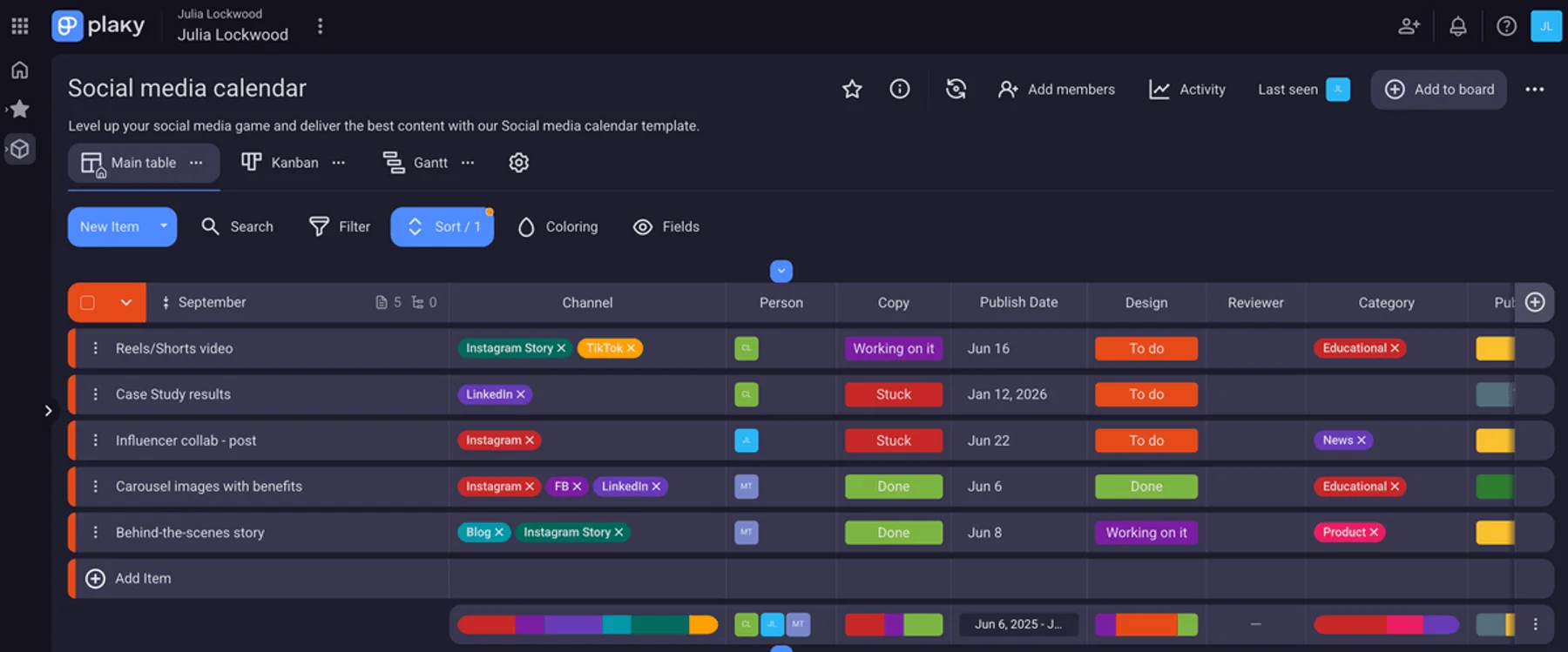
Plaky is a flexible project management tool you can use as an individual or within a team. Plaky offers a robust free plan with an unlimited the number of:
- Espacios
- Project boards
- Usuarios
- Items
- Files
You also have the option to start from scratch or utilize pre-made project management templates tailored to specific industries like:
- Software development
- Marketing
- Ventas
- RRHH
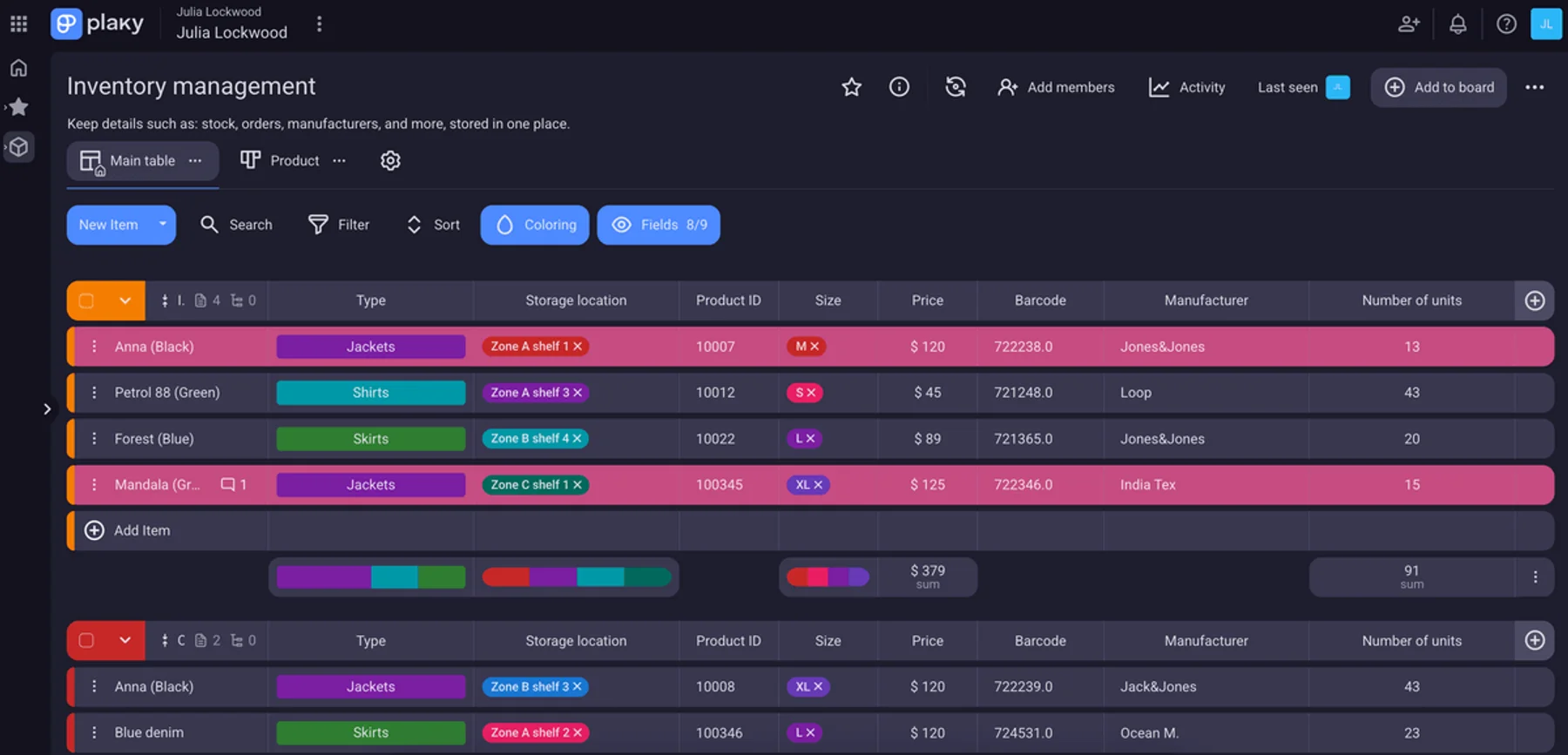
With its highly customizable features, Plaky can adapt to the needs of different teams and industries, offering ways to visualize project data in an accessible and manageable way.
Plus, teams and organizations that want to further invest in project excellence and upgrade for more features can choose between 2 affordable paid plans — Plaky Pro and Plaky Enterprise.
💡 CONSEJO PRO DE PLAKY
Are you already using Notion? Switch to Plaky in a few simple steps, and experience how seamless and efficient project management can be with the right tool:
Notion vs. Plaky by CAKE.com comparison
Plaky and Notion — while both valuable in the field of project management and collaboration — have notable distinctions.
Here’s a quick comparison of Notion vs. Plaky:
| Notion | Plaky by CAKE.com | |
|---|---|---|
| Main use | Note-taking, knowledge management, and task management software | Project and task management, as well as team collaboration software |
| Main features | Note-sharing, document collaboration, and knowledge sharing | Task management, file sharing, and real-time team communication via comments and mentions |
| Free plan limits | Limited to individual use and only 10 guest collaborators, 5 MB cap on file size, and AI-generated customer support | Unlimited users and teams, 10 MB cap on file size, and 24/7 customer support |
| Paid plans start at | $10/user/month | 3,99 $/usuario/mes |
A major difference between Notion and Plaky is that Plaky has made essential project management features unlimited across all of its plans.
In Plaky, you can invite all your team members and collaborate with them on projects without restrictions.
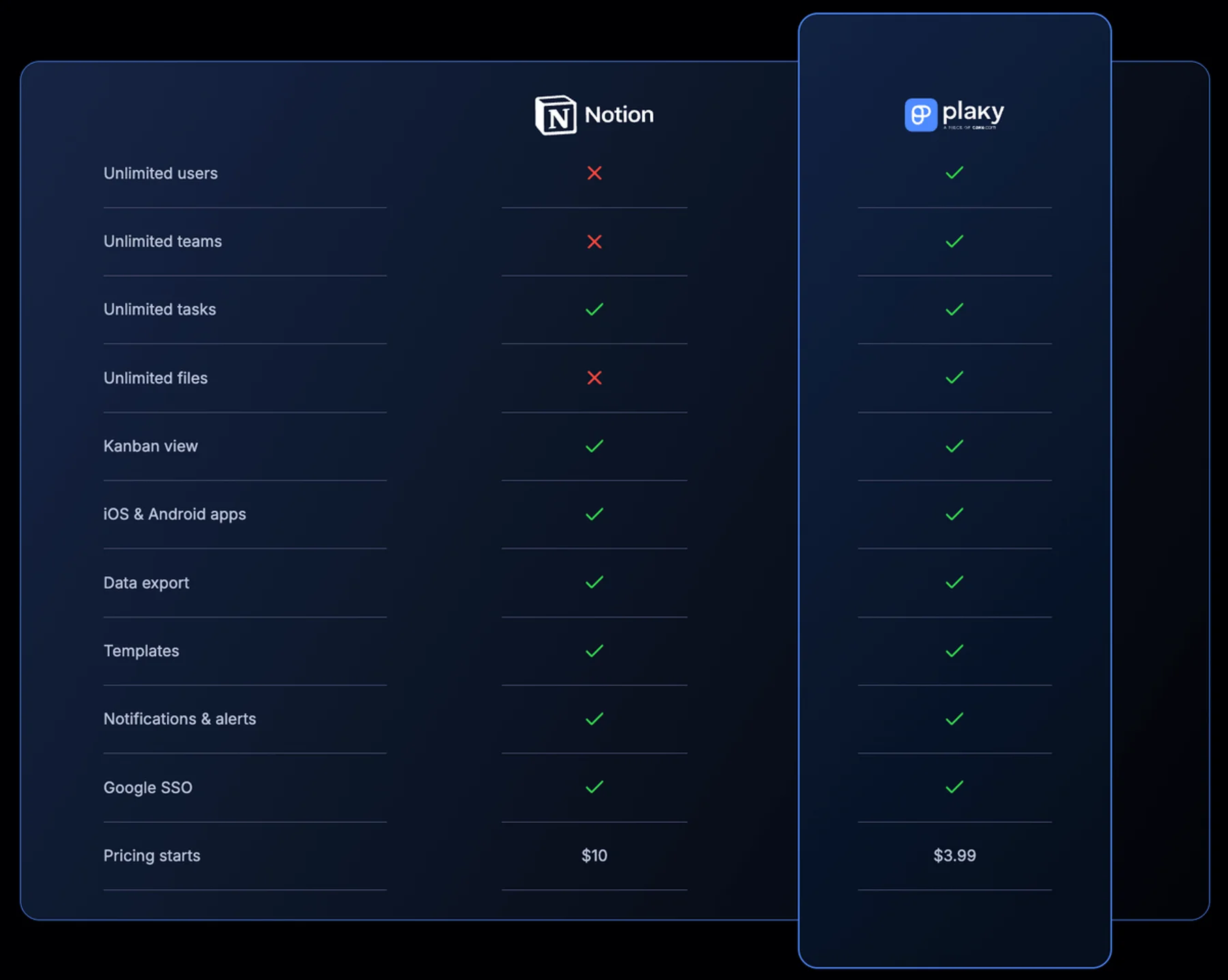
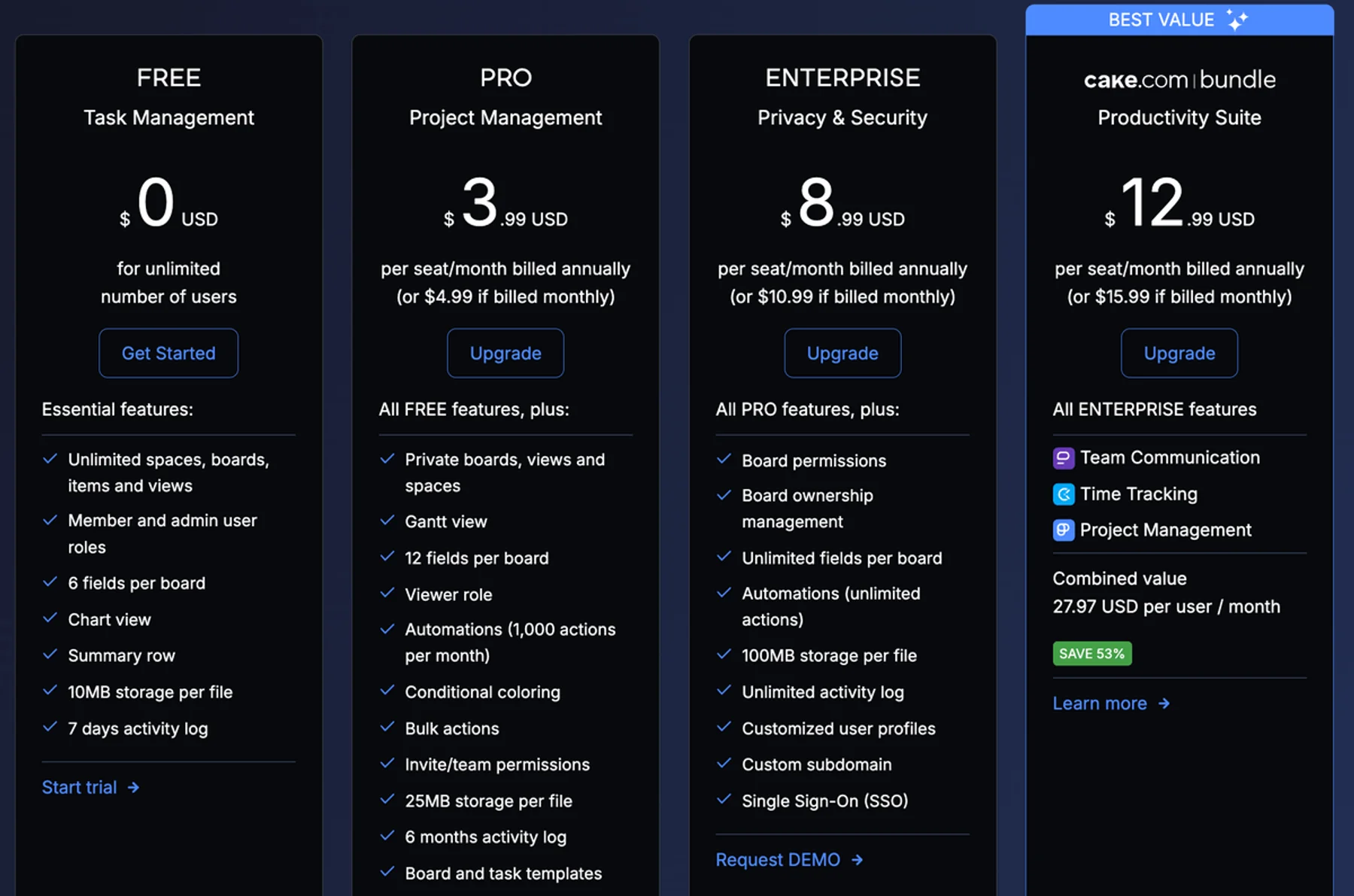
Plaky’s Pro and Enterprise paid plans encompass all the project management features available in the free version — and provide some major upgrades, including:
- Larger file size cap (up to 100 MB per file)
- Additional or unlimited custom fields
- Additional board views and user groups
- Extended activity log history
- Advanced board and workspace permissions
- Additional security options
But how much would you save if you opted for Plaky instead of Notion? Here’s how much you’d have to pay for these apps based on your team size (when billed annually):
| Team size | Plaky Pro | Plaky Enterprise | Notion Plus | Notion Business |
|---|---|---|---|---|
| 10 | $39.9 | $89.9 | $100 | $200 |
| 50 | $199.5 | $449.5 | $500 | $1,000 |
| 100 | $399 | $899 | $1000 | $2,000 |
Overall, Notion stands out as a versatile platform that serves various purposes and offers several paid plans to meet different user requirements.
However, Notion’s steep learning curve and pricing can easily deter users and prompt them to look for more affordable and overall more user-friendly options.
As one of Notion’s best alternatives, Plaky is a reliable, flexible, and budget-friendly organizational tool.
Offering an extensive feature set even in its free plan, Plaky by CAKE.com is a cost-effective choice that caters to individuals and teams of all sizes and across many different industries.
Eager to streamline work processes and maximize your savings? Sign up for Plaky’s free account today!
Empieza a utilizar Plaky by CAKE.com
Cómo revisamos esta publicación: Nuestros escritores y editores monitorean las publicaciones y las actualizan cuando hay nueva información disponible, para mantenerlas frescas y relevantes.