Trello is a popular Kanban-based task management tool intended for individuals and teams looking to simplify project planning and task management.
How much does Trello cost on a monthly basis, and which features are included in the pricing plans? Read on to find out.
- Trello has 4 tiers: Free, Standard, Premium, and Enterprise.
- Trello’s Free forever plan is accessible for up to 10 users.
- There are discounts available for nonprofits, social enterprises, academic institutions, students, and teachers.
Is Trello free?
Yes, Trello has a free forever plan, but it has a limit of 10 collaborators and 10 boards.
In short — Trello can be free, but only so long as you have a small team and don’t mind archiving project boards once the project is finished, since the 10-board limit fills up quickly.
How much does Trello cost?
Depending on the tier you opt for, Trello can cost between $5 and $17.5 per user per month. Of course, there’s also a free Trello plan available.
This puts it in the middle of the pricing range between more affordable tools such as Plaky and Todoist and the expensive options like monday.com and Asana.
Here’s a quick comparison of all Trello pricing plans:
| Trello plan | Monthly price | Yearly price |
|---|---|---|
| Free | $0 | $0 |
| Standard | $6/user/month | $5/user/month |
| Premium | $12.50/user/month | $10/user/month |
| Enterprise* | N/A | Est. $17.50/user/month (for 50 users) |
*The price per user depends on the number of users
Trello’s pricing plan explained
Now, let’s dive deeper into the feature sets of each Trello plan and see who they’re suited for.
Free plan
Trello’s Free plan is tailored for individuals and teams just getting started with task organization. It includes:
- Unlimited cards
- Inbox
- Unlimited activity log
- 2-factor authentication
- Unlimited Power-Ups
- Unlimited storage (10 MB per file)
- 250 workspace command runs per month
- iOS and Android apps
What are the limits of Trello’s Free plan?
Though Trello’s Free plan offers basic functionalities, it still has many limitations:
- The plan is available to 10 users only.
- You can create only 10 boards.
- No AI features are available.
- Kanban is the only view you can use.
This makes it virtually useless for a bigger team or even a small team dealing with large projects.
Standard plan
Trello’s Standard plan is intended for smaller teams that want to manage their everyday work but need more than what the Free plan offers.
Along with all free features, the Standard plan includes:
- Unlimited users
- Unlimited boards
- Advanced checklists
- Custom fields
- Planner
- 1,000 workspace command runs per month
- Collapsible lists
It also introduces AI to your workspace, with basic AI features such as:
- AI-generated boards — say what you need and get a ready-to-use board.
- AI organizations — merge cards, generate checklists, and add due dates.
- AI summarization — generate content, brainstorm, and correct grammar.
Moreover, on the Standard plan you can add single-board guests which aren’t billable. A guest can access a board you invite them to, but not the entire Workspaces, which makes it a perfect role for clients or external collaborators.
Premium plan
Trello’s Premium plan is its most balanced option, as it offers more advanced tools for tracking and visualizing work.
Most importantly, Trello Premium tier lets you visualize your projects with:
- Table
- Calendar
- Dashboard
- Map
- Timeline
Besides different ways to view your data, Premium plan also includes:
- Unlimited workspace command runs
- Simple data export
- Workspace-level templates
- Domain-restricted invites
- Ability to deactivate a user
- Board collections
Trello’s Premium plan is best suited for mid-sized teams that are looking for more than Kanban to organize their work visually.
However, this plan may be too limited for larger companies and corporations that need even more security and control features.
There’s also no 24/7 customer support for technical issues — or phone support, for that matter. Moreover, the response time varies depending on the severity of your problem, meaning that for low-impact issues you need to wait 2 business days for a response.
Enterprise plan
Trello’s Enterprise plan is intended for larger organizations that need to manage work across multiple projects and teams. So, the minimum number of users on this plan is 50.
The Enterprise plan comes with additional features other plans lack, including:
- Unlimited workspaces
- Organization-wide permissions
- Multi-board guests
- 24/7 customer support
- Attachment restrictions
- Atlassian Guard Standard security
- Power-Up administration
The price of the Enterprise plan starts at $210 per user annually, and decreases as the number of users goes up. So, for example, a team of 500 will pay $195 per user annually.
The minimum spending threshold for Trello’s Enterprise plan is $10,000, which is pretty much equal to an annual subscription for 50 users.
Discounts for nonprofits, social enterprises, students and educators
Trello offers 75% discount on all its paid plans (Standard, Premium, and Enterprise) to nonprofits and social enterprises that are:
- Non-governmental
- Non-political
- Recognized as a nonprofit
- For-profit with a social mission
If you are a collegiate student, graduate student, or a teacher, you can get a Classroom licence, which provides you with 75% of Standard and Premium plans.
Certain academic institutions are eligible for 50% off Standard, Premium, and Enterprise plans, namely:
- Schools, colleges and educational institutions
- Administrative offices and boards of education
- Research institutes and teaching hospitals affiliated with an accredited university
- Certified teaching and training organizations accredited by a statutory government qualifications body
Here are a couple of examples to make it less abstract:
If you’re a nonprofit with 50 volunteers, you qualify for Atlassian’s 75% discount. So, you would pay $750 a year for the Standard plan and $1,500 a year for the Premium plan. Meanwhile, an educational institution with 50 employees receives a 50% discount, paying $1,500 a year for the Standard plan and $3,000 a year for the Premium plan.
How does Trello compare to its competitors?
Here’s a breakdown of how Trello fares against other popular task management platforms.
Trello vs. Jira pricing
Trello and Jira are both owned by Atlassian, but they’re focused on different customers and needs. Trello is great for simpler projects, while Jira caters to those with more complex endeavors.
Here’s how Trello’s and Jira’s prices compare:
| Plan | Trello | Jira |
|---|---|---|
| Free | $0 | $0 |
| Standard | $5/user/month* | $9.05/user/month (billed monthly) or $900/year for user tier 1–10 (billed annually) |
| Premium | $10/user/month* | $18.30/user/month (billed monthly) or $1,850/year for user tier 1–10 users (billed annually) |
| Enterprise | $17.5/user/month | POA |
*billed annually
However, there’s an important difference between Trello’s and Jira’s annual plans — Jira forces you to buy seats in groups (1–10, 10–15, 16–25, 26–50, 50–100, 100–200, etc.), while Trello charges per seat. This means that if you have a team of 30, you will have to pay for 50 seats in Jira.
When comparing their free plans, it seems that Jira is more generous in terms of board views, but somewhat limited when it comes to storage space.
Here’s a preview of what Trello and Jira offer on their free plans:
| Feature | Trello | Jira |
|---|---|---|
| User limit | 10 | 10 |
| Board limit | 10 | Unlimited |
| AI features | ❌ | ❌ |
| Timeline view | ❌ | ✔️ |
| Calendar view | ❌ | ✔️ |
| Automations | 250 runs per workspace | 150 automation steps per subscription |
| Storage space | Unlimited (10 MB/file) | 2 GB |
💡 Dica profissional do Plaky
Learn more about the similarities and differences between Trello and Jira:
Trello vs. Asana pricing
Trello’s prices are significantly lower than Asana’s, but Asana offers more features than Trello.
| Plan | Trello | Asana |
|---|---|---|
| Free/Personal | $0 | $0 |
| Standard / Starter | $5/user/month* | $10.99/user/month* |
| Premium/Advanced | $10/user/month* | $24.99/user/month* |
| Enterprise | $17.50 | POA |
*billed annually
When we compare Trello’s and Asana’s free plans, the most obvious difference is that Trello allows for 5 times more users, but Asana offers much more file storage:
| Feature | Trello | Asana |
|---|---|---|
| Users | 10 | 2 |
| Board/Projects | 10 | Unlimited |
| List view | ❌ | ✔️ |
| Calendar view | ❌ | ✔️ |
| File Storage | 10 MB/file | 100 MB/file |
This makes Trello’s plan much more suitable for a small team. On the other hand, a freelance graphic designer or a marketer, for example, would benefit much more from Asana, since it would allow them to store high-definition images or videos.
💡 Dica profissional do Plaky
Check out a thorough comparison of Trello and Asana that includes features, ease of use, and support:
Trello vs. monday.com pricing
While Trello puts Kanban into focus, monday.com is more versatile. This means it can handle complex projects with ease. Its pricing is also more developed and includes an additional tier:
| Plan | Trello | monday.com |
|---|---|---|
| Free | $0 | $0 |
| Basic | ❌ | $9/user/month* |
| Standard | $5/user/month* | $12/user/month* |
| Premium/Pro | $10/user/month* | $19/user/month* |
| Enterprise | 17.50/user/month* | POA |
*billed annually
On the other hand, Trello is more generous on the free plan than monday.com, especially in terms of the activity log and file storage:
| Feature | Trello | monday.com |
|---|---|---|
| Users | 10 | 2 |
| Boards | 10 | 3 |
| Items/cards | Unlimited | 1,000 |
| Activity log | Unlimited | 7 days |
| Dashboards | ❌ | 1 per board |
| File storage | Unlimited (10 MB/file) | 500 MB |
💡 Dica profissional do Plaky
If you need more details about how Trello and monday.com compare, we got you covered! Check out our detailed analysis:
Trello vs. ClickUp pricing
ClickUp is well-known in the world of project management as an all-in-1 solution. So, it comes as no surprise that ClickUp costs more than Trello.
Here’s the breakdown of their pricing:
| Plan | Trello | ClickUp |
|---|---|---|
| Free | $0 | $0 |
| Standard/Unlimited | $5/user/month* | $7/user/month* |
| Premium/Business | $10/user/month* | $12/user/month* |
| Pro | $17.50/user/month* | POA |
*billed annually
ClickUp’s free plan is famous for being quite generous, offering unlimited users and tasks, but Trello’s free plan has additional advantages, like unlimited activity log:
| Feature | Trello | ClickUp |
|---|---|---|
| Users | 10 | Unlimited |
| Quadros | 10/Workspace | Unlimited |
| File storage | Unlimited | 60 MB storage |
| Activity log | Unlimited | 1 day |
| Calendar view | ❌ | ✔️ |
| List view | ❌ | ✔️ |
💡 Dica profissional do Plaky
See how ClickUp and Trello stack against each other in our detailed comparison:
Is Trello the right choice for you?
You need to ask yourself what’s most important for you.
Trello is a solid choice for you if:
- You like to track your projects on a Kanban board.
- You’re a small business with simple projects.
- You want an unlimited activity log to track all actions on your projects.
- You want an AI-assisted task management tool that’s easy to navigate.
💡 Dica profissional do Plaky
Learn what features are a must for a good project management tool:
FAQ
Here are some of the most common questions about Trello in 2026.
Is Trello still free in 2026?
Yes, Trello has a free forever plan for up to 10 users that includes unlimited cards, activity log, and Power-ups.
How much does Trello cost per user?
Trello has 3 tiers. The lowest paid plan starts at $5/user/month if you choose annual subscription or $6/user/month if you opt for monthly subscription. The Premium plan is $10/user/month when paid annually, and $12.50/user/month when paid monthly.
The Trello Enterprise costs depend on the number of users, but start at $17.50/user/month, paid annually.
Does Trello offer a discount for nonprofits?
Yes, Trello offers a 75% discount to nonprofits on all its paid plans (Standard, Premium, and Enterprise).
What are the limits of Trello’s free plan?
The biggest limit of Trello’s free plan is that it allows only 10 users. Other significant limitations include 10 boards, no custom fields, and no access to AI features.
Does Trello have AI?
Yes, Trello offers AI features on all its paid plans. Trello AI features can help you generate images and checklists, merge cards, brainstorm, capture to-dos, and more.
How does Trello compare to Plaky on price?
Trello is more expensive than Plaky. So much so that Plaky’s Enterprise plan is more affordable than Trello’s Premium one. Plaky’s prices start at $3.99, and go up to $8.99/user/month depending on the plan. Trello on the other hand, costs between $5 and $17.50/user/month.
Looking for a Trello alternative? Try Plaky by CAKE.com
If you don’t think Trello is right for you, here’s another project management tool to consider — Plaky.
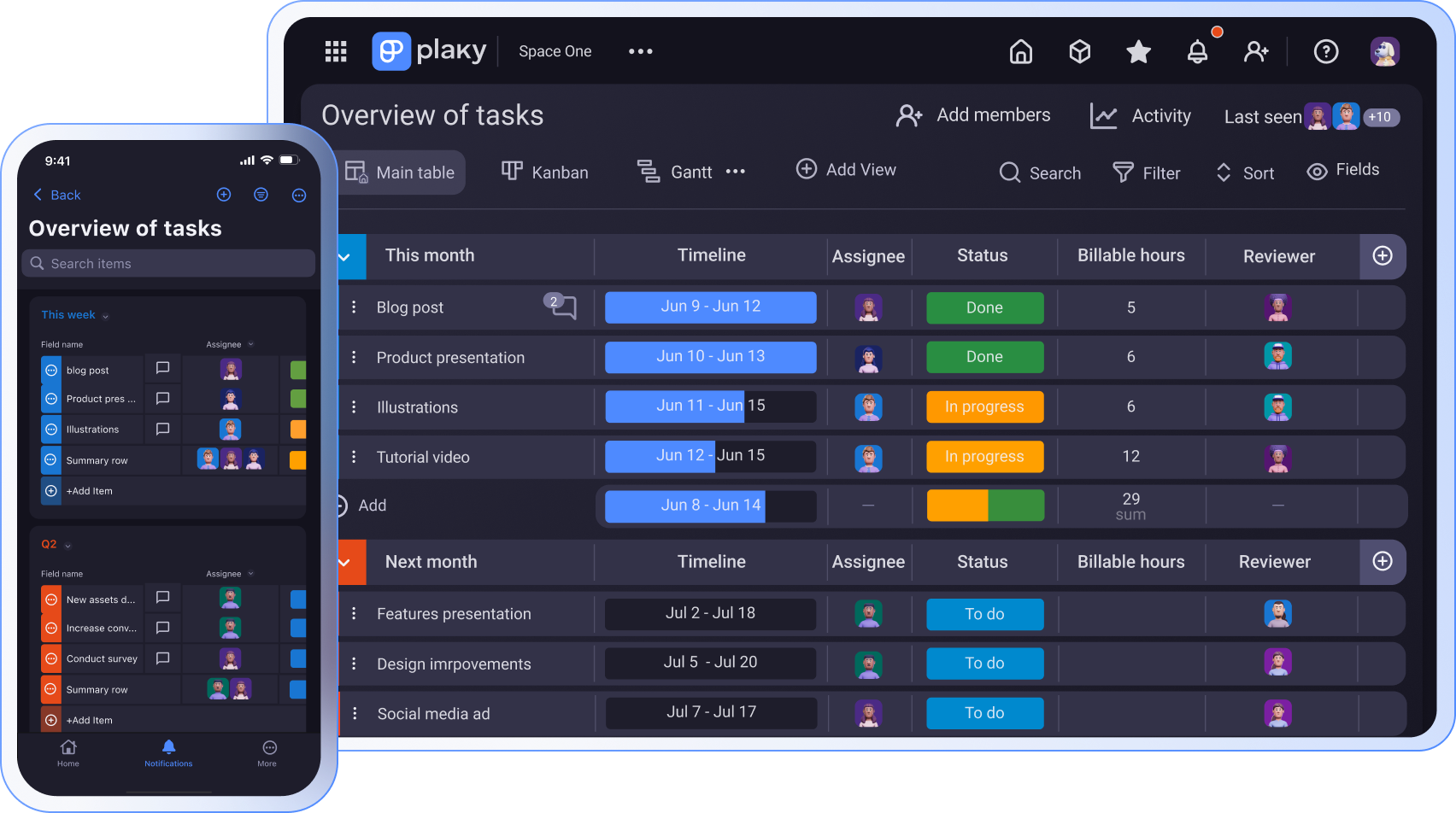
Plaky is a great Trello alternative, since it offers an unlimited number of users and projects, as well as 24/7 support for free.
It is as straightforward as Trello, but offers more board view options in lower tiers.
Feature-wise, Plaky Free plan is strong, since you get:
- My tasks — for a unified view of your tasks across multiple boards
- Table, Kanban, and Chart view — for easy data overview
- Dashboard (1 board per Dashboard) — for tracking progress across different boards
- Summary row — for simple data aggregation
- Item groups — for clear tasks organization
- 6 custom Fields — for tracking various information (dates, assignees, links, budget)
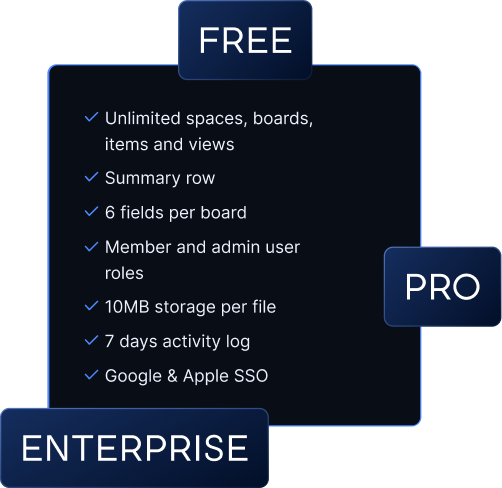
In addition to its free plan, Plaky’s pricing plans include 2 paid options as well:
| Plan | Monthly | Yearly |
|---|---|---|
| Free | $0 | $0 |
| Pro | $4.99/user/month | $3.99/user/month |
| Enterprise | $10.99/user/month | $8.99/user/month |
If you opt for Plaky Pro plan, you get everything in the Free plan, plus other functionalities such as:
- Gantt view
- Unlimited custom Fields
- Private Dashboards, Boards, Views, and Spaces
- Bulk actions
- Board automations
- Viewer role
If you are looking for more security and administrative features, Plaky’s Enterprise plan might be the right fit for you with:
- Protected board
- Board permissions
- Board ownership management
- Single-Sign-On
- Custom subdomain
And if you think of picking the Enterprise plan, consider CAKE.com Bundle, which offers an Enterprise-level access to:
This way you get a complete productivity suite with 3 perfectly integrated apps that provides you with seamless work management.
Important: If you’re already using Trello, and want to switch to Plaky, there’s no need to worry about your existing projects. You can easily transfer your data from Trello to Plaky.
Trello vs. Plaky by CAKE.com pricing comparison
Plaky’s and Trello’s free plans differ significantly in terms of available features — most notably, the number of users and boards.
Plaky doesn’t limit the number of users or boards in its free plan, while Trello only allows 10 collaborators and 10 boards free of charge. These constraints greatly impact small to medium teams, making Plaky a better choice overall.
Here’s a quick comparison of their free plans:
| Feature | Plaky by CAKE.com | Trello |
|---|---|---|
| Users | Unlimited | 10 |
| Quadros | Unlimited | 10 |
| Table view | ✔️ | ❌ |
| Dashboard | ✔️ | ❌ |
| Chart view | ✔️ | ❌ |
| Custom fields | 6 per board | ❌ |
| Activity log | 7 days | Unlimited |
| Suporte | 24/7 live support | Community support |
Design-wise, while both apps have an intuitive interface, the workspace in Trello can quickly become overly cluttered. This is mainly because Trello offers only the Kanban view in its Free and Standard plans.
As projects grow, the overwhelming number of tasks can be difficult to handle in the Kanban view. So, Plaky lets you switch between Kanban and Table views, which helps manage an unlimited number of tasks in a more structured way.
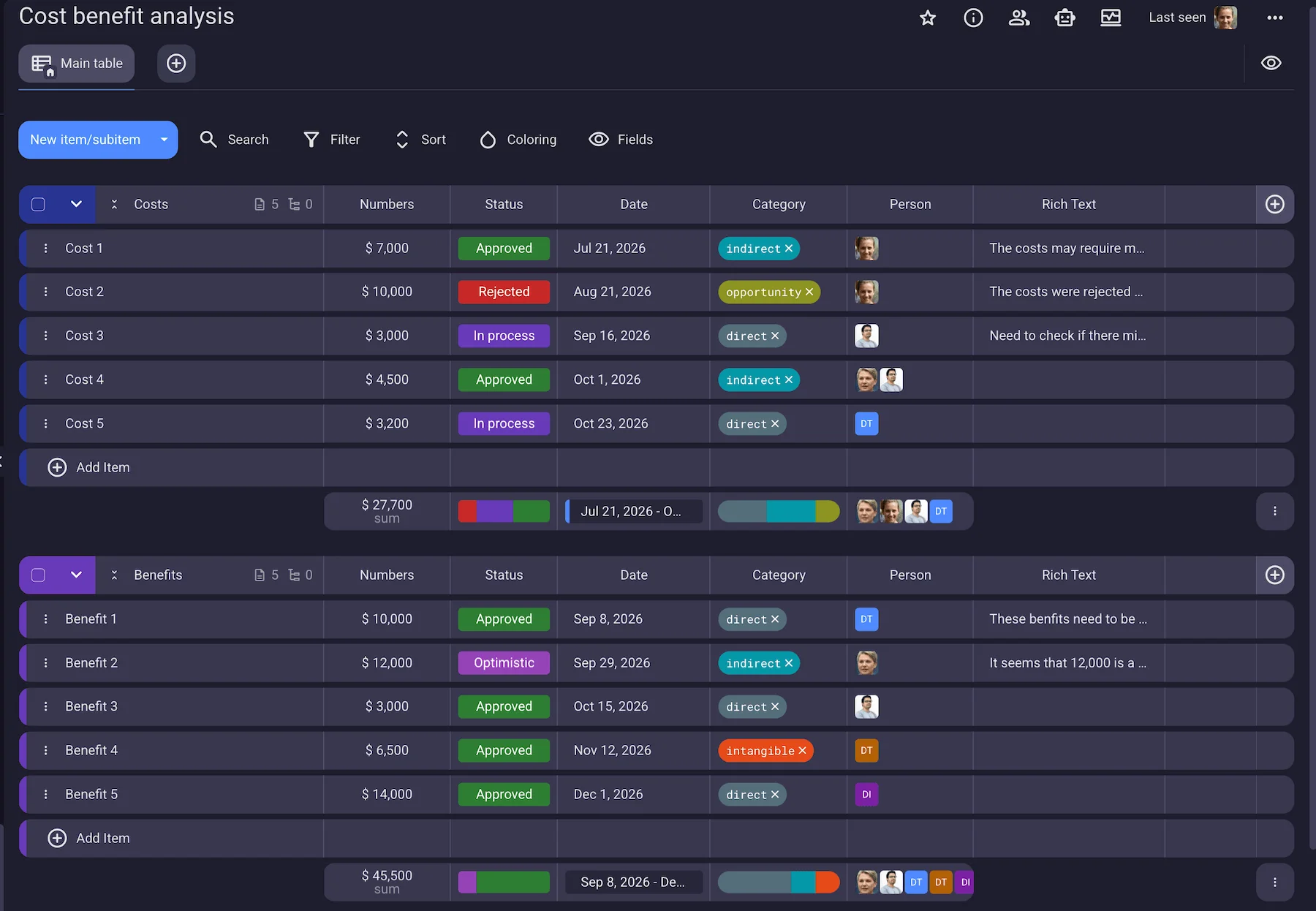
In Plaky, you can sort all your tasks into smaller chunks called Item groups and even assign each item group a color to differentiate them at a glance.
Each task within the item group can then be further customized with various types of fields, including:
- Text
- Person
- Date
- Status
- Number
- Tag field
While Trello also offers similar task management features, its free plan lacks the option to add custom fields, unlike Plaky, which provides up to 6 custom fields for free.
If you’re need more than a free plan, here’s a Plaky and Trello pricing breakdown based on team size to help you get a better idea of how these 2 apps compare price-wise:
| Team size | Plaky Pro | Plaky Enterprise | Trello Standard | Trello Premium | Trello Enterprise |
|---|---|---|---|---|---|
| 20 | $79.8 | $179.8 | $100 | $200 | N/A |
| 50 | $199.5 | $449.5 | $250 | $500 | $875 |
| 100 | $399 | $899 | $500 | $1,000 | $1,750 |
*All prices are per user per month when billed annually.
As you can see, Plaky’s paid plans are more affordable than Trello’s, making Plaky an attractive option for teams looking for a reliable and straightforward task management solution at a lower cost.
To learn more about what Plaky offers, check out the video below.
Bring order into your scattered tasks and projects — try Plaky by CAKE.com
Como revisamos esta publicação: Nossos redatores e editores monitoram as publicações e as atualizam quando novas informações são disponibilizadas, para mantê-las atualizadas e relevantes.