 Published: February 18, 2026
Organizing projects and tracking hours are everyday activities for most teams, so having software that can support both is a huge perk.
That’s why CAKE.com has made it possible to seamlessly integrate 2 of its products — Plaky + Clockify. Less manual work, improved planning, and reliable reporting are just some of the benefits of connecting these 2 apps.
Let’s see how all of it simplifies your everyday workflows!

Key information
Before we delve deeper, here are a few things to keep in mind:
- This is a native integration, built and maintained by the CAKE.com team. In other words, it follows CAKE.com’s security standards and doesn’t rely on third-party tools.
- The Plaky + Clockify integration is free for users on all plans, and using it is completely optional.
- This is a two-way sync, so any changes you make to time logs in Plaky will appear in Clockify and vice versa.
- No technical knowledge is required, as the integration is easy to set up and use.
Get started with Plaky by CAKE.com
Why you should connect Plaky and Clockify
While you can use Plaky and Clockify as separate apps effectively, connecting them unlocks additional benefits, such as:
- Less manual work — You don’t need to recreate tasks or match them with time entries manually, saving you hours over time.
- No context switching — Clockify’s stopwatch and manual time logger appear within Plaky tasks, so you won’t be jumping between tools and losing focus.
- Clearer visibility into workload — Tracked time reveals how much effort assignments truly require. This makes it easier to balance workloads and prevent burnout.
- Smarter billing — Separating billable and non-billable hours as you track them helps you see what generates revenue and where profitability could be improved.
- Accuracy & transparency — Teams get a clear, factual summary of how time is spent, while client trust is boosted through more accurate reporting and billing.
Plaky’s development team is always looking for ways to make the app even more useful and polished. You can visit the Plaky Roadmap to see how its integrations and features will be improved further.
How to set up the integration in 3 easy steps
Setting up and using the Plaky-Clockify integration is simple even if you’re a non-technical user — just follow these 3 steps.
#1 Create your account and set up workspaces
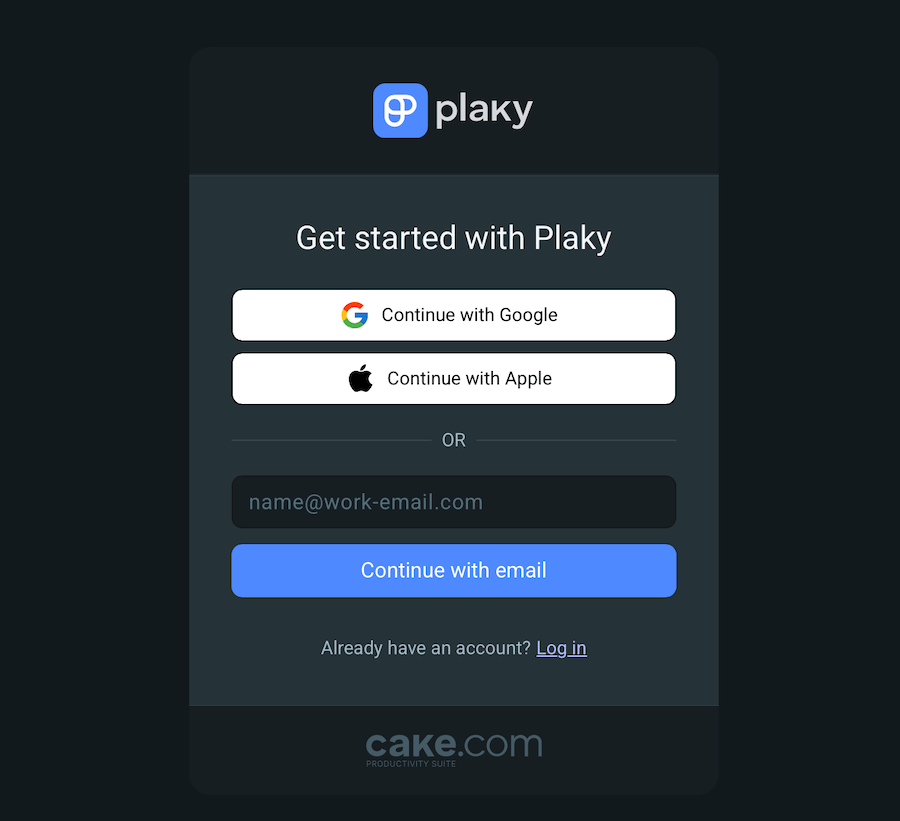
If you don’t already have a Plaky/Clockify account, you must create one first. The sign-up process is quick and free — you either provide information (name, email) manually or sign up with Google/Apple.
One account for either app gives you instant access to both, as they are part of the CAKE.com Productivity Suite.
In addition, to connect the products, you need at least 1 active workspace in both. Again, this is easy — a default workspace is automatically created when you enter Plaky/Clockify for the first time, and you can always add more.
#2 Connect Plaky boards with Clockify projects
A Space in Plaky consists of Boards — this is where you organize (sub)tasks for a project or a workflow. You can build a board from scratch with custom Fields, use Plaky’s template library, or upload a CSV file.
To enable the automatic data flow between Plaky and Clockify, you need to connect the desired board with a Clockify project.
Here’s how to do that:
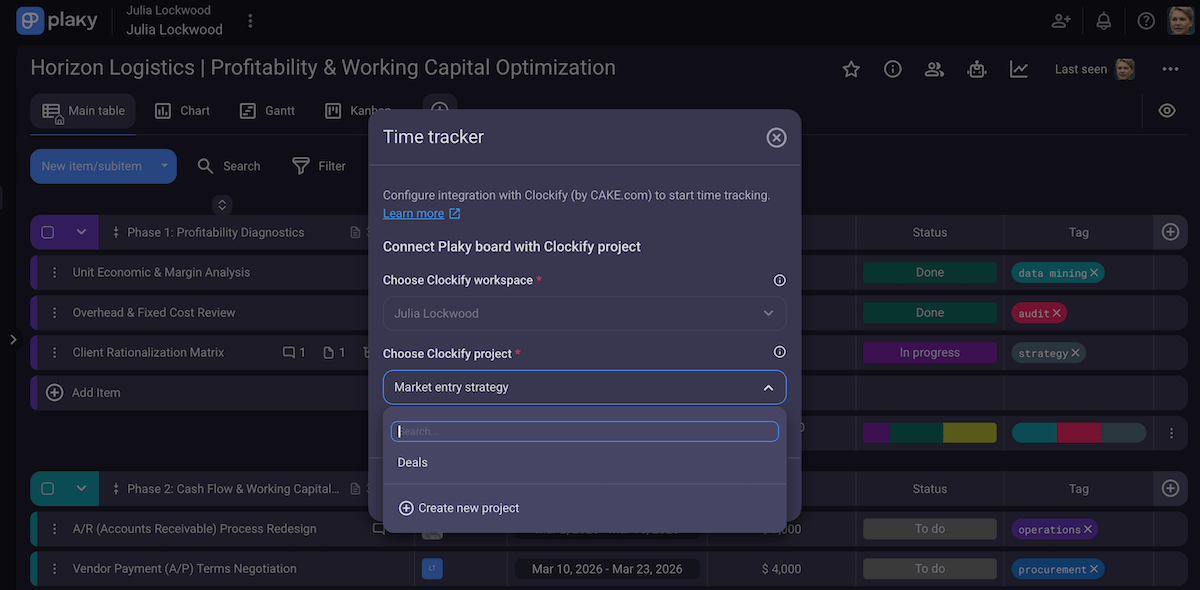
- Find the Plaky board settings (the 3 dots in the upper right corner).
- Click on Time tracker.
- Specify the Clockify workspace.
- Create/pick a project from the drop down menu.
#3 Track time directly from your (Sub)Items
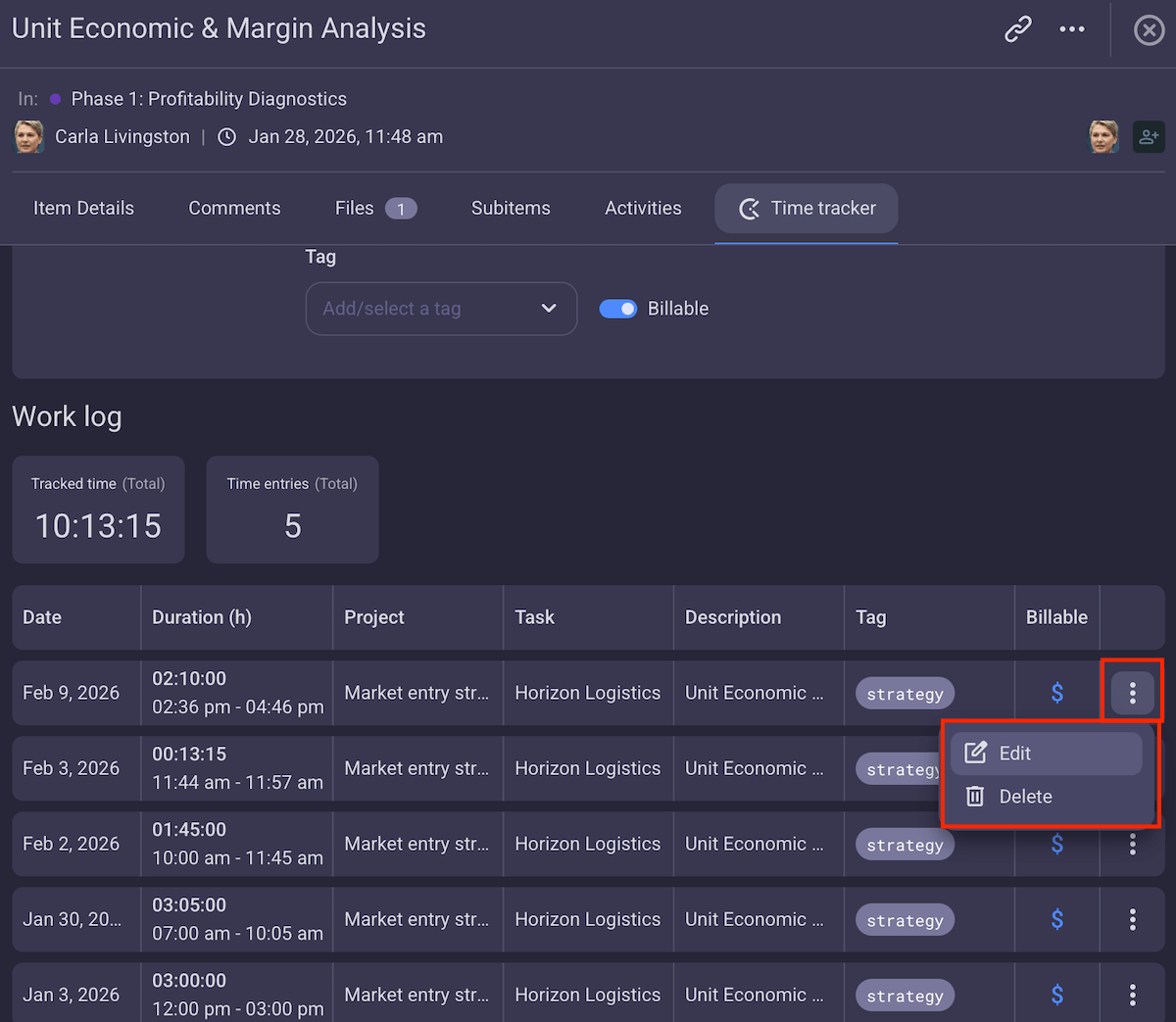
Each (Sub)Item card in Plaky has a tab for time tracking where you can:
- Use the built-in timer — Start the stopwatch when you begin a task, and stop it when you’re done. Plaky will automatically record the time spent.
- Enter hours manually — Type in the number of hours and/or minutes you dedicated to a task if you prefer not to use the timer or want to log past work.
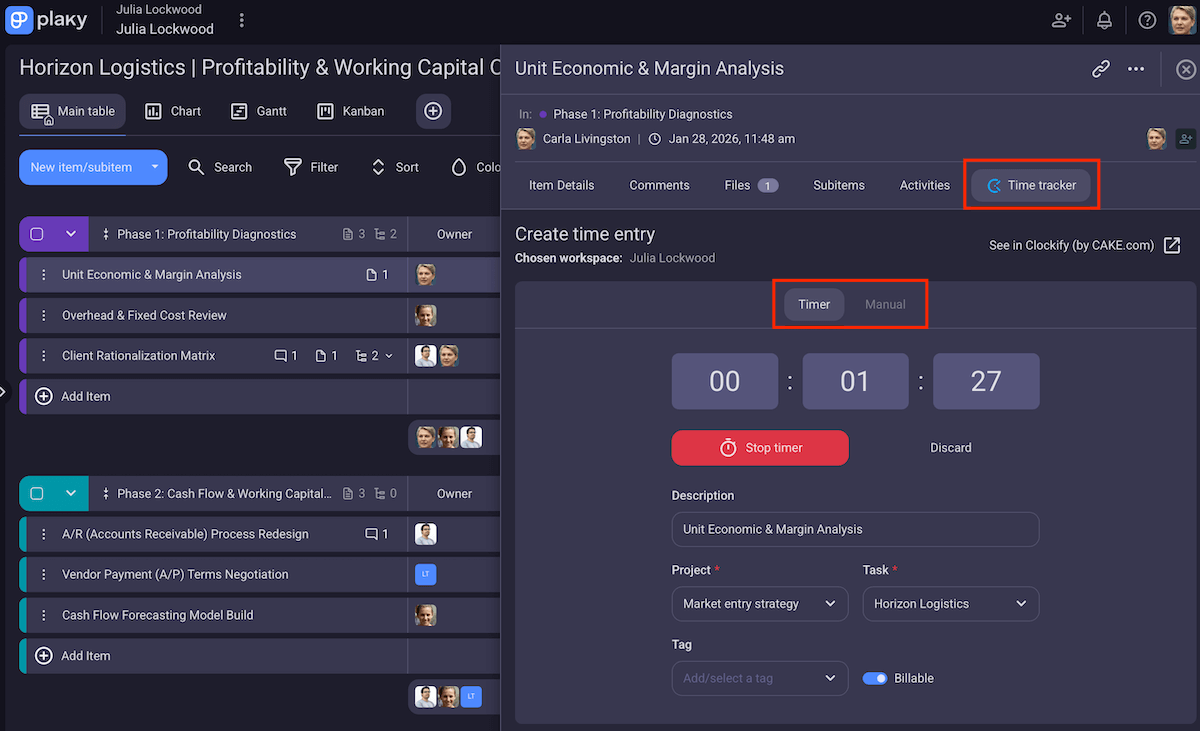
Using the timer is great for absolute precision — real-time data without guessing. But, if you forget to start the timer or simply like to log work afterward, manual entry is for you.
Each time entry has fields for:
- Project,
- Task,
- Billability,
- Description, and
- Tags (optional).
All those support full context and clarity, which is the foundation for turning raw time data into actionable insights for both your team and clients.
Bonus: You can edit time entries for extra flexibility and accuracy. Let’s be honest — mistakes happen, or work schedules change, so being able to correct/update past entries ensures your time tracking and billing stay reliable.
💡 Plaky Pro Tip:
Want a step-by-step tutorial on connecting the 2 apps? Check out our Help page:
What this looks like in practice
Imagine a small client services team (project managers, developers, and designers) working across several projects at once.
At first, they use Plaky and Clockify separately. Both tools serve the team well, so the problem isn’t their functionality — it’s the gap between them.
The team members interact with Plaky to update task status, leave comments, and upload files, more or less staying in the same mental context related to their assignment.
Going to a new tab to log time, however, sometimes slows down handoffs and makes the whole thing feel like admin work instead of a natural part of completing an assignment.
And, at the end of the day, some time entries are noted down from memory, so the project managers spend extra time cleaning up reports and double-checking billable hours before invoicing.
These issues get raised at a team meeting, quickly making everyone realize they should connect the apps. And, soon enough, the workflow becomes much smoother for several reasons:
- The managers still plan and monitor work in Plaky, but each board is directly connected to a Clockify project.
- Team members start/stop timers from the task they’re already working on without switching context or relying on memory later.
- Time entries are automatically linked to the right project and task, with billable and non-billable work clearly separated.
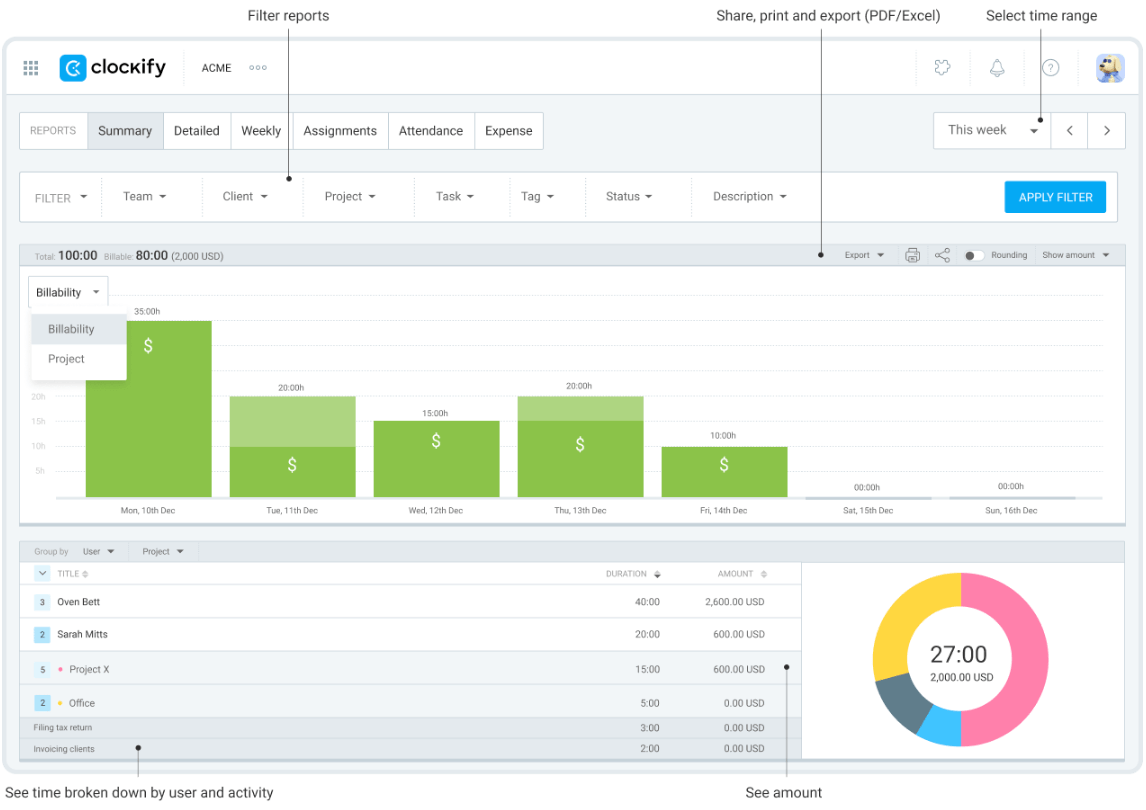
As a result, the team’s reports are clearer and faster to generate. Also, billing is more reliable, and future planning is based on real data instead of assumptions.
Overall, the workflow feels less fragmented and more intentional — using the same tools, but working together at a higher level.
FAQ
Now that we’ve covered all the essentials, let’s look at some common considerations teams might have once they start using the integration.
Can I restrict certain team members from seeing expenses while still allowing them to track time?
This depends on your subscription.
All members in your workspace can see all time entries and expenses by default. However, if you opt for any of Clockify’s paid plans (or the CAKE.com Bundle), you can choose how much of all the tracked time and expenses is visible to regular users (those who aren’t assigned admin or manager roles).
If I change a task name in Plaky, will it update the existing time entries in Clockify?
Yes! Renaming a task in any of the apps won’t break the connection. Existing time entries stay intact while displaying the updated task name — no messy workarounds or need to manually fix past entries.
What is the advantage of the native integration over the browser extension?
While the Clockify browser extension works well for quick time tracking, it’s still an extra layer on top of your work.
The native integration goes a step further, connecting tasks and time tracking at the system level. Updates and reports stay consistent, and your team doesn’t have to think about fixing, syncing, or double-checking data.
Manage work and time with Plaky + Clockify by CAKE.com
When tasks and time tracking are handled in separate tools, even the best teams end up doing extra work to stay aligned. The Plaky-Clockify integration, on the other hand, ensures your work and hours logged paint the same picture.
And, when you add communication into the mix, that picture becomes complete. That’s why we also have Pumble, a robust work communication tool that integrates with both Plaky and Clockify to make sure you never miss important updates.
If you want to go from connected tools to a connected ecosystem, get the CAKE.com Bundle — Plaky + Clockify + Pumble, all fully upgraded at only $12.99/user/month. That’s less than what many similar all-in-1 solutions require for basic tiers with fewer functionalities!
And, instead of managing multiple subscriptions, the CAKE.com Bundle consolidates everything into a single invoice to simplify your accounting and budgeting.
To sum up, the CAKE.com Suite gives you all 3 tools at their full potential — unlimited board automations, invoicing, flexible permissions, professional-grade collaboration, and more.
Enjoy a workflow that actually supports your team instead of slowing it down!

