
Create Plaky Items in Pumble
1 min read
Who can use this feature?
Owner, Admin, Member
Available on all plans
If you are using Pumble to communicate with your team, you can create Plaky Items directly from your Pumble Workspace. This eliminates the need to switch between the two apps and makes the workflow much easier.
Here’s how you can create an Item in Pumble.
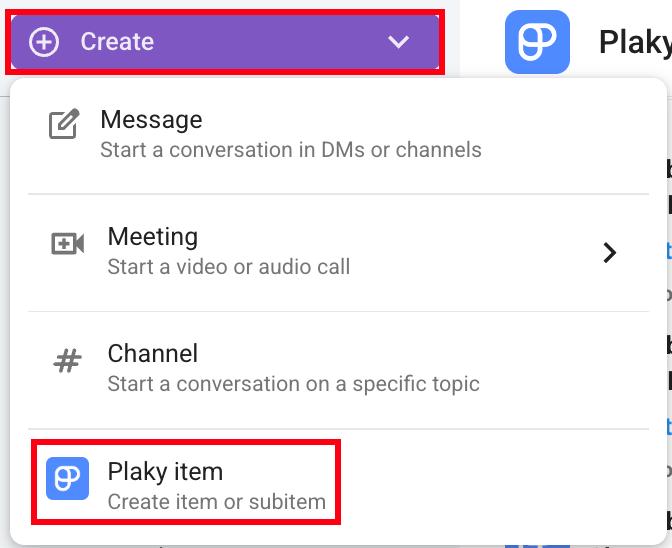
- Click on the Create button in the top left corner
- Click on Plaky item
- Select Space and Board
- Write the Item title
- Click on Create to complete the action
Or
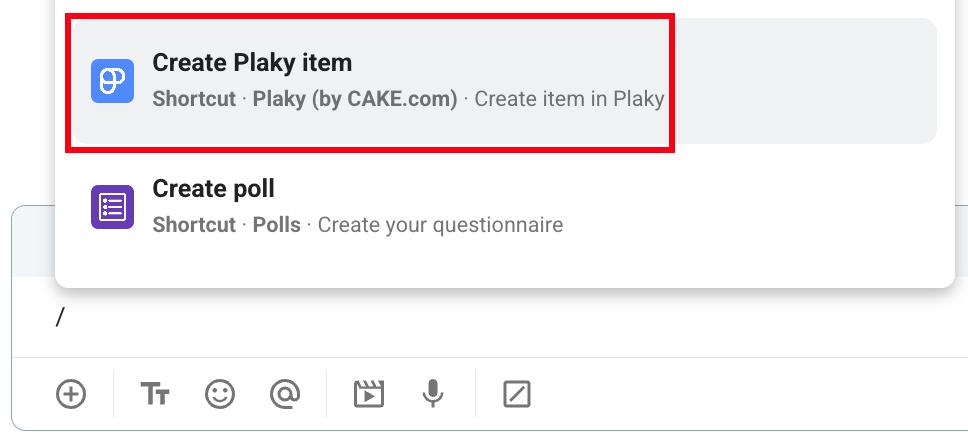
- Enter / in the message box
- Select Create Plaky item from the dropdown
- Select Space and Board
- Write the Item title
- Click on Create to complete the action
Or
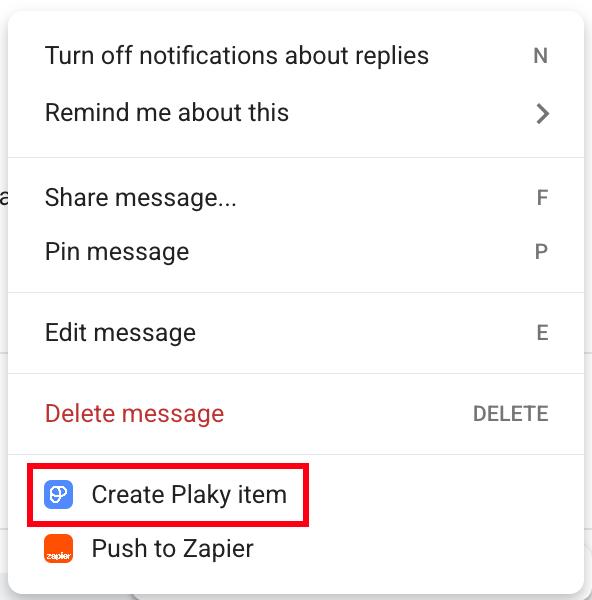
- Hover over a message
- Click on the three dots menu
- Select Create Plaky item
- Select Space and Board
- Write the Item title
- Click on Create to complete the action
Info
To learn how to get Plaky notifications directly in Pumble, please visit this article.
Was this article helpful?
Thank you! If you’d like a member of our support team to respond to you, please drop us a note at support@plaky.com