
Creativity is a powerful human trait — it embraces curiosity, boosts progress, and spurs innovation.
Still, to fully demonstrate their skills, creative teams need flexibility and freedom, which is something that traditional project management usually frowns upon.
Luckily, there’s a way to bridge the gap between demands of creative work and structured workflows — and that’s exactly where creative project management plays a key role.
So, let’s explore what creative project management is, why it’s important, and how creativity and project management join forces to ensure high-quality results.
- Creative project management refers to the process of managing creative teams and projects while trying to reconcile the need for flexibility in creative teams with project procedures.
- There are 4 phases in creative project management: initiation, planning, execution, and creative sign-off.
- Some of the key responsibilities of creative managers are planning, balancing workloads, progress monitoring, approval management, etc.
- Creative project management brings order to creative processes by ensuring structured approach, enhanced communication, timely delivery, aligned expectations, and more.
- Creative managers and teams use dedicated project management software to centralize collaboration, customize work, reduce administrative load, streamline feedback, and more.
- Key features of creative project management software are multiple views, file-sharing, automation, time tracking, etc.
- Creative projects differ from traditional ones in planning and execution, the perception of projects’ success, and approach to feedback.
What is creative project management?
Creative project management is the process of managing creative teams and projects while balancing formal practices and unconventional creative work strategies.
The creative industry recognizes the value of project management and uses its principles to keep creative projects within scope, budget, and deadline.
Creative teams typically include a mix of specialists including content creators, designers, video producers, marketers, and other creative professionals whose goal is to come up with fresh ideas and translate them into concrete marketing deliverables.
Creative departments are usually led by creative directors, but the “engine” behind operational efficiency and a balanced team workload is a creative project manager.
What are the phases of creative project management?
The creative project management process goes through 4 phases that help you structure workflows and ensure efficient delivery.
If you’re familiar with traditional project management phases, you’ll see that the creative project lifecycle follows a similar procedure.
#1 Initiation
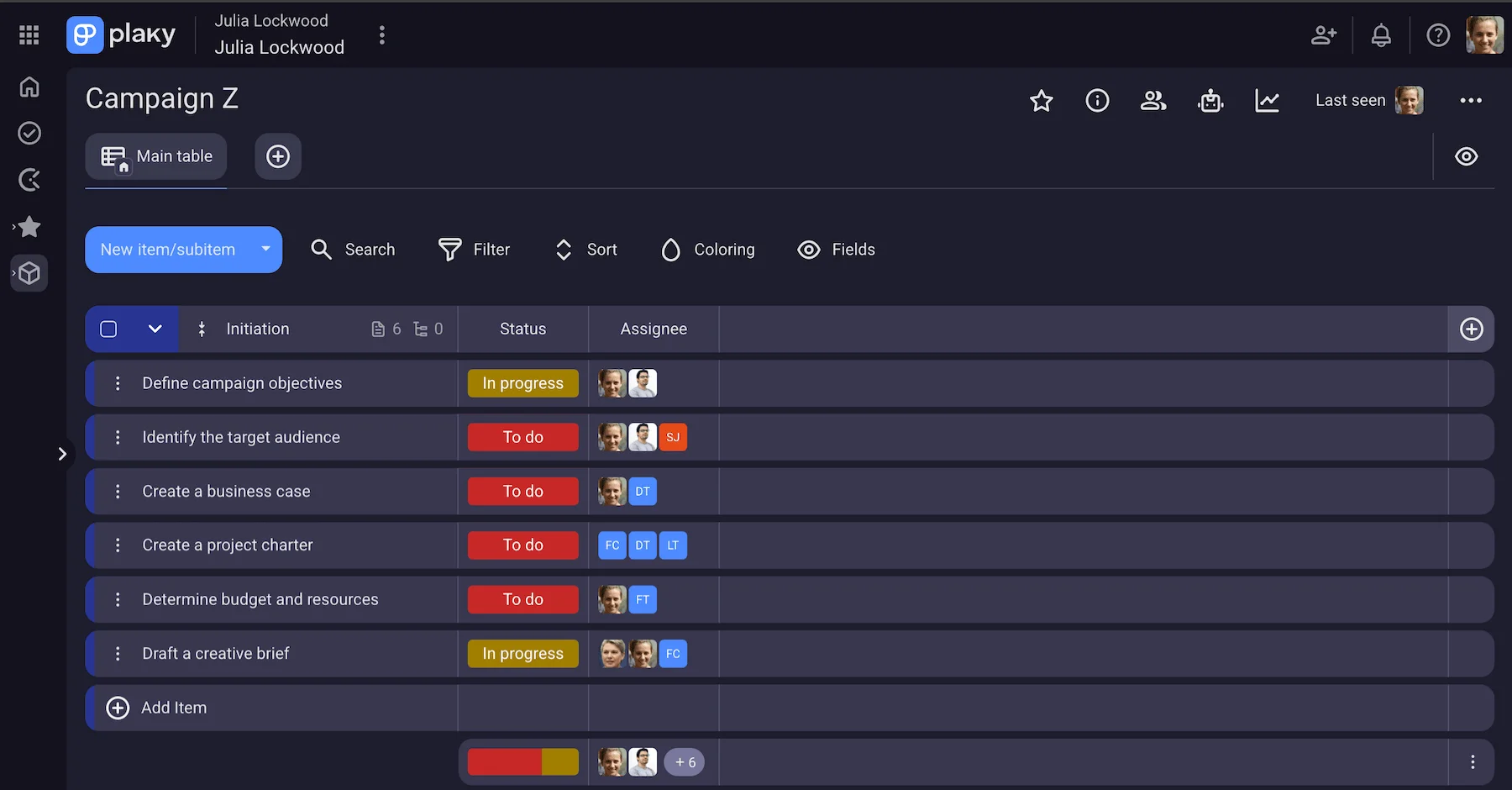
In this phase, the creative team representatives and clients agree to work together and reach a particular project goal (logo suite, newsletter, advertising campaign, etc.).
The usual path is to create a business case that justifies the project’s viability and ensures it has potential.
The next document you’ll need is a project charter that should be approved by leading project stakeholders.
Creative agencies also use a creative brief to establish their agreement with clients. This document serves as a roadmap for the creative team working on a project.
Finally, you need to select the right creative project management software, as it helps you to:
- Plan your project,
- Manage your creative team’s workload,
- Store files and other relevant content,
- Gather team members in one centralized space,
- Facilitate cross-department cooperation, and
- Include external stakeholders in the project processes.
💡 PLAKY PRO TIP
Check out the article below to find a list of 10 best creative project management software:
#2 Planning
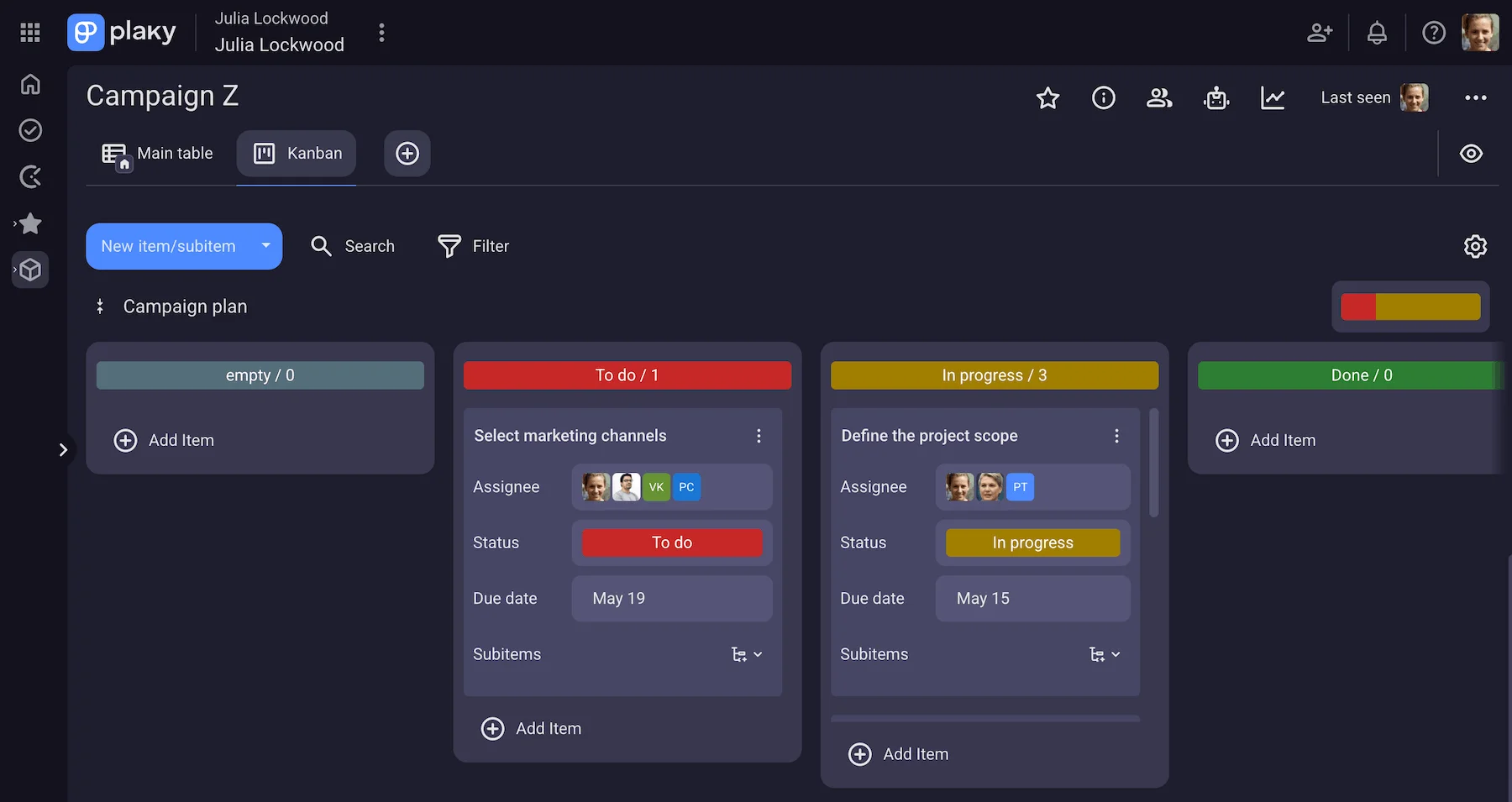
At this stage, you should define the project scope and clearly state objectives, budget, deliverables, and deadlines.
Another important step is to develop a project schedule that explicitly specifies the estimated task time and sets project milestones.
Also, you should identify project resources necessary to complete project deliverables and eventually bring your project to success. Make sure you assign the right people to your planned tasks, and ensure the team is aligned with tasks before the next phase.
#3 Execution
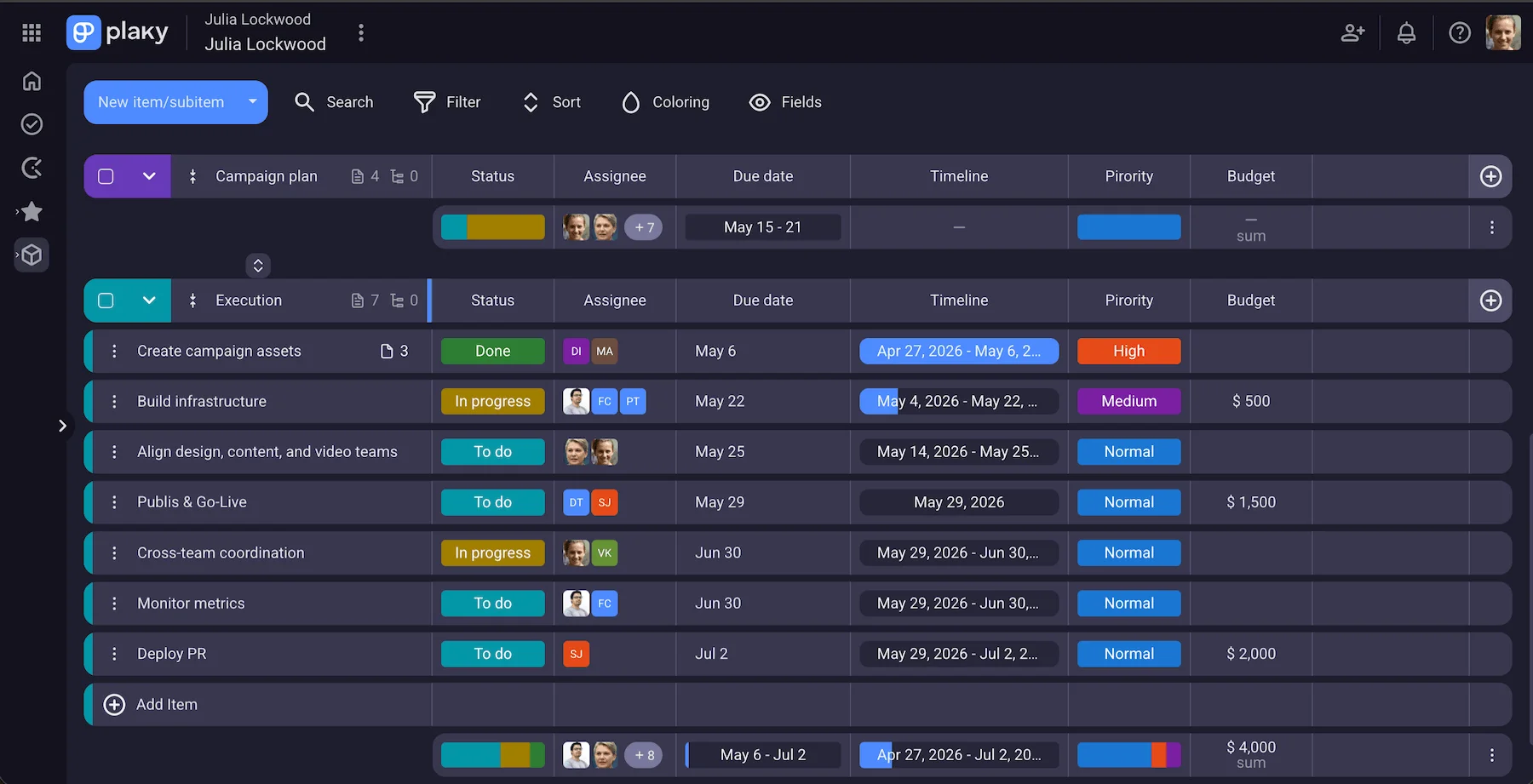
The execution phase is where creative project managers put plans into action. Creative teams already know their responsibilities and can finally start shaping their ideas and bringing them to life.
However, most of the changes that impact the original project plan take place in this phase. You have to address issues like project scope change requests, late client feedback, or employee leave.
It’s important to take action on time and help your creative team adapt to changes to maintain their work efficiency and prevent missed deadlines.
Using a project management software makes your creative project management much easier. You can reassign tasks quickly, prioritize them, and spot potential risks and blockers on time to protect creative focus.
Plus, the software keeps doors open for your team’s real-time communication and collaboration helping them stay on course. It also helps stakeholders to stay informed about updates and provides a transparent insight into progress for everyone involved.
💡 PLAKY PRO TIP
Creative teams face many challenges on a daily basis. Learn how to respond to them in the article below:
#4 Creative sign-off
This stage is all about ensuring alignment with the stakeholders and/or clients and getting their seal of approval.
So, the first step you need to take is to collect the final feedback and take it into account before you finalize project deliverables and send them for sign-off.
Still, this doesn’t mean you’re done with the project. Make sure you:
- Complete the paperwork,
- Store documentation,
- Arrange a post-project review to analyze what went well and what didn’t, and
- Capture lessons learned with ideas on how to improve in the future.
Also, don’t forget to celebrate project completion with your team and give them a pat on the back for all the effort and good work.
Key responsibilities of a creative project manager
In a nutshell, creative project managers’ main job is to build an atmosphere that drives creativity and allows flexibility while setting clear goals and ensuring a balanced team workload. Easier said than done, right?
Creative project managers act like mediators between their team’s creative mindset and real business trying to get the best of both worlds. They remove administrative obstacles and clarify priorities to protect creative freedom and still keep stakeholders satisfied.
Apart from managing their team, creative project managers have a bunch of other responsibilities such as:
- Planning project scope and setting timelines, budget, milestones, and success metrics,
- Balancing workloads across teams,
- Organizing and leading team meetings,
- Monitoring project progress,
- Communicating with clients/stakeholders and gathering their feedback,
- Creating progress reports for stakeholders,
- Reviewing work in progress and giving approvals,
- Managing risks and developing strategies to mitigate them,
- Ensuring quality standards are met, and
- Refining team workflows to improve efficiency and productivity.
Use Plaky to manage your creatives
Why is creative project management important?
Creative teams are often a hive of activity — ideas constantly pop up, conflicts arise, and feedback rolls in causing teams to redo work. Without proper guidance, things can quickly get messy and chaotic.
That’s where creative project management steps in — to bring order to the creative process. Here’s what creative teams get with a nudge of project management:
- Structured approach — Creative processes are non-linear, as work evolves and changes shape each day. A clear project roadmap provides a goal-oriented framework while ensuring freedom to explore and a safe environment for failure.
- Enhanced communication — Creative teams prefer working in a trust-based environment where they can share ideas, make mistakes, and provide new insights. Creative project management sets the stage for open communication and encourages iterative dialogue that brings the best solutions to light.
- Aligned expectations — Creative work is subjective, and it can be difficult to reconcile it with your client and stakeholders’ expectations and vision. Creative project management clearly defines scope and offers transparency with no unspoken assumptions.
- Timely delivery — Tight deadlines, slow client feedback, and endless revisions can seriously jeopardize your project delivery. Having a system in place that includes buffer periods, streamlined approval processes, and regular monitoring empowers creative teams to keep projects on track.
- Better risk management — Creative projects are prone to issues like scope creep, timeline shifts, budget overruns, and staff shortages. Creative project management helps you identify risks early and create action plans to avoid them.
- Greater flexibility — Creative project management supports flexible workflows allowing teams to quickly adapt to changes. Teams get enough guidance while staying free to foster innovation.
- High-quality deliverables — By balancing structure with flexibility, creative project management allows teams to focus on work and turn ideas into finished deliverables. Clear understanding of what is built and why paired with smart guidance ensures high-quality results.
Deliver projects on time with Plaky
Benefits of using project management software for creative teams
As workloads grow, creative teams often struggle with pressure to innovate, lack of “deep work” time, and inefficient processes.
So, to provide an effective work environment for your creatives, it’s best to put creative project management software into use, as such tools help you to:
- Centralize collaboration — you provide a centralized hub for managing workload, sharing files, and exchanging feedback.
- Improve resource allocation — you can assign the right person to the task and stay up-to-date with who’s working on what to prevent burnout and uneven workload.
- Customize work — when you manage more than one creative team, you can adapt the tool to match their unique needs and boost productivity.
- Get real-time visibility into work — with real-time tracking of your project health, you can spot bottlenecks early and take action to prevent them.
- Reduce administrative load — you can use automation to minimize repetitive tasks and delegate them to the software, as this enables more time for deep work and creative thinking.
- Streamline feedback — by keeping task comments, discussions and feedback within a dedicated space, you provide in-context task management and approval process.
- Improve efficiency — you set clear boundaries over how, when, and what should be done while giving enough freedom to your creative team to give their best.
💡 PLAKY PRO TIP
Wanna see Plaky by CAKE.com in action? Read one of our success stories to find out how Plaky helped VM digital to overcome challenges:
Key features of creative project management software
With so many tools on the market that support creative teams and processes, the search for the right one can cause you a serious headache. Still, here are key features you should pay attention to.
Multiple views
Your chosen tools should enable different views and an easy switch between them. This allows everyone (creatives, clients, stakeholders, etc.) to visualize work the way they want.
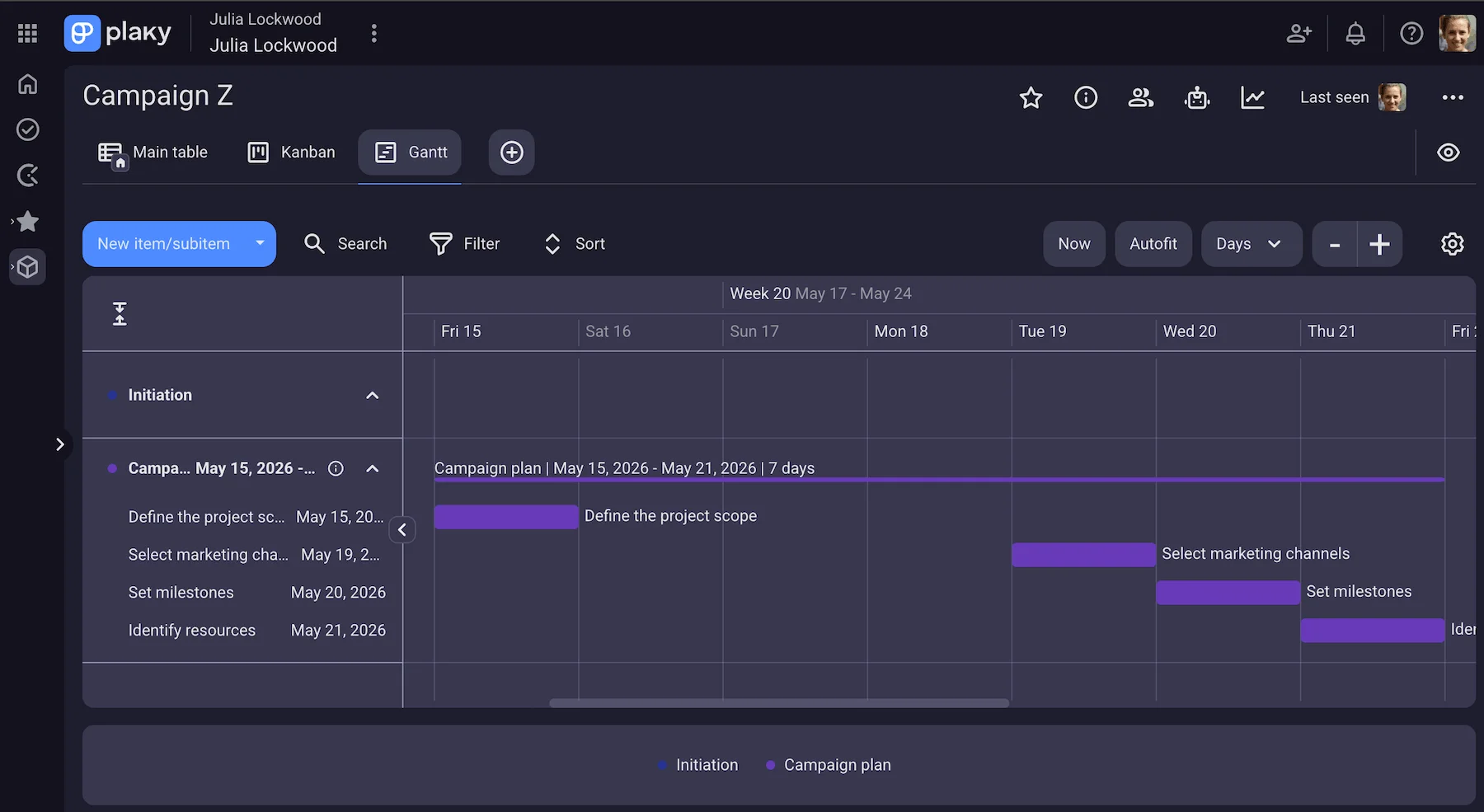
For instance, Plaky by CAKE.com offers 4 different views (Table, Kanban, Gantt chart, and Chart) that cater different uses. You can use Table and Kanban view to see tasks lists and what comes next. Also, the Gantt chart view is great to manage timelines, spot bottlenecks, and make necessary adjustments to avoid creative burnout.
Plaky’s views are highly customizable, allowing you to structure information and eliminate ambiguity and scope creep. With custom Fields like Person and Date, you’ll always know who’s working on what and what the deadlines are. And, to clear the clutter on your boards and find what you need in a second, use the Sort and filter features.
File sharing
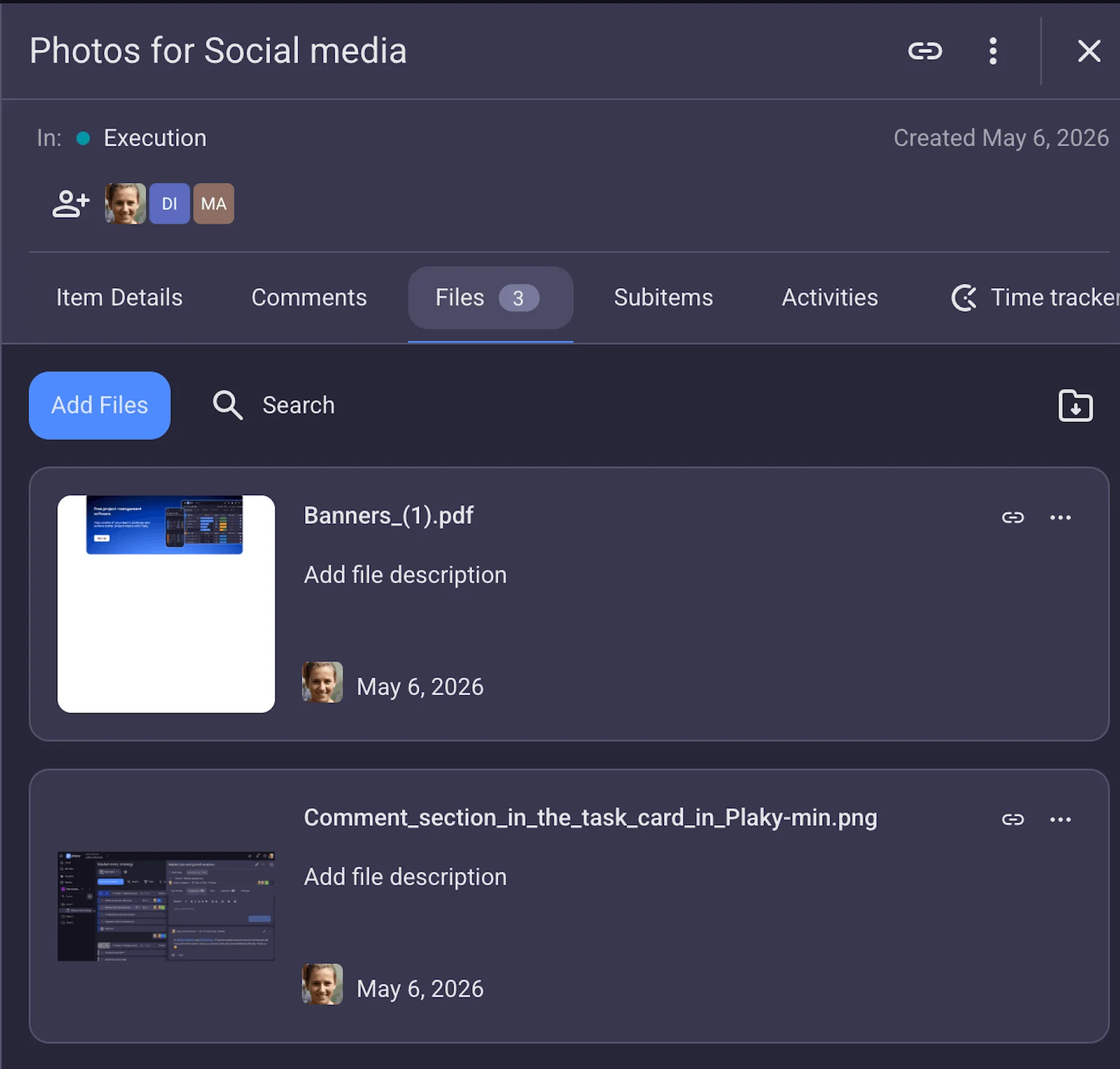
By storing and sharing your team’s files within one centralized space you can enhance collaboration and speed up creative processes, as everyone involved gets real-time access to documents, images, videos, and other file types.
In Plaky, files are attached directly to tasks so that you can always stay in the loop with the latest updates, comments, revisions, etc. The search bar in every Plaky board helps you quickly find the file you need, no matter the number of files in your storage.
Time tracking
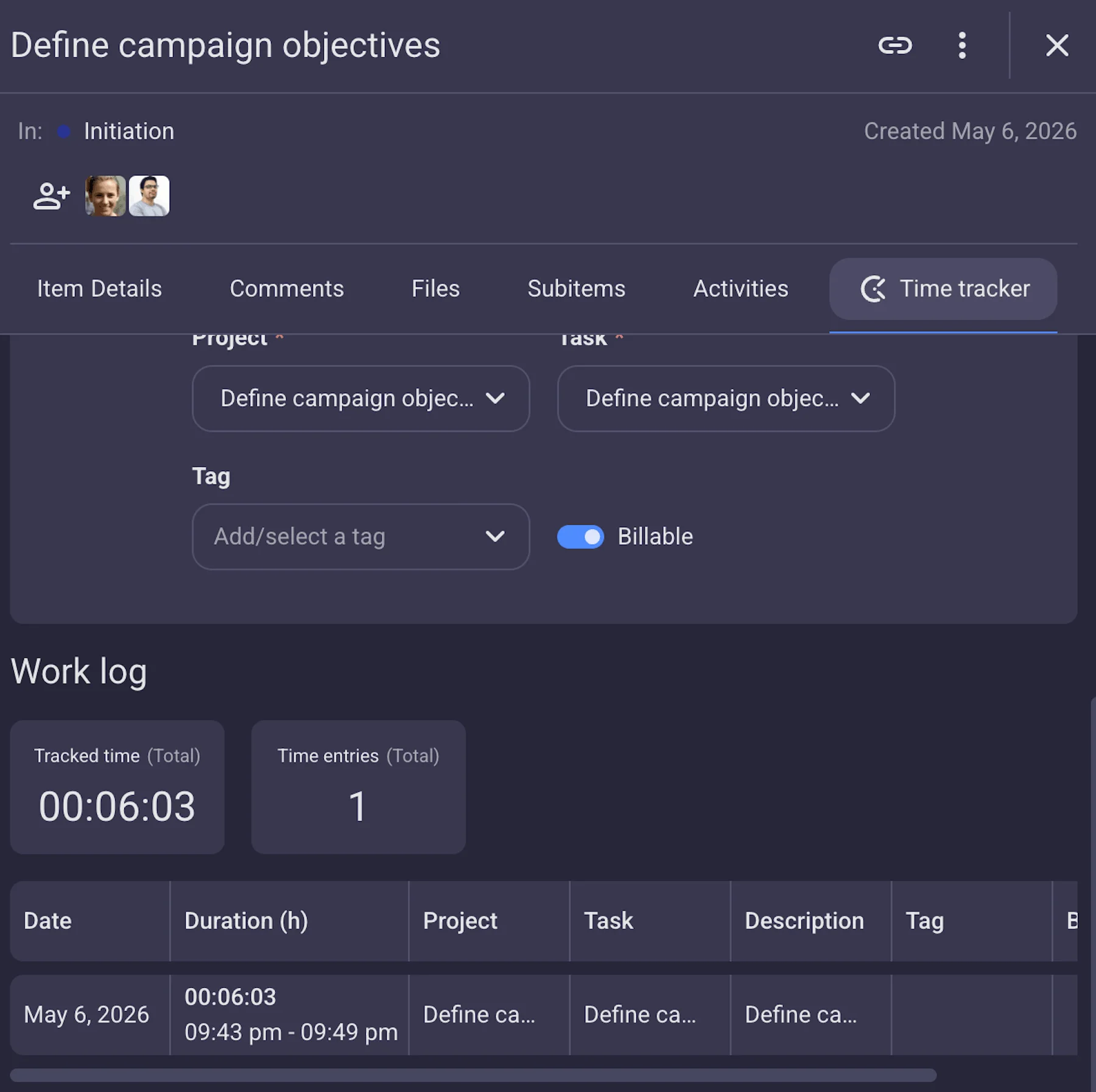
Your PM tool must support time tracking to avoid deadline overlap, foster accountability, and make accurate project estimations. Also, time tracking ensures accurate client billing and helps keep projects within budget and on schedule.
Thanks to Plaky’s integration with Clockify, you can track time directly in Plaky and run time reports and create invoices in Clockify. This native integration also helps you with resource planning, as you can see who’s underutilized or overloaded.
Automation
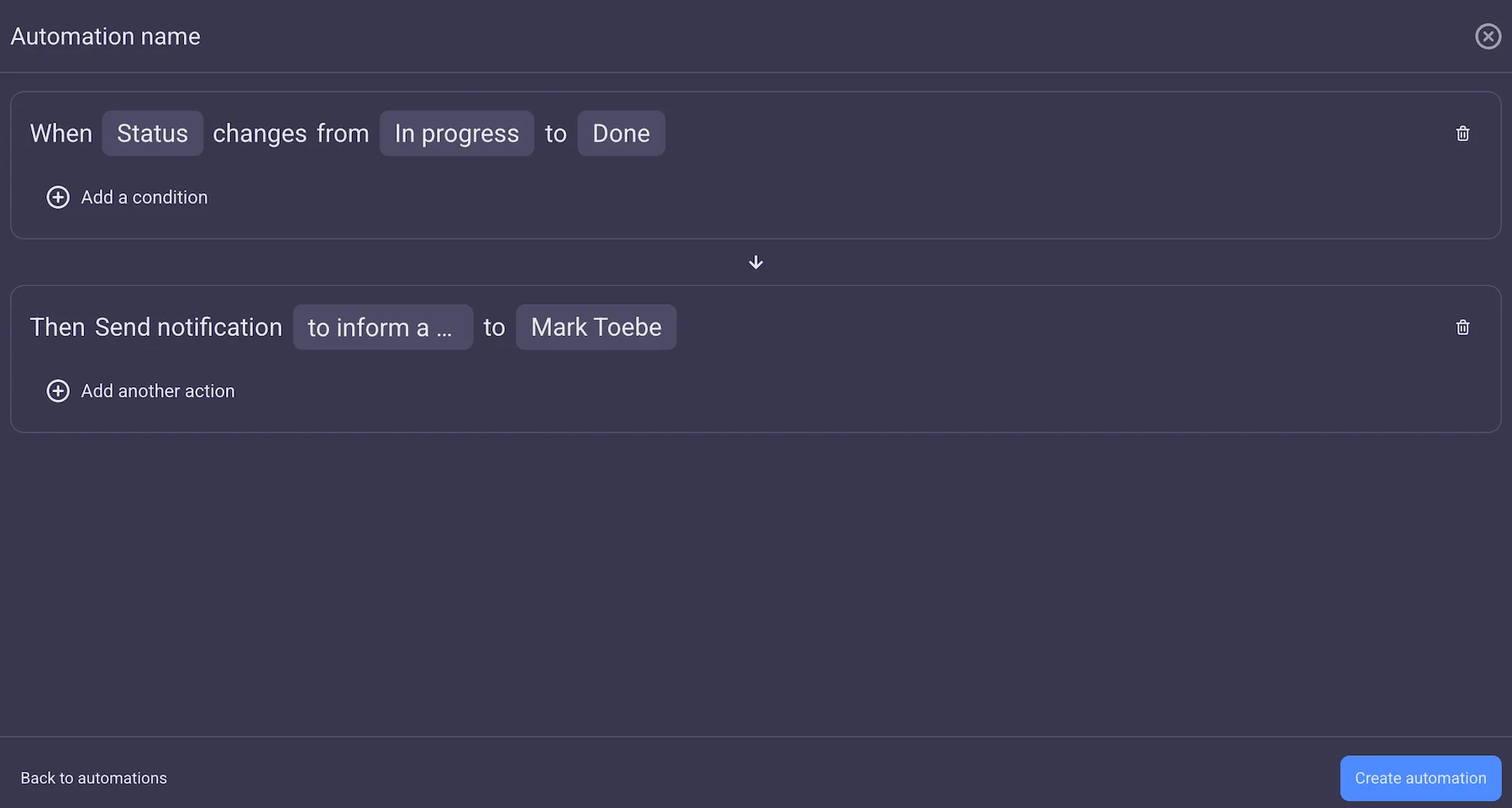
The best way to secure more time for deep work is by eliminating manual and repetitive tasks like sending notifications, changing task statuses, moving items, or updating fields. That’s why your preferred tool should have automations.
Plaky helps you automate processes and save hours for creative work by using a simple trigger/action formula “When this happens, then do that”.
Collaborative features
Creative project management software enables centralized collaboration and communication real-time. This improves productivity as nothing can slip through the cracks.
Plaky helps its users stay informed about fast-paced changes made to tasks and/or projects they are involved with thanks to real-time notifications.
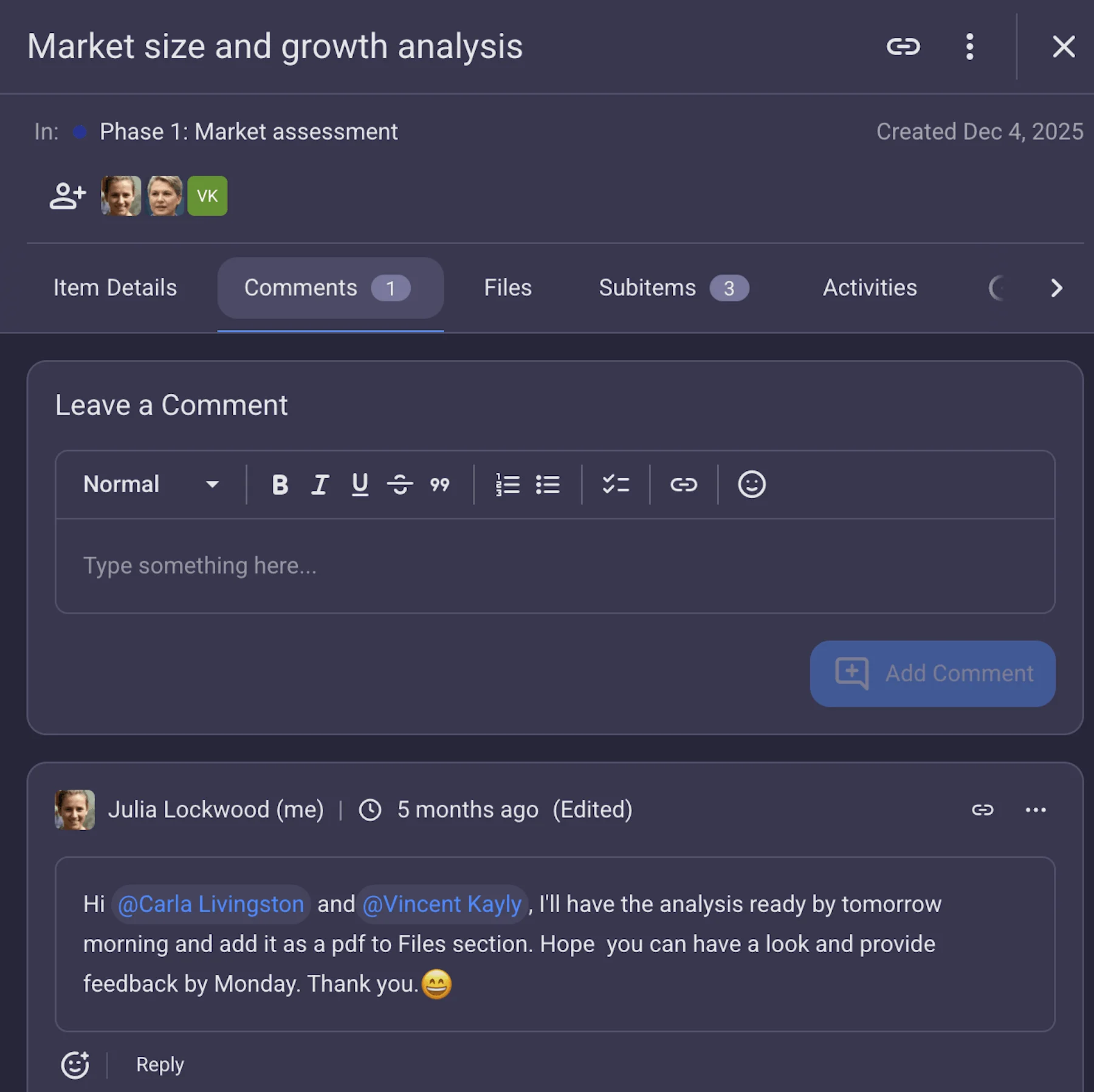
Also, by using in-task Comments in Plaky, you can give feedback, share updates, approve/disapprove changes, and @mention team members to get their attention when necessary. In addition, you can react to comments with emojis and reply in threads to keep the logical flow of information.
Another interesting feature is the Plaky’s Activity log that allows you to see a real-time record of all activities, on both project and task level.
Templates
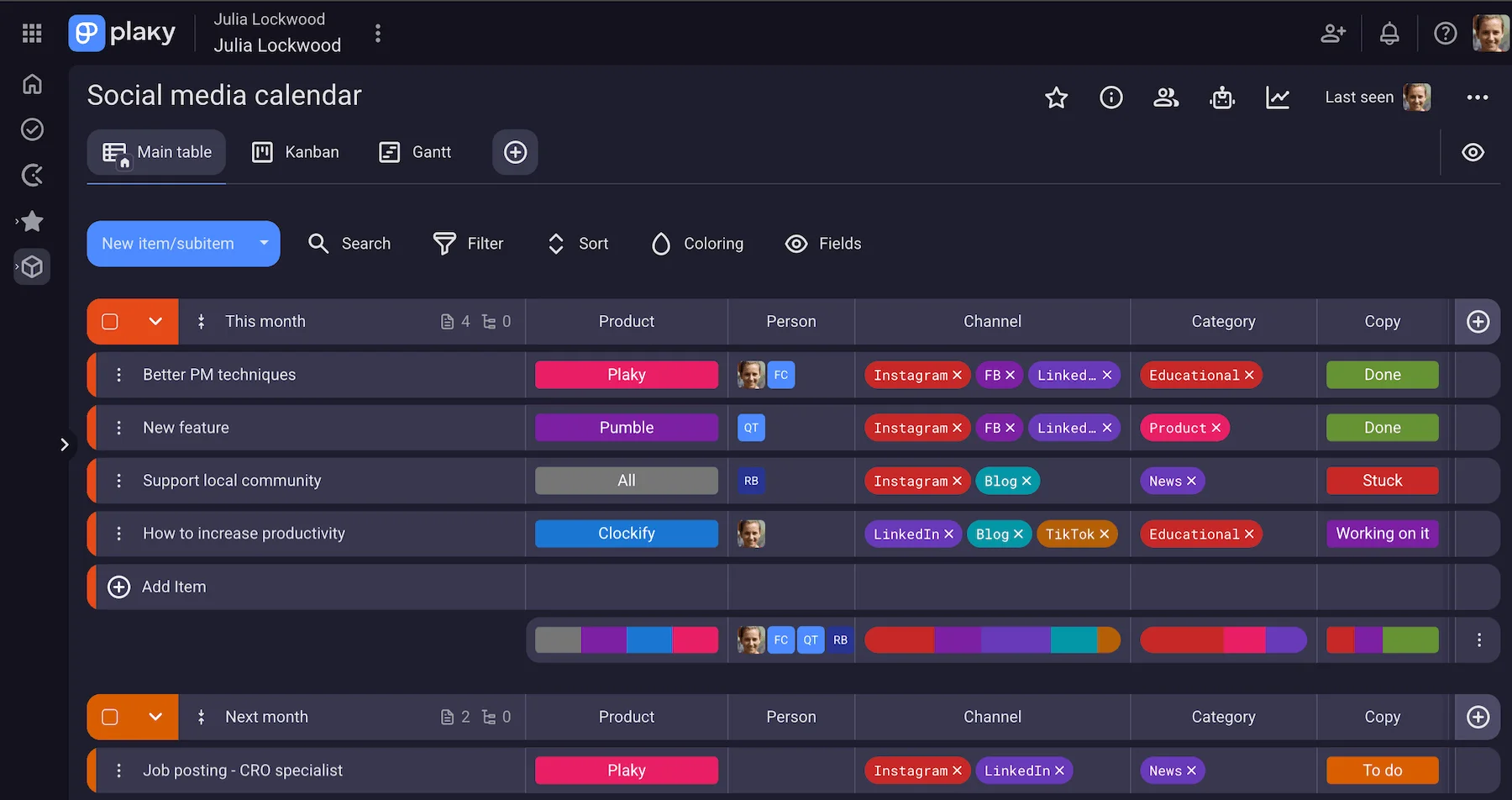
No matter whether you work in-house or at a creative agency, it’s important to standardize processes and eliminate repetitive setup of recurring project boards.
By using ready-made templates, creative teams can jumpstart projects and work much faster as they are already familiar with procedures.
In Plaky’s template centre, you’ll find templates for:
- Strategy plan,
- Creative requests,
- Event planning,
- Content calendar, and
- Social media.
User roles
Efficient and streamlined workflows are only possible when everyone knows their role and responsibilities in the process.
Creative project management software helps you define who has access to what, who can make changes on boards and tasks, and who is responsible for a particular task.
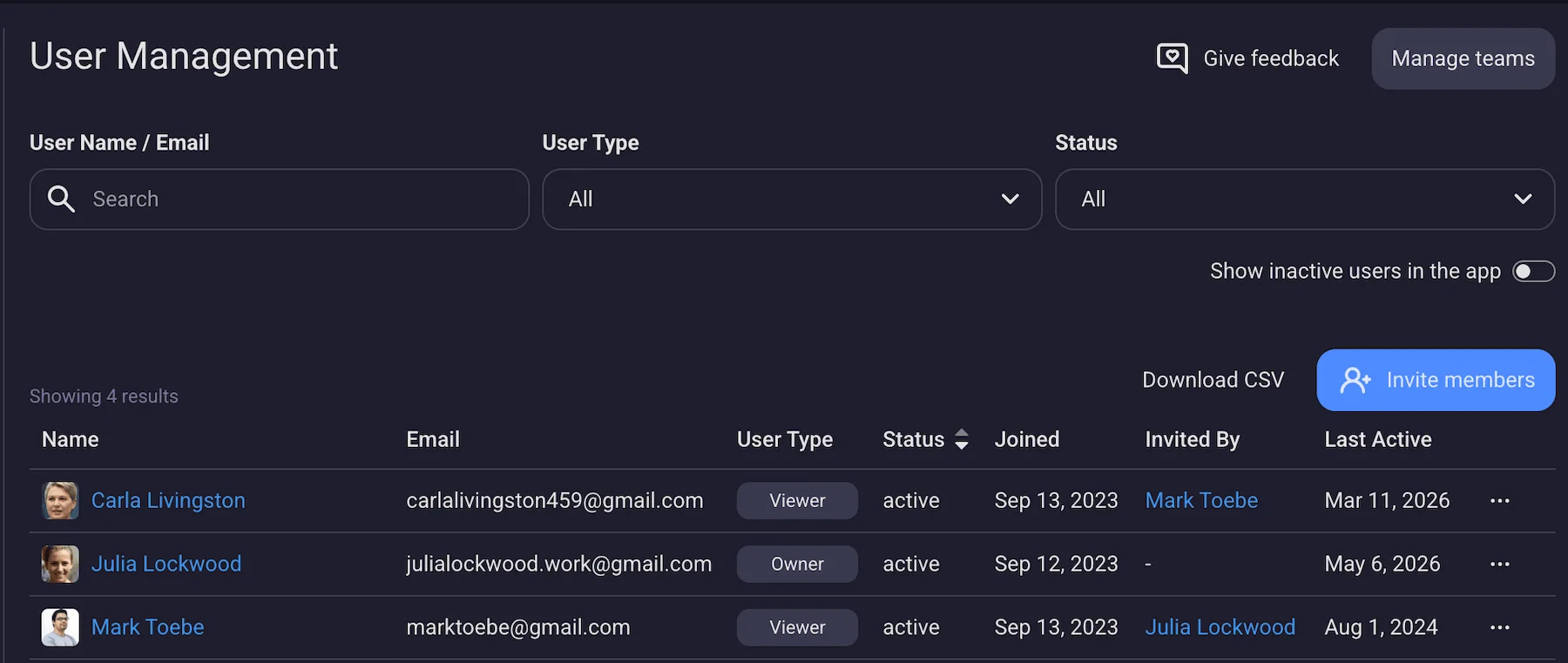
In Plaky, user roles determine the access level:
- Admin,
- Member, and
- Viewer.
The viewer role is ideal to minimize stakeholder friction by allowing you to seamlessly collaborate with external parties and/or team members who aren’t directly involved with the project.
You can share project updates and statuses in a polished and transparent way without fear of unauthorized changes.
Creative project management vs. traditional project management
Here are the main differences between traditional and creative project management.
#1 Planning and execution
Traditional project management sets deadlines and has clear milestones and guidelines, whereas creative project management prefers a more flexible approach.
While creatives do have deadlines, they are less tight since creativity cannot be rushed.
And, when it comes to the execution phase, the traditional approach follows a sequential timeline. On the other hand, the creative approach needs to have regular checks of the work in progress, which makes it a more Agile approach in nature.
#2 The perception of the project’s success
Traditional and creative project management measure success differently. In traditional project management, reaching milestones and meeting deadlines is considered a success.
On the other hand, creativity is more subjective, it depends on ideas and inspiration, and success is often measured by your client’s satisfaction with the final product.
#3 Approach to feedback
In traditional project management, feedback is usually a formal thing — its purpose is to minimize discrepancies between the original plan and actual progress. Teams tend to collect feedback at specific project points such as project initiation or when they reach key milestones. Feedback helps traditional project managers verify that a project runs as planned in terms of budget and schedule.
On the other hand, creative teams thrive on continuous feedback. Rather than a formality, it is a tool their managers use to improve work quality and ensure alignment with the artistic vision.
5 tips for great creative project managers
Managing creative people is quite challenging, but, with the right approach, it doesn’t have to be. Here are top 5 tips that will help you polish your leadership style.
#1 Create a transparent process
If you want to build trust between the team you manage and the client, make sure you create a transparent process.
Your team needs to be familiar with the creative workflow and know what steps to take in order to reach project objectives.
Also, by providing stakeholders with clear insight into the project’s progress, you show them respect and readiness to cooperate.
#2 Avoid micromanagement
Constant checking if your team members are on track can have negative effects on their performance.
Creatives prefer a relaxed working environment, and if you control all their activities, you won’t get far in bringing out the best in them.
Try to loosen up the strings to avoid killing creativity. Set clear goals and organize check-ins to monitor the progress, talk about potential bottlenecks, and encourage them to move on.
#3 Be flexible
The ability to quickly adapt your work and reallocate resources is highly important in creative project management.
For instance, your client might ask for some additional features, a crucial team member could go on sick leave, and the rain might keep pouring on the photoshoot day.
Such unpredictable situations require creative managers who can adapt to changes quickly.
Quickly adapt timelines in Plaky
#4 Have empathy
An experienced creative project manager will never underestimate the personal needs of their team members.
The main source of their creativity is their inner peace, and if something prevents them from doing their best, you should offer help and understanding. After all, you manage real people, not machines.
#5 Give recognition
Throughout the project lifecycle, you and your creative team will probably have ups and downs. But, as long as your team members keep up with the plan and do a good job, make sure you give praise to successful outcomes and celebrate victories.
Boost your creative team’s productivity with Plaky by CAKE.com
Managing creative teams can be a rewarding experience as much as it can be frustrating. One day you get a whirlwind of ideas whereas the next day your team is struggling to break new ground.
Although there’s no button you can push to set the creativity in motion, using software such as Plaky by CAKE.com to manage your creative projects can level up your team’s productivity.
Plaky’s got a bunch of features able to support the entire creative project lifecycle. You can easily:
- Streamline creative processes,
- Delegate work, and
- Execute projects on time.
What’s best about Plaky is that it’s:
- Easy-to-use — Plaky’s interface is user-friendly, so you won’t need hours of training to onboard your creatives.
- Affordable — Plaky offers 3 budget-friendly pricing plans, but all of them include an unlimited number of users, tasks, files, boards, and spaces.
- Secure — Plaky keeps your project data safe thanks to 24/7 security audit and penetration tests.
Maximize your team’s creativity by offering workflows that suit their needs! Try out Plaky by CAKE.com today!