



Monday.com is a popular, cloud-based task management tool suitable for both newcomers and seasoned experts that provides a variety of different features across its many pricing plans.
When comparing the many tools available on the market today, managers must have a clear idea of what their team needs and consider their budget limit.
So, how much does monday.com really cost and what does each plan offer? Read on to find out!
2026 key takeaways
Here are some key facts to sum up monday.com’s AI work platform 2026 pricing:
- A free plan is available for up to 2 seats.
- There are 4 paid plans that require a minimum of 3 seats.
- Each paid plan includes both seats and AI credits.
- AI credits are billed alongside your seats with the Basic, Standard, and Pro plans — $0.01 per credit for yearly plans and $0,0125 for monthly plans.
- Users get AI credits to use across all monday.com’s AI capabilities — no more need for separate add-on purchases.
How much does monday.com cost?
The pricing for monday.com varies across a total of 5 plans.
The app has a free plan that can accommodate up to 2 seats, but its feature set is quite limited.
The paid plans, which start at $9/seat/month, add a number of diverse and powerful features and require a minimum of 3 seats.
Here’s a quick comparison of the prices and each plan’s total monthly and yearly cost (3 seats minimum):
| monday.com plan | Monthly price | Yearly price |
|---|---|---|
| Free (max. 2 seats) | $0 | $0 |
| Basic (3 seats minimum) | $12/seat/month ($36/month in total) + 1,000 AI credits/month ($12.5) | $9/seat/month ($324/year in total) + 1,000 AI credits/month ($10) |
| Standard (3 seats minimum) | $14/seat/month ($42/month in total) + 2,000 AI credits/month ($25) | $12/seat/month ($432/year in total) + 2,000 AI credits/month ($20) |
| Pro (3 seats minimum) | $24/seat/month ($72/month in total) + 3,000 AI credits/month ($37.5) | $19/seat/month ($684/year in total) + 3,000 AI credits/month ($30) |
| Enterprise (3 seats minimum) | POA | POA |
All monday.com paid plans are grouped based on the number of seats, starting with 3 and going up to 40 seats. The lowest monthly cost amounts to $27 per month for 3 seats if you opt for an annual commitment with monday.com’s Basic plan.
If you go for the paid plans, you’ll have to add the AI credits price to the regular cost of those plans. This means that a yearly subscription for monday.com’s Standard plan for 3 seats will cost you $36 per month + $20 per month for 2,000 AI credits, which is $56/month in total.
The cost for up to 40 users is calculated automatically across all plans. But, those with a larger project team who need 50, 100, or 200+ seats will have to contact sales for a custom quote.
Is monday.com free?
Monday.com has a free plan, but it comes with a 2-user cap.
The features included in the free plan are quite limited, which is why this plan is best suited for individual users looking for a task tracking app for personal use.
Monday.com also offers a 14-day free trial that allows users to test its Pro plan. After this, they can choose one of the existing paid plans or continue using the free plan.
Monday.com’s pricing for nonprofits
Monday.com discounts its pricing plans for non-profit and social change organizations. It also offers a student program for students and student organizations.
💡 Dica profissional do Plaky
Looking for the best project management tool for nonprofits? Check out our list of 10 best tools for your nonprofit projects:
Monday CRM pricing
Monday.com’s CRM doesn’t have a free plan, but you can see how it works during a 14-day free trial.
Its pricing works similarly to monday.com’s regular plans — you can choose a pre-defined number of seats, and the plans offered are: Basic, Standard, Pro, and Ultimate (formerly Enterprise).
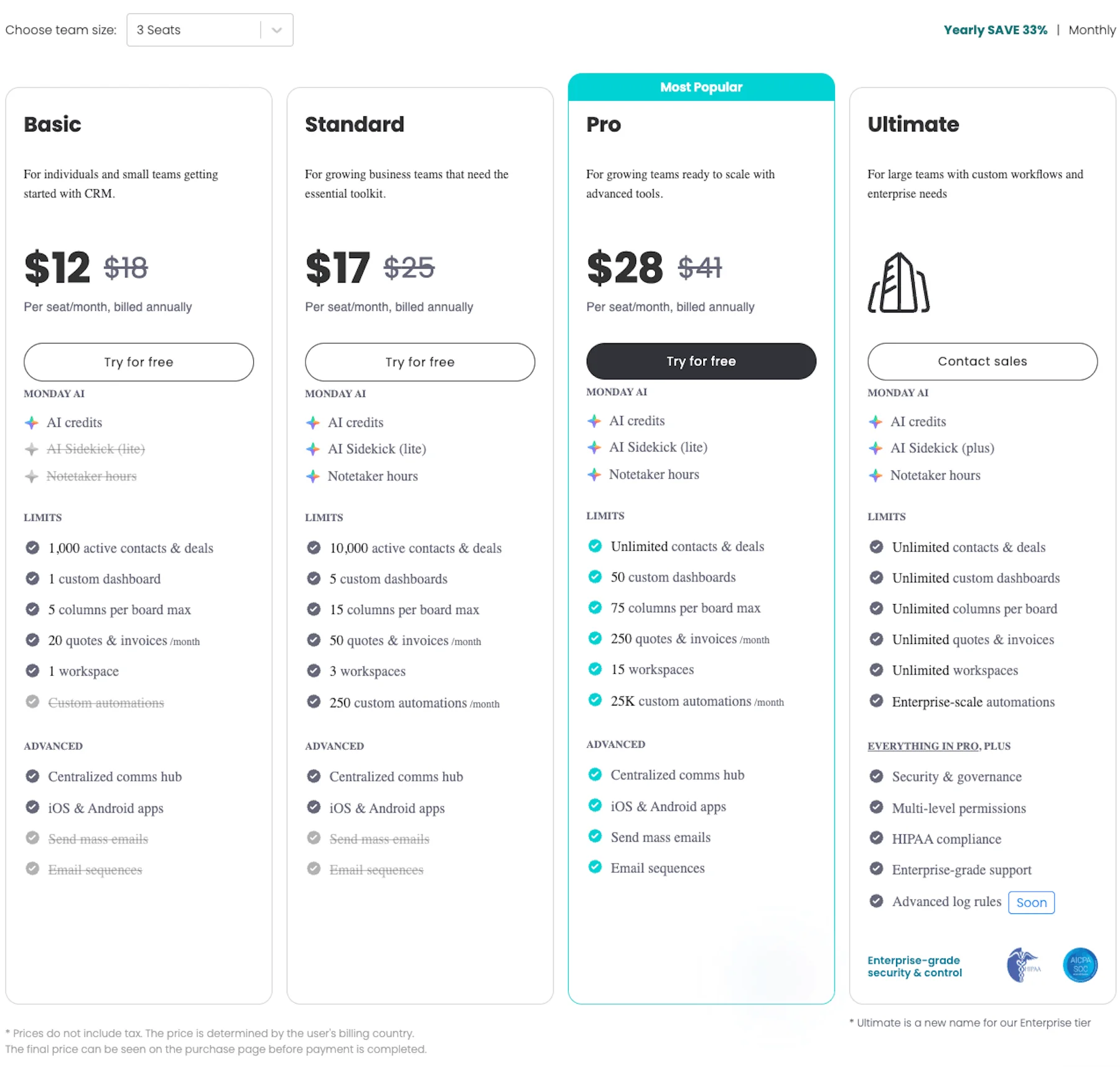
The Basic CRM plan starts at $12/user/month, Standard CRM at $17/user/month, and Pro at $28/user/month, when billed annually. You’ll have to contact sales for a custom quote on Enterprise CRM and all other plans if your team exceeds 40 members.
Monday dev pricing
Monday.com’s dev app is created with product and dev teams in mind. Just like monday CRM, this app has no free plan and offers a 14-day free trial.
You can opt for one of 4 plans named Basic, Standard, Pro, and Enterprise.
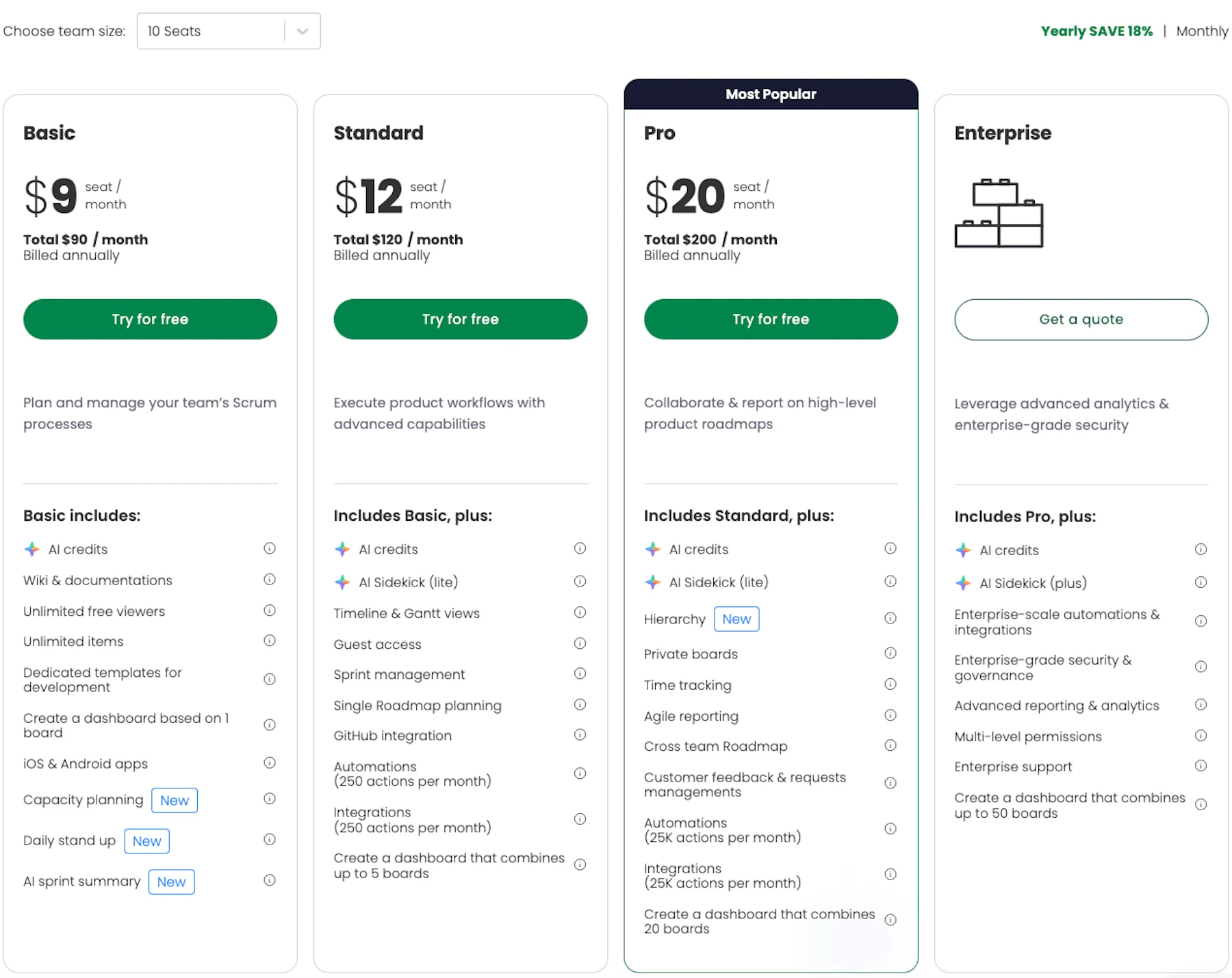
As you can see, the Basic dev plan starts at $9/seat/month, Standard at $12/seat/month, and Pro at $20/seat/month, when billed annually. You’ll have to contact sales for a custom quote on the Enterprise plan and all other plans once your team exceeds 40 members.
Monday service pricing
Made for IT and support teams, monday.com’s service app offers 3 paid plans: Standard, Pro, and Enterprise.
Monday service doesn’t offer a free plan, but you can try out how the app works thanks to a free 14-day trial.
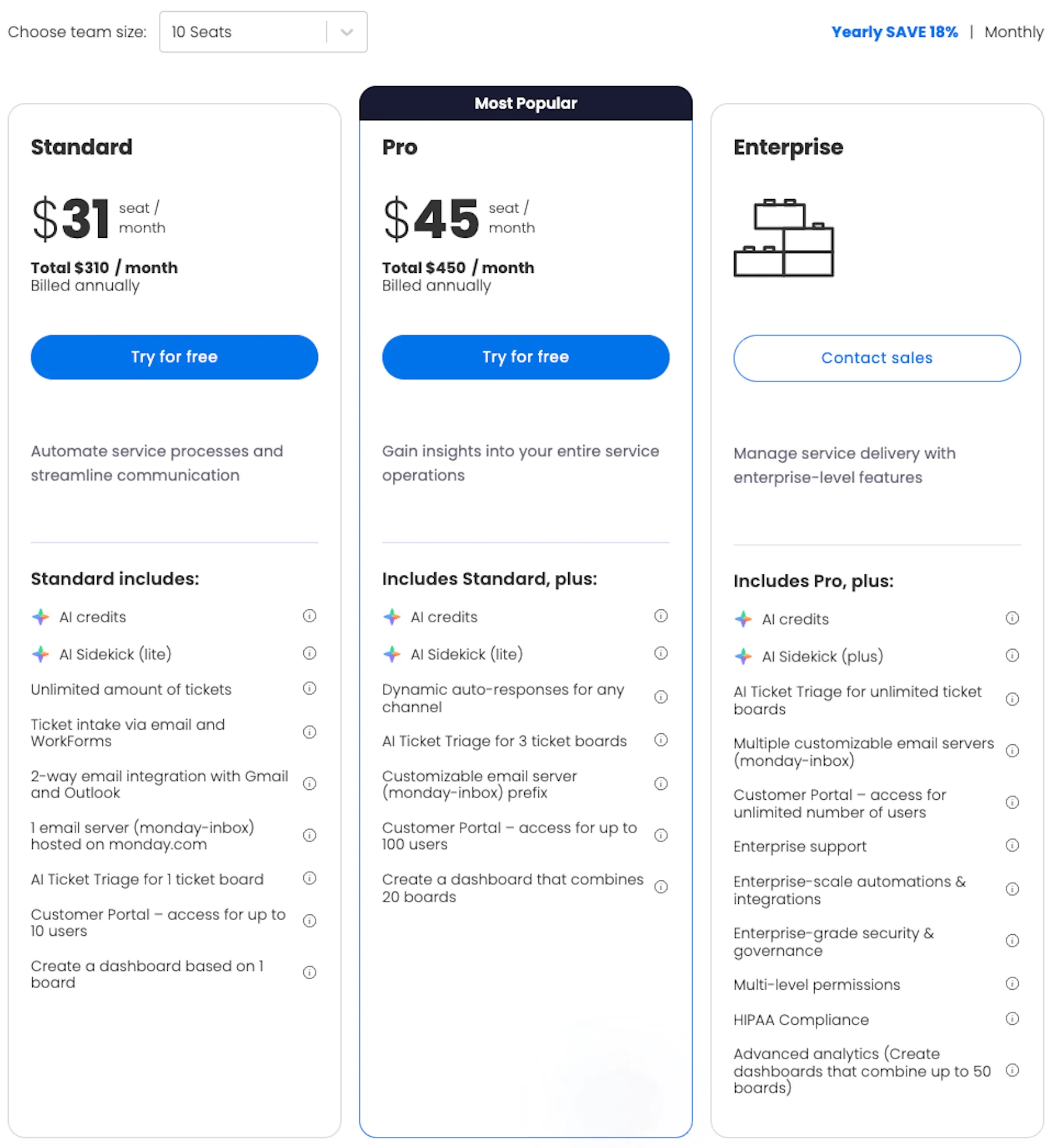
The Standard plan is $31/seat/month whereas the Pro plan costs $45/seat/month. If you need monday service Enterprise plan, you’ll have to contact their sales team for a quote. The same goes for all other plans if you have more than 40 people in your team.
Monday.com pricing plans explained
Now that we’ve covered different monday.com apps and their plans and pricing, let’s go back to the primary monday AI work platform and take a closer look at each plan’s feature set to see which one offers the best value for your money.
Free plan
Monday.com’s free plan is quite limited and best suited for individuals or 2-person teams mainly looking for a good task tracking app.
It includes several notable features:
- Up to 3 boards that can host up to 1,000 items in total,
- Up to 500 MB of storage space,
- 1-week activity log,
- A total of 8 column types and 200+ templates, and
- Kanban view mode for easier visualization (especially convenient for those using the Kanban framework).
The main downside of the free plan is that it lacks some of the advanced features of other plans. The most notable limits are:
- No AI features,
- No guest access,
- No integrations, and
- No 24/7 customer support.
Basic plan
Starting at $9/user/month, the Basic plan is monday.com’s most affordable option. It’s available for a minimum of 3 users, totaling $27 per month.
This plan supplements everything offered in the free plan with the following features:
- Storage up to 5 GB,
- Unlimited boards, items, docs, and viewers,
- Custom fields,
- 1 custom dashboard, and
- 24/7 customer support and daily live webinars.
In general, the Basic plan is a step-up from the free version and suits small teams with modest project collaboration needs.
Basic plan users also get 1,000 AI credits/month/account for $10 on annual plans, and $12.5 on monthly plans.
Standard plan
Monday.com’s Standard plan costs only $3 more per user than the Basic plan — but offers a large set of additional workflow management features.
Specifically, this plan allows users to:
- Store up to 20 GB of data,
- Access activity logs up to 6 months back,
- Use integrations and automations (250 actions per month),
- Provide guest access to external users (4 guest seats billed as 1 regular seat),
- Create dashboards combining up to 5 boards,
- Use timeline, Gantt, and calendar views, and
- Use the map view to coordinate team members in the field.
This paid plan is best suited for small and medium-sized teams with advanced project management needs. Teams that rely heavily on automation and integrations with external apps, on the other hand, may feel limited by this plan.
In terms of value, larger teams could also find the Standard plan too expensive compared to everything it offers. For example, a team of 40 people would have to pay a whopping $5,760 yearly for seats only.
However, as of recently, the Standard plan includes AI credits as well. The minimum number of AI credits on this plan is 2,000 per month, but you can add more.
That said, take a look at the table below to see how much you would pay annually for the Standard plan with available AI credit options for teams of 10 and 40 people.
| Team size | Standard plan ($12/seat/month) + 2,000 AI credits ($20/month) | Standard plan ($12/seat/month) + 4,000 AI credits ($40/month) | Standard plan ($12/seat/month)+ 8,000 AI credits ($80/month) |
|---|---|---|---|
| 10 | $1,680 | $1,920 | $2,400 |
| 40 | $6,000 | $6,240 | $6,720 |
Pro plan
The Pro plan is the most advanced monday.com plan available to teams of up to 40 users at a regular per seat price.
It offers all the features in the Standard plan, plus:
- Up to 100 GB of storage,
- Activity logs up to 1 year,
- Unlimited guest seats for external users,
- Dashboards combining up to 20 boards,
- Integrated time tracking,
- A total of 25,000 actions per month for automations and integrations,
- Private boards visible only to select team members,
- A chart view for visualizing data with various charts and graphs,
- A formula column used to carry out calculations automatically,
- The ability to create and track task dependencies,
- Enhanced workload management, and
- Google authentication for extra security.
The main downside of the Pro plan is its price — it’s noticeably more expensive than the Standard plan, making it quite costly in the long run.
For instance, for a team of 10 people, the yearly cost would be $2,280, while a team of 40 would spend $9,120 for the Pro plan per year. But, this is for the seats only. To get the full price, you should count in AI credits as well.
Pro plan users can purchase a minimum of 3,000 AI credits per month, but you can purchase more when you spend the initial 3,000.
The table below displays the full price of the Pro plan with available AI credit options for teams of 10 and 40 members when paid annually.
| Team size | Pro plan ($19/seat/month) + 3,000 AI credits ($30/month) | Pro plan ($19/seat/month) + 4,000 AI credits ($40/month) | Pro plan ($19/seat/month)+ 8,000 AI credits ($80/month) | Pro plan ($19/seat/month)+ 20,000 AI credits ($200/month) |
|---|---|---|---|---|
| 10 | $2,640 | $2,760 | $3,240 | $4,680 |
| 40 | $9,480 | $9,600 | $10,080 | $11,520 |
Enterprise plan
The Enterprise plan focuses less on adding extra productivity features and more on scaling the service for larger companies, as well as introducing advanced security features.
In terms of scaling, the Enterprise plan users get:
- Up to 1 TB of storage,
- Activity logs up to 5 years,
- A whopping 250,000 actions for automations and integrations,
- Dashboards comprising up to 50 boards,
- A 99.9% uptime guarantee, and
- A dedicated customer success manager who provides training and support and helps users tailor the app to their needs.
In addition, the Enterprise plan goes above and beyond when it comes to security and administration tools. While all plans are SOC 2 type II compliant and offer 2-factor authentication, Enterprise users also benefit from:
- HIPAA compliance,
- Integration permissions,
- Custom IP restrictions,
- A content directory with an overview of all content associated with the account,
- A panic mode that locks down the entire account in case of a security breach,
- A detailed audit log of all IP addresses that have accessed the account, and
- Session management for all users.
The main downside of the Enterprise plan is that its price is quote-based, so teams don’t know what cost to expect.
How does monday.com compare to its competitors?
Whether you’re already using monday.com and looking to switch to another app or still exploring your options, here’s an overview of monday.com’s main competitors so that you can make a decision quickly.
Monday.com vs. Asana pricing
Asana is a fierce competitor in the project management field. But, monday.com has an extra pricing tier that gives more choices to smaller teams.
Here’s an overall comparison of Asana and monday.com’s pricing plans:
| Plan | monday.com | Asana |
|---|---|---|
| Free/Personal plan | $0 | $0 |
| Basic/Starter | $9 | $10.99 |
| Standard | $12 | ❌ |
| Pro/Advanced | $19 | $24.99 |
| Enterprise | POA | POA |
Perhaps an even more interesting comparison is the one between some of the key features offered in the free plan:
| Feature | monday.com | Asana |
|---|---|---|
| User limit | 2 | 2 |
| File storage | 500 MB | Unlimited |
| Activity log | 1 week | Unlimited |
| Integrations | ❌ | ✔ |
| Calendar view | ❌ | ✔ |
| SOC 2 Type 2 | ✔ | ✔ |
It’s clear that Asana is more generous with its free plan and may be a better option for small teams with basic task management needs.
💡 Dica profissional do Plaky
If you want to explore this comparison in more detail, check out this article:
ClickUp vs. monday.com pricing
Just like Asana, ClickUp also has one fewer pricing plan than monday.com. Let’s take a look at the cost of both apps per user per month when paid annually:
| Plan | monday.com | ClickUp |
|---|---|---|
| Free / FreeForever plan | $0 | $0 |
| Basic/Unlimited | $9 | $7 |
| Standard | $12 | ❌ |
| Pro/Business | $19 | $12 |
| Enterprise | POA | POA |
We also analyzed the free plans and highlighted the main differences:
| Feature | monday.com | ClickUp |
|---|---|---|
| User limit / Number of members | 2 | Unlimited |
| File storage | 500 MB | 60 MB |
| Activity log | 1 week | 1 day |
| Integrations | ❌ | ✔ |
| Calendar view | ❌ | ✔ |
| Time tracking | ❌ | ✔ |
| Two-factor authentication | ✔ | ✔ |
| 24/7 support | ❌ | ✔ |
ClickUp’s free plan stands out as it doesn’t limit the number of users, making it a great solution for teams of any size that need basic project management features and time tracking and 24/7 support.
💡 Dica profissional do Plaky
Need a more thorough insight? Here’s the full comparison:
Is monday.com the right solution for you?
Overall, monday.com is a versatile and well-rounded solution that allows teams of any size to enhance their productivity through flexible and easy-to-use project boards, as well as robust communication features.
The app also offers a wide variety of templates, integrations, and automations that can greatly streamline day-to-day operations.
However, with monday.com, the price is its main downside.
While it’s not as expensive as some of its competitors, many users and startups might be discouraged by the more limited feature sets in the cheaper plans. This makes monday.com a less-than-ideal solution if you’re looking for an affordable option.
Another downside is that you can’t use monday.com’s paid plans for less than 3 users, and you must pay in increments of 5, 10, 15, etc. seats, no matter the number of team members you have on your account. This means that if you have, say, 12 people on the account, you’ll have to pay for 3 more seats.
Finally, the customer support service is what some users find frustrating, as monday.com’s team takes a lot of time to resolve even the simplest tech issues. Plus, tailored onboarding and personalized support is only provided to Enterprise customers.

Need an affordable monday.com alternative? Check out Plaky by CAKE.com
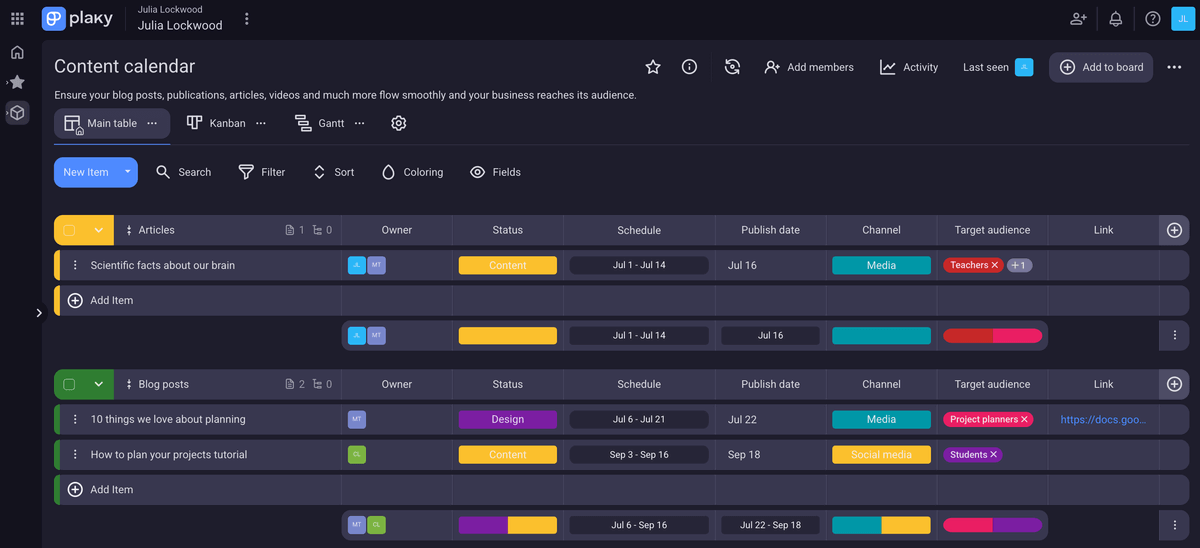
As far as budget-friendly project management software goes, Plaky is unmatched, with an excellent free plan that offers:
- Unlimited users, spaces, boards, and items,
- Up to 6 customizable fields per board,
- Unlimited storage for files up to 10 MB in size,
- Table, Kanban, and Chart views,
- Communication via @mentions and emoji reactions in comment threads,
- A summary row for each item group,
- An activity log of up to 7 days,
- A project template center with useful project templates for a number of industries, and
- 24/7 live customer support.
But if you crave more, Plaky has 2 paid plans as well:
| Plaky plan | Yearly pricing | Monthly pricing |
|---|---|---|
| Pro | $3.99/user/month | $4.99/user/month |
| Enterprise | $8.99/user/month | $10.99/user/month |
| Pacote CAKE.com | $12.99/seat/month | $15.99/seat/month |
As you can see, all plans are far more affordable than monday.com, even if you opt to pay monthly.
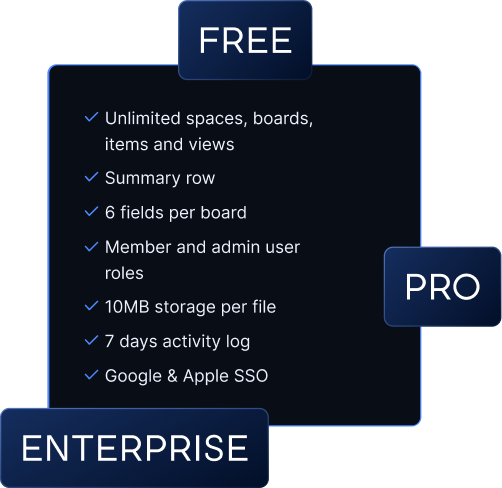
They also enhance the Free plan’s already comprehensive feature set. Here’s a quick overview of Plaky’s Free, Pro, and Enterprise plans and their key differences:
| Feature | Gratuito | Pro | Enterprise |
|---|---|---|---|
| Number of fields | 6 per board | Unlimited | Unlimited |
| Storage | 10 MB per file | 25 MB per file | 100 MB per file |
| Activity log | 7 days | 6 months | Unlimited |
| Timeline field | ❌ | ✔ | ✔ |
| Closed spaces & private boards | ❌ | ✔ | ✔ |
| Bulk actions | ❌ | ✔ | ✔ |
| Task templates | ❌ | ✔ | ✔ |
| Gantt view | ❌ | ✔ | ✔ |
| Multiple charts view | ❌ | ✔ | ✔ |
| Automations | ❌ | 1,000 actions/month | Unlimited |
| Board permissions | ❌ | ❌ | ✔ |
| Board ownership management | ❌ | ❌ | ✔ |
| Customized user profiles | ❌ | ❌ | ✔ |
| Custom workspace subdomain | ❌ | ❌ | ✔ |
| Custom OAuth2 SSO | ❌ | ❌ | ✔ |
| 24/7 live support | ✔ | ✔ | ✔ |
Monday.com vs. Plaky by CAKE.com comparison
Both monday.com and Plaky by CAKE.com are well-rounded and feature-rich project management tools. However, there are some key distinctions between them regarding:
- Pricing plan limitations,
- User interface, and
- Affordability.
Plan limitations
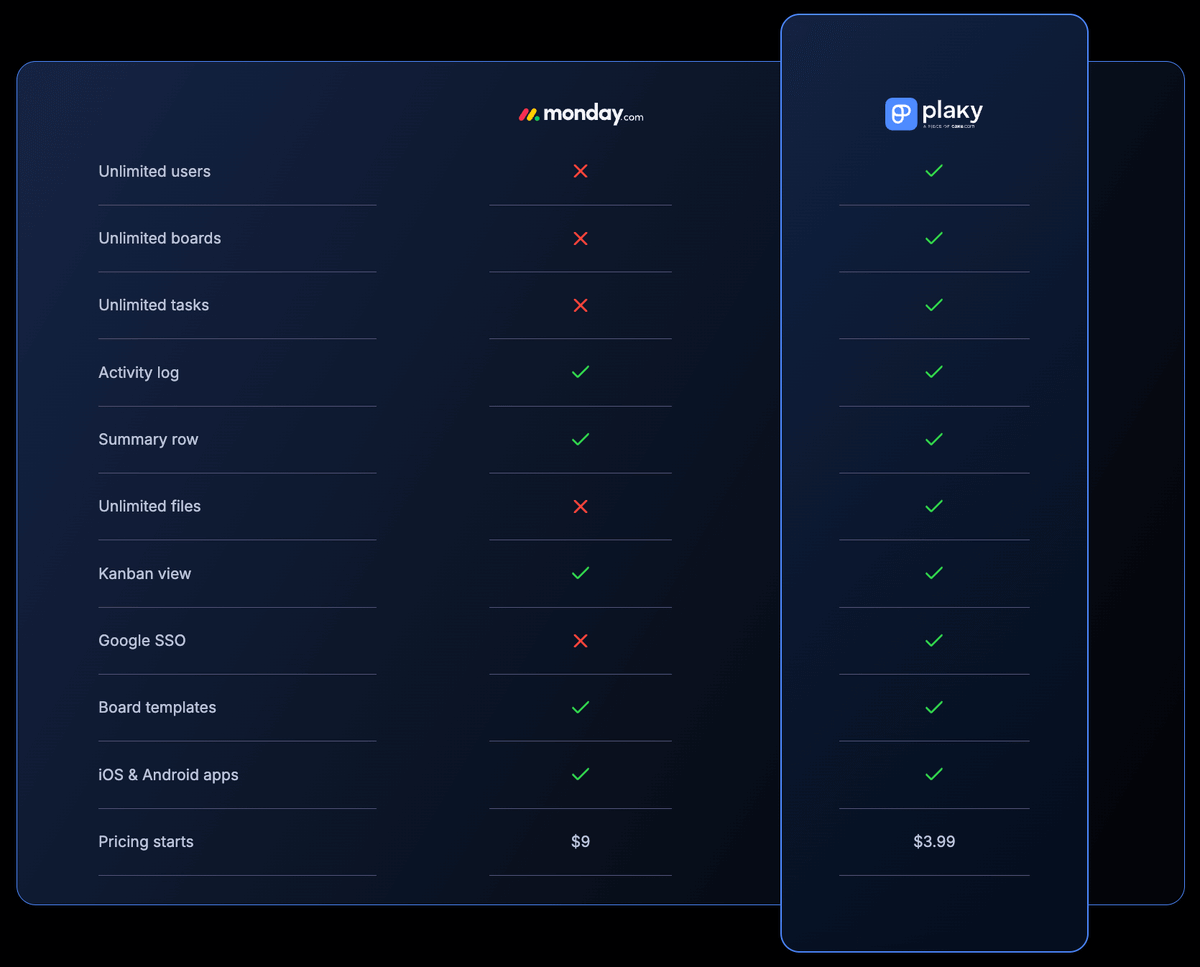
The most essential features are limited in monday.com, such as the number of users and boards. Meanwhile, Plaky supports an unlimited number of users, projects, tasks, and files even in its free plan.
This means that you have a lot more freedom with Plaky, as you can include as many team members across as many projects as you need. More importantly, you can share files with no hard upper limit on total storage capacity.
UI
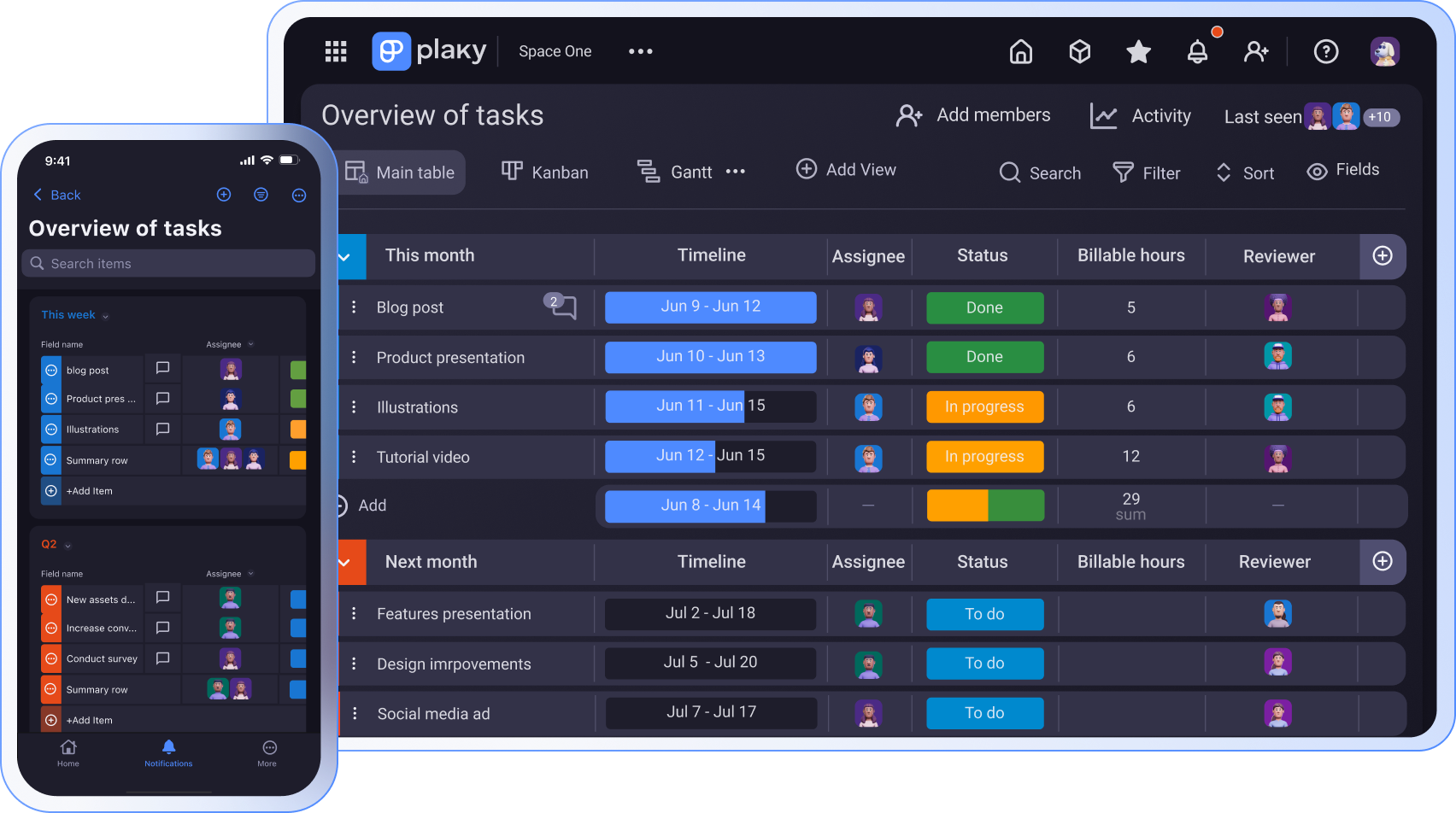
Both apps have an appealing and intuitive design, with one key difference — Plaky’s UI makes more conservative use of color, making it cleaner and easier to skim, especially in dark mode.
Both platforms have mobile apps for iOS and Android too, allowing team members to use them on the go. You can download them on the Apple App Store or Google Play.
Affordability
As for the pricing, Plaky’s paid plans are exceptionally affordable and offer good value, making them highly appealing to smaller teams or those who prioritize affordability over some specific advanced features available in monday.com’s more expensive plans.
To better illustrate just how much more budget-friendly Plaky is, here are the costs associated with a 10-person and a 40-person team.
| Team size | Plaky Pro | Plaky Enterprise | monday.com Basic | monday.com Standard | monday.com Pro |
|---|---|---|---|---|---|
| 10 | $39.9 | $89.9 | $90 | $120 + $20/$40/$80 | $190 + $30/$40/$80/$200 |
| 40 | $159.6 | $359.6 | $360 | $480 + $20/$40/$80 | $760 + $30/$40/$80/$200 |
*All prices are per month when paid annually. Monday.com’s total price depends on the number of AI credits you opt for.
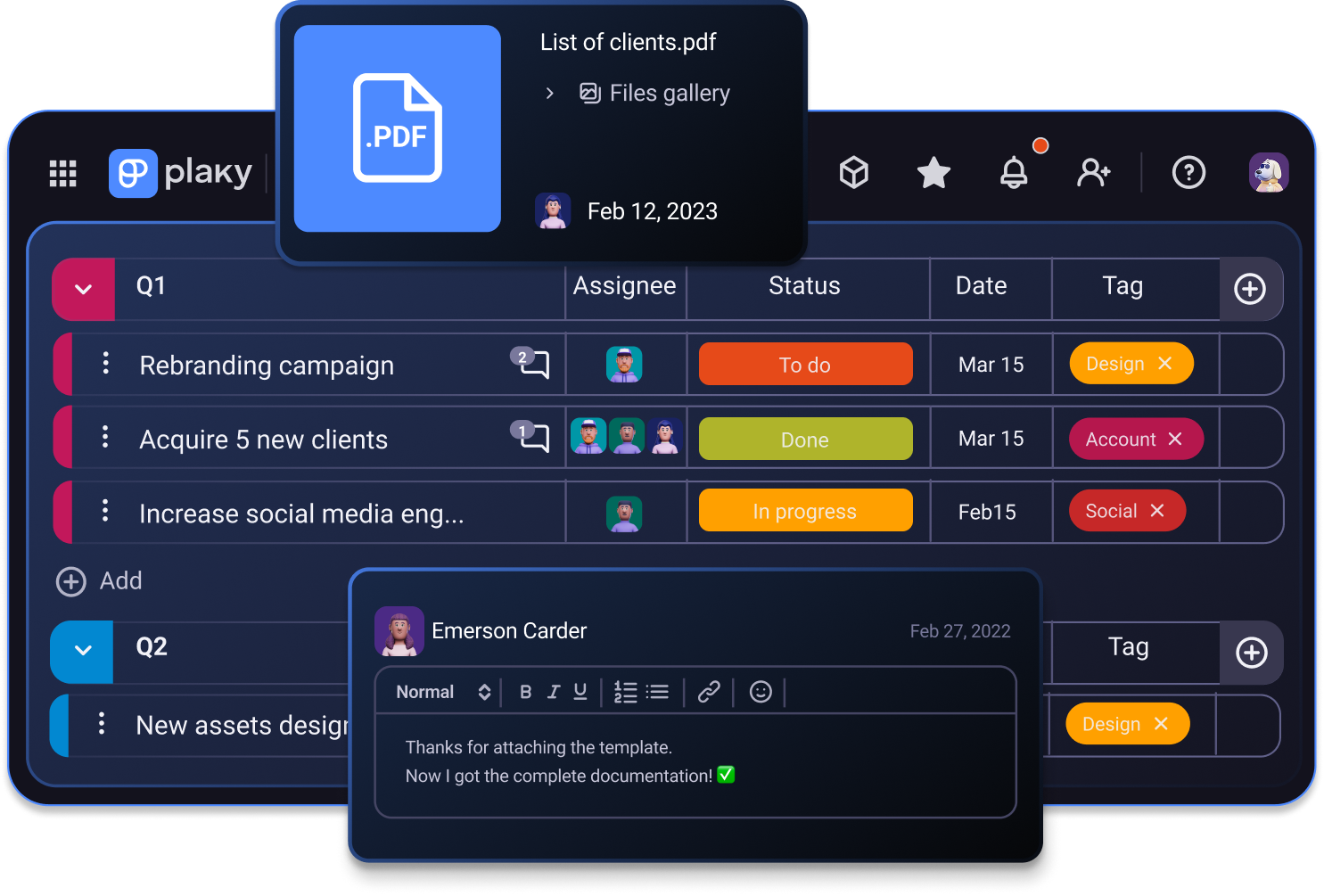
Monday.com too pricey? Plaky by CAKE.com is free forever
Every app has its strengths and weaknesses, but if you’re looking for a budget-friendly solution, Plaky is an excellent alternative to monday.com.
Monday.com is an established veteran in the niche of project management tools, and as such, the app has grown to encompass some advanced features that Plaky still lacks.
However, Plaky is much more accessible and affordable while still offering a robust feature set and live 24/7 customer support across all its plans.
This makes it an excellent project management tool for small businesses, as well as anyone looking for a well-rounded solution at the lower end of the price spectrum.
Ready to give Plaky a try? Sign up for a free Plaky account today!
Comece a usar o Plaky da CAKE.com
