


All resource managers have the same goals: preventing burnout and keeping projects on track. That’s why capacity planning exists — to assess how much work your team and systems can take on and match it with upcoming demand.
Capacity planning templates can be a lifesaver here. So, we offer you 7 free, fully customizable templates (Google Sheets/Excel) to help you plan work more efficiently.
And, if you’re interested in more than spreadsheets, we’ll also touch on a smarter, more scalable way to handle capacity planning.
Let’s dive in!
#1 Team capacity forecast template
Download: Google Sheets | Excel
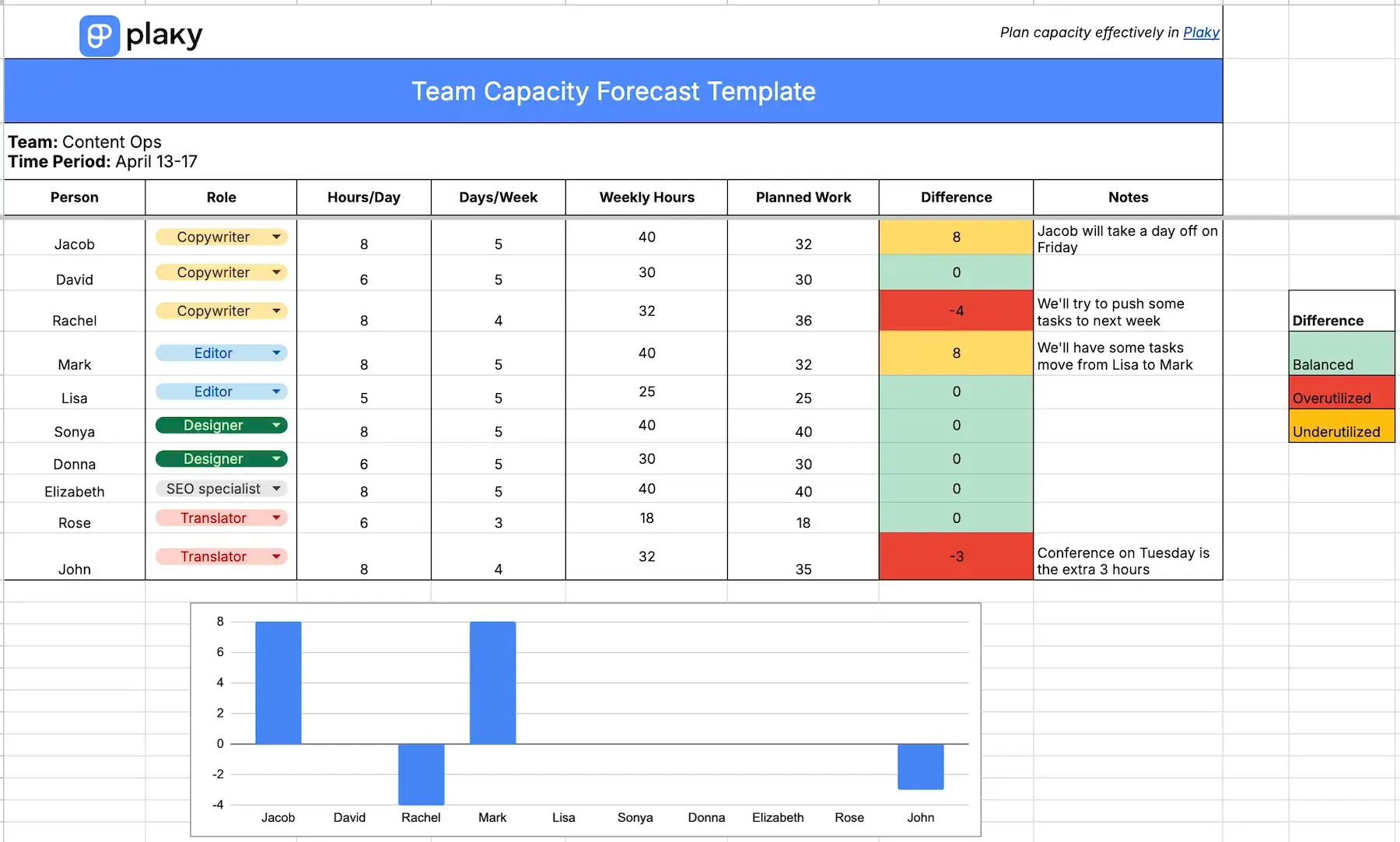
The team capacity planning template helps you understand how much work every team member can handle on a weekly basis. You can easily switch to a monthly view by tweaking the time inputs, though.
By combining everyone’s availability with their planned workload, the template prevents overbooking and underutilization. There’s a column that highlights whether someone is over capacity or has room to take on more, feeding into a bar chart below in case you want a more visual representation.
This type of template is for team leads in virtually any industry who need a quick overview of human resource allocation.
#2 Individual workload capacity planner template
Download: Google Sheets | Excel
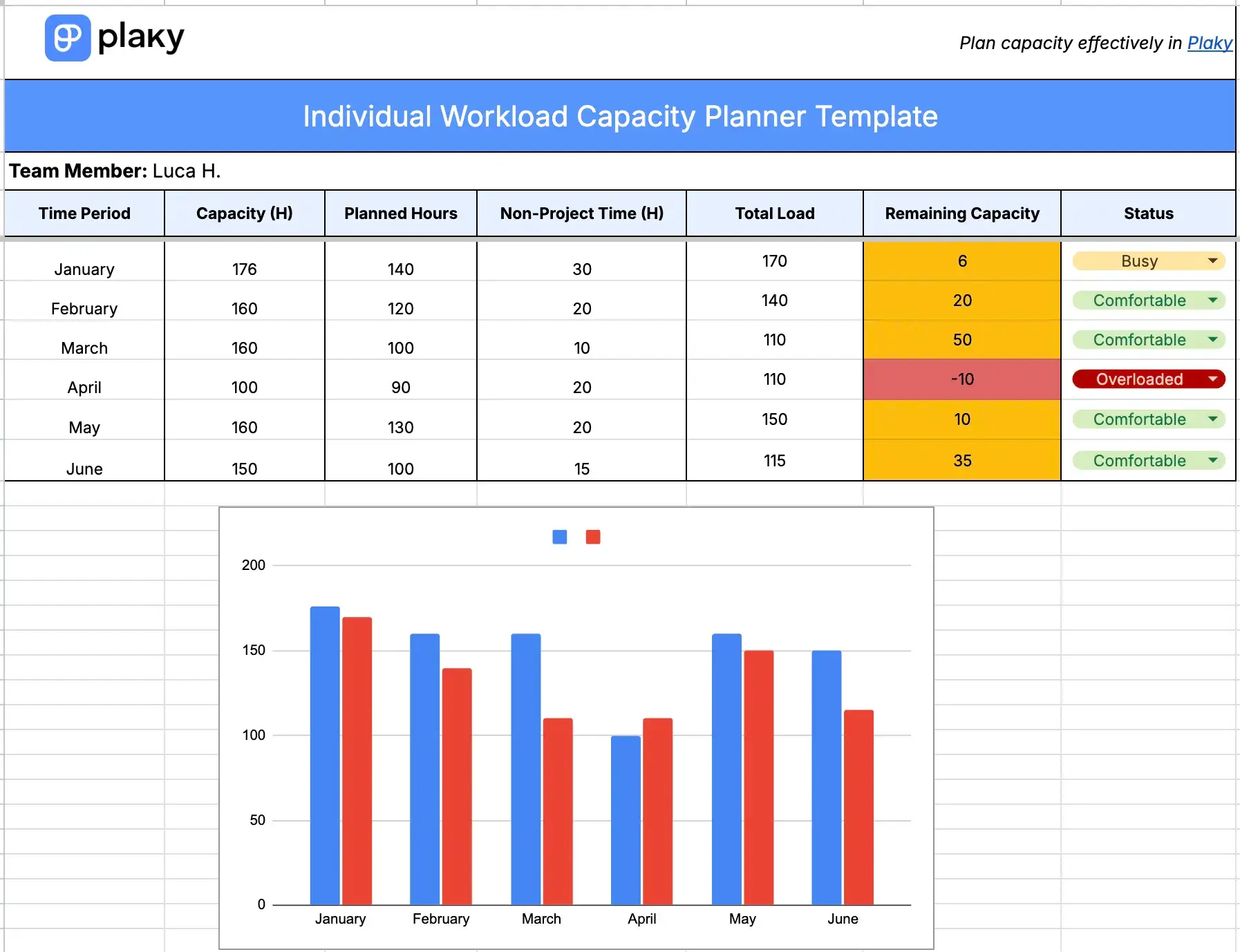
The purpose of this template is to track and manage the workload of a single team member in a structured way.
The spreadsheet includes key inputs such as time period, planned hours, and non-project time (e.g., meetings, admin work). These are combined into a total load, which is then measured against the available hours.
This way, you quickly see if the teammate in question is comfortable, busy, or overloaded, and then you can adjust their tasks accordingly.
#3 Project capacity planning template
Download: Google Sheets | Excel
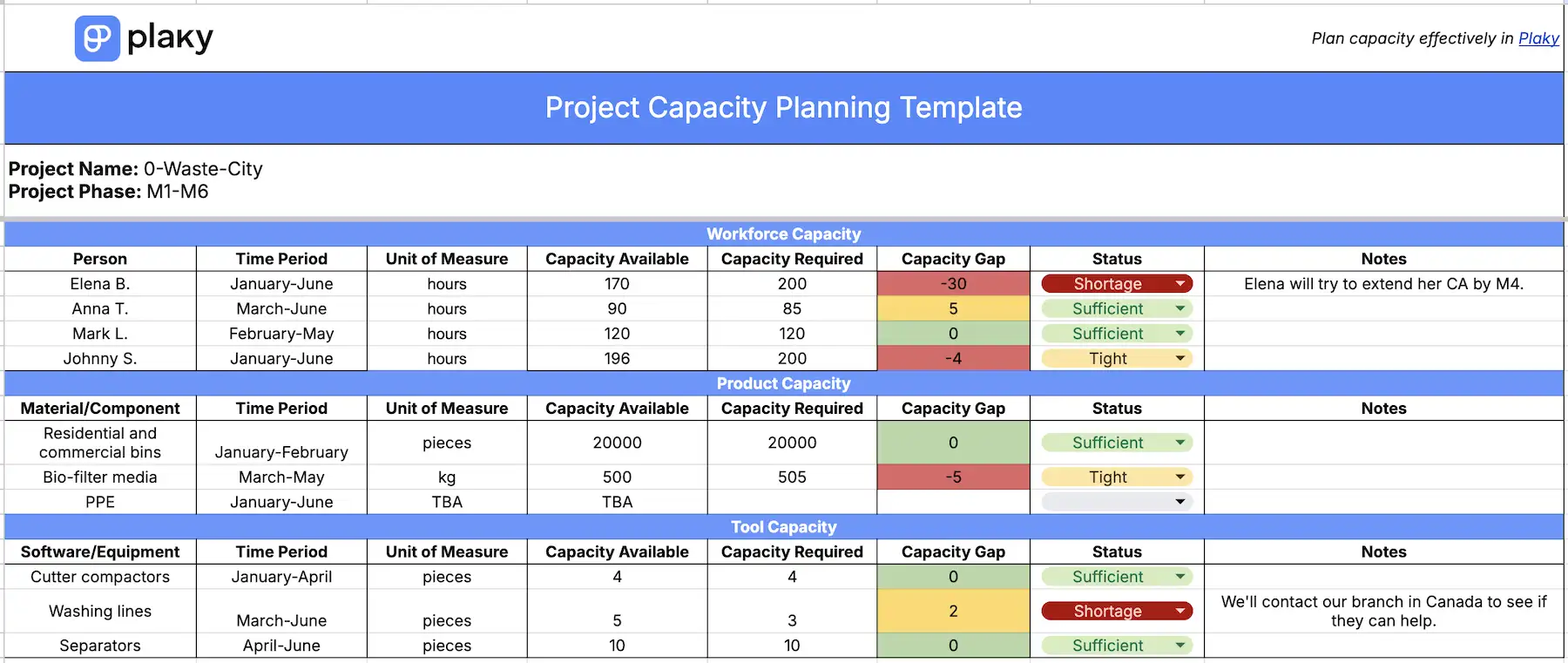
The project capacity planning template offers a complete view of everything required to successfully deliver a project: people, materials, and tools.
Each of the 3 sections follows the same structure, making it easy to compare availability and demand. The template then calculates the capacity gap, showing whether you have enough resources to meet project needs.
In other words, you get clear signals whether you need to take action — reallocate team members, secure additional materials, upgrade tools, etc.
#4 Multi-project capacity planning template
Download: Google Sheets | Excel
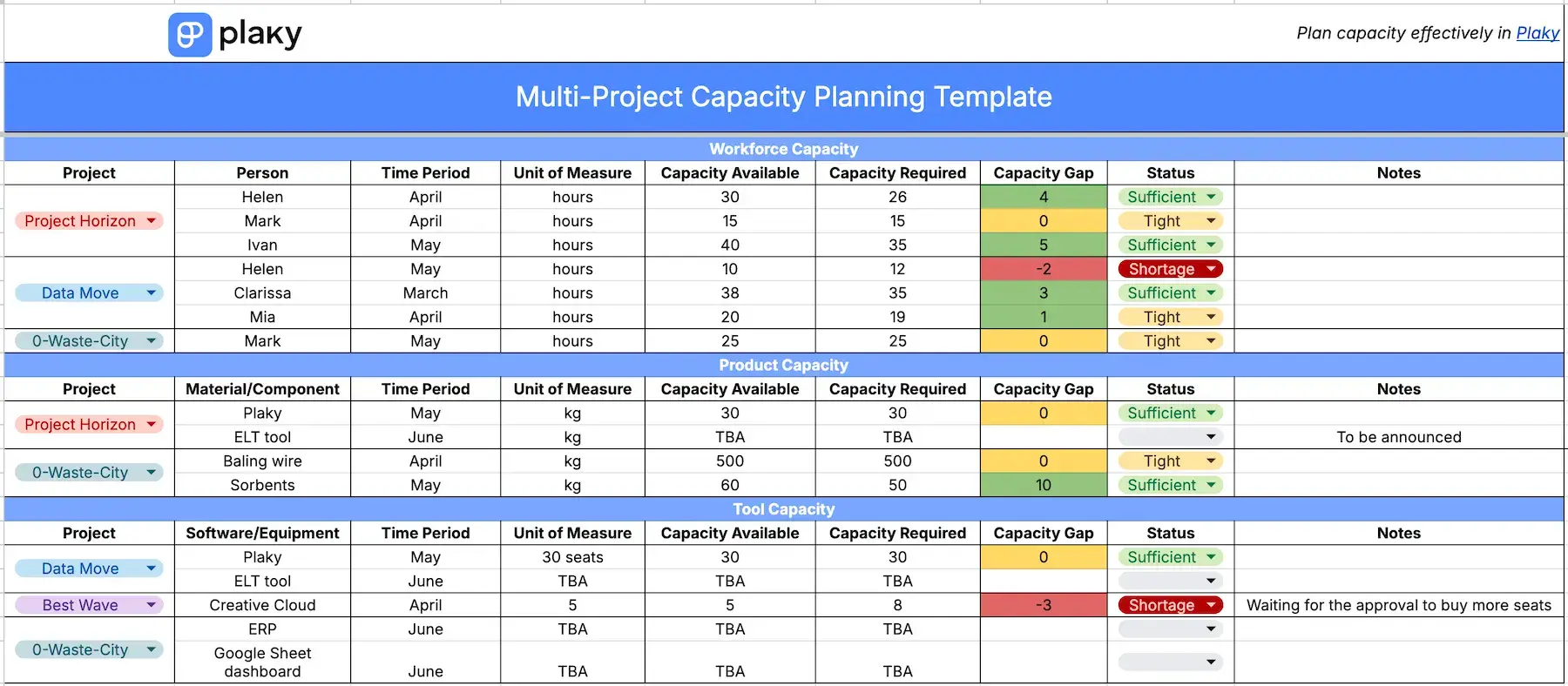
The multi-project capacity planning template builds on the previously described single-project spreadsheet. In this case, you can see how different initiatives compete for the same workforce, materials, and tools.
All 3 segments have the same columns — capacity available, capacity required, and the resulting capacity gap.
This template helps you spot resource conflicts or overcommitments across projects. With clear status indicators like Shortage, Tight, and Sufficient, you can quickly identify which resources to rebalance.
#5 Agile capacity planning template
Download: Google Sheets | Excel
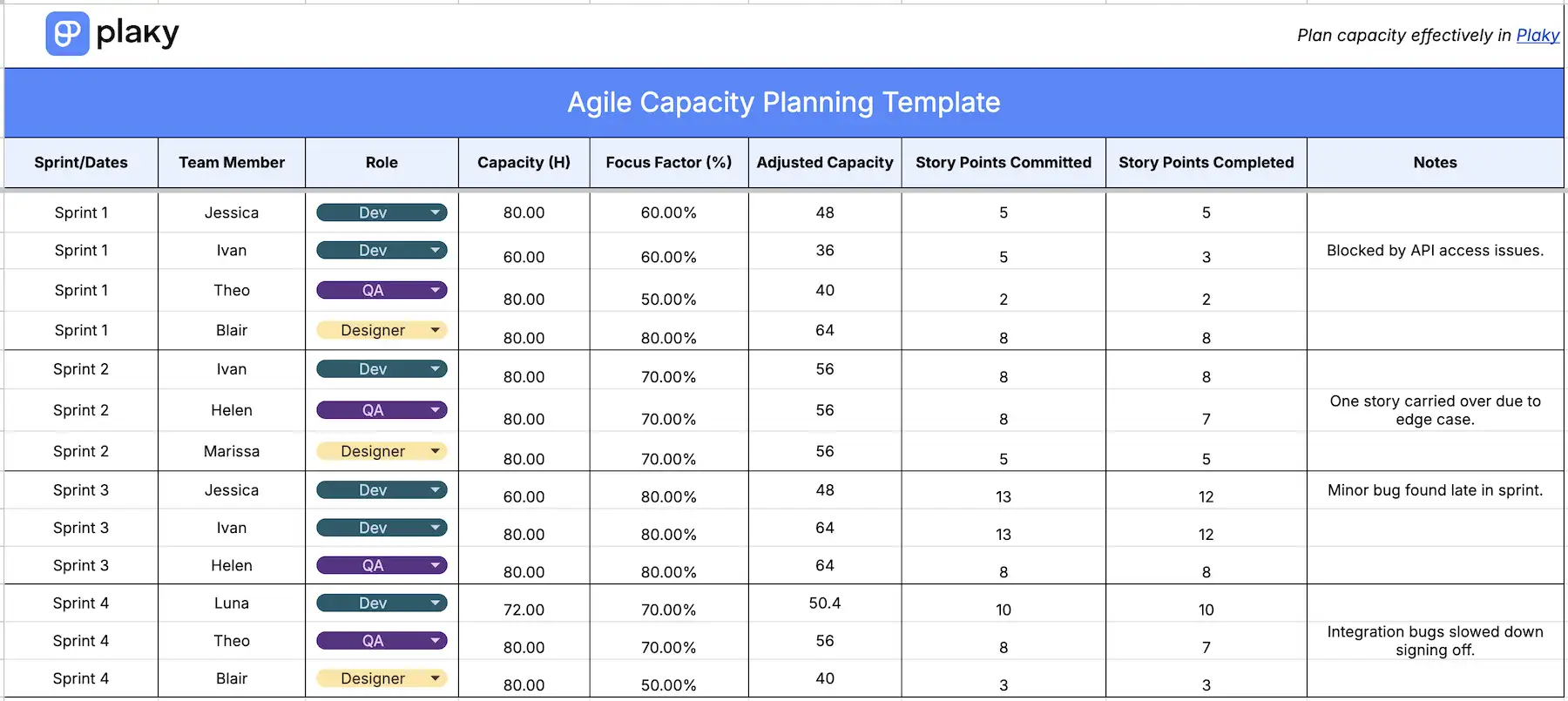
This Agile capacity planning template helps teams plan and track workload within Sprints. It combines time-based availability with Agile metrics, making it especially useful for Scrum or Sprint-based workflows.
Along with key inputs like Sprint/date, team member, role, and capacity (hours), there’s a focus factor column to account for interruptions, meetings, or context switching. This produces an adjusted capacity — a more realistic view of what each person can take on.
This is then paired with story points committed vs. completed, allowing teams to compare planned vs. delivered work. All of it can help you improve estimation accuracy and avoid overcommitment.
Get a sleek Agile PM app — Plaky
#6 Capacity vs. demand planning template
Download: Google Sheets | Excel
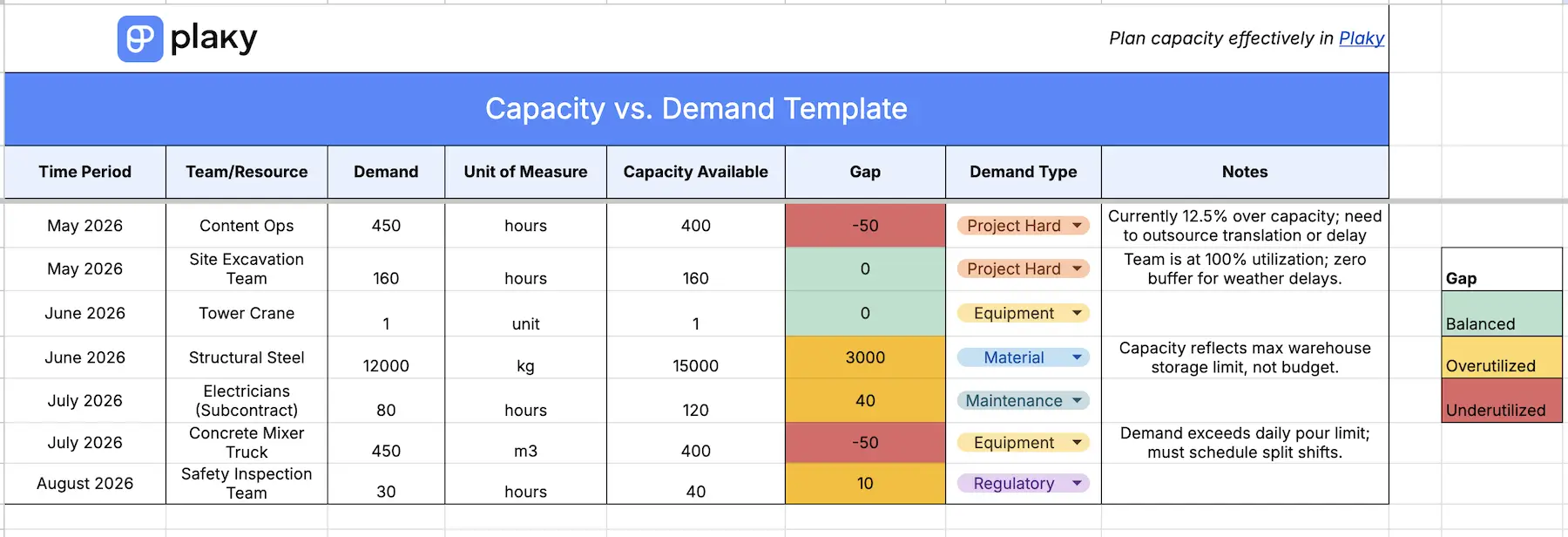
This template focuses on comparing how much work is required against how much capacity is actually available over a given time.
The goal is to highlight imbalances early and adjust resources/expectations before issues arise. For each resource, you specify demand and capacity available, allowing for the automatic calculation of the potential gap.
In addition, there’s a column for the demand type (e.g., client work, operational tasks). This helps you see what is driving demand, supporting more informed planning decisions.
#7 Capacity utilization tracker template
Download: Google Sheets | Excel
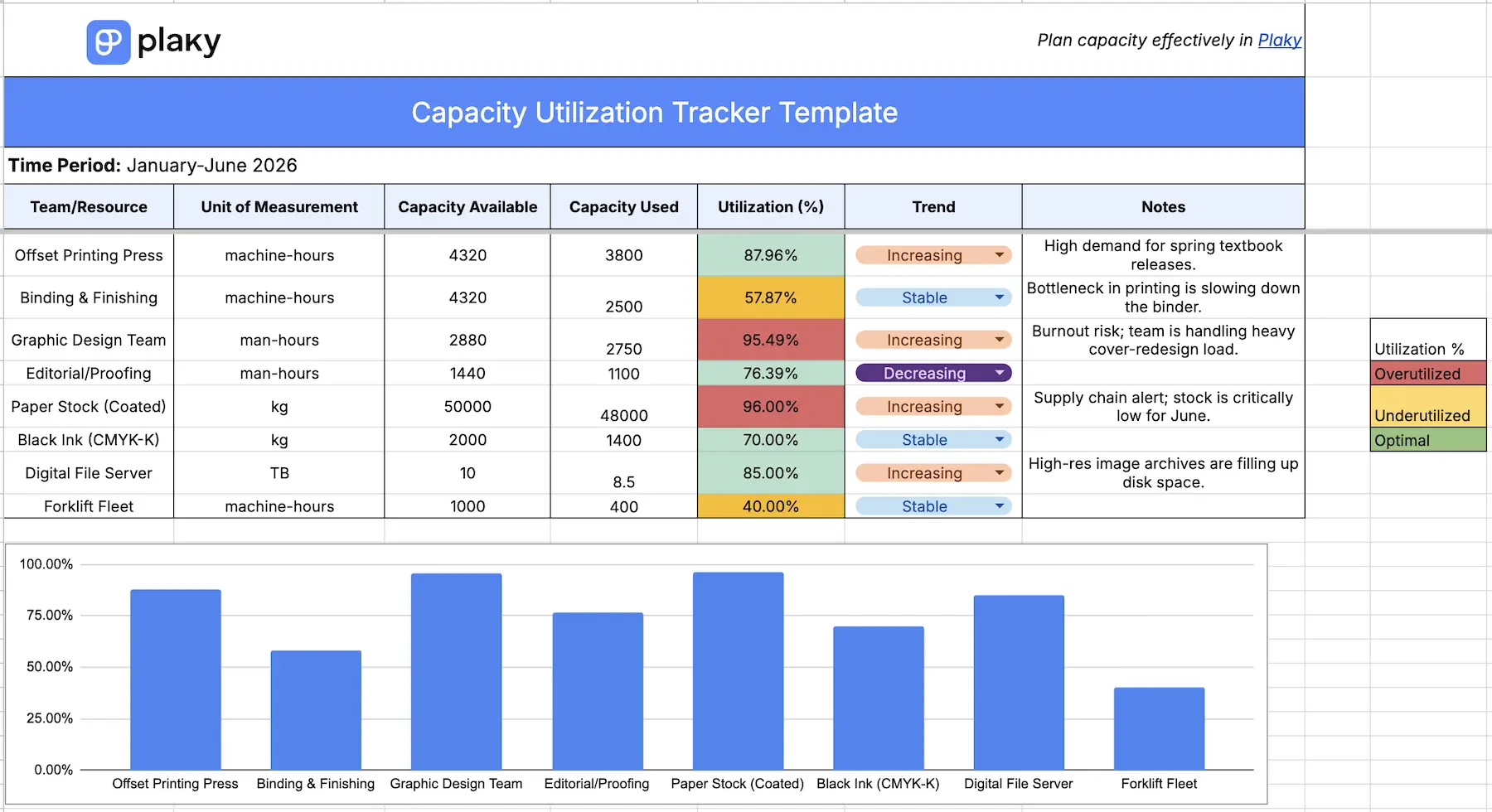
Using a capacity utilization tracker will show you how effectively you’re using resources within a specific period. This template tracks each resource with its capacity available and used, and from this, the utilization rate is automatically calculated.
So, instead of focusing directly on future planning, this template provides a snapshot of current performance. However, to add context over time, the Trend column allows you to manually indicate whether utilization is stable, increasing, or decreasing.
Combined with a column for notes, all of this makes it easier to spot patterns and make informed decisions about optimizing resource allocation — for present or future tasks.
Capacity planning vs. resource planning
Sometimes people use these 2 terms interchangeably, but even though capacity planning and resource planning are closely related, they serve different purposes.
Capacity planning determines how much work you can realistically handle over a given period. It looks at:
- Total available hours,
- Workload forecasts, and
- Upcoming demand.
The aim is to ensure you aren’t overloading people or leaving resources unused.
Resource planning, on the other hand, is more detailed and tactical. It focuses on who is doing what and when, which includes:
- Assigning specific tasks to team members,
- Balancing workloads, and
- Aligning skills with project needs.
This way, you make sure the work you’ve committed to is executed efficiently.
In short, capacity planning sets the limits, and resource planning works within them.
💡 Dica profissional do Plaky
Wish to try out some resource planning templates, as well? Check out this page:
A smarter way to plan capacity — Plaky by CAKE.com
Capacity planning templates are handy if you’re just getting organized or managing smaller projects. However, as your team and projects grow, manual upkeep and version control issues can slow you down. So, the smart thing to do is switch to a tool that can do some of the heavy lifting for you.
Let’s look at Plaky by CAKE.com — rich with features yet easy to navigate, so capacity planning won’t end up being more complicated or time-consuming than the work itself.
Our platform offers benefits such as:
- Flexible setup — use customizable Fields to track exactly what you need, whether it’s priority, availability, or any other metric.
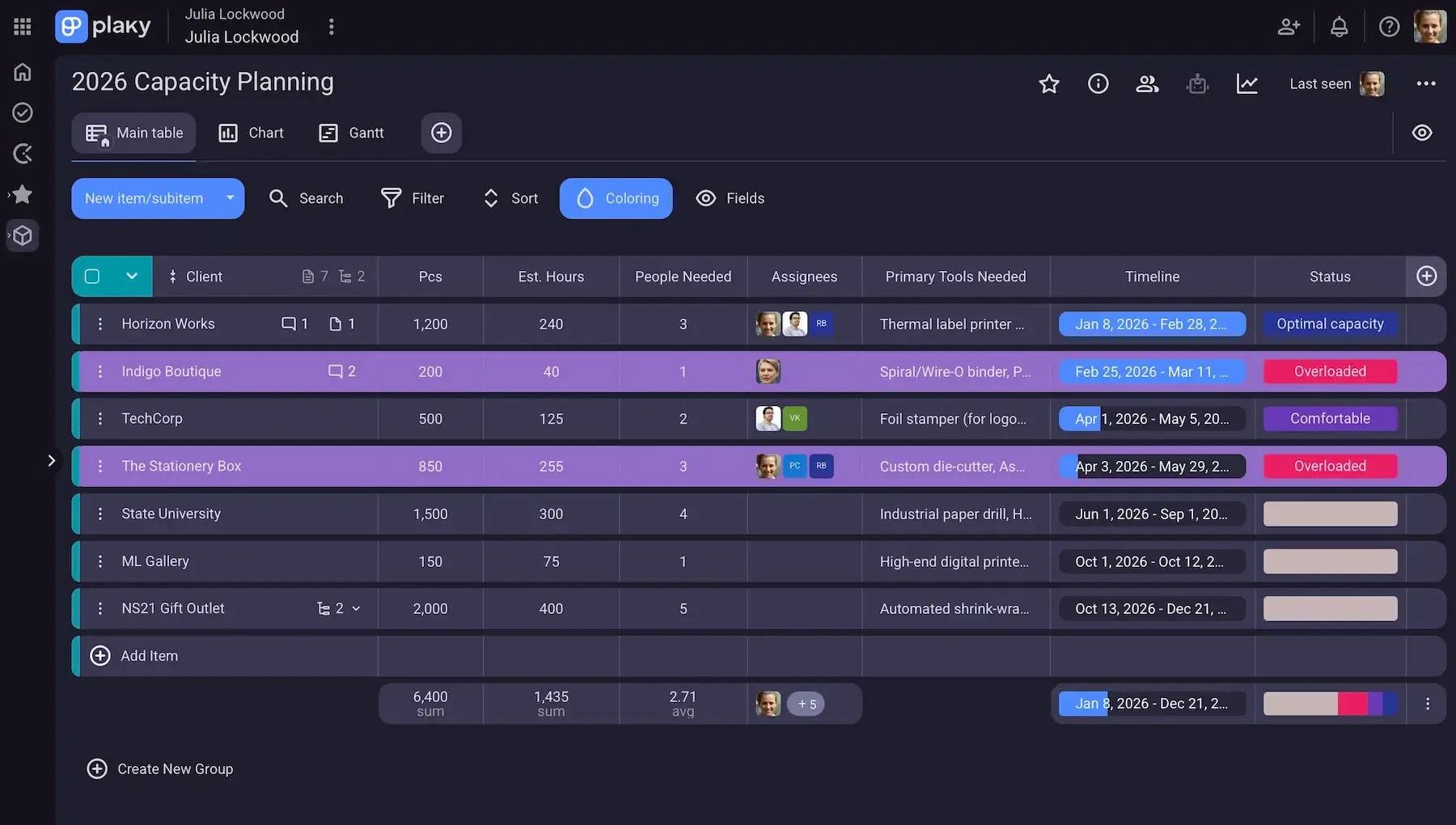
- Visualization options — explore capacity and task distribution in the format that makes the most sense (Table, Chart, Kanban, or Gantt).
- Real-time insights — analyze board data more easily with Plaky’s Summary row (e.g., count, summation, average).
- Centralized team communication — keep discussions and files directly within tasks instead of switching between tools.
Our free plan is generous already, but the paid tiers take everything to the next level — without breaking the bank. Besides saving money by avoiding complex and overpriced tools, the most prominent perk here is saving time thanks to:
- Board automations — set up rules and triggers to automate routine actions (like status updates or recurring tasks).
- Bulk actions — update multiple resources, timelines, or allocations in one action.
- Conditional coloring — spot issues at a glance by automatically highlighting overloads, gaps, or risks.
On top of everything, Plaky has a native mobile app (iOS and Android), which means a much smoother user experience compared to basic spreadsheets while away from your desk.
Stop guessing — plan your capacity with clarity and control in Plaky by CAKE.com!
Como revisamos esta publicação: Nossos redatores e editores monitoram as publicações e as atualizam quando novas informações são disponibilizadas, para mantê-las atualizadas e relevantes.